2017 CHEVROLET SONIC Owner manual indicator
[x] Cancel search: Owner manual indicatorPage 4 of 342

Chevrolet Sonic Owner Manual (GMNA-Localizing-U.S./Canada-10122660) -2017 - crc - 5/13/16
Introduction 3
Danger, Warning, and
Caution
Warning messages found on vehiclelabels and in this manual describehazards and what to do to avoid orreduce them.
{Danger
Danger indicates a hazard with a
high level of risk which will result
in serious injury or death.
{Warning
Warning indicates a hazard that
could result in injury or death.
Caution
Caution indicates a hazard that
could result in property or vehicle
damage.
Acirclewithaslashthroughitisasafety symbol which means“DoNot,”“Do not do this,”or“Do not letthis happen.”
Symbols
The vehicle has components andlabels that use symbols instead oftext. Symbols are shown along withthe text describing the operation orinformation relating to a specificcomponent, control, message,gauge, or indicator.
M:Shown when the ownermanual has additional instructionsor information.
*:Shown when the servicemanual has additional instructionsor information.
0:Shown when there is moreinformation on another page—“see page.”
Vehicle Symbol Chart
Here are some additional symbolsthat may be found on the vehicleand what they mean. For moreinformation on the symbol, refer tothe Index.
9:Airbag Readiness Light
#:Air Conditioning
!:Antilock Brake System (ABS)
%:Audio Steering Wheel Controlsor OnStar®
$:Brake System Warning Light
":Charging System
I:Cruise Control
`:Do Not Puncture
^:Do Not Service
B:Engine Coolant Temperature
O:Exterior Lamps
_:Flame/Fire Prohibited
#:Fog Lamps
.:Fuel Gauge
+:Fuses
Page 5 of 342
Chevrolet Sonic Owner Manual (GMNA-Localizing-U.S./Canada-10122660) -2017 - crc - 5/13/16
4 Introduction
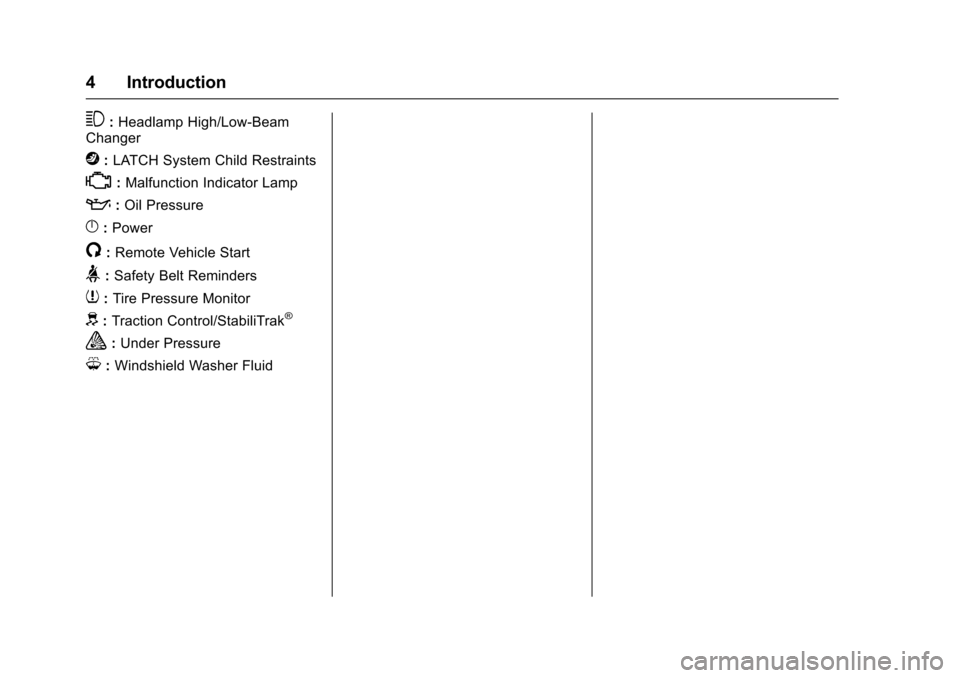
3:Headlamp High/Low-BeamChanger
j:LATCH System Child Restraints
*:Malfunction Indicator Lamp
::Oil Pressure
}:Power
/:Remote Vehicle Start
>:Safety Belt Reminders
7:Tire Pressure Monitor
d:Traction Control/StabiliTrak®
a:Under Pressure
M:Windshield Washer Fluid
Page 8 of 342

Chevrolet Sonic Owner Manual (GMNA-Localizing-U.S./Canada-10122660) -2017 - crc - 5/13/16
In Brief 7
1.Air Vents0168.
2.Exterior Lamp Controls0134.
Instrument Panel IlluminationControl0137.
3. Turn Signal Lever. SeeTu r nand Lane-ChangeSignals0136.
4.Instrument Cluster0107.
5.Windshield Wiper/Washer0102.
6. Card Holder.
7.Infotainment0141.
8. Light Sensor. SeeAutomaticHeadlamp System0135.
9.Instrument Panel Storage097.
10.Passenger SensingSystem071.
11 .Hazard WarningFlashers0136.
12.USB Port0149(If Equipped).
Auxiliary Devices0155(IfEquipped).
13. Shift Lever. SeeAutomaticTr a n s m i s s i o n0191(IfEquipped) orManualTr a n s m i s s i o n0193(IfEquipped).
14. Trunk Release (Sedan). SeeTr u n k ( S e d a n )041.
Lane Departure Warning(LDW)0206(If Equipped).
Tr a c t i o n C o n t r o l / E l e c t r o n i cStability Control0197.
15.Power Outlets0105.
16.Climate ControlSystems0166.
17. Central Locking Switch. SeeDoor Locks038.
18. Ignition Switch. SeeIgnitionPositions (Key Access)0182orIgnition Positions (KeylessAccess)0183.
19.Steering Wheel Controls0101.
20.Horn0102.
21.Steering WheelAdjustment0101.
22.Cruise Control0199.
Forward Collision Alert (FCA)System0204(If Equipped.
Heated Steering Wheel0102(If Equipped).
23. Data Link Connector (DLC)(Out of View). SeeMalfunctionIndicator Lamp (Check EngineLight)011 2.
24. Hood Release. SeeHood0215.
Page 15 of 342
Chevrolet Sonic Owner Manual (GMNA-Localizing-U.S./Canada-10122660) -2017 - crc - 5/13/16
14 In Brief
The passenger airbag statusindicator will be visible on theinstrument panel when the vehicle isstarted. SeePassenger AirbagStatus Indicator0111.
Mirror Adjustment
Exterior Mirrors
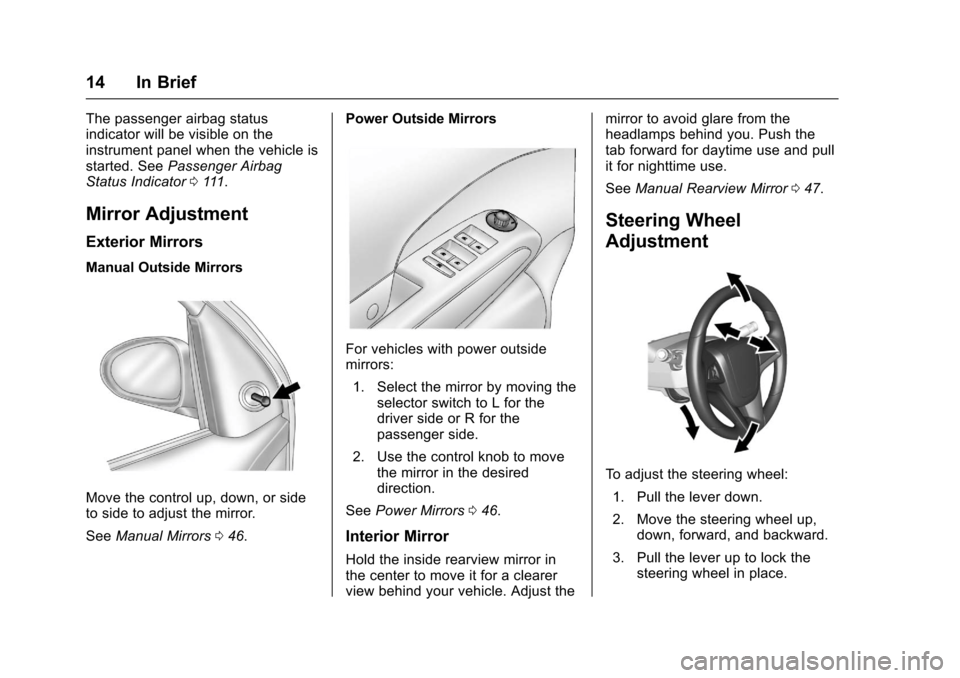
Manual Outside Mirrors
Move the control up, down, or sideto side to adjust the mirror.
SeeManual Mirrors046.
Power Outside Mirrors
For vehicles with power outsidemirrors:
1. Select the mirror by moving theselector switch to L for thedriver side or R for thepassenger side.
2. Use the control knob to movethe mirror in the desireddirection.
SeePower Mirrors046.
Interior Mirror
Hold the inside rearview mirror inthe center to move it for a clearerview behind your vehicle. Adjust the
mirror to avoid glare from theheadlamps behind you. Push thetab forward for daytime use and pullit for nighttime use.
SeeManual Rearview Mirror047.
Steering Wheel
Adjustment
To a d j u s t t h e s t e e r i n g w h e e l :
1. Pull the lever down.
2. Move the steering wheel up,down, forward, and backward.
3. Pull the lever up to lock thesteering wheel in place.
Page 22 of 342

Chevrolet Sonic Owner Manual (GMNA-Localizing-U.S./Canada-10122660) -2017 - crc - 5/13/16
In Brief 21
Cruise Control
5:Press to turn the cruise controlsystem on and off. A white indicatorcomes on in the instrument clusterwhen cruise is turned on.
RES/+ :If there is a set speed inmemory, move the thumbwheel upbriefly to resume to that speed orhold upward to accelerate. If cruisecontrol is already active, use toincrease vehicle speed.
SET/✓:Move the thumbwheel downbriefly to set the speed and activatecruise control. If cruise control isalready active, use to decreasespeed.
*:Press to disengage cruisecontrol without erasing the setspeed from memory.
SeeCruise Control0199.
Driver Information
Center (DIC)
The DIC display is in the instrumentcluster. It shows the status of manyvehicle systems. The controls forthe DIC are on the turn signal lever.
1.SET/CLR:Press to set or clearthe menu item displayed.
2.wx:Turn the band to scroll
through the menu items.
3.MENU:Press to display theDIC menus. This button is alsoused to return to or exit the lastscreen displayed on the DIC.
SeeDriver Information Center(DIC)0121.
Forward Collision Alert
(FCA) System
If equipped, FCA may help avoid orreduce the harm caused byfront-end crashes. FCA provides a
green indicator,V,whenavehicle
is detected ahead. Whenapproaching a vehicle ahead tooquickly, FCA provides a red flashingalert and rapidly beeps. This alertstays lit if you follow a vehicle muchtoo closely.
SeeForward Collision Alert (FCA)System0204.
Lane Departure
Warning (LDW)
If equipped, LDW may help avoidunintentional lane departures atspeeds of 56 km/h (35 mph) or
Page 24 of 342
Chevrolet Sonic Owner Manual (GMNA-Localizing-U.S./Canada-10122660) -2017 - crc - 5/13/16
In Brief 23
Performance and
Maintenance
Traction Control/
Electronic Stability
Control
The Traction Control System (TCS)limits wheel spin. The system is onwhen the vehicle is started.
The StabiliTrak system assists withdirectional control of the vehicle indifficult driving conditions. Thesystem is on when the vehicle isstarted.
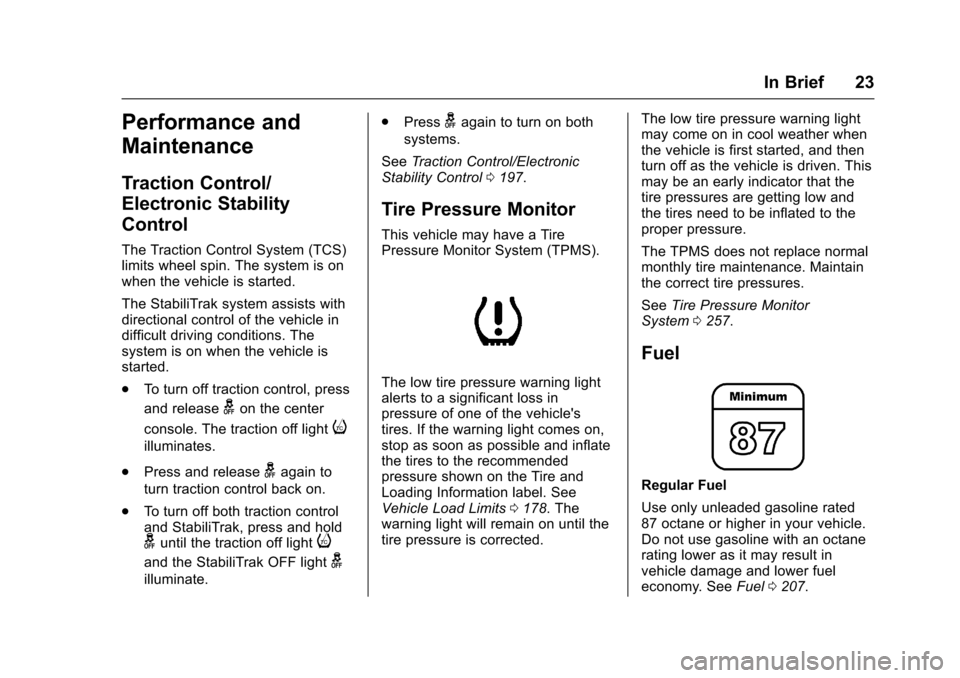
.To t u r n o f f t r a c t i o n c o n t r o l , p r e s s
and releasegon the center
console. The traction off lighti
illuminates.
.Press and releasegagain to
turn traction control back on.
.To t u r n o f f b o t h t r a c t i o n c o n t r o land StabiliTrak, press and holdguntil the traction off lighti
and the StabiliTrak OFF lightg
illuminate.
.Pressgagain to turn on both
systems.
SeeTr a c t i o n C o n t r o l / E l e c t r o n i cStability Control0197.
Tire Pressure Monitor
This vehicle may have a TirePressure Monitor System (TPMS).
The low tire pressure warning lightalerts to a significant loss inpressure of one of the vehicle'stires. If the warning light comes on,stop as soon as possible and inflatethe tires to the recommendedpressure shown on the Tire andLoading Information label. SeeVehicle Load Limits0178.Thewarning light will remain on until thetire pressure is corrected.
The low tire pressure warning lightmay come on in cool weather whenthe vehicle is first started, and thenturn off as the vehicle is driven. Thismay be an early indicator that thetire pressures are getting low andthe tires need to be inflated to theproper pressure.
The TPMS does not replace normalmonthly tire maintenance. Maintainthe correct tire pressures.
SeeTire Pressure MonitorSystem0257.
Fuel
Regular Fuel
Use only unleaded gasoline rated87 octane or higher in your vehicle.Do not use gasoline with an octanerating lower as it may result invehicle damage and lower fueleconomy. SeeFuel0207.
Page 30 of 342

Chevrolet Sonic Owner Manual (GMNA-Localizing-U.S./Canada-10122660) -2017 - crc - 5/13/16
Keys, Doors, and Windows 29
Remote Keyless Entry
(RKE) System Operation
(Key Access)
The RKE transmitter may work up to60 m (197 ft) away from the vehicle.
Other conditions can affect theperformance of the transmitter. SeeRemote Keyless Entry (RKE)System028.
With Remote Start Shown
The following buttons are on thetransmitter:
Q:Press to lock all doors liftgate ortrunk. The turn signal indicators mayflash and/or the horn may sound toindicate locking. SeeVehiclePersonalization0127.
If the driver door is open whenQis
pressed, all doors lock except thedriver door, if Unlocked Door AntiLock Out is enabled through vehiclepersonalization. SeeVehiclePersonalization0127.Ifthe
passenger door is open whenQis
pressed, all doors lock.
PressingQmay also arm the
theft-deterrent system. SeeVehicleAlarm System044.
K:Press to unlock the driver dooror all doors liftgate or trunk. The turnsignal indicators flash to indicateunlocking has occurred. SeeVehiclePersonalization0127.
PressingKmay also disarm the
theft-deterrent system. SeeVehicleAlarm System044.
Y:If equipped, press and hold torelease the trunk.
7:Press and release one time toinitiate vehicle locator. The exteriorlamps flash and the horn chirps
three times. Press and hold7for at
least three seconds to sound thepanic alarm. The horn sounds andthe turn signals flash for 30 seconds
until7is pressed again, or until the
key is placed in the ignition andturned to ON/RUN.
/:If equipped, press and releaseQand then immediately press and
hold/for at least four seconds or
until the turn signal lamps flash tostart the engine from outside thevehicle using the RKE transmitter.SeeRemote Vehicle Start037.
The buttons on the RKE transmitterare disabled when there is a key inthe ignition.
Page 32 of 342
Chevrolet Sonic Owner Manual (GMNA-Localizing-U.S./Canada-10122660) -2017 - crc - 5/13/16
Keys, Doors, and Windows 31
Battery Replacement
The battery is not rechargeable. Toreplace the battery:
Caution
When replacing the battery, do
not touch any of the circuitry on
the transmitter. Static from your
body could damage the
transmitter.
1. Press the button on thetransmitter to extend the key.
2. Remove the battery cover byprying with a finger.
3. Remove the old battery.
4. Insert the new battery, positiveside facing up. Replace with aCR2032 or equivalent battery.
5. Snap the battery cover back onto the transmitter.
Remote Keyless Entry
(RKE) System Operation
(Keyless Access)
The Keyless Access system allowsfor vehicle entry when thetransmitter is within range. See“Keyless Access Operation”following.
The transmitter functions may workup to 60 m (197 ft) away from thevehicle.
Other conditions can impact theperformance of the transmitter.
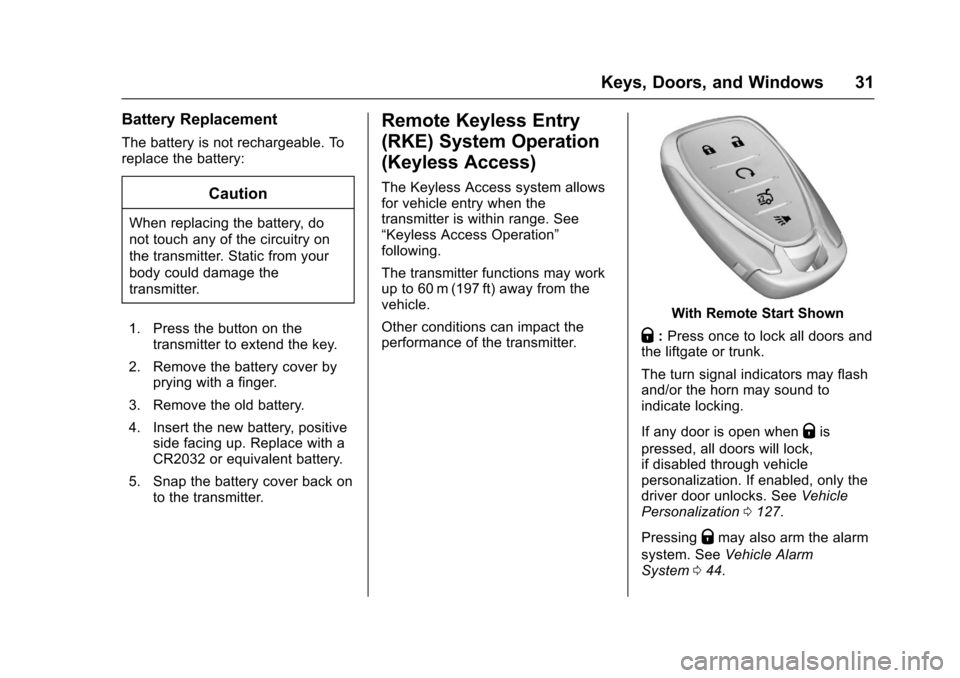
With Remote Start Shown
Q:Press once to lock all doors andthe liftgate or trunk.
The turn signal indicators may flashand/or the horn may sound toindicate locking.
If any door is open whenQis
pressed, all doors will lock,if disabled through vehiclepersonalization. If enabled, only thedriver door unlocks. SeeVehiclePersonalization0127.
PressingQmay also arm the alarm
system. SeeVehicle AlarmSystem044.