2017 CHEVROLET SILVERADO roof
[x] Cancel search: roofPage 173 of 509

Chevrolet Silverado Owner Manual (GMNA-Localizing-U.S./Canada/Mexico-9956065) - 2017 - CRC - 4/29/16
172 Lighting
roof marker lamps (if equipped),front/rear sidemarker lamps, andlicense plate lamps.
When the vehicle is turned off andthe headlamps are in AUTO, theheadlamps turn off. When the key isremoved, they automatically turn onfor a set time. The time of the delaycan be changed using the DIC. SeeDriver Information Center (DIC)(Base Level)0145orDriverInformation Center (DIC)(Uplevel)0147.
;:Turns on the parking lampsincluding all lamps, except theheadlamps.
2:Turns on the headlampstogether with the parking lamps andinstrument panel lights.
When the headlamps are turned onwhile the vehicle is on, theheadlamps turn off automatically10 minutes after the ignition isturned off. When the headlamps areturned on while the vehicle is off,the headlamps will stay on for10 minutes before turning off toprevent the battery from beingdrained. Turn the headlamp control
off and then back to the headlampon position to make the headlampsstay on for an additional 10 minutes.To k e e p t h e l a m p s o n f o r m o r e t h a n10 minutes, the ignition must be inthe ACC/ACCESSORY or ON/RUNposition.
#:If equipped, turns on the foglamps. SeeFog Lamps0176.
IntelliBeam®System
If equipped, this system turns thevehicle's high-beam headlamps onand off according to surroundingtraffic conditions.
The system turns the high-beamheadlamps on when it is darkenough and there is no other trafficpresent.
This light comes on in theinstrument cluster when theIntelliBeam system is enabled.
Turning On and EnablingIntelliBeam
To e n a b l e t h e I n t e l l i B e a m s y s t e m ,with the turn signal lever in theneutral position, turn the exteriorlamp control to AUTO. The bluehigh-beam on light appears on theinstrument cluster when the highbeams are on.
Driving with IntelliBeam
The system only activates the highbeams when driving over 40 km/h(25 mph).
There is a sensor near the topcenter of the windshield thatautomatically controls the system.Keep this area of the windshieldclear of debris to allow for bestsystem performance.
The high-beam headlamps remainon, under the automatic control,until one of the following situationsoccurs:
.The system detects anapproaching vehicle'sheadlamps.
Page 177 of 509
Chevrolet Silverado Owner Manual (GMNA-Localizing-U.S./Canada/Mexico-9956065) - 2017 - CRC - 4/29/16
176 Lighting
The lever returns to its startingposition whenever it is released.
If after signaling a turn or a lanechange the arrows flash rapidly ordo not come on, a signal bulb couldbe burned out. If equipped with LEDturn signals, see your dealer.
Replace any burned out bulbs. If abulb is not burned out, check thefuse. SeeFuses0390.
Turn Signal On Chime
If the turn signal is left on for morethan 1.2 km (0.75 mi), a chimesounds at each flash of the turnsignal. The message TURNSIGNAL ON will also appear in theDriver Information Center (DIC). Toturn the chime and message off,move the turn signal lever to the offposition.
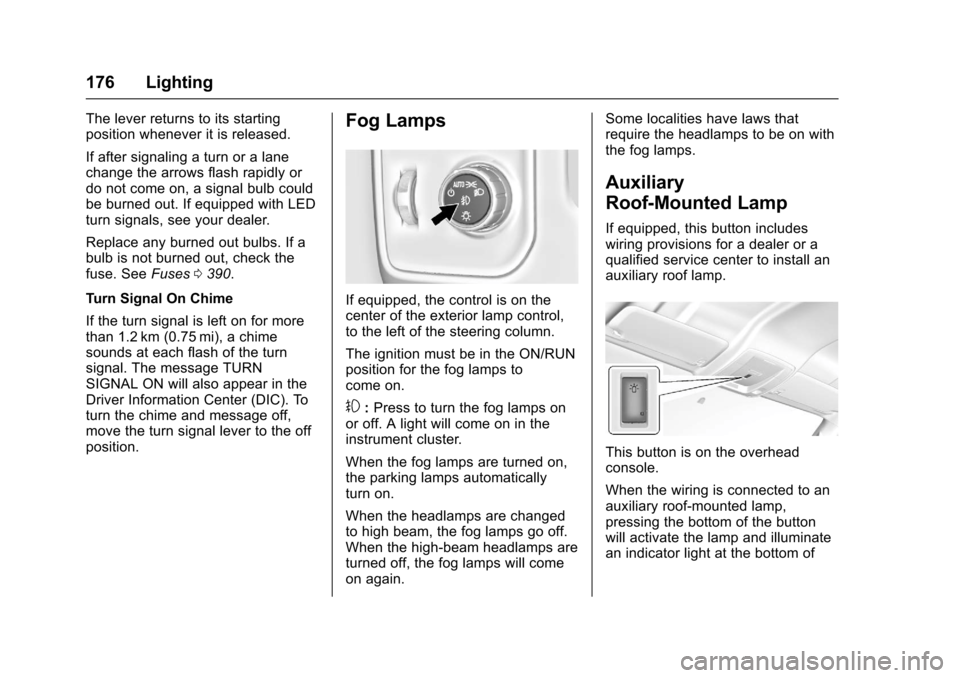
Fog Lamps
If equipped, the control is on thecenter of the exterior lamp control,to the left of the steering column.
The ignition must be in the ON/RUNposition for the fog lamps tocome on.
#:Press to turn the fog lamps onor off. A light will come on in theinstrument cluster.
When the fog lamps are turned on,the parking lamps automaticallyturn on.
When the headlamps are changedto high beam, the fog lamps go off.When the high-beam headlamps areturned off, the fog lamps will comeon again.
Some localities have laws thatrequire the headlamps to be on withthe fog lamps.
Auxiliary
Roof-Mounted Lamp
If equipped, this button includeswiring provisions for a dealer or aqualified service center to install anauxiliary roof lamp.
This button is on the overheadconsole.
When the wiring is connected to anauxiliary roof-mounted lamp,pressing the bottom of the buttonwill activate the lamp and illuminatean indicator light at the bottom of
Page 178 of 509

Chevrolet Silverado Owner Manual (GMNA-Localizing-U.S./Canada/Mexico-9956065) - 2017 - CRC - 4/29/16
Lighting 177
this button. Pressing the top of thebutton will turn off the roof-mountedlamp and indicator.
The emergency roof lamp circuit isfused at 30 amps, so the totalcurrent draw of the attached lampsshould be less than this value. Theattachment points for the roof lampcircuits are two blunt cut wiresabove the overhead console: a darkgreen with blue stripe switchedpower wire and a black ground wire.
For information on roof-mountedemergency lamp installation, seewww.gmupfitter.com or contact yourdealer.
If the vehicle has this button, thevehicle may have the snow plowprep package. SeeAdd-OnElectrical Equipment0345.
Interior Lighting
Instrument Panel
Illumination Control
This feature controls the brightnessof the steering wheel and instrumentpanel lights. The instrument panelillumination control is next to theexterior lamp control.
D:Move the thumbwheel up ordown to brighten or dim the lights.
Cargo Lamp
The cargo lamp provides more lightin the cargo area or on the sides ofthe vehicle, if needed. The lightsinside the pickup box and/or on theoutside rearview mirrors also turnon, if equipped.
Press the switch down to turn thecargo lamp on or off. An indicatorlight will turn on when the lamp isturned on, if equipped. The shiftlever must be in the P (Park)position to operate the cargo lamp.The lights on the outside rearview
Page 197 of 509

Chevrolet Silverado Owner Manual (GMNA-Localizing-U.S./Canada/Mexico-9956065) - 2017 - CRC - 4/29/16
196 Infotainment System
Multi-Band Antenna
The multi-band antenna is on theroof of the vehicle. The antenna isused for OnStar, the SiriusXMSatellite Radio Service System, andGPS (Global Positioning System),if the vehicle has these features.Keep the antenna clear ofobstructions for clear reception.
If the vehicle has a sunroof, and it isopen, reception can also beaffected.
Items on the roof of the vehicle caninterfere with the performance of theradio system and OnStar (ifequipped). Make sure themulti-band antenna is notobstructed.
Audio Players
Avoiding Untrusted Media
Devices
When using media devices such asCDs, DVDs, Blu-Ray Discs®,SDcards, USB drives, and mobiledevices, consider the source.Untrusted media devices couldcontain files that affect systemoperation or performance. Avoid useif the content or origin cannot betrusted.
CD Player
If the vehicle is equipped with a CDplayer, it can be used for CD andMP3 audio.
With the vehicle on, insert a discinto the slot, label side up. Press theMEDIA button to select CD as asource.
The system is capable ofplaying most:
.Audio CDs
.CD-R
.CD-RW
.MP3 or unprotected WMAformats
When playing any compatiblerecordable disc, the sound qualitycan be reduced due to disc quality,the method of recording, the qualityof the music that has beenrecorded, or the way the disc hasbeen handled.
There can be increased skipping,difficulty in finding tracks, and/ordifficulty in loading and ejecting.If these problems occur, check thedisc for damage or try a knowngood disc.
To a v o i d d a m a g e t o t h e C D p l a y e r :
.Do not use scratched ordamaged discs.
.Do not apply labels to discs. Thelabels could get caught in theplayer.
.Insert only one disc at a time.
.Keep the loading slot free offoreign materials, liquids, anddebris.
Page 253 of 509

Chevrolet Silverado Owner Manual (GMNA-Localizing-U.S./Canada/Mexico-9956065) - 2017 - CRC - 4/29/16
252 Driving and Operating
Loading the Vehicle for
Off-Road Driving
{Warning
.Unsecured cargo on theload floor can be tossedabout when driving overrough terrain. You or yourpassengers can be struckby flying objects. Secure thecargo properly.
.Keep cargo in the cargoarea as far forward and aslow as possible. Theheaviest things should beon the floor, forward of therear axle.
.Heavy loads on the roofraise the vehicle's center ofgravity, making it more likelyto roll over. You can beseriously or fatally injured ifthe vehicle rolls over. Putheavy loads inside thecargo area, not on the roof.
For more information about loadingthe vehicle, seeVehicle Load Limits0259andTires0397.
Environmental Concerns
.Always use established trails,roads, and areas that have beenset aside for public off-roadrecreational driving and obey allposted regulations.
.Do not damage shrubs, flowers,trees, or grasses or disturbwildlife.
.Do not park over things thatburn. SeeParking over ThingsThat Burn0275.
Driving on Hills
Driving safely on hills requires goodjudgment and an understanding ofwhat the vehicle can and cannot do.
{Warning
Many hills are simply too steep
for any vehicle. Driving up hills
can cause the vehicle to stall.
Driving down hills can cause loss
(Continued)
Warning (Continued)
of control. Driving across hills can
cause a rollover. You could be
injured or killed. Do not drive on
steep hills.
Before driving on a hill, assess thesteepness, traction, andobstructions. If the terrain aheadcannot be seen, get out of thevehicle and walk the hill beforedriving further.
When driving on hills:
.Use a low gear and keep a firmgrip on the steering wheel.
.Maintain a slow speed.
.When possible, drive straight upor down the hill.
.Slow down when approachingthe top of the hill.
.Use headlamps even during theday to make the vehicle morevisible.
Page 272 of 509

Chevrolet Silverado Owner Manual (GMNA-Localizing-U.S./Canada/Mexico-9956065) - 2017 - CRC - 4/29/16
Driving and Operating 271
gasoline. Try pushing theaccelerator pedal all the way tothe floor and holding it therewhile holding the key in STARTfor up to 15 seconds. Wait atleast 15 seconds between eachtry, to allow the cranking motorto cool down. When the enginestarts, let go of the key andaccelerator. If the vehicle startsbriefly but then stops again, dothe same thing. This clears theextra gasoline from the engine.Do not race the engineimmediately after starting it.Operate the engine andtransmission gently until the oilwarms up and lubricates allmoving parts.
Fast Idle System
If equipped, this feature is availableonly with cruise control. The manualfast idle switch is operated using thecruise control buttons on the leftside of the steering wheel.
This system can be used toincrease engine idle speedwhenever the following conditionsare met:
.The parking brake is set.
.The brake pedal is not pressed.
.The vehicle must not be movingand the accelerator must not bepressed.
To c o n t r o l t h e f a s t i d l e :
.To e n a b l e t h e F a s t I d l e S y s t e m ,press and release the cruisecontrol on/off button and ensurethat the switch indicator lightis lit.
.Press and release the cruisecontrol SET- button. Enginespeed will be held atapproximately 1200 rpm.
One of the following actions will turnoff the fast idle:
.Pressing the brake.
.Selecting the cruise controlcancel button.
.Releasing the parking brake.
.Moving the transmission shiftlever out of P (Park) orN(Neutral).
.Selecting the cruise control on/off button when it waspreviously on.
.Pressing the cruise control SET-button a second time.
.Pressing the accelerator morethan one-quarter of theway down.
.Turning the ignition switch to theLOCK/OFF position.
Retained Accessory
Power (RAP)
The following vehicle accessoriescan be used for up to 10 minutesafter the engine is turned off:
.Audio System
.Power Windows
.OnStar System (if equipped)
.Sunroof (if equipped)
These features work when the keyis in ON/RUN or ACC/ACCESSORY. Once the key is
Page 273 of 509

Chevrolet Silverado Owner Manual (GMNA-Localizing-U.S./Canada/Mexico-9956065) - 2017 - CRC - 4/29/16
272 Driving and Operating
turned from ON/RUN to LOCK/OFF,the windows and sunroof continueto work up to 10 minutes or until anydoor is opened. The radio continuesto work for up to 10 minutes or untilthe driver door is opened.
Accessory Power Outlets (APOs)
The vehicle may have AccessoryPower Outlets (APOs) in severallocations. SeePower Outlets0124.
The APOs in the console or centerseat position are powered byRetained Accessory Power (RAP).They will continue to work for up to10 minutes after the key is turnedfrom ON/RUN to LOCK/OFF, or untilthe driver door is opened.
The APOs on the center stack comefrom the factory powered directlyfrom the vehicle battery, and supplyaccessory power at all times,regardless of ignition key position.
If electronic items are left pluggedinto these APOs for long periods oftime with the vehicle off, the vehiclebattery could be drained. Thevehicle may not start if the battery isallowed to drain for an extendedperiod of time.
Engine Coolant Heater
The engine heater can provideeasier starting and better fueleconomy during engine warm-up incold weather conditions at or below✓18 °C (0 °F). Vehicles with anengine heater should be plugged inat least four hours before starting.An internal thermostat in theplug-end of the cord may exist,which will prevent engine coolantheater operation at temperaturesabove✓18 °C (0 °F).
If the vehicle has a diesel engine,see the Duramax dieselsupplement.
To Use the Engine Coolant
Heater
1. Turn off the engine.
2. Open the hood and unwrap theelectrical cord. The cord issecured to the driver sidefender with a clip, next to theengine compartment fuseblock. Carefully remove thewire tie that bundles theelectrical plug. Do not cut theelectrical cord.
Check the heater cord fordamage. If it is damaged, donot use it. See your dealer forareplacement.Inspectthecord for damage yearly.
3. Plug the cord into a normal,grounded 110-volt AC outlet.
Page 274 of 509

Chevrolet Silverado Owner Manual (GMNA-Localizing-U.S./Canada/Mexico-9956065) - 2017 - CRC - 4/29/16
Driving and Operating 273
{Warning
Improper use of the heater cord
or an extension cord can damage
the cord and may result in
overheating and fire.
.Plug the cord into athree-prong electrical utilityreceptacle that is protectedby a ground fault detectionfunction. An ungroundedoutlet could cause anelectric shock.
.Use a weatherproof,heavy-duty, 15 amp-ratedextension cord if needed.Failure to use therecommended extensioncord in good operatingcondition, or using adamaged heater orextension cord, could makeit overheat and cause a fire,property damage, electricshock, and injury.
(Continued)
Warning (Continued)
.Do not operate the vehicle
with the heater cord
permanently attached to the
vehicle. Possible heater
cord and thermostat
damage could occur.
.While in use, do not let theheater cord touch vehicleparts or sharp edges. Neverclose the hood on theheater cord.
.Before starting the vehicle,unplug the cord, reattachthe cover to the plug, andsecurely fasten the cord.Keep the cord away fromany moving parts.
4. Before starting the engine, besure to unplug and store thecord as it was before to keep itaway from moving engineparts. If you do not, it could bedamaged.
The length of time the heater shouldremain plugged in depends onseveral factors. Ask a dealer in thearea where you will be parking thevehicle for the best advice on this.
Shifting Into Park
{Warning
It can be dangerous to get out of
the vehicle if the shift lever is not
fully in P (Park) with the parking
brake firmly set. The vehicle can
roll. If you have left the engine
running, the vehicle can move
suddenly. You or others could be
injured. To be sure the vehicle will
not move, even when you are on
fairly level ground, use the steps
that follow. With four-wheel drive,
if the transfer case is in
N(Neutral), the vehicle will be
free to roll, even if the shift lever
is in P (Park). Be sure the transfer
case is in a drive gear. If towing a
trailer, seeDriving Characteristics
and Towing Tips0315.