2017 CHEVROLET SILVERADO instrument cluster
[x] Cancel search: instrument clusterPage 152 of 509

Chevrolet Silverado Owner Manual (GMNA-Localizing-U.S./Canada/Mexico-9956065) - 2017 - CRC - 4/29/16
Instruments and Controls 151
SERVICE BATTERY
CHARGING SYSTEM
On some vehicles, this messagedisplays if there is a problem withthe battery charging system. Undercertain conditions, the chargingsystem light may also turn on in theinstrument cluster. SeeChargingSystem Light0138.Drivingwiththisproblem could drain the battery.Turn off all unnecessaryaccessories. Have the electricalsystem checked as soon aspossible. See your dealer.
TRANSPORT MODE ON
This message is displayed when thevehicle is in transport mode. Somefeatures can be disabled while inthis mode, including RemoteKeyless Entry (RKE), remote start,and the vehicle alarm system. Takethe vehicle to your dealer for serviceto turn transport mode off.
Brake System Messages
BRAKE FLUID LOW
This message is displayed when thebrake fluid level is low. SeeBrakeFluid0377.
SERVICE BRAKE ASSIST
This message may be displayedwhen there is a problem with thebrake boost assist system. Whenthis message is displayed, the brakeboost assist motor might be heardoperating and you might noticepulsation in the brake pedal. This isnormal under these conditions. Takethe vehicle to your dealer forservice.
SERVICE TRAILER BRAKE
SYSTEM
On vehicles with the IntegratedTrailer Brake Control (ITBC) system,this message displays and a chimemay sound when there is a problemwith the ITBC system.
When this message displays, poweris no longer available to the trailerbrakes.
As soon as it is safe to do so,carefully pull your vehicle over tothe side of the road and turn theignition off. Check the wiringconnection to the trailer and turn theignition back on. If this message stilldisplays, either your vehicle or thetrailer needs service. See yourdealer.
See“Integrated Trailer BrakeControl System”underTo w i n gEquipment0335for moreinformation.
Compass Messages
Dashes may be displayed if thevehicle temporarily losescommunication with the GlobalPositioning System (GPS).
Door Ajar Messages
DOOR OPEN
This message displays and a chimemay sound if a door is not fullyclosed. Stop and turn off thevehicle, check the door for
Page 173 of 509

Chevrolet Silverado Owner Manual (GMNA-Localizing-U.S./Canada/Mexico-9956065) - 2017 - CRC - 4/29/16
172 Lighting
roof marker lamps (if equipped),front/rear sidemarker lamps, andlicense plate lamps.
When the vehicle is turned off andthe headlamps are in AUTO, theheadlamps turn off. When the key isremoved, they automatically turn onfor a set time. The time of the delaycan be changed using the DIC. SeeDriver Information Center (DIC)(Base Level)0145orDriverInformation Center (DIC)(Uplevel)0147.
;:Turns on the parking lampsincluding all lamps, except theheadlamps.
2:Turns on the headlampstogether with the parking lamps andinstrument panel lights.
When the headlamps are turned onwhile the vehicle is on, theheadlamps turn off automatically10 minutes after the ignition isturned off. When the headlamps areturned on while the vehicle is off,the headlamps will stay on for10 minutes before turning off toprevent the battery from beingdrained. Turn the headlamp control
off and then back to the headlampon position to make the headlampsstay on for an additional 10 minutes.To k e e p t h e l a m p s o n f o r m o r e t h a n10 minutes, the ignition must be inthe ACC/ACCESSORY or ON/RUNposition.
#:If equipped, turns on the foglamps. SeeFog Lamps0176.
IntelliBeam®System
If equipped, this system turns thevehicle's high-beam headlamps onand off according to surroundingtraffic conditions.
The system turns the high-beamheadlamps on when it is darkenough and there is no other trafficpresent.
This light comes on in theinstrument cluster when theIntelliBeam system is enabled.
Turning On and EnablingIntelliBeam
To e n a b l e t h e I n t e l l i B e a m s y s t e m ,with the turn signal lever in theneutral position, turn the exteriorlamp control to AUTO. The bluehigh-beam on light appears on theinstrument cluster when the highbeams are on.
Driving with IntelliBeam
The system only activates the highbeams when driving over 40 km/h(25 mph).
There is a sensor near the topcenter of the windshield thatautomatically controls the system.Keep this area of the windshieldclear of debris to allow for bestsystem performance.
The high-beam headlamps remainon, under the automatic control,until one of the following situationsoccurs:
.The system detects anapproaching vehicle'sheadlamps.
Page 174 of 509

Chevrolet Silverado Owner Manual (GMNA-Localizing-U.S./Canada/Mexico-9956065) - 2017 - CRC - 4/29/16
Lighting 173
.The system detects a precedingvehicle's taillamps.
.The outside light is brightenough that high-beamheadlamps are not required.
.The vehicle's speed drops below20 km/h (12 mph).
.The IntelliBeam system isdisabled by the high/low-beamchanger or the flash-to-passfeature. If this happens, the high/low-beam changer must beactivated two times withintwo seconds to reactivate theIntelliBeam system. Theinstrument cluster light will comeon to indicate the IntelliBeam isreactivated. SeeHeadlampHigh/Low-Beam Changer0173andFlash-to-Pass0174.
The high beams may not turn offautomatically if the system cannotdetect another vehicle's lampsbecause of any of the following:
.The other vehicle's lamps aremissing, damaged, obstructedfrom view, or otherwiseundetected.
.The other vehicle's lamps arecovered with dirt, snow, and/orroad spray.
.The other vehicle's lamps cannotbe detected due to denseexhaust, smoke, fog, snow, roadspray, mist, or other airborneobstructions.
.The vehicle's windshield is dirty,cracked, or obstructed bysomething that blocks the viewof the light sensor.
.The vehicle is loaded such thatthe front end points upward,causing the light sensor to aimhigh and not detect headlampsand taillamps.
.Driving on winding or hilly roads.
The automatic high-beamheadlamps may need to be disabledif any of the above conditions exist.
Exterior Lamps Off
Reminder
Areminderchimesoundswhentheheadlamps or parking lamps aremanually turned on, the ignition isoff, and a door is open. To disablethe chime, turn the lamps off.
Headlamp High/
Low-Beam Changer
$:Push the turn signal levertoward the instrument panel tochange the headlamps from low tohigh beam.
Pull the turn signal lever toward youand release it to return to low-beamheadlamps.
When the high-beam headlamps areon, this indicator light on theinstrument cluster will also be on.
Page 175 of 509

Chevrolet Silverado Owner Manual (GMNA-Localizing-U.S./Canada/Mexico-9956065) - 2017 - CRC - 4/29/16
174 Lighting
Flash-to-Pass
This feature lets you use thehigh-beam headlamps to signal adriver in front of you that you wantto pass. It works even if theheadlamps are in the automaticposition.
To u s e i t , p u l l t h e t u r n s i g n a l l e v e rtoward you, then release it.
If the headlamps are in theautomatic position or on low beam,the high-beam headlamps will turnon. Depending on the type ofheadlamp, they will either turn offafter a short duration or stay on aslong as you hold the lever towardyou. The high-beam indicator on theinstrument cluster will come on.Release the lever to return tonormal operation.
Daytime Running
Lamps (DRL)
DRL can make it easier for others tosee the front of the vehicle duringthe day. Fully functional DRL arerequired on all vehicles first sold inCanada.
The DRL system comes on whenthe following conditions are met:
.The ignition is on.
.The exterior lamp control isin AUTO.
.The transmission is not inP(Park).
.The light sensor determines it isdaytime.
When the DRL system is on, onlythe DRL are on. The taillamps,sidemarker lamps, instrument panellights, and other lamps will notbe on.
When it begins to get dark, theautomatic headlamp systemswitches from DRL to theheadlamps.
To t u r n o f f t h e D R L , t u r n t h e e x t e r i o rlamp control to the off position andthen release. For vehicles first soldin Canada, off will only work whenthe vehicle is in P (Park).
Automatic Headlamp
System
When the exterior lamp control isset to AUTO and it is dark enoughoutside, the headlamps come onautomatically.
There is a light sensor on top of theinstrument panel. Do not cover thesensor, otherwise the headlampswill come on when they are notneeded.
The system may also turn on theheadlamps when driving through aparking garage or tunnel.
If the vehicle is started in a darkgarage, the automatic headlampsystem comes on immediately. If itis light outside when the vehicle
Page 176 of 509

Chevrolet Silverado Owner Manual (GMNA-Localizing-U.S./Canada/Mexico-9956065) - 2017 - CRC - 4/29/16
Lighting 175
leaves the garage, there is a slightdelay before the automaticheadlamp system changes to theDRL. During that delay, theinstrument cluster may not be asbright as usual. Make sure theinstrument panel brightness controlis in the full bright position. SeeInstrument Panel IlluminationControl0177.
When it is bright enough outside,the headlamps will turn off or maychange to Daytime RunningLamps (DRL).
The automatic headlamp systemturns off when the exterior lamp
control is turned toOor the ignition
is off.
Lights On with Wipers
If the windshield wipers areactivated in daylight with the engineon, and the exterior lamp control isin AUTO, the headlamps, parkinglamps, and other exterior lampscome on. The transition time for thelamps coming on varies based onwiper speed. When the wipers are
not operating, these lamps turn off.
Move the exterior lamp control toO
or;to disable this feature.
Hazard Warning Flashers
|:Press this button to make thefront and rear turn signal lampsflash on and off. Press again to turnthe flashers off.
When the hazard warning flashersare on, the vehicle's turn signals willnot work.
Turn and Lane-Change
Signals
An arrow on the instrument clusterflashes in the direction of the turn orlane change.
Move the turn signal lever all theway up or down to signal a turn.
Raise or lower the lever for lessthan one second until the arrowstarts to flash to signal a lanechange. This causes the turnsignals to automatically flash threetimes. It will flash six times if Tow/Haul Mode is active. Holding theturn signal lever for more thanone second will cause the turnsignals to flash until the lever isreleased.
Page 177 of 509
Chevrolet Silverado Owner Manual (GMNA-Localizing-U.S./Canada/Mexico-9956065) - 2017 - CRC - 4/29/16
176 Lighting
The lever returns to its startingposition whenever it is released.
If after signaling a turn or a lanechange the arrows flash rapidly ordo not come on, a signal bulb couldbe burned out. If equipped with LEDturn signals, see your dealer.
Replace any burned out bulbs. If abulb is not burned out, check thefuse. SeeFuses0390.
Turn Signal On Chime
If the turn signal is left on for morethan 1.2 km (0.75 mi), a chimesounds at each flash of the turnsignal. The message TURNSIGNAL ON will also appear in theDriver Information Center (DIC). Toturn the chime and message off,move the turn signal lever to the offposition.
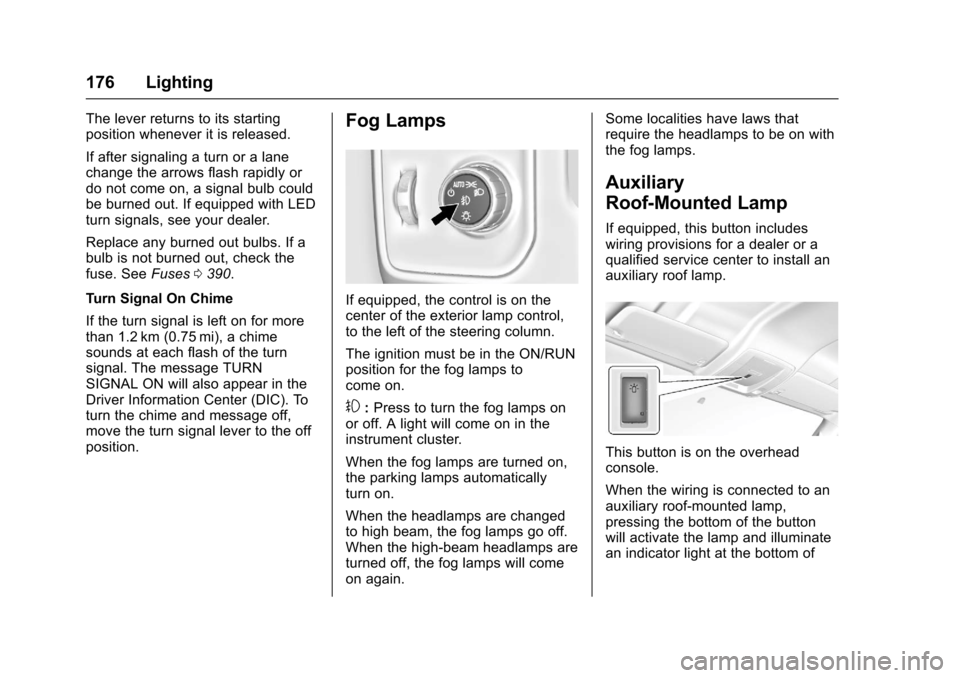
Fog Lamps
If equipped, the control is on thecenter of the exterior lamp control,to the left of the steering column.
The ignition must be in the ON/RUNposition for the fog lamps tocome on.
#:Press to turn the fog lamps onor off. A light will come on in theinstrument cluster.
When the fog lamps are turned on,the parking lamps automaticallyturn on.
When the headlamps are changedto high beam, the fog lamps go off.When the high-beam headlamps areturned off, the fog lamps will comeon again.
Some localities have laws thatrequire the headlamps to be on withthe fog lamps.
Auxiliary
Roof-Mounted Lamp
If equipped, this button includeswiring provisions for a dealer or aqualified service center to install anauxiliary roof lamp.
This button is on the overheadconsole.
When the wiring is connected to anauxiliary roof-mounted lamp,pressing the bottom of the buttonwill activate the lamp and illuminatean indicator light at the bottom of
Page 183 of 509

Chevrolet Silverado Owner Manual (GMNA-Localizing-U.S./Canada/Mexico-9956065) - 2017 - CRC - 4/29/16
182 Infotainment System
The infotainment system has built-infeatures intended to help avoiddistraction by disabling somefunctions when driving. Thesefunctions may gray out when theyare unavailable. Many infotainmentfeatures are also available throughthe instrument cluster and steeringwheel controls.
Before driving:
.Become familiar with theoperation, faceplate buttons, andscreen buttons.
.Set up the audio by presettingfavorite stations, setting thetone, and adjusting thespeakers.
.Set up phone numbers inadvance so they can be calledeasily by pressing a singlebutton or by using a single voicecommand if equipped withBluetooth phone capability.
SeeDefensive Driving0248.
To p l a y t h e i n f o t a i n m e n t s y s t e m w i t hthe ignition off, seeRetainedAccessory Power (RAP)0271.
Theft-Deterrent Feature
TheftLock®is designed todiscourage theft of the vehicle'sradio by learning a portion of theVehicle Identification Number (VIN).The radio does not operate if it isstolen or moved to a differentvehicle.
Page 188 of 509

Chevrolet Silverado Owner Manual (GMNA-Localizing-U.S./Canada/Mexico-9956065) - 2017 - CRC - 4/29/16
Infotainment System 187
SETTINGS :Select the SETTINGSscreen icon to display the Settingsmain page. See“Setting RadioPreferences”following.
Setting Radio Preferences
Select the SETTINGS screen iconto display the Settings menu andthe following may display:
Time and Date :SeeClock0123.
Language (Current Language) :This will set the display language inthe radio and instrument cluster.Select to display a list of languages.
SelectoBACK to go back to the
previous menu.
Valet Mode:
Using the circular numeric keypad,enter a four-digit code:
1. Turn the MENU knob tohighlight a number.
2. Press the MENU knob to selectit. Do this for each one of thefour digits. Select Enter to go tothe confirmation screen.
3. Re-enter the four-digit code.Select LOCK to lock thesystem.
4. Enter the four-digit code tounlock the system.
SelectoBACK to go back to
the previous menu.
Radio :See“Radio Setup”later inthis section.
Vehicle :SeeVehiclePersonalization0160.
Display :Press the MENU knob toturn the display on or off.
Return to Factory Settings :See“Return to Factory Settings”later inthis section.
Software Information (IfEquipped) :Press the MENU knobto select Save Vehicle Info to USB.Press the MENU knob again to startdownloading the vehicle informationto the USB.
Radio Setup
Press the RADIO button and thefollowing may display:
Manage Favorites:
.Turn the MENU knob and pressto select a favorite.
.To d e l e t e a f a v o r i t e , p r e s sthe button just below theDELETE screen button.
.To m o v e a f a v o r i t e , p r e s s t h eMOVE screen button. Turnthe MENU knob to select anew location, then press theDROP screen button toselect the new location.
.SelectoBACK to go back to
the previous menu.
Number of Favorites Shown :Select Auto and the system willautomatically adjust the number offavorite pages when favorites areadded and removed, or select anumber from 5–25 to manuallyadjust the number of favoritesshown.