2017 CHEVROLET SILVERADO fuel
[x] Cancel search: fuelPage 146 of 509
Chevrolet Silverado Owner Manual (GMNA-Localizing-U.S./Canada/Mexico-9956065) - 2017 - CRC - 4/29/16
Instruments and Controls 145
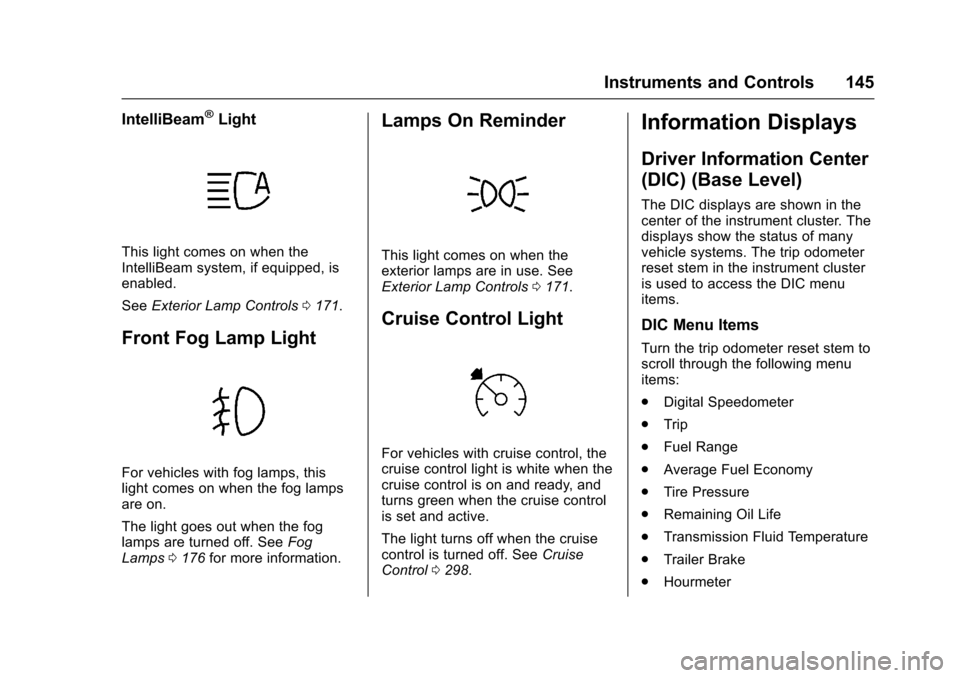
IntelliBeam®Light
This light comes on when theIntelliBeam system, if equipped, isenabled.
SeeExterior Lamp Controls0171.
Front Fog Lamp Light
For vehicles with fog lamps, thislight comes on when the fog lampsare on.
The light goes out when the foglamps are turned off. SeeFogLamps0176for more information.
Lamps On Reminder
This light comes on when theexterior lamps are in use. SeeExterior Lamp Controls0171.
Cruise Control Light
For vehicles with cruise control, thecruise control light is white when thecruise control is on and ready, andturns green when the cruise controlis set and active.
The light turns off when the cruisecontrol is turned off. SeeCruiseControl0298.
Information Displays
Driver Information Center
(DIC) (Base Level)
The DIC displays are shown in thecenter of the instrument cluster. Thedisplays show the status of manyvehicle systems. The trip odometerreset stem in the instrument clusteris used to access the DIC menuitems.
DIC Menu Items
Turn the trip odometer reset stem toscroll through the following menuitems:
.Digital Speedometer
.Trip
.Fuel Range
.Average Fuel Economy
.Tire Pressure
.Remaining Oil Life
.Transmission Fluid Temperature
.Trailer Brake
.Hourmeter
Page 147 of 509

Chevrolet Silverado Owner Manual (GMNA-Localizing-U.S./Canada/Mexico-9956065) - 2017 - CRC - 4/29/16
146 Instruments and Controls
.Unit
Digital Speedometer
The speedometer shows how fastthe vehicle is moving in eitherkilometers per hour (km/h) or milesper hour (mph). The speedometercannot be reset.
Trip
Turn the trip odometer reset stemuntil TRIP displays. The currentdistance traveled, in eitherkilometers (km) or miles (mi), sincethe last reset for the trip odometer isshown. The trip odometer can bereset to zero by pressing andholding the trip odometer reset stemwhile the trip odometer is displayed.
Fuel Range
This display shows the approximatedistance the vehicle can be drivenwithout refueling. The fuel rangeestimate is based on an average ofthe vehicle's fuel economy overrecent driving history and theamount of fuel remaining in the fueltank. Fuel range cannot be reset.
Average Fuel Economy
The Average Fuel Economy displayshows the approximate averageliters per 100 kilometers (L/100 km)or miles per gallon (mpg). Thisnumber reflects only theapproximate average fuel economythat the vehicle has right now, andwill change as driving conditionschange. This number is based onthe number of L/100 km (mpg)recorded since the last time thismenu item was reset. Reset thisdisplay by pressing the tripodometer reset stem.
Tire Pressure
Turn the trip odometer reset stemuntil a vehicle with the approximatepressures of all four tires displays.Tire pressure is displayed in eitherkilopascal (kPa) or in pounds persquare inch (psi).
SeeTire Pressure Monitor System0407andTire Pressure MonitorOperation0408.
Remaining Oil Life
Turn the trip odometer reset stemuntil REMAINING OIL LIFEdisplays. An estimate of the oil'sremaining useful life is shown.REMAINING OIL LIFE 99% means99% of the current oil life remains.
When the remaining oil life is low,the CHANGE ENGINE OIL SOONmessage will appear on the display.SeeEngine Oil Messages0152.The oil should be changed as soonas possible. SeeEngine Oil0359.In addition to the engine oil lifesystem monitoring the oil life,additional maintenance isrecommended in the MaintenanceSchedule. SeeMaintenanceSchedule0452.
The Oil Life display must be resetafter each oil change. It will notreset itself. Do not reset the Oil Lifedisplay at any time other than whenthe oil has just been changed.It cannot be reset accurately untilthe next oil change. To reset theengine oil life system, seeEngineOil Life System0362.
Page 149 of 509

Chevrolet Silverado Owner Manual (GMNA-Localizing-U.S./Canada/Mexico-9956065) - 2017 - CRC - 4/29/16
148 Instruments and Controls
1. Pressoto access the cluster
applications.
2. Pressworxto scroll to the
Settings application.
3. PressVto enter the
Settings menu.
4. Scroll to Info Pages and
pressp.
5. Pressworxto move
through the list of possibleinformation displays.
6. PressVwhile an item is
highlighted to select ordeselect that item. When anitem is selected, a checkmarkwill appear next to it.
DIC Info Pages
The following is the list of allpossible DIC info page displays.Some may not be available for yourparticular vehicle. Some items maynot be turned on by default but canbe turned on through the Settingsapp. See“DIC Info Page Options”earlier in this section.
Speed :Shows the vehicle speed ineither kilometers per hour (km/h) ormiles per hour (mph).
Tr i p A o r Tr i p B :Shows thecurrent distance traveled, in eitherkilometers (km) or miles (mi), sincethe trip odometer was last reset.
This also shows the approximateaverage liters per 100 kilometers(L/100 km) or miles pergallon (mpg). This number iscalculated based on the number ofL/100 km (mpg) recorded since thelast time this menu item was reset.This number reflects only theapproximate average fuel economythat the vehicle has right now, andwill change as driving conditionschange.
Press and holdVwhile this display
is active to reset the trip odometerand the average fuel economy. TripAandTripBcanalsoberesetby
pressingpand choosing reset.
Fuel Range :Shows theapproximate distance the vehiclecan be driven without refueling.LOW will be displayed when the
vehicle is low on fuel. The fuelrange estimate is based on anaverage of the vehicle's fueleconomy over recent driving historyand the amount of fuel remaining inthe fuel tank.
Oil Life :Shows an estimate of theoil's remaining useful life.If REMAINING OIL LIFE 99% isdisplayed, that means 99% of thecurrent oil life remains.
When the remaining oil life is low,the CHANGE ENGINE OIL SOONmessage will appear on the display.SeeEngine Oil Messages0152.The oil should be changed as soonas possible. SeeEngine Oil0359.In addition to the engine oil lifesystem monitoring the oil life,additional maintenance isrecommended in the MaintenanceSchedule. SeeMaintenanceSchedule0452.
The Oil Life display must be resetafter each oil change. It will notreset itself. Do not reset the Oil Lifedisplay at any time other than whenthe oil has just been changed.It cannot be reset accurately until
Page 150 of 509

Chevrolet Silverado Owner Manual (GMNA-Localizing-U.S./Canada/Mexico-9956065) - 2017 - CRC - 4/29/16
Instruments and Controls 149
the next oil change. To reset theengine oil life system, press and
holdVfor several seconds while
the Oil Life display is active. SeeEngine Oil Life System0362.
Tire Pressure :Shows theapproximate pressures of all fourtires. Tire pressure is displayed ineither kilopascal (kPa) or in poundsper square inch (psi). If the pressureis low, the value for that tire isshown in amber. SeeTire PressureMonitor System0407andTirePressure Monitor Operation0408.
Fuel Economy :The centerdisplays the approximateinstantaneous fuel economy as anumber and bar graph. Displayedabove the bar graph is a runningaverage of fuel economy for themost recently traveled selecteddistance. Displayed below the bargraph is the best average fueleconomy that has been achieved forthe selected distance. The selecteddistance is displayed at the top ofthe page as“last xxx mi/km.”Nextto the odometer, the Active FuelManagement displays the number of
cylinders the vehicle is runningon. SeeActive FuelManagement®0275.
Presspto select the distance or
reset best value. Usewandxto
choose the distance and pressV.
Presswandxto select“Reset
Best Score.”PressVto reset the
best average fuel economy. Afterreset, the momentary average fueleconomy will display.
The display provides information onhow current driving behavior affectsthe running average and how wellrecent driving compares to the bestthat has been achieved for theselected distance.
Timer :This display can be used as
atimer.Tostartthetimer,pressV
while this display is active. Thedisplay will show the amount of timethat has passed since the timer was
last reset. To stop the timer, pressV
briefly while this display is activeand the timer is running. To reset
the timer to zero, press and holdV
while this display is active, or presspand select reset.
Speed Limit (If Equipped) :Showssign information, which comes fromaroadwaydatabaseintheonboardnavigation.
Engine Hours :Shows the totalnumber of hours the engine has run.
Tr a n s m i s s i o n F l u i dTe m p e r a t u r e :Shows thetemperature of the automatictransmission fluid in either degreesCelsius (°C) or degreesFahrenheit (°F).
Tr a i l e r B r a k e ( I f E q u i p p e d ) :Onvehicles with the Integrated TrailerBrake Control (ITBC) system, thetrailer brake display appears inthe DIC.
TRAILER GAIN shows the trailergain setting. This setting can beadjusted from 0.0 to 10.0 with eitheratrailerconnectedordisconnected.
Page 154 of 509

Chevrolet Silverado Owner Manual (GMNA-Localizing-U.S./Canada/Mexico-9956065) - 2017 - CRC - 4/29/16
Instruments and Controls 153
and allow the vehicle to idle until itcools down. SeeEngine CoolantTe m p e r a t u r e G a u g e0133.
OIL PRESSURE LOW STOP
ENGINE
This message displays if low oilpressure levels occur. Stop thevehicle as soon as safely possibleand do not operate it until the causeof the low oil pressure has beencorrected. Check the oil as soon aspossible and have the vehicleserviced by your dealer. SeeEngineOil0359.
Engine Power Messages
ENGINE POWER IS REDUCED
This message displays and a chimemay sound when the cooling systemtemperature gets too hot and theengine further enters the enginecoolant protection mode. SeeEngine Overheating0372for moreinformation.
This message also displays whenthe vehicle's engine power isreduced. Reduced engine powercan affect the vehicle's ability to
accelerate. If this message is on,but there is no reduction inperformance, proceed to yourdestination. The performance maybe reduced the next time the vehicleis driven. The vehicle may be drivenat a reduced speed while thismessage is on, but acceleration andspeed may be reduced. Anytimethis message stays on, the vehicleshould be taken to your dealer forservice as soon as possible.
Fuel System Messages
FUEL LEVEL LOW
This message displays and a chimemay sound if the fuel level is low.Refuel as soon as possible. SeeFuel Gauge0131andFuel0311.
Key and Lock Messages
REPLACE BATTERY IN
REMOTE KEY
This message displays if a RemoteKeyless Entry (RKE) transmitterbattery is low. The battery needs tobe replaced in the transmitter. See
“Battery Replacement”underRemote Keyless Entry (RKE)System Operation036.
Lamp Messages
TURN SIGNAL ON
This message displays and a chimesounds if a turn signal is left on for1.2 km (0.75 mi). Move the turnsignal lever to the off position.
Object Detection System
Messages
FORWARD COLLISION
ALERT OFF
This message displays when theForward Collision Alert has beenturned off.
FRONT CAMERA BLOCKED
CLEAN WINDSHIELD
This message displays when thecamera is blocked. Cleaning theoutside of the windshield behind therearview mirror may correct theissue. The Lane Departure Warning
Page 247 of 509

Chevrolet Silverado Owner Manual (GMNA-Localizing-U.S./Canada/Mexico-9956065) - 2017 - CRC - 4/29/16
246 Driving and Operating
Driving and
Operating
Driving Information
Distracted Driving . . . . . . . . . . . . 247Defensive Driving . . . . . . . . . . . . . 248Drunk Driving . . . . . . . . . . . . . . . . . 248Control of a Vehicle . . . . . . . . . . . 248Braking . . . . . . . . . . . . . . . . . . . . . . . 248Steering . . . . . . . . . . . . . . . . . . . . . . 249Off-Road Recovery . . . . . . . . . . . 250Loss of Control . . . . . . . . . . . . . . . 250Off-Road Driving . . . . . . . . . . . . . 251Driving on Wet Roads . . . . . . . . 255Hill and Mountain Roads . . . . . 256Winter Driving . . . . . . . . . . . . . . . . 257If the Vehicle Is Stuck . . . . . . . . 258Vehicle Load Limits . . . . . . . . . . . 259Truck-Camper LoadingInformation . . . . . . . . . . . . . . . . . . 265
Starting and Operating
New Vehicle Break-In . . . . . . . . . 267Adjustable Throttle and BrakePedal . . . . . . . . . . . . . . . . . . . . . . . 267Ignition Positions . . . . . . . . . . . . . 268Starting the Engine . . . . . . . . . . . 269Fast Idle System . . . . . . . . . . . . . 271
Retained AccessoryPower (RAP) . . . . . . . . . . . . . . . . 271Engine Coolant Heater . . . . . . . 272Shifting Into Park . . . . . . . . . . . . . 273Shifting out of Park . . . . . . . . . . . 275Parking (ManualTransmission) . . . . . . . . . . . . . . . 275Parking over ThingsThat Burn . . . . . . . . . . . . . . . . . . . 275Active Fuel Management®.... 275
Engine Exhaust
Engine Exhaust . . . . . . . . . . . . . . 276Running the Vehicle WhileParked . . . . . . . . . . . . . . . . . . . . . . 277
Automatic Transmission
Automatic Transmission . . . . . . 277Manual Mode . . . . . . . . . . . . . . . . . 280To w / H a u l M o d e . . . . . . . . . . . . . . . 2 8 2
Manual Transmission
Manual Transmission . . . . . . . . . 283
Drive Systems
Four-Wheel Drive . . . . . . . . . . . . . 284
Brakes
Antilock BrakeSystem (ABS) . . . . . . . . . . . . . . . 292Parking Brake . . . . . . . . . . . . . . . . 293Brake Assist . . . . . . . . . . . . . . . . . . 294
Hill Start Assist (HSA) . . . . . . . . 294
Ride Control Systems
Traction Control/ElectronicStability Control . . . . . . . . . . . . . 295Hill Descent Control (HDC) . . . 297Locking Rear Axle . . . . . . . . . . . . 298
Cruise Control
Cruise Control . . . . . . . . . . . . . . . . 298
Driver Assistance Systems
Driver Assistance Systems . . . 301Assistance Systems forParking or Backing . . . . . . . . . . 302Assistance Systems forDriving . . . . . . . . . . . . . . . . . . . . . . 304Forward Collision Alert (FCA)System . . . . . . . . . . . . . . . . . . . . . . 304Forward AutomaticBraking (FAB) . . . . . . . . . . . . . . . 306Lane Departure Warning(LDW) (2500/3500Series) . . . . . . . . . . . . . . . . . . . . . . 307Lane Keep Assist (LKA) (1500Series) . . . . . . . . . . . . . . . . . . . . . . 309
Fuel
Fuel . . . . . . . . . . . . . . . . . . . . . . . . . . 311California FuelRequirements . . . . . . . . . . . . . . . 312Fuels in Foreign Countries . . . 312
Page 248 of 509

Chevrolet Silverado Owner Manual (GMNA-Localizing-U.S./Canada/Mexico-9956065) - 2017 - CRC - 4/29/16
Driving and Operating 247
Fuel Additives . . . . . . . . . . . . . . . . 312E85 or FlexFuel . . . . . . . . . . . . . . 312Filling the Tank . . . . . . . . . . . . . . . 313Filling a Portable FuelContainer . . . . . . . . . . . . . . . . . . . 315
Trailer Towing
General TowingInformation . . . . . . . . . . . . . . . . . . 315Driving Characteristics andTo w i n g T i p s . . . . . . . . . . . . . . . . . 3 1 5Trailer Towing . . . . . . . . . . . . . . . . 318To w i n g E q u i p m e n t . . . . . . . . . . . . 3 3 5Trailer Sway Control (TSC) . . . 344
Conversions and Add-Ons
Add-On ElectricalEquipment . . . . . . . . . . . . . . . . . . 345Adding a Snow Plow or SimilarEquipment . . . . . . . . . . . . . . . . . . 345Pickup Conversion toChassis Cab . . . . . . . . . . . . . . . . 349
Driving Information
Distracted Driving
Distraction comes in many formsand can take your focus from thetask of driving. Exercise goodjudgment and do not let otheractivities divert your attention awayfrom the road. Many localgovernments have enacted lawsregarding driver distraction. Becomefamiliar with the local laws inyour area.
To a v o i d d i s t r a c t e d d r i v i n g , k e e pyour eyes on the road, keep yourhands on the steering wheel, andfocus your attention on driving.
.Do not use a phone indemanding driving situations.Use a hands-free method toplace or receive necessaryphone calls.
.Watch the road. Do not read,take notes, or look upinformation on phones or otherelectronic devices.
.Designate a front seatpassenger to handle potentialdistractions.
.Become familiar with vehiclefeatures before driving, such asprogramming favorite radiostations and adjusting climatecontrol and seat settings.Program all trip information intoany navigation device prior todriving.
.Wait until the vehicle is parkedto retrieve items that have fallento the floor.
.Stop or park the vehicle to tendto children.
.Keep pets in an appropriatecarrier or restraint.
.Avoid stressful conversationswhile driving, whether with apassenger or on a cell phone.
{Warning
Ta k i n g y o u r e y e s o f f t h e r o a d t o o
long or too often could cause a
crash resulting in injury or death.
Focus your attention on driving.
Page 252 of 509

Chevrolet Silverado Owner Manual (GMNA-Localizing-U.S./Canada/Mexico-9956065) - 2017 - CRC - 4/29/16
Driving and Operating 251
The vehicle may straighten out.Be ready for a second skid if itoccurs.
.Slow down and adjust yourdriving according to weatherconditions. Stopping distancecan be longer and vehiclecontrol can be affected whentraction is reduced by water,snow, ice, gravel, or othermaterial on the road. Learn torecognize warning clues—suchas enough water, ice, or packedsnow on the road to make amirrored surface—and slowdown when you have any doubt.
.Try to avoid sudden steering,acceleration, or braking,including reducing vehicle speedby shifting to a lower gear. Anysudden changes could causethe tires to slide.
Remember: Antilock brakes helpavoid only the braking skid.
Off-Road Driving
Four-wheel-drive vehicles can beused for off-road driving. Vehicleswithout four-wheel drive and
vehicles not equipped with AllTe r r a i n ( AT ) o r O n - O f f R o a d ( O O R )tires must not be driven off-roadexcept on a level, solid surface. Forcontact information about theoriginal equipment tires, see thewarranty manual.
One of the best ways for successfuloff-road driving is to control thespeed.
{Warning
When driving off-road, bouncing
and quick changes in direction
can easily throw you out of
position. This could cause you to
lose control and crash. You and
your passengers should always
wear safety belts.
Before Driving Off-Road
.Have all necessary maintenanceand service work completed.
.Fuel the vehicle, fill fluid levels,and check inflation pressure inall tires, including the spare,if equipped.
.Read all the information aboutfour-wheel-drive vehicles in thismanual.
.Remove any underbody airdeflector, if equipped. Re-attachthe air deflector after off-roaddriving.
.SeeHill Descent Control(HDC)0297
.Know the local laws that apply tooff-road driving.
To g a i n m o r e g r o u n d c l e a r a n c e i fneeded, it may be necessary toremove the front fascia lower airdam. However, driving without theair dam reduces fuel economy.
Caution
Operating the vehicle for
extended periods without the front
fascia lower air dam installed can
cause improper airflow to the
engine. Reattach the front fascia
air dam after off-road driving.