2017 CHEVROLET MALIBU lock
[x] Cancel search: lockPage 168 of 419
Chevrolet Malibu Owner Manual (GMNA-Localizing-U.S./Canada/Mexico-10122664) - 2017 - crc - 5/23/16
Lighting 167
Turn and Lane-Change
Signals
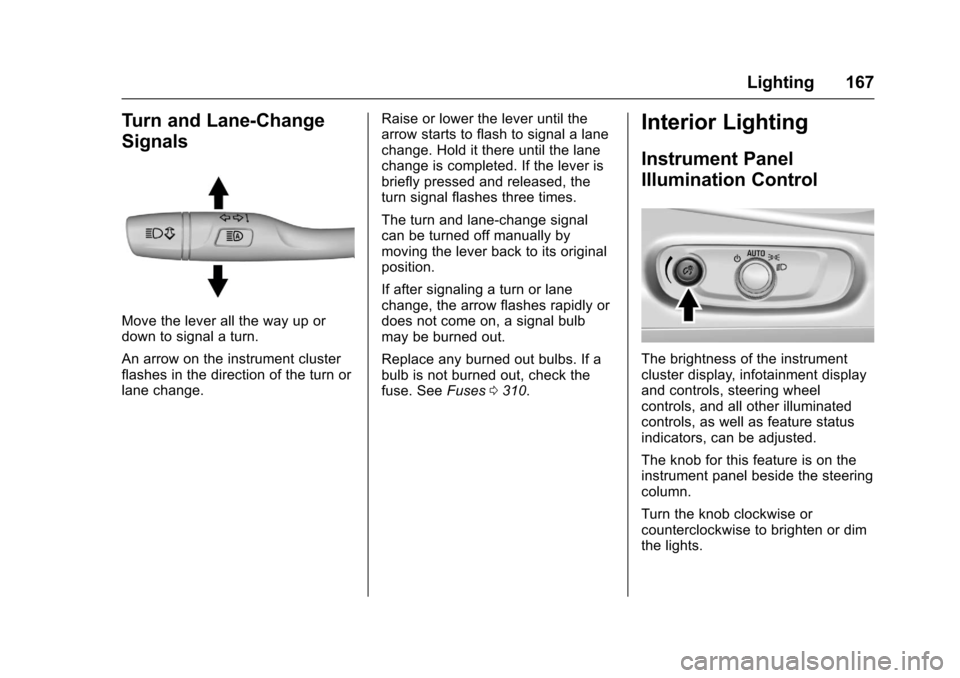
Move the lever all the way up ordown to signal a turn.
An arrow on the instrument clusterflashes in the direction of the turn orlane change.
Raise or lower the lever until thearrow starts to flash to signal a lanechange. Hold it there until the lanechange is completed. If the lever isbriefly pressed and released, theturn signal flashes three times.
The turn and lane-change signalcan be turned off manually bymoving the lever back to its originalposition.
If after signaling a turn or lanechange, the arrow flashes rapidly ordoes not come on, a signal bulbmay be burned out.
Replace any burned out bulbs. If abulb is not burned out, check thefuse. SeeFuses0310.
Interior Lighting
Instrument Panel
Illumination Control
The brightness of the instrumentcluster display, infotainment displayand controls, steering wheelcontrols, and all other illuminatedcontrols, as well as feature statusindicators, can be adjusted.
The knob for this feature is on theinstrument panel beside the steeringcolumn.
Turn the knob clockwise orcounterclockwise to brighten or dimthe lights.
Page 190 of 419
Chevrolet Malibu Owner Manual (GMNA-Localizing-U.S./Canada/Mexico-10122664) - 2017 - crc - 5/23/16
Infotainment System 189
Browse Music
1. Touch Browse Music.
2. Touch the desired music.
To n e S e t t i n g s
To u c h To n e S e t t i n g s . T h e To n eSettings menu is displayed. See“To n e S e t t i n g s”under“RadioControls”inOperation0176
Auto Volume
To u c h A u t o V o l u m e . T h e A u t oVolume menu is displayed. See“Auto Volume”under“RadioControls”inOperation0176.
Picture System Information
The infotainment system can viewpicture files stored on a USBstorage device and devices thatsupport Media TransferProtocol (MTP).
.Supported file extensions: .jpg,.bmp, .png, .gif.
.Animated GIF files are notsupported.
.Some files may not operate dueto a different recording format orthe condition of the file.
Viewing Pictures
1. Connect the USB device to theUSB port.
2. Touch the screen to open to fullscreen. Touch the screen againto return to the previousscreen.
If the USB device is alreadyconnected:
1. Press{.
2. Touch GALLERY.
Some features are disabled whilethe vehicle is in motion.
Viewing a Slide Show
1. Touchzfrom the picture
screen.
2. Touch the screen to cancel theslide show during the slideshow playback.
Viewing a Previous or NextPicture
To u c hSorTfrom the picture
screen.
Rotating a Picture
To u c hwfrom the picture screen.
Enlarging a Picture
To u c hxfrom the picture screen.
Using the USB Picture Menu
1. Touch MENU from the picturescreen.
2. Touch the appropriate menu:
.Slide Show Time: Allowsselection of the slide showinterval.
.Clock, Temp. Display:Allows selection of On orOff to show the clock andtemperature on the fullscreen.
.Display Settings: Adjustsfor Brightness and Contrast.
3. Touch0to exit.
Page 206 of 419
Chevrolet Malibu Owner Manual (GMNA-Localizing-U.S./Canada/Mexico-10122664) - 2017 - crc - 5/23/16
Climate Controls 205
Climate Controls
Climate Control Systems
Climate Control Systems . . . . . 205Dual Automatic ClimateControl System . . . . . . . . . . . . . 208
Air Vents
Air Vents . . . . . . . . . . . . . . . . . . . . . . 211
Maintenance
Passenger Compartment AirFilter . . . . . . . . . . . . . . . . . . . . . . . . 212Service . . . . . . . . . . . . . . . . . . . . . . . 213
Climate Control Systems
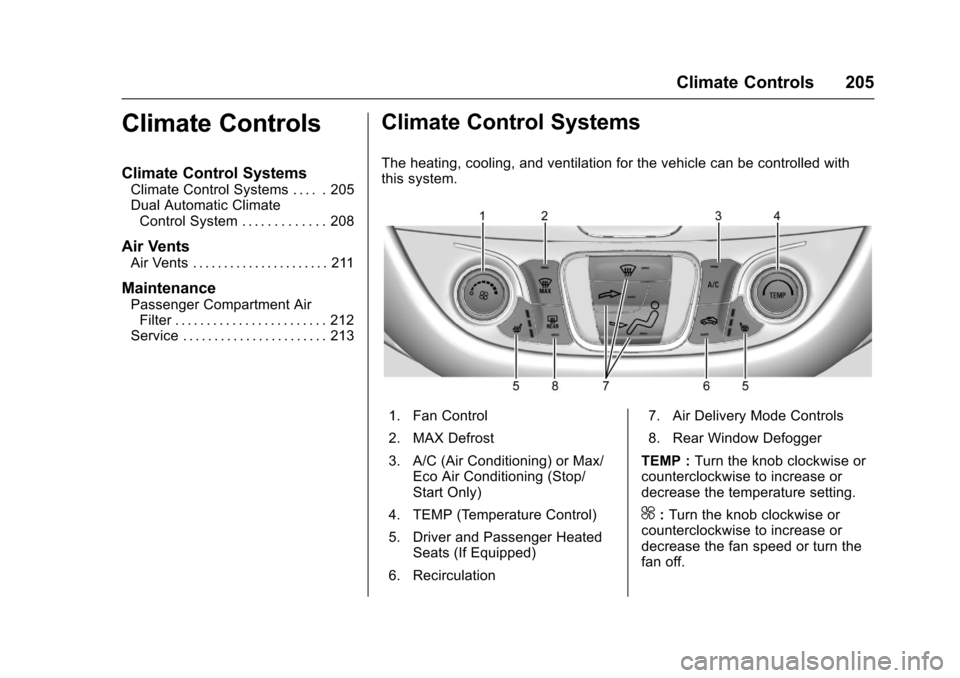
The heating, cooling, and ventilation for the vehicle can be controlled withthis system.
1. Fan Control
2. MAX Defrost
3. A/C (Air Conditioning) or Max/Eco Air Conditioning (Stop/Start Only)
4. TEMP (Temperature Control)
5. Driver and Passenger HeatedSeats (If Equipped)
6. Recirculation
7. Air Delivery Mode Controls
8. Rear Window Defogger
TEMP :Turn the knob clockwise orcounterclockwise to increase ordecrease the temperature setting.
^:Turn the knob clockwise orcounterclockwise to increase ordecrease the fan speed or turn thefan off.
Page 208 of 419
Chevrolet Malibu Owner Manual (GMNA-Localizing-U.S./Canada/Mexico-10122664) - 2017 - crc - 5/23/16
Climate Controls 207
Rear Window Defogger
K:Press to turn the rear windowdefogger on or off. An indicator lighton the button comes on to show thatthe rear window defogger is on. Thedefogger turns off when the ignitionis placed in the ACC/ACCESSORYor LOCK/OFF position.
The upper lines on the rear windoware antenna grids and are notintended to defrost the glass.
The rear window defogger can beset to automatic operation. See“Climate and Air Quality”underVehicle Personalization0147.When Auto Rear Defog is selected,the rear window defogger turns onautomatically when the interiortemperature is cold and the outsidetemperature is about 7 °C (44 °F)and below. The auto rear defoggerturns off automatically.
If the vehicle is equipped withheated outside mirrors, they turn onwhen the rear window defoggerbutton is on and help to clear fog orfrost from the surface of the mirror.SeeHeated Mirrors049.
Caution
Do not try to clear frost or other
material from the inside of the
front windshield and rear window
with a razor blade or anything
else that is sharp. This may
damage the rear window
defogger grid and affect the
radio's ability to pick up stations
clearly. The repairs would not be
covered by the vehicle warranty.
LorM:If equipped, pressLorMto heat the driver or passenger seat.SeeHeated and Ventilated FrontSeats060.
Remote Start Climate ControlOperation :If equipped with remotestart, the climate control systemmay run when the vehicle is startedremotely. The system uses thedriver’sprevioussettingstoheatorcool the inside of the vehicle. Therear defog may come on duringremote start based on cold ambientconditions. The rear defog indicatorlight does not come on during aremote start. The front heated seatswill turn on if it is cold outside. Theheated seat indicator lights do notcome on during a remote start.
Page 210 of 419
Chevrolet Malibu Owner Manual (GMNA-Localizing-U.S./Canada/Mexico-10122664) - 2017 - crc - 5/23/16
Climate Controls 209
Press@to manually select
recirculation and the indicator lightwill turn on. Press it again to selectoutside air and the indicator light willturn off.
Driver and PassengerTe m p e r a t u r e C o n t r o l s :Thetemperature can be adjustedseparately for the driver and thepassenger. Turn the knob clockwiseor counterclockwise to increase ordecrease the driver or passengertemperature setting.
SYNC :Press to link the passengertemperature settings to the driversetting. The SYNC indicator light willturn on. When the passengersettings are adjusted, the SYNCindicator light turns off.
Manual Operation
O:Press to turn the fan off or on.
^Qor^R:Press to increase ordecrease the fan speed. The fanspeed setting appears on the maindisplay. When the fan speed isdecreased completely, the fan turnsoff. Pressing either button cancels
automatic fan control and the fan iscontrolled manually. Press AUTO toreturn to automatic operation.
Air Delivery Mode Controls :
Press0,d,orcto change
the direction of the airflow. Anycombination of the three buttonscan be selected. The indicator lightin the button will turn on. Thecurrent mode appears in the displayscreen. Pressing any button cancelsautomatic air delivery control andthe direction of the airflow iscontrolled manually. Press AUTO toreturn to automatic operation.
To c h a n g e t h e c u r r e n t m o d e , s e l e c tone or more of the following modes:
0:Clears the windows of fog ormoisture. Air is directed to thewindshield.
d:Air is directed to the instrumentpanel outlets.
c:Air is directed to the flooroutlets.
0MAX :Air is directed to thewindshield, the fan runs at a higherspeed, and the temperature of theair is increased if not already at
maximum. This mode overrides theprevious mode selected and clearsfog or frost from the windshieldmore quickly. When the button ispressed again, the system returnsto the previous mode setting andfan speed.
For best results, clear all snow andice from the windshield beforedefrosting.
A/C :Press to turn the airconditioning system on or off. If thefan control is turned off or theoutside temperature falls belowfreezing, the air conditioner willnot run.
Pressing this button cancelsautomatic air conditioning and turnsoff the air conditioner. Press AUTOto return to automatic operation andthe air conditioner runsautomatically as needed. When theindicator light is on, the airconditioner runs automatically tocool the air inside the vehicle or todry the air needed to defog thewindshield faster.
Page 211 of 419
Chevrolet Malibu Owner Manual (GMNA-Localizing-U.S./Canada/Mexico-10122664) - 2017 - crc - 5/23/16
210 Climate Controls
A/C (Max/Eco A/C For Stop/StartVehicles) :Press to cycle betweenthe max, eco, and off airconditioning modes. The indicatorwill be lit in max and eco modes andturns off when there is no A/Cfunction. If the fan is turned off, theair conditioner will not run and theindicator light will turn off.
Press AUTO to return to automaticoperation and the air conditionerruns automatically as needed. WithStop/Start vehicles, the A/C willreturn to eco a/c operation.
For max a/c, press A/C. Theindicator will turn amber. Auto stopswill occur less frequently, be shorter,and will not occur in extremely warmweather.
For eco a/c, press A/C again. Theindicator will turn green. This settingbalances fuel economy and airconditioning comfort. In warmweather conditions, auto stops mayoccur more frequently, last longer,and the vehicle interior may bewarmer during auto stops ascompared to the max a/c setting.This setting allows higher humidity
inside the vehicle and windowfogging may occur before theengine restarts.
@:Press to turn on recirculation.An indicator light comes on. Air isrecirculated to quickly cool theinside of the vehicle or to reduce theentry of outside air and odors.
If selected during cool or coldweather, the windshield andwindows may fog. Turn offrecirculation to help clear thewindshield and windows.
Auto Defog :The climate controlsystem may have a sensor toautomatically detect high humidityinside the vehicle. When highhumidity is detected, the climatecontrol system may adjust tooutside air supply and turn on theair conditioner. The fan speed mayslightly increase to help preventfogging. If the climate controlsystem does not detect possiblewindow fogging, it returns to normaloperation.
To t u r n A u t o D e f o g o f f o r o n , s e e“Climate and Air Quality”underVehicle Personalization0147.
Rear Window Defogger
K:Press to turn the rear windowdefogger on or off. An indicator lighton the button comes on to show thatthe rear window defogger is on. Therear window defogger only workswhen the ignition is in ON/RUN. Thedefogger turns off when the ignitionis placed in the ACC/ACCESSORYor LOCK/OFF position.
The upper lines on the rear windoware antenna grids and are notintended to defrost the glass.
The rear window defogger can beset to automatic operation. See“Climate and Air Quality”underVehicle Personalization0147.When Auto Rear Defog is selected,the rear window defogger turns onautomatically when the interiortemperature is cold and the outsidetemperature is about 7 °C (44 °F)and below. The auto rear defoggerturns off automatically.
If the vehicle is equipped withheated outside rearview mirrors,they turn on when the rear window
Page 215 of 419
Chevrolet Malibu Owner Manual (GMNA-Localizing-U.S./Canada/Mexico-10122664) - 2017 - crc - 5/23/16
214 Driving and Operating
Driving and
Operating
Driving Information
Distracted Driving . . . . . . . . . . . . 215Defensive Driving . . . . . . . . . . . . . 216Drunk Driving . . . . . . . . . . . . . . . . . 216Control of a Vehicle . . . . . . . . . . . 216Braking . . . . . . . . . . . . . . . . . . . . . . . 216Steering . . . . . . . . . . . . . . . . . . . . . . 217Off-Road Recovery . . . . . . . . . . . 217Loss of Control . . . . . . . . . . . . . . . 218Driving on Wet Roads . . . . . . . . 218Hill and Mountain Roads . . . . . 219Winter Driving . . . . . . . . . . . . . . . . 220If the Vehicle Is Stuck . . . . . . . . 221Vehicle Load Limits . . . . . . . . . . . 222
Starting and Operating
New Vehicle Break-In . . . . . . . . . 225Ignition Positions . . . . . . . . . . . . . 225Starting the Engine . . . . . . . . . . . 227Engine Heater . . . . . . . . . . . . . . . . 229Retained AccessoryPower (RAP) . . . . . . . . . . . . . . . . 230Shifting Into Park . . . . . . . . . . . . . 230Shifting out of Park . . . . . . . . . . . 231Parking over ThingsThat Burn . . . . . . . . . . . . . . . . . . . 232
Extended Parking . . . . . . . . . . . . 232
Engine Exhaust
Engine Exhaust . . . . . . . . . . . . . . 232Running the Vehicle WhileParked . . . . . . . . . . . . . . . . . . . . . . 233
Automatic Transmission
Automatic Transmission . . . . . . 233Manual Mode . . . . . . . . . . . . . . . . . 235
Brakes
Antilock BrakeSystem (ABS) . . . . . . . . . . . . . . . 236Parking Brake . . . . . . . . . . . . . . . . 237Electric Parking Brake . . . . . . . . 238Brake Assist . . . . . . . . . . . . . . . . . . 239Hill Start Assist (HSA) . . . . . . . . 240Regenerative Braking(Hybrid Only) . . . . . . . . . . . . . . . . 240
Ride Control Systems
Traction Control/ElectronicStability Control . . . . . . . . . . . . . 241
Cruise Control
Cruise Control . . . . . . . . . . . . . . . . 243Adaptive Cruise Control . . . . . . 245
Driver Assistance Systems
Driver Assistance Systems . . . 252Assistance Systems forParking or Backing . . . . . . . . . . 253
Assistance Systems forDriving . . . . . . . . . . . . . . . . . . . . . . 257Forward Collision Alert (FCA)System . . . . . . . . . . . . . . . . . . . . . . 258Forward AutomaticBraking (FAB) . . . . . . . . . . . . . . . 260Front Pedestrian Braking(FPB) System . . . . . . . . . . . . . . . 261Side Blind ZoneAlert (SBZA) . . . . . . . . . . . . . . . . 263Lane Change Alert (LCA) . . . . . 264Lane DepartureWarning (LDW) . . . . . . . . . . . . . 266Lane Keep Assist (LKA) . . . . . . 266
Fuel
Fuel . . . . . . . . . . . . . . . . . . . . . . . . . . 268California FuelRequirements . . . . . . . . . . . . . . . 269Fuels in Foreign Countries . . . 269Fuel Additives . . . . . . . . . . . . . . . . 269Filling the Tank . . . . . . . . . . . . . . . 269Filling a Portable FuelContainer . . . . . . . . . . . . . . . . . . . 271
Page 218 of 419
Chevrolet Malibu Owner Manual (GMNA-Localizing-U.S./Canada/Mexico-10122664) - 2017 - crc - 5/23/16
Driving and Operating 217
Steering
Electric Power Steering
The vehicle has electric powersteering. It does not have powersteering fluid. Regular maintenanceis not required.
If power steering assist is lost dueto a system malfunction, the vehiclecan be steered, but may requireincreased effort.
See your dealer if there is aproblem.
If the steering wheel is turned until itreaches the end of its travel and isheld against that position for anextended period of time, powersteering assist may be reduced.
If the steering assist is used for anextended period of time, powerassist may be reduced.
Normal use of the power steeringassist should return when thesystem cools down.
See specific vehicle steeringmessages underService VehicleMessages0145.Seeyourdealerifthere is a problem.
Curve Tips
.Ta k e c u r v e s a t a r e a s o n a b l espeed.
.Reduce speed before entering acurve.
.Maintain a reasonable steadyspeed through the curve.
.Wait until the vehicle is out ofthe curve before acceleratinggently into the straightaway.
Steering in Emergencies
.There are some situations whensteering around a problem maybe more effective than braking.
.Holding both sides of thesteering wheel allows you to turn180 degrees without removingahand.
.The Antilock Brake System(ABS) allows steering whilebraking.
Off-Road Recovery
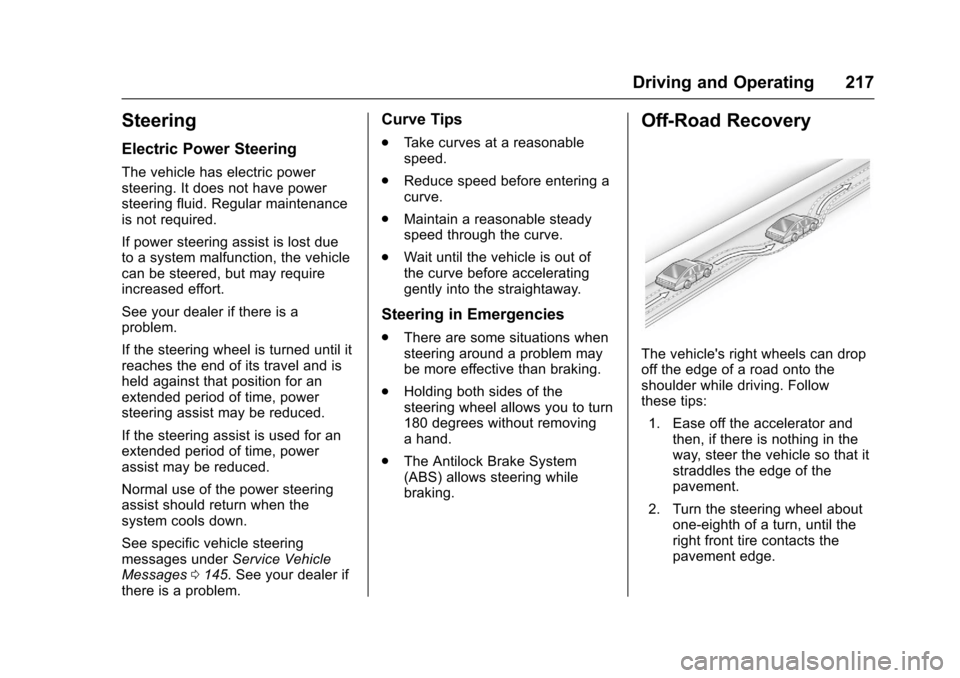
The vehicle's right wheels can dropoff the edge of a road onto theshoulder while driving. Followthese tips:
1. Ease off the accelerator andthen, if there is nothing in theway, steer the vehicle so that itstraddles the edge of thepavement.
2. Turn the steering wheel aboutone-eighth of a turn, until theright front tire contacts thepavement edge.