2017 CHEVROLET MALIBU lock
[x] Cancel search: lockPage 51 of 419
Chevrolet Malibu Owner Manual (GMNA-Localizing-U.S./Canada/Mexico-10122664) - 2017 - crc - 5/23/16
50 Keys, Doors, and Windows
Windows
{Warning
Never leave a child, a helpless
adult, or a pet alone in a vehicle,
especially with the windows
closed in warm or hot weather.
They can be overcome by the
extreme heat and suffer
permanent injuries or even death
from heat stroke.
The vehicle aerodynamics aredesigned to improve fuel economyperformance. This may result in a
pulsing sound when either rearwindow is down and the frontwindows are up. To reduce thesound, open either a front windowor the sunroof, if equipped.
Power Windows
{Warning
Children could be seriously
injured or killed if caught in the
path of a closing window. Never
leave keys in a vehicle with
children. When there are children
in the rear seat, use the window
lockout button to prevent
operation of the windows. See
Keys031.
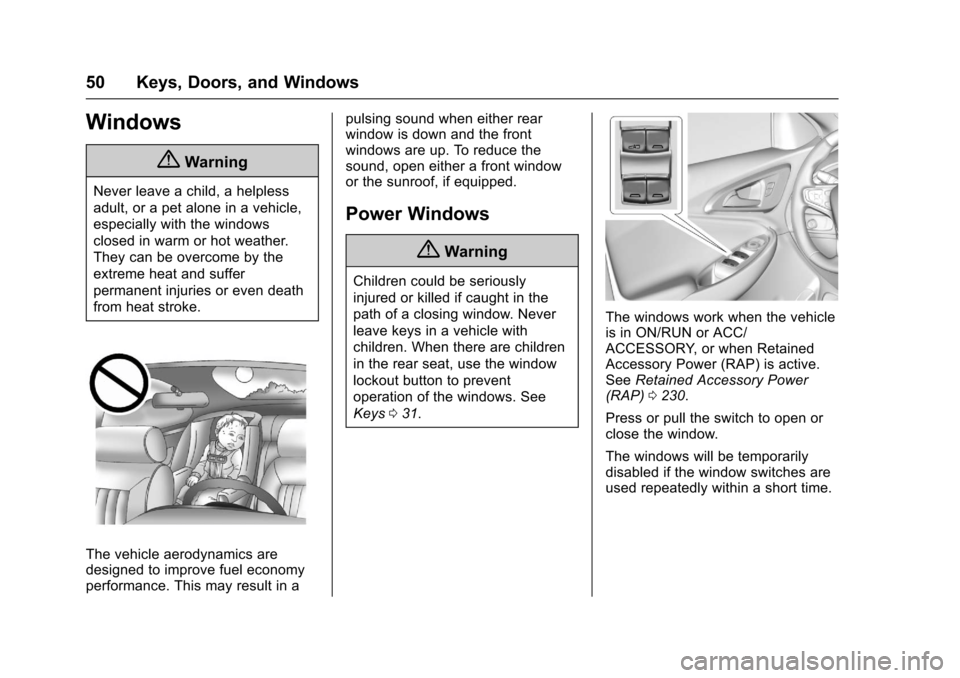
The windows work when the vehicleis in ON/RUN or ACC/ACCESSORY, or when RetainedAccessory Power (RAP) is active.SeeRetained Accessory Power(RAP)0230.
Press or pull the switch to open orclose the window.
The windows will be temporarilydisabled if the window switches areused repeatedly within a short time.
Page 52 of 419
Chevrolet Malibu Owner Manual (GMNA-Localizing-U.S./Canada/Mexico-10122664) - 2017 - crc - 5/23/16
Keys, Doors, and Windows 51
Window Lockout
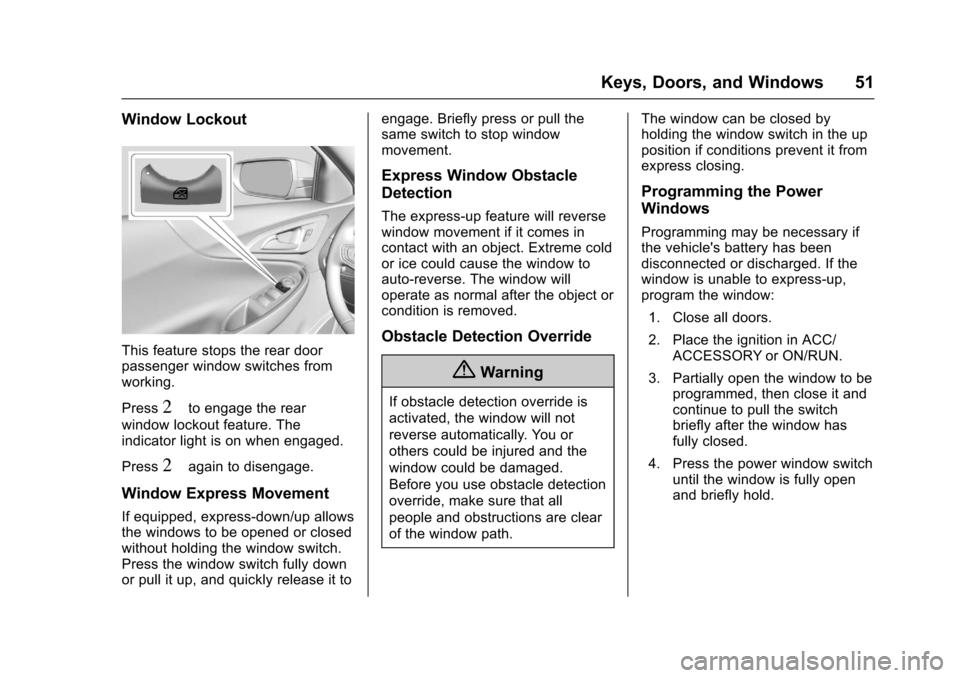
This feature stops the rear doorpassenger window switches fromworking.
Press2to engage the rear
window lockout feature. Theindicator light is on when engaged.
Press2again to disengage.
Window Express Movement
If equipped, express-down/up allowsthe windows to be opened or closedwithout holding the window switch.Press the window switch fully downor pull it up, and quickly release it to
engage. Briefly press or pull thesame switch to stop windowmovement.
Express Window Obstacle
Detection
The express-up feature will reversewindow movement if it comes incontact with an object. Extreme coldor ice could cause the window toauto-reverse. The window willoperate as normal after the object orcondition is removed.
Obstacle Detection Override
{Warning
If obstacle detection override is
activated, the window will not
reverse automatically. You or
others could be injured and the
window could be damaged.
Before you use obstacle detection
override, make sure that all
people and obstructions are clear
of the window path.
The window can be closed byholding the window switch in the upposition if conditions prevent it fromexpress closing.
Programming the Power
Windows
Programming may be necessary ifthe vehicle's battery has beendisconnected or discharged. If thewindow is unable to express-up,program the window:
1. Close all doors.
2. Place the ignition in ACC/ACCESSORY or ON/RUN.
3. Partially open the window to beprogrammed, then close it andcontinue to pull the switchbriefly after the window hasfully closed.
4. Press the power window switchuntil the window is fully openand briefly hold.
Page 53 of 419
Chevrolet Malibu Owner Manual (GMNA-Localizing-U.S./Canada/Mexico-10122664) - 2017 - crc - 5/23/16
52 Keys, Doors, and Windows
Sun Visors
Pull the sun visor down to blockglare. Detach the sun visor from thecenter mount to pivot to the sidewindow, or to extend along the rod,if available.
The vehicle may have mirror lamps.The lamps turn on and off when thecover is opened and closed.
Roof
Sunroof
If equipped, the ignition must be onor in ACC/ACCESSORY, or inRetained Accessory Power (RAP) tooperate the sunroof. SeeIgnitionPositions0225andRetainedAccessory Power (RAP)0230.
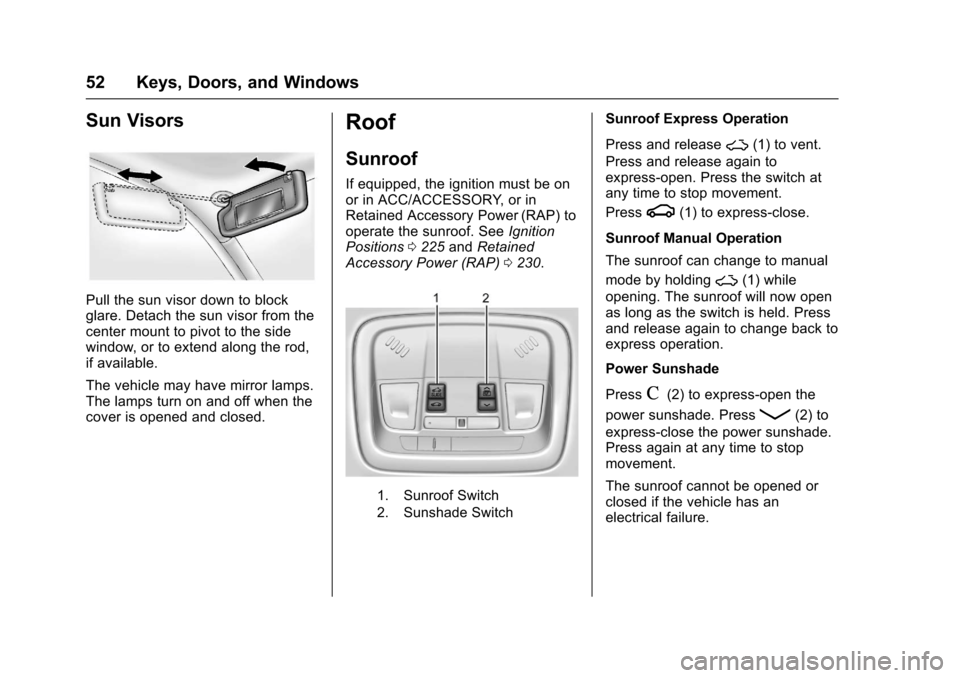
1. Sunroof Switch
2. Sunshade Switch
Sunroof Express Operation
Press and release~(1) to vent.
Press and release again toexpress-open. Press the switch atany time to stop movement.
Pressg(1) to express-close.
Sunroof Manual Operation
The sunroof can change to manual
mode by holding~(1) while
opening. The sunroof will now openas long as the switch is held. Pressand release again to change back toexpress operation.
Power Sunshade
PressC(2) to express-open the
power sunshade. PressQ(2) to
express-close the power sunshade.Press again at any time to stopmovement.
The sunroof cannot be opened orclosed if the vehicle has anelectrical failure.
Page 56 of 419
Chevrolet Malibu Owner Manual (GMNA-Localizing-U.S./Canada/Mexico-10122664) - 2017 - crc - 5/23/16
Seats and Restraints 55
Head Restraints
{Warning
With head restraints that are not
installed and adjusted properly,
there is a greater chance that
occupants will suffer a neck/
spinal injury in a crash. Do not
drive until the head restraints for
all occupants are installed and
adjusted properly.
Adjust the head restraint so that thetop of the restraint is at the sameheight as the top of the occupant'shead. This position reduces thechance of a neck injury in a crash.
Front Seat
The vehicle's front seats haveadjustable head restraints in theoutboard seating positions.
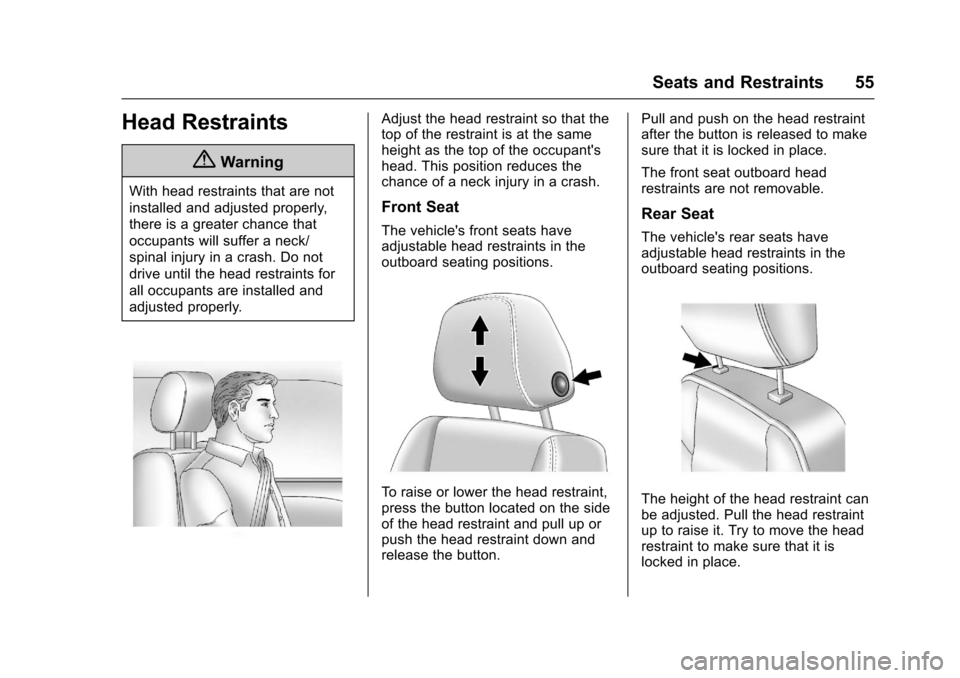
To r a i s e o r l o w e r t h e h e a d r e s t r a i n t ,press the button located on the sideof the head restraint and pull up orpush the head restraint down andrelease the button.
Pull and push on the head restraintafter the button is released to makesure that it is locked in place.
The front seat outboard headrestraints are not removable.
Rear Seat
The vehicle's rear seats haveadjustable head restraints in theoutboard seating positions.
The height of the head restraint canbe adjusted. Pull the head restraintup to raise it. Try to move the headrestraint to make sure that it islocked in place.
Page 57 of 419
Chevrolet Malibu Owner Manual (GMNA-Localizing-U.S./Canada/Mexico-10122664) - 2017 - crc - 5/23/16
56 Seats and Restraints
To l o w e r t h e h e a d r e s t r a i n t , p r e s sthe button, located on the top of theseatback, and push the headrestraint down. Try to move thehead restraint after the button isreleased to make sure that it islocked in place.
Rear outboard head restraints arenot removable.
Front Seats
Seat Adjustment
{Warning
Yo u c a n l o s e c o n t r o l o f t h e
vehicle if you try to adjust a driver
seat while the vehicle is moving.
Adjust the driver seat only when
the vehicle is not moving.
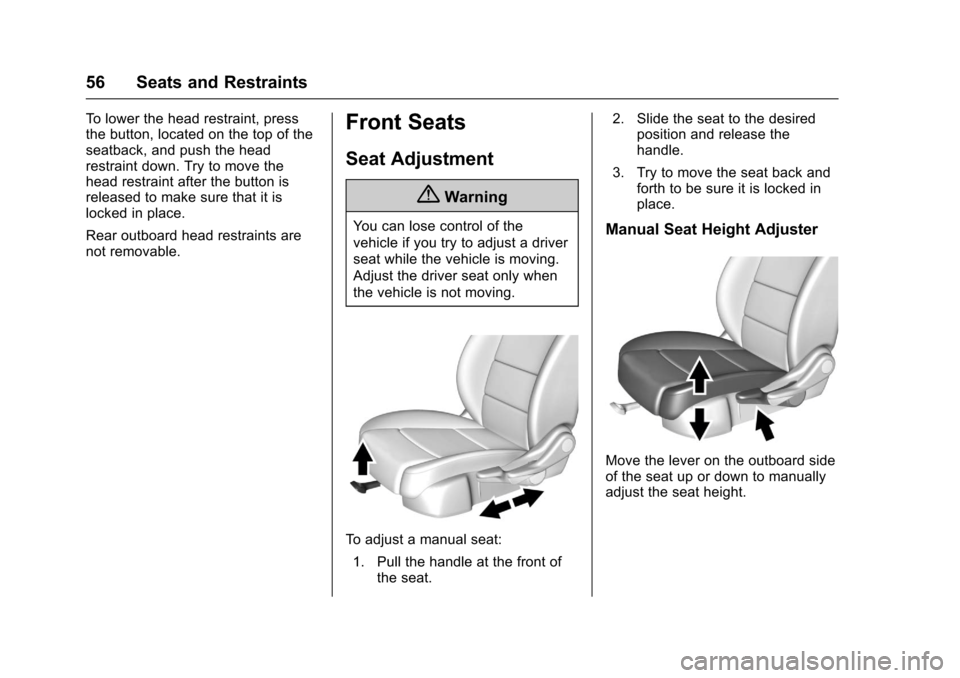
To a d j u s t a m a n u a l s e a t :
1. Pull the handle at the front ofthe seat.
2. Slide the seat to the desiredposition and release thehandle.
3. Try to move the seat back andforth to be sure it is locked inplace.
Manual Seat Height Adjuster
Move the lever on the outboard sideof the seat up or down to manuallyadjust the seat height.
Page 59 of 419
Chevrolet Malibu Owner Manual (GMNA-Localizing-U.S./Canada/Mexico-10122664) - 2017 - crc - 5/23/16
58 Seats and Restraints
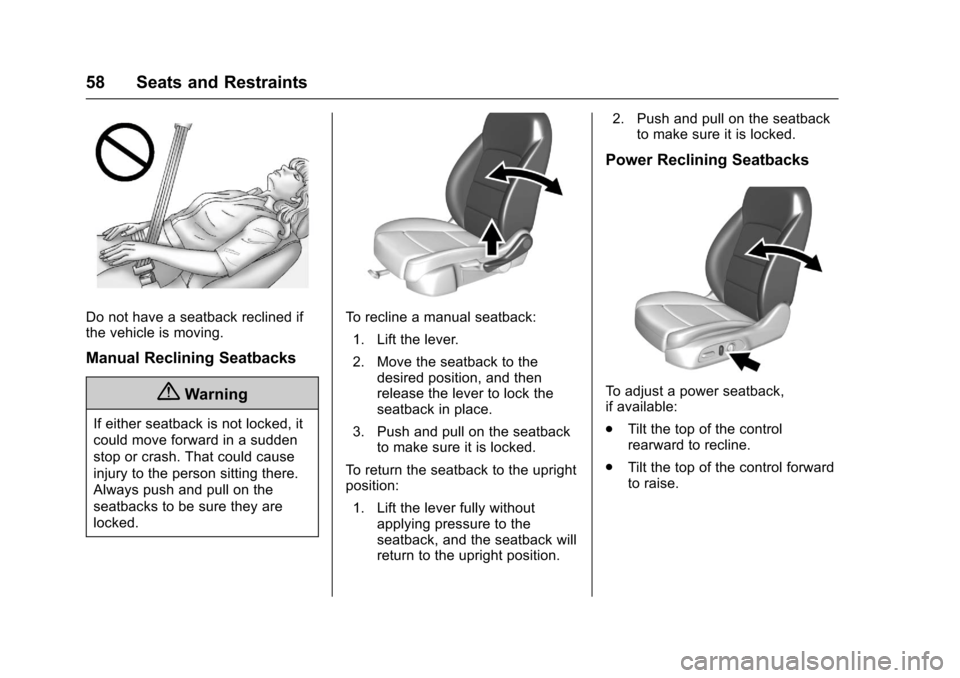
Do not have a seatback reclined ifthe vehicle is moving.
Manual Reclining Seatbacks
{Warning
If either seatback is not locked, it
could move forward in a sudden
stop or crash. That could cause
injury to the person sitting there.
Always push and pull on the
seatbacks to be sure they are
locked.
To r e c l i n e a m a n u a l s e a t b a c k :
1. Lift the lever.
2. Move the seatback to thedesired position, and thenrelease the lever to lock theseatback in place.
3. Push and pull on the seatbackto make sure it is locked.
To r e t u r n t h e s e a t b a c k t o t h e u p r i g h tposition:
1. Lift the lever fully withoutapplying pressure to theseatback, and the seatback willreturn to the upright position.
2. Push and pull on the seatbackto make sure it is locked.
Power Reclining Seatbacks
To a d j u s t a p o w e r s e a t b a c k ,if available:
.Tilt the top of the controlrearward to recline.
.Tilt the top of the control forwardto raise.
Page 60 of 419
Chevrolet Malibu Owner Manual (GMNA-Localizing-U.S./Canada/Mexico-10122664) - 2017 - crc - 5/23/16
Seats and Restraints 59
Memory Seats
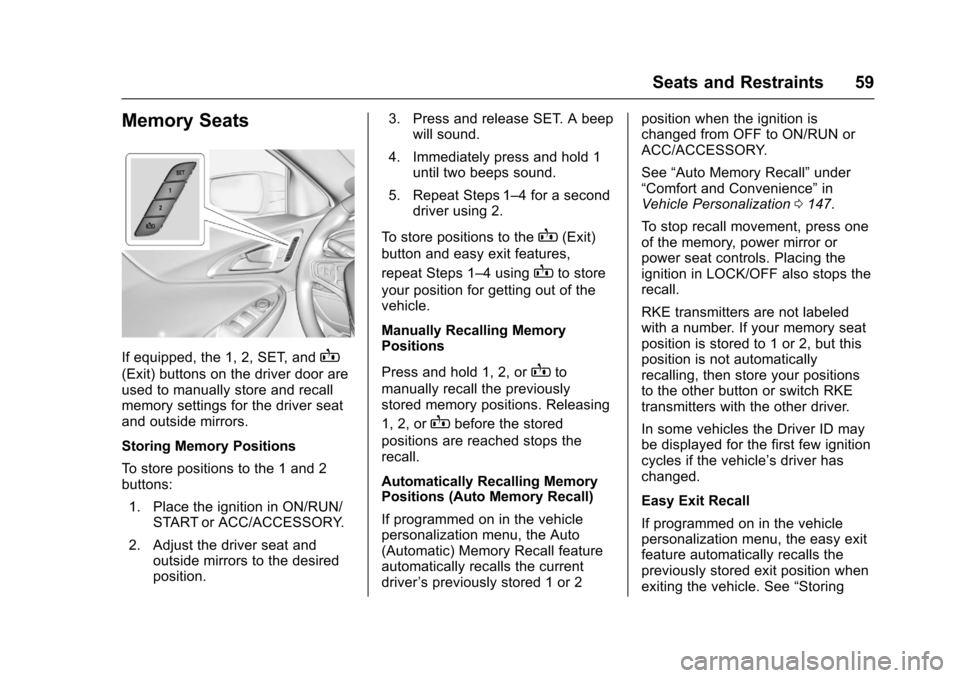
If equipped, the 1, 2, SET, andB
(Exit) buttons on the driver door areused to manually store and recallmemory settings for the driver seatand outside mirrors.
Storing Memory Positions
To s t o r e p o s i t i o n s t o t h e 1 a n d 2buttons:
1. Place the ignition in ON/RUN/START or ACC/ACCESSORY.
2. Adjust the driver seat andoutside mirrors to the desiredposition.
3. Press and release SET. A beepwill sound.
4. Immediately press and hold 1until two beeps sound.
5. Repeat Steps 1–4foraseconddriver using 2.
To s t o r e p o s i t i o n s t o t h eB(Exit)
button and easy exit features,
repeat Steps 1–4usingBto store
your position for getting out of thevehicle.
Manually Recalling MemoryPositions
Press and hold 1, 2, orBto
manually recall the previouslystored memory positions. Releasing
1, 2, orBbefore the stored
positions are reached stops therecall.
Automatically Recalling MemoryPositions (Auto Memory Recall)
If programmed on in the vehiclepersonalization menu, the Auto(Automatic) Memory Recall featureautomatically recalls the currentdriver’spreviouslystored1or2
position when the ignition ischanged from OFF to ON/RUN orACC/ACCESSORY.
See“Auto Memory Recall”under“Comfort and Convenience”inVehicle Personalization0147.
To s t o p r e c a l l m o v e m e n t , p r e s s o n eof the memory, power mirror orpower seat controls. Placing theignition in LOCK/OFF also stops therecall.
RKE transmitters are not labeledwith a number. If your memory seatposition is stored to 1 or 2, but thisposition is not automaticallyrecalling, then store your positionsto the other button or switch RKEtransmitters with the other driver.
In some vehicles the Driver ID maybe displayed for the first few ignitioncycles if the vehicle’sdriverhaschanged.
Easy Exit Recall
If programmed on in the vehiclepersonalization menu, the easy exitfeature automatically recalls thepreviously stored exit position whenexiting the vehicle. See“Storing
Page 61 of 419
Chevrolet Malibu Owner Manual (GMNA-Localizing-U.S./Canada/Mexico-10122664) - 2017 - crc - 5/23/16
60 Seats and Restraints
Memory Positions”previously in thissection. See alsoVehiclePersonalization0147.
Easy exit recall automaticallyactivates when one of the followingoccurs:
.The vehicle is turned off and thedriver door is opened within ashort time.
.The vehicle is turned off with thedriver door open.
To s t o p r e c a l l m o v e m e n t , p r e s s o n eof the memory, driver seat oroutside mirror.
Obstructions
If something has blocked the driverseat while recalling a memoryposition, the recall may stop.Remove the obstruction. Then doone of the following:
.If automatically or manuallyrecalling the stored memoryposition, press and hold theappropriate manual control fortwo seconds. Try recalling againby pressing the appropriatememory button.
.If automatically recalling theposition, press and hold theappropriate manual control forthe memory item that is notrecalling for two seconds. Tryrecalling again by opening the
driver door and pressingKon
the RKE transmitter.
.If recalling the exit position,press and hold the appropriatemanual control for the exitfeature not recalling fortwo seconds. Then try recallingthe exit position again.
If the memory position is still notrecalling, see your dealer forservice.
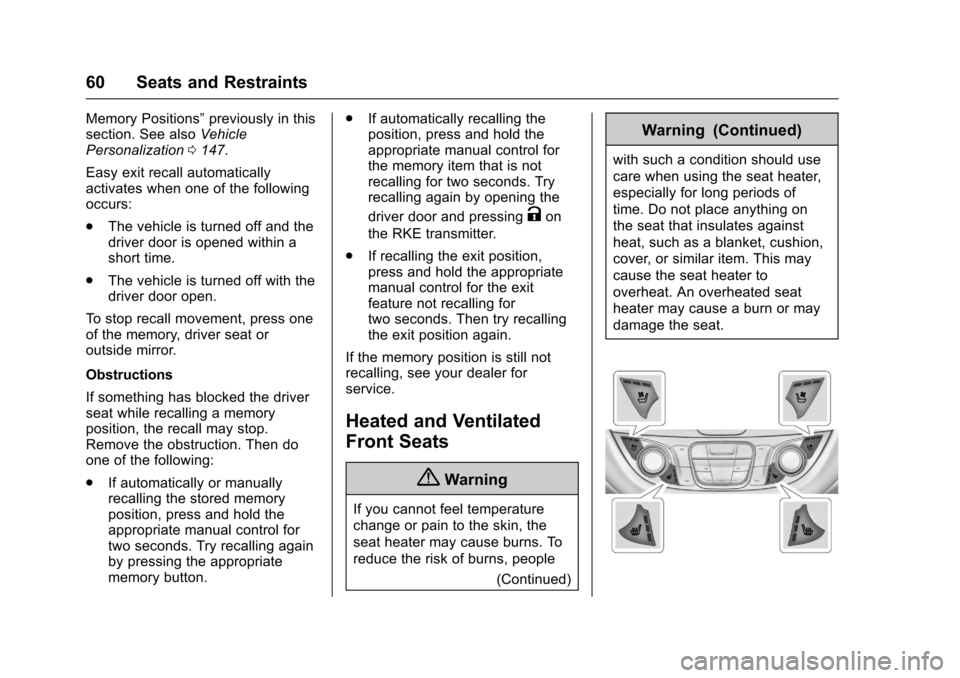
Heated and Ventilated
Front Seats
{Warning
If you cannot feel temperature
change or pain to the skin, the
seat heater may cause burns. To
reduce the risk of burns, people
(Continued)
Warning (Continued)
with such a condition should use
care when using the seat heater,
especially for long periods of
time. Do not place anything on
the seat that insulates against
heat, such as a blanket, cushion,
cover, or similar item. This may
cause the seat heater to
overheat. An overheated seat
heater may cause a burn or may
damage the seat.