2017 CHEVROLET MALIBU buttons
[x] Cancel search: buttonsPage 192 of 419
Chevrolet Malibu Owner Manual (GMNA-Localizing-U.S./Canada/Mexico-10122664) - 2017 - crc - 5/23/16
Infotainment System 191
There may be restrictions on usingBluetooth wireless technology insome locations.
Due to the variety of Bluetoothdevices and their firmware versions,the device may respond differentlywhen performing over Bluetooth.
On a current phone call, an imageof the current contact from thephone's contact list may bedisplayed. Not all phones arecompatible with this feature.
Refer to the cell phonemanufacturer’suserguideforquestions about the phone'sBluetooth functionality.
Bluetooth Controls
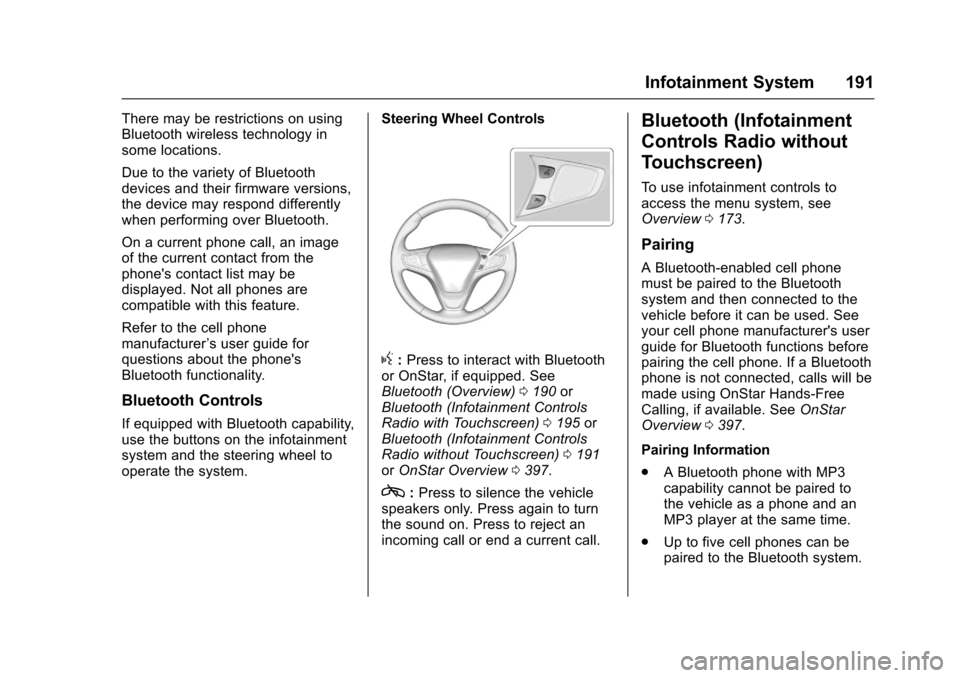
If equipped with Bluetooth capability,use the buttons on the infotainmentsystem and the steering wheel tooperate the system.
Steering Wheel Controls
g:Press to interact with Bluetoothor OnStar, if equipped. SeeBluetooth (Overview)0190orBluetooth (Infotainment ControlsRadio with Touchscreen)0195orBluetooth (Infotainment ControlsRadio without Touchscreen)0191orOnStar Overview0397.
c:Press to silence the vehiclespeakers only. Press again to turnthe sound on. Press to reject anincoming call or end a current call.
Bluetooth (Infotainment
Controls Radio without
Touchscreen)
To u s e i n f o t a i n m e n t c o n t r o l s t oaccess the menu system, seeOverview0173.
Pairing
ABluetooth-enabledcellphonemust be paired to the Bluetoothsystem and then connected to thevehicle before it can be used. Seeyour cell phone manufacturer's userguide for Bluetooth functions beforepairing the cell phone. If a Bluetoothphone is not connected, calls will bemade using OnStar Hands-FreeCalling, if available. SeeOnStarOverview0397.
Pairing Information
.ABluetoothphonewithMP3capability cannot be paired tothe vehicle as a phone and anMP3 player at the same time.
.Up to five cell phones can bepaired to the Bluetooth system.
Page 201 of 419
Chevrolet Malibu Owner Manual (GMNA-Localizing-U.S./Canada/Mexico-10122664) - 2017 - crc - 5/23/16
200 Infotainment System
no app required for AppleCarPlay. Use the latestavailable operation system.
2. Connect your Android phone orApple iPhone by using thecompatible phone USB cableand plugging into a USB dataport. For best performance, usethe device’sfactory-providedUSB cable. Aftermarket orthird-party cables maynot work.
The PROJECTION icon on theHome Page will change to AndroidAuto or Apple CarPlay dependingon the phone. Android Auto and/orApple CarPlay may automaticallylaunch upon USB connection. If not,touch the ANDROID AUTO and/orAPPLE CARPLAY icon on theHome Page to launch.
For further information on how to setup Android Auto and Apple CarPlayin the vehicle, seewww.my.chevrolet.com for the U.S.and www.chevroletowner.ca forCanada only orCustomerAssistance Offices0385.
Android Auto is provided by Googleand is subject to Google’stermsand privacy policy. CarPlay isprovided by Apple and is subject toApple’stermsandprivacypolicy.For Android Auto support seehttps://support.google.com/androidauto or Apple CarPlaysupport at https://www.apple.com/ios/carplay/. Apple or Google maychange or suspend availability atany time. Android Auto is atrademark of Google Inc.; AppleCarPlay is a trademark of Apple Inc.
Hands-Free Phone
General Information without
Touchscreen
If equipped, pressg,selectOnStar
Hands-Free Calling, then say thedesired number.
General Information with
Touchscreen
If equipped, vehicles with aHands-Free Phone system can useaBluetooth-capablecellphonewithahands-freeprofiletomakeandreceive phone calls. The
infotainment system and voicecontrol are used to operate thesystem. Not all phones support allfunctions and not all phones workwith the Hands-Free Phone system.
Hands-Free Phone Controls
Use the buttons on the infotainmentsystem and the steering wheel tooperate the Hands-Free Phonesystem.
Steering Wheel Controls
Steering wheel controls can beused to:
.Answer incoming calls.
.Confirm system information.
.End a call.
.Decline a call.
.Cancel an operation.
.Make outgoing calls using thecall list.
g:Press to answer incoming calls.
c:Press to end a call, decline acall, or cancel an operation.
Page 207 of 419
Chevrolet Malibu Owner Manual (GMNA-Localizing-U.S./Canada/Mexico-10122664) - 2017 - crc - 5/23/16
206 Climate Controls
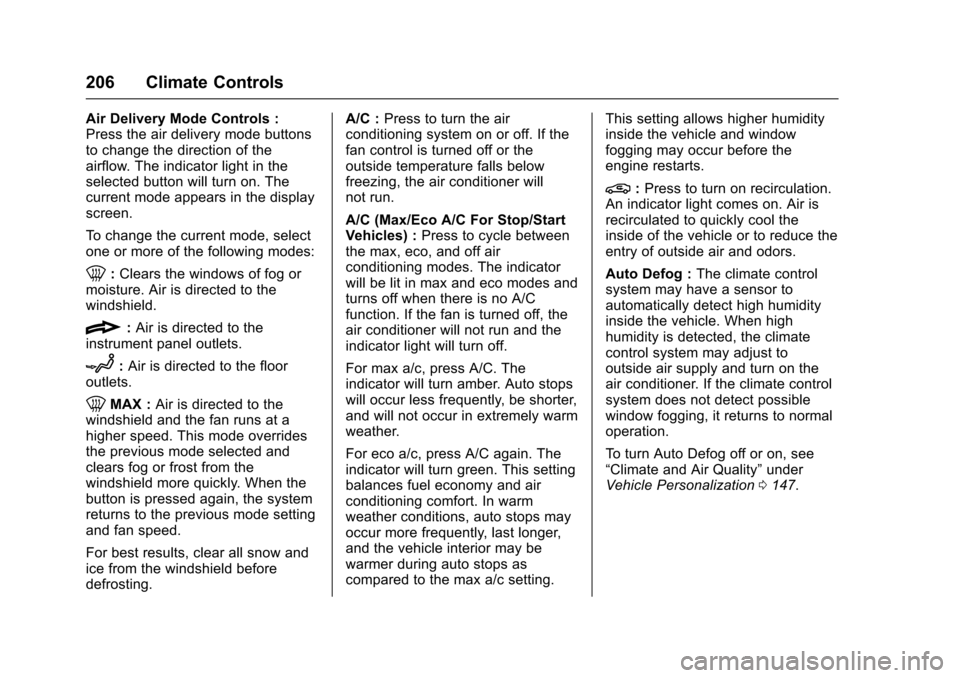
Air Delivery Mode Controls :Press the air delivery mode buttonsto change the direction of theairflow. The indicator light in theselected button will turn on. Thecurrent mode appears in the displayscreen.
To c h a n g e t h e c u r r e n t m o d e , s e l e c tone or more of the following modes:
0:Clears the windows of fog ormoisture. Air is directed to thewindshield.
{:Air is directed to theinstrument panel outlets.
z:Air is directed to the flooroutlets.
0MAX :Air is directed to thewindshield and the fan runs at ahigher speed. This mode overridesthe previous mode selected andclears fog or frost from thewindshield more quickly. When thebutton is pressed again, the systemreturns to the previous mode settingand fan speed.
For best results, clear all snow andice from the windshield beforedefrosting.
A/C :Press to turn the airconditioning system on or off. If thefan control is turned off or theoutside temperature falls belowfreezing, the air conditioner willnot run.
A/C (Max/Eco A/C For Stop/StartVehicles) :Press to cycle betweenthe max, eco, and off airconditioning modes. The indicatorwill be lit in max and eco modes andturns off when there is no A/Cfunction. If the fan is turned off, theair conditioner will not run and theindicator light will turn off.
For max a/c, press A/C. Theindicator will turn amber. Auto stopswill occur less frequently, be shorter,and will not occur in extremely warmweather.
For eco a/c, press A/C again. Theindicator will turn green. This settingbalances fuel economy and airconditioning comfort. In warmweather conditions, auto stops mayoccur more frequently, last longer,and the vehicle interior may bewarmer during auto stops ascompared to the max a/c setting.
This setting allows higher humidityinside the vehicle and windowfogging may occur before theengine restarts.
@:Press to turn on recirculation.An indicator light comes on. Air isrecirculated to quickly cool theinside of the vehicle or to reduce theentry of outside air and odors.
Auto Defog :The climate controlsystem may have a sensor toautomatically detect high humidityinside the vehicle. When highhumidity is detected, the climatecontrol system may adjust tooutside air supply and turn on theair conditioner. If the climate controlsystem does not detect possiblewindow fogging, it returns to normaloperation.
To t u r n A u t o D e f o g o f f o r o n , s e e“Climate and Air Quality”underVehicle Personalization0147.
Page 210 of 419
Chevrolet Malibu Owner Manual (GMNA-Localizing-U.S./Canada/Mexico-10122664) - 2017 - crc - 5/23/16
Climate Controls 209
Press@to manually select
recirculation and the indicator lightwill turn on. Press it again to selectoutside air and the indicator light willturn off.
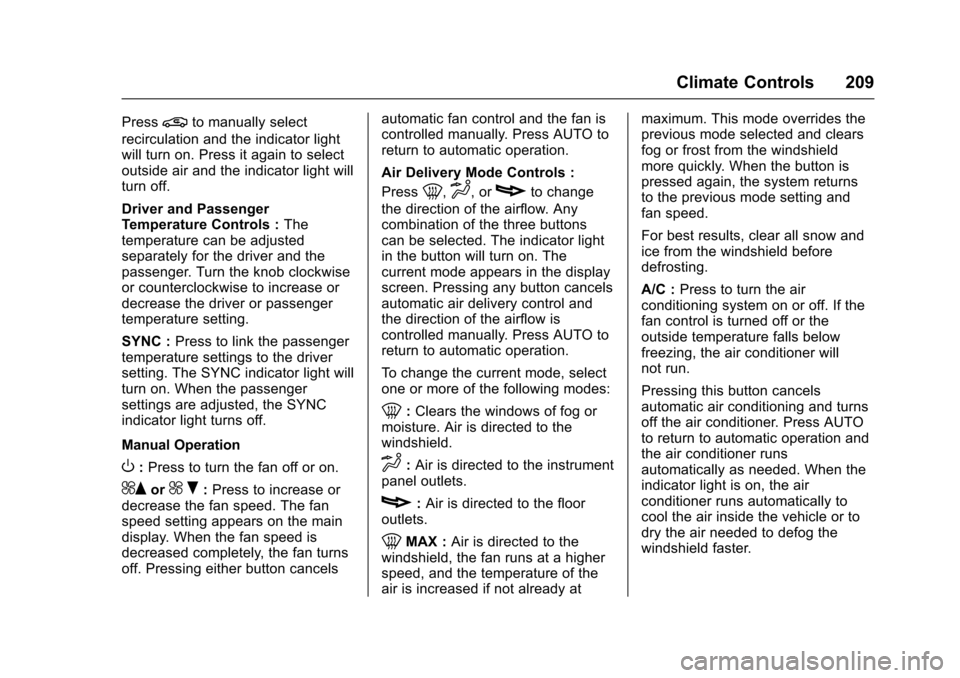
Driver and PassengerTe m p e r a t u r e C o n t r o l s :Thetemperature can be adjustedseparately for the driver and thepassenger. Turn the knob clockwiseor counterclockwise to increase ordecrease the driver or passengertemperature setting.
SYNC :Press to link the passengertemperature settings to the driversetting. The SYNC indicator light willturn on. When the passengersettings are adjusted, the SYNCindicator light turns off.
Manual Operation
O:Press to turn the fan off or on.
^Qor^R:Press to increase ordecrease the fan speed. The fanspeed setting appears on the maindisplay. When the fan speed isdecreased completely, the fan turnsoff. Pressing either button cancels
automatic fan control and the fan iscontrolled manually. Press AUTO toreturn to automatic operation.
Air Delivery Mode Controls :
Press0,d,orcto change
the direction of the airflow. Anycombination of the three buttonscan be selected. The indicator lightin the button will turn on. Thecurrent mode appears in the displayscreen. Pressing any button cancelsautomatic air delivery control andthe direction of the airflow iscontrolled manually. Press AUTO toreturn to automatic operation.
To c h a n g e t h e c u r r e n t m o d e , s e l e c tone or more of the following modes:
0:Clears the windows of fog ormoisture. Air is directed to thewindshield.
d:Air is directed to the instrumentpanel outlets.
c:Air is directed to the flooroutlets.
0MAX :Air is directed to thewindshield, the fan runs at a higherspeed, and the temperature of theair is increased if not already at
maximum. This mode overrides theprevious mode selected and clearsfog or frost from the windshieldmore quickly. When the button ispressed again, the system returnsto the previous mode setting andfan speed.
For best results, clear all snow andice from the windshield beforedefrosting.
A/C :Press to turn the airconditioning system on or off. If thefan control is turned off or theoutside temperature falls belowfreezing, the air conditioner willnot run.
Pressing this button cancelsautomatic air conditioning and turnsoff the air conditioner. Press AUTOto return to automatic operation andthe air conditioner runsautomatically as needed. When theindicator light is on, the airconditioner runs automatically tocool the air inside the vehicle or todry the air needed to defog thewindshield faster.
Page 226 of 419
Chevrolet Malibu Owner Manual (GMNA-Localizing-U.S./Canada/Mexico-10122664) - 2017 - crc - 5/23/16
Driving and Operating 225
{Warning
Things inside the vehicle can
strike and injure people in a
sudden stop or turn, or in a
crash.
.Put things in the cargo
area of the vehicle. In the
cargo area, put them as
far forward as possible.
Try to spread the weight
evenly.
.Never stack heavier
things, like suitcases,
inside the vehicle so that
some of them are above
the tops of the seats.
.Do not leave an
unsecured child restraint
in the vehicle.
.Secure loose items in the
vehicle.
.Do not leave a seat
folded down unless
needed.
Starting and
Operating
New Vehicle Break-In
Caution
The vehicle does not need an
elaborate break-in. But it will
perform better in the long run if
you follow these guidelines:
.Do not drive at any oneconstant speed, fast or slow,for the first 805 km (500 mi).Do not make full-throttlestarts. Avoid downshifting tobrake or slow the vehicle.
.Avoid making hard stops forthe first 322 km (200 mi) orso. During this time the newbrake linings are not yetbroken in. Hard stops withnew linings can meanpremature wear and earlierreplacement. Follow this
(Continued)
Caution (Continued)
breaking-in guideline everytime you get new brakelinings.
Following break-in, engine speed
and load can be gradually
increased.
Ignition Positions
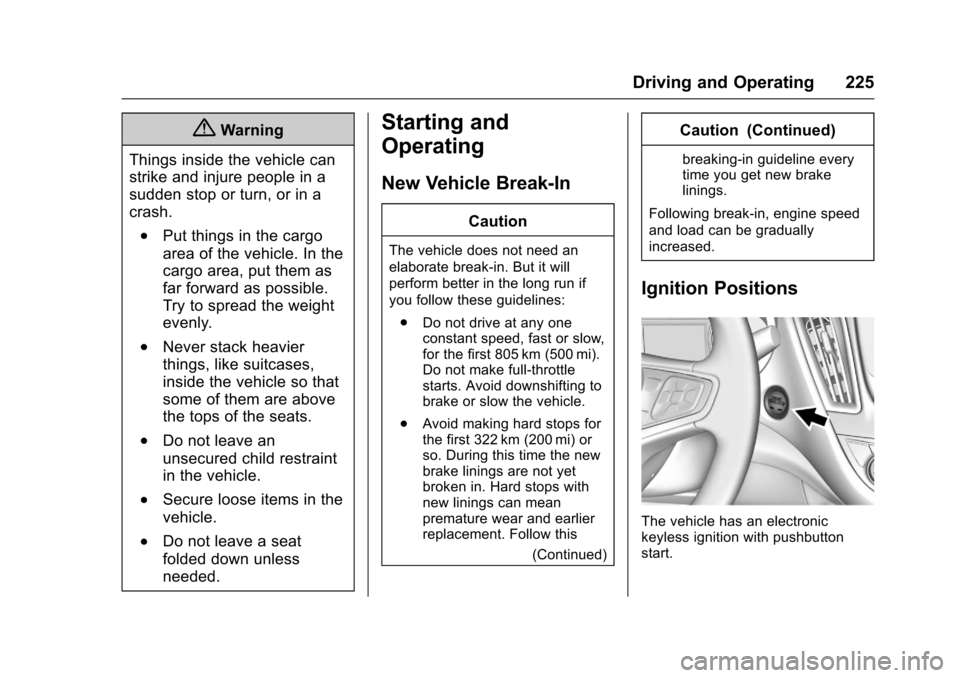
The vehicle has an electronickeyless ignition with pushbuttonstart.
Page 398 of 419
Chevrolet Malibu Owner Manual (GMNA-Localizing-U.S./Canada/Mexico-10122664) - 2017 - crc - 5/23/16
OnStar 397
OnStar
OnStar Overview
OnStar Overview . . . . . . . . . . . . . 397
OnStar Services
Emergency . . . . . . . . . . . . . . . . . . . 398Security . . . . . . . . . . . . . . . . . . . . . . 398Navigation . . . . . . . . . . . . . . . . . . . . 399Connections . . . . . . . . . . . . . . . . . . 399Diagnostics . . . . . . . . . . . . . . . . . . . 401
OnStar Additional Information
OnStar AdditionalInformation . . . . . . . . . . . . . . . . . . 402
OnStar Overview
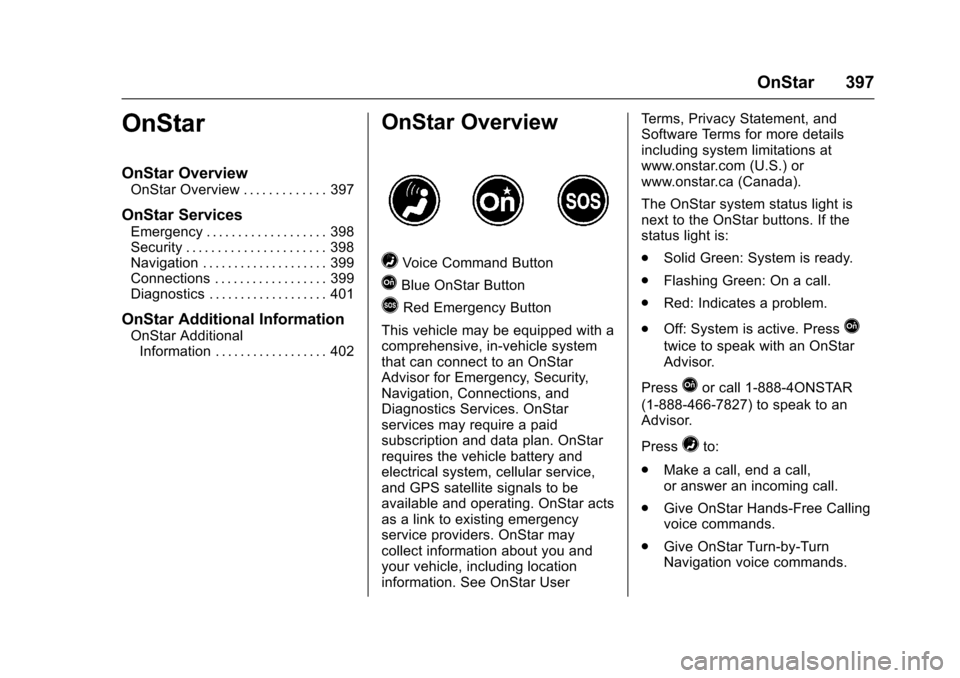
=Voice Command Button
QBlue OnStar Button
>Red Emergency Button
This vehicle may be equipped with acomprehensive, in-vehicle systemthat can connect to an OnStarAdvisor for Emergency, Security,Navigation, Connections, andDiagnostics Services. OnStarservices may require a paidsubscription and data plan. OnStarrequires the vehicle battery andelectrical system, cellular service,and GPS satellite signals to beavailable and operating. OnStar actsas a link to existing emergencyservice providers. OnStar maycollect information about you andyour vehicle, including locationinformation. See OnStar User
Te r m s , P r i v a c y S t a t e m e n t , a n dSoftware Terms for more detailsincluding system limitations atwww.onstar.com (U.S.) orwww.onstar.ca (Canada).
The OnStar system status light isnext to the OnStar buttons. If thestatus light is:
.Solid Green: System is ready.
.Flashing Green: On a call.
.Red: Indicates a problem.
.Off: System is active. PressQ
twice to speak with an OnStarAdvisor.
PressQor call 1-888-4ONSTAR
(1-888-466-7827) to speak to anAdvisor.
Press=to:
.Make a call, end a call,or answer an incoming call.
.Give OnStar Hands-Free Callingvoice commands.
.Give OnStar Turn-by-TurnNavigation voice commands.