2017 CHEVROLET MALIBU Battery
[x] Cancel search: BatteryPage 161 of 419
Chevrolet Malibu Owner Manual (GMNA-Localizing-U.S./Canada/Mexico-10122664) - 2017 - crc - 5/23/16
160 Instruments and Controls
instructions refer to a garage dooropener, but can be used for otherdevices.
Do not use the Universal Remotesystem with any garage door openerthat does not have the stop andreverse feature. This includes anygarage door opener modelmanufactured before April 1, 1982.
Read these instructions completelybefore programming the UniversalRemote system. It may help to haveanother person assist with theprogramming process.
Keep the original hand-heldtransmitter for use in other vehiclesas well as for future programming.Erase the programming whenvehicle ownership is terminated.See“Erasing Universal RemoteSystem Buttons”later in thissection.
To p r o g r a m a g a r a g e d o o r o p e n e r ,park outside directly in line with andfacing the garage door openerreceiver. Clear all people andobjects near the garage door.
Make sure the hand-held transmitterhas a new battery for quick andaccurate transmission of theradio-frequency signal.
Programming the Universal
Remote System
For questions or help programmingthe Universal Remote system, call1-800-355-3515 or seewww.homelink.com.
Programming involvestime-sensitive actions, and may timeout causing the procedure to berepeated.
To p r o g r a m u p t o t h r e e d e v i c e s :
1. Hold the end of the hand-heldtransmitter about 3 to 8 cm (1to 3 in) away from theUniversal Remote systembuttons with the indicator lightin view. The hand-heldtransmitter was supplied by themanufacturer of the garagedoor opener receiver.
2. At the same time, press andhold both the hand-heldtransmitter button and one ofthe three Universal Remote
system buttons to be used tooperate the garage door. Donot release either button untilthe indicator light changes fromaslowtoarapidflash.Thenrelease both buttons.
Some garage door openersmay require substitution ofStep 2 with the procedureunder“Radio Signals forCanada and Some GateOperators”later in this section.
3. Press and hold the newlyprogrammed Universal Remotesystem button for five secondswhile watching the indicatorlight and garage dooractivation.
.If the indicator light stays oncontinuously or the garagedoor moves when thebutton is pressed, thenprogramming is complete.There is no need tocomplete Steps 4–6.
.If the indicator light doesnot come on or the garagedoor does not move, asecond button press may
Page 164 of 419
Chevrolet Malibu Owner Manual (GMNA-Localizing-U.S./Canada/Mexico-10122664) - 2017 - crc - 5/23/16
Lighting 163
Lighting
Exterior Lighting
Exterior Lamp Controls . . . . . . . 163Exterior Lamps OffReminder . . . . . . . . . . . . . . . . . . . 165Headlamp High/Low-BeamChanger . . . . . . . . . . . . . . . . . . . . 165Flash-to-Pass . . . . . . . . . . . . . . . . 165Daytime RunningLamps (DRL) . . . . . . . . . . . . . . . 165Automatic HeadlampSystem . . . . . . . . . . . . . . . . . . . . . . 166Hazard Warning Flashers . . . . . 166Turn and Lane-ChangeSignals . . . . . . . . . . . . . . . . . . . . . . 167
Interior Lighting
Instrument Panel IlluminationControl . . . . . . . . . . . . . . . . . . . . . . 167Courtesy Lamps . . . . . . . . . . . . . . 168Dome Lamps . . . . . . . . . . . . . . . . . 168Reading Lamps . . . . . . . . . . . . . . 168
Lighting Features
Entry Lighting . . . . . . . . . . . . . . . . 169Exit Lighting . . . . . . . . . . . . . . . . . . 169Battery Load Management . . . 169Battery Power Protection . . . . . 170Exterior Lighting BatterySaver . . . . . . . . . . . . . . . . . . . . . . . 170
Exterior Lighting
Exterior Lamp Controls
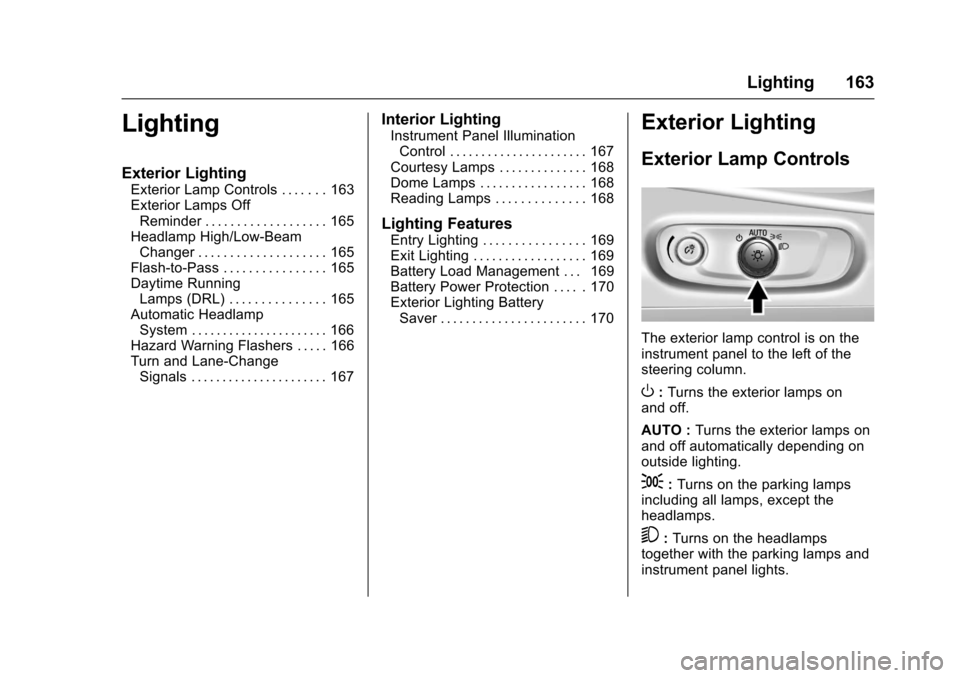
The exterior lamp control is on theinstrument panel to the left of thesteering column.
O:Turns the exterior lamps onand off.
AUTO :Turns the exterior lamps onand off automatically depending onoutside lighting.
;:Turns on the parking lampsincluding all lamps, except theheadlamps.
5:Turns on the headlampstogether with the parking lamps andinstrument panel lights.
Page 170 of 419
Chevrolet Malibu Owner Manual (GMNA-Localizing-U.S./Canada/Mexico-10122664) - 2017 - crc - 5/23/16
Lighting 169
Lighting Features
Entry Lighting
Some exterior lamps and most ofthe interior lamps turn on briefly atnight or in areas with limited lightingwhen the Remote Keyless Entry
(RKE) transmitterKbutton is
pressed. SeeRemote Keyless Entry(RKE) System Operation032.Afterabout 30 seconds the exterior lampsturn off, then the dome lamps andremaining interior lamps dim to off.Entry lighting can be disabledmanually by changing the ignitionout of the OFF position, or by
pressing the RKE transmitterQ
button.
This feature can be changed. SeeVehicle Personalization0147.
Exit Lighting
Some exterior lamps and interiorlights come on at night, or in areaswith limited lighting, when the driverdoor is opened after the ignition isturned off. The dome lamp comeson after the ignition is changed to
the OFF position. The exteriorlamps and dome lamp remain on forasetamountoftime,thenautomatically turn off.
The exterior lamps turn offimmediately by turning the exteriorlamp control off.
This feature can be changed. SeeVehicle Personalization0147.
Battery Load
Management
The vehicle has Electric PowerManagement (EPM), whichestimates the battery's temperatureand state of charge. It then adjuststhe voltage for best performanceand extended life of the battery.
When the battery's state of chargeis low, the voltage is raised slightlyto quickly bring the charge back up.When the state of charge is high,the voltage is lowered slightly toprevent overcharging. If the vehiclehas a voltage display on the DriverInformation Center (DIC), you may
see the voltage move up or down.This is normal. If there is a problem,an alert will be displayed.
The battery can be discharged atidle if the electrical loads are veryhigh. This is true for all vehicles.This is because the generator(alternator) may not be spinning fastenough at idle to produce all thepower that is needed for very highelectrical loads.
Ahighelectricalloadoccurswhenseveral of the following are on, suchas: headlamps, high beams, foglamps, rear window defogger,climate control fan at high speed,heated seats, engine cooling fans,trailer loads, and loads plugged intoaccessory power outlets.
EPM works to prevent excessivedischarge of the battery. It does thisby balancing the generator's outputand the vehicle's electrical needs.It can increase engine idle speed togenerate more power, wheneverneeded. It can temporarily reducethe power demands of someaccessories.
Page 171 of 419
Chevrolet Malibu Owner Manual (GMNA-Localizing-U.S./Canada/Mexico-10122664) - 2017 - crc - 5/23/16
170 Lighting
Normally, these actions occur insteps or levels, without beingnoticeable. In rare cases at thehighest levels of corrective action,this action may be noticeable to thedriver. If so, a DIC message mightbe displayed and it is recommendedthat the driver reduce the electricalloads as much as possible. SeeBattery Voltage and ChargingMessages0138.
Battery Power Protection
The battery saver feature isdesigned to protect the vehicle'sbattery.
If some interior lamps are left onand the ignition is turned off, thebattery rundown protection systemautomatically turns the lamp off aftersome time.
Exterior Lighting Battery
Saver
The exterior lamps turn off about10 minutes after the ignition isturned off, if the parking lamps orheadlamps have been manually lefton. This protects against draining
the battery. To restart the 10-minutetimer, turn the exterior lamp controlto the off position and then back tothe parking lamp or headlampposition.
To k e e p t h e l a m p s o n f o r m o r e t h a n10 minutes, the ignition must be inthe ACC/ACCESSORY or ON/RUNposition.
Page 185 of 419
Chevrolet Malibu Owner Manual (GMNA-Localizing-U.S./Canada/Mexico-10122664) - 2017 - crc - 5/23/16
184 Infotainment System
Audio Players
Avoiding Untrusted Media
Devices
When using media devices such asCDs, DVDs, Blu-ray Discs®,SDcards, USB drives, and mobiledevices, consider the source.Untrusted media devices couldcontain files that affect systemoperation or performance. Avoid useif the content or origin cannot betrusted.
USB Port
Using the USB Port
The infotainment system can playmusic by connecting an auxiliarydevice to the USB port.
USB Support
The USB ports are in the centerconsole, and use the USB 2.0standard.
USB Supported Devices
.USB Flash Drives
.iPods/iPhones
.Portable USB Hard Drives
Not all iPods and USB drives arecompatible with the USB port.
Make sure the iPod has the latestfirmware from Apple®for properoperation. iPod firmware can beupdated using the latest iTunes®
application. See www.apple.com/itunes.
For help with identifying your iPod,go to www.apple.com/support.
The USB port can play both lowerand upper case .mp3, .wma, .ogg,and .wav files stored on a USBstorage device.
Supported Apple®Devices
To v i e w s u p p o r t e d d e v i c e s i n t h eU.S., see www.my.chevrolet.com\learned.
To v i e w s u p p o r t e d d e v i c e s i nCanada, seewww.chevroletowner.ca.
To v i e w s u p p o r t e d d e v i c e s i nMexico, see your dealer.
USB Supported File and FolderStructure
The infotainment system supports:
.FAT 1 6 .
.FAT 3 2 .
.exFAT.
Connecting a USB Storage
Device or iPod/iPhone
To c o n n e c t a U S B s t o r a g e d e v i c e ,connect the device to the USB port.
To c o n n e c t a n i P o d / i P h o n e , c o n n e c tone end of the device’scabletotheiPod/iPhone and the other end tothe USB port.
The iPod/iPhone charges while it isconnected to the vehicle if thevehicle is in ACC/ACCESSORY orON/RUN. SeeIgnition Positions0225.Whenthevehicleisturnedoff, the iPod/iPhone automaticallypowers off and will not charge ordraw power from the vehicle'sbattery.
For more information on USBusage, see“Audio SystemInformation”following.
Page 222 of 419
Chevrolet Malibu Owner Manual (GMNA-Localizing-U.S./Canada/Mexico-10122664) - 2017 - crc - 5/23/16
Driving and Operating 221
Warning (Continued)
the fan speed to the highestsetting. See“ClimateControl Systems.”
For more information about CO,
seeEngine Exhaust0232.
To s a v e f u e l , r u n t h e e n g i n e f o rshort periods to warm the vehicleand then shut the engine off andpartially close the window. Movingabout to keep warm also helps.
If it takes time for help to arrive,when running the engine, push theaccelerator pedal slightly so theengine runs faster than the idlespeed. This keeps the batterycharged to restart the vehicle and tosignal for help with the headlamps.Do this as little as possible, tosave fuel.
If the Vehicle Is Stuck
Slowly and cautiously spin thewheels to free the vehicle whenstuck in sand, mud, ice, or snow.
If stuck too severely for the tractionsystem to free the vehicle, turn thetraction system off and use therocking method. SeeTr a c t i o nControl/Electronic StabilityControl0241.
{Warning
If the vehicle's tires spin at high
speed, they can explode, and you
or others could be injured. The
vehicle can overheat, causing an
engine compartment fire or other
damage. Spin the wheels as little
as possible and avoid going
above 56 km/h (35 mph).
Rocking the Vehicle to Get
it Out
Turn the steering wheel left andright to clear the area around thefront wheels. Turn off any tractionsystem. Shift back and forthbetween R (Reverse) and a lowforward gear, spinning the wheelsas little as possible. To preventtransmission wear, wait until thewheels stop spinning before shiftinggears. Release the acceleratorpedal while shifting, and presslightly on the accelerator pedalwhen the transmission is in gear.Slowly spinning the wheels in theforward and reverse directionscauses a rocking motion that couldfree the vehicle. If that does not getthe vehicle out after a few tries, itmight need to be towed out. If thevehicle does need to be towed out,seeTo w i n g t h e V e h i c l e0355.
Page 228 of 419
Chevrolet Malibu Owner Manual (GMNA-Localizing-U.S./Canada/Mexico-10122664) - 2017 - crc - 5/23/16
Driving and Operating 227
With the ignition off, pressing thebutton one time without the brakepedal applied will place the ignitionsystem in ACC/ACCESSORY.
The ignition will switch from ACC/ACCESSORY to OFF afterfive minutes to prevent batteryrun down.
ON/RUN/START (Green IndicatorLight) :This mode is for driving andstarting. With the ignition off, andthe brake pedal applied, pressingthe button once will place theignition system in ON/RUN/START.Once engine cranking begins,release the button. Engine crankingwill continue until the engine starts.SeeStarting the Engine0227.Theignition will then remain in ON/RUN.
Service Only Mode
This power mode is available forservice and diagnostics, and toverify the proper operation of themalfunction indicator lamp as maybe required for emission inspectionpurposes. With the vehicle off, andthe brake pedal not applied,pressing and holding the button formore than five seconds will place
the vehicle in Service Only Mode.The instruments and audio systemswill operate as they do in ON/RUN,but the vehicle will not be able to bedriven. The engine will not start inService Only Mode. Press thebutton again to turn the vehicle off.
Starting the Engine
Move the shift lever to P (Park) orN(Neutral). The engine will not startin any other position. To restart theengine when the vehicle is alreadymoving, use N (Neutral) only.
For hybrid vehicles, the engine willonly start if required for cabinwarming or high voltage batterycharging. The vehicle ready light willbe illuminated when the vehicle isready to be driven.
Caution
Do not try to shift to P (Park) if the
vehicle is moving. If you do, you
could damage the transmission.
Shift to P (Park) only when the
vehicle is stopped.
Caution
If you add electrical parts or
accessories, you could change
the way the engine operates. Any
resulting damage would not be
covered by the vehicle warranty.
SeeAdd-On Electrical
Equipment0277.
Starting Procedure
1. With the Keyless Accesssystem, the RKE transmittermust be in the vehicle. PressENGINE START/STOP with thebrake pedal applied. When theengine begins cranking, let goof the button.
The idle speed will go down asthe engine gets warm. Do notrace the engine immediatelyafter starting it.
Page 229 of 419
Chevrolet Malibu Owner Manual (GMNA-Localizing-U.S./Canada/Mexico-10122664) - 2017 - crc - 5/23/16
228 Driving and Operating
If the RKE transmitter is not inthe vehicle, if there isinterference, or the RKEtransmitter battery is low, theDriver Information Center (DIC)will display a message. SeeDriver Information Center (DIC)(Base Level)0131orDriverInformation Center (DIC)(Uplevel)0134andRemoteKeyless Entry (RKE) SystemOperation032.
Caution
Cranking the engine for long
periods of time, by returning the
ignition to the START position
immediately after cranking has
ended, can overheat and damage
the cranking motor, and drain the
battery. Wait at least 15 seconds
between each try, to let the
cranking motor cool down.
2. If the engine does not startafter five to 10 seconds,especially in very cold weather(below✓18 °C or 0 °F), it couldbe flooded with too much
gasoline. Try pushing theaccelerator pedal all the way tothe floor and holding it there asyou hold ENGINE START/STOP, for up to a maximum of15 seconds. Wait at least15 seconds between each try,to allow the cranking motor tocool down. When the enginestarts, let go of the button andthe accelerator. If the vehiclestarts briefly but then stopsagain, do the same thing. Thisclears the extra gasoline fromthe engine. Do not race theengine immediately afterstarting it. Operate the engineand transmission gently untilthe oil warms up and lubricatesall moving parts.
Hybrid Operation
This vehicle combines gasoline andelectric propulsion. The gasolineengine will automatically start toprovide power and then shut off tosave fuel.
The engine may remainrunning when:
.Accelerating aggressively orclimbing hills.
.Vehicle speed is greater than88 km/h (55 mph).
.Charging the high voltagebattery.
.The heater is being used.
The engine and transmission worktogether to provide propulsionpower at the highest efficiency. Thismay result in higher engine speeds.
Stop/Start System
{Warning
Exiting the vehicle without first
shifting into P (Park) may cause
the vehicle to move. You or others
may be injured. Because the
vehicle has the auto engine stop/
start feature, the vehicle's engine
might seem to be shut off;
(Continued)