2017 CHEVROLET MALIBU wheel
[x] Cancel search: wheelPage 105 of 419
Chevrolet Malibu Owner Manual (GMNA-Localizing-U.S./Canada/Mexico-10122664) - 2017 - crc - 5/23/16
104 Instruments and Controls
Lamp Messages . . . . . . . . . . . . . . 142Object Detection SystemMessages . . . . . . . . . . . . . . . . . . . 142Propulsion PowerMessages . . . . . . . . . . . . . . . . . . . 144Ride Control SystemMessages . . . . . . . . . . . . . . . . . . . 145Airbag System Messages . . . . 145Security Messages . . . . . . . . . . . 145Service Vehicle Messages . . . . 145Steering SystemMessages . . . . . . . . . . . . . . . . . . . 145Starting the VehicleMessages . . . . . . . . . . . . . . . . . . . 146Tire Messages . . . . . . . . . . . . . . . . 146Transmission Messages . . . . . . 146Vehicle ReminderMessages . . . . . . . . . . . . . . . . . . . 147Window Messages . . . . . . . . . . . 147
Vehicle Personalization
Vehicle Personalization . . . . . . . 147
Universal Remote System
Universal Remote System . . . . 159Universal Remote SystemProgramming . . . . . . . . . . . . . . . 159Universal Remote SystemOperation . . . . . . . . . . . . . . . . . . . 162
Controls
Steering Wheel
Adjustment
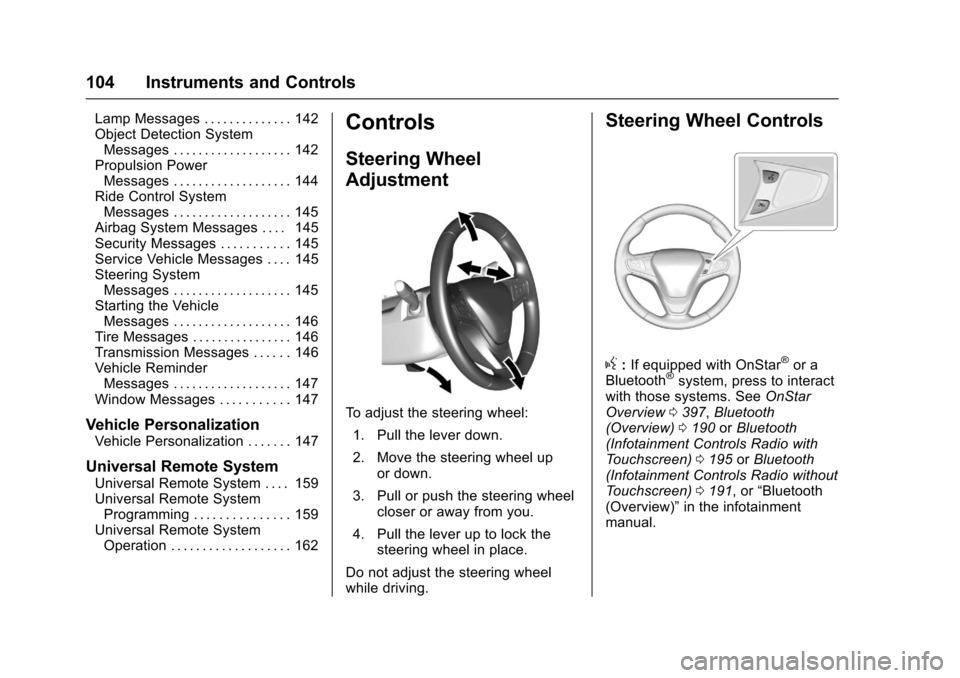
To a d j u s t t h e s t e e r i n g w h e e l :
1. Pull the lever down.
2. Move the steering wheel upor down.
3. Pull or push the steering wheelcloser or away from you.
4. Pull the lever up to lock thesteering wheel in place.
Do not adjust the steering wheelwhile driving.
Steering Wheel Controls
g:If equipped with OnStar®or aBluetooth®system, press to interactwith those systems. SeeOnStarOverview0397,Bluetooth(Overview)0190orBluetooth(Infotainment Controls Radio withTo u c h s c r e e n )0195orBluetooth(Infotainment Controls Radio withoutTo u c h s c r e e n )0191,or“Bluetooth(Overview)”in the infotainmentmanual.
Page 106 of 419
Chevrolet Malibu Owner Manual (GMNA-Localizing-U.S./Canada/Mexico-10122664) - 2017 - crc - 5/23/16
Instruments and Controls 105
c:Press to reject an incomingcall or end a current call. Press tomute or unmute the infotainmentsystem when not on a call.
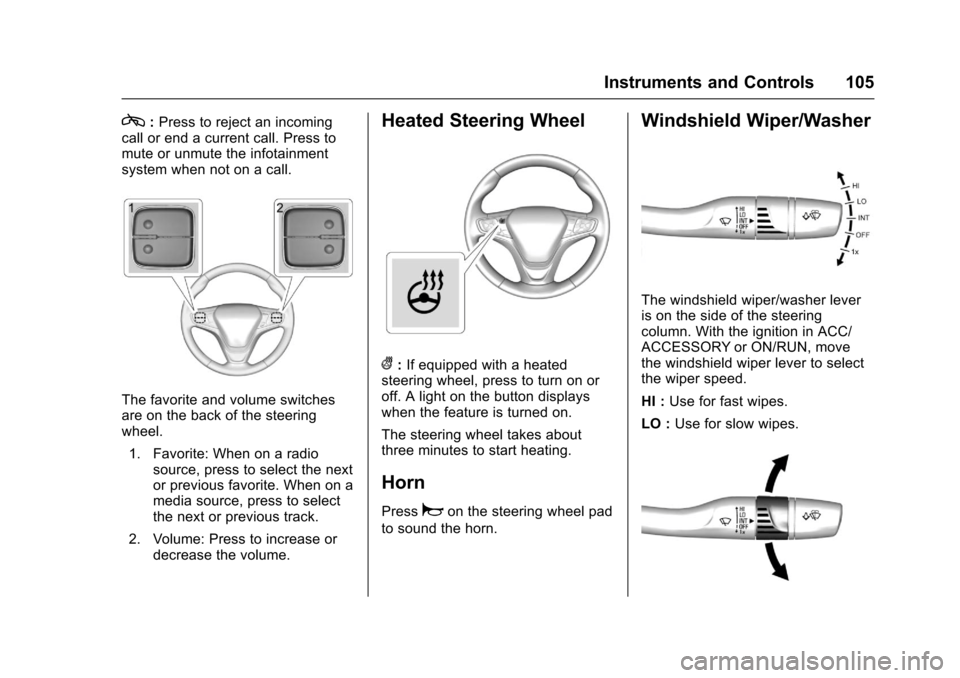
The favorite and volume switchesare on the back of the steeringwheel.
1. Favorite: When on a radiosource, press to select the nextor previous favorite. When on amedia source, press to selectthe next or previous track.
2. Volume: Press to increase ordecrease the volume.
Heated Steering Wheel
(:If equipped with a heatedsteering wheel, press to turn on oroff. A light on the button displayswhen the feature is turned on.
The steering wheel takes aboutthree minutes to start heating.
Horn
Pressaon the steering wheel pad
to sound the horn.
Windshield Wiper/Washer
The windshield wiper/washer leveris on the side of the steeringcolumn. With the ignition in ACC/ACCESSORY or ON/RUN, movethe windshield wiper lever to selectthe wiper speed.
HI :Use for fast wipes.
LO :Use for slow wipes.
Page 117 of 419
Chevrolet Malibu Owner Manual (GMNA-Localizing-U.S./Canada/Mexico-10122664) - 2017 - crc - 5/23/16
116 Instruments and Controls
Cluster Menu
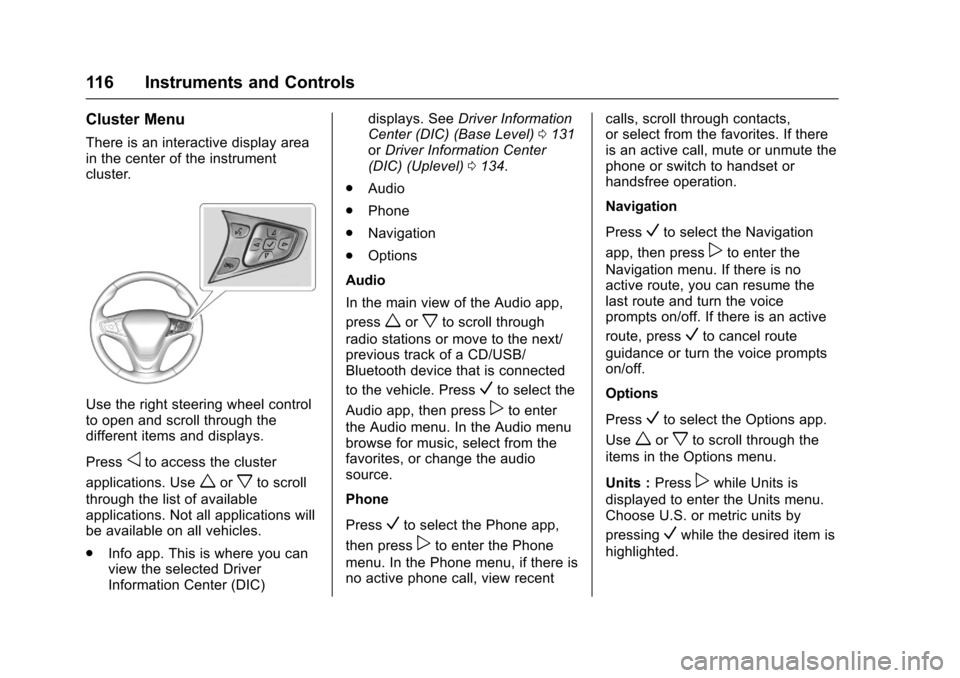
There is an interactive display areain the center of the instrumentcluster.
Use the right steering wheel controlto open and scroll through thedifferent items and displays.
Pressoto access the cluster
applications. Useworxto scroll
through the list of availableapplications. Not all applications willbe available on all vehicles.
.Info app. This is where you canview the selected DriverInformation Center (DIC)
displays. SeeDriver InformationCenter (DIC) (Base Level)0131orDriver Information Center(DIC) (Uplevel)0134.
.Audio
.Phone
.Navigation
.Options
Audio
In the main view of the Audio app,
pressworxto scroll through
radio stations or move to the next/previous track of a CD/USB/Bluetooth device that is connected
to the vehicle. PressVto select the
Audio app, then presspto enter
the Audio menu. In the Audio menubrowse for music, select from thefavorites, or change the audiosource.
Phone
PressVto select the Phone app,
then presspto enter the Phone
menu. In the Phone menu, if there isno active phone call, view recent
calls, scroll through contacts,or select from the favorites. If thereis an active call, mute or unmute thephone or switch to handset orhandsfree operation.
Navigation
PressVto select the Navigation
app, then presspto enter the
Navigation menu. If there is noactive route, you can resume thelast route and turn the voiceprompts on/off. If there is an active
route, pressVto cancel route
guidance or turn the voice promptson/off.
Options
PressVto select the Options app.
Useworxto scroll through the
items in the Options menu.
Units :Presspwhile Units is
displayed to enter the Units menu.Choose U.S. or metric units by
pressingVwhile the desired item is
highlighted.
Page 124 of 419
Chevrolet Malibu Owner Manual (GMNA-Localizing-U.S./Canada/Mexico-10122664) - 2017 - crc - 5/23/16
Instruments and Controls 123
Caution (Continued)
costly repairs not covered by the
vehicle warranty. This could also
affect the vehicle’sabilitytopass
an Emissions Inspection/
Maintenance test. See
Accessories and
Modifications0280.
If the light is flashing :Amalfunction has been detected thatcould damage the emission controlsystem and increase vehicleemissions. Diagnosis and servicemay be required.
To h e l p p r e v e n t d a m a g e , r e d u c evehicle speed and avoid hardaccelerations and uphill grades.If towing a trailer, reduce theamount of cargo being hauled assoon as possible.
If the light continues to flash, find asafe place to park. Turn the vehicleoff and wait at least 10 secondsbefore restarting the engine. If thelight is still flashing, follow the
previous guidelines and see yourdealer for service as soon aspossible.
If the light is on steady :Amalfunction has been detected.Diagnosis and service may berequired.
Check the following:
.If fuel has been added to thevehicle using the capless funneladapter, make sure that it hasbeen removed. See“Filling theTa n k w i t h a P o r t a b l e G a s C a n”underFilling the Tank0269.The diagnostic system candetect if the adapter has beenleft installed in the vehicle,allowing fuel to evaporate intothe atmosphere. A few drivingtrips with the adapter removedmay turn off the light.
.Poor fuel quality can causeinefficient engine operation andpoor driveability, which may goaway once the engine is warmedup. If this occurs, change thefuel brand. It may require at
least one full tank of the properfuel to turn the light off. SeeFuel0268.
If the light remains on, see yourdealer.
Emissions Inspection and
Maintenance Programs
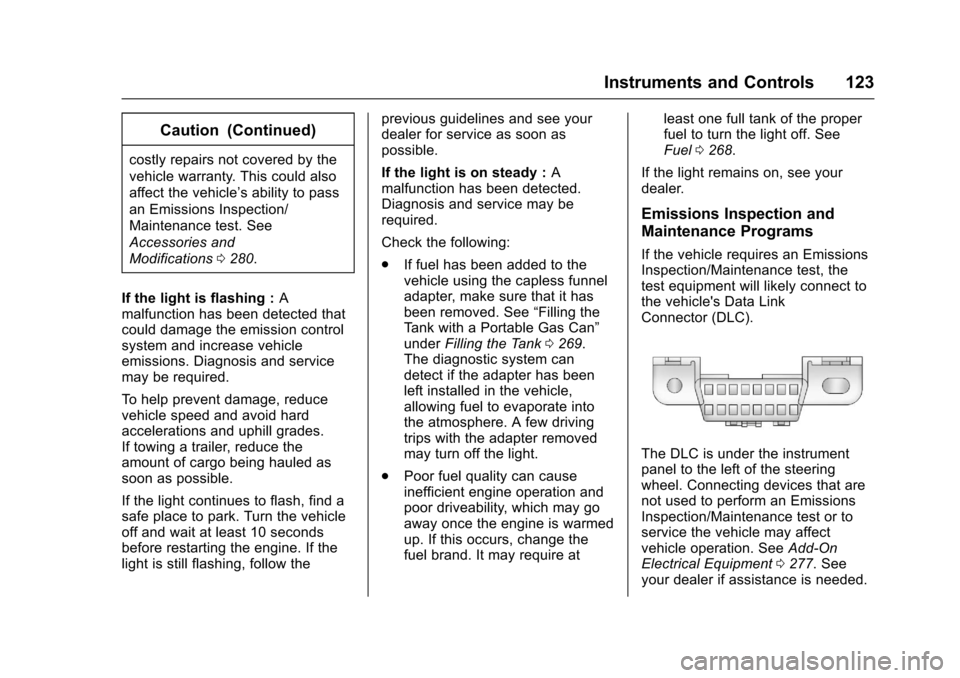
If the vehicle requires an EmissionsInspection/Maintenance test, thetest equipment will likely connect tothe vehicle's Data LinkConnector (DLC).
The DLC is under the instrumentpanel to the left of the steeringwheel. Connecting devices that arenot used to perform an EmissionsInspection/Maintenance test or toservice the vehicle may affectvehicle operation. SeeAdd-OnElectrical Equipment0277.Seeyour dealer if assistance is needed.
Page 127 of 419
Chevrolet Malibu Owner Manual (GMNA-Localizing-U.S./Canada/Mexico-10122664) - 2017 - crc - 5/23/16
126 Instruments and Controls
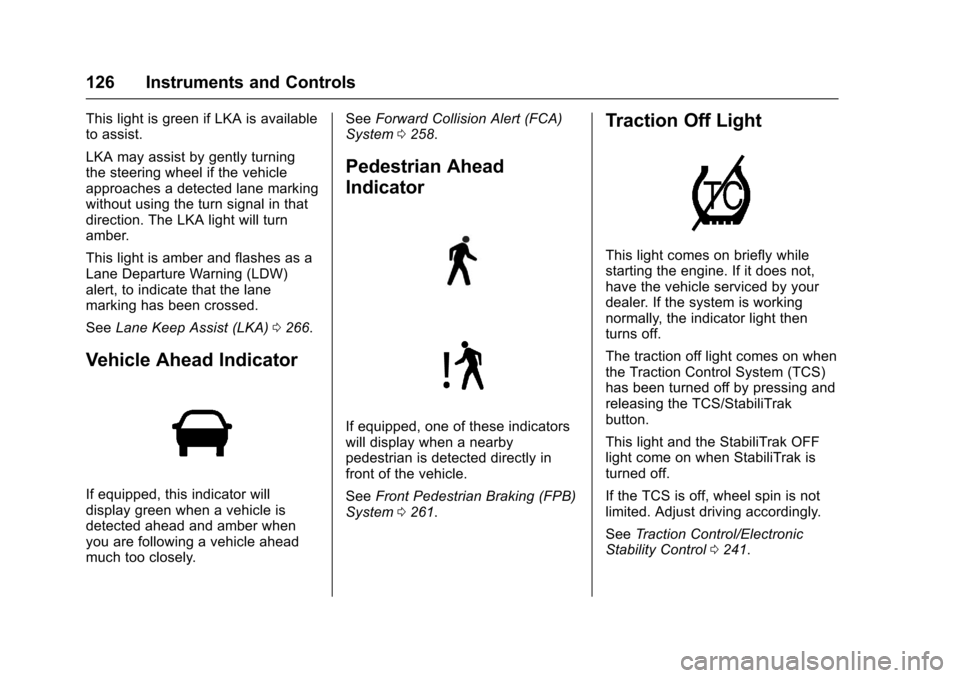
This light is green if LKA is availableto assist.
LKA may assist by gently turningthe steering wheel if the vehicleapproaches a detected lane markingwithout using the turn signal in thatdirection. The LKA light will turnamber.
This light is amber and flashes as aLane Departure Warning (LDW)alert, to indicate that the lanemarking has been crossed.
SeeLane Keep Assist (LKA)0266.
Vehicle Ahead Indicator
If equipped, this indicator willdisplay green when a vehicle isdetected ahead and amber whenyou are following a vehicle aheadmuch too closely.
SeeForward Collision Alert (FCA)System0258.
Pedestrian Ahead
Indicator
If equipped, one of these indicatorswill display when a nearbypedestrian is detected directly infront of the vehicle.
SeeFront Pedestrian Braking (FPB)System0261.
Traction Off Light
This light comes on briefly whilestarting the engine. If it does not,have the vehicle serviced by yourdealer. If the system is workingnormally, the indicator light thenturns off.
The traction off light comes on whenthe Traction Control System (TCS)has been turned off by pressing andreleasing the TCS/StabiliTrakbutton.
This light and the StabiliTrak OFFlight come on when StabiliTrak isturned off.
If the TCS is off, wheel spin is notlimited. Adjust driving accordingly.
SeeTr a c t i o n C o n t r o l / E l e c t r o n i cStability Control0241.
Page 145 of 419
Chevrolet Malibu Owner Manual (GMNA-Localizing-U.S./Canada/Mexico-10122664) - 2017 - crc - 5/23/16
144 Instruments and Controls
SERVICE DRIVER ASSIST
SYSTEM
If this message displays, take thevehicle to your dealer to repair thesystem.
Adaptive Cruise Control (ACC),Forward Collision Alert (FCA),Active Emergency Braking System,Assistance Systems for Parking orBacking, and/or Lane Keep Assist(LKA) system may not work. Do notuse these systems until the vehiclehas been repaired.
SERVICE FRONT CAMERA
If this message remains on aftercontinued driving, the vehicle needsservice. Take the vehicle to yourdealer. Do not use the FrontPedestrian Braking (FPB), ForwardCollision Alert (FCA), ForwardAutomatic Braking (FAB), LaneKeep Assist (LKA), and LaneDeparture Warning (LDW) features.
SERVICE PARK ASSIST
This message displays if there is aproblem with the Parking Assistsystem. Do not use this system tohelp you park. See your dealer forservice.
SERVICE SIDE DETECTION
SYSTEM
If this message remains on aftercontinued driving, the vehicle needsservice. Side Blind Zone Alert(SBZA), Lane Change Alert (LCA),and Rear Cross Traffic Alert (RCTA)features will not work. Take thevehicle to your dealer.
SIDE DETECTION SYSTEM
UNAVAILABLE
This message indicates that SideBlind Zone Alert (SBZA), LaneChange Alert (LCA), and RearCross Traffic Alert (RCTA) aredisabled either because the sensoris blocked and cannot detectvehicles in the blind zone, or thevehicle is passing through an openarea, such as the desert, wherethere is insufficient data foroperation. This message may also
activate during heavy rain or due toroad spray. The vehicle does notneed service. For cleaning, see"Washing the Vehicle" underExterior Care0358.
TAKE STEERING
If LKA does not detect active driversteering, an alert and chime may beprovided. Move the steering wheelto dismiss. SeeLane Keep Assist(LKA)0266.
Propulsion Power
Messages
PROPULSION POWER IS
REDUCED
This message displays when thepropulsion power is reduced andcan affect the ability to accelerate.If this message is on, but there is noreduction in performance, proceedto your destination. Theperformance may be reduced thenext time the vehicle is driven. Thevehicle may be driven at a reducedspeed while this message is on, butmaximum acceleration and speedmay be reduced. If this message
Page 146 of 419
Chevrolet Malibu Owner Manual (GMNA-Localizing-U.S./Canada/Mexico-10122664) - 2017 - crc - 5/23/16
Instruments and Controls 145
stays on when the malfunctionindicator lamp is on, the vehicleshould be taken to your dealer forservice as soon as possible.
Ride Control System
Messages
SERVICE TRACTION
CONTROL
This message displays when thereis a problem with the TractionControl System (TCS). When thismessage is displayed, the systemwill not limit wheel spin. Adjust yourdriving accordingly. See your dealerfor service.
SERVICE STABILITRAK
This message displays if there is aproblem with the StabiliTrak system.If this message appears, try to resetthe system. Stop; turn off the enginefor at least 15 seconds; then startthe engine again. If this messagestill comes on, it means there is aproblem. See your dealer forservice. The vehicle is safe to drive;
however, you do not have thebenefit of StabiliTrak, so reduceyour speed and drive accordingly.
Airbag System Messages
SERVICE AIRBAG
This message displays if there is aproblem with the airbag system. Seeyour dealer for service.
Security Messages
THEFT ATTEMPTED
This message displays if the vehicledetects a tamper condition.
Service Vehicle Messages
SERVICE AC SYSTEM
This message displays if there is aproblem with the air conditioningsystem. Take the vehicle to yourdealer for service.
SERVICE KEYLESS START
SYSTEM
This message is displayed if there isaproblemwiththepushbuttonstartsystem. Take the vehicle to yourdealer for service.
SERVICE VEHICLE SOON
This message displays if there is aproblem with the vehicle. Take thevehicle to your dealer for service.
Steering System
Messages
SERVICE POWER STEERING
This message displays and a chimemay sound when there may be aproblem with the power steeringsystem. If this message displaysand a reduction in steeringperformance or loss of powersteering assistance is noticed, seeyour dealer.
Page 150 of 419
Chevrolet Malibu Owner Manual (GMNA-Localizing-U.S./Canada/Mexico-10122664) - 2017 - crc - 5/23/16
Instruments and Controls 149
Climate and Air Quality
Select and the following maydisplay:
.Auto Fan Speed
.Air Quality Sensor
.Auto Defog
.Auto Rear Defog
Auto Fan Speed
This adjusts the blower level duringautomatic operation.
Select Low, Medium, or High.
Air Quality Sensor
This automatically selectsrecirculate when certain gases aredetected.
Select Off, Low Sensitivity, or HighSensitivity.
Auto Defog
This allows the climate controlsystem to prevent fog on the insideof the windows. See“Auto Defog”inDual Automatic Climate ControlSystem0208.
Select Off or On.
Auto Rear Defog
This allows the rear windowdefogger to turn on automaticallywhen the interior temperature is coldand the outside temperature isabout 7 °C (44 °F) and below. See“Rear Window Defogger”inDualAutomatic Climate ControlSystem0208.
Select Off or On.
Comfort and Convenience
Select and the following maydisplay:
.Auto Memory Recall
.Easy Exit Options
.Chime Volume
.Reverse Tilt Mirror
.Extended Hill Start Assist
Auto Memory Recall
This feature automatically recallsthe current driver’spreviouslystored1or2positionswhentheignitionischanged from OFF to ON/RUN/START or ACCESSORY. SeeMemory Seats059.
Select Off or On.
Easy Exit Options
This feature automatically recallsthe current driver’spreviouslystoredExit button position when exiting thevehicle. SeeMemory Seats059.
Select Off or On.
Chime Volume
Select to set the chime volumelevel.
Reverse Tilt Mirror
When on, both the driver andpassenger, driver, or passengermirrors will tilt downward when thevehicle is shifted to R (Reverse) toimprove visibility of the ground nearthe rear wheels. They will return totheir previous driving position whenthe vehicle is shifted out ofR(Reverse)ortheignitionisturnedto OFF.
Select Off, On - Driver andPassenger, On - Driver, or On -Passenger.