2017 CHEVROLET MALIBU towing
[x] Cancel search: towingPage 239 of 419
Chevrolet Malibu Owner Manual (GMNA-Localizing-U.S./Canada/Mexico-10122664) - 2017 - crc - 5/23/16
238 Driving and Operating
system warning light will be on andachimewillsoundwarningyouthatthe parking brake is still on.
If you are towing a trailer and areparking on a hill, seeDrivingCharacteristics and TowingTips0272.
Electric Parking Brake
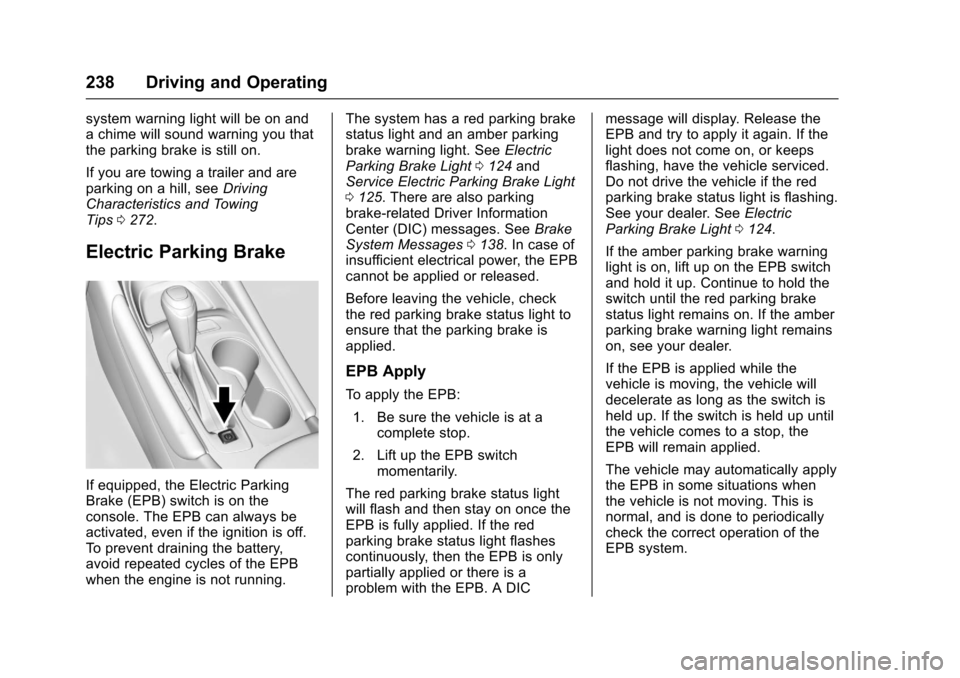
If equipped, the Electric ParkingBrake (EPB) switch is on theconsole. The EPB can always beactivated, even if the ignition is off.To p r e v e n t d r a i n i n g t h e b a t t e r y,avoid repeated cycles of the EPBwhen the engine is not running.
The system has a red parking brakestatus light and an amber parkingbrake warning light. SeeElectricParking Brake Light0124andService Electric Parking Brake Light0125.Therearealsoparkingbrake-related Driver InformationCenter (DIC) messages. SeeBrakeSystem Messages0138.Incaseofinsufficient electrical power, the EPBcannot be applied or released.
Before leaving the vehicle, checkthe red parking brake status light toensure that the parking brake isapplied.
EPB Apply
To a p p l y t h e E P B :
1. Be sure the vehicle is at acomplete stop.
2. Lift up the EPB switchmomentarily.
The red parking brake status lightwill flash and then stay on once theEPB is fully applied. If the redparking brake status light flashescontinuously, then the EPB is onlypartially applied or there is aproblem with the EPB. A DIC
message will display. Release theEPB and try to apply it again. If thelight does not come on, or keepsflashing, have the vehicle serviced.Do not drive the vehicle if the redparking brake status light is flashing.See your dealer. SeeElectricParking Brake Light0124.
If the amber parking brake warninglight is on, lift up on the EPB switchand hold it up. Continue to hold theswitch until the red parking brakestatus light remains on. If the amberparking brake warning light remainson, see your dealer.
If the EPB is applied while thevehicle is moving, the vehicle willdecelerate as long as the switch isheld up. If the switch is held up untilthe vehicle comes to a stop, theEPB will remain applied.
The vehicle may automatically applythe EPB in some situations whenthe vehicle is not moving. This isnormal, and is done to periodicallycheck the correct operation of theEPB system.
Page 240 of 419
Chevrolet Malibu Owner Manual (GMNA-Localizing-U.S./Canada/Mexico-10122664) - 2017 - crc - 5/23/16
Driving and Operating 239
If the EPB fails to apply, the rearwheels should be blocked toprevent vehicle movement.
EPB Release
To r e l e a s e t h e E P B :
1. Place the ignition in the ACC/ACCESSORY or ON/RUNposition.
2. Apply and hold the brakepedal.
3. Push down momentarily on theEPB switch.
The EPB is released when the redparking brake status light is off.
If the amber parking brake warninglight is on, release the EPB bypushing down on the EPB switchand holding it down. Continue tohold the switch until the red parkingbrake status light is off. If either lightstays on after release is attempted,see your dealer.
Caution
Driving with the parking brake on
can overheat the brake system
and cause premature wear or
damage to brake system parts.
Make sure that the parking brake
is fully released and the brake
warning light is off before driving.
Automatic EPB Release
The EPB will automatically release ifthe vehicle is running, placed intogear, and an attempt is made todrive away. Avoid rapid accelerationwhen the EPB is applied, topreserve parking brake lining life.
If parking on a hill, or if the vehicleis pulling a trailer, seeDrivingCharacteristics and TowingTips0272.
Brake Assist
The Brake Assist feature isdesigned to assist the driver instopping or decreasing vehiclespeed in emergency drivingconditions. This feature uses thestability system hydraulic brakecontrol module to supplement thepower brake system underconditions where the driver hasquickly and forcefully applied thebrake pedal in an attempt to quicklystop or slow down the vehicle. Thestability system hydraulic brakecontrol module increases brakepressure at each corner of thevehicle until the ABS activates.Minor brake pedal pulsation orpedal movement during this time isnormal and the driver shouldcontinue to apply the brake pedal asthe driving situation dictates. TheBrake Assist feature willautomatically disengage when thebrake pedal is released or brakepedal pressure is quicklydecreased.
Page 253 of 419
Chevrolet Malibu Owner Manual (GMNA-Localizing-U.S./Canada/Mexico-10122664) - 2017 - crc - 5/23/16
252 Driving and Operating
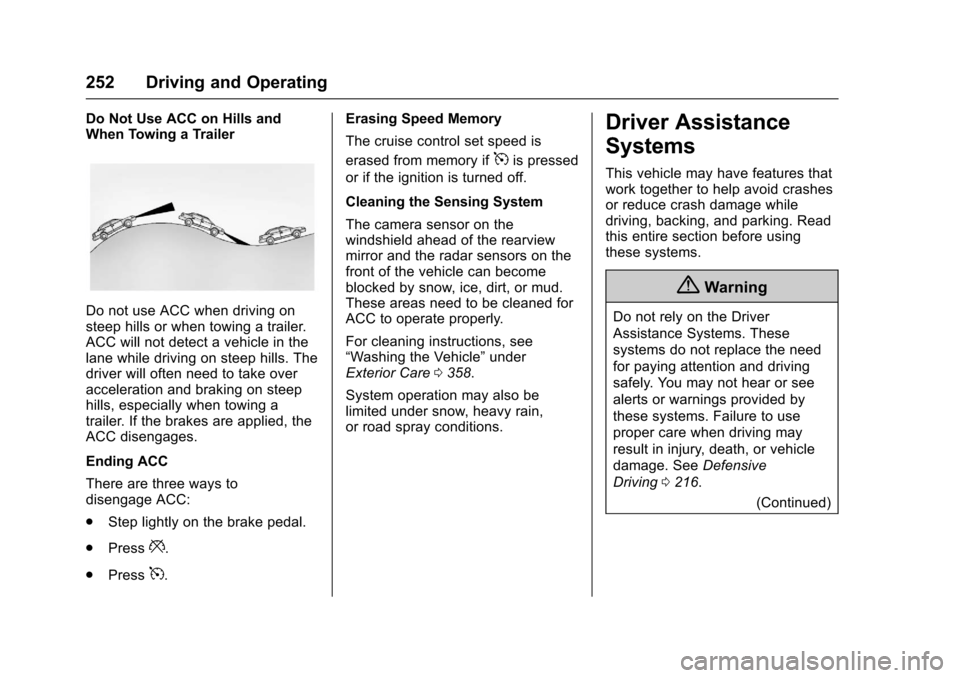
Do Not Use ACC on Hills andWhen Towing a Trailer
Do not use ACC when driving onsteep hills or when towing a trailer.ACC will not detect a vehicle in thelane while driving on steep hills. Thedriver will often need to take overacceleration and braking on steephills, especially when towing atrailer. If the brakes are applied, theACC disengages.
Ending ACC
There are three ways todisengage ACC:
.Step lightly on the brake pedal.
.Press*.
.Press5.
Erasing Speed Memory
The cruise control set speed is
erased from memory if5is pressed
or if the ignition is turned off.
Cleaning the Sensing System
The camera sensor on thewindshield ahead of the rearviewmirror and the radar sensors on thefront of the vehicle can becomeblocked by snow, ice, dirt, or mud.These areas need to be cleaned forACC to operate properly.
For cleaning instructions, see“Washing the Vehicle”underExterior Care0358.
System operation may also belimited under snow, heavy rain,or road spray conditions.
Driver Assistance
Systems
This vehicle may have features thatwork together to help avoid crashesor reduce crash damage whiledriving, backing, and parking. Readthis entire section before usingthese systems.
{Warning
Do not rely on the Driver
Assistance Systems. These
systems do not replace the need
for paying attention and driving
safely. You may not hear or see
alerts or warnings provided by
these systems. Failure to use
proper care when driving may
result in injury, death, or vehicle
damage. SeeDefensive
Driving0216.
(Continued)
Page 262 of 419
Chevrolet Malibu Owner Manual (GMNA-Localizing-U.S./Canada/Mexico-10122664) - 2017 - crc - 5/23/16
Driving and Operating 261
{Warning
FA B m a y a u t o m a t i c a l l y b r a k e t h e
vehicle suddenly in situations
where it is unexpected and
undesired. It could respond to a
turning vehicle ahead, guardrails,
signs, and other non-moving
objects. To override FAB, firmly
press the accelerator pedal, if it is
safe to do so.
Intelligent Brake Assist (IBA)
IBA may activate when the brakepedal is applied quickly by providingaboosttobrakingbasedonthespeed of approach and distance toavehicleahead.
Minor brake pedal pulsations orpedal movement during this time isnormal and the brake pedal shouldcontinue to be applied as needed.IBA will automatically disengageonly when the brake pedal isreleased.
{Warning
IBA may increase vehicle braking
in situations when it may not be
necessary. You could block the
flow of traffic. If this occurs, take
your foot off the brake pedal and
then apply the brakes as needed.
FA B a n d I B A c a n b e d i s a b l e dthrough vehicle personalization. See“Collision/Detection Systems”underVehicle Personalization0147.
{Warning
Using FAB or IBA while towing a
trailer could cause you to lose
control of the vehicle and crash.
Turn the system to Alert, or if the
vehicle has ACC to Off, when
towing a trailer.
Front Pedestrian Braking
(FPB) System
If equipped, the Front PedestrianBraking (FPB) system may helpavoid or reduce the harm caused byfront-end crashes with nearbypedestrians when driving in aforward gear. FPB displays apedestrian ahead indicator when anearby pedestrian is detecteddirectly ahead. When approaching adetected pedestrian too quickly,FPB provides a red flashing alert onthe windshield and rapidly beeps.FPB can provide a boost to brakingor automatically brake the vehicle.This system includes IntelligentBrake Assist (IBA), and the ForwardAutomatic Braking (FAB) may alsorespond to pedestrians. SeeForward Automatic Braking(FAB)0260.
The FPB system can detect andalert to pedestrians in a forwardgear at speeds between 8 km/h(5 mph) and 80 km/h (50 mph).During daytime driving, the systemdetects pedestrians up to a distance
Page 264 of 419
Chevrolet Malibu Owner Manual (GMNA-Localizing-U.S./Canada/Mexico-10122664) - 2017 - crc - 5/23/16
Driving and Operating 263
more rapidly which can cause abrief, mild deceleration. Continue toapply the brake pedal as needed.Cruise control may be disengagedwhen the Front Pedestrian Alertoccurs.
Automatic Braking
If FPB detects it is about to crashinto a pedestrian directly ahead ofthe vehicle, and the brakes have notbeen applied, it may automaticallybrake moderately or brake hard.This can help to avoid some verylow-speed pedestrian crashes orreduce pedestrian injury. FPB canautomatically brake to detectedpedestrians between 8 km/h (5 mph)and 80 km/h (50 mph). Automaticbraking levels may be reducedunder certain conditions, such ashigher speeds.
If this happens, Automatic Brakingmay engage the Electric ParkingBrake (EPB) to hold the vehicle at astop. Release the EPB. A firm pressof the accelerator pedal will alsorelease Automatic Braking andthe EPB.
{Warning
FPB may alert or automatically
brake the vehicle suddenly in
situations where it is unexpected
and undesired. It could falsely
alert or brake for objects similar in
shape or size to pedestrians,
including shadows. This is normal
operation and the vehicle does
not need service. To override
Automatic Braking, firmly press
the accelerator pedal, if it is safe
to do so.
Automatic Braking can be disabledthrough vehicle personalization. See“Front Pedestrian Detection”in“Collision/Detection Systems”underVehicle Personalization0147.
{Warning
Using the Front Pedestrian
Braking system while towing a
trailer could cause you to lose
(Continued)
Warning (Continued)
control of the vehicle and crash.
Turn the system to Alert or Off
when towing a trailer.
Cleaning the System
If FPB does not seem to operateproperly, cleaning the outside of thewindshield in front of the rearviewmirror may correct the issue.
Side Blind Zone
Alert (SBZA)
If equipped, the SBZA system is alane-changing aid that assistsdrivers with avoiding crashes thatoccur with moving vehicles in theside blind zone (or spot) areas.When the vehicle is in a forwardgear, the left or right side mirrordisplay will light up if a movingvehicle is detected in that blindzone. If the turn signal is activatedand a vehicle is also detected onthe same side, the display will flashas an extra warning not to changelanes. Since this system is part of
Page 266 of 419
Chevrolet Malibu Owner Manual (GMNA-Localizing-U.S./Canada/Mexico-10122664) - 2017 - crc - 5/23/16
Driving and Operating 265
system is operating. When thevehicle is in a forward gear, the leftor right side mirror display will lightup if a moving vehicle is detected inthe next lane over in that blind zoneor rapidly approaching that zone.If the turn signal is activated in thesame direction as a detectedvehicle, this display will flash as anextra warning not to change lanes.
LCA can be disabled throughvehicle personalization. See“Collision/Detection Systems”underVehicle Personalization0147.If LCA is disabled by the driver, theLCA mirror displays will not light up.
When the System Does Not
Seem to Work Properly
The LCA system requires somedriving for the system to calibrate tomaximum performance. Thiscalibration may occur more quickly ifthe vehicle is driven on a straighthighway road with traffic androadside objects (e.g., guardrails,barriers). During a trip, the LCAsystem is not operational until thevehicle first reaches a speed of24 km/h (15 mph).
LCA displays may not come onwhen passing a vehicle quickly, forastoppedvehicle,orwhentowingatrailer. The LCA detection zonesthat extend back from the side ofthe vehicle do not move further backwhen a trailer is towed. Use cautionwhile changing lanes when towing atrailer. LCA may alert to objectsattached to the vehicle, such as atrailer, bicycle, or object extendingout to either side of the vehicle.Attached objects may also interferewith the detection of vehicles. Thisis normal system operation; thevehicle does not need service.
LCA may not always alert the driverto vehicles in the next lane over,especially in wet conditions or whendriving on sharp curves. The systemdoes not need to be serviced. Thesystem may light up due toguardrails, signs, trees, shrubs, andother non-moving objects. This isnormal system operation; thevehicle does not need service.
LCA may not operate when the LCAsensors in the left or right corners ofthe rear bumper are covered withmud, dirt, snow, ice, or slush, or in
heavy rainstorms. For cleaninginstructions, see "Washing theVehicle" underExterior Care0358.If the DIC still displays the systemunavailable message after cleaningboth sides of the vehicle toward therear corners of the vehicle, see yourdealer.
If the LCA displays do not light upwhen moving vehicles are in theside blind zone or rapidlyapproaching this zone and thesystem is clean, the system mayneed service. Take the vehicle toyour dealer.
When LCA is disabled for anyreason other than the driver turningit off, the Lane Change Alert Onoption will not be available on thepersonalization menu.
Radio Frequency Information
SeeRadio FrequencyStatement0393.
Page 268 of 419
Chevrolet Malibu Owner Manual (GMNA-Localizing-U.S./Canada/Mexico-10122664) - 2017 - crc - 5/23/16
Driving and Operating 267
{Warning
Using LKA while towing a trailer
or on slippery roads could cause
loss of control of the vehicle and
acrash.Turnthesystemoff.
How the System Works
The LKA camera sensor is on thewindshield ahead of the rearviewmirror.
To t u r n L K A o n a n d o f f , p r e s sA
on the steering wheel.
When on,Ais green if LKA is
available to assist and provide LDWalerts. It may assist by gentlyturning the steering wheel and
displayAas amber if the vehicle
approaches a detected lane markingwithout using a turn signal in thatdirection. It may also provide an
LDW alert by flashingAamber
as the lane marking is crossed.Additionally, there will be threebeeps on the right or left, dependingon the lane departure direction.
The LKA system does notcontinuously steer the vehicle.If LKA does not detect active driversteering, an alert and chime may beprovided. Move the steering wheelto dismiss.
When the System Does Not
Seem to Work Properly
The system performance may beaffected by:
.Close vehicles ahead.
.Sudden lighting changes, suchas when driving through tunnels.
.Banked roads.
.Roads with poor lane markings,such as two-lane roads.
If the LKA system is not functioningproperly when lane markings areclearly visible, cleaning thewindshield may help.
LKA assistance and/or LDW alertsmay occur due to tar marks,shadows, cracks in the road,temporary or construction lanemarkings, or other roadimperfections. This is normal systemoperation; the vehicle does not needservice. Turn LKA off if theseconditions continue.
Page 273 of 419
Chevrolet Malibu Owner Manual (GMNA-Localizing-U.S./Canada/Mexico-10122664) - 2017 - crc - 5/23/16
272 Driving and Operating
Warning (Continued)
.Fill the container no morethan 95% full to allow forexpansion.
.Do not smoke, lightmatches, or use lighterswhile pumping fuel.
.Avoid using cell phones orother electronic devices.
Trailer Towing
General Towing
Information
Only use towing equipment that hasbeen designed for the vehicle.Contact your dealer or traileringdealer for assistance with preparingthe vehicle for towing a trailer. Readthe entire section before towing atrailer.
When towing with the 2.0L L4engine, only use unleaded gasolinewith an octane rating of 89 orhigher. Using gasoline with a loweroctane rating while towing maydamage the engine and may not becovered by the vehicle warranty.SeeFuel0268.
For towing a disabled vehicle, seeTo w i n g t h e V e h i c l e0355.Fortowing the vehicle behind anothervehicle such as a motor home, seeRecreational Vehicle Towing0356.
Driving Characteristics
and Towing Tips
Driving with a Trailer
When towing a trailer:
.Become familiar with the stateand local laws that applyspecifically to trailer towing.
.Do not tow a trailer during thefirst 800 km (500 mi), to preventdamage to the engine, axle,or other parts.
.Then, during the first 800 km(500 mi) of trailer towing, do notdrive over 80 km/h (50 mph) anddo not make starts at full throttle.
.The vehicle can tow in D (Drive)but Manual Mode isrecommended. SeeManualMode0235.Usealowergearifthe transmission shifts too often.
.Turn off Parking Assist whentowing.
.Do not use Adaptive CruiseControl when towing.