2017 CHEVROLET MALIBU snow
[x] Cancel search: snowPage 221 of 419
Chevrolet Malibu Owner Manual (GMNA-Localizing-U.S./Canada/Mexico-10122664) - 2017 - crc - 5/23/16
220 Driving and Operating
Winter Driving
Driving on Snow or Ice
Snow or ice between the tires andthe road creates less traction orgrip, so drive carefully. Wet ice canoccur at about 0 °C (32 °F) whenfreezing rain begins to fall. Avoiddriving on wet ice or in freezing rainuntil roads can be treated.
For Slippery Road Driving:
.Accelerate gently. Acceleratingtoo quickly causes the wheels tospin and makes the surfaceunder the tires slick.
.Turn on Traction Control. SeeTr a c t i o n C o n t r o l / E l e c t r o n i cStability Control0241.
.The Antilock Brake System(ABS) improves vehicle stabilityduring hard stops, but thebrakes should be applied soonerthan when on dry pavement.SeeAntilock Brake System(ABS)0236.
.Allow greater following distanceand watch for slippery spots. Icypatches can occur on otherwise
clear roads in shaded areas.The surface of a curve or anoverpass can remain icy whenthe surrounding roads are clear.Avoid sudden steeringmaneuvers and braking whileon ice.
.Turn off cruise control.
Blizzard Conditions
Stop the vehicle in a safe place andsignal for help. Stay with the vehicleunless there is help nearby.If possible, use RoadsideAssistance. SeeRoadsideAssistance Program0387.Togethelp and keep everyone in thevehicle safe:
.Turn on the hazard warningflashers.
.Tie a red cloth to an outsidemirror.
{Warning
Snow can trap engine exhaust
under the vehicle. This may
cause exhaust gases to get
inside. Engine exhaust contains
carbon monoxide (CO), which
cannot be seen or smelled. It can
cause unconsciousness and even
death.
If the vehicle is stuck in snow:
.Clear snow from the base ofthe vehicle, especially anyblocking the exhaust pipe.
.Open a window about 5 cm(2 in) on the vehicle sidethat is away from the wind,to bring in fresh air.
.Fully open the air outlets onor under the instrumentpanel.
.Adjust the climate controlsystem to circulate the airinside the vehicle and set
(Continued)
Page 222 of 419
Chevrolet Malibu Owner Manual (GMNA-Localizing-U.S./Canada/Mexico-10122664) - 2017 - crc - 5/23/16
Driving and Operating 221
Warning (Continued)
the fan speed to the highestsetting. See“ClimateControl Systems.”
For more information about CO,
seeEngine Exhaust0232.
To s a v e f u e l , r u n t h e e n g i n e f o rshort periods to warm the vehicleand then shut the engine off andpartially close the window. Movingabout to keep warm also helps.
If it takes time for help to arrive,when running the engine, push theaccelerator pedal slightly so theengine runs faster than the idlespeed. This keeps the batterycharged to restart the vehicle and tosignal for help with the headlamps.Do this as little as possible, tosave fuel.
If the Vehicle Is Stuck
Slowly and cautiously spin thewheels to free the vehicle whenstuck in sand, mud, ice, or snow.
If stuck too severely for the tractionsystem to free the vehicle, turn thetraction system off and use therocking method. SeeTr a c t i o nControl/Electronic StabilityControl0241.
{Warning
If the vehicle's tires spin at high
speed, they can explode, and you
or others could be injured. The
vehicle can overheat, causing an
engine compartment fire or other
damage. Spin the wheels as little
as possible and avoid going
above 56 km/h (35 mph).
Rocking the Vehicle to Get
it Out
Turn the steering wheel left andright to clear the area around thefront wheels. Turn off any tractionsystem. Shift back and forthbetween R (Reverse) and a lowforward gear, spinning the wheelsas little as possible. To preventtransmission wear, wait until thewheels stop spinning before shiftinggears. Release the acceleratorpedal while shifting, and presslightly on the accelerator pedalwhen the transmission is in gear.Slowly spinning the wheels in theforward and reverse directionscauses a rocking motion that couldfree the vehicle. If that does not getthe vehicle out after a few tries, itmight need to be towed out. If thevehicle does need to be towed out,seeTo w i n g t h e V e h i c l e0355.
Page 233 of 419
Chevrolet Malibu Owner Manual (GMNA-Localizing-U.S./Canada/Mexico-10122664) - 2017 - crc - 5/23/16
232 Driving and Operating
4. Move the shift lever to thedesired position.
If still unable to shift out of P (Park):
1. Fully release the shift leverbutton.
2. Hold the brake pedal down andpress the shift lever buttonagain.
3. Move the shift lever to thedesired position.
If you are still having a problemshifting, see your dealer.
Parking over Things
That Burn
{Warning
Things that can burn could touch
hot exhaust parts under the
vehicle and ignite. Do not park
over papers, leaves, dry grass,
or other things that can burn.
Extended Parking
It is better not to park with thevehicle running. If the vehicle is leftwhile running, follow the propersteps to be sure the vehicle will notmove and there is adequateventilation. SeeShifting Into Park0230andEngine Exhaust0232.
If the vehicle is left in P (Park) whilerunning and the Remote KeylessEntry (RKE) transmitter is outsidethe vehicle, the vehicle will turn offafter one hour.
If the vehicle is left in P (Park) whilerunning and the RKE transmitter isinside, the vehicle will run for twohours. At the end of the secondhour, the vehicle will turn off.
The timer will reset if the vehicle istaken out of P (Park) while it isrunning.
Engine Exhaust
{Warning
Engine exhaust contains carbon
monoxide (CO), which cannot be
seen or smelled. Exposure to CO
can cause unconsciousness and
even death.
Exhaust may enter the vehicle if:
.The vehicle idles in areaswith poor ventilation(parking garages, tunnels,deep snow that may blockunderbody airflow or tailpipes).
.The exhaust smells orsounds strange or different.
.The exhaust system leaksdue to corrosion or damage.
.The vehicle exhaust systemhas been modified,damaged, or improperlyrepaired.
(Continued)
Page 235 of 419
Chevrolet Malibu Owner Manual (GMNA-Localizing-U.S./Canada/Mexico-10122664) - 2017 - crc - 5/23/16
234 Driving and Operating
Warning (Continued)
Do not leave the vehicle when the
engine is running. If you have left
the engine running, the vehicle
can move suddenly. You or others
could be injured. To be sure the
vehicle will not move, even when
you are on fairly level ground,
always set the parking brake and
move the shift lever to P (Park).
SeeShifting Into Park0230.
Make sure the shift lever is fully inP(Park) before starting the engine.The vehicle has an automatictransmission shift lock controlsystem. The brake pedal must befully applied, then press the shiftlever button before shifting fromP(Park) while the ignition is in ON/RUN. If the vehicle will not shift outof P (Park), ease pressure on theshift lever and push the shift leverall the way into P (Park) whilemaintaining brake application. Thenmove the shift lever into anothergear. SeeShifting out of Park0231.
R:Use this gear to back up.
Caution
Shifting to R (Reverse) while the
vehicle is moving forward could
damage the transmission. The
repairs would not be covered by
the vehicle warranty. Shift to
R(Reverse) only after the vehicle
is stopped.
To r o c k t h e v e h i c l e b a c k a n d f o r t h t oget out of snow, ice, or sand withoutdamaging the transmission, seeIfthe Vehicle Is Stuck0221.
N:In this position, the engine doesnot connect with the wheels. Torestart the engine when the vehicleis already moving, useN(Neutral) only.
If equipped with the 1.8L Hybridengine and the hood is openedwhile in N (Neutral), the vehicle willshut down. The vehicle will have tobe restarted after closing the hood.
{Warning
Shifting into a drive gear while the
engine is running at high speed is
dangerous. Unless your foot is
firmly on the brake pedal, the
vehicle could move very rapidly.
Yo u c o u l d l o s e c o n t r o l a n d h i t
people or objects. Do not shift
into a drive gear while the engine
is running at high speed.
Caution
Shifting out of P (Park) or
N(Neutral) with the engine
running at high speed may
damage the transmission. The
repairs would not be covered by
the vehicle warranty. Be sure the
engine is not running at high
speed when shifting the vehicle.
For hybrid vehicles, the engine willalways be off while in N (Neutral).The vehicle cannot charge the highvoltage battery while the shift lever
Page 242 of 419
Chevrolet Malibu Owner Manual (GMNA-Localizing-U.S./Canada/Mexico-10122664) - 2017 - crc - 5/23/16
Driving and Operating 241
SeeWarning Lights, Gauges, andIndicators0111andDriverInformation Center (DIC) (BaseLevel)0131orDriver InformationCenter (DIC) (Uplevel)0134.Intheevent of a controller problem, thebrake pedal may be harder to pushand the stopping distance may belonger.
Ride Control Systems
Traction Control/
Electronic Stability
Control
System Operation
The vehicle has a Traction ControlSystem (TCS) and StabiliTrak®,anelectronic stability control system.These systems help limit wheel slipand assist the driver in maintainingcontrol, especially on slippery roadconditions.
TCS activates if it senses that anyof the drive wheels are spinning orbeginning to lose traction. When thishappens, TCS applies the brakes tothe spinning wheels and reducesengine power to limit wheel spin.
StabiliTrak activates when thevehicle senses a difference betweenthe intended path and the directionthe vehicle is actually traveling.StabiliTrak selectively appliesbraking pressure to any one of the
vehicle wheel brakes to assist thedriver in keeping the vehicle on theintended path.
If cruise control is being used andtraction control or StabiliTrak beginsto limit wheel spin, cruise control willdisengage. Cruise control may beturned back on when roadconditions allow.
Both systems come onautomatically when the vehicle isstarted and begins to move. Thesystems may be heard or felt whilethey are operating or whileperforming diagnostic checks. Thisis normal and does not mean thereis a problem with the vehicle.
It is recommended to leave bothsystems on for normal drivingconditions, but it may be necessaryto turn TCS off if the vehicle getsstuck in sand, mud, ice, or snow.SeeIf the Vehicle Is Stuck0221and“Turning the Systems Off andOn”later in this section.
Page 247 of 419
Chevrolet Malibu Owner Manual (GMNA-Localizing-U.S./Canada/Mexico-10122664) - 2017 - crc - 5/23/16
246 Driving and Operating
conditions allow ACC to be safelyused, the ACC can be turnedback on.
ACC will not engage if the TCS orStabiliTrak system is disabled.
{Warning
ACC has limited braking ability
and may not have time to slow
the vehicle down enough to avoid
acollisionwithanothervehicle
you are following. This can occur
when vehicles suddenly slow or
stop ahead, or enter your lane.
Also see“Alerting the Driver”in
this section. Complete attention is
always required while driving and
you should be ready to take
action and apply the brakes. See
Defensive Driving0216.
{Warning
ACC will not detect or brake for
children, pedestrians, animals,
or other objects.
Do not use ACC when:
.On winding and hilly roadsor when the sensors areblocked by snow, ice, or dirt.The system may not detectavehicleahead.Keeptheentire front of the vehicleclean.
.Visibility is low, such as infog, rain, or snowconditions. ACCperformance is limited underthese conditions.
.On slippery roads wherefast changes in tire tractioncan cause excessivewheel slip.
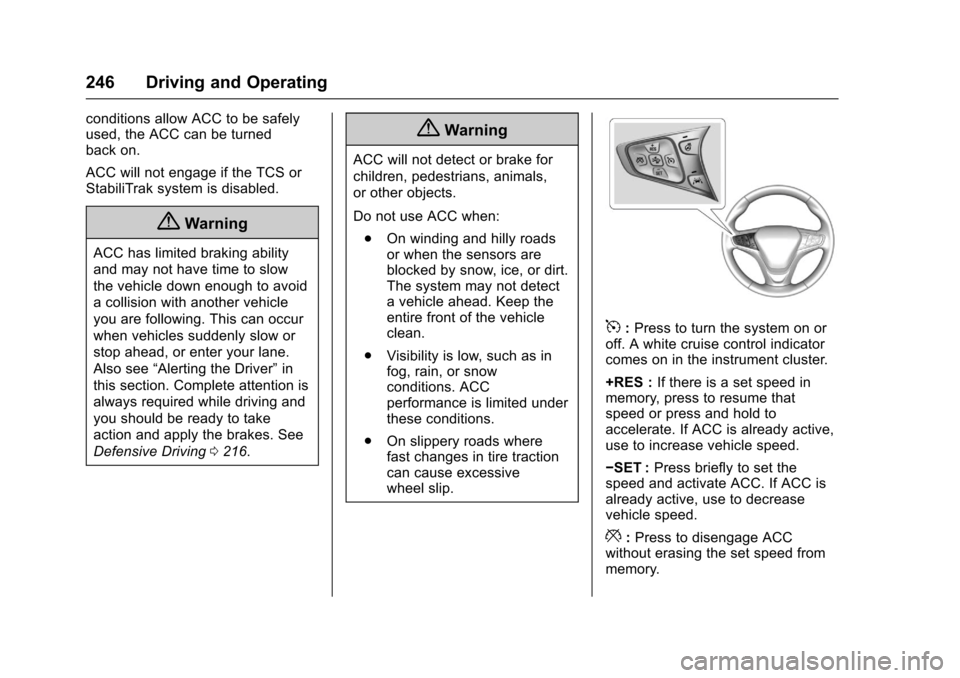
5:Press to turn the system on oroff. A white cruise control indicatorcomes on in the instrument cluster.
+RES :If there is a set speed inmemory, press to resume thatspeed or press and hold toaccelerate. If ACC is already active,use to increase vehicle speed.
✓SET :Press briefly to set thespeed and activate ACC. If ACC isalready active, use to decreasevehicle speed.
*:Press to disengage ACCwithout erasing the set speed frommemory.
Page 253 of 419
Chevrolet Malibu Owner Manual (GMNA-Localizing-U.S./Canada/Mexico-10122664) - 2017 - crc - 5/23/16
252 Driving and Operating
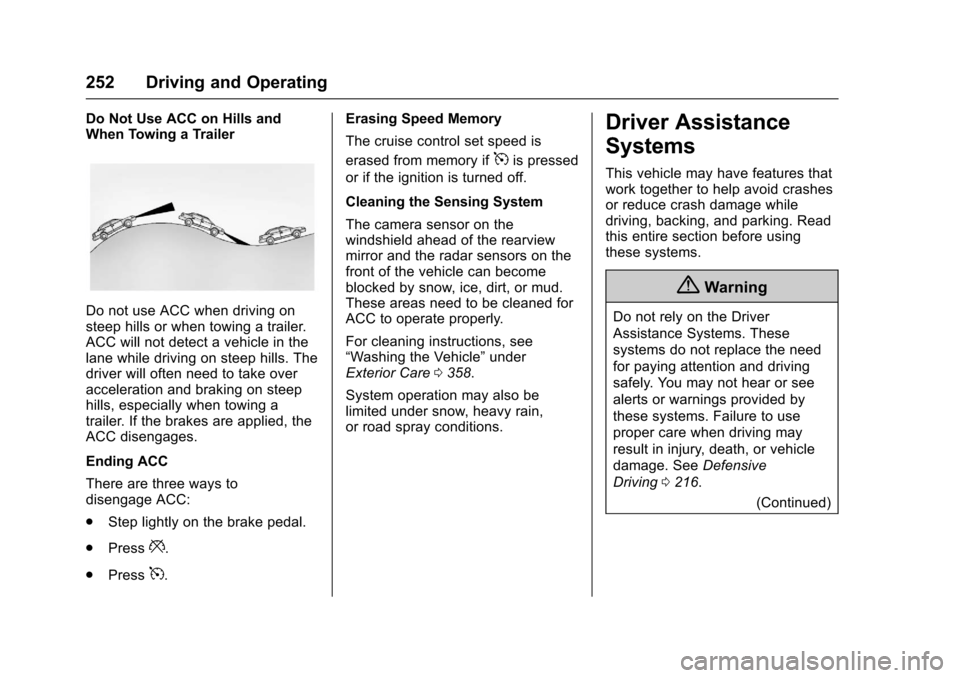
Do Not Use ACC on Hills andWhen Towing a Trailer
Do not use ACC when driving onsteep hills or when towing a trailer.ACC will not detect a vehicle in thelane while driving on steep hills. Thedriver will often need to take overacceleration and braking on steephills, especially when towing atrailer. If the brakes are applied, theACC disengages.
Ending ACC
There are three ways todisengage ACC:
.Step lightly on the brake pedal.
.Press*.
.Press5.
Erasing Speed Memory
The cruise control set speed is
erased from memory if5is pressed
or if the ignition is turned off.
Cleaning the Sensing System
The camera sensor on thewindshield ahead of the rearviewmirror and the radar sensors on thefront of the vehicle can becomeblocked by snow, ice, dirt, or mud.These areas need to be cleaned forACC to operate properly.
For cleaning instructions, see“Washing the Vehicle”underExterior Care0358.
System operation may also belimited under snow, heavy rain,or road spray conditions.
Driver Assistance
Systems
This vehicle may have features thatwork together to help avoid crashesor reduce crash damage whiledriving, backing, and parking. Readthis entire section before usingthese systems.
{Warning
Do not rely on the Driver
Assistance Systems. These
systems do not replace the need
for paying attention and driving
safely. You may not hear or see
alerts or warnings provided by
these systems. Failure to use
proper care when driving may
result in injury, death, or vehicle
damage. SeeDefensive
Driving0216.
(Continued)
Page 254 of 419
Chevrolet Malibu Owner Manual (GMNA-Localizing-U.S./Canada/Mexico-10122664) - 2017 - crc - 5/23/16
Driving and Operating 253
Warning (Continued)
Under many conditions, these
systems will not:
.Detect children,pedestrians, bicyclists,or animals.
.Detect vehicles or objectsoutside the area monitoredby the system.
.Work at all driving speeds.
.Warn you or provide youwith enough time to avoid acrash.
.Work under poor visibility orbad weather conditions.
.Work if the detection sensoris not cleaned or is coveredby ice, snow, mud, or dirt.
(Continued)
Warning (Continued)
.Work if the detection sensor
is covered up, such as with
asticker,magnet,ormetal
plate.
.Work if the area surroundingthe detection sensor isdamaged or not properlyrepaired.
Complete attention is always
required while driving, and you
should be ready to take action
and apply the brakes and/or steer
the vehicle to avoid crashes.
Audible Alert
Some driver assistance featuresalert the driver of obstacles bybeeping. To change the volume ofthe warning chime, see“Comfortand Convenience”underVehiclePersonalization0147.
Assistance Systems for
Parking or Backing
If equipped, the Rear Vision Camera(RVC), Front and Rear ParkingAssist (FRPA), Rear Cross TrafficAlert (RCTA), and AutomaticParking Assist (APA) may help thedriver park or avoid objects. Alwayscheck around the vehicle whenparking or backing.
Rear Vision Camera (RVC)
When the vehicle is shifted intoR(Reverse), the RVC displays animage of the area behind the vehiclein the center stack display. Theprevious screen displays when thevehicle is shifted out of R (Reverse)after a short delay. To return to theprevious screen sooner, press abutton on the infotainment system,shift into P (Park), or reach a vehiclespeed of 8 km/h (5 mph).