2017 CHEVROLET EXPRESS CARGO VAN instrument panel
[x] Cancel search: instrument panelPage 128 of 346
Chevrolet Express Owner Manual (GMNA-Localizing-U.S./Canada/Mexico-9967827) - 2017 - crc - 5/2/16
Lighting 127
Automatic Headlamp
System
When it is dark enough outside andthe headlamp switch is in AUTO,the automatic headlamp systemturns on the headlamps, along withthe taillamps, sidemarker lamps,parking lamps, and the instrumentpanel lights. The radio lights willalso be dim.
To t u r n o f f t h e a u t o m a t i c h e a d l a m psystem, turn the exterior lampcontrol to the off position and thenrelease. For vehicles first sold inCanada, the transmission must bein the P (Park) position, before theautomatic headlamp system can beturned off.
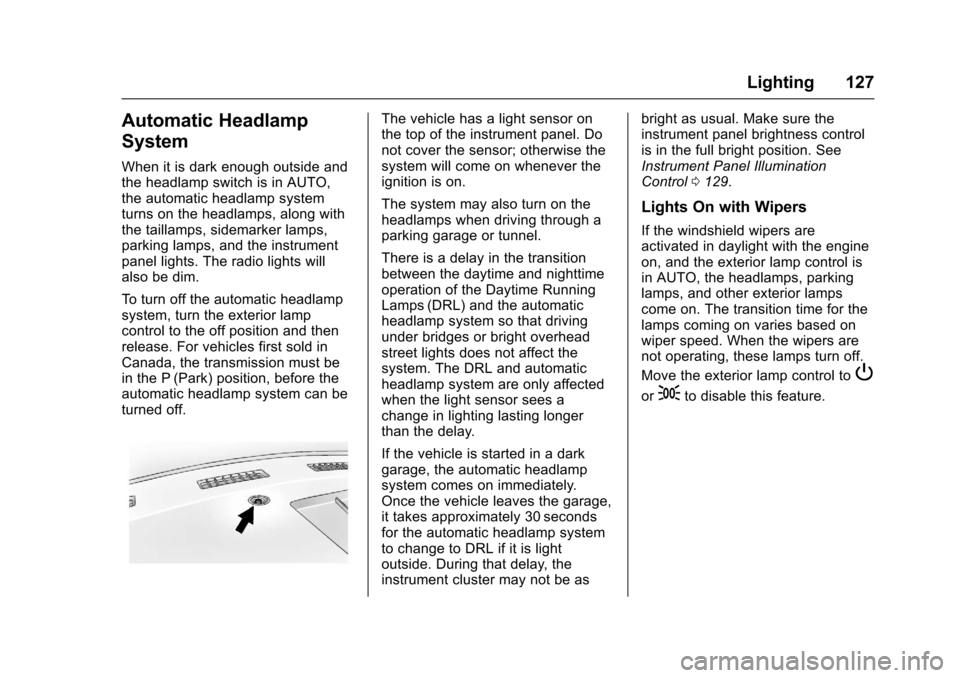
The vehicle has a light sensor onthe top of the instrument panel. Donot cover the sensor; otherwise thesystem will come on whenever theignition is on.
The system may also turn on theheadlamps when driving through aparking garage or tunnel.
There is a delay in the transitionbetween the daytime and nighttimeoperation of the Daytime RunningLamps (DRL) and the automaticheadlamp system so that drivingunder bridges or bright overheadstreet lights does not affect thesystem. The DRL and automaticheadlamp system are only affectedwhen the light sensor sees achange in lighting lasting longerthan the delay.
If the vehicle is started in a darkgarage, the automatic headlampsystem comes on immediately.Once the vehicle leaves the garage,it takes approximately 30 secondsfor the automatic headlamp systemto change to DRL if it is lightoutside. During that delay, theinstrument cluster may not be as
bright as usual. Make sure theinstrument panel brightness controlis in the full bright position. SeeInstrument Panel IlluminationControl0129.
Lights On with Wipers
If the windshield wipers areactivated in daylight with the engineon, and the exterior lamp control isin AUTO, the headlamps, parkinglamps, and other exterior lampscome on. The transition time for thelamps coming on varies based onwiper speed. When the wipers arenot operating, these lamps turn off.
Move the exterior lamp control toP
or;to disable this feature.
Page 130 of 346
Chevrolet Express Owner Manual (GMNA-Localizing-U.S./Canada/Mexico-9967827) - 2017 - crc - 5/2/16
Lighting 129
Interior Lighting
Instrument Panel
Illumination Control
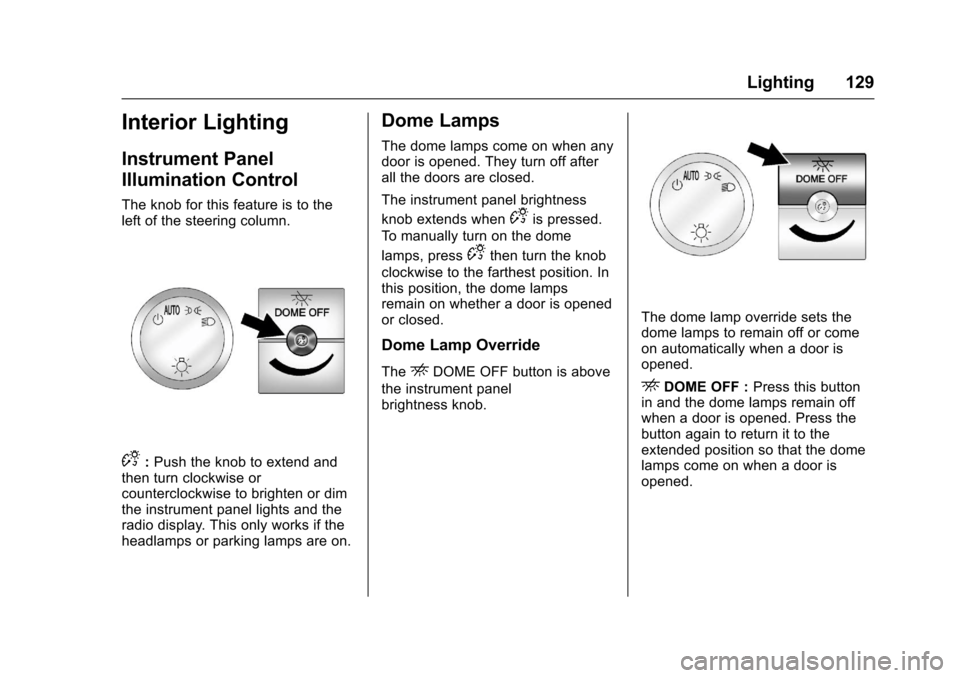
The knob for this feature is to theleft of the steering column.
D:Push the knob to extend andthen turn clockwise orcounterclockwise to brighten or dimthe instrument panel lights and theradio display. This only works if theheadlamps or parking lamps are on.
Dome Lamps
The dome lamps come on when anydoor is opened. They turn off afterall the doors are closed.
The instrument panel brightness
knob extends whenDis pressed.
To m a n u a l l y t u r n o n t h e d o m e
lamps, pressDthen turn the knob
clockwise to the farthest position. Inthis position, the dome lampsremain on whether a door is openedor closed.
Dome Lamp Override
TheEDOME OFF button is above
the instrument panelbrightness knob.
The dome lamp override sets thedome lamps to remain off or comeon automatically when a door isopened.
EDOME OFF :Press this buttonin and the dome lamps remain offwhen a door is opened. Press thebutton again to return it to theextended position so that the domelamps come on when a door isopened.
Page 148 of 346
Chevrolet Express Owner Manual (GMNA-Localizing-U.S./Canada/Mexico-9967827) - 2017 - crc - 5/2/16
Infotainment System 147
SRCE :If equipped, press to listento the radio when a portable audiodevice is playing. The portableaudio device continues playing.
Press to play a CD when a portableaudio device is playing. Press againand the system begins playingaudio from the connected portableaudio player. If a portable audioplayer is not connected,“No InputDevice Found”displays.
Using the USB Port
Radios with a USB port can controlaUSBstoragedeviceoraniPod®
using the radio buttons and knobs.See“Playing an MP3”inCD Player0141for information about how toconnect and control a USB storagedevice or an iPod.
USB Support
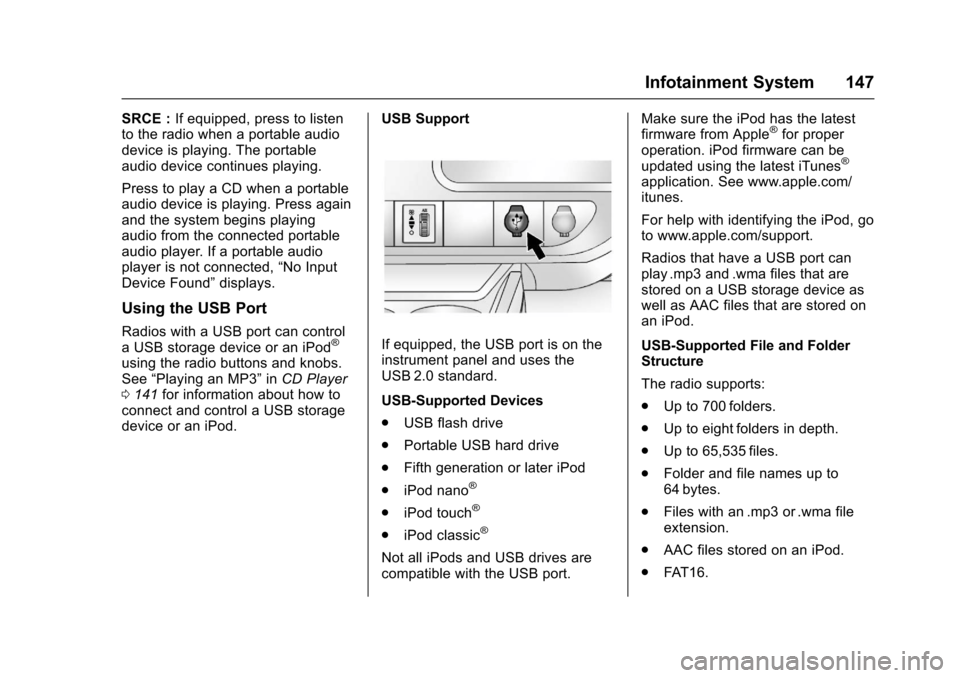
If equipped, the USB port is on theinstrument panel and uses theUSB 2.0 standard.
USB-Supported Devices
.USB flash drive
.Portable USB hard drive
.Fifth generation or later iPod
.iPod nano®
.iPod touch®
.iPod classic®
Not all iPods and USB drives arecompatible with the USB port.
Make sure the iPod has the latestfirmware from Apple®for properoperation. iPod firmware can beupdated using the latest iTunes®
application. See www.apple.com/itunes.
For help with identifying the iPod, goto www.apple.com/support.
Radios that have a USB port canplay .mp3 and .wma files that arestored on a USB storage device aswell as AAC files that are stored onan iPod.
USB-Supported File and FolderStructure
The radio supports:
.Up to 700 folders.
.Up to eight folders in depth.
.Up to 65,535 files.
.Folder and file names up to64 bytes.
.Files with an .mp3 or .wma fileextension.
.AAC files stored on an iPod.
.FAT 1 6 .
Page 149 of 346
Chevrolet Express Owner Manual (GMNA-Localizing-U.S./Canada/Mexico-9967827) - 2017 - crc - 5/2/16
148 Infotainment System
.FAT 3 2 .
Connecting a USB Storage
Device or iPod
The USB port can be used tocontrol an iPod or a USB storagedevice.
To c o n n e c t a U S B s t o r a g e d e v i c e ,connect the device to the USB porton the instrument panel.
To c o n n e c t a n i P o d , c o n n e c t o n eend of the USB cable that camewith the iPod to the iPod’sdockconnector and connect the otherend to the USB port on theinstrument panel. If the vehicle is onand the USB connection works,“OKto disconnect”and a GM logo mayappear on the iPod, and iPodappears on the radio display. TheiPod music appears on the radiodisplay and begins playing.
The iPod charges while it isconnected to the vehicle if thevehicle is in the ACC/ACCESSORYor ON/RUN position. When thevehicle is turned off, the iPod
automatically powers off and will notcharge or draw power from thevehicle's battery.
If you have an older iPod model thatis not supported, it can still be usedby connecting it to the auxiliaryinput jack using a standard 3.5 mm(1/8 in) stereo cable. See“Using theAuxiliary Input Jack”previously inthis section.
Using the Radio to Control a
USB Storage Device or iPod
The radio can control a USBstorage device or an iPod using theradio buttons and knobs, anddisplay song information on theradio display.
f:Turn to select files.
©SEEK :Press to go to the start ofthe track, if more than 10 secondshave played. Press and hold orpress multiple times to continuemoving backward through tracks.
¨SEEK :Press to go to the nexttrack. Press and hold or pressmultiple times to continue movingforward through tracks.
sREV :Press and hold to reverseplayback quickly. Sound is heard at
areducedvolume.ReleasesREV
to resume playing. The elapsed timeof the file displays.
\FWD :Press and hold toadvance playback quickly. Sound isheard at a reduced volume. Release\FWD to resume playing. Theelapsed time of the file displays.
4:Press to display additionalinformation about the selected track.
Using Softkeys to Control a
USB Storage Device or iPod
The five softkeys below the radiodisplay are used to control thefunctions listed below.
To u s e t h e s o f t k e y s :
1. Press the first or fifth softkeybelow the radio display todisplay the functions listedbelow, or press the softkeybelow the function if it iscurrently displayed.
2. Press the softkey below the tabwith the function on it to usethat function.
Page 159 of 346
Chevrolet Express Owner Manual (GMNA-Localizing-U.S./Canada/Mexico-9967827) - 2017 - crc - 5/2/16
158 Climate Controls
Climate Controls
Climate Control Systems
Climate Control Systems . . . . . 158Rear Heating System . . . . . . . . . 160Rear Climate ControlSystem . . . . . . . . . . . . . . . . . . . . . . 161
Air Vents
Air Vents . . . . . . . . . . . . . . . . . . . . . 163
Maintenance
Service . . . . . . . . . . . . . . . . . . . . . . . 163
Climate Control Systems
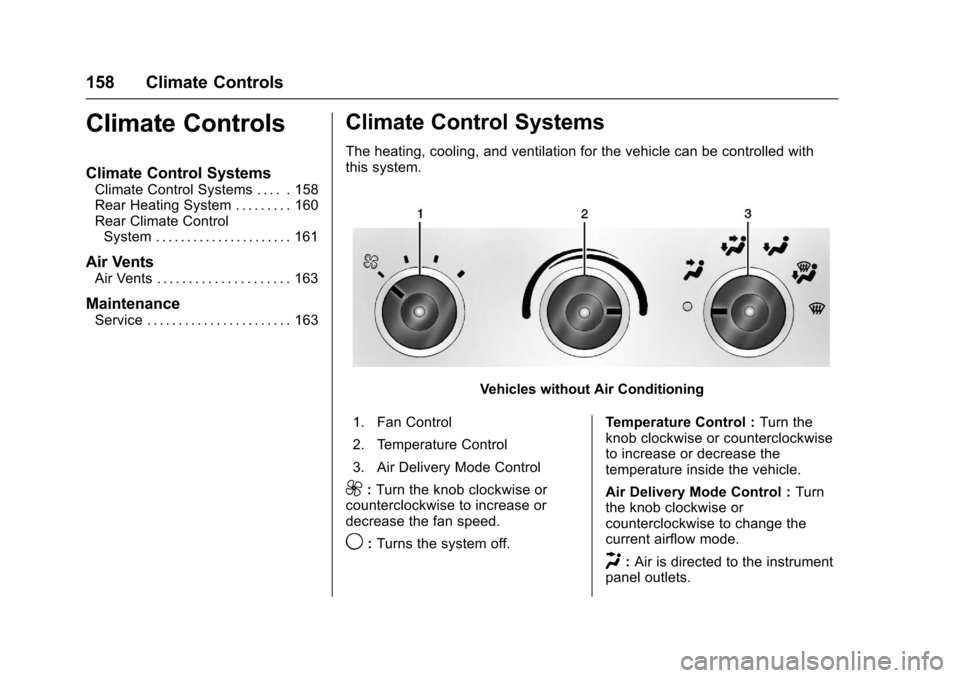
The heating, cooling, and ventilation for the vehicle can be controlled withthis system.
Vehicles without Air Conditioning
1. Fan Control
2. Temperature Control
3. Air Delivery Mode Control
9:Turn the knob clockwise orcounterclockwise to increase ordecrease the fan speed.
9:Turns the system off.
Te m p e r a t u r e C o n t r o l :Turn theknob clockwise or counterclockwiseto increase or decrease thetemperature inside the vehicle.
Air Delivery Mode Control :Turnthe knob clockwise orcounterclockwise to change thecurrent airflow mode.
H:Air is directed to the instrumentpanel outlets.
Page 160 of 346
Chevrolet Express Owner Manual (GMNA-Localizing-U.S./Canada/Mexico-9967827) - 2017 - crc - 5/2/16
Climate Controls 159
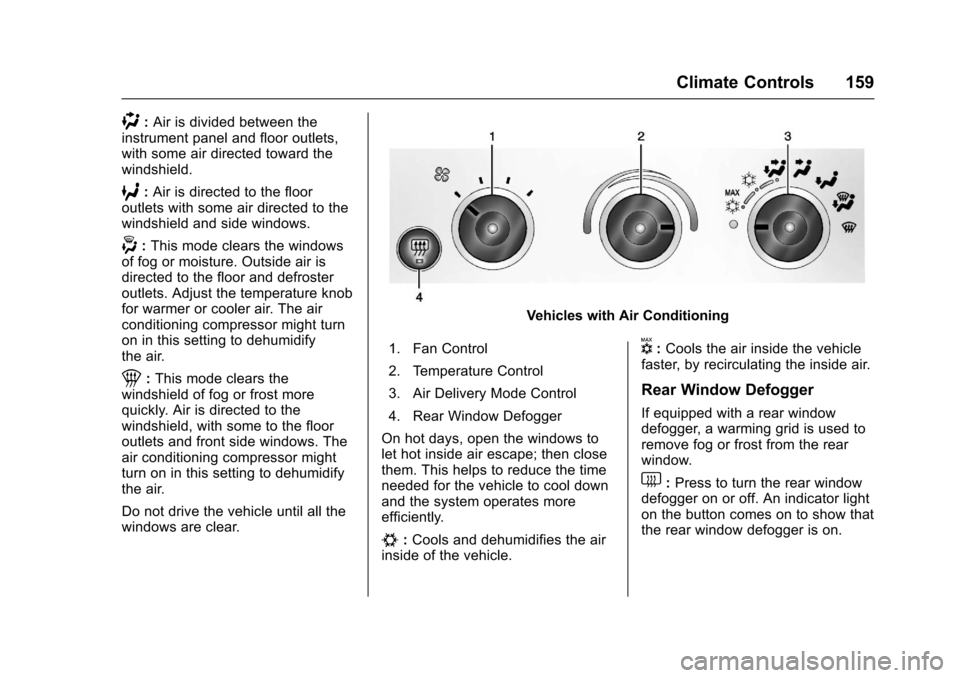
):Air is divided between theinstrument panel and floor outlets,with some air directed toward thewindshield.
6:Air is directed to the flooroutlets with some air directed to thewindshield and side windows.
-:This mode clears the windowsof fog or moisture. Outside air isdirected to the floor and defrosteroutlets. Adjust the temperature knobfor warmer or cooler air. The airconditioning compressor might turnon in this setting to dehumidifythe air.
1:This mode clears thewindshield of fog or frost morequickly. Air is directed to thewindshield, with some to the flooroutlets and front side windows. Theair conditioning compressor mightturn on in this setting to dehumidifythe air.
Do not drive the vehicle until all thewindows are clear.
Vehicles with Air Conditioning
1. Fan Control
2. Temperature Control
3. Air Delivery Mode Control
4. Rear Window Defogger
On hot days, open the windows tolet hot inside air escape; then closethem. This helps to reduce the timeneeded for the vehicle to cool downand the system operates moreefficiently.
#:Cools and dehumidifies the airinside of the vehicle.
V:Cools the air inside the vehiclefaster, by recirculating the inside air.
Rear Window Defogger
If equipped with a rear windowdefogger, a warming grid is used toremove fog or frost from the rearwindow.
1:Press to turn the rear windowdefogger on or off. An indicator lighton the button comes on to show thatthe rear window defogger is on.
Page 161 of 346
Chevrolet Express Owner Manual (GMNA-Localizing-U.S./Canada/Mexico-9967827) - 2017 - crc - 5/2/16
160 Climate Controls
The defogger only works when theignition is in ON/RUN. The defoggerturns off if the ignition is in the ACC/ACCESSORY or LOCK/OFFposition.
Do not drive the vehicle until all thewindows are clear.
Caution
Do not use a razor blade or sharp
object to clear the inside rear
window. Do not adhere anything
to the defogger grid lines in the
rear glass. These actions may
damage the rear defogger.
Repairs would not be covered by
the vehicle warranty.
Rear Heating System
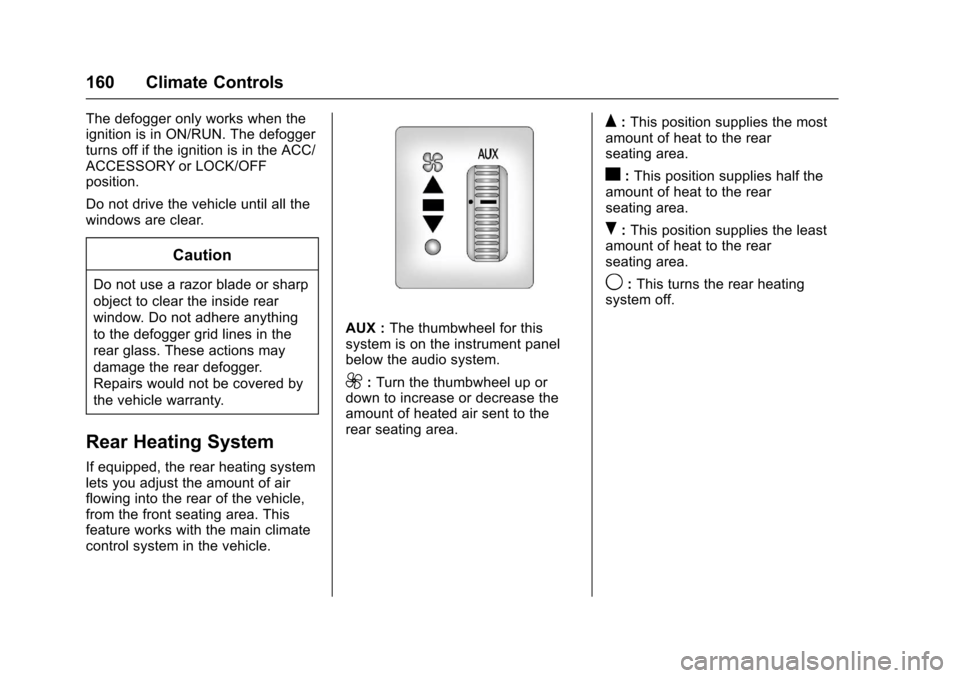
If equipped, the rear heating systemlets you adjust the amount of airflowing into the rear of the vehicle,from the front seating area. Thisfeature works with the main climatecontrol system in the vehicle.
AUX :The thumbwheel for thissystem is on the instrument panelbelow the audio system.
9:Turn the thumbwheel up ordown to increase or decrease theamount of heated air sent to therear seating area.
Q:This position supplies the mostamount of heat to the rearseating area.
c:This position supplies half theamount of heat to the rearseating area.
R:This position supplies the leastamount of heat to the rearseating area.
9:This turns the rear heatingsystem off.
Page 164 of 346
Chevrolet Express Owner Manual (GMNA-Localizing-U.S./Canada/Mexico-9967827) - 2017 - crc - 5/2/16
Climate Controls 163
2:Air is directed to the flooroutlets.
Be sure to keep the area under thefront seats clear of any objects sothat the air inside of the vehicle cancirculate effectively.
For information on how to use themain climate control system, seeClimate Control Systems0158.Forinformation on ventilation, seeAirVents0163.
Air Vents
Use the outlets located near thecenter and on the sides of theinstrument panel to change thedirection of airflow.
Operation Tips
.Clear away any ice, snow orleaves from the air inlets at thebase of the windshield that mayblock the flow of air into thevehicle.
.Use of non-GM approved hooddeflectors may adversely affectthe performance of the system.
.Keep the path under the frontseats clear of objects to helpcirculate the air inside of thevehicle more effectively.
Maintenance
Service
All vehicles have a label underhoodthat identifies the refrigerant used inthe vehicle. The refrigerant systemshould only be serviced by trainedand certified technicians. The airconditioning evaporator shouldnever be repaired or replaced byone from a salvage vehicle.It should only be replaced by a newevaporator to ensure proper andsafe operation.
During service, all refrigerantsshould be reclaimed with properequipment. Venting refrigerantsdirectly to the atmosphere is harmfulto the environment and may alsocreate unsafe conditions based oninhalation, combustion, frostbite,or other health-based concerns.