2017 CHEVROLET EXPRESS CARGO VAN audio
[x] Cancel search: audioPage 153 of 346
Chevrolet Express Owner Manual (GMNA-Localizing-U.S./Canada/Mexico-9967827) - 2017 - crc - 5/2/16
152 Infotainment System
can be used while the key is in theON/RUN or ACC/ACCESSORYposition. The range of the Bluetoothsystem can be up to 9.1 m (30 ft).Not all phones support all functions,and not all phones work with thein-vehicle Bluetooth system. Seewww.gm.com/bluetooth for moreinformation on compatible phones inU.S. and Canada only.
Voice Recognition
The Bluetooth system uses voicerecognition to interpret voicecommands to dial phone numbersand name tags.
For additional information, say“Help”while you are in a voicerecognition menu.
Noise :Keep interior noise levels toaminimum.Thesystemmaynotrecognize voice commands if thereis too much background noise.
When to Speak :Ashorttonesounds after the system respondsindicating when it is waiting for avoice command. Wait until the toneand then speak.
How to Speak :Speak clearly in acalm and natural voice.
Audio System
When using the in-vehicle Bluetoothsystem, sound comes through thevehicle's front audio systemspeakers and overrides the audiosystem. Use the audio systemvolume knob, during a call, tochange the volume level. Theadjusted volume level remains inmemory for later calls. To preventmissed calls, a minimum volumelevel is used if the volume is turneddown too low.
Bluetooth Controls
Use the buttons on the steeringwheel to operate the in-vehicleBluetooth system. SeeSteeringWheel Controls088.
b/g:Press to answer incomingcalls, confirm system information,and start speech recognition.
c/x:Press to end a call, rejectacall,orcancelanoperation.
Pairing
ABluetooth-enabledcellphonemust be paired to the Bluetoothsystem and then connected to thevehicle before it can be used. Seethe cell phone manufacturer's userguide for Bluetooth functions beforepairing the cell phone. If a Bluetoothphone is not connected, calls will bemade using OnStar Hands-FreeCalling, if equipped. See OnStar,if equipped.
Pairing Information
.ABluetoothphonewithMP3capability cannot be paired tothe vehicle as a phone and anMP3 player at the same time.
.Up to five cell phones can bepaired to the Bluetooth system.
.The pairing process is disabledwhen the vehicle is moving.
.Pairing only needs to becompleted once, unless thepairing information on the cellphone changes or the cell phoneis deleted from the system.
Page 156 of 346
Chevrolet Express Owner Manual (GMNA-Localizing-U.S./Canada/Mexico-9967827) - 2017 - crc - 5/2/16
Infotainment System 155
To d e l e t e a l l n a m e t a g s :
1. Press and holdb/gfor
two seconds.
2. Say“Delete all name tags.”
Listing Stored Numbers
The list command will list all storednumbers and name tags.
Using the“List”Command
1. Press and holdb/gfor
two seconds.
2. Say“Directory.”
3. Say“Hands-Free Calling.”
4. Say“List.”
Making a Call
Calls can be made using thefollowing commands.
Dial or Call :The dial or callcommand can be usedinterchangeably to dial a phonenumber or a stored name tag.
Digit Dial :This command allows aphone number to be dialed byentering the digits one at a time.
Re-dial :This command is used todial the last number used on the cellphone.
Using the“Dial”or“Call”Command
1. Press and holdb/gfor
two seconds.
2. Say“Dial”or“Call.”
3. Say the entire number withoutpausing, or say the name tag.
Once connected, the person calledwill be heard through the audiospeakers.
Calling Emergency
1. Press and holdb/gfor
two seconds. The systemresponds“Ready,”followed byatone.
2. Say“Dial”or“Call.”
3. Say [emergency number].
4. Say“Dial”or“Call.”
Once connected, the person calledwill be heard through the audiospeakers.
Using the“Digit Dial”Command
The digit dial command allows aphone number to be dialed byentering the digits one at a time.After each digit is entered, thesystem repeats back the digit itheard followed by a tone.
If an unwanted number isrecognized by the system, say“Clear”at any time to clear the lastnumber.
To h e a r a l l o f t h e n u m b e r srecognized by the system, say“Ve r i f y”at any time.
1. Press and holdb/gfor
two seconds.
2. Say“Digit Dial.”
3. Say each digit, one at a time,that you want to dial. Aftereach digit is entered, thesystem repeats back the digit itheard followed by a tone. Afterthe last digit has been entered,say“Dial.”
Once connected, the person calledwill be heard through the audiospeakers.
Page 157 of 346
Chevrolet Express Owner Manual (GMNA-Localizing-U.S./Canada/Mexico-9967827) - 2017 - crc - 5/2/16
156 Infotainment System
Using the“Re-dial”Command
1. Press and holdb/gfor
two seconds.
2. After the tone, say“Re-dial.”
Once connected, the person calledwill be heard through the audiospeakers.
Receiving a Call
When an incoming call is received,the audio system mutes and a ringtone is heard in the vehicle.
.Pressb/gto answer the call.
.Pressc/xto ignore a call.
Call Waiting
Call waiting must be supported onthe cell phone and enabled by thewireless service carrier.
.Pressb/gto answer an
incoming call when another callis active. The original call isplaced on hold.
.Pressb/gagain to return to
the original call.
.To i g n o r e t h e i n c o m i n g c a l l , n oaction is required.
.Pressc/xto disconnect the
current call and switch to the callon hold.
Three-Way Calling
Three-way calling must besupported on the cell phone andenabled by the wireless servicecarrier.
1. While on a call, pressb/g.
2. Say“Three-way call.”
3. Use the dial or call commandto dial the number of the thirdparty to be called.
4. Once the call is connected,
pressb/gto link all callers
together.
Ending a Call
Pressc/xto end a call.
Muting a Call
During a call, all sounds from insidethe vehicle can be muted so that theperson on the other end of the callcannot hear them.
.To m u t e a c a l l , p r e s sb/g,and
then say“Mute call.”
.To c a n c e l m u t e , p r e s sb/g,
and then say“Un-mute call.”
Transferring a Call
Audio can be transferred betweenthe Bluetooth system and the cellphone.
The cell phone must be paired andconnected with the Bluetoothsystem before a call can betransferred. The connection processcan take up to two minutes after theignition is turned to ON/RUN.
Transferring Audio from theBluetooth System to a Cell Phone
During a call with the audio in thevehicle:
1. Pressb/g.
2. Say“Transfer Call.”
Page 158 of 346
Chevrolet Express Owner Manual (GMNA-Localizing-U.S./Canada/Mexico-9967827) - 2017 - crc - 5/2/16
Infotainment System 157
Transferring Audio to theBluetooth System from a CellPhone
During a call with the audio on the
cell phone, pressb/g.Theaudio
transfers to the vehicle. If the audiodoes not transfer to the vehicle, usethe audio transfer feature on the cellphone. See your cell phonemanufacturer's user guide for moreinformation.
Voice Pass-Thru
Voice pass-thru allows access to thevoice recognition commands on thecell phone. See your cell phonemanufacturer's user guide to see ifthe cell phone supports this feature.
To a c c e s s c o n t a c t s s t o r e d i n t h e c e l lphone:
1. Press and holdb/gfor
two seconds.
2. Say“Bluetooth.”This commandcan be skipped.
3. Say“Vo i c e .”The systemresponds“OK, accessing
The cell phone's normal promptmessages will go through their cycleaccording to the phone's operatinginstructions.
Dual Tone Multi-Frequency
(DTMF) Tones
The Bluetooth system can sendnumbers and the numbers stored asname tags during a call. You canuse this feature when calling amenu-driven phone system.Account numbers can also bestored for use.
Sending a Number or Name TagDuring a Call
1. Pressb/g.Thesystem
responds“Ready,”followed byatone.
2. Say“Dial.”
3. Say the number or name tagto send.
Clearing the System
Unless information is deleted out ofthe in-vehicle Bluetooth system, itwill be retained indefinitely. Thisincludes all saved name tags in the
phone book and phone pairinginformation. For information on howto delete this information, see theprevious section“Deleting a PairedPhone”and the previous sectionson deleting name tags.
Other Information
The Bluetooth®word mark andlogos are owned by the Bluetooth®
SIG, Inc. and any use of such marksby General Motors is under license.Other trademarks and trade namesare those of their respective owners.
SeeRadio FrequencyStatement0322.
Page 161 of 346
Chevrolet Express Owner Manual (GMNA-Localizing-U.S./Canada/Mexico-9967827) - 2017 - crc - 5/2/16
160 Climate Controls
The defogger only works when theignition is in ON/RUN. The defoggerturns off if the ignition is in the ACC/ACCESSORY or LOCK/OFFposition.
Do not drive the vehicle until all thewindows are clear.
Caution
Do not use a razor blade or sharp
object to clear the inside rear
window. Do not adhere anything
to the defogger grid lines in the
rear glass. These actions may
damage the rear defogger.
Repairs would not be covered by
the vehicle warranty.
Rear Heating System
If equipped, the rear heating systemlets you adjust the amount of airflowing into the rear of the vehicle,from the front seating area. Thisfeature works with the main climatecontrol system in the vehicle.
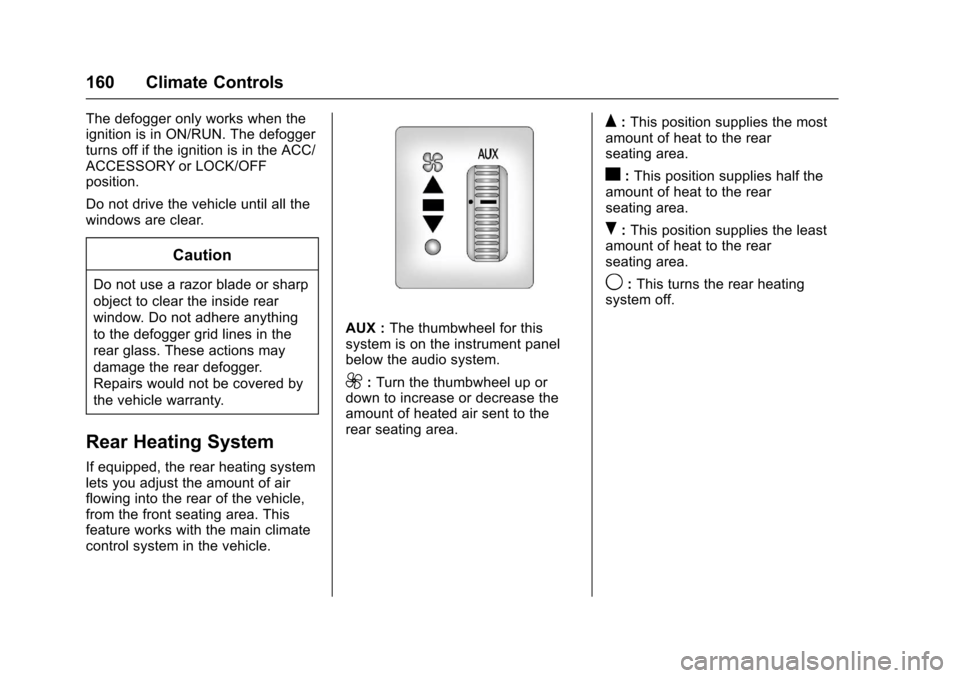
AUX :The thumbwheel for thissystem is on the instrument panelbelow the audio system.
9:Turn the thumbwheel up ordown to increase or decrease theamount of heated air sent to therear seating area.
Q:This position supplies the mostamount of heat to the rearseating area.
c:This position supplies half theamount of heat to the rearseating area.
R:This position supplies the leastamount of heat to the rearseating area.
9:This turns the rear heatingsystem off.
Page 181 of 346
Chevrolet Express Owner Manual (GMNA-Localizing-U.S./Canada/Mexico-9967827) - 2017 - crc - 5/6/16
180 Driving and Operating
Warning (Continued)
condition, or using adamaged heater orextension cord, could makeit overheat and cause a fire,property damage, electricshock, and injury.
.Do not operate the vehiclewith the heater cordpermanently attached to thevehicle. Possible heatercord and thermostatdamage could occur.
.While in use, do not let theheater cord touch vehicleparts or sharp edges. Neverclose the hood on theheater cord.
.Before starting the vehicle,unplug the cord, reattachthe cover to the plug, andsecurely fasten the cord.Keep the cord away fromany moving parts.
4. Before starting the engine, besure to unplug and store thecord as it was before to keep itaway from moving engine partsand prevent damage.
The length of time the heater shouldremain plugged in depends onseveral factors. Ask a dealer in thearea where you will be parking thevehicle for the best advice on this.
Retained Accessory
Power (RAP)
These vehicle accessories can beused for up to 10 minutes after theengine is turned off:
.Audio System
.Power Windows (if equipped)
These features will work when theignition key is in ON/RUN or ACC/ACCESSORY. Once the key isturned from ON/RUN to LOCK/OFF,power to the radio and powerwindows will continue to work10 minutes or until the driver door isopened.
Shifting Into Park
1. Hold the brake pedal down,then set the parking brake.
2. Move the shift lever into theP(Park) position by pulling theshift lever toward you andmoving it up as far as it will go.
3. Turn the ignition key toLOCK/OFF.
4. Remove the key and take itwith you. If you can leave thevehicle with the ignition key inyour hand, the vehicle isin P (Park).
Leaving the Vehicle with the
Engine Running
{Warning
It can be dangerous to leave the
vehicle with the engine running.
It could overheat and catch fire.
(Continued)
Page 332 of 346
Chevrolet Express Owner Manual (GMNA-Localizing-U.S./Canada/Mexico-9967827) - 2017 - crc - 5/2/16
OnStar 331
OnStar Additional
Information
In-Vehicle Audio Messages
Audio messages may play importantinformation at the following times:
.Prior to vehicle purchase.
PressQto set up an account.
.With the OnStar Basic Plan,every 60 days.
.After change in ownership andat 90 days.
Transferring Service
PressQto request account transfer
eligibility information. The Advisorcan cancel or change accountinformation.
Selling/Transferring the
Vehicle
Call 1-888-4ONSTAR(1-888-466-7827) immediately toterminate your OnStar services ifthe vehicle is disposed of, sold,transferred, or if the lease ends.
Reactivation for Subsequent
Owners
PressQand follow the prompts to
speak to an Advisor as soon aspossible. The Advisor will updatevehicle records and explain OnStarservice options.
How OnStar Service Works
Automatic Crash Response,Emergency Services, Crisis Assist,Stolen Vehicle Assistance,Advanced Vehicle Diagnostics,Remote Services, RoadsideAssistance, Turn-by-TurnNavigation, and Hands-Free Callingare available on most vehicles. Notall OnStar services are availableeverywhere or on all vehicles. Formore information, a full descriptionof OnStar services, systemlimitations, and OnStar User Terms,Privacy Statement, and SoftwareTe r m s :
.Call 1-888-4ONSTAR(1-888-466-7827).
.See www.onstar.com (U.S.).
.See www.onstar.ca (Canada).
.Call TTY 1-877-248-2080.
.PressQto speak with an
Advisor.
OnStar services cannot work unlessthe vehicle is in a place whereOnStar has an agreement with awireless service provider for servicein that area. The wireless serviceprovider must also have coverage,network capacity, reception, andtechnology compatible with OnStarservices. Service involving locationinformation about the vehicle cannotwork unless GPS signals areavailable, unobstructed, andcompatible with the OnStarhardware. OnStar services may notwork if the OnStar equipment is notproperly installed or it has not beenproperly maintained. If equipment orsoftware is added, connected,or modified, OnStar services maynot work. Other problems beyondthe control of OnStar—such ashills, tall buildings, tunnels, weather,electrical system design andarchitecture of the vehicle, damage
Page 337 of 346

Chevrolet Express Owner Manual (GMNA-Localizing-U.S./Canada/Mexico-9967827) - 2017 - crc - 5/2/16
336 Index
IndexA
Accessories and
Modifications . . . . . . . . . . . . . . . . . . 216
Accessory Power . . . . . . . . . . . . . . . 180
Add-On Electrical Equipment . . . 212
Additional Information
OnStar®...................... 331
Additional Maintenance
and Care . . . . . . . . . . . . . . . . . . . . . . 302
Air Cleaner/Filter, Engine . . . . . . . 225
Air Vents . . . . . . . . . . . . . . . . . . . . . . . 163
Airbag System
Check . . . . . . . . . . . . . . . . . . . . . . . . . . 65
How Does an Airbag
Restrain? . . . . . . . . . . . . . . . . . . . . . 60
What Makes an Airbag
Inflate? . . . . . . . . . . . . . . . . . . . . . . . . 60
What Will You See after an
Airbag Inflates? . . . . . . . . . . . . . . . 60
When Should an Airbag
Inflate? . . . . . . . . . . . . . . . . . . . . . . . . 59
Where Are the Airbags? . . . . . . . . 57
Airbags
Adding Equipment to the
Vehicle . . . . . . . . . . . . . . . . . . . . . . . . 65
Light On-Off . . . . . . . . . . . . . . . . . . 100
On-Off Light . . . . . . . . . . . . . . . . . . 100
On-Off Switch . . . . . . . . . . . . . . . . . . 62
Airbags (cont'd)
Readiness Light . . . . . . . . . . . . . . . . 99
Servicing Airbag-Equipped
Vehicles . . . . . . . . . . . . . . . . . . . . . . . 65
System Check . . . . . . . . . . . . . . . . . . 55
All-Season Tires . . . . . . . . . . . . . . . . 253
All-Terrain Tires . . . . . . . . . . . . . . . . . 253
AM-FM Radio . . . . . . . . . . . . . . . . . . . 138
Antenna
Multi-band . . . . . . . . . . . . . . . . . . . . 141
Antilock Brake System (ABS) . . . 188
Warning Light . . . . . . . . . . . . . . . . . 104
Appearance Care
Exterior . . . . . . . . . . . . . . . . . . . . . . . 288
Interior . . . . . . . . . . . . . . . . . . . . . . . . 292
Ashtrays . . . . . . . . . . . . . . . . . . . . . . . . . 94
Assistance Program,
Roadside . . . . . . . . . . . . . . . . . . . . . . 316
Audio
Theft-Deterrent Feature . . . . . . . 133
Audio Players
CD . . . . . . . . . . . . . . . . . . . . . . . . . . . 141
Automatic
Door Locks . . . . . . . . . . . . . . . . . . . . . 30
Headlamp System . . . . . . . . . . . . 127
Transmission . . . . . . . . . . . . . . . . . 183
Transmission Fluid . . . . . . . . . . . 222