2017 CHEVROLET EXPRESS CARGO VAN radio
[x] Cancel search: radioPage 93 of 346
Chevrolet Express Owner Manual (GMNA-Localizing-U.S./Canada/Mexico-9967827) - 2017 - crc - 5/2/16
92 Instruments and Controls
Clock
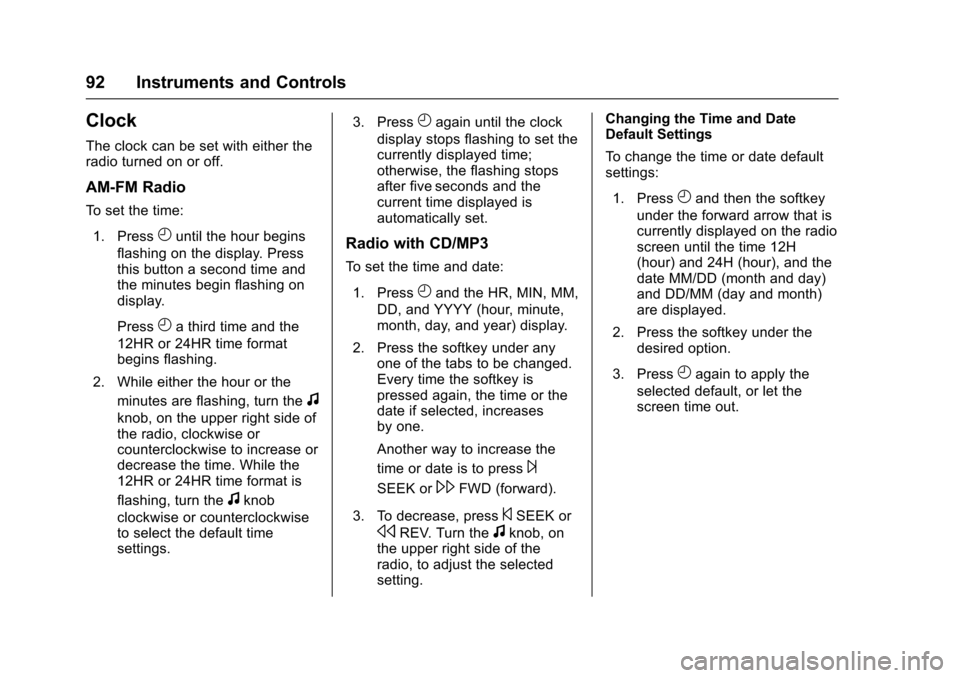
The clock can be set with either theradio turned on or off.
AM-FM Radio
To s e t t h e t i m e :
1. PressHuntil the hour begins
flashing on the display. Pressthis button a second time andthe minutes begin flashing ondisplay.
PressHathirdtimeandthe
12HR or 24HR time formatbegins flashing.
2. While either the hour or the
minutes are flashing, turn thef
knob, on the upper right side ofthe radio, clockwise orcounterclockwise to increase ordecrease the time. While the12HR or 24HR time format is
flashing, turn thefknob
clockwise or counterclockwiseto select the default timesettings.
3. PressHagain until the clock
display stops flashing to set thecurrently displayed time;otherwise, the flashing stopsafter five seconds and thecurrent time displayed isautomatically set.
Radio with CD/MP3
To s e t t h e t i m e a n d d a t e :
1. PressHand the HR, MIN, MM,
DD, and YYYY (hour, minute,month, day, and year) display.
2. Press the softkey under anyone of the tabs to be changed.Every time the softkey ispressed again, the time or thedate if selected, increasesby one.
Another way to increase the
time or date is to press¨
SEEK or\FWD (forward).
3. To decrease, press©SEEK or
sREV. Turn thefknob, onthe upper right side of theradio, to adjust the selectedsetting.
Changing the Time and DateDefault Settings
To c h a n g e t h e t i m e o r d a t e d e f a u l tsettings:
1. PressHand then the softkey
under the forward arrow that iscurrently displayed on the radioscreen until the time 12H(hour) and 24H (hour), and thedate MM/DD (month and day)and DD/MM (day and month)are displayed.
2. Press the softkey under thedesired option.
3. PressHagain to apply the
selected default, or let thescreen time out.
Page 103 of 346

Chevrolet Express Owner Manual (GMNA-Localizing-U.S./Canada/Mexico-9967827) - 2017 - crc - 5/2/16
102 Instruments and Controls
Center (DIC) can also appear. SeeBattery Voltage and ChargingMessages011 2for moreinformation. This light could indicatethat there are problems with agenerator drive belt, or that there isan electrical problem. Have itchecked right away. If the vehiclemust be driven a short distance withthe light on, turn off accessories,such as the radio and airconditioner.
Malfunction Indicator
Lamp (Check Engine
Light)
This light is part of the vehicle’semission control on-boarddiagnostic system. If this light is onwhile the engine is running, amalfunction has been detected andthe vehicle may require service. Thelight should come on to show that itis working when the ignition is inON/RUN and the engine is notrunning. SeeIgnitionPositions0176.
Malfunctions are often indicated bythe system before any problem isnoticeable. Being aware of the lightand seeking service promptly whenit comes on may prevent damage.
Caution
If the vehicle is driven continually
with this light on, the emission
control system may not work as
well, the fuel economy may be
lower, and the vehicle may not
run smoothly. This could lead to
costly repairs that might not be
covered by the vehicle warranty.
Caution
Modifications to the engine,
transmission, exhaust, intake,
or fuel system, or the use of
replacement tires that do not
meet the original tire
specifications, can cause this light
to come on. This could lead to
costly repairs not covered by the
vehicle warranty. This could also
affect the vehicle’sabilitytopass
an Emissions Inspection/
Maintenance test. See
Accessories and
Modifications0216.
If the light is flashing :Amalfunction has been detected thatcould damage the emission controlsystem and increase vehicleemissions. Diagnosis and servicemay be required.
To h e l p p r e v e n t d a m a g e , r e d u c evehicle speed and avoid hardaccelerations and uphill grades.
Page 128 of 346
Chevrolet Express Owner Manual (GMNA-Localizing-U.S./Canada/Mexico-9967827) - 2017 - crc - 5/2/16
Lighting 127
Automatic Headlamp
System
When it is dark enough outside andthe headlamp switch is in AUTO,the automatic headlamp systemturns on the headlamps, along withthe taillamps, sidemarker lamps,parking lamps, and the instrumentpanel lights. The radio lights willalso be dim.
To t u r n o f f t h e a u t o m a t i c h e a d l a m psystem, turn the exterior lampcontrol to the off position and thenrelease. For vehicles first sold inCanada, the transmission must bein the P (Park) position, before theautomatic headlamp system can beturned off.
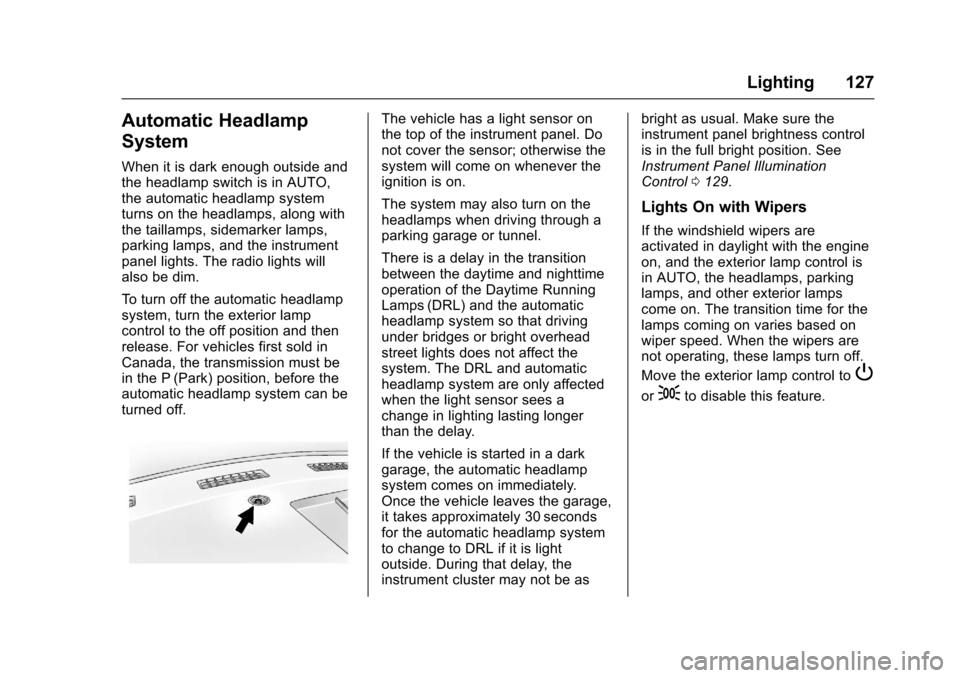
The vehicle has a light sensor onthe top of the instrument panel. Donot cover the sensor; otherwise thesystem will come on whenever theignition is on.
The system may also turn on theheadlamps when driving through aparking garage or tunnel.
There is a delay in the transitionbetween the daytime and nighttimeoperation of the Daytime RunningLamps (DRL) and the automaticheadlamp system so that drivingunder bridges or bright overheadstreet lights does not affect thesystem. The DRL and automaticheadlamp system are only affectedwhen the light sensor sees achange in lighting lasting longerthan the delay.
If the vehicle is started in a darkgarage, the automatic headlampsystem comes on immediately.Once the vehicle leaves the garage,it takes approximately 30 secondsfor the automatic headlamp systemto change to DRL if it is lightoutside. During that delay, theinstrument cluster may not be as
bright as usual. Make sure theinstrument panel brightness controlis in the full bright position. SeeInstrument Panel IlluminationControl0129.
Lights On with Wipers
If the windshield wipers areactivated in daylight with the engineon, and the exterior lamp control isin AUTO, the headlamps, parkinglamps, and other exterior lampscome on. The transition time for thelamps coming on varies based onwiper speed. When the wipers arenot operating, these lamps turn off.
Move the exterior lamp control toP
or;to disable this feature.
Page 130 of 346
Chevrolet Express Owner Manual (GMNA-Localizing-U.S./Canada/Mexico-9967827) - 2017 - crc - 5/2/16
Lighting 129
Interior Lighting
Instrument Panel
Illumination Control
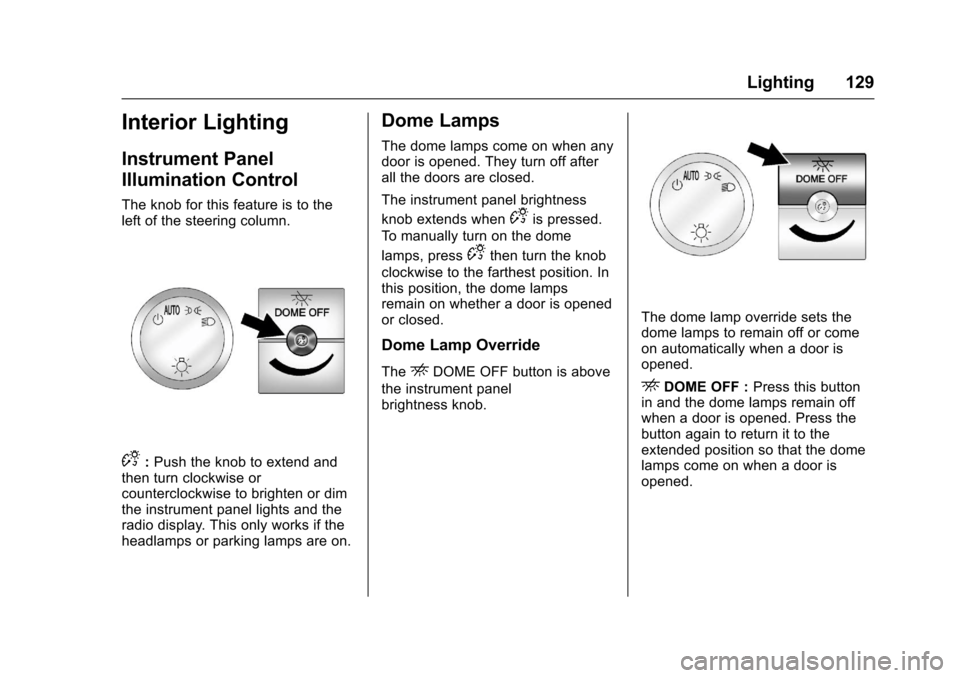
The knob for this feature is to theleft of the steering column.
D:Push the knob to extend andthen turn clockwise orcounterclockwise to brighten or dimthe instrument panel lights and theradio display. This only works if theheadlamps or parking lamps are on.
Dome Lamps
The dome lamps come on when anydoor is opened. They turn off afterall the doors are closed.
The instrument panel brightness
knob extends whenDis pressed.
To m a n u a l l y t u r n o n t h e d o m e
lamps, pressDthen turn the knob
clockwise to the farthest position. Inthis position, the dome lampsremain on whether a door is openedor closed.
Dome Lamp Override
TheEDOME OFF button is above
the instrument panelbrightness knob.
The dome lamp override sets thedome lamps to remain off or comeon automatically when a door isopened.
EDOME OFF :Press this buttonin and the dome lamps remain offwhen a door is opened. Press thebutton again to return it to theextended position so that the domelamps come on when a door isopened.
Page 133 of 346
Chevrolet Express Owner Manual (GMNA-Localizing-U.S./Canada/Mexico-9967827) - 2017 - crc - 5/2/16
132 Infotainment System
Infotainment
System
Introduction
Infotainment . . . . . . . . . . . . . . . . . . 132Theft-Deterrent Feature . . . . . . 133Overview (AM-FM Radio) . . . . . 133Overview (Radio withCD/MP3) . . . . . . . . . . . . . . . . . . . . 135Operation . . . . . . . . . . . . . . . . . . . . . 136
Radio
AM-FM Radio . . . . . . . . . . . . . . . . 138Satellite Radio . . . . . . . . . . . . . . . . 139Radio Reception . . . . . . . . . . . . . . 140Multi-Band Antenna . . . . . . . . . . 141
Audio Players
Avoiding Untrusted MediaDevices . . . . . . . . . . . . . . . . . . . . . 141CD Player . . . . . . . . . . . . . . . . . . . . 141Auxiliary Devices . . . . . . . . . . . . . 146
OnStar System
OnStar System . . . . . . . . . . . . . . . 150
Phone
Bluetooth . . . . . . . . . . . . . . . . . . . . . 151
Introduction
Infotainment
Base radio information is included inthis manual. See the infotainmentmanual for information on otheravailable infotainment systems.
Read the following pages tobecome familiar with the BaseRadio features.
{Warning
Ta k i n g y o u r e y e s o f f t h e r o a d f o r
too long or too often while using
any infotainment feature can
cause a crash. You or others
could be injured or killed. Do not
give extended attention to
infotainment tasks while driving.
Limit your glances at the vehicle
displays and focus your attention
on driving. Use voice commands
whenever possible.
The infotainment system has built-infeatures intended to help avoiddistraction by disabling some
functions when driving. Thesefunctions may gray out when theyare unavailable. Many infotainmentfeatures are also available throughthe instrument cluster and steeringwheel controls.
Before driving:
.Become familiar with theoperation, faceplate buttons, andscreen buttons.
.Set up the audio by presettingfavorite stations, setting thetone, and adjusting thespeakers.
.Set up phone numbers inadvance so they can be calledeasily by pressing a singlebutton or by using a single voicecommand if equipped withBluetooth phone capability.
SeeDefensive Driving0165.
To p l a y t h e i n f o t a i n m e n t s y s t e m w i t hthe ignition off, seeRetainedAccessory Power (RAP)0180.
Page 134 of 346
Chevrolet Express Owner Manual (GMNA-Localizing-U.S./Canada/Mexico-9967827) - 2017 - crc - 5/2/16
Infotainment System 133
Theft-Deterrent Feature
The theft-deterrent feature works bylearning a portion of the VehicleIdentification Number (VIN) to theinfotainment system. Theinfotainment system does notoperate if it is stolen or moved to adifferent vehicle.
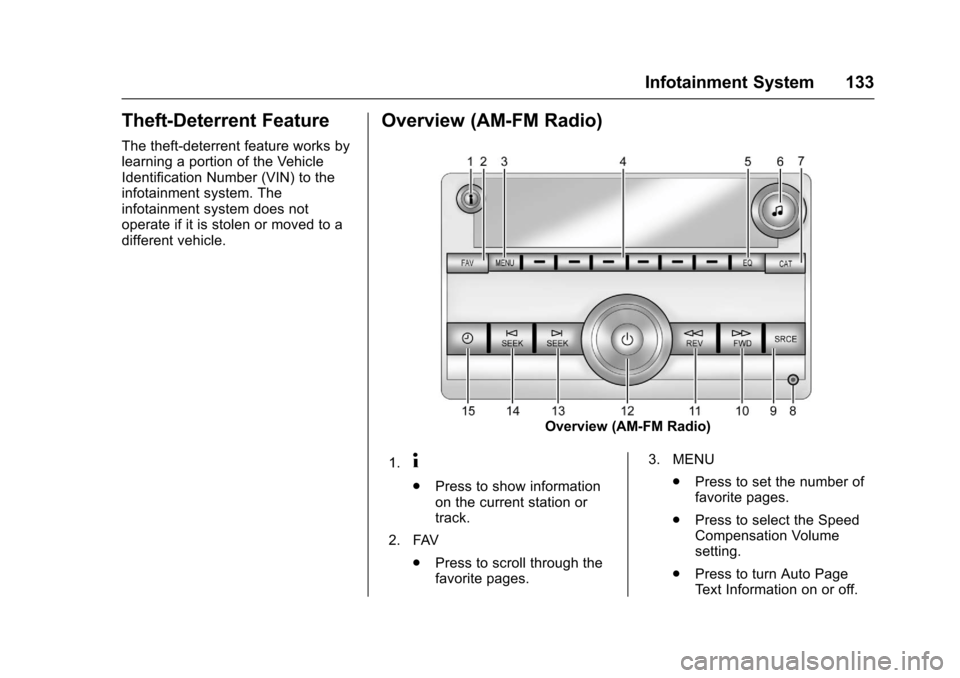
Overview (AM-FM Radio)
Overview (AM-FM Radio)
1.4
.Press to show informationon the current station ortrack.
2. FAV
.Press to scroll through thefavorite pages.
3. MENU
.Press to set the number offavorite pages.
.Press to select the SpeedCompensation Volumesetting.
.Press to turn Auto PageTe x t I n f o r m a t i o n o n o r o f f .
Page 135 of 346

Chevrolet Express Owner Manual (GMNA-Localizing-U.S./Canada/Mexico-9967827) - 2017 - crc - 5/2/16
134 Infotainment System
4. Buttons 1 - 6
.Press to save and selectfavorite stations.
5. EQ
.Press to adjust theequalizer.
6.f
.Press to set the bass,midrange, treble, fade, andbalance.
.Turn to manually selectradio stations.
7. CAT
.Press to display a list ofSXM categories,if equipped.
8. Auxiliary Input Jack (IfEquipped)
.Use to connect externalaudio devices.
9. SRCE
.Press to scroll throughauxiliary devices, AM, FM,or SXM if equipped.
10.\FWD
.Press and hold to fastforward through a track.
11 .sREV
.Press and hold to gobackward fast through atrack.
12.P
.Press to turn theinfotainment system onor off.
.Turn to adjust the volume.
13.¨SEEK
.Seeks or scans to the nextstation.
14.©SEEK
.Seeks or scans to theprevious station.
15.H
.Press to set the clockand date.
Page 136 of 346
Chevrolet Express Owner Manual (GMNA-Localizing-U.S./Canada/Mexico-9967827) - 2017 - crc - 5/2/16
Infotainment System 135
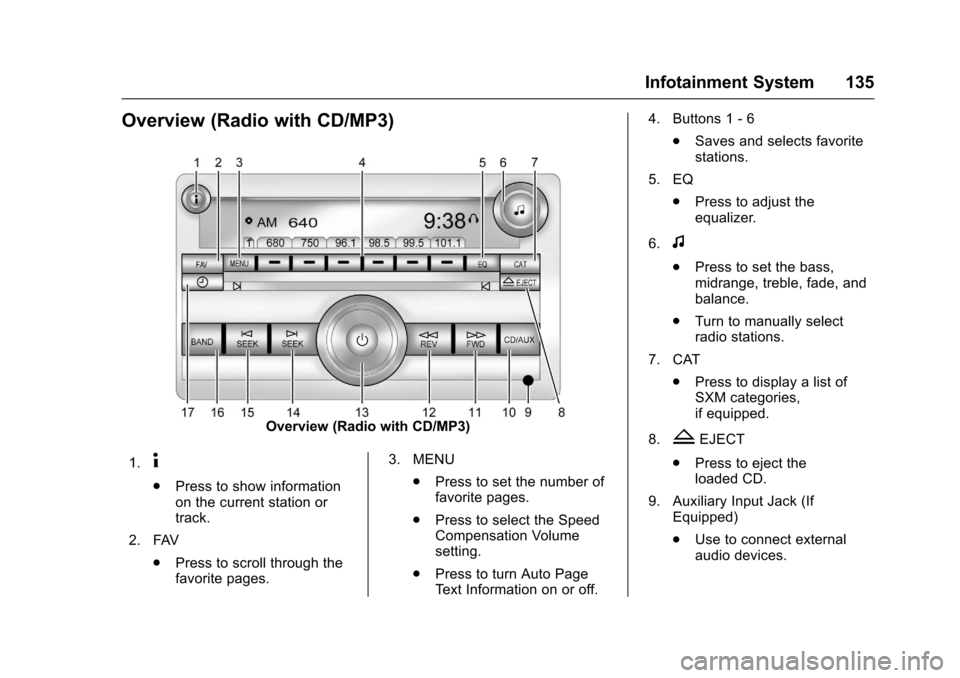
Overview (Radio with CD/MP3)
Overview (Radio with CD/MP3)
1.4
.Press to show informationon the current station ortrack.
2. FAV
.Press to scroll through thefavorite pages.
3. MENU
.Press to set the number offavorite pages.
.Press to select the SpeedCompensation Volumesetting.
.Press to turn Auto PageTe x t I n f o r m a t i o n o n o r o f f .
4. Buttons 1 - 6
.Saves and selects favoritestations.
5. EQ
.Press to adjust theequalizer.
6.f
.Press to set the bass,midrange, treble, fade, andbalance.
.Turn to manually selectradio stations.
7. CAT
.Press to display a list ofSXM categories,if equipped.
8.ZEJECT
.Press to eject theloaded CD.
9. Auxiliary Input Jack (IfEquipped)
.Use to connect externalaudio devices.