2017 CHEVROLET COLORADO lock
[x] Cancel search: lockPage 108 of 419

Chevrolet Colorado Owner Manual (GMNA-Localizing-U.S./Canada/Mexico-10122675) - 2017 - crc - 8/22/16
Instruments and Controls 107
To s e t t h e c l o c k d i s p l a y :
1. Touch SETTINGS on the HomePage, then touch Timeand Date.
2. Touch Clock Display, thentouch Off or On to turn theclock display off or on.
3. TouchSto go back to the
previous menu.
Power Outlets
For USB charging port locations,seeUSB Port (Base Radio)0170orUSB Port (Base Radio withTo u c h s c r e e n )0173.
Accessory power outlets can beused to plug in electrical equipment,such as a cell phone, MP3player, etc.
The vehicle may have accessorypower outlets:
.On the center stack below theclimate control system,if equipped.
.On the center floor console,if equipped.
.On the rear of the center storageconsole.
Lift the cover to access and replacewhen not in use.
{Warning
Power is always supplied to the
outlets. Do not leave electrical
equipment plugged in when the
vehicle is not in use because the
vehicle could catch fire and cause
injury or death.
Caution
Leaving electrical equipment
plugged in for an extended period
of time while the vehicle is off will
drain the battery. Always unplug
electrical equipment when not in
use and do not plug in equipment
that exceeds the maximum
15 amp rating.
Certain power accessory plugs maynot be compatible with theaccessory power outlet and couldoverload vehicle or adapter fuses.If a problem is experienced, seeyour dealer.
When adding electrical equipment,be sure to follow the properinstallation instructions included withthe equipment. SeeAdd-OnElectrical Equipment0278.
Caution
Hanging heavy equipment from
the power outlet can cause
damage not covered by the
vehicle warranty. The power
outlets are designed for
accessory power plugs only, such
as mobile phone charge cords.
Wireless Charging
If equipped, the vehicle has wirelesscharging in front of the center floorconsole. The system wirelesslycharges one PMA or Qi compatiblemobile device.
Page 122 of 419
Chevrolet Colorado Owner Manual (GMNA-Localizing-U.S./Canada/Mexico-10122675) - 2017 - crc - 8/22/16
Instruments and Controls 121
Warning (Continued)
warning light on can lead to a
crash. If the light is still on after
the vehicle has been pulled off
the road and carefully stopped,
have the vehicle towed for
service.
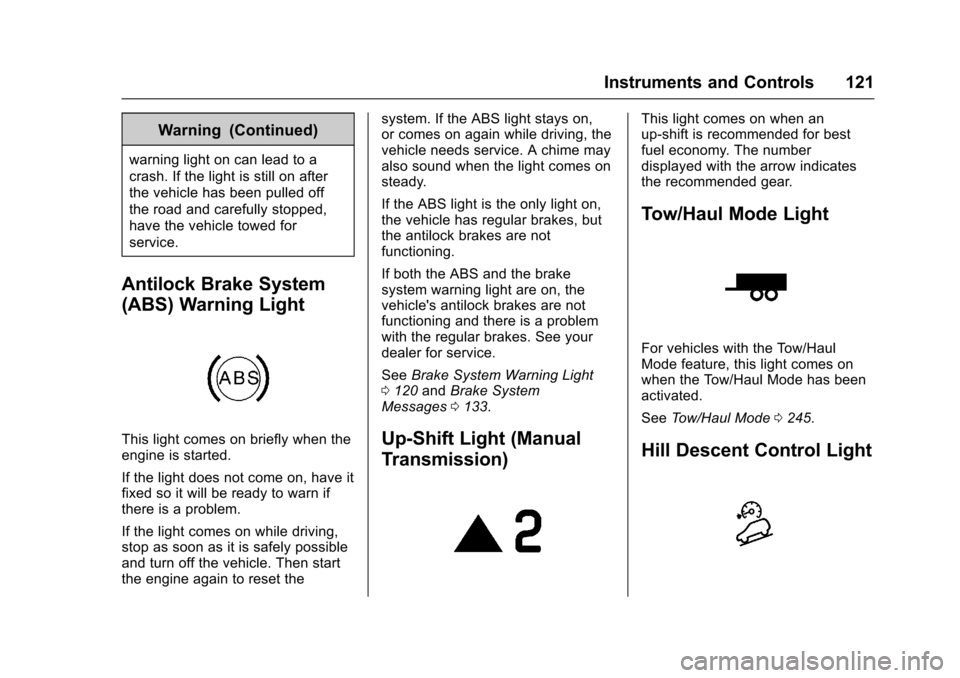
Antilock Brake System
(ABS) Warning Light
This light comes on briefly when theengine is started.
If the light does not come on, have itfixed so it will be ready to warn ifthere is a problem.
If the light comes on while driving,stop as soon as it is safely possibleand turn off the vehicle. Then startthe engine again to reset the
system. If the ABS light stays on,or comes on again while driving, thevehicle needs service. A chime mayalso sound when the light comes onsteady.
If the ABS light is the only light on,the vehicle has regular brakes, butthe antilock brakes are notfunctioning.
If both the ABS and the brakesystem warning light are on, thevehicle's antilock brakes are notfunctioning and there is a problemwith the regular brakes. See yourdealer for service.
SeeBrake System Warning Light0120andBrake SystemMessages0133.
Up-Shift Light (Manual
Transmission)
This light comes on when anup-shift is recommended for bestfuel economy. The numberdisplayed with the arrow indicatesthe recommended gear.
Tow/Haul Mode Light
For vehicles with the Tow/HaulMode feature, this light comes onwhen the Tow/Haul Mode has beenactivated.
SeeTo w / H a u l M o d e0245.
Hill Descent Control Light
Page 136 of 419

Chevrolet Colorado Owner Manual (GMNA-Localizing-U.S./Canada/Mexico-10122675) - 2017 - crc - 8/22/16
Instruments and Controls 135
accelerate. If this message is on,but there is no reduction inperformance, proceed to yourdestination. The performance maybe reduced the next time the vehicleis driven. The vehicle may be drivenat a reduced speed while thismessage is on, but acceleration andspeed may be reduced. Anytimethis message stays on, or displaysrepeatedly, the vehicle should betaken to your dealer for service assoon as possible.
Fuel System Messages
FUEL LEVEL LOW
This message displays when thevehicle is low on fuel. Refuel assoon as possible.
Key and Lock Messages
REPLACE BATTERY IN
REMOTE KEY
This message displays if a RemoteKeyless Entry (RKE) transmitterbattery is low. The battery needs tobe replaced in the transmitter. See
“Battery Replacement”underRemote Keyless Entry (RKE)System Operation030.
Lamp Messages
TURN SIGNAL ON
This message displays and a chimesounds if a turn signal is left on for1.2 km (0.75 mi). Move the turnsignal lever to the off position.
Object Detection System
Messages
FORWARD COLLISION
ALERT OFF
If your vehicle has the ForwardCollision Alert (FCA) system, thismessage may display if the FCAsystem cannot activate due to atemporary condition. SeeForwardCollision Alert (FCA) System0263.
FRONT CAMERA BLOCKED,
CLEAN WINDSHIELD
This message displays when theLane Departure Warning (LDW) andForward Collision Alert (FCA)
systems are disabled because thecamera view is blocked and cannotoperate properly. It may alsoactivate during heavy rain or due toroad spray. To clean the system,clean the outside of the windshieldarea in front of the LDW/FCAcamera sensor.
LANE DEPARTURE SYSTEM
UNAVAILABLE
If your vehicle has the LaneDeparture Warning (LDW) system,this message may display if theLDW system cannot activate due toatemporarycondition.SeeLaneDeparture Warning (LDW)0264formore information.
SERVICE FRONT CAMERA
This message displays when theLane Departure Warning (LDW) andForward Collision Alert (FCA)systems are disabled and needservice. See your dealer.
Page 137 of 419
Chevrolet Colorado Owner Manual (GMNA-Localizing-U.S./Canada/Mexico-10122675) - 2017 - crc - 8/22/16
136 Instruments and Controls
Ride Control System
Messages
SERVICE STABILITRAK
If this message displays, it meansthere may be a problem with theStabiliTrak system. If you see thismessage, try to reset the system.Stop; turn off the engine for at least15 seconds; then start the engineagain. If this message still comeson, it means there is a problem. Youshould see your dealer for service.The vehicle is safe to drive;however, you do not have thebenefit of StabiliTrak, so reduceyour speed and drive accordingly.
SERVICE TRACTION
CONTROL
This message displays when thereis a problem with the TractionControl System (TCS). When thismessage displays, the system willnot limit wheel spin. Adjust yourdriving accordingly. See your dealerfor service. SeeTr a c t i o n C o n t r o l /Electronic Stability Control0256.
STABILITRAK INITIALIZING
This message may come on if theStabiliTrak system has not fullyinitialized because of roadconditions or the incorrect tire size.When the StabiliTrak system is fullyinitialized, the message will turn off.SeeTr a c t i o n C o n t r o l / E l e c t r o n i cStability Control0256.Ifthismessage continues to be displayedfor multiple ignition cycles and ondifferent road surfaces, see yourdealer for service.
Airbag System Messages
SERVICE AIRBAG
This message displays if there is aproblem with the airbag system.Ta k e t h e v e h i c l e t o y o u r d e a l e r f o rservice.
Safety Belt Messages
SHIFTER LOCKED. BUCKLE
SEATBELT
This message displays if the vehicleis equipped with the Safety BeltAssurance System and the driver
and front outboard passenger,if present, safety belts are notbuckled. The vehicle will not shiftout of P (Park). Buckle the safetybelt(s) to unlock the shift lever.
This system may not allow thevehicle to shift out of P (Park) if anobject—such as a briefcase,handbag, grocery bag, laptop,or other electronic device—is onthe front outboard passenger seat.If this happens, remove the objectfrom the seat or buckle thesafety belt.
If the driver or front outboardpassenger unbuckles their safetybelt while driving, the safety beltreminder chime and light(s) willcome on. SeeSafety BeltReminders011 6.
SHIFTER UNLOCKED. BRAKE
TO SHIFT
This message displays when theSafety Belt Assurance System timesout and allows the vehicle to beshifted out of P (Park) after30 seconds following brake apply.See“Safety Belts”and“Child
Page 139 of 419
Chevrolet Colorado Owner Manual (GMNA-Localizing-U.S./Canada/Mexico-10122675) - 2017 - crc - 8/22/16
138 Instruments and Controls
TIRE PRESSURE LOW ADD
AIR TO TIRE
If equipped with the Tire PressureMonitor System (TPMS), thismessage displays when thepressure in one or more of thevehicle's tires is low. This messagealso displays with a vehicle pictureto indicate the location of the lowtire. The low tire pressure warninglight will also come on. SeeTirePressure Light0123.Youcanreceive more than one tire pressuremessage at a time. If a tire pressuremessage appears on the DIC, stopas soon as you can. Have the tirepressures checked and set to thoseshown on the Tire and LoadingInformation label. SeeTires0316,Vehicle Load Limits0226,andTirePressure0323.TheDICalsoshows the tire pressure values. SeeDriver Information Center (DIC)(Base Level)0126orDriverInformation Center (DIC)(Uplevel)0129.
Transmission Messages
4WD OFF
If equipped with four-wheel drive,this message displays when thefour-wheel-drive system istemporarily disabled due to anoverheated condition. The vehiclewill run in two-wheel drive when thismessage is present. Once thefour-wheel-drive system cools down,the message turns off and thefour-wheel-drive system returns tonormal operation.
4WD SHIFT IN PROGRESS
This message will display while thefour-wheel-drive system is shifting.
FOR 4WD LOW SLOW TO XXX
If a four-wheel drive shift intoFour-Wheel Drive Low is requested,but the vehicle speed is too high,this message will display until thecorrect vehicle speed is reached.
FOR 4WD LOW SHIFT TO
NEUTRAL
If a four-wheel drive shift intoFour-Wheel Drive Low is requested,and the vehicle speed is correct, butthe transmission is not inN(Neutral), this message willdisplay until the transmission isshifted to N (Neutral).
SERVICE 4WD
If the vehicle has four-wheel drive,this message may display if aproblem occurs with thefour-wheel-drive system. If thismessage appears, stop as soon aspossible and turn off the vehicle.Make sure the key is in the LOCK/OFF position for at leastone minute, then restart the vehicleand check for the message on theDIC display. If the message is stilldisplayed or appears again whenyou begin driving, thefour-wheel-drive system needsservice. See your dealer.
Page 141 of 419

Chevrolet Colorado Owner Manual (GMNA-Localizing-U.S./Canada/Mexico-10122675) - 2017 - crc - 8/22/16
140 Instruments and Controls
3. PressoBACK on the
faceplate or touch0screen
button to return to the previousmenu or exit.
Turn the vehicle to ON/RUN toaccess the Settings menu, thenselect SETTINGS from the Homepage on the infotainment display.
Personalization Menus
The following list of menu items maybe available:
.Time and Date
.Language (Language)
.Rear Seat Reminder
.Te e n D r i v e r
.Va l e t M o d e
.Radio
.Vehicle
.Bluetooth
.Apple CarPlay
.Android Auto
.Voice
.Display
.Rear Camera
.Return to Factory Settings
.Software Information
Detailed information for each menufollows.
Time and Date
Manually set the time and date. SeeClock0106.
Language (Language)
Select Language, then select fromthe available language(s).
The selected language will displayon the system, and voicerecognition will reflect the selectedlanguage.
Rear Seat Reminder
This allows for a chime and amessage“Look in Rear Seat”whenthe rear door has been openedbefore or during operation of thevehicle.
Select Off or On.
Teen Driver
See“Te e n D r i v e r”under“Settings”in the infotainment manual.
Valet Mode (If Equipped)
This will lock the infotainmentsystem and steering wheel controls.It may also limit access to vehiclestorage locations (if equipped).
To e n a b l e v a l e t m o d e :
1. Enter a four-digit code on thekeypad.
2. Select Enter to go to theconfirmation screen.
3. Re-enter the four-digit code.
To u c h L O C K o r U N L O C K t o l o c k o runlock the system. Touch Back togo back to the previous menu.
Radio
To u c h t o d i s p l a y t h e R a d i o m e n uand the following may display:
.Manage Favorites
.Number of Favorites Shown
.Audible Touch Feedback
.Auto Volume
Page 142 of 419
Chevrolet Colorado Owner Manual (GMNA-Localizing-U.S./Canada/Mexico-10122675) - 2017 - crc - 8/22/16
Instruments and Controls 141
.Maximum Startup Volume
Manage Favorites
This allows favorites to be edited.See“Manage Favorites”in“RadioSetup”underHome Page (BaseRadio)0158orHome Page (BaseRadio with Touchscreen)0160or“Manage Favorites”in“Settings”under“Radio”in the infotainmentmanual.
Number of Favorites Shown
To u c h t o s e t t h e n u m b e r o f f a v o r i t e sto display.
Select the desired number or selectAuto and the infotainment systemwill automatically adjust the numberof favorites shown.
Audible Touch Feedback
This allows Audible TouchFeedback to be turned on or off.
Select Off or On.
Auto Volume
This feature adjusts the volumebased on vehicle speed andambient noise.
Select Off, Low, Medium-Low,Medium, Medium-High, or High.
Maximum Startup Volume
This feature sets the maximumstartup volume. If the vehicle isstarted and the volume is greaterthan this level, the volume isadjusted to this level. To set themaximum startup volume, touch +or✓to increase or decrease.
Vehicle
Select and the following maydisplay:
.Climate and Air Quality
.Comfort and Convenience
.Lighting
.Power Door Locks
.Remote Lock, Unlock, Start
Climate and Air Quality
Select and the following maydisplay:
.Auto Fan Speed
.Auto Defog
.Auto Rear Defog
Auto Fan Speed
This feature will set the maximumauto fan speed.
Select Low, Medium, or High.
Auto Defog
This allows the feature to be turnedon or off.
Select Off or On.
Auto Rear Defog
This allows the feature to be turnedon or off.
Select Off or On.
Comfort and Convenience
Select and the following maydisplay:
.Chime Volume
Chime Volume
This allows the selection of thechime volume level.
Select + or✓to adjust the volume.
Page 143 of 419
Chevrolet Colorado Owner Manual (GMNA-Localizing-U.S./Canada/Mexico-10122675) - 2017 - crc - 8/22/16
142 Instruments and Controls
Lighting
Select and the following maydisplay:
.Vehicle Locator Lights
.Exit Lighting
Vehicle Locator Lights
This feature will flash the exteriorlamps and allows the headlamps,parking lamps, taillamps, and mostof the interior lamps to turn on
briefly whenKon the Remote
Keyless Entry (RKE) transmitter ispressed to locate the vehicle.
Select Off or On.
Exit Lighting
This allows the selection of howlong the exterior lamps stay onwhen leaving the vehicle when it isdark outside.
Select Off, 30 Seconds, 60Seconds, or 120 Seconds.
Power Door Locks
Select and the following maydisplay:
.Unlocked Door Anti-Lockout
.Auto Door Unlock
.Delayed Door Lock
Unlocked Door Anti-Lockout
When on, this feature will keep thedriver door from locking when thedoor is open. If Off is selected, theDelayed Door Lock menu will beavailable.
Select Off or On.
Auto Door Unlock
This allows selection of which of thedoors will automatically unlock whenthe vehicle is shifted into P (Park)for an automatic transmission orwhen the key is removed from theignition for a manual transmission.
Select Off, All Doors, or Driver Door.
Delayed Door Lock
When on, this feature will delay thelocking of the doors. To override thedelay, press the power door lockswitch on the door.
Select Off or On.
Remote Lock, Unlock, Start
Select and the following maydisplay:
.Remote Unlock Light Feedback
.Remote Lock Feedback
.Remote Door Unlock
.Remote Start Auto Heat Seats
Remote Unlock Light Feedback
When on, the exterior lamps willflash when unlocking the vehiclewith the RKE transmitter.
Select Off or Flash Lights.
Remote Lock Feedback
This allows selection of what type offeedback is given when locking thevehicle with the RKE transmitter.
Select Off, Lights and Horn, LightsOnly, or Horn Only.
Remote Door Unlock
This allows selection of which doors
will unlock when pressingKon the
RKE transmitter.
Select All Doors or Driver Door.