2017 CHEVROLET COLORADO ESP
[x] Cancel search: ESPPage 236 of 419
Chevrolet Colorado Owner Manual (GMNA-Localizing-U.S./Canada/Mexico-10122675) - 2017 - crc - 8/22/16
Driving and Operating 235
Manual Transmission
The shift lever should be in Neutraland the parking brake engaged.Hold the clutch pedal down to thefloor and start the engine. Thevehicle will not start if the clutchpedal is not all the way down.
Starting Procedure
1. With your foot off theaccelerator pedal, turn theignition key to START. Whenthe engine starts, let go of thekey. The idle speed will godown as the engine gets warm.Do not race the engineimmediately after starting it.Operate the engine andtransmission gently to allow theoil to warm up and lubricate allmoving parts.
Caution
Cranking the engine for long
periods of time, by returning the
ignition to the START position
immediately after cranking has
(Continued)
Caution (Continued)
ended, can overheat and damage
the cranking motor, and drain the
battery. Wait at least 15 seconds
between each try, to let the
cranking motor cool down.
2. If the engine does not startafter five to 10 seconds,especially in very cold weather(below✓18 °C or 0 °F), it couldbe flooded with too muchgasoline. Try pushing theaccelerator pedal all the way tothe floor and holding it therewhile holding the key in STARTfor up to 15 seconds. Wait atleast 15 seconds between eachtry, to allow the cranking motorto cool down. When the enginestarts, let go of the key andaccelerator. If the vehicle startsbriefly but then stops again, dothe same thing. This clears theextra gasoline from the engine.Do not race the engineimmediately after starting it.Operate the engine and
transmission gently until the oilwarms up and lubricates allmoving parts.
Engine Heater
If the vehicle has a diesel engine,see the Duramax dieselsupplement.
{Warning
Do not plug in the engine block
heater while the vehicle is in
parked in a garage or under a
carport. Property damage or
personal injury may result. Always
park the vehicle in a clear open
area away from buildings or
structures.
If equipped, the engine heater canprovide easier starting and betterfuel economy during enginewarm-up in cold weather conditionsat or below✓18 °C (0 °F). Vehicleswith an engine heater should beplugged in at least four hours beforestarting. An internal thermostat inthe plug-end of the cord may exist,
Page 242 of 419
Chevrolet Colorado Owner Manual (GMNA-Localizing-U.S./Canada/Mexico-10122675) - 2017 - crc - 8/22/16
Driving and Operating 241
Running the Vehicle
While Parked
It is better not to park with theengine running.
If the vehicle is left with the enginerunning, follow the proper steps tobe sure the vehicle will not move.SeeShifting Into Park0238andEngine Exhaust0240.Ifthevehiclehas a manual transmission, seeParking0239.
If parking on a hill and pulling atrailer, seeDriving Characteristicsand Towing Tips0270.
Automatic
Transmission
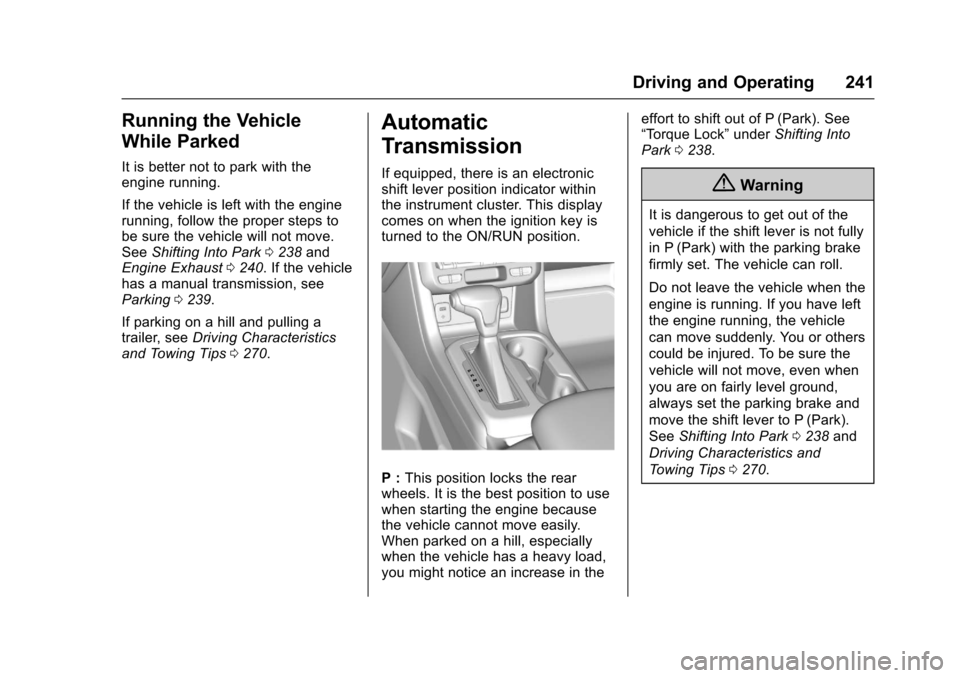
If equipped, there is an electronicshift lever position indicator withinthe instrument cluster. This displaycomes on when the ignition key isturned to the ON/RUN position.
P:This position locks the rearwheels. It is the best position to usewhen starting the engine becausethe vehicle cannot move easily.When parked on a hill, especiallywhen the vehicle has a heavy load,you might notice an increase in the
effort to shift out of P (Park). See“To r q u e L o c k”underShifting IntoPark0238.
{Warning
It is dangerous to get out of the
vehicle if the shift lever is not fully
in P (Park) with the parking brake
firmly set. The vehicle can roll.
Do not leave the vehicle when the
engine is running. If you have left
the engine running, the vehicle
can move suddenly. You or others
could be injured. To be sure the
vehicle will not move, even when
you are on fairly level ground,
always set the parking brake and
move the shift lever to P (Park).
SeeShifting Into Park0238and
Driving Characteristics and
To w i n g T i p s0270.
Page 244 of 419
Chevrolet Colorado Owner Manual (GMNA-Localizing-U.S./Canada/Mexico-10122675) - 2017 - crc - 8/22/16
Driving and Operating 243
off-road. Shift the transmission to alower gear range selection if thetransmission shifts too often. SeeManual Mode0244.
Downshifting the transmission inslippery road conditions could resultin skidding. See“Skidding”underLoss of Control0217.
The vehicle has a shift stabilizationfeature that adjusts the transmissionshifting to the current drivingconditions in order to reduce rapidupshifts and downshifts. This shiftstabilization feature is designed todetermine, before making anupshift, if the engine is able tomaintain vehicle speed by analyzingthings such as vehicle speed,throttle position, and vehicle load.If the shift stabilization featuredetermines that a current vehiclespeed cannot be maintained, thetransmission does not upshift andinstead holds the current gear.In some cases, this could appear tobe a delayed shift, however thetransmission is operating normally.
The transmission uses adaptiveshift controls. The adaptive shiftcontrol process continuallycompares key shift parameters topre-programmed ideal shifts storedin the transmission’scomputer.Thetransmission constantly makesadjustments to improve vehicleperformance according to how thevehicle is being used, such as withaheavyloadorwhenthetemperature changes. During thisadaptive shift control process,shifting might feel different as thetransmission determines the bestsettings.
When temperatures are very cold,the transmission's gear shiftingcould be delayed providing morestable shifts until the engine warmsup. Shifts could be more noticeablewith a cold transmission. Thisdifference in shifting is normal.
M:This position allows selection ofarangeofgearsappropriateforcurrent driving conditions. SeeManual Mode0244.
Caution
Spinning the tires or holding the
vehicle in one place on a hill
using only the accelerator pedal
may damage the transmission.
The repair will not be covered by
the vehicle warranty. If you are
stuck, do not spin the tires. When
stopping on a hill, use the brakes
to hold the vehicle in place.
Normal Mode Grade Braking
Normal Mode Grade Braking isenabled when the vehicle is started,but is not enabled in RangeSelection Mode. It assists inmaintaining desired vehicle speedswhen driving on downhill grades byusing the engine and transmissionto slow the vehicle.
Page 256 of 419

Chevrolet Colorado Owner Manual (GMNA-Localizing-U.S./Canada/Mexico-10122675) - 2017 - crc - 8/22/16
Driving and Operating 255
Set the parking brake by holding theregular brake pedal down, thenpushing down the parking brakepedal.
If the ignition is on, the brakesystem warning light will come on.SeeBrake System WarningLight0120.
Caution
Driving with the parking brake on
can overheat the brake system
and cause premature wear or
damage to brake system parts.
Make sure that the parking brake
is fully released and the brake
warning light is off before driving.
To r e l e a s e t h e p a r k i n g b r a k e , h o l dthe regular brake pedal down, thenpush down momentarily on theparking brake pedal until you feelthe pedal release. Slowly pull yourfoot up off the parking brake pedal.If the parking brake is not releasedwhen you begin to drive, the brake
system warning light will flash and achime will sound warning you thatthe parking brake is still on.
If you are towing a trailer and areparking on a hill, seeDrivingCharacteristics and TowingTips0270.
Brake Assist
The Brake Assist feature isdesigned to assist the driver instopping or decreasing vehiclespeed in emergency drivingconditions. This feature uses thestability system hydraulic brakecontrol module to supplement thepower brake system underconditions where the driver hasquickly and forcefully applied thebrake pedal in an attempt to quicklystop or slow down the vehicle. Thestability system hydraulic brakecontrol module increases brakepressure at each corner of thevehicle until the ABS activates.
Minor brake pedal pulsation orpedal movement during this time isnormal and the driver shouldcontinue to apply the brake pedal asthe driving situation dictates. TheBrake Assist feature willautomatically disengage when thebrake pedal is released or brakepedal pressure is quicklydecreased.
Hill Start Assist (HSA)
This vehicle has a Hill Start Assist(HSA) feature, which may be usefulwhen the vehicle is stopped on agrade sufficient enough to activateHSA. This feature is designed toprevent the vehicle from rolling,either forward or rearward, duringvehicle drive off. After the drivercompletely stops and holds thevehicle in a complete standstill on agrade, HSA will be automaticallyactivated. During the transitionperiod between when the driverreleases the brake pedal and startsto accelerate to drive off on a grade,
Page 257 of 419
Chevrolet Colorado Owner Manual (GMNA-Localizing-U.S./Canada/Mexico-10122675) - 2017 - crc - 8/22/16
256 Driving and Operating
HSA holds the braking pressure foramaximumoftwosecondstoensure that there is no rolling. Thebrakes will automatically releasewhen the accelerator pedal isapplied within the two-secondwindow. It will not activate if thevehicle is in a drive gear and facingdownhill, or if the vehicle is facinguphill and in R (Reverse).
Ride Control Systems
Traction Control/
Electronic Stability
Control
System Operation
The vehicle has a Traction ControlSystem (TCS) and StabiliTrak®,anelectronic stability control system.These systems help limit wheel slipand assist the driver in maintainingcontrol, especially on slippery roadconditions.
TCS activates if it senses that anyof the drive wheels are spinning orbeginning to lose traction. When thishappens, TCS applies the brakes tothe spinning wheels and reducesengine power to limit wheel spin.
StabiliTrak activates when thevehicle senses a difference betweenthe intended path and the directionthe vehicle is actually traveling.StabiliTrak selectively appliesbraking pressure to any one of the
vehicle wheel brakes to assist thedriver in keeping the vehicle on theintended path.
If cruise control is being used andtraction control or StabiliTrak beginsto limit wheel spin, cruise control willdisengage. Cruise control may beturned back on when roadconditions allow.
Both systems come onautomatically when the vehicle isstarted and begins to move. Thesystems may be heard or felt whilethey are operating or whileperforming diagnostic checks. Thisis normal and does not mean thereis a problem with the vehicle.
It is recommended to leave bothsystems on for normal drivingconditions, but it may be necessaryto turn TCS off if the vehicle getsstuck in sand, mud, ice, or snow.SeeIf the Vehicle Is Stuck0225and“Turning the Systems Off andOn”later in this section.
When the transfer case (if equipped)is in Four-Wheel Drive Low, thestability system is automatically
disabled, andgcomes on in the
Page 260 of 419
Chevrolet Colorado Owner Manual (GMNA-Localizing-U.S./Canada/Mexico-10122675) - 2017 - crc - 8/22/16
Driving and Operating 259
Cruise Control
With cruise control a speed of about40 km/h (25 mph) or more can bemaintained without keeping yourfoot on the accelerator. Cruisecontrol does not work at speedsbelow about 40 km/h (25 mph).
{Warning
Cruise control can be dangerous
where you cannot drive safely at
asteadyspeed.Donotuse
cruise control on winding roads or
in heavy traffic.
Cruise control can be dangerous
on slippery roads. On such roads,
fast changes in tire traction can
cause excessive wheel slip, and
you could lose control. Do not use
cruise control on slippery roads.
If equipped with a manualtransmission, the cruise control willremain active when the gears areshifted. The cruise is deactivated ifthe clutch is pressed for severalseconds. If the cruise control is
being used and the Traction Control(TCS) system or StabiliTrak beginsto limit wheel spin, the cruise controlwill automatically disengage. SeeTr a c t i o n C o n t r o l / E l e c t r o n i c S t a b i l i t yControl0256.Ifacollisionalertoccurs when cruise control isactivated, cruise control isdisengaged. SeeForward CollisionAlert (FCA) System0263.Whenroad conditions allow you to safelyuse it again, cruise control can beturned back on.
If the brakes are applied, the cruisecontrol disengages.
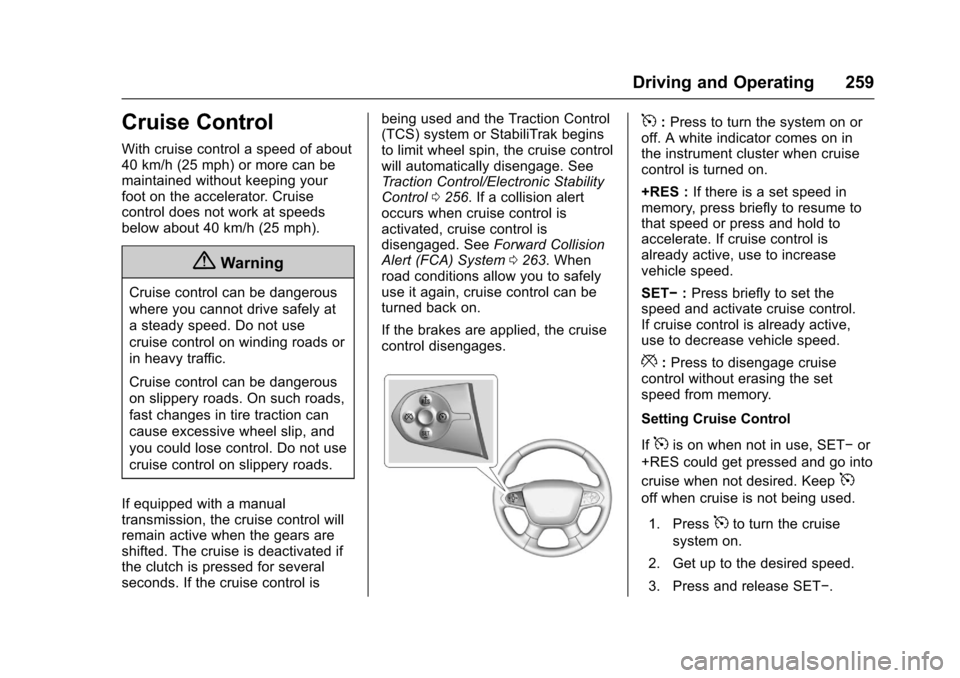
5:Press to turn the system on oroff. A white indicator comes on inthe instrument cluster when cruisecontrol is turned on.
+RES :If there is a set speed inmemory, press briefly to resume tothat speed or press and hold toaccelerate. If cruise control isalready active, use to increasevehicle speed.
SET✓:Press briefly to set thespeed and activate cruise control.If cruise control is already active,use to decrease vehicle speed.
*:Press to disengage cruisecontrol without erasing the setspeed from memory.
Setting Cruise Control
If5is on when not in use, SET✓or
+RES could get pressed and go into
cruise when not desired. Keep5
off when cruise is not being used.
1. Press5to turn the cruise
system on.
2. Get up to the desired speed.
3. Press and release SET✓.
Page 261 of 419

Chevrolet Colorado Owner Manual (GMNA-Localizing-U.S./Canada/Mexico-10122675) - 2017 - crc - 8/22/16
260 Driving and Operating
4. Remove foot from theaccelerator.
The cruise control indicator on theinstrument cluster turns green aftercruise control has been set to thedesired speed. SeeInstrumentCluster (Base Level)011 0orInstrument Cluster (Uplevel)011 2.
Resuming a Set Speed
If the cruise control is set at adesired speed and then the brakes
are applied or*is pressed, the
cruise control is disengaged withouterasing the set speed from memory.
Once the vehicle speed reachesabout 40 km/h (25 mph) or more,press +RES briefly. The vehiclereturns to the previous set speed.
Increasing Speed While UsingCruise Control
If the cruise control system isalready activated:
.Press and hold +RES until thedesired speed is reached, thenrelease it.
.To i n c r e a s e v e h i c l e s p e e d i nsmall increments, briefly press+RES. For each press, thevehicle goes about 1.6 km/h(1 mph) faster.
The speedometer reading can bedisplayed in either English or metricunits. SeeDriver Information Center(DIC) (Base Level)0126orDriverInformation Center (DIC) (Uplevel)0129.Theincrementvalueuseddepends on the units displayed.
Reducing Speed While UsingCruise Control
If the cruise control system isalready activated:
.Press and hold SET–until thedesired lower speed is reached,then release it.
.To s l o w d o w n i n s m a l lincrements, briefly press SET–.For each press, the vehicle goesabout 1.6 km/h (1 mph) slower.
The speedometer reading can bedisplayed in either English or metricunits. SeeDriver Information Center(DIC) (Base Level)0126orDriver
Information Center (DIC) (Uplevel)0129.Theincrementvalueuseddepends on the units displayed.
Passing Another Vehicle WhileUsing Cruise Control
Use the accelerator pedal toincrease the vehicle speed. Whenyou take your foot off the pedal, thevehicle will slow down to theprevious set cruise speed. Whilepressing the accelerator pedal orshortly following the release tooverride cruise control, brieflypressing SET–will result in cruisecontrol set to the current vehiclespeed.
Using Cruise Control on Hills
How well the cruise control will workon hills depends on the vehiclespeed, load, and the steepness ofthe hills. When going up steep hills,you might have to step on theaccelerator pedal to maintain yourspeed. When going downhill, youmight have to brake or shift to alower gear to keep your speeddown. If the brake pedal is applied,cruise control will disengage.
Page 265 of 419

Chevrolet Colorado Owner Manual (GMNA-Localizing-U.S./Canada/Mexico-10122675) - 2017 - crc - 8/22/16
264 Driving and Operating
Warning (Continued)
or ice, or if the windshield is
damaged. It may also not detect a
vehicle on winding or hilly roads,
or in conditions that can limit
visibility such as fog, rain,
or snow, or if the headlamps or
windshield are not cleaned or in
proper condition. Keep the
windshield, headlamps, and FCA
sensors clean and in good repair.
Collision Alert
When your vehicle approachesanother detected vehicle too rapidly,the red lights will flash on thewindshield. Also, eight rapidhigh-pitched beeps will sound fromthe front. When this Collision Alertoccurs, the brake system mayprepare for driver braking to occur
more rapidly which can cause abrief, mild deceleration. Continue toapply the brake pedal as needed.Cruise control may be disengagedwhen the Collision Alert occurs.
Tailgating Alert
The vehicle ahead indicator willdisplay amber when you arefollowing a detected vehicle aheadmuch too closely.
Selecting the Alert Timing
The Collision Alert control is on the
steering wheel. Press[to set the
FCA timing to Far, Medium, Near,or Off. The first button press showsthe current setting on the DIC.Additional button presses willchange this setting. The chosensetting will remain until it is changedand will affect the timing of both theCollision Alert and the TailgatingAlert features. The timing of both
alerts will vary based on vehiclespeed. The faster the vehicle speed,the farther away the alert will occur.Consider traffic and weatherconditions when selecting the alerttiming. The range of selectable alerttiming may not be appropriate for alldrivers and driving conditions.
Unnecessary Alerts
FCA may provide unnecessaryalerts for turning vehicles, vehiclesin other lanes, objects that are notvehicles, or shadows. These alertsare normal operation and thevehicle does not need service.
Cleaning the System
If the FCA system does not seem tooperate properly, cleaning theoutside of the windshield in front ofthe rearview mirror, and cleaning theheadlamps, may correct the issue.
Lane Departure
Warning (LDW)
If equipped, LDW may help avoidcrashes due to unintentional lanedepartures. It may provide an alert if