2017 CHEVROLET COLORADO service
[x] Cancel search: servicePage 123 of 419
Chevrolet Colorado Owner Manual (GMNA-Localizing-U.S./Canada/Mexico-10122675) - 2017 - crc - 8/22/16
122 Instruments and Controls
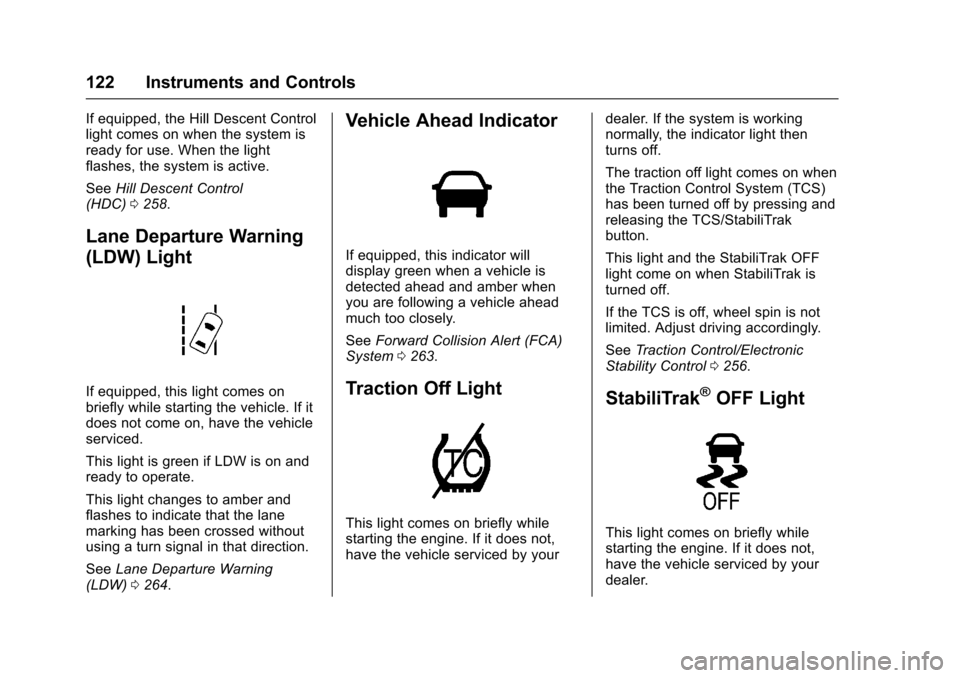
If equipped, the Hill Descent Controllight comes on when the system isready for use. When the lightflashes, the system is active.
SeeHill Descent Control(HDC)0258.
Lane Departure Warning
(LDW) Light
If equipped, this light comes onbriefly while starting the vehicle. If itdoes not come on, have the vehicleserviced.
This light is green if LDW is on andready to operate.
This light changes to amber andflashes to indicate that the lanemarking has been crossed withoutusing a turn signal in that direction.
SeeLane Departure Warning(LDW)0264.
Vehicle Ahead Indicator
If equipped, this indicator willdisplay green when a vehicle isdetected ahead and amber whenyou are following a vehicle aheadmuch too closely.
SeeForward Collision Alert (FCA)System0263.
Traction Off Light
This light comes on briefly whilestarting the engine. If it does not,have the vehicle serviced by your
dealer. If the system is workingnormally, the indicator light thenturns off.
The traction off light comes on whenthe Traction Control System (TCS)has been turned off by pressing andreleasing the TCS/StabiliTrakbutton.
This light and the StabiliTrak OFFlight come on when StabiliTrak isturned off.
If the TCS is off, wheel spin is notlimited. Adjust driving accordingly.
SeeTr a c t i o n C o n t r o l / E l e c t r o n i cStability Control0256.
StabiliTrak®OFF Light
This light comes on briefly whilestarting the engine. If it does not,have the vehicle serviced by yourdealer.
Page 124 of 419
Chevrolet Colorado Owner Manual (GMNA-Localizing-U.S./Canada/Mexico-10122675) - 2017 - crc - 8/22/16
Instruments and Controls 123
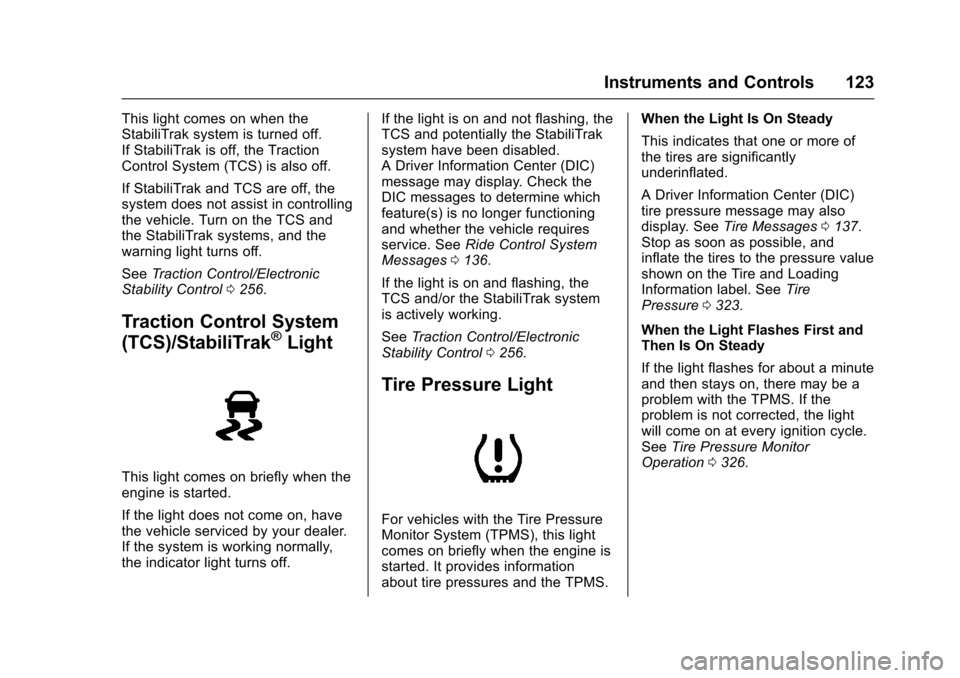
This light comes on when theStabiliTrak system is turned off.If StabiliTrak is off, the TractionControl System (TCS) is also off.
If StabiliTrak and TCS are off, thesystem does not assist in controllingthe vehicle. Turn on the TCS andthe StabiliTrak systems, and thewarning light turns off.
SeeTr a c t i o n C o n t r o l / E l e c t r o n i cStability Control0256.
Traction Control System
(TCS)/StabiliTrak®Light
This light comes on briefly when theengine is started.
If the light does not come on, havethe vehicle serviced by your dealer.If the system is working normally,the indicator light turns off.
If the light is on and not flashing, theTCS and potentially the StabiliTraksystem have been disabled.ADriverInformationCenter(DIC)message may display. Check theDIC messages to determine whichfeature(s) is no longer functioningand whether the vehicle requiresservice. SeeRide Control SystemMessages0136.
If the light is on and flashing, theTCS and/or the StabiliTrak systemis actively working.
SeeTr a c t i o n C o n t r o l / E l e c t r o n i cStability Control0256.
Tire Pressure Light
For vehicles with the Tire PressureMonitor System (TPMS), this lightcomes on briefly when the engine isstarted. It provides informationabout tire pressures and the TPMS.
When the Light Is On Steady
This indicates that one or more ofthe tires are significantlyunderinflated.
ADriverInformationCenter(DIC)tire pressure message may alsodisplay. SeeTire Messages0137.Stop as soon as possible, andinflate the tires to the pressure valueshown on the Tire and LoadingInformation label. SeeTirePressure0323.
When the Light Flashes First andThen Is On Steady
If the light flashes for about a minuteand then stays on, there may be aproblem with the TPMS. If theproblem is not corrected, the lightwill come on at every ignition cycle.SeeTire Pressure MonitorOperation0326.
Page 125 of 419
Chevrolet Colorado Owner Manual (GMNA-Localizing-U.S./Canada/Mexico-10122675) - 2017 - crc - 8/22/16
124 Instruments and Controls
Engine Oil Pressure Light
Caution
Lack of proper engine oil
maintenance can damage the
engine. Driving with the engine oil
low can also damage the engine.
The repairs would not be covered
by the vehicle warranty. Check
the oil level as soon as possible.
Add oil if required, but if the oil
level is within the operating range
and the oil pressure is still low,
have the vehicle serviced. Always
follow the maintenance schedule
for changing engine oil.
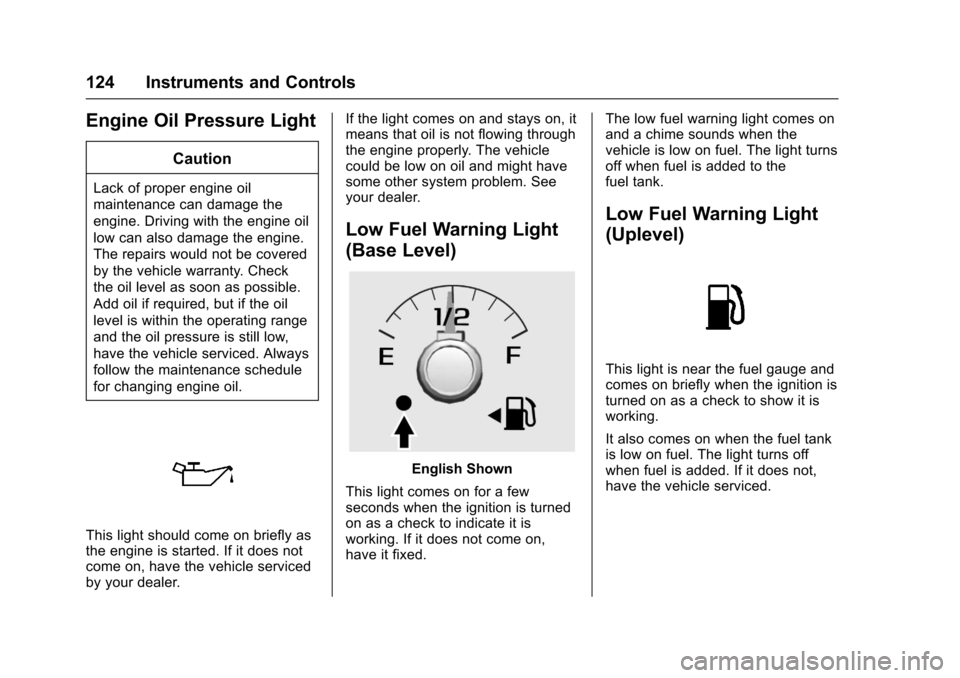
This light should come on briefly asthe engine is started. If it does notcome on, have the vehicle servicedby your dealer.
If the light comes on and stays on, itmeans that oil is not flowing throughthe engine properly. The vehiclecould be low on oil and might havesome other system problem. Seeyour dealer.
Low Fuel Warning Light
(Base Level)
English Shown
This light comes on for a fewseconds when the ignition is turnedon as a check to indicate it isworking. If it does not come on,have it fixed.
The low fuel warning light comes onand a chime sounds when thevehicle is low on fuel. The light turnsoff when fuel is added to thefuel tank.
Low Fuel Warning Light
(Uplevel)
This light is near the fuel gauge andcomes on briefly when the ignition isturned on as a check to show it isworking.
It also comes on when the fuel tankis low on fuel. The light turns offwhen fuel is added. If it does not,have the vehicle serviced.
Page 126 of 419
Chevrolet Colorado Owner Manual (GMNA-Localizing-U.S./Canada/Mexico-10122675) - 2017 - crc - 8/22/16
Instruments and Controls 125
Security Light
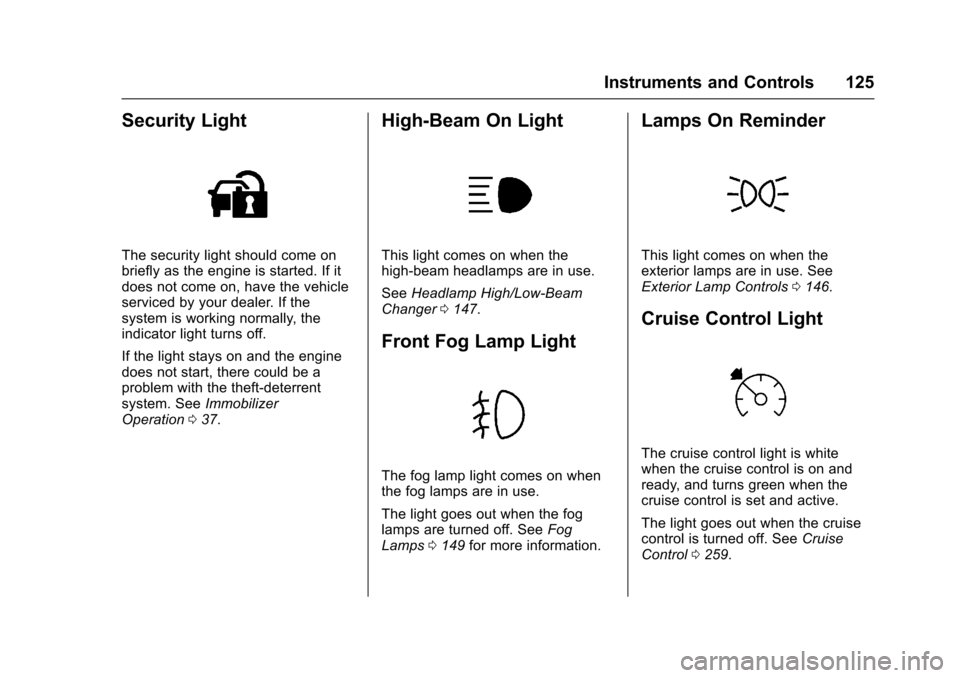
The security light should come onbriefly as the engine is started. If itdoes not come on, have the vehicleserviced by your dealer. If thesystem is working normally, theindicator light turns off.
If the light stays on and the enginedoes not start, there could be aproblem with the theft-deterrentsystem. SeeImmobilizerOperation037.
High-Beam On Light
This light comes on when thehigh-beam headlamps are in use.
SeeHeadlamp High/Low-BeamChanger0147.
Front Fog Lamp Light
The fog lamp light comes on whenthe fog lamps are in use.
The light goes out when the foglamps are turned off. SeeFogLamps0149for more information.
Lamps On Reminder
This light comes on when theexterior lamps are in use. SeeExterior Lamp Controls0146.
Cruise Control Light
The cruise control light is whitewhen the cruise control is on andready, and turns green when thecruise control is set and active.
The light goes out when the cruisecontrol is turned off. SeeCruiseControl0259.
Page 133 of 419
Chevrolet Colorado Owner Manual (GMNA-Localizing-U.S./Canada/Mexico-10122675) - 2017 - crc - 8/22/16
132 Instruments and Controls
Vehicle Messages
Messages displayed on the DICindicate the status of the vehicle orsome action that may be needed tocorrect a condition. Multiplemessages may display one after theother.
The messages that do not requireimmediate action can beacknowledged and cleared by
pressing SET/CLR orV.The
messages that require immediateaction cannot be cleared until thataction is performed. All messagesshould be taken seriously andclearing the messages does notcorrect the problem.
The following are some of thevehicle messages that may bedisplayed depending on yourvehicle content.
If the vehicle has a diesel engine,see the Duramax diesel supplementfor additional messages.
Battery Voltage and
Charging Messages
BATTERY LOW START
VEHICLE
When the vehicle’sbatteryisseverely discharged, this messagewill display and four chimes willsound. Start the vehicleimmediately. If the vehicle is notstarted and the battery continues todischarge, the climate controls,heated seats, and audio systemswill shut off and the vehicle mayrequire a jump start. These systemswill function again after the vehicleis started.
BATTERY SAVER ACTIVE
This message displays when thebattery voltage drops belowexpected levels and features aredisabled. Turn off all unnecessaryaccessory features.
SERVICE BATTERY
CHARGING SYSTEM
On some vehicles, this messagedisplays if there is a problem withthe battery charging system. Undercertain conditions, the chargingsystem light may also turn on in theinstrument cluster. SeeChargingSystem Light011 8.Drivingwiththisproblem could drain the battery.Turn off all unnecessaryaccessories. Have the electricalsystem checked as soon aspossible. See your dealer.
TRANSPORT MODE ON
This message is displayed when thevehicle is in transport mode. Somefeatures can be disabled while inthis mode, including RemoteKeyless Entry (RKE), remote start,and the vehicle alarm system. Takethe vehicle to your dealer for serviceto turn transport mode off.
Page 134 of 419

Chevrolet Colorado Owner Manual (GMNA-Localizing-U.S./Canada/Mexico-10122675) - 2017 - crc - 8/22/16
Instruments and Controls 133
Brake System Messages
BRAKE FLUID LOW
This message is displayed when thebrake fluid level is low; seeBrakeFluid0299.
HILL START ASSIST ACTIVE
This message is displayed when thevehicle is stopped on a gradesufficient to activate HSA. HSAholds the braking pressure for amaximum of two seconds to ensurethat there is no rolling, which willassist the driver to transitionbetween releasing the brake pedaland accelerating to drive off whileon the grade. The brakes willautomatically release when theaccelerator pedal is applied withinthe two-second window. SeeHillStart Assist (HSA)0255.
RELEASE PARKING BRAKE
This message is displayed as areminder that the parking brake ison. Release it before you attempt todrive.
SERVICE BRAKE ASSIST
This message may be displayedwhen there is a problem with thebrake boost assist system. Whenthis message is displayed, the brakeboost assist motor may be heardoperating and you might noticepulsation in the brake pedal. This isnormal under these conditions. Takethe vehicle to your dealer forservice.
Compass Messages
Dashes may be displayed if thevehicle temporarily losescommunication with the GlobalPositioning System (GPS).
Door Ajar Messages
DOOR OPEN
This message displays and a chimemay sound if a door is not fullyclosed. Stop and turn off thevehicle, check the door forobstructions, and close the dooragain. Check to see if the messagestill appears on the DIC.
HOOD OPEN
This message displays and a chimemay sound if the hood is not fullyclosed. Stop and turn off thevehicle, check the hood forobstructions, and close the hoodagain. Check to see if the messagestill appears on the DIC.
Engine Cooling System
Messages
AIR CONDITIONING OFF
This message displays when theengine coolant becomes hotter thanthe normal operating temperature.SeeEngine Coolant TemperatureGauge011 5.Toavoidaddedstrainon a hot engine, the air conditioningcompressor automatically turns off.When the coolant temperaturereturns to normal, the airconditioning compressor turns backon. You can continue to drive yourvehicle.
If this message continues to appear,have the system repaired by yourdealer as soon as possible to avoiddamage to the engine.
Page 135 of 419

Chevrolet Colorado Owner Manual (GMNA-Localizing-U.S./Canada/Mexico-10122675) - 2017 - crc - 8/22/16
134 Instruments and Controls
ENGINE OVERHEATING, IDLE
ENGINE
This message displays when theengine coolant temperature is toohot. Stop and allow the vehicle toidle until it cools down. SeeEngineCoolant Temperature Gauge011 5.
When towing, use Tow/Haul Modeto prevent damage to the engine ortransmission. SeeTo w / H a u lMode0245.
ENGINE OVERHEATED STOP
ENGINE
This message displays and a chimemay sound if the engine coolingsystem reaches unsafetemperatures for operation. Stopand turn off the vehicle as soon as itis safe to do so to avoid severedamage. This message clears whenthe engine has cooled to a safeoperating temperature.
Engine Oil Messages
CHANGE ENGINE OIL SOON
This message displays when theengine oil needs to be changed.When you change the engine oil, besure to reset the CHANGE ENGINEOIL SOON message. SeeEngineOil Life System0288forinformation on how to reset themessage. SeeEngine Oil0286andMaintenance Schedule0366.
ENGINE OIL LOW ADD OIL
On some vehicles, this messagedisplays when the engine oil levelmay be too low. Check the oil levelbefore filling to the recommendedlevel. If the oil is not low and thismessage remains on, take thevehicle to your dealer for service.SeeEngine Oil0286.
ENGINE OIL HOT IDLE
ENGINE
This message displays when theengine oil becomes hotter than thenormal operating temperature. Stop
and allow the vehicle to idle until itcools down. SeeEngine CoolantTe m p e r a t u r e G a u g e011 5.
OIL PRESSURE LOW STOP
ENGINE
This message displays if low oilpressure levels occur. Stop thevehicle as soon as safely possibleand do not operate it until the causeof the low oil pressure has beencorrected. Check the oil as soon aspossible and have the vehicleserviced by your dealer. SeeEngineOil0286.
Engine Power Messages
ENGINE POWER IS REDUCED
This message displays and a chimemay sound when the cooling systemtemperature gets too hot and theengine further enters the enginecoolant protection mode. SeeEngine Overheating0296for moreinformation.
This message also displays whenthe vehicle's engine power isreduced. Reduced engine powercan affect the vehicle's ability to
Page 136 of 419

Chevrolet Colorado Owner Manual (GMNA-Localizing-U.S./Canada/Mexico-10122675) - 2017 - crc - 8/22/16
Instruments and Controls 135
accelerate. If this message is on,but there is no reduction inperformance, proceed to yourdestination. The performance maybe reduced the next time the vehicleis driven. The vehicle may be drivenat a reduced speed while thismessage is on, but acceleration andspeed may be reduced. Anytimethis message stays on, or displaysrepeatedly, the vehicle should betaken to your dealer for service assoon as possible.
Fuel System Messages
FUEL LEVEL LOW
This message displays when thevehicle is low on fuel. Refuel assoon as possible.
Key and Lock Messages
REPLACE BATTERY IN
REMOTE KEY
This message displays if a RemoteKeyless Entry (RKE) transmitterbattery is low. The battery needs tobe replaced in the transmitter. See
“Battery Replacement”underRemote Keyless Entry (RKE)System Operation030.
Lamp Messages
TURN SIGNAL ON
This message displays and a chimesounds if a turn signal is left on for1.2 km (0.75 mi). Move the turnsignal lever to the off position.
Object Detection System
Messages
FORWARD COLLISION
ALERT OFF
If your vehicle has the ForwardCollision Alert (FCA) system, thismessage may display if the FCAsystem cannot activate due to atemporary condition. SeeForwardCollision Alert (FCA) System0263.
FRONT CAMERA BLOCKED,
CLEAN WINDSHIELD
This message displays when theLane Departure Warning (LDW) andForward Collision Alert (FCA)
systems are disabled because thecamera view is blocked and cannotoperate properly. It may alsoactivate during heavy rain or due toroad spray. To clean the system,clean the outside of the windshieldarea in front of the LDW/FCAcamera sensor.
LANE DEPARTURE SYSTEM
UNAVAILABLE
If your vehicle has the LaneDeparture Warning (LDW) system,this message may display if theLDW system cannot activate due toatemporarycondition.SeeLaneDeparture Warning (LDW)0264formore information.
SERVICE FRONT CAMERA
This message displays when theLane Departure Warning (LDW) andForward Collision Alert (FCA)systems are disabled and needservice. See your dealer.