2017 BMW X3 fluid
[x] Cancel search: fluidPage 204 of 265
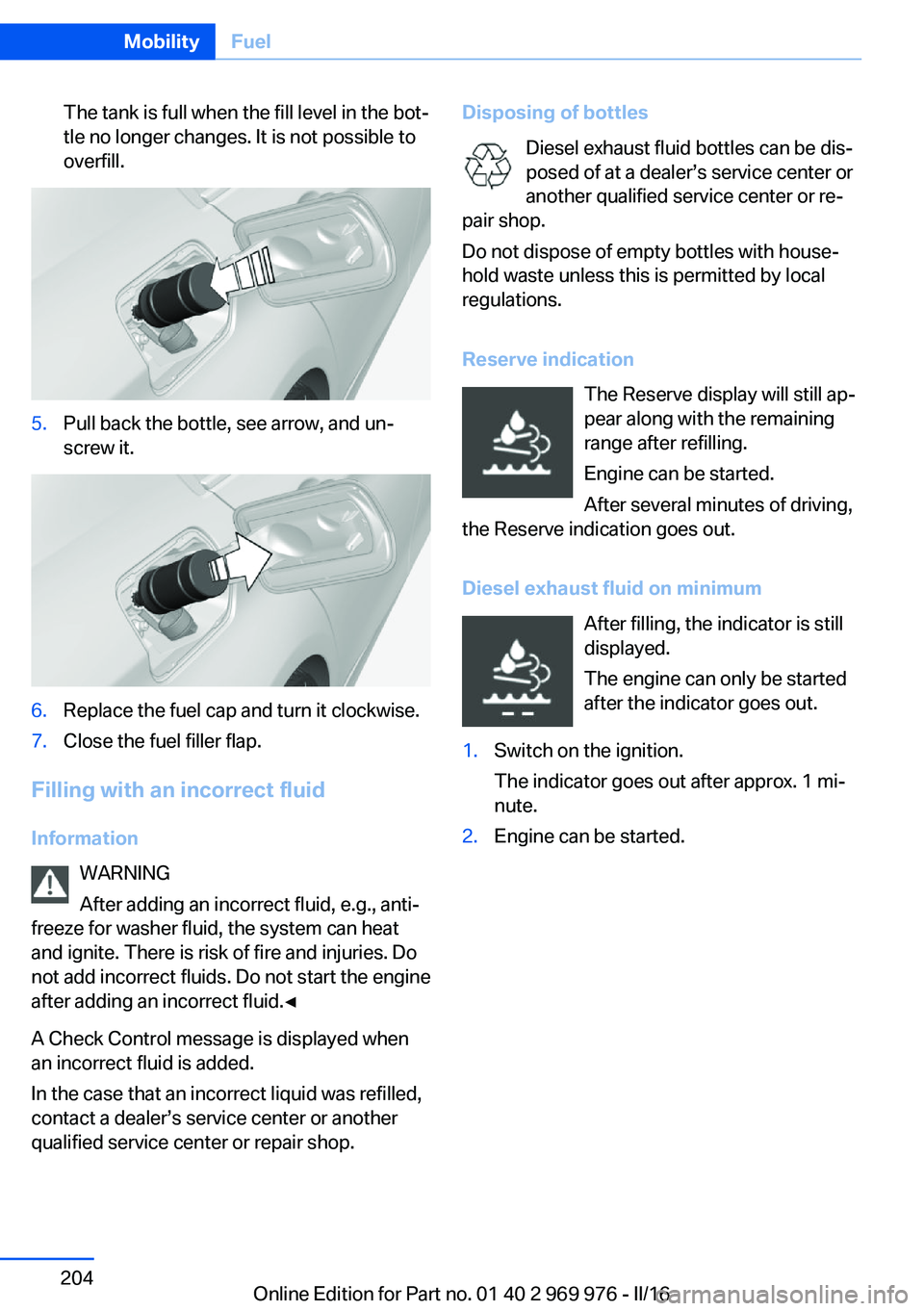
The tank is full when the fill level in the bot‐
tle no longer changes. It is not possible to
overfill.5.Pull back the bottle, see arrow, and un‐
screw it.6.Replace the fuel cap and turn it clockwise.7.Close the fuel filler flap.
Filling with an incorrect fluid
Information WARNING
After adding an incorrect fluid, e.g., anti‐
freeze for washer fluid, the system can heat
and ignite. There is risk of fire and injuries. Do
not add incorrect fluids. Do not start the engine
after adding an incorrect fluid.◀
A Check Control message is displayed when
an incorrect fluid is added.
In the case that an incorrect liquid was refilled,
contact a dealer’s service center or another
qualified service center or repair shop.
Disposing of bottles
Diesel exhaust fluid bottles can be dis‐
posed of at a dealer’s service center or another qualified service center or re‐
pair shop.
Do not dispose of empty bottles with house‐
hold waste unless this is permitted by local
regulations.
Reserve indication The Reserve display will still ap‐
pear along with the remaining
range after refilling.
Engine can be started.
After several minutes of driving,
the Reserve indication goes out.
Diesel exhaust fluid on minimum After filling, the indicator is still
displayed.
The engine can only be started
after the indicator goes out.1.Switch on the ignition.
The indicator goes out after approx. 1 mi‐
nute.2.Engine can be started.Seite 204MobilityFuel204
Online Edition for Part no. 01 40 2 969 976 - II/16
Page 217 of 265

Engine compartmentVehicle features and optionsThis chapter describes all standard, country-
specific and optional features offered with the
series. It also describes features that are not
necessarily available in your car, e. g., due tothe selected options or country versions. This
also applies to safety-related functions and
systems. The respectively applicable country
provisions must be observed when using the
respective features and systems.
Important features in the engine compartment
1Washer fluid reservoir2Vehicle identification number3Jump-starting, negative battery terminal4Jump-starting, positive battery terminal5Coolant reservoir6Oil filler neckHood
Information WARNING
Improperly executed work in the engine
compartment can damage vehicle compo‐
nents and impair vehicle functions. There is a
risk of personal and property damage. Themanufacturer of your vehicle recommends
that, in the effort to avoid such risks, work in
the engine compartment be performed by a
dealer’s service center or another qualified
service center or repair shop.◀Seite 217Engine compartmentMobility217
Online Edition for Part no. 01 40 2 969 976 - II/16
Page 226 of 265

MaintenanceVehicle features and options
This chapter describes all standard, country-
specific and optional features offered with the
series. It also describes features that are not
necessarily available in your car, e. g., due to
the selected options or country versions. This
also applies to safety-related functions and
systems. The respectively applicable country
provisions must be observed when using the
respective features and systems.
BMW maintenance system The maintenance system indicates required
maintenance measures, and thereby provides
support in maintaining road safety and the op‐
erational reliability of the vehicle.
In some cases scopes and intervals may vary
according to the country-specific version. Re‐
placement work, spare parts, fuels and lubri‐
cants and wear materials are calculated sepa‐
rately. Further information is available from a
dealer’s service center or another qualified
service center or repair shop.
Condition Based ServiceCBS
Sensors and special algorithms take into ac‐
count the driving conditions of the vehicle.
Based on this, Condition Based Service recog‐
nizes the maintenance requirements.
The system makes it possible to adapt the
amount of maintenance corresponding to your
user profile.
Information on service requirements can be
displayed on the Control Display.Service data in the remote control
Information on the required maintenance is
continuously stored in the remote control. The dealer’s service center can read this data out
and suggest a maintenance scope for the vehi‐
cle.
Therefore, hand the service advisor the remote
control with which the vehicle was driven most
recently.
Storage periods Storage periods during which the vehicle bat‐
tery was disconnected are not taken into ac‐
count.
If this occurs, have a dealer's service center or
another qualified service center or repair shop
update the time-dependent maintenance pro‐
cedures, such as checking brake fluid and, if
necessary, changing the engine oil and the mi‐
crofilter/activated-charcoal filter.
Service and WarrantyInformation Booklet for US
models and Warranty and
Service Guide Booklet for
Canadian models
Please consult your Service and Warranty In‐
formation Booklet for US models and Warranty
and Service Guide Booklet for Canadian mod‐
els for additional information on service re‐
quirements.
The manufacturer of your vehicle recommends
that maintenance and repair be performed by a
dealer’s service center or another qualified
service center or repair shop. Records of regu‐
lar maintenance and repair work should be re‐
tained.Seite 226MobilityMaintenance226
Online Edition for Part no. 01 40 2 969 976 - II/16
Page 240 of 265

corresponding engine or body ground of
the vehicle to be started.
Starting the engine
Never use spray fluids to start the engine.
1.Start the engine of the assisting vehicle
and let it run for several minutes at an in‐
creased idle speed.
If the vehicle to be started has a diesel en‐
gine: let the engine of the assisting vehicle
run for approx. 10 minutes.2.Start the engine of the vehicle that is to be
started in the usual way.
If the first starting attempt is not success‐
ful, wait a few minutes before making an‐
other attempt in order to allow the dis‐
charged battery to recharge.3.Let both engines run for several minutes.4.Disconnect the jumper cables in the re‐
verse order.
Check the battery and recharge if needed.
Tow-starting and towing Information WARNING
Due to system limits, individual functions
can malfunction during tow-starting/towing
with the Intelligent Safety systems activated,
e.g., approach control warning with light brak‐
ing function. There is risk of an accident.
Switch all Intelligent Safety systems off prior to
tow-starting/towing.◀
Steptronic transmission: transporting
the vehicle
Information
The vehicle is not permitted to be towed.
ATTENTION
The vehicle can be damaged when tow‐
ing the vehicle with a single lifted axle. There is
a risk of damage to property. The vehicle
should only be transported on a loading plat‐
form.◀
Tow truck
The vehicle should only be transported on a
loading platform.
ATTENTION
When lifting the vehicle by the tow fitting
or body and chassis parts; damage can occur
on vehicle parts. There is a risk of damage to
property. Lift vehicle using suitable means.◀
Use tow fitting located in the front only for po‐
sitioning the vehicle.
Pushing vehicle To maneuver vehicle from the danger area,
electronically unlock the transmission lock, re‐
fer to page 82, if needed.
Towing other vehicles
Information WARNING
If the approved gross vehicle weight of
the towing vehicle is lighter than the vehicle to
be towed, the tow fitting can tear off or it will
not be possible to control the vehicle's re‐
sponse. There is risk of an accident! Make sure
Seite 240MobilityBreakdown assistance240
Online Edition for Part no. 01 40 2 969 976 - II/16
Page 246 of 265
Safety belts
Dirty belt straps impede the reeling action and
thus have a negative impact on safety.
WARNING
Chemical cleansers can destroy the
safety belt webbing. Missing protective effect
of the safety belts. There is a risk of injury or
danger to life. Use only a mild soapy solution
for cleaning the safety belts.◀
Use only a mild soapy solution, with the safety
belts clipped into their buckles.
Do not allow the switchs to retract the safety
belts until they are dry.
Carpets and floor mats WARNING
Objects in the driver's floor area can limit
the pedal distance or block a depressed pedal.
There is risk of an accident. Stow objects in
the vehicle such that they are secured and
cannot enter into the driver's floor area. Use
floor mats that are suitable for the vehicle and
can be safely attached to the floor. Do not use
loose floor mats and do not layer several floor
mats. Make sure that there is sufficient clear‐
ance for the pedals. Ensure that the floor mats
are securely fastened again after they were re‐
moved, e.g., for cleaning.◀
Floor mats can be removed from the car's inte‐
rior for cleaning.
If the floor carpets are very dirty, clean with a
microfiber cloth and water or a textile cleaner.
To prevent matting of the carpet, rub back and
forth in the direction of travel only.
Sensor/camera lenses
To clean sensors and camera lenses, use a
cloth moistened with a small amount of glass
detergent.Displays/Screens/protective glass of
the Head-up Display
ATTENTION
Chemical cleansers, moisture or fluids of
any kind can damage the surface of displays
and screens. There is a risk of damage to prop‐
erty. Clean with a clean, antistatic microfiber
cloth.◀
ATTENTION
The surface of displays can be damaged
with improper cleaning. There is a risk of dam‐
age to property. Avoid pressure that is too high
and do not use any scratching materials.◀
Clean with a clean, antistatic microfiber cloth.
Head-up Display:
Clean the protective glass of the Head-up Dis‐
play using a microfiber cloth and commercially
available dish-washing soap.
Long-term vehicle storage
When the vehicle is shut down for longer than
three months, special measures must be
taken. Further information is available from a
dealer’s service center or another qualified
service center or repair shop.Seite 246MobilityCare246
Online Edition for Part no. 01 40 2 969 976 - II/16
Page 254 of 265

Everything from A to Z
IndexA ABS, Antilock Brake Sys‐ tem 129
ACC, Active Cruise Control with Stop&Go function 136
Acceleration Assistant, refer to Launch Control 82
Accessories and parts 8
Activated-charcoal filter 164
Active Blind Spot Detec‐ tion 126
Active Cruise Control with Stop&Go function,
ACC 136
Adaptive brake lights, see Brake force display 128
Adaptive Light Control 102
Additional information, iDrive 23
Additives, oil 222
Adjustments, seats/head re‐ straints 53
After washing vehicle 244
Airbags 105
Airbags, indicator/warning light 106
Air circulation, see Recircu‐ lated-air mode 160, 163
Air, dehumidifying, see Cool‐ ing function 160, 163
Air distribution, man‐ ual 161 , 164
Air flow, automatic climate control 161, 164
Air pressure, tires 205
Air vents, see Ventilation 165
Alarm system 47
Alarm, unintentional 48
All around the center con‐ sole 16 All around the roofliner 17
All around the steering wheel 14
All-season tires, see Winter tires 211
All-wheel-drive 131
Alternating-code hand-held transmitter 168
Alternative oil types 222
Ambient light 104
Antifreeze, washer fluid 78
Antilock Brake System, ABS 129
Anti-slip control, see DSC 129
App, BMW Driver’s Guide 6
Approved axle load 251
Armrest, see Center arm‐ rest 177
Arrival time 95
Ash tray 169
Assistance, Roadside Assis‐ tance 238
Assistance when driving off 135
Assist system, see Intelligent Safety 114
AUTO H button 73
AUTO H button, see Auto‐ matic Hold 73
AUTO intensity 163
Automatic car wash 243
Automatic climate con‐ trol 159
Automatic cruise control with Stop&Go function 136
Automatic Curb Monitor 61
Automatic deactivation, Front-seat passenger air‐
bags 107 Automatic headlamp con‐
trol 101
Automatic Hold 73
Automatic locking 46
Automatic recirculated-air control 163
Automatic tailgate 41
Automatic transmission, see Steptronic transmission 79
AUTO program, automatic cli‐ mate control 163
AUTO program, climate con‐ trol 160
AUTO program, intensity 163
Auto Start/Stop function 70
AUX-IN port, general informa‐ tion 171
Average fuel consumption 94
Average speed 94
Axle loads, weights 251
B Backrest curvature, see Lum‐ bar support 55
Backrest, width 56
Bad road trips 182
Band-aids, see First-aid kit 238
Battery replacement, vehicle battery 235
Battery replacement, vehicle remote control 35
Battery, vehicle 235
Being towed, see Tow-start‐ ing and towing 240
Belts, safety belts 56
Beverage holder, cup holder 177
Biodiesel 201
Blinds, sun protection 50 Seite 254ReferenceEverything from A to Z254
Online Edition for Part no. 01 40 2 969 976 - II/16
Page 256 of 265

Configuring driving pro‐gram 134
Confirmation signal 46
ConnectedDrive, see Owner's Manual for Navigation, En‐
tertainment and Communi‐
cation
ConnectedDrive Services
Connecting electrical devi‐ ces 170
Container for washer fluid 78
Continued driving with a flat tire 111 , 114
Control Display 18
Control Display, settings 96
Controller 19
Control systems, driving sta‐ bility 129
Convenient opening with the remote control 38
Coolant 224
Coolant temperature 89
Cooling function 160, 163
Cooling, maximum 163
Cooling system 224
Cornering light 102
Corrosion on brake discs 185
Cosmetic mirror 169
Courtesy lamps during un‐ locking 38
Courtesy lamps with the vehi‐ cle locked 38
Cruise control 142
Cruise control, active with Stop&Go function 136
Cruise control with distance control, see active cruise
control, ACC 136
Cruise control without dis‐ tance control, see cruise
control 142
Cruising range 90
Cup holder 177
Current fuel consumption 90 D
Damage, tires 210
Damping control, dy‐ namic 132
Data, technical 250
Date 90
Daytime running lights 102
Daytime running lights, bulb replacement 230
Defrosting, see Windows, de‐ frosting 161, 164
Dehumidifying, air 160, 163
Deleting personal data 25
Deletion of personal data 25
Destination distance 95
Diesel exhaust fluid, at low temperatures 202
Diesel exhaust fluid, having refilled 202
Diesel exhaust fluid, on mini‐ mum 202
Diesel exhaust fluid, replen‐ ishing yourself 202
Diesel fuel 201
Diesel particulate filter 183
Digital clock 89
Dimensions 250
Dimmable exterior mirrors 62
Dimmable interior mirror 62
Direction indicator, see Turn signals 75
Display, electronic, instru‐ ment cluster 84
Display in windshield 98
Display lighting, see Instru‐ ment lighting 104
Displays, cleaning 246
Disposal, coolant 225
Disposal, vehicle battery 236
Distance control, see PDC 145
Distance to destination 95
Divided screen view, split screen 24
Door lock 39 Door lock, see Remote con‐
trol 34
Downhill control 131
Drive-off assistant 135
Drive-off assistant, see DSC 129
Driving Dynamics Con‐ trol 133
Driving instructions, break- in 182
Driving mode 133
Driving notes, general 183
Driving on bad roads 182
Driving on racetracks 185
Driving stability control sys‐ tems 129
Driving tips 183
DSC Dynamic Stability Con‐ trol 129
DTC Dynamic Traction Con‐ trol 130
Dynamic Damping Con‐ trol 132
Dynamic Stability Control DSC 129
Dynamic Traction Control DTC 130
E
ECO PRO 190
ECO PRO, bonus range 191
ECO PRO display 190
ECO PRO driving mode 190
ECO PRO mode 190
ECO PRO Tip - driving in‐ struction 192
EfficientDynamics 192
Electronic displays, instru‐ ment cluster 84
Electronic oil measure‐ ment 220
Electronic Stability Program ESP, see DSC 129
Emergency detection, remote control 35 Seite 256ReferenceEverything from A to Z256
Online Edition for Part no. 01 40 2 969 976 - II/16
Page 260 of 265

Oil filler neck 221
Oil types, alternative 222
Oil types, suitable 222
Old batteries, disposal 236
Onboard computer 94
Onboard computer, see On‐ board computer 94
Onboard monitor, see Control Display 18
Onboard vehicle tool kit 228
Opening/closing via door lock 39
Opening and closing 34
Opening and closing, without remote control 39
Opening and closing, with re‐ mote control 38
Opening the tailgate with no- touch activation 44
Operating concept, iDrive 18
Optional equipment 7
Outside air, see Automatic re‐ circulated-air control 163
Overheating of engine, see Coolant temperature 89
Own Safety 7
P Paint, vehicle 244
Panoramic glass sunroof 50
Parallel parking assistant 154
Park Distance Control PDC 145
Parked-car ventilation 165
Parked vehicle, condensa‐ tion 185
Parking aid, see PDC 145
Parking assistant 154
Parking brake 72
Parking lights 100
Parking lights, bulb replace‐ ment 230
Parking with Automatic Hold 73
Particulate filter 183 Parts and accessories 8
Passenger side mirror, tilting downward 61
Pathway lines, rearview cam‐ era 149
PDC Park Distance Con‐ trol 145
Performance Control 131
Personal Profile 36
Personal Profile, exporting profiles 37
Personal Profile, importing profiles 37
Person warning with City light braking function 121
Pinch protection system, glass sunroof 52
Pinch protection system, win‐ dows 49
Plastic, care 245
Power failure 236
Power windows 48
Prescribed engine oil types 222
Pressure, tire air pres‐ sure 205
Pressure warning, tires 112
Profile, see Personal Pro‐ file 36
Programmable memory but‐ tons, iDrive 24
Protective function, glass sunroof 52
Protective function, win‐ dows 49
Push-and-turn switch, see Controller 19
R Racetrack operation 185
Radiator fluid 224
Radio-operated key, see Re‐ mote control 34
Radio ready state 68 Radio, see Owner's Manual
for Navigation, Entertain‐
ment and Communication
Rain sensor 76
Rapeseed-oil methyl ester RME 201
Ratchet straps, securing cargo 187
Rear lights 233
Rear socket 171
Rearview camera 148
Rearview mirror 61
Rear window de‐ froster 161, 164
Recirculated-air filter 164
Recirculated-air mode 160, 163
Recommended fuel grade 201
Recommended tire brands 211
Refueling 198
Remaining range 90
Remote control/key 34
Remote control, malfunc‐ tion 39
Remote control, univer‐ sal 167
Replacement fuse 236
Replacing parts 228
Replacing wheels/tires 210
Reporting safety malfunc‐ tions 10
RES button 139
RES button, see Active Cruise Control, ACC 136
RES button, see Cruise con‐ trol 142
Reserve warning, see Range 90
Reset, Tire Pressure Monitor TPM 109
Retreaded tires 211
RME rapeseed-oil methyl es‐ ter 201
Roadside parking lights 100 Seite 260ReferenceEverything from A to Z260
Online Edition for Part no. 01 40 2 969 976 - II/16