2017 BMW 6 SERIES GRAN COUPE set clock
[x] Cancel search: set clockPage 22 of 261
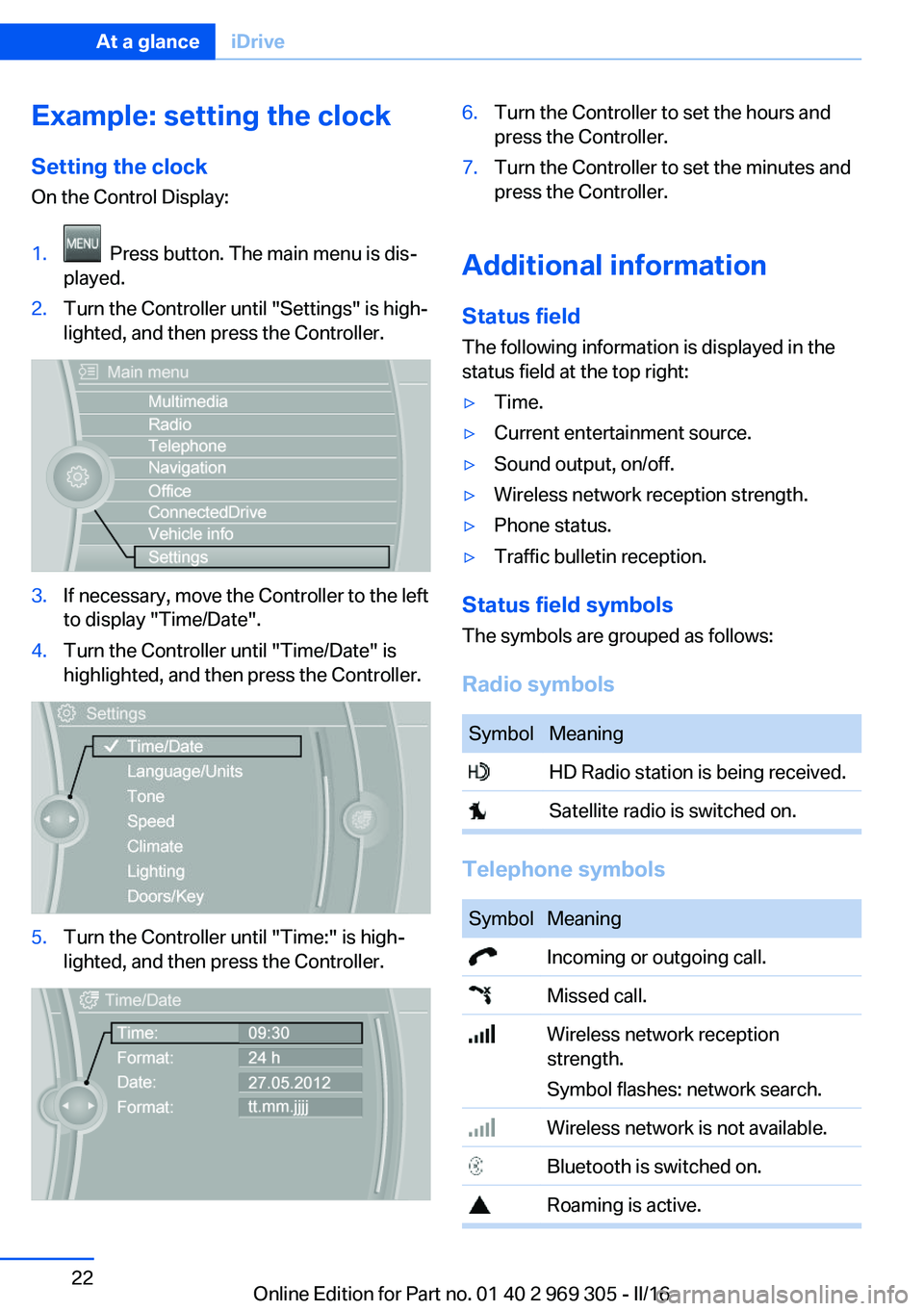
Example: setting the clockSetting the clock
On the Control Display:1. Press button. The main menu is dis‐
played.2.Turn the Controller until "Settings" is high‐
lighted, and then press the Controller.3.If necessary, move the Controller to the left
to display "Time/Date".4.Turn the Controller until "Time/Date" is
highlighted, and then press the Controller.5.Turn the Controller until "Time:" is high‐
lighted, and then press the Controller.6.Turn the Controller to set the hours and
press the Controller.7.Turn the Controller to set the minutes and
press the Controller.
Additional information
Status field
The following information is displayed in the
status field at the top right:
▷Time.▷Current entertainment source.▷Sound output, on/off.▷Wireless network reception strength.▷Phone status.▷Traffic bulletin reception.
Status field symbols
The symbols are grouped as follows:
Radio symbols
SymbolMeaning HD Radio station is being received. Satellite radio is switched on.
Telephone symbols
SymbolMeaning Incoming or outgoing call. Missed call. Wireless network reception
strength.
Symbol flashes: network search. Wireless network is not available. Bluetooth is switched on. Roaming is active.Seite 22At a glanceiDrive22
Online Edition for Part no. 01 40 2 969 305 - II/16
Page 131 of 261
be detected in time. There is risk of an acci‐
dent. Make sure that the driver is rested and
alert. Adjust the driving style to the traffic con‐
ditions.◀
Function
The system is activated each time the engine
is started and cannot be switched off.
After travel has begun, the system is trained
about the driver, so that decreasing alertness
or fatigue can be detected.
This procedure takes the following criteria into
account:▷Personal driving style, for example, steer‐
ing behavior.▷Driving conditions, for example, length of
trip.
Starting at approximately 43 mph/70 km/h, the
system is active and can display a recommen‐
dation to take a break.
Break recommendation
If the driver becomes less alert or fatigued, a
message is displayed in the Control Display
with the recommendation to take a break.
A recommendation to take a break is displayed
only once during an uninterrupted trip.
After a break, another recommendation to take
a break cannot be displayed until after approxi‐
mately 45 minutes.
System limits
The function may be limited in the following
situations, for instance, and will either output
an incorrect warning or no warning at all:
▷When the clock is set incorrectly.▷When the vehicle speed is mainly below
about 43 mph/70 km/h.▷With a sporty driving style, such as during
rapid acceleration or when cornering fast.▷In active driving situations, such as when
changing lanes frequently.▷When the road surface is poor.▷In the event of strong side winds.
The system is reset approx. 45 minutes after
parking the vehicle, e.g. in the case of a break
during longer trips on highways.
PreCrash
The concept
With this system critical driving situations that
might result in an accident can be detected
above a speed of approx. 20 mph/30 km/h. In
these situations, preventive measures are au‐
tomatically taken to minimize the risk of an ac‐
cident as much as possible.
Critical driving situations may include:
Emergency stop.
If the vehicle includes the front-end collision
warning or front-end collision warning with
braking feature, impending collisions with vehi‐
cles driving ahead or stopped in front of you
can also be detected within the system's
range.
Information WARNING
The system does not release from the
personal responsibility. Due to the system lim‐
its, critical situation could not be detected reli‐
ably or in time. There is risk of an accident. Ad‐
just the driving style to the traffic conditions.
Watch traffic closely and actively intervene in
the respective situations.◀
Function
After the safety belt is buckled, the front safety
belts are automatically tightened once after the
vehicle drove off.
In critical driving situations, the following indi‐
vidual functions become active as needed:
▷The front safety belts are automatically
pretensioned.Seite 131SafetyControls131
Online Edition for Part no. 01 40 2 969 305 - II/16
Page 252 of 261
COMFORT program, DrivingDynamics Control 139
Compressor 212
Condensation on win‐ dows 165
Condensation under the vehi‐ cle 187
Condition Based Service CBS 226
Configure driving mode 140
Confirmation signal 44
ConnectedDrive, see Owner's Manual for Navigation, En‐
tertainment and Communi‐
cation
ConnectedDrive Services
Container for washer fluid 76
Continued driving with a flat tire 110 , 113
Control Display 18
Control Display, settings 96
Controller 19
Control systems, driving sta‐ bility 133
Convenient opening with the remote control 38
Coolant 224
Coolant level 224
Coolant temperature 89
Cooling function 163
Cooling, maximum 163
Cooling system 224
Cornering light 102
Corrosion on brake discs 186
Cosmetic mirror 171
Courtesy lamps during un‐ locking 38
Courtesy lamps with the vehi‐ cle locked 38
Cruise control 147
Cruise control, active with Stop&Go function 141
Cruise control with distance control, see active cruise
control, ACC 141 Cruise control without dis‐
tance control, see cruise
control 147
Cruising range 90
Cup holder 179
Current fuel consumption 90
D
Damage, tires 210
Damping control, dy‐ namic 136
Data, technical 246
Date 90
Daytime running lights 102
Defrosting, see Windows, de‐ frosting 165
Dehumidifying, air 163
Deleting personal data 24
Deletion of personal data 24
Destination distance 95
Digital clock 90
Dimensions 246
Dimmable exterior mirrors 59
Dimmable interior mirror 60
Direction indicator, see Turn signals 73
Display, electronic, instru‐ ment cluster 81
Display in windshield 98
Display lighting, see Instru‐ ment lighting 104
Displays 82
Displays, cleaning 242
Disposal, coolant 225
Disposal, vehicle battery 232
Distance control, see PDC 150
Distance to destination 95
Divided screen view, split screen 23
Door lock 39
Door lock, see Remote con‐ trol 34
Doors, Automatic Soft Clos‐ ing 41 Downhill control 135
Drive mode 137
Drive-off assistant 133
Drive-off assistant, see DSC 133
Driver assistance, see Intelli‐ gent Safety 114
Driving Assistant, see Intelli‐ gent Safety 114
Driving Dynamics Con‐ trol 137
Driving instructions, break- in 184
Driving notes, general 184
Driving on racetracks 187
Driving stability control sys‐ tems 133
Driving tips 184
DSC Dynamic Stability Con‐ trol 133
DTC Dynamic Traction Con‐ trol 134
Dynamic Damping Con‐ trol 136
Dynamic Drive 136
Dynamic Stability Control DSC 133
Dynamic Traction Control DTC 134
E
ECO PRO 191
ECO PRO, bonus range 192
ECO PRO display 191
ECO PRO displays 83
ECO PRO driving mode 191
ECO PRO mode 191
ECO PRO Tip - driving in‐ struction 193
EfficientDynamics 193
Electronic displays, instru‐ ment cluster 81
Electronic oil measure‐ ment 220 Seite 252ReferenceEverything from A to Z252
Online Edition for Part no. 01 40 2 969 305 - II/16