2017 AUDI TT ROADSTER lock
[x] Cancel search: lockPage 39 of 314
CD
CD
.... N
" N .... 0 r--. V, co
Power top emergency
operation
General information
The power top can be closed manually if there is
a malfunction .
• Set the parking brake .
• Open all windows.
• Switch the ignition off.
Only close the power top manually in an emer
gency. Have a second person assist. Drive to an
authorized Audi dealer or authorized Audi Service
F acility immediately to have the malfunction cor
rected.
A WARNING
- There is a risk of pinching the hands or other
people during all of the power top emergen
cy operation steps .
- Make sure all windows are lowered during
emergency operation.
- Do not reach into the power top supports
or other moving components.
- Never drive when the power top is not
locked correctly. The w ind from dr iving
cou ld cause the power top to open. This can
resu lt in injuries and damage to the vehicle.
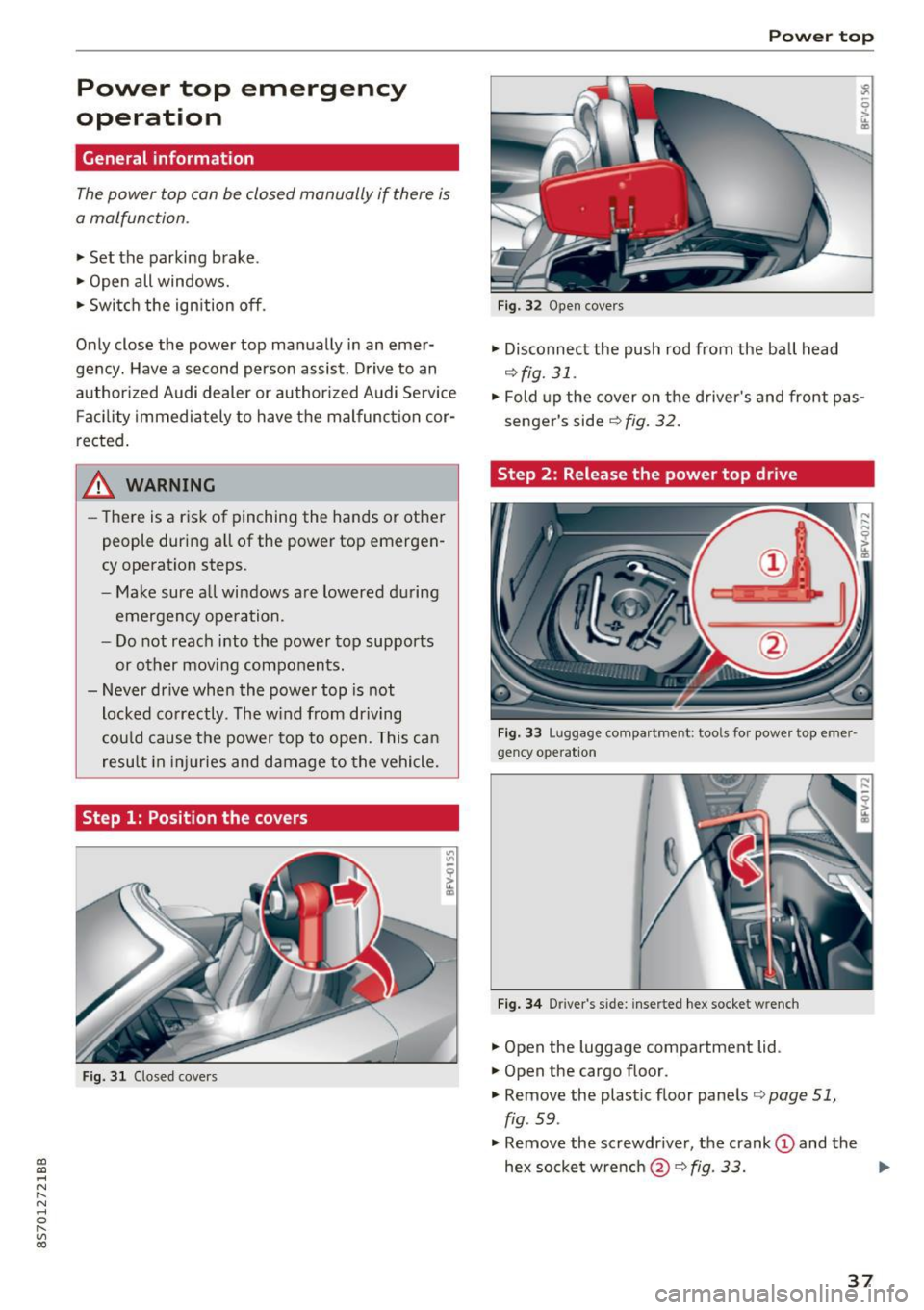
Step 1: Position the covers
Fig. 31 Closed covers
Power top
Fig. 32 Open covers
• Disconnect the push rod from the ball head
¢ fig. 31.
• Fold up the cover on the d river's and front pas
senger's side
r:::;, fig. 32 .
Step 2 : Release the power top drive
Fig. 33 Luggage compa rt me nt: t ools for power top eme r·
gency operat io n
Fig. 34 D river 's s ide: inserte d hex socket w re nch
• Open the luggage compartment lid .
• Open the cargo floor .
• Remove the plastic floor panels
r:::;, page 51,
fig . 59 .
• Remove the screwdr iver, the crank (D and the
hex socketwrench @r:::;,fig .
33. .,..
37
Page 40 of 314
Power top
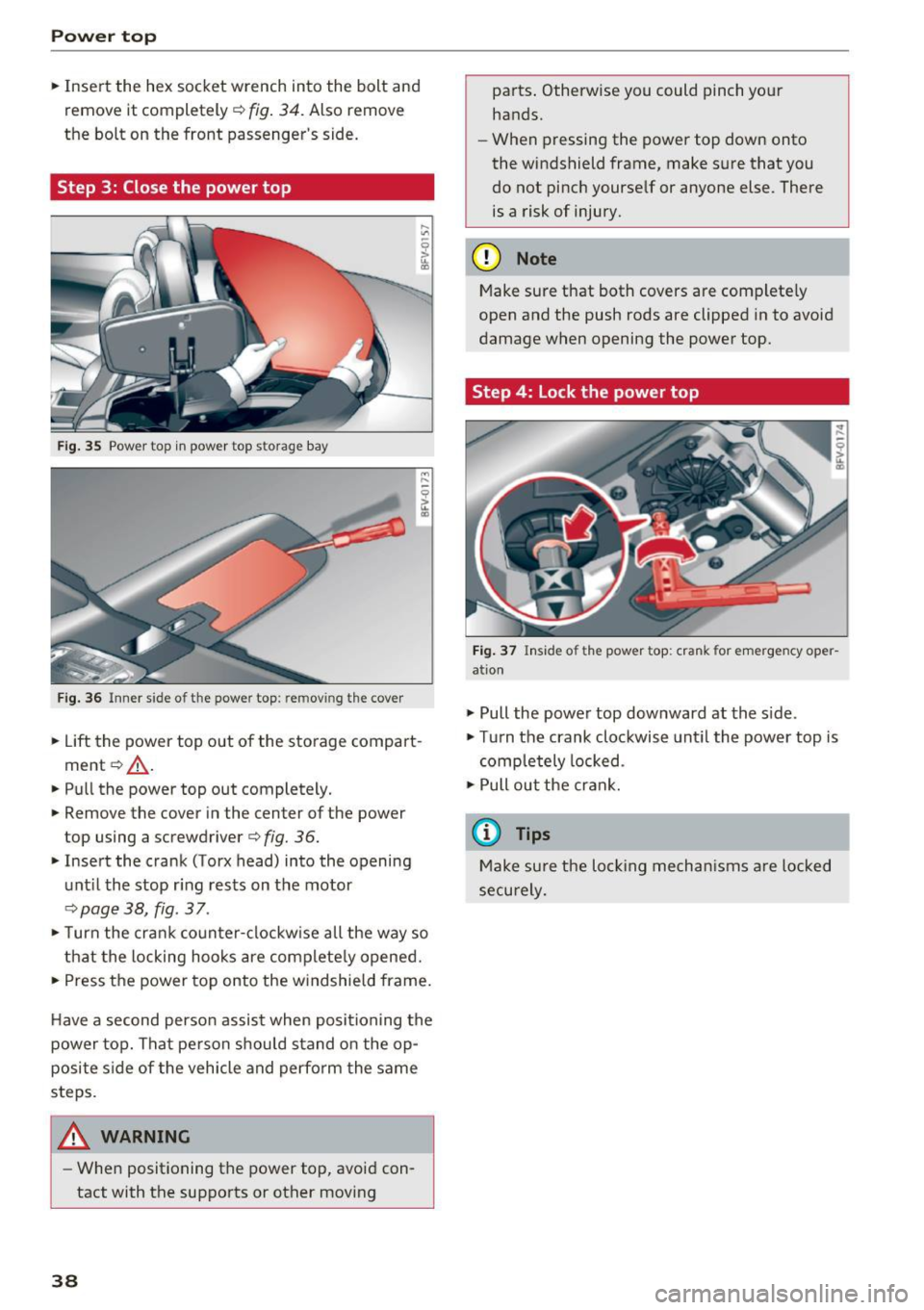
• Insert the hex socket wrench into the bolt and
remove it completely ¢
fig. 34. Also remove
the bolt on the front passenger's side.
Step 3: Close the power top
Fig. 35 Power top in power top s torage bay
Fig. 36 Inner side o f th e powe r top: re m ov ing the cover
• Lift the power top out of the storage compart
ment ¢,& .
• Pull the power top out completely.
• Remove the cover in the center of the power
top using a screwdriver ¢
fig. 36.
• Insert the crank (Torx head) into the opening
until the stop ring rests on the motor
¢page 38, fig . 37 .
• Turn the crank counter-clockwise all the way so
that the locking hooks are completely opened.
• Press the power top onto the windshield frame.
Have a second person assist when positioning the
power top. That person should stand on the op
posite side of the vehicle and perform the same
steps.
_& WARNING
- When positioning the power top, avoid con
tact with the supports or other moving
38
parts. Otherwise you could pinch your
hands.
- When pressing the power top down onto
the windshield frame, make sure that you
do not pinch yourself or anyone else . There
is a risk of injury.
(D Note
Make sure that both covers are completely
open and the push rods are clipped in to avoid
damage when opening the power top.
Step 4: Lock the power top
Fig. 37 Inside of the power top: crank for emergency oper
ation
• Pull the power top downward at the side.
• Turn the crank clockwise until the power top is
completely locked .
•Pullout the crank.
(D Tips
Make sure the locking mechanisms are locked
securely.
Page 43 of 314
CD
CD
.... N
" N .... 0 r--. V, co
Canada models: this function cannot be switched
off . They activate automatically each time the ig
n ition is switched on . This menu item is shown
with a "gray background".
Coming home, Leaving home
The coming home function illuminates the area
outside the vehicle when you turn the ignition off
and open the driver's door. To switch on the func
tion, se lect
Entry/exit lighting.
The leaving home illumi nates the area outs ide
the vehicle when you unlock the vehicle . To
switch on the function, select
Entry/exit light
ing .
The coming home and leaving home funct ions
only operate when it is dark and the light switch
is in the
AUTO position.
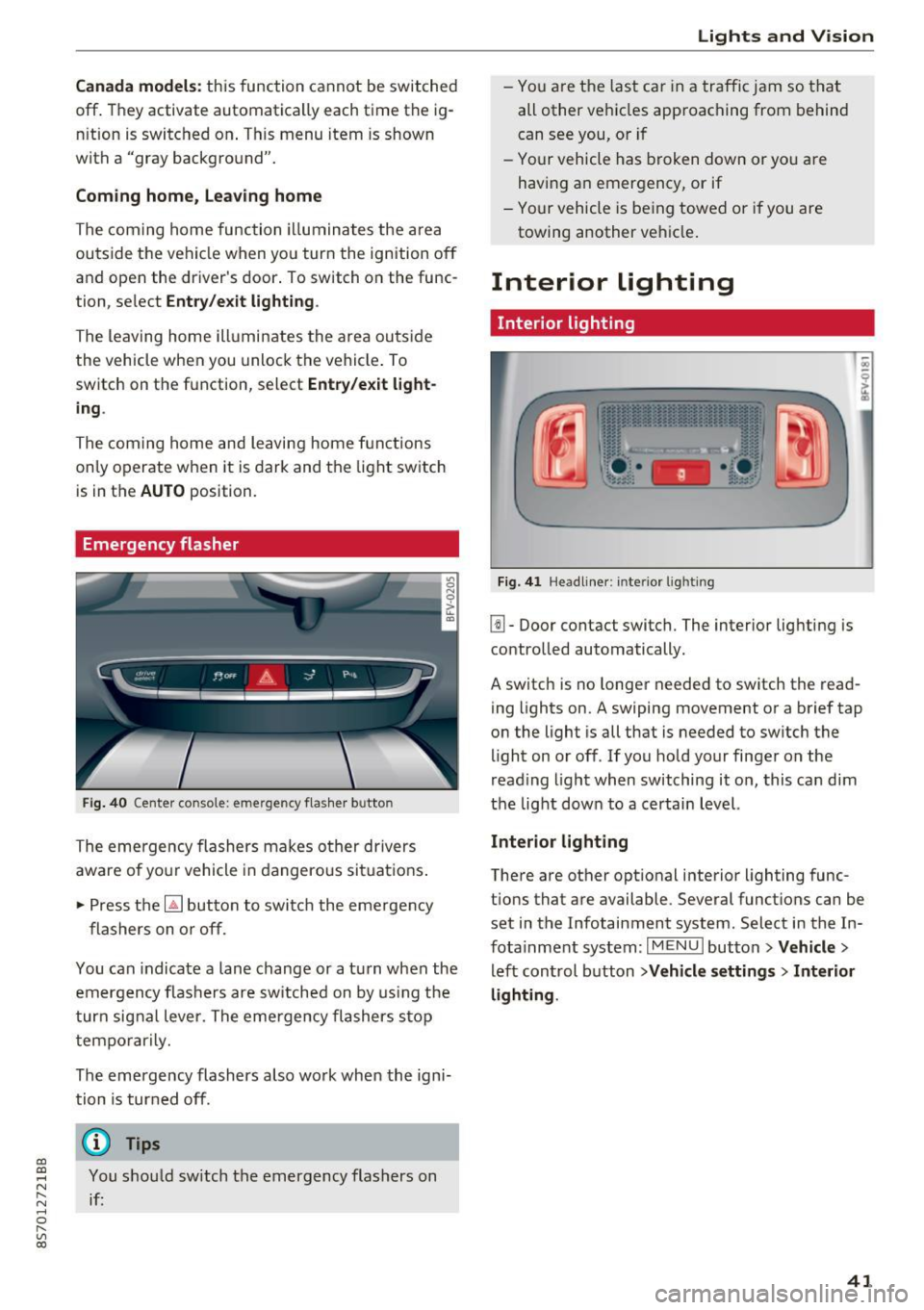
Emergency flasher
Fig. 40 Center conso le: emergency f las her button
The emergency flashers makes other drivers
aware of yo ur vehicle in dangerous situations .
.. Press the
[!J button to switch the emergency
flashers on or off.
You can indicate a lane change or a turn when the
emergency flas hers are switched on by using the
turn signal lever. The eme rgency flashers s top
temporarily.
The emergency flashers also wo rk when the igni
tion is turned off.
(D} Tips
You should sw itch the emergency flashers on
if:
Lights and V ision
-You are the last ca r in a traffic jam so that
all other vehicles approaching from behind
can see you, or i f
- Your vehicle has broken down or yo u are
having an emergency, or if
- Your vehicle is be ing towed o r if you are
towing another vehicle .
Interior lighting
Interior lighting
Fig. 41 Headliner: interior lighti ng
[!l-Door contact switch. The interior lighting is
controlled automatically.
A switch is no longer needed to switch the read
ing lights on.
A swiping movement or a brief tap
on the light is all that is needed to switch the
light on or off. If you hold your finger on the
read ing light when switching it on, this can d im
the light down to a certain level.
Interior lighting
There are other opt ional interior lighting func
tions that are available . Several functions can be
set in the Infotainment system. Select in the In
fotainment system:
I MENU I button> Vehicle>
left control button >Vehicle settings > Interior
lighting .
41
Page 44 of 314
Lights and Vision
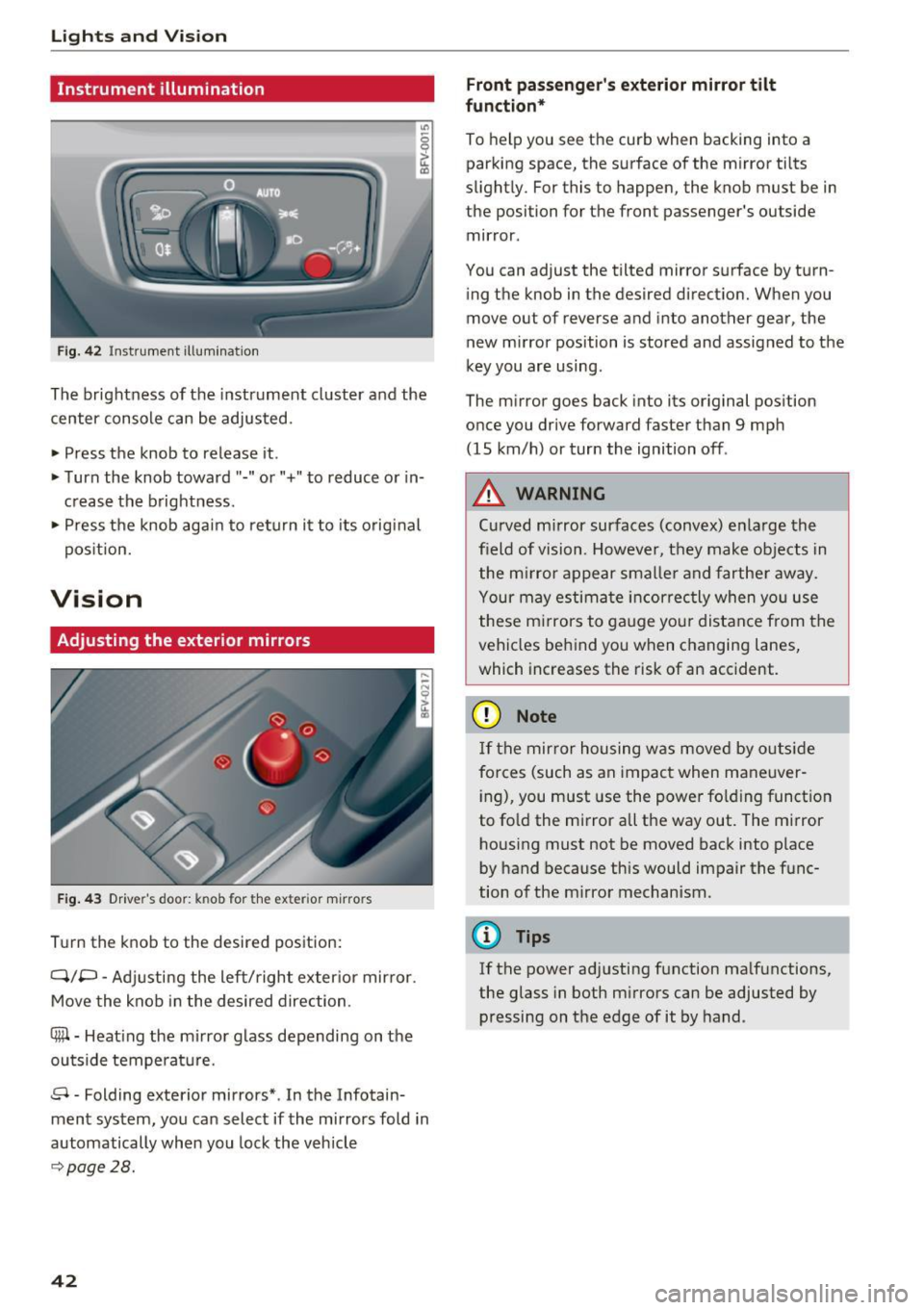
Instrument illumination
Fig . 42 Inst ru m ent illuminat io n
"' ~ 0 0
~ (0
The brightness of the instrument cluster and the
center console can be adjusted.
• Press the knob to release it .
• Turn the knob toward"-" or"+" to reduce or in
c rease the b rightness .
• Press the knob again to ret urn it to its original
pos ition.
Vision
Adjusting the exterior mirrors
F ig. 4 3 Driver's door: knob for the exter ior m irrors
T u rn the knob to the desired pos ition:
Q/P -Adjusti ng the left/right exter ior mir ror.
Move the knob in the desired direction.
®-Heat ing the mi rror g lass depending on the
outside temperat ure.
8 -Folding exterior mirrors *. In the Infotain
ment system, you can select if the mirrors fold in
automatically when you lock the vehicle
9 page28.
42
Front passenge r's exterior mirror tilt
function *
To help you see the cur b when backing into a
parking space, the surface of the m irror tilts
slight ly. For this to happen, the knob must be in
the position for the front passenger's outside
mir ror .
You can adjust the tilted mirror s urface by turn
i ng the knob in the desired direct ion. When you
move out of reverse and into another gear, the
new m irror position is stored and assigned to the
key you are using.
The m irror goes back into its or ig inal pos ition
once you drive forward faster than 9 mp h
(15 km/h) or turn the ignition off .
,&. WARNING
Curved mirror surfaces (convex) e nla rge the
field of vision. Howeve r, they make objec ts in
the m irror appear s maller and fart he r aw ay.
Your may estima te inc orrec tly when yo u use
these m irrors to ga uge you r distan ce from the
vehicles behind you w hen changing la nes ,
which increases the risk of an accident.
(D Note
If th e mir ror h ousing w as move d by o utsid e
forces (such as an imp act when ma neuver
i ng), you must use the power fo lding funct ion
to fo ld the m irror all the way out. The m irror
h ousing must not be moved back into place
by hand because this would impair the func
tion o f the m irro r mechan ism.
(D Tips
If the power ad justing function ma lfunctions ,
the glass in both m irrors can be adjusted by
pressing on t he edge of it by hand.
-
Page 47 of 314
CD
CD
.... N
" N .... 0 r--. V, co
_& WARNING
Dirty windshield wiper blades can impair vi
sion, which increases the risk of a n accident.
Replacing windshield wiper blades
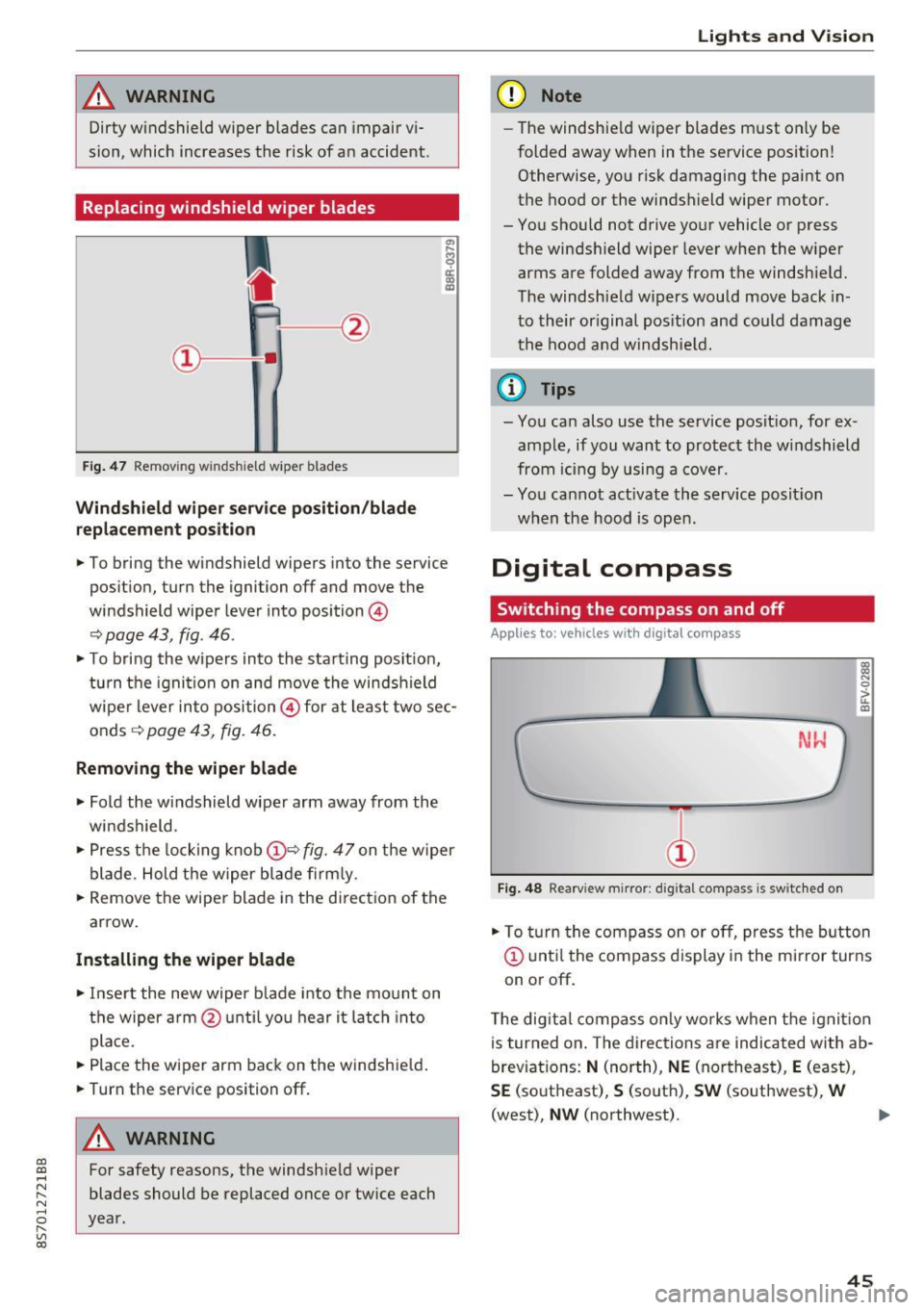
Fig . 47 Remov ing windshie ld wiper blades
Windshield wiper service position /blade
replacement position
"'
~ a: a) OJ
.. To bring the windshield wipers into the service
pos it ion, turn the ignition off and move the
windshield wiper lever into position @
~ page 43, fig. 46 .
.. To bring the wipers into the starting posit ion,
tu rn the ignition on and move the windshield
wiper lever into position@ for at least two sec
onds ~
page 43, fig. 46.
Removing the wiper blade
.. Fold the windshield wiper arm away from the
windshield .
.,. Press the locking knob@~
fig. 47 on the wiper
blade. Hold the wiper blade firmly.
.. Remove the wiper blade in the direct ion of the
arrow.
Installing the wiper blade
.. Insert the new wiper b lade into the mount on
the wiper arm @until you hear it latch into
place.
.. Place the wiper arm back on the windshie ld .
.. Turn the service position off.
A WARNING
-
For safety reasons, the windshield wiper
blades should be replaced once or twice each
year.
Lights and V ision
(D Note
-The windshie ld wiper blades must only be
folded away when in the service position!
Otherwise, you risk damaging the paint on
the hood or the windshield wiper motor.
- You should not drive your vehicle or press the windsh ield wiper lever when the wiper
arms are folded away from the windshield.
The windshield wipers would move back in
to their original pos ition and could damage
the hood and windshie ld.
(1} Tips
-You can also use the service posit ion, for ex
ample, if you want to protect the windshield
from icing by using a cover.
- You cannot act ivate the service posit ion
when the hood is open.
Digital compass
Switching the compass on and off
Applies to: vehicles wit h digita l compass
Fig. 48 Rearview mirror: digita l compass is switc hed on
::l
"' 0
> LL OJ
.. To turn the compass on or off, press the button
@ until the compass d isplay in the mirror turns
on or off .
The digita l compass only works when the ignit ion
is turned on . The directions are indicated with ab
breviations:
N (north), NE (northeast), E (east),
SE (southeast), S (south), SW (southwest), W
(west),
NW (northwest). ..,_
45
Page 51 of 314
CD
CD
.... N
" N .... 0 r--. V, co
CD Note
-To reduce the risk of damage to the vehicle
electrical system, never attempt to charge
the veh icle battery by connect ing accesso
ries that prov ide power, such as solar panels
or battery chargers, to the 12 Volt sockets
or the cigarette lighter.
- To reduce the risk of damage to the sockets,
on ly use plugs that fit correctly .
Storage
Beverage holders
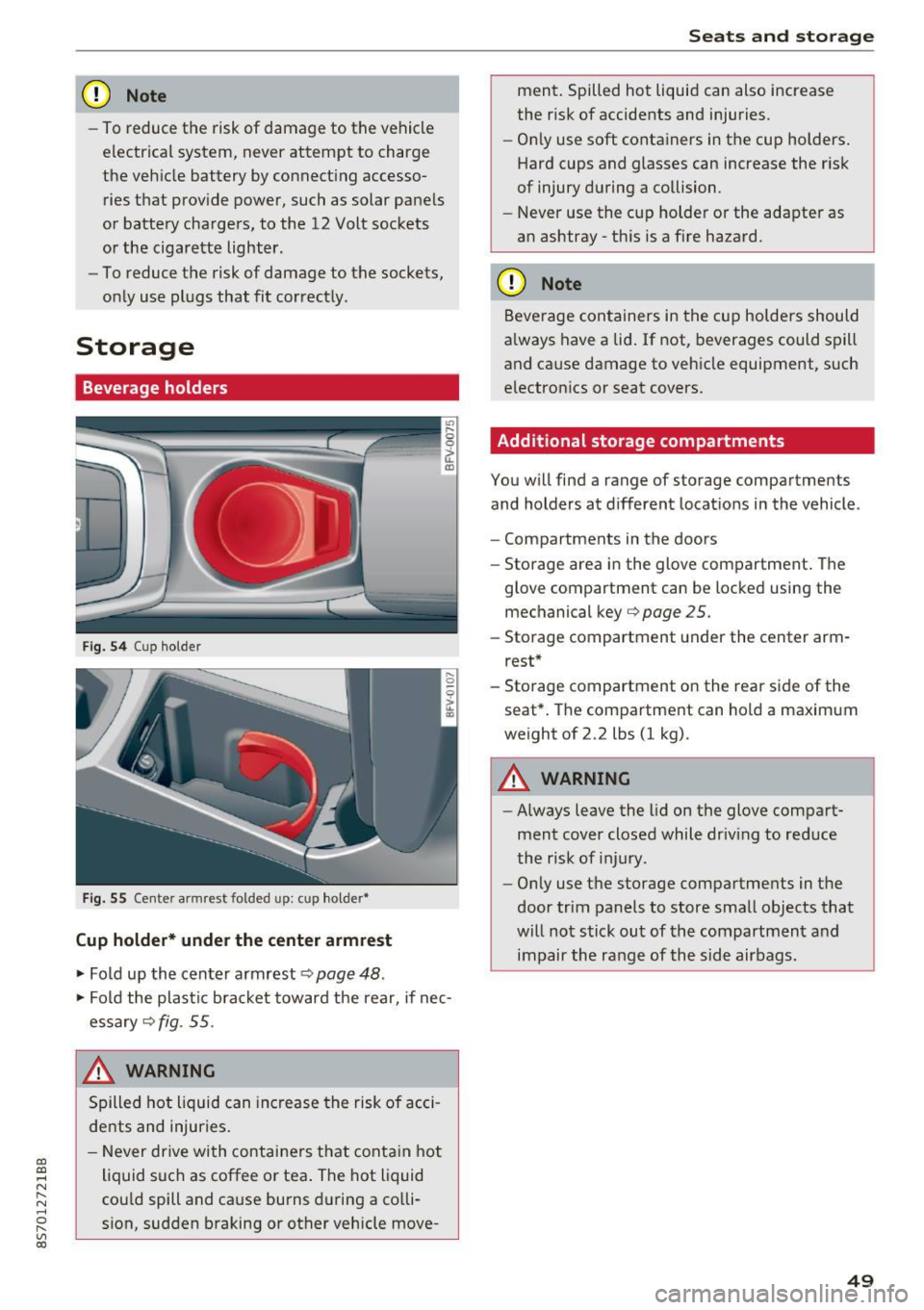
Fig. 5 4 Cup holder
Fig. 55 Cente r armrest folded up: cup holder•
Cup holder* under the center armrest
~ Fold up the center armrest q page 48 .
~ Fold the plas tic bracket toward the rear, if nec
essary
q fig . 55.
,&_ WARNING
Spilled hot liquid can increase the risk of acci
de nts and injuries .
- Never drive wi th containers that contain hot
liquid such as coffee or tea . The hot liquid
cou ld spill and cause burns during a colli·
sion, sudden braking or other vehicle move -
Seats and storage
ment. Spilled hot liquid can also increase
the risk of accidents and injuries.
- On ly use soft containers in the cup holders .
Hard cups and glasses can increase the risk
of injury during a collision.
- Never use the cup holder or the adapter as
an ashtray -th is is a f ire hazard.
CD Note
Beverage containers in the cup holders should
a lways have a lid. If not, beverages could spill
and cause damage to vehicle equipment, such
electronics or seat covers.
Additional storage compartments
You w ill find a range of storage compartments
and holders at different locat ions in the vehicle .
- Compartments in the doors
- Storage area in the glove compartment . The
glove compartment can be locked using the mechanical key
qpage 25 .
-Storage compartment under the center arm
rest*
- Storage compartment on the rea r side of the
seat*. The compartment can hold a maximum
weight of 2.2 lbs (1 kg) .
A WARNING
-
-Always leave the lid on the glove compart
ment cover closed while driv ing to reduce
the risk of injury.
- Only use the storage compartments in the
door trim panels to store small objects that
will not stick out of the compartment and
impair the range of the side airbags.
-
49
Page 53 of 314

CD
CD
.... N
" N ...... 0 r--. V, co
Lowering the cargo floor
In exceptional situations, the cargo floor can be lowered .
Fig. S9 Luggage compartment: ca rgo floor removed
Fig. 60 Luggage compartment: spare tire rem oved
.. Remove the cargo floor q page 2 72 .
.. Remove the plastic floor panel~
fig. 59 .
.. Turn the handle counter-clockwise to remove
and remove the foam p iece .
.. Remove the spare tire .
.. Reinsert the foam piece and turn the handle
clockwise to tighten .
.,. Now reinsert the cargo floor .
_& WARNING
Please note that you are no longer mob ile i n
t he event of a fla t tire. P lease no te the legal
regulat ions befo re removing the spa re tire.
Seats and storag e
51
Page 61 of 314

CD
CD
.... N
" N ...... 0 r--. V, co
Steering
Adjusting the steering wheel position
The steering wheel position is fully adjustable up
and down and forward and back.
Fig . 6 6 Lever on th e steering column
... Tilt the lever c:::> fig . 66 downward c:::> A
... Bring the steering wheel into the desired posi
tion .
... Push the lever against the steering column un
t il it is secure.
A WARNING
Incorrect use of the steering wheel adj ust
ment and an incorrect seating posi tion can
cause se rious injuries.
- Only adjust the steering column when the vehicle is stat ionary so that you do not lose
cont ro l of the ve hicl e.
- Adjust the dr iver's seat or steering wheel so
that there is at least a 10 in (25 cm) d is
t an ce betwee n your chest a nd the s teering
w heel. If you d o not m aint ain this dis tance,
yo u will no t be proper ly protected by the a ir
bag system.
- If your phys ic al characteris tic s preven t you
from sit ting at least 10 in ( 25 cm) or mo re
away from the steering wheel, see if yo ur
authorized Audi dealer or autho rized Audi
Service Facility can prov ide adapters that
will help.
- If your face is level with the steering wheel,
the a irbag does not provide as much protec
t io n during a collision. A lways make s ure
that the steering wheel is level with you r
chest.
D rivi ng
-Always hold the steering wheel with your
hands in the 9 o'clock and 3 o'clock pos i
tions to reduce the risk of injury if the airbag
deploys.
- Never hold the steering wheel in the 12
o'clock position or with both hands on the
rim or the center of the stee ring wheel.
H old ing the steer ing whee l incorrect ly sig
n ificant ly increases the r isk of injury to the
hands, a rms and head if the airbag deploys.
Starting and stopping
the engine
Starting the engine
The ! S TART ENGINE STOPI button switches the
ignition on and starts the engine .
Fig . 67 Center console: START ENGINE STOP b utto n
Switching the ignition on /off
... To switch t he ignit io n on or off, press t he
!START ENGINE STOPI but ton. Do not press the
brake pedal while doing this.
Starting the engine
... Press the brake pedal a nd move the selector
lever into the P or N position
c:::> ,&. .
... Press the !START ENGINE STOP I butto n
<=:> fig. 67 . The eng ine will start.
If the engine does not start immediately, the
sta rt ing procedure stops automa tica lly after a
sho rt time. Repea t the s ta rt ing process .
A WARNING
-To redu ce the r is k of poiso ning, never allow
the eng ine to run in confined spaces.
59