2017 AUDI TT ROADSTER light
[x] Cancel search: lightPage 28 of 314
Opening and clo sin g
LED and batteries in the remote control key
fr=-~=;;;;- --~
I
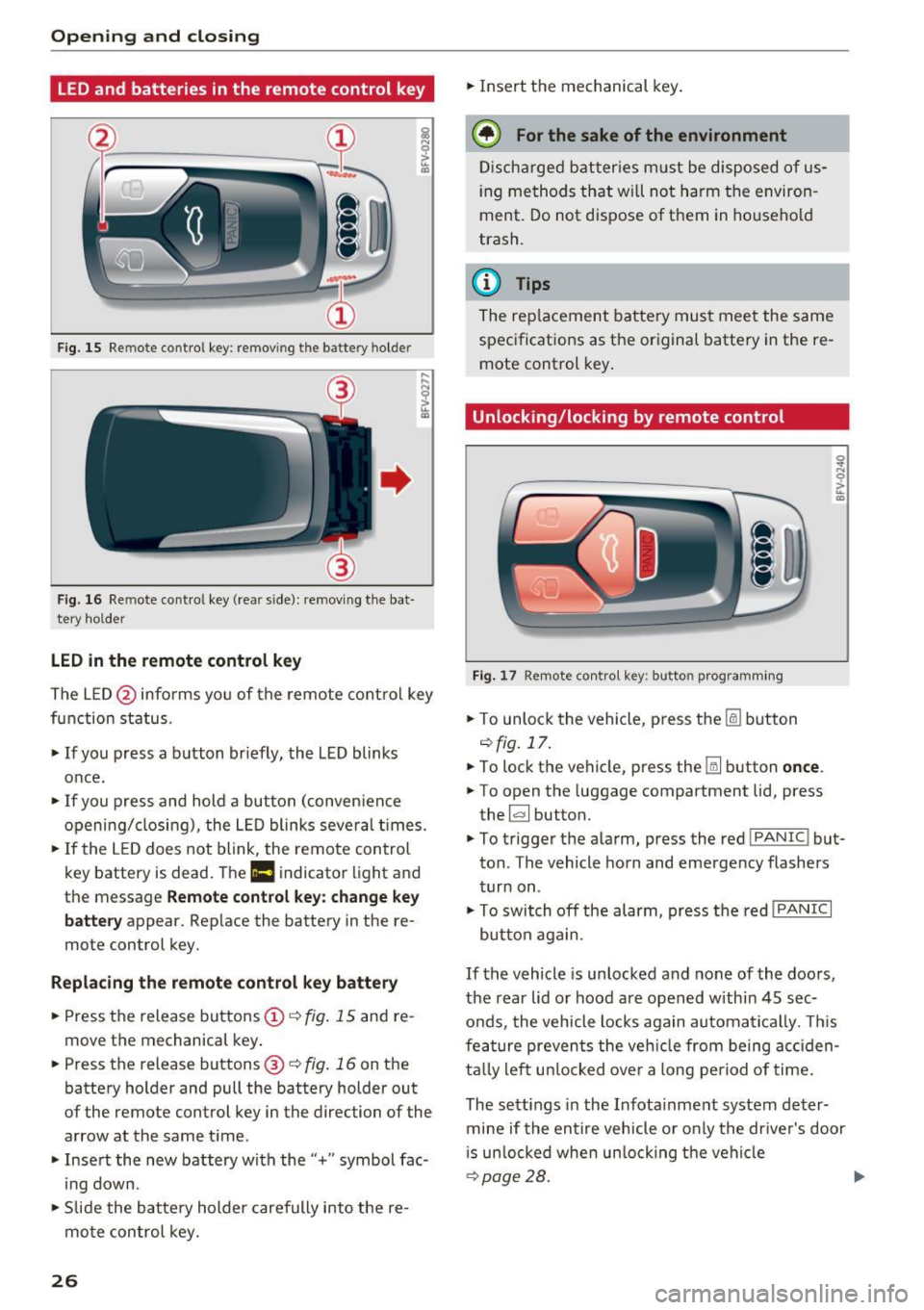
Fig . 15 Re mote contro l key : rem ov ing the ba ttery h olde r
F ig. 16 Re mote cont ro l key (re ar side ): re m ovi ng the bat
tery ho lder
LED in the remote control k ey
The LE D @ info rms you of the remote control key
function status .
.,. If you press a b utton briefly, the LED blinks
once.
.,. If you press and hold a button (conven ience
opening/closing), the LED blinks several t imes .
.,. If the L ED does not blink , the remote control
key battery is dead . The
Ill indicator light and
th e m essag e
Rem ote control key : cha nge ke y
b att ery
appea r. Rep lace the battery in the re
mote con trol key.
R eplacing th e remot e co ntrol k ey batt ery
.,. Press the release buttons@¢ fig. 15 and re
move the mechanical key .
.,. Pre ss the r ele as e buttons @¢
fig. 16 on th e
battery holder and pull the battery holde r out
of the remo te control key in the dire ction o f the
arrow at the same t ime .
.,. Insert the new battery with the"+" symbol fac·
ing down .
.,. Slide the batte ry holder carefully into the re
mote control key.
26 .,.
Insert the mechanical key .
@ For the sake of the environment
Discharged batter ies m ust be disposed of us
ing methods that wi ll not harm the environ
ment. Do not dispose of them in ho usehold
trash.
(D Tips
The rep lacement battery must meet the same
spec ificat ions as the or iginal battery in the re
mote control key .
Unlocking/locking by remote control
Fig. 17 Remot e con tro l key: butt on programming
.,. To unlock the vehicle , pr ess the lil button
¢fig.17 .
.,. To lock the vehicle, press th e Iii button once .
.,. To open the luggage compartment lid, press
the ~ button.
.,. To trigger the alarm, press the red
!PAN IC! but·
ton . The vehicle horn and emergency flashers
turn on .
.,. To switch off the alarm, press the red
! PANIC I
button aga in .
If the vehicle is unlocked and none of the doors,
the rear lid or hood are opened within 45 sec
onds, the vehicle locks again automatically . T his
fea ture prevents the veh icle from being acc iden
ta lly left un locked over a long period of time .
The sett ings in the Infota inment system deter·
mine if the entire vehicle o r only the dr iver's door
i s un locked whe n un locking the veh icle
¢ page 28. .,.
Page 30 of 314

Opening and clo sin g
Central locking switch
Fig. 19 D rive r's door : central lock ing switch
• To lock the vehicle, press the~ button c> .&,.
• Press t he !ill button to unlock the vehicle.
When locking the vehicle with the centra l locking
switch, the follow ing applies:
- Opening the door and the luggage compart
ment lid from the
outside is not possible (for
security such as when stopped at a light).
- The LED in the central locking switch turns on
when all doors are closed and locked.
- You can open the doors ind ividually from the
inside by pulling the door handle .
- In the event of a c rash with airbag deployment,
the doors unlock automat ically to a llow access
to the vehicle.
& WARNING
- The power locking sw itch works with the ig
nition off and automatically locks the entire
vehicle when the~ button is pressed.
- The centra l locking switch is inoperative
when the vehicle is locked from the outside.
- Locked doors make it more difficult for
emergency worke rs to get into t he vehicle,
wh ich puts lives at risk. Do not leave anyone
behind in the vehicle, especially children .
(D Tips
Your vehicle locks automatically when it
reaches a speed of 9 mph (15 km/h) (Auto Lock)
c> page 24 . You can unlock the vehicle
aga in using the
!ill b utton in the central lock
ing sw itch.
l) Th is fun ctio n is not a vailab le in a ll coun tries.
28
Setting the central locking system
In the Infotainment system, you can set which
doors the central locking system will unlock .
• Select in the Infotainment system: IMENU ! but
ton>
V eh icle > left control button >Vehicle set
t ings.
Door unloc king -
you can decide if All doors or
only the
Dr ive r door should unlock . The luggage
compartment lid also unlocks when
All i s select
ed . If you select
D riv er in a vehicle with a conven
i ence key*, on ly the door whose handle you pu ll
will unlock .
If you se lect
Dri ver , all the doors and luggage
compartment lid w ill unlock if you press the
I@
button on the remote control key tw ice .
Fold m irrors* -if you select On, the exterior rear
view m irrors fold in automatically when you press
the ~ button on the remote control master key
or touch the sensor* in the handle.
Lock whe n driving1l -if you select On , the veh icle
locks automatically when driving. All of the doors
and the luggage compartment lid lock .
Page 33 of 314
CD
CD
.... N
" N ,-I 0 r--. V, co
@ Tips
-You can still open and close the windows for
approximately 10 minutes after turn ing the
ignition off. The power windows do not
switch off until the driver's door or front passenger's door has been opened.
- When opening the doors and when open
i ng/closing the power top, the windows au
tomatically lower approximately 10 mm.
Convenience opening/closing
All windows can be opened and closed at the
same time.
Convenience opening feature
• Press the Im button on the remote control key
until all windows reach the desired position.
Convenience closing feature
• Press the {D button on the remote control key
u nti l all windows are closed¢
A or
Convenience closing with the convenience
key*
• Touch the sensor* on the door handle long
enough until all windows and the power top*
are closed . Do not place your hand in the door
hand le when doing this.
Setting convenience opening in the
Infotainment system
• Select in the Infotainment system: !MENUI but
ton
> Vehicle> left control button >Vehicle set
tings .
To enable the convenience window opening func
tion, the
Long press to open windows function
must be switched
on.
.&_ WARNING
- Never close the windows or power top* care lessly or in an uncontrolled manner, be
cause this increases the risk of injury.
- For security reasons, the windows and the
power top* can only be opened and closed
with the remote control key at a maximum
distance of approximately 6 ft (2 m) away
Open ing and closing
from the vehicle . Always pay attention when
pressing the
Im button to close the w indows
and the power top* so that no one is
pinched. The closing process w ill stop im
mediately when the
Im button is released .
Correcting power window malfunctions
You can reactivate the one-touch up/down func
tion if it malfunctions.
• Pull the power window switch up until the win
dow is completely raised.
• Release the switch and pull it up aga in for at
least one second .
Garage door opener
(Homelink)
Description
Applies to : veh icles w ith garage door o pen er (Home link)
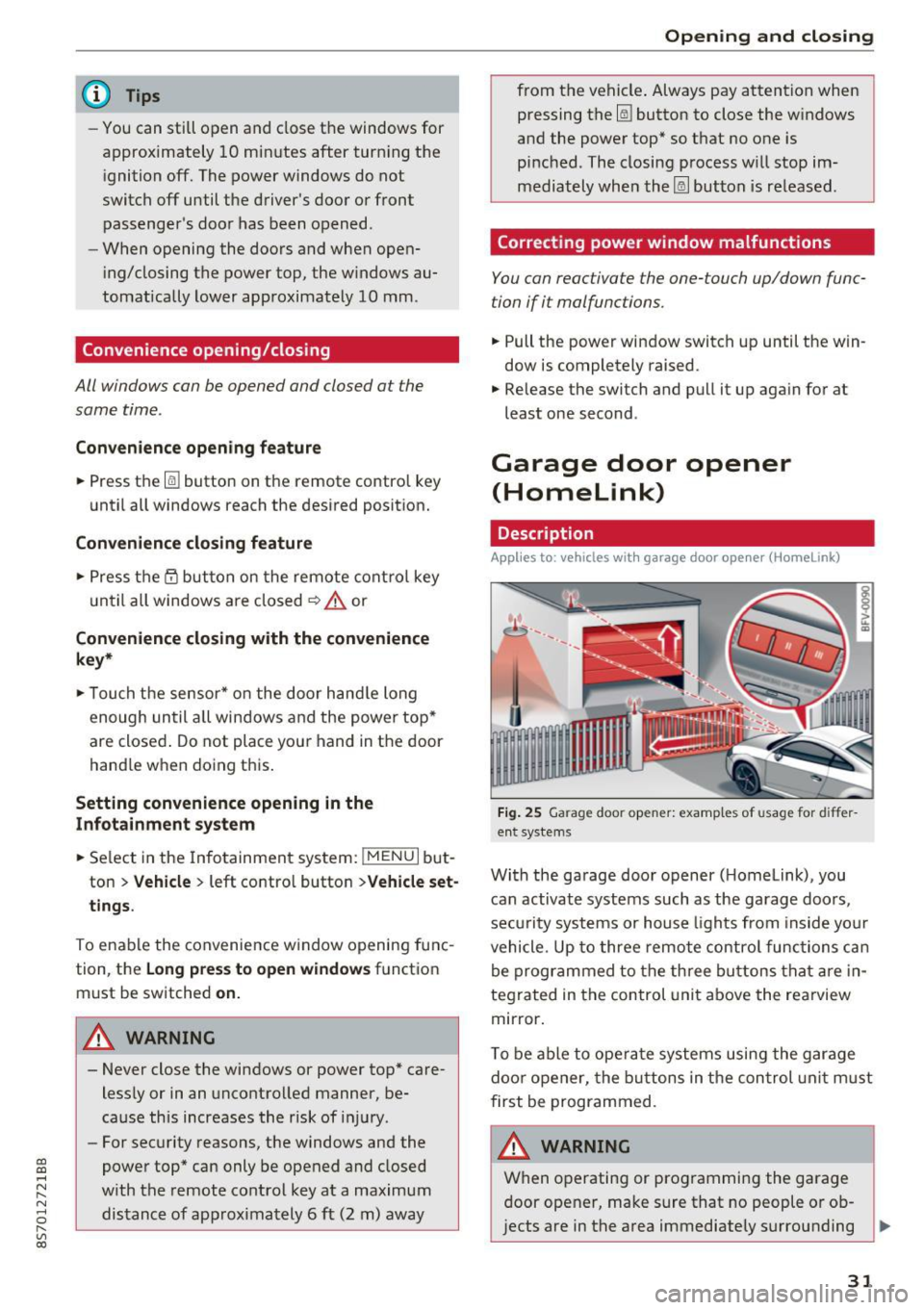
Fig. 25 Garage door opener: examples of usage for differ
ent systems
With the garage door opener ( Homelink), you
can activate systems such as the garage doors,
security systems or house lights from inside your
vehicle. Up to three remote control functions can
be programmed to the three buttons that are in
tegrated in the control unit above the rearview
mirror.
T o be able to operate systems using the garage
door opener, the buttons in the control unit must
first be programmed.
A WARNING ~
When operating or programming the garage
door opener, make sure that no people or ob
jects are in the area immediately surrounding ..,.
31
Page 37 of 314
CD
CD
.... N
" N ...... 0 r--. V, co
-When operating the power top, visibility to
the rear is limited. Avoid operating the top
while driving in reverse.
(D Note
-To prevent damage to the power top:
- do not store any objects in the power top
storage compartment .
- make sure there is enough space above
the vehicle when opening or closing the
power top.
(D Tips
- To prevent the vehicle battery from draining
unnecessarily, do not open or close the pow
er top repeatedly when the engine is switch
ed off.
- A message will appear in the instrument cluster if there is a malfunction in the power
top
¢ page 35.
- The power top can also be operated manual
l y temporarily if there is a malfunction
¢ page 3 7, Power top emergency opera
tion.
An authori zed A udi dealer or au thor
i zed Audi Service Facility should diag nose
and correct the cause of the ma lfunction as
soon as possib le .
- If the vehicle is parked with the power top open, the vehicle interior is not p rotected
from damaging weather or unauthorized ac
cess. Lock any items you leave behind in the
l uggage compartment. Close the power top
before leaving the vehicle .
- The side windows automat ically lower
slight ly when opening or closing the power
top.
P owe r top
Power top convenience opening and closing
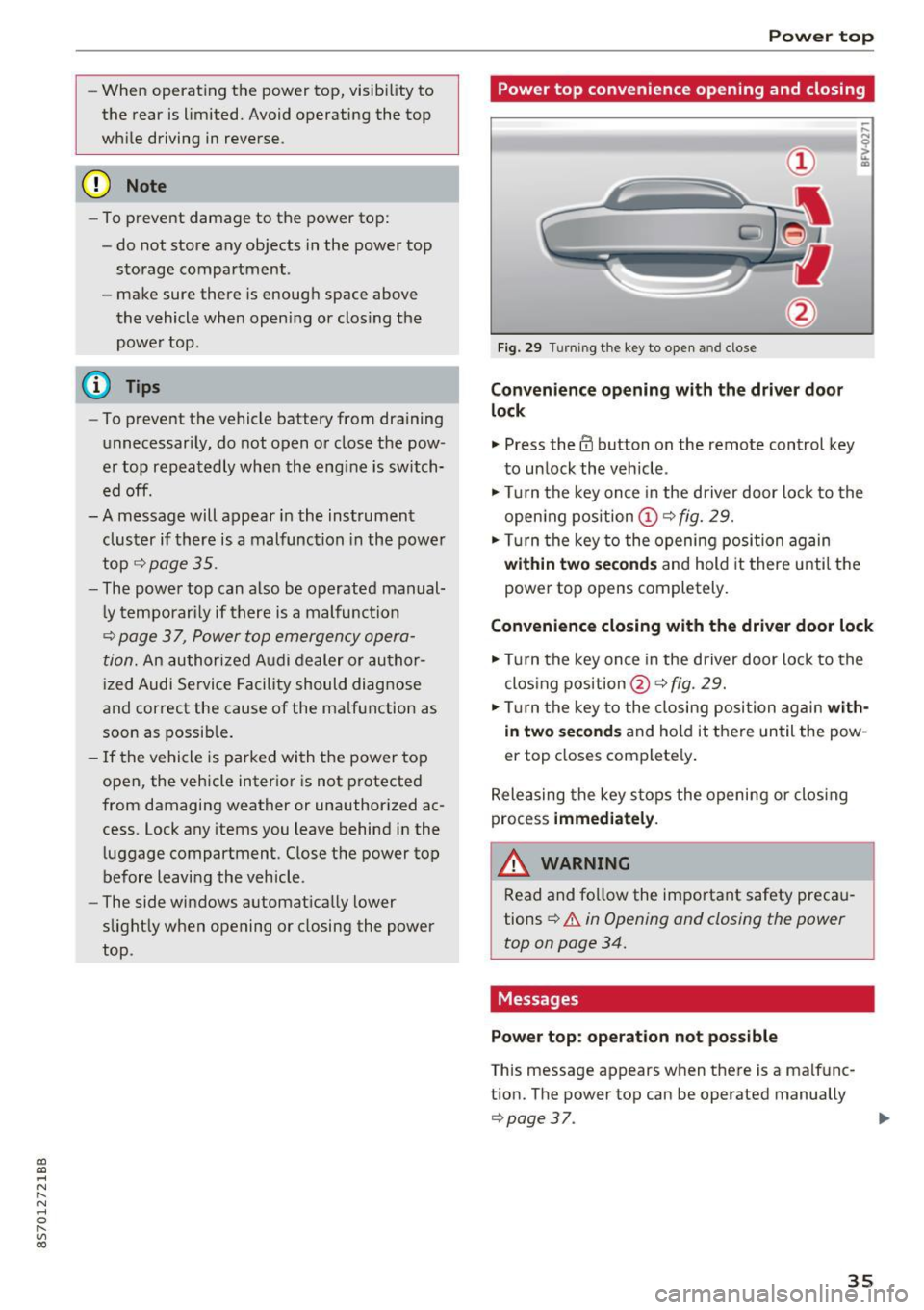
Fig. 29 Turning the key to open and close
Conven ience opening with the dri ver door
lock
.,. Press the 63 button on the remote control key
to un lock the vehicle .
.,. Turn the key once in the driver door lock to the
open ing pos ition
© ¢fig. 29.
.,. Turn the key to the opening posi tion again
within tw o second s and hold it there until the
power top opens completely.
Convenience closing with the driver door lock
.,. Turn the key once in the driver door lock to the
clos ing position @¢
fig. 29.
.,. Tur n the key to the closing position again
with
in two second s
and ho ld it there un til the pow
er top closes complete ly .
Releasing the key s tops the opening or clos ing
process
immedi ate ly.
A WARNING
-
Read and fo llow the important safety preca u
tions
¢ .&. in Opening and closing the power
top on page 34.
Messages
Pow er top : operation n ot pos sibl e
This message appears when there is a malfunc
t ion. The power top can be operated manually
¢ page 37. ..,.
35
Page 41 of 314
CD
CD
.... N
" N ...... 0
" V, co
Lights and Vision
Exterior Lighting
Switching lights on and off
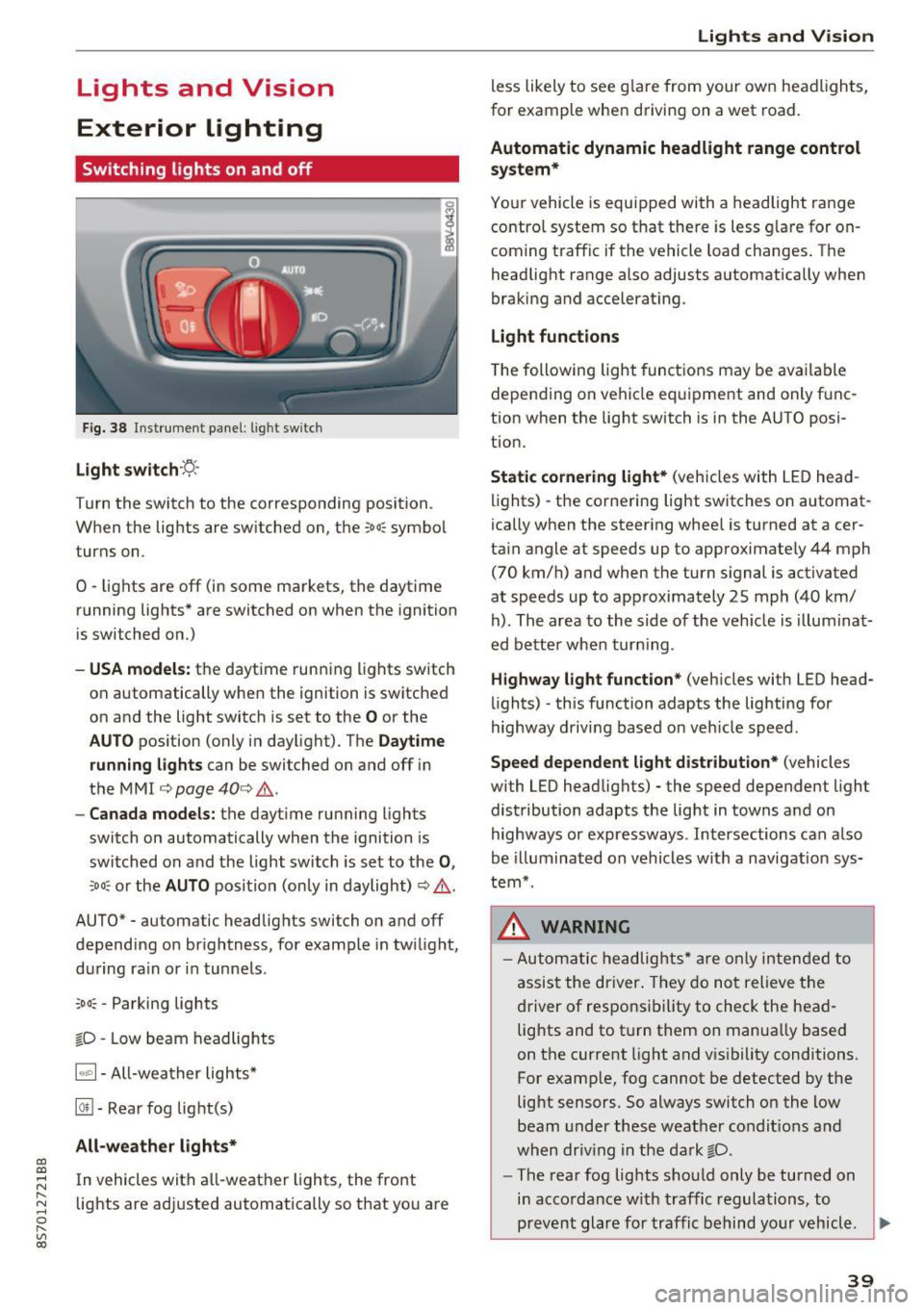
Fig. 38 Instrument panel: l ig ht switc h
Light switch ·:<'>'.·
Turn the switch to the corresponding position.
When the lights are switched on, the
;oo: symbol
turns on.
0 · lights are off (in some markets, the daytime
running lights* are switched on when the ignition
is switched on.)
-USA model s: the daytime running lights sw itch
on automatically when the ignition is switched
on and the light switch is set to the
O or the
AUTO pos ition (only in daylight). The D aytime
runn ing lights
can be switched on and off i n
the MMI
¢ page 40 ¢ &.
- Canada models: the dayt ime running lights
switch on automatically when the ignition is
switched on and the light switch is set to the
0 ,
;oo: or the AUTO posit ion (only in daylight) ¢ & .
AUTO* - automatic headlig hts switch on and off
depending on brightness, for example in tw ilight,
during ra in or in tunne ls .
~oo: -Parking lights
gD -Low beam headlights
IQ., 1-All-weather lights*
@il -Rear fog lig ht(s)
All-weather light s*
In vehicles with all-weather lights, the front
lights are adjusted automatically so that yo u are
Lights and V ision
less likely to see g lare from your own headlights,
for example when driving on a wet road.
Automatic dynamic headlight range control
system*
Your vehicle is equipped with a headlight range
contro l system so that there is less g lare for on
coming traff ic if the vehicle load changes . The
headlight range also adjusts automatically when
braking and accelerat ing .
Light function s
The following light funct ions may be avai lable
depending on vehicle eq uipment and only f unc
tion when the lig ht switch is in the AUTO posi
tion.
Static cornering light * (vehicles with LED head
li ghts) - the cornering light switches on automat
ica lly when the steer ing whee l is turned at acer
ta in angle at speeds up to approximate ly 44 mph
(70 km/h) and when the turn signal is activated
at speeds up to approximately 25 mph (40 km/
h) . The area to the side of the veh icle is illumina t
ed bette r when turn ing .
Highway l ight function * (vehicles with LED head
lights) -th is function adapts the lighting for
highway driving based o n veh icle speed.
Speed dependent light distribution* (vehicles
with LED headlights) - the speed dependent l ight
distribution adapts the lig ht in towns a nd on
highways or expressways . Intersections can a lso
be illuminated on vehicles w ith a navigation sys
tem*.
_& WARNING
- Autom atic headlights * are only inten ded to
a ssis t the driver . They do no t relieve t he
d river of respo nsibility to check the head
lig hts and to t urn them on manua lly based
on the current light and v is ibility conditions.
For example, fog cannot be detected by the
light sensors . So always switch on the low
beam under these weather condit ions a nd
when dr iv ing in the da rk
gD .
-The rear fog lights shou ld only be turned on
i n acco rdanc e w ith traffic regulations, to
prevent glare for traffic behind yo ur v ehicl e.
~
39
Page 42 of 314
Lights and Vision
-If the battery has been discharging for a
wh ile, the parking light may switch off auto
matically. Always make sure your vehicle is
parked and adequately lit according to the
laws. Avo id using the parking lights for sev
era l hours.
- Always observe legal regulations when us ing the light ing systems described.
(D Tips
- The light sensor for the automatic head
lights* is in the rearview m irror mount. Do
not place any stickers in th is area on the
windsh ield.
- Some exterior lighting functions can be ad
ju sted
c:::;, page 40.
-If you turn off the ignition wh ile the exter ior
lights are on and open the-door, a warning
tone so unds.
- In some markets, the tail lights will sw itch
on when the daytime runn ing lights sw itch
on .
- In cool or damp weather, the inside of the
headlights, turn s ignals and tail lights can
fog over due to the tempe rature d ifference
betwee n the inside and ou ts ide. They will
clea r short ly after sw itch ing them on. This
does not affect the service life o f the light
i ng.
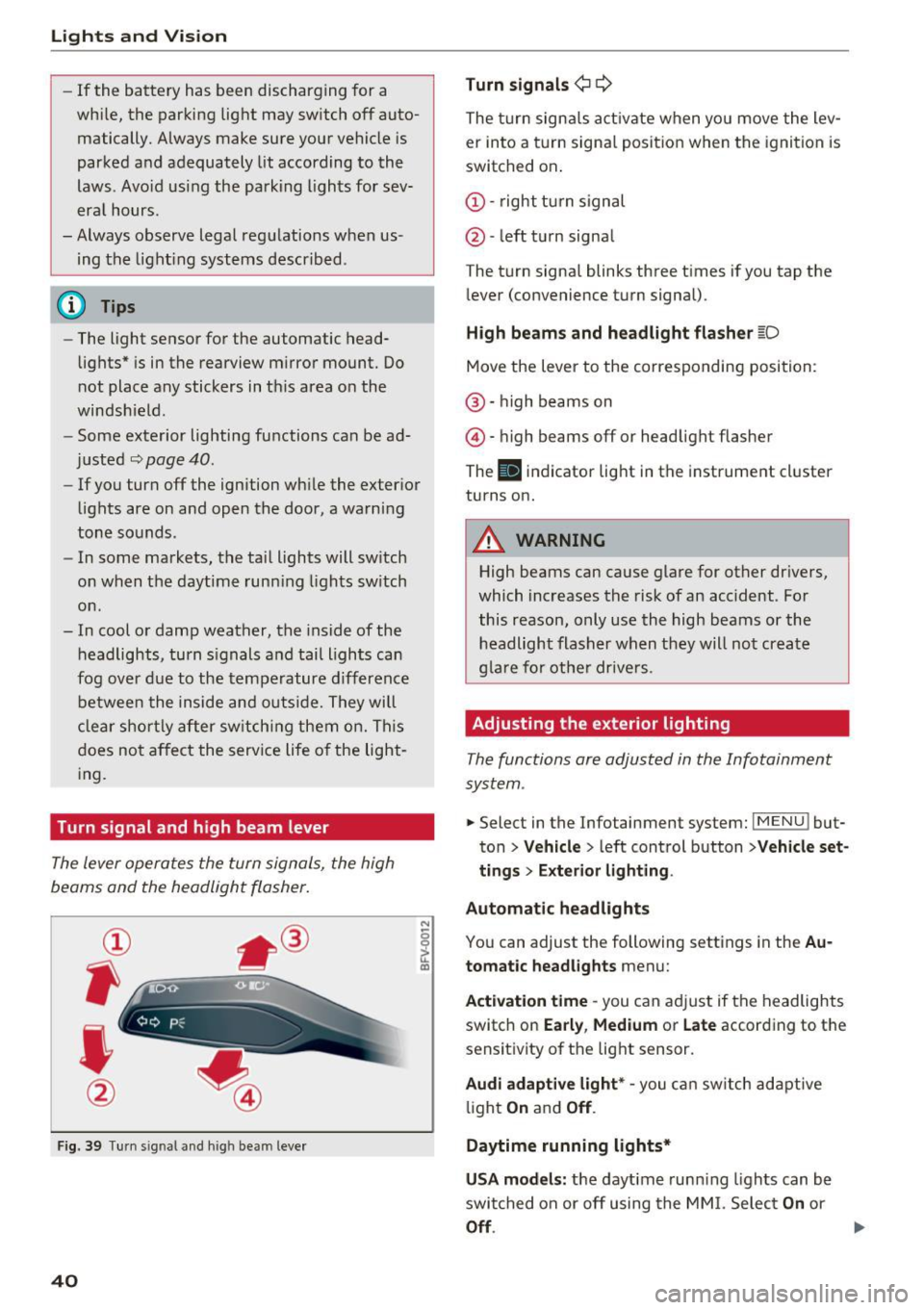
Turn signal and high beam lever
The lever operates the turn signals, the high
beams and the headlight flasher.
®
,
I
@
F ig . 39 Tu rn sig nal a nd high beam lever
40
N
c 0
ct a,
Turn signals ¢ Q
The turn sign als act ivate when yo u move the lev
er into a turn signa l posit ion when the igni tion is
switched on.
(D -right tu rn signal
@ -left t urn signa l
The tu rn signa l blinks three t imes i f you tap the
l ever (convenience t urn signal).
High beams and headlight fla sher l[D
Move the lever to the correspondin g position:
@ · high beams on
@ · high beams off or head light flasher
The
El i ndicator lig ht in the instrume nt cl uster
turns on.
_8 WARNING
High beams can cause glare for other dr ivers,
which inc reases the risk of an accident . Fo r
this reason, only use the high beams or the headlight flasher when t hey will no t create
g la re for ot he r drive rs.
Adjusting the exterior lighting
The functions are adjusted in the Infotainment
system .
.. Select in the Infotainment system: IMENU! but
ton>
Veh icle > left control button >Vehicle set
tings > Exterior light ing.
Automatic headlights
You can adjust the following sett ings in the Au
tomatic headlights
menu:
Act ivation time -you can a dju st if the headlights
switch on
Early , Medium or Late according to the
sensit ivity of th e lig ht sensor.
Audi adaptive light* -you c an switch adapt ive
li ght
On an d Off .
Daytime running lights*
USA models: the daytime runn ing lights can be
swi tched on or off using the MM I. Selec t
On or
Off.
Page 43 of 314
CD
CD
.... N
" N .... 0 r--. V, co
Canada models: this function cannot be switched
off . They activate automatically each time the ig
n ition is switched on . This menu item is shown
with a "gray background".
Coming home, Leaving home
The coming home function illuminates the area
outside the vehicle when you turn the ignition off
and open the driver's door. To switch on the func
tion, se lect
Entry/exit lighting.
The leaving home illumi nates the area outs ide
the vehicle when you unlock the vehicle . To
switch on the function, select
Entry/exit light
ing .
The coming home and leaving home funct ions
only operate when it is dark and the light switch
is in the
AUTO position.
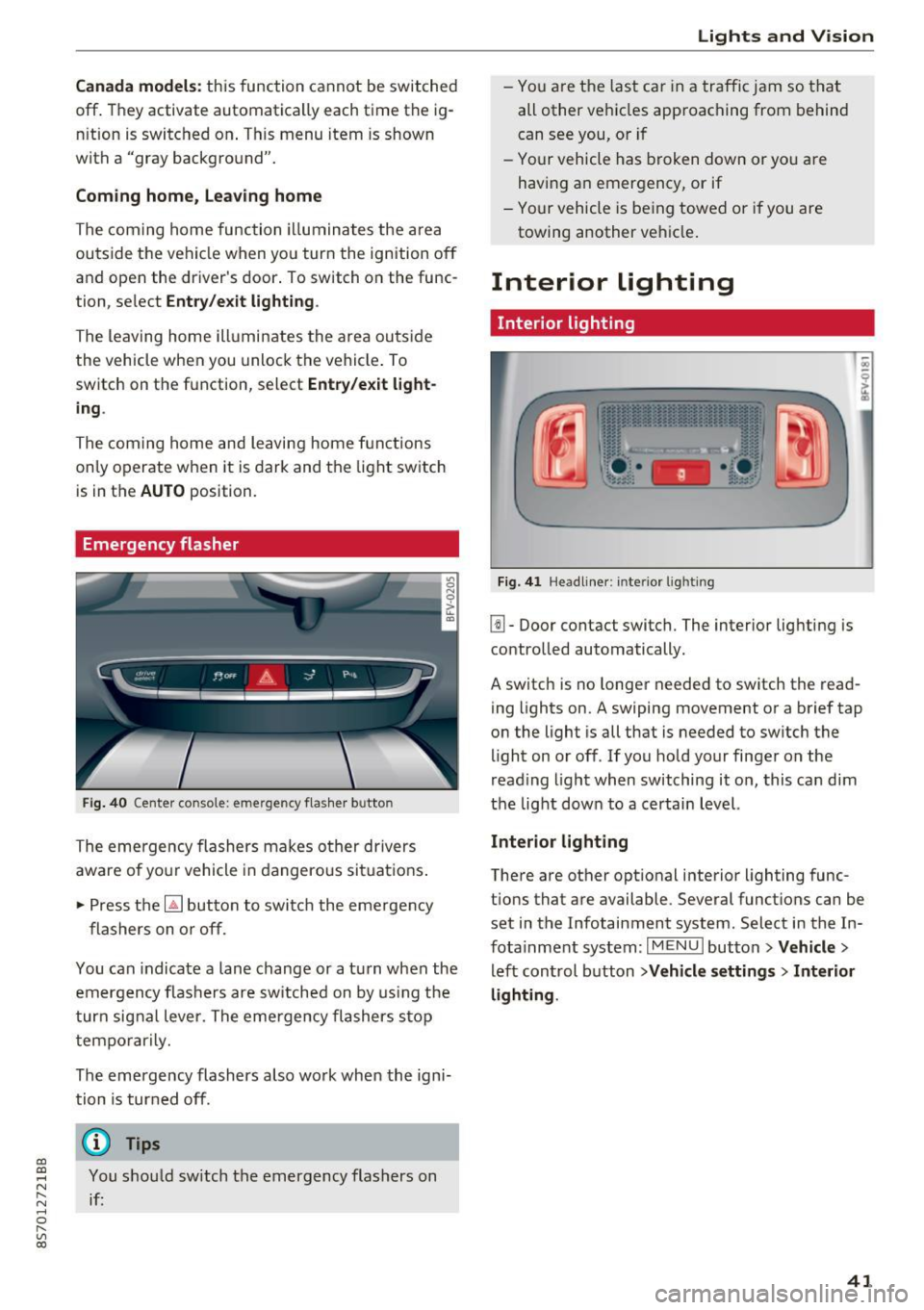
Emergency flasher
Fig. 40 Center conso le: emergency f las her button
The emergency flashers makes other drivers
aware of yo ur vehicle in dangerous situations .
.. Press the
[!J button to switch the emergency
flashers on or off.
You can indicate a lane change or a turn when the
emergency flas hers are switched on by using the
turn signal lever. The eme rgency flashers s top
temporarily.
The emergency flashers also wo rk when the igni
tion is turned off.
(D} Tips
You should sw itch the emergency flashers on
if:
Lights and V ision
-You are the last ca r in a traffic jam so that
all other vehicles approaching from behind
can see you, or i f
- Your vehicle has broken down or yo u are
having an emergency, or if
- Your vehicle is be ing towed o r if you are
towing another vehicle .
Interior lighting
Interior lighting
Fig. 41 Headliner: interior lighti ng
[!l-Door contact switch. The interior lighting is
controlled automatically.
A switch is no longer needed to switch the read
ing lights on.
A swiping movement or a brief tap
on the light is all that is needed to switch the
light on or off. If you hold your finger on the
read ing light when switching it on, this can d im
the light down to a certain level.
Interior lighting
There are other opt ional interior lighting func
tions that are available . Several functions can be
set in the Infotainment system. Select in the In
fotainment system:
I MENU I button> Vehicle>
left control button >Vehicle settings > Interior
lighting .
41
Page 44 of 314
Lights and Vision
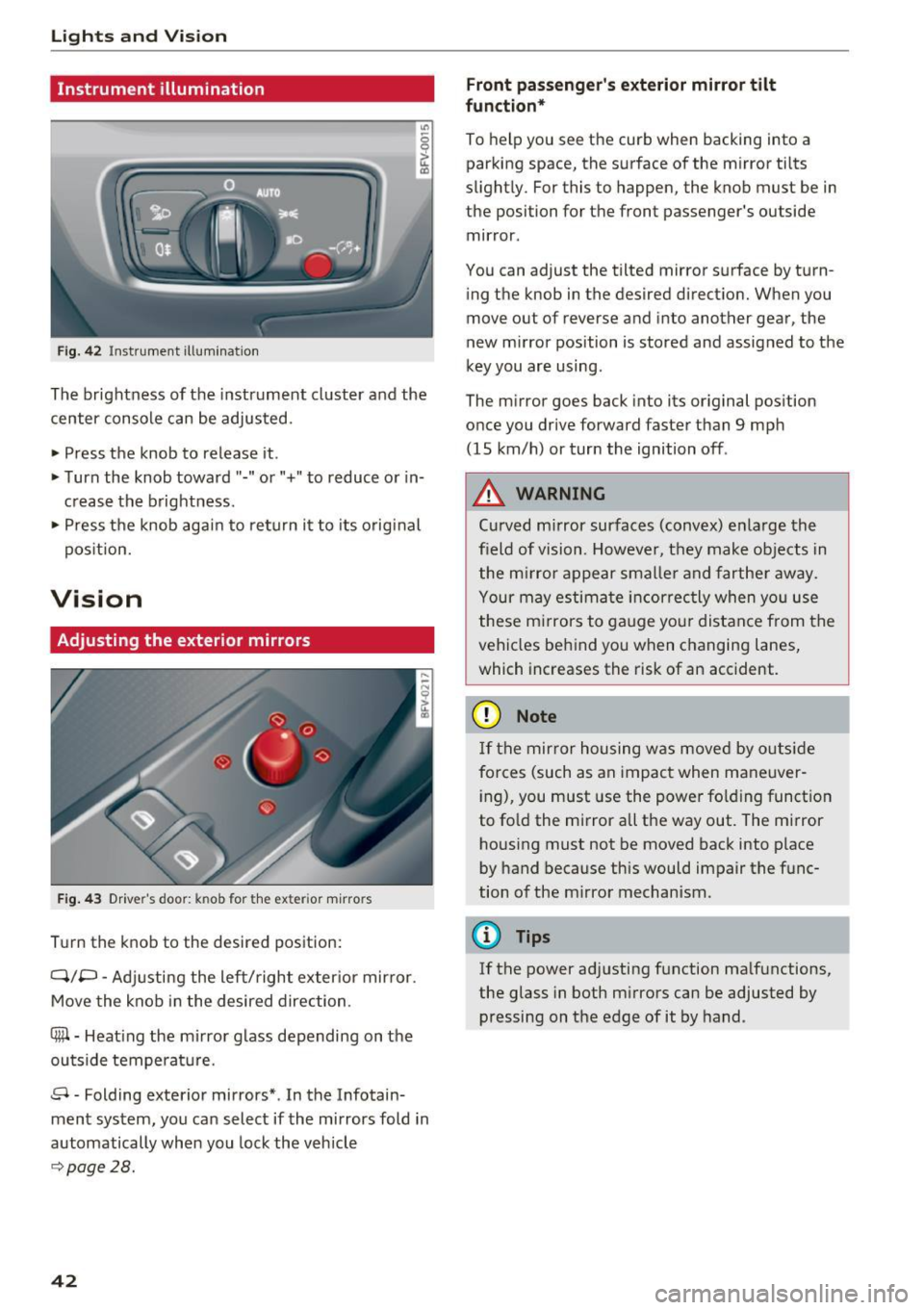
Instrument illumination
Fig . 42 Inst ru m ent illuminat io n
"' ~ 0 0
~ (0
The brightness of the instrument cluster and the
center console can be adjusted.
• Press the knob to release it .
• Turn the knob toward"-" or"+" to reduce or in
c rease the b rightness .
• Press the knob again to ret urn it to its original
pos ition.
Vision
Adjusting the exterior mirrors
F ig. 4 3 Driver's door: knob for the exter ior m irrors
T u rn the knob to the desired pos ition:
Q/P -Adjusti ng the left/right exter ior mir ror.
Move the knob in the desired direction.
®-Heat ing the mi rror g lass depending on the
outside temperat ure.
8 -Folding exterior mirrors *. In the Infotain
ment system, you can select if the mirrors fold in
automatically when you lock the vehicle
9 page28.
42
Front passenge r's exterior mirror tilt
function *
To help you see the cur b when backing into a
parking space, the surface of the m irror tilts
slight ly. For this to happen, the knob must be in
the position for the front passenger's outside
mir ror .
You can adjust the tilted mirror s urface by turn
i ng the knob in the desired direct ion. When you
move out of reverse and into another gear, the
new m irror position is stored and assigned to the
key you are using.
The m irror goes back into its or ig inal pos ition
once you drive forward faster than 9 mp h
(15 km/h) or turn the ignition off .
,&. WARNING
Curved mirror surfaces (convex) e nla rge the
field of vision. Howeve r, they make objec ts in
the m irror appear s maller and fart he r aw ay.
Your may estima te inc orrec tly when yo u use
these m irrors to ga uge you r distan ce from the
vehicles behind you w hen changing la nes ,
which increases the risk of an accident.
(D Note
If th e mir ror h ousing w as move d by o utsid e
forces (such as an imp act when ma neuver
i ng), you must use the power fo lding funct ion
to fo ld the m irror all the way out. The m irror
h ousing must not be moved back into place
by hand because this would impair the func
tion o f the m irro r mechan ism.
(D Tips
If the power ad justing function ma lfunctions ,
the glass in both m irrors can be adjusted by
pressing on t he edge of it by hand.
-