2017 AUDI S4 drive select
[x] Cancel search: drive selectPage 113 of 386

<( a, .... N ,....
N .... 0 0
3 a,
-Inflating the side bolsters* in the seat backrest
and s eat surfac e.
Aud i drive select*: the function is not active de
pending on the mode selected.
A WARNING -,..___
-Pre sense city cannot overcome the laws of
physics. It is a system designed to assist and
it cannot prevent a collision in every circum
stance. The driver must always intervene.
The driver is always responsible for braking at the correct time . Do not let the increased
safety provided tempt you into taking risks.
This could increase your risk of a collision .
- The system can deploy incorrectly due to
system-specific limits.
- To reduce the risk of an accident, please
note that the camera does not always detect
every object .
- Pre sense city does not react to animals,
crossing or oncoming vehicles, objects such
as bars, railings or railcars, and objects that
are difficult to detect~&.
in General infor
mation on page 97.
A WARNING
Pre sense city may be restricted or not availa
ble in the following example situations:
- in heavy fog, rain, spray or snow.
- when there are visual obstructions, such as
glare, reflections or var iations in light.
- when it is dark .
- if the camera window or the windshield is
dirty, iced over, damaged or covered .
- when driving on snow, ice or loose ground .
- on sharp curves.
- if the ESC was restricted or switched off .
- when towing a trailer.
- when the driver's seat belt is unfastened.
- up to ten seconds after sw itching on the ig-
nition.
1 ) Thi s is no t avail able in some c oun tries.
Assist
(D Note
Impacts or damage to the camera mount on
the windshield can displace the sensor . Pre
sense city can be impaired by this. Have an au
thorized Audi dealer or authorized Audi Serv
ice Facility check their function .
(i) Tips
-You can cancel the system braking interven
tion if you accelerate considerably or swerve
away .
- Keep in mind that pre sense city can brake
unexpectedly. Always secure any cargo or
objects that you are transporting to reduce
the risk of damage or injury.
- When there is a malfunction in the camera,
the pre sense city functions also switch off.
Settings in the
Infotainment system
Applies to: vehicles with Aud i pre sense
.,. Select in the Infotainment system: I MEN U! but
ton
> Vehicle > left control button > Driver as
s ist > Audi pre sense.
Audi pre sense-
switch On/Off. You can switch
the pre sense functions on and off with th is.
If the system is switched off, it switches on again
automatically once the ignition is switched on
again
l ).
Early warning1
) -the early warning can be
switched off or the pre sense city/front warning
point
( Early /Mediu m/La te) can be set .
Driver messages
Applies to: vehicles with Aud i pre sense
fll Audi pre sense currently restricted. Restrict
ed sensor vision due to surroundings. See own
er's manual
This message appears if the radar sensor and
camera view is obstructed, for example by leaves,
snow, heavy spray or dirt . If necessary , clean the .,..
111
Page 117 of 386

-Th e system has been unable to detect the lanes
for an extended period of time due to road con
ditions . Sw itch act ive lane assist back on when
the lines are more visible .
rm Audi active lane assist: currently unavaila
ble. See owner's manual
There is a temporary active lane assist malfunc
tion . Try sw itching the active lane assist on again
later .
• Audi active lane assist: malfunction! See
owner's manual
Drive to an authorized Aud i dealer or authorized
Audi Service Facility immediately to have the
malfunction corrected.
rm Audi active lane assist: Please take over
steering!
This message appears if you are not steering by
yourself. Active lane assist is activated, but is not ready to give warning
Adjusting the steering time and vibration
warning
Applies to: vehicles with Audi active lane assist
You can adjust individual active lane assist set
tings in the Infotainment system .
... Select in the Infotainment system: !MENUI but
ton
>Ve hicle > left control button > Driver as
sist
> Audi active lane assist .
Steering time Early:
in this setting, the correct ive steering hap
pens continuously to help keep the vehicle in the
center of the lane.
Late: in this setting, the system provides correc
tive steering just before a vehicle whee l goes over
a detected lane marker line.
Vibration warning
You can switch the additional vibration warning
in the steering wheel on or
off.
A WARNING
-
With the vibration warning switched off,
there will also be no visual warning in the in-
Assist
strument cluster disp lay when crossing a lane
marker line.
(D Tips
In certain countries: your settings are stored
automatica lly and assigned to the remote
control key in use.
Audi side assist
Description
Applies to: vehicles with Audi side assist
Fig. 109 Sensor detection range
Fig. 110 Disp lay on th e exterio r m irror
Side assist (lane change assist) helps you mon itor
your blind spot and traffic behind your vehicle .
Within its lim its, the system warns you about
vehicles that are coming closer or that are travel
ing within your sensor range
(D <=?fig. 109. If a
lane change is classified as critical, the display@
turns on in the exterio r mirror
<=? fig. 110 .
The display in the left exterior mirror p rovides as
s istanc e when making a lane change to the left,
wh ile th e display in the rig ht exterior m irro r pro
vides ass istance when making a lane change to
the right. ..,.
115
Page 119 of 386

<( a, .... N ..... N .... 0 0
3 a,
are indicated, at the latest, by the time they en
ter your "blind spot".
© Vehicles you are passing
If you slowly pass a vehicle that side assist has
detected (the difference in speed between the
veh icle and your vehicle is less than approximate
ly 9 mph (15 km/h)), the display in the exterior
mirror turns on as soon as the vehicle enters your
blind spot.
The display will not turn on if you quickly pass a
vehicle that side assist has detected (the differ
ence in speed is greater than approximately 9 mph (15 km/h)).
Functional limitations
The radar sensors are designed to detect the left
and right adjacent lanes when the road lanes are
the normal width. In some situations, the display
in the exterior mirror may turn on even though
there is no vehicle located in the area that is criti
cal for a lane change. For example:
- If the lanes are narrow or if your are driving on
the edge of your lane. If this is the case, the system may have detected a vehicle in another
lane that is
not adjacent to your current lane.
- If you are driving through a curve. Side assist
may react to a vehicle that is in the same lane
or one lane over from the adjacent lane.
- If side assist reacts to other objects (such as
roadside structures like guard rails).
- In poor weather conditions . The side assist
functions are limited.
Do not cover the radar sensors ¢
fig. 112 with
stickers, deposits, bicycle racks or other objects,
because this will impair their function. Do not
use side assist when towing a trailer. For infor
mation on cleaning, refer to¢
page 33 7.
A WARNING
- Always pay attention to traffic and to the
area around your vehicle. Side assist cannot
replace a driver's attention. The driver alone
is a lways responsible for lane changes and
similar driving maneuvers.
Assist
-In some situations, the system may not
function or its function may be limited. For
example:
- If vehicles are approaching or being left
behind very quickly. The display may not
turn on in time.
- In poor weather conditions such as heavy
rain, snow or heavy m ist.
- On very wide lanes, in tight curves, or if
there is a rise in the road surface. Vehicles
in the adjacent lane may not be detected
because they are outside of the sensor
range.
(D Note
The sensors can be displaced by impacts or
damage to the bumper, wheel housing and
underbody. This can adversely affect the sys
tem. Have an authorized Audi dealer or au
thorized Audi Service Facility check their func
tion.
(D Tips
If the window glass in the driver's door or
front passenger's door has been tinted, the
display in the exterior mirror may be incor
rect.
Switching on and off
App lies to : vehicles wi th Audi sid e ass ist
The system can be switched on/off in the Info
tainment system.
If the system is activated, the displays in the ex
terior m irrors will turn on briefly when the igni
tion is switched on.
.,. Select in the Infotainment system:
I MENU ! but
ton
> Vehicle > left control button > Driver as
sist
> Audi side assist. Off switches the system
off.
(D Tips
When you switch side assist on or off, the exit
warning system activates or deactivates
¢ page 118.
117
Page 123 of 386

<( a, .... N ,....
N .... 0 0
3 a,
The rear cross-traffi c assist is not ava ila ble . E i
ther the ESC is switched off, or the radar sensors may be covered by a b ike rack, stickers, leaves,
snow or other objects. Switch the ESC on, or
clean the area in front of the sensors if necessary
c> page 116, fig. 112 . If this message cont inues
to be d isplayed, d rive immed iate ly to an au thor
iz ed A udi dealer o r autho rized Audi Servi ce Fac ili
ty to have t he malfunc tion repa ired.
Audi drive select
Introduction
Applies to: vehicles with Audi drive select
Drive se lect makes it possible to experience dif
fe rent types of vehicle settings in one vehicle.
The dr ive r can se lect
Comfort , Auto a nd Dynamic
modes in the I nfota inme nt system to switch be
tween , fo r exa mple, a sporty and a co mfo rtable
d riving mo de. Settings ca n be ad justed to your
p e rs o nal pr efe ren ces in
Individual m ode. This
makes it poss ible to comb ine settings su ch as a
sporty eng ine setting w ith smooth stee ring.
Descript ion
Applies to: vehicles with Audi drive select
The fo llow ing systems, among other things, are
i nfluenced by drive select:
Engine and automatic transmission
D epending on the mode, the en gine and auto
mat ic transmission respond more quickly o r in a
mo re balanced ma nner to accelerator pe dal
movements . In the spo rty
Dynamic mode, the
transmission shifts at higher speed ranges.
Steering
The power s teering adapts. Ind irect s teer ing t hat
moves easi ly as in
comfort mode is espec ia lly
suited to long drives on highways . The
dynamic
mode p rovides sporty, d irect steering.
The fo llow ing applies to vehicles wi th dynam ic
steer ing* : the stee ring rat io chan ges base d on
ve hicle speed in or der to ma inta in optim um
steer ing effort for the drive r at all times. This
sets the steer ing to be less sensitive at higher
speeds i n order to prov ide improved vehicle con-
Assist
t ro l. At r educed spee ds, steeri ng is more direct in
o rder to kee p the steering effort as minima l as
poss ib le when the drive r is maneuvering t he vehi
cle. Dynam ic steer ing* also p rovides more re
spons ive steering performance at low and aver
age speeds .
Suspension control*
The ada ptive dampers * use sensors to reco rd in
f ormat ion regard ing steering movements, b rak
ing and accele ration operations by the dr iver,
road s urface, driving speed, and load. This makes
it possible to adapt damping to the d riv in g situa
t io n virtu ally in rea l ti me . Wi th drive select, you
can ad just th e adap tiv e dam pers to sporty
(Dy
nami c),
comfo rtable (Comfort ) or balan ced (Au
to ).
Cornering light*
T he co rne ring light adapts the high beams to the
direction of the curve de pending on the speed .
T he pivo ting ac tion and the lighting also a dapt to
t h e mode.
Adaptive cruise cont rol (ACC)*
The behavio r whe n accelerati ng ca n be adjusted
from comfortable to s porty, depending on the
dr ive selec t mode . Adap tive cruise control also
r espon ds to the dr iv ing behav ior of t he vehicle
ahea d in a m ore conse rv a tive or sporty m an ner.
Engine sound*
The eng ine sound adapts to the c urrent mode
and can be subtle to sporty .
(D Tips
The S selector leve r posit ion automatically en
gages whe n the
Dynamic mode is select ed.
121
Page 124 of 386

Assist
Selecting the driving mode
Applies to: vehicles with Audi drive select
:... ~ -'!. .:· ~ .:
LI , Ill .. tJ
------
Fig. 117 Center console: controls for drive select
Fig. 118 Infotainment: drive select
• Press the left or rig ht arrow key<=> fig. 117 until
the desired mode appears in the instrument
cluster/Infotainment system display. Or
Adjusting the Individual mode
Applies to: vehicles with Audi drive select
• Select in the Infotainment system: IMENU ! but
ton
> Vehicle > Audi drive select.
• Select and confirm the des ired sett ing
qfig. 118.
You can change the driv ing mode when the vehi
cle is stationary or while driving . If traffic per
mits, after changing modes, briefly take your
foot off the accelerator pedal so that the recently
selected mode is also activated for the engine.
Comfort -provides a comfort-oriented vehicle
setup and is suited for long drives on highways.
Auto -provides an overall comfortab le yet dy
namic driving feel and is suited for everyday use.
Dynamic -gives the dr ive r a sporty driving fee l
and is suited to a sporty driving style.
Individual-q page 122.
&_ WARNING
Pay attention to traffic when ope rating the
drive select to reduce the risk of an accident.
-
You can adjust the vehicle settings to your personal preferences .
• Se lect in the Infotainment system: I MENU I but
ton
>V ehicle > Audi drive select> Individual >
right control button.
After you have closed the sett ings, you will a uto
mat ically drive in the
Individual mode.
Systems Comfort
Engine/trans .
balanced
Steering comfortable The equipment in you
r vehicle will determine
which sett ings you can adjust. The fo llowing ta
ble gives an overview of the characteristics.
Auto Dynamic
balanced sporty
balanced sporty
Dynamic
steering* comfortable/indirect balanced/direct sporty/direct
Suspension control* comfortab le
balanced sporty
Engine
sound* subtle subtle/sporty
a)
sporty
ACC* comfortab le balanced sporty
•> Subtle in the selector lever position D and sporty in$.
122
Page 131 of 386
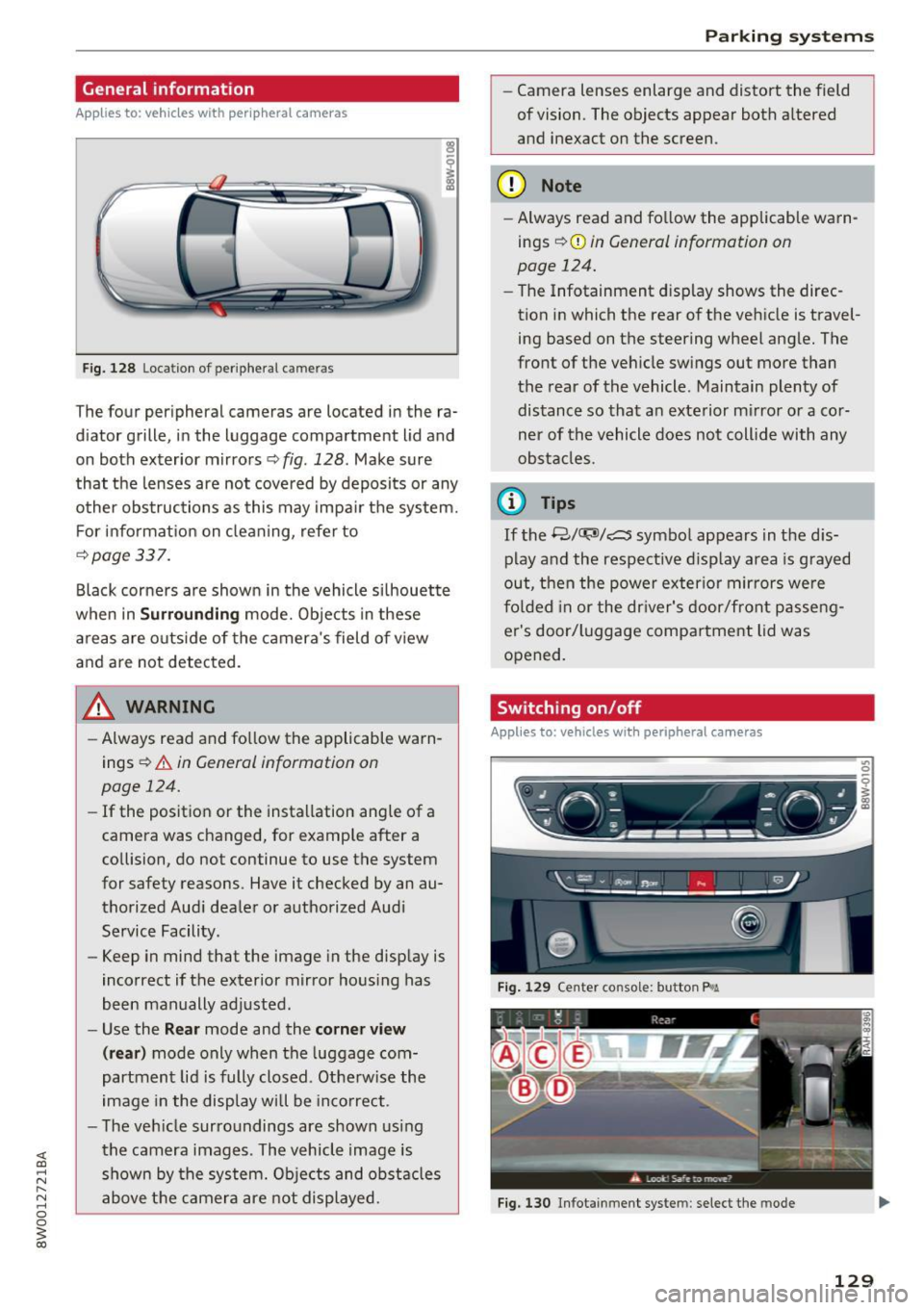
General information
Applies to: vehicles with peripheral cameras
Fig. 128 Loca tion of peripheral c amera s
The four periphe ral cameras are located in the ra
diator grille, in the luggage compartment lid and
on both exterior mirrors
q fig . 128 . Make sure
that the lenses are not covered by deposits or any
other obstructions as this may impair the system.
For information on cleaning, refer to
¢page 337.
Black corners are shown in the vehicle silhouette
when in
Surrounding mode. Objects in these
areas are outside of the camera's field of view
and are not detected .
A WARNING
-Always read and follow the applicable warn
ings
~ &. in General information on
page 124.
- If the position or the installation angle of a
camera was changed, for example after a
collision, do not continue to use the system
for safety reasons . Have it checked by an au
thorized Audi dealer or authorized Audi
Service Facility .
- Keep in mind that the image in the display is
incorrect if the exterior mirror housing has
been manually adjusted .
- Use the
Rear mode and the corner view
(rear)
mode only when the luggage com
partment lid is fully closed. Otherwise the
image in the display will be incorrect.
- The vehicle surroundings are shown using
the camera images . The vehicle image is
shown by the system. Objects and obstacles
above the camera are not displayed.
Parking systems
-Camera lenses enlarge and distort the field
of vision. The objects appear both altered
and inexact on the screen .
(D Note
-Always read and follow the applicable warn
ings
~ CD in General information on
page 124.
- The Infotainment display shows the direc
tion in which the rear of the vehicle is travel ing based on the steering wheel angle. The
front of the vehicle swings out more than
the rear of the vehicle . Maintain plenty of
distance so that an exterior mirror or a cor
ner of the vehicle does not collide with any
obstacles.
(D Tips
If the 8/fl;!J/c::5 symbol appears in the dis
play and the respective display area is grayed
out, then the power exterior mirrors were
folded in or the driver's door/front passeng
er's door/luggage compartment lid was
opened.
Switching on/off
Applies to: vehicles with peripheral cameras
-----------
' :_~ '.!! _:-,~~
~ !i'! .. ' !J -,1~ ===:.===. ,
Fig. 129 Center console: button P.a
Fig. 130 In fo tai nment syste m: select the mode
129
Page 132 of 386

Parking systems
Switching on
.. Shift into reverse , or
.. Press the
P1JJA button in the center console
c::> fig. 129 . A short conf irmation tone sounds
and the LED in the button turns on .
Selecting the mode
.. Turn the con trol knob to the symbol fo r the de
s ir ed mode @thr ough @¢
fig. 130 and press
the control knob .
Switching off
.. Drive faster than 6 mph (10 km/h), or
.. Press the P
1#A button, or
.. Switch the ignition off .
You may select from the following modes:
@ -Corner view (front) ¢
page 130
@-Front ¢ page 130
©-Surround ing ¢ page 130
@-Rear c::> page 131
© -Corner view (rear) ¢ page 130
You can also sw itch to trailer view¢ page 128.
Corner view (front)/corner view (rear)
Applies to: veh icles w ith per ip heral cameras
F ig . 131 In fotainme nt system: corner v iew (front)
Fig. 132 Infotainment sys tem: corner v iew (rear)
130 This view can assist you fo
r example, when you
are exiting from an area with poor visibility. The
area at the front and rear sides of the veh icles is
displayed.
.. To show the side view toward the front, select
the symbol @
c::> fig. 131 with the control knob
and press the control knob .
.. To show the side view toward the rear, select
the symbol ©
c::> fig. 132 with the control knob
and press the control knob .
Front
Applies to : ve hicles with pe ripheral cameras
Fig. 133 Infota inment sys tem: front mode
This view assists you fo r example, in using the
full maneuvering range in front of the vehicle.
The area in front of the vehicle is displayed . The
vehicle surround ings are shown in the right area
of the display. You can switch between the opti
cal display and camera image¢
page 131 .
.. Select the@ symbo l w ith the control knob. The
orange orientation lines mark the expected
path of the vehicle. Stop the vehicle at the lat
est when the red orientation line* borders an
object¢ &.
in General information on
page 129.
Peripheral
App lies to : vehicles with per ipheral cameras
Fig. 134 Infota inment system : peripheral mode
Page 133 of 386

This view is ideal for maneuvering. The vehicle
surroundings are shown using the camera im
ages . The vehicle image is shown by the system .
... Se lect the © symbol with the control knob and
press the control knob.
Rear
Appl ies to: ve hicles with perip heral ca meras
F ig. 135 Infotainment system : rea r mode
This view assists you for example, in using the
full maneuvering range behind the vehicle. The
area behind the vehicle is displayed. The vehicle
surroundings are shown in the right area of the
display. You can switch between t he optical dis
play and camera image
¢page 131.
... Select the @symbol with the control knob.
Perpendicular parking
Appl ies to: ve hicles with per ip heral came ras
This view may be used when parking in a garage
or in a parking space .
Fig. 136 Infotai nment system : aimin g at a park ing space
Parking systems
Fig. 137 Infotainme nt system: a lig n in g the vehicle
... Turn the Infotainment system on and shift into
reverse gear .
... The orange orientation lines
(D show the vehi
cle's direction of travel. Turn the steering wheel
until the orange orientation lines appear in the
pa rking space
c::> fig . 136. Use the markings @
to help you estimate the d istance from an ob
stacle. Each marking represen ts approximately
3 feet (1 m) . The blue area represents an exten
sion of the vehicle's outline by approximately
16 feet (5 meters) to the rear.
... Wh ile driving in reverse gear, adj ust the steer
ing wheel angle to
fit the park ing space with
the aid of the orange orientation lines
c::> &. in
General information on page 129,
c::> (D in Gen
eral information on page 129.@
represents
the rear bumper . Stop the vehicle at the latest
when the red orientation line@ borders an ob
jec t
c::> ,& in General information on page 12 7.
Adjusting park assist
Applies to : vehicles wit h a rear par kin g system/par king sys
t e m plus/ rea rview ca mera/ periph eral cameras
The functions are adjusted in the Infotainment
system .
... Select in the Infotain ment system: I MENU ! but
ton
> Vehicle > left control button > Driver as
sist
> Parking aid . Or
... When the parking aid is active, select in the In-
fo tainmen t system: right control button*.
End system* -end the parking aid
Front volume * -vol ume for the front area
Rear volume -volume for the rea r area
Entertainment fader -when the parking system
is turned on, the vo lume of the audio/video
sou rce is lowered.
131