2017 AUDI S4 drive select
[x] Cancel search: drive selectPage 303 of 386

This message appears when there is only enough
Ad Blue left to drive the distance indicated in the i nstr ument cluster . Fill the Ad Blue. Otherwise
the eng ine will not start aga in if you stop it once
the distance indicated has been dr iven .
• Refill with at least x qt (l) AdBlue. Engine
start not po ssible . S ee owner 's m anual
This message appears when the AdBlue ta nk is
empty. Fill the AdB lue . Otherwise you will not be
ab le to start the engine agai n once yo u stop it.
The AdBl ue m ust be refilled when the amoun t in
the tank has reached the minimum level
c::> page 301, Preparation .
Incorrect filling/system malfunction
A message appears if the Ad Blue tank was filled
with a f luid other than Ad Bl ue and the system
h as detec ted that the t ank was fi lled incor rect ly,
or if there is a system malfunc tion .
II Ad Blue: malfunct ion! No engine start in
x mi (km ). See owner's manual
This message appears when it is only poss ible to
drive the d istance indicated in the instrumen t
cluster . Drive to the nearest authorized A udi
deale r or autho riz ed Aud i Serv ice Facility to have
the m alfunction co rrected. Otherwise the engine
w ill no t start aga in if you stop it once the d is
tance indicated has been driven .
• Ad Blue : malfun ction! No engin e start poss i
ble. See owner' s manual
This message appea rs if the system has detected
that the tank was filled inco rrectly or that there
is a malfunction . D rive immediately to the near
est a utho riz ed Aud i dea ler o r authorized Audi
Service Fa cili ty to have the malfunction correct
ed . Otherwise you will not be able to start the en
gine again once you stop it.
Checking and Filling
Preparation
Applies to: vehicles with selective cata lytic reduction
Fig. 243 Right rear s ide o f th e ve hicle: removing t he Ad Bl
u e cap
The Ad Blue tank ope ning is located near the d ie
se l tank opening. Add at least 1.5 gallons (5. 7
L)
of Ad Blue. This is the minim um amount required
to ensure the system detects the refilling and to
start the engine. You can add a maximum of 6.3 gallons (24 L).
Requireme nt: the request to add Ad Blue must
appea r in the instrument cluster disp lay.
.,. Switch the ignit ion off.
.,. Open the tank filler doo r
c::> page 298.
.,. Tu rn the tank filler neck cap to the left to re
move
c::>fig. 243.
.,. Refill Ad Blue using a bottle c::> page 302, a can
ister
c::> page 302 or a pump nozzle
c::> page 303 .
A WARNING , ~ -Ad B lue can irritate the sk in, eyes and respira
tory sys tem.
If th ere is contact with the flu id,
flus h immed iate ly w ith plenty of wa ter. Con
su lt a phys ician if necessary.
(D Note
- Only use Ad Blue that conforms to the
standard ISO 22241-1. Do not m ix any addi
tives with the Ad Blue and do not dilu te it
w ith wate r.
- Do not add AdBl ue to the diesel tank or add
diese l fuel to t he A d Bl ue tank. Do not s tart
t he engine un de r any c ircumst ances if th e
wrong fuel is filled in the tan k. There is a
r is k of damaging the fue l tank system and
301
Page 305 of 386

Refilling AdBlue using a pump
Appl ies to: ve hicles with selective cataly tic reduction
"' Open the tank fi ller door ¢ page 298, fig. 239 .
.,. Turn the tank filler neck cap to the left to re
move
¢ page 301, fig. 243 .
.,. Refill Ad B lue until the pump nozzle switches
off for the first time
¢ (D.
.,. Close the filler neck. ¢ page 303, Completing
AdBlue refill
(D Note
- The pump nozzle handle must be pointing
downward when fill ing . Otherwise the
pump nozzle w ill not sw itch off automat i
cally
¢ @ in Preparation on page 301.
-Do not continue filling once the pump noz
zle automatically switches off for the first
time . The AdBlue tank system cou ld be
ove rfilled and leak Ad B lue
¢(Din Prepara
tion on page 301.
Completing AdBlue refill
A pp lies to: ve hicles with selective ca ta ly tic reduc tion
Closing the filler neck
.,. Turn the Ad Blue cap to the right on the filler
tube u ntil the cap cli cks into place ¢.&.
in
Preparation on page 3 01,
¢ d) in Preparation
on page 301.
.,. The n press on the left side of the tank door un-
t il it latches.
After filling
The vehicle mus t be driven so that the system
r ecognizes that the Ad Bl ue was refille d. Thi s can
take severa l min utes .
.,. If there was no Ad Blue left in the tank a nd a
ra nge of O mi (0 km) was shown in the display ,
switch the ig nition on for about 30 seconds be
f ore star ting the engine .
(D Tips
Ad Blue in the tank can free ze at very low tern-
; pe ra tures. If this happens, the system will
~ not detect that the Ad Bl ue was refilled and it N
8 wi ll continue to inform you of the low Ad Blue 0
3
level. The message t urns off as soon as the
tank thaws out again .
Emissions control
systems
Catalytic converter
Applies to vehicles a with gasoli ne engine : the
vehicle may only be driven with unleaded gaso li ne, otherwise the cata lytic converter will be de
stroyed .
Never dr ive until the tank is complete ly empty.
The irregu lar supply of fuel that resu lts from that
can cause eng ine misfires. Uncombusted fue l will
enter the exhaust system, which can cause over
hea ting and damage to the cata lytic converter .
Diesel particulate filter
Applies to vehicle s with a diesel engine : the die
sel part icu late filter filters nearly all of the soot
particles out of the exhaust. The f ilter cleans it
self automatically under normal dr iv ing cond i
t ions .
If the filter cannot clean itself (fo r exam
ple, bec ause you are only d rivi ng short distan
c es), the filte r becomes clogged wi th soo t and
t h e
Cl indica to r li gh t for the diese l part icu late
filter turns on ¢
page 34.
A WARNING
The temperat ure of the exhaust system is
h igh, both when driv ing and after stopping
the eng ine.
-
- Never touch the exhaust tail pipes once they
have become hot. This cou ld res ult in burns.
- Do not park your veh icle over flammable
materials such as grass or leaves because
the high temperature of the emissions con trol system (catalytic converter or d iesel
pa rtic ulate filter) could start a fire.
- Do not app ly underbody protectant in the
exhaust system area , beca use this increases
the r isk of f ire.
303
Page 318 of 386

Check ing and F illing
Windshield washer
system
.........
w •
F ig. 252 Engin e comp artm ent : wash er fluid r ese rvoir cap
"' N
0
~ 00 m
The washer fluid reservoir O contains the clean
ing solution for the windshield and the headlight
washer system* c>
page 306, fig. 24 7. The reser
voir capacity can be found inc>
page 362 .
To reduce the risk of lime sca le deposits on the
spray nozzles, use clean water with low amounts
of calci um. Always add window cleaner to the wa
t er. When the outside temper atures are co ld, an
anti-free zing agent should be added to the water
so that it does not freeze .
Cl) Note
-The concentration of anti-free zing agent
must be adjusted to the vehicle operating
conditions in the respective climate. A con
centration that is too high can lead to veh i
cle damage .
- Never add rad iator anti -freeze or other addi
tives to the washer fluid .
- Do not use a glass cleaner that contains
paint solvents, beca use this could damage
the pa int.
Service interval display
The service interval display detects when your ve
hicle is due for service.
Checking se rv ice intervals
You can check the rema ining distance or time un
til the next oil change or next inspection i n the
I nfotainment system .
316
.. Select in the Infotainment system : the !MENUI
button > V ehicle > left control button > Se rvice
& che cks > Ser vice inte rvals .
Resettin g the indicator
You r authorized Audi dea le r or authorized Audi
Se rvice Facility w ill reset the se rvice interval dis
play after performing service.
If you have changed the oi l yourself, yo u must re
set the o il change interval.
.. Select in the Infotainment system: thel
M ENU !
button > Vehicle > left control button > Ser vic e
& check s > Service int erv al s > Re set oil chang e
int erva l.
If an o il cha nge or inspection is due, you can ac
cess it i n the Infota inment system. The display
works in two stages :
-Se rv ice re mind er: after a certain distance is
dr iven, a message appears in the instrument
cluste r display eve ry t ime the ignition is switch
ed on. The remaining d istance and time is dis
played briefly .
-Serv ic e due : if your vehicle has reached a se rv
ice in terva l, a message appears briefly after
sw itching the ignition on.
(D Note
- Only reset the oil change indicator if the oi l
was changed.
- Following the se rvice interva ls is cr itical to
ma inta ining the se rvice l ife and val ue of
yo ur vehicle, especially the engine. Even if
the mileage on the vehi cle is low, do not ex
ceed the time for the next service .
- Calc ulat ing the time to the next oil change
is interrupted when the vehicle battery is
disconnected.
If the vehicle is not driven for
a long period of time, check the mainte
nance schedule so that you can fo llow the
maintenance intervals .
Page 327 of 386

&_ WARNING . -
-Only use tire/rim combina-tions and suitable wheel bolts
that have been approved by
Audi. Otherwise, damage to
the vehicle and an accident
could result.
-For technical reasons, it is not possible to use tires from oth
er vehicles - in some cases,
you cannot even use tires from
the same vehicle model.
-Make sure that the tires you select have enough clearance
to the vehicle. Replacement
tires should not be chosen simply based on the nominal
size, because tires with a dif
ferent construction can differ
greatly even if they are the
same size. If there is not
enough clearance, the tires or
the vehicle can be damaged
and this can reduce driving
safety and increase the risk of
an accident.
-Only use tires that are more than six years old when abso
lutely necessary and drive
carefully when doing so.
-If you install wheel covers on
the vehicle, make sure they al low enough air circulation to
Wheels
cool the brake system. If they
do not, this could increase the
risk of an accident.
Tire wear/damage
Fig. 254 Tire profile: treadwear indica
tor
Tire wear
Check the tires regularly for wear.
-Inflation pressure that is too low or high can increase tire wear
considerably.
-Driving quickly through curves,
rapid acceleration and heavy
braking increase tire wear.
-Have an authorized Audi dealer or authorized Audi Service Facili
ty check the wheel alignment if
there is unusual wear.
-Have the wheels rebalanced if an imbalance is causing noticeable
vibration in the steering wheel.
If you do not, the tires and other
vehicle components could wear more quickly. .,..
325
Page 338 of 386

Wheels
A WARNING
-If the tire pressure indicator appears in the
display, reduce your speed immediately and
avoid any hard steering or braking maneu
vers. Stop as soon as possible and check the
tires and their pressure .
- The driver is responsible for maintaining the
correct tire pressure. You must check the
tire pressure regularly.
- Under certain conditions (such as a sporty
driving style, winter conditions or unpaved
roads), the tire pressure monitoring system
indicator may be delayed.
@ Tips
- The tire pressure monitoring system can al
so stop working when there is an ESC mal
function.
- Using snow chains may result in a system
malfunction.
- The Tire Pressure Monitoring System in your
Audi was calibrated with "Audi Original
Tires "~
page 324. We recommend that you
use these tires.
Storing tire pressures
If the tire pressure changes or a tire is replaced,
it must be confirmed in the Infotainment sys
tem .
.. Before storing the tire pressures, make sure the
tire pressures of all four tires meet the speci
fied values and are adapted to the load
~page 327 .
.. Switch on the ignition .
.. Select in the Infotainment system:
IMENU I but
ton
> Vehicle > Service & checks> Tire pres
sure monitor> Store tire pressure > Yes, store
now.
(D Tips
Do not store the tire pressures if snow chains
are installed .
336
Page 363 of 386
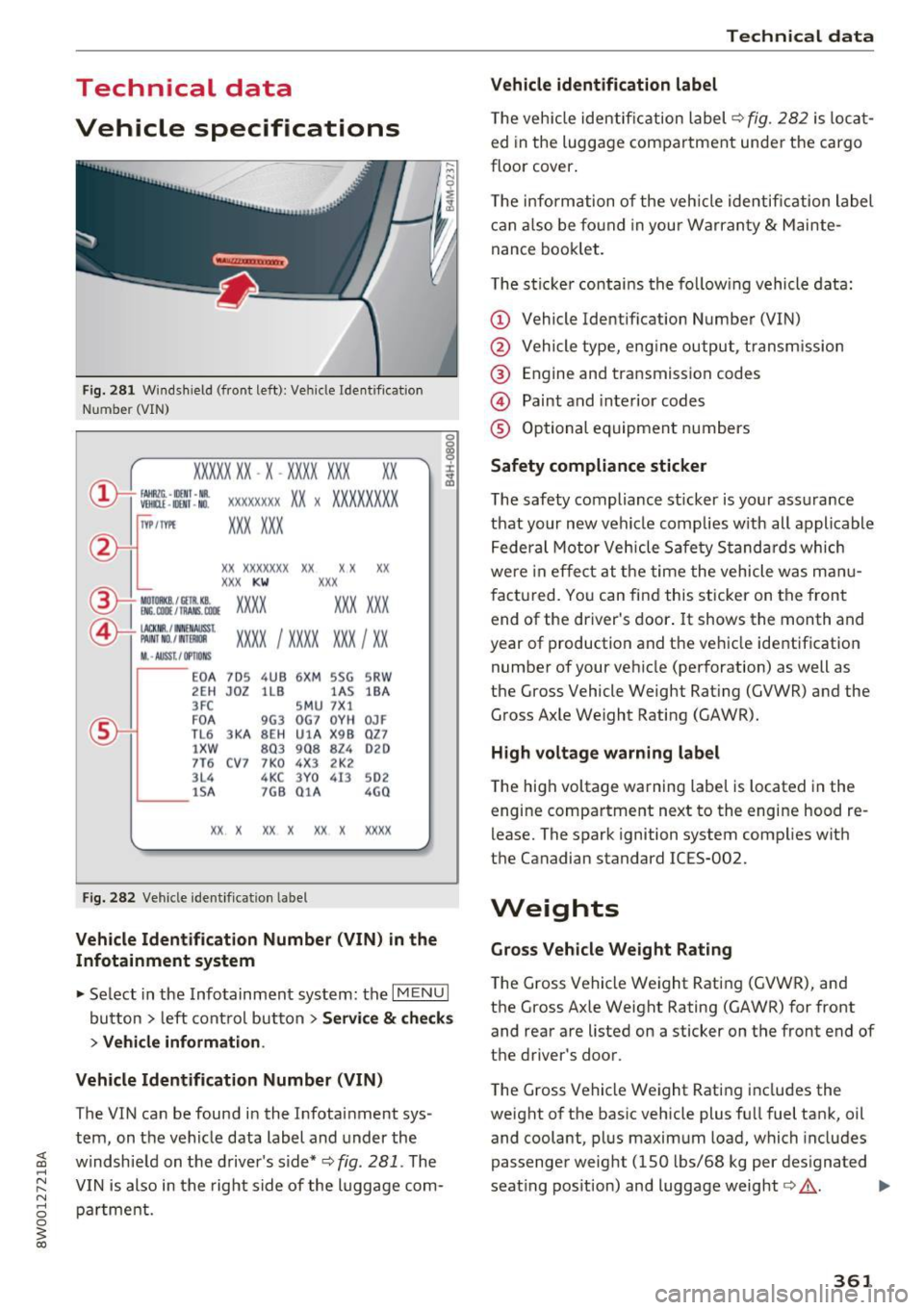
Technical data
Vehicle specifications
F ig. 281 W indshield (front left): Ve hicle Ident ification
Number (VIN)
XXXXX XX -X -XX XX X XX XX
CD+ ~t :1 :: xxxxxxxx xx x xxx xxxxx
TVP/fffl XXX XXX
XX XXXXXXX XX X X XX
XXX
KW XXX
®i ~:J ·f lfils~~ XXXX XXX XXX
®-+ ~N:a=i~l xxxx ; xxxx xx x ; xx
11. • AUSS, I OPTIONS
E0 A
7D 5 4UB 6
XM 5SG 5R W
2E H
J0Z lL B l
A S lB A
3FC SM U 7 Xl
F 0 A 9G3 0G7 0YH 0JF
TL 6 3KA 8EH UlA X 98 Q Z7
lXW 803 908 824 020
7T6 C V7 7 K0 4 X3 2K2
3L4
4KC 3 Y 0 413
502
lSA 7GB 01 A 4G0
XX . X XX X XX X xxxx
Fig. 282 Vehicle identification label
Vehicle Identification Number (VIN) in the
Infotainment system
• Select in the Infotainment system: the I MENU I
button > left control button > Service & checks
> Vehicle information.
Vehicle Identification Number (VIN)
The VIN can be found in the Infotainment sys
tem, on the vehicle data label and under the
windshield on the driver's side*¢
fig. 281 . The
VIN is also in the right side of the luggage com
partment.
Technical data
Vehicle identification label
T he veh icle identification label¢ fig. 282 is locat
ed in the luggage compartment under the cargo
floor cover .
T he information of the veh icle identification label
can also be found in your Warranty
& Mainte
nance booklet.
The sticker contains the fol low ing vehicle data:
(D Vehicle Identification Number (VIN)
@ Vehicle type, eng ine output, transm ission
@ Engine and transmission codes
@ Paint and interior codes
® Optional equipment numbers
Safety compliance sticker
The safety compliance sticker is your assurance
that your new vehicle complies w ith all applicable
Federal Motor Vehicle Safety Standards which
were in effect at the time the vehicle was manu
factured. You can find this sticker on the front end of the driver's door.
It shows the month and
year of production and the vehicle identification number of your vehicle (perforation) as well as
the Gross Vehicle Weight Rating (GVWR) and the Gross Axle Weight Rating (GAWR).
High voltage warning label
The high voltage warning label is located in the
engine compartment next to the engine hood re
lease. The spark ignition system complies with
the Canadian standard ICES-002.
Weights
Gross Vehicle Weight Rating
The Gross Vehicle Weight Rating (GVWR), and
the Gross Axle Weight Rating (GAWR) for front
and rear are listed on a sticker on the front end of
the driver's door .
The Gross Vehicle Weight Rating includes the
weight of the basic vehicle plus full fuel tank, oil and coolant, plus maximum load, which includes
passenger weight (150 lbs/68 kg per designated
seating pos ition) and luggage weight¢,&. . .,.
361
Page 370 of 386

Index
Audi connect ( Infotainment) .. ... .. . 172, 178
Data protection
Pe rsonal hotspot 179
172
Services overv iew . . . . . . . . . . . . . . . . . . . . 173
Starting . . . . . . . . . . . . . . . . . . . . . . . . . . . 173
Aud i d rive select
refer to Drive select . . . . . . . . . . . . . . . . . . 121
Aud i Enterta inment mobi le ...... .... .. . 217
Aud i mus ic interface ............ .... .. . 215
Aud i m usic s tream
refer to Wi -Fi . . . . . . . . . . . . . . . . . . . . . . . 213
Aud iofi les ..... .. ................ ... . 217
Aud io player
Bluetooth audio pl ayer . . . . . . . . . . . . . . . 212
W i-F i aud io player . . . . . . . . . . . . . . . . . . . 213
Audio track 220
Aud i Serv ice Repair Man uals and Lite rature 363
Aud i smar tphone interface ...... ... 227,231
Aud i virtual cockp it
refer to Instr ument cluster . . . . . . . . . . . . . 10
AUTO Automatic headlights . . . . . . . . . . . . . . . . . SO
Climate con trol system . . . . . . . . . . . . . . . . 70
Auto Lock (central locking system) . . . . . . . . 3 7
Automatic belt ret ractor . . . . . . . . . . . . . . . 248
Automatic transm ission . . . . . . . . . . . . . . . . . 83
E me rgency mode . . . . . . . . . . . . . . . . . . . . . 87
H ill descent contro l . . . . . . . . . . . . . . . . . . . 85
Kick -down . . . . . . . . . . . . . . . . . . . . . . . . . . . 87
Launch contro l program . . . . . . . . . . . . . . . 87
Manual sh ifting . . . . . . . . . . . . . . . . . . . . . . 86
Parking lock emergency re lease . . . . . . . . . 89
Selector lever pos itions . . . . . . . . . . . . . . . . 83
Automatic wipe/wash system . . . . . . . . . . . . 56
Auto Safety Hotline . . . . . . . . . . . . . . . . . . . 243
Auxiliary heater (climate control system) . . . 71
AUX inp ut . .. .. .. ............. .... .. . 215
Average consumption . . . . . . . . . . . . . . . . . . . 16
Average speed . . . . . . . . . . . . . . . . . . . . . . . . 1 6
Avoid damaging the vehicle . . . . . . . . . . . . . . 73
B
BACK button
Balance (sound)
Basic
Bass (sound)
368
141
233 108
233 Battery .
... .. .. .. .. .. ... . .. .... ... .. 312
Battery location inside the luggage compart-
ment . . . . . . . . . . . . . . . . . . . . . . . . . . . . . . 313
Charge leve l . . . . . . . . . . . . . . . . . . . . . . . . 138
Charging . . . . . . . . . . . . . . . . . . . . . . . . 31, 314
E nergy management . . . . . . . . . . . . . . . . . 138
Impo rtant warnings when working on the
batte ry . . . . . . . . . . . . . . . . . . . . . . . . . . . . 313
Ind icator lig ht . . . . . . . . . . . . . . . . . . . . . . . 31
Jump start ing . . . . . . . . . . . . . . . . . . . . . . . 356
Replacing . . . . . . . . . . . . . . . . . . . . . . . . . . 315
Winter operation ... .. ... . .. .... ... . .
Working on the battery . ... .. .... ... . .
Befo re dr iv ing
Be lt tens ioner
. .. .. .. .. ............. ..
B lended gasoline . ... .. .. .. .. .... ... . .
Blind
......... ... ... ............. ....
3 12
313
236
251
296
56
B lower (climate control system) . . . . . . . . . . 70
B luetoot h
Audio p layer . . . . . . . . . . . . . . . . . . . . . . . . 2 12
Connecting a cell phone . . . . . . . . . . . . . . 160
Settings . . . . . . . . . . . . . . . . . . . . . . . . . . . 231
Booster seats
Brake flu id 28
7
Changi ng the brake flu id .. ... .... ... .. 311
Check ing the brake fluid level ......... . 311
Brakes Ind icator light . . . . . . . . . . . . . . . . . . . . . . . 35
B rake system
B rake flu id
311
Brake fl uid spec ifications for refill and re
placement . . . . . . . . . . . . . . . . . . . . . . . . . 311
Fluid reservo ir . .. .. .. ............. .. 311
B raking . . . . . . . . . . . . . . . . . . . . . . . . . . . . . 136
A utomat ic post-collision braking system . 134
Brake assist system . . . . . . . . . . . . . . . . . . 134
Brake booster . . . . . . . . . . . . . . . . . . . . . . . 136
E me rgency braking function . . . . . . . . . . . . 82
Ind icator light . . . . . . . . . . . . . . . . . . . . 29, 33
New brake pads . . . . . . . . . . . . . . . . . . . . . 136
Parking brake . . . . . . . . . . . . . . . . . . . . . . . . 81
Wo rn brake pads . . . . . . . . . . . . . . . . . . . . . 33
Braking in New brake pads 136
B re aking in
New engine . . . . . . . . . . . . . . . . . . . . . . . . . 73
New ti res . . . . . . . . . . . . . . . . . . . . . . . . . . 324
Page 371 of 386

<( a, .... N ,....
N .... 0 0
3 a,
Browser
refer to Media center . . . . . . . . . . . . . . . . . 218
Bulbs . . . . . . . . . . . . . . . . . . . . . . . . . . . . . . . 355
Buttons Control panel (MMI) . . . . . . . . . . . . . . . . . 141
Multifunction steering wheel . . . . . . . . 12, 15
C
Cable (U5B adapter/AUX connector cable) 215
California Proposition 65 Warning . . . . . . . 304
Battery specific . . . . . . . . . . . . . . . . . . . . . 314
Ca ll list . . . . . . . . . . . . . . . . . . . . . . . . . . . . . 163
Call options ................... ....... 170
Capacities AdBlue . ... .. ................ ..... . 300
Fu el tank . . . . . . . . . . . . . . . . . . . . . . . . . . . 362
Washer fluid reservoir . . . . . . . . . . . . . . . . 362
Care . . . . . . . . . . . . . . . . . . . . . . . . . . . . . . . . 337
Cargo area
refer to Loading the luggage compart-
ment .. .. ...................... ... . 242
Catalytic converter . . . . . . . . . . . . . . . . . . . . 303
CD drive (media drives) . . . . . . . . . . . . . . . . 211
Cell phone
refer to Telephone . . . . . . . . . . . . . . . . . . . 160
Center armrest . . . . . . . . . . . . . . . . . . . . . . . . 61
Cent ral indicato r lights . . . . . . . . . . . . . . . . . 26
Central locking
Central locking switch . . . . . . . . . . . . . . . . . 41
Convenience key . . . . . . . . . . . . . . . . . . . . . . 40
E mergency locking . . . . . . . . . . . . . . . . . . . . 42
Power window . . . . . . . . . . . . . . . . . . . . . . . 46
Remote control key . . . . . . . . . . . . . . . . . . . 40
Setting . . . . . . . . . . . . . . . . . . . . . . . . . . . . . 41
Central Locking . . . . . . . . . . . . . . . . . . . . . . . . 37
Certification . . . . . . . . . . . . . . . . . . . . . . . . . 366
Changing engine o il . . . . . . . . . . . . . . . . . . . 309
Changing the scale . . . . . . . . . . . . . . . . . . . . . 13
Changing wiper blades . . . . . . . . . . . . . . . . . . 58
Charging the battery (mob ile dev ices) ... . 215
Child restraints Danger of using child restraints in the front
seat . . . . . . . . . . . . . . . . . . . . . . . . . . . . . . . 254
Where can I get additional information
about child restraints and their use? . . . . 295
Child restraint system anchors ..... .. .. . 291
Index
Child safety . . . . . . . . . . . . . . . . . . . . . . . . . . 277
Im portant safety instructions for using child
safety seats . . . . . . . . . . . . . . . . . . . . . . . . 281
Installing a child restraint using the LATCH
system ....... ..................... 293
Mounting and releasing the anchorage
hook .... ... .. .. .. .... ...... ... .. .. 293
Tether anchors . . . . . . . . . . . . . . . . . . . . . . 293
T ether straps . . . . . . . . . . . . . . . . . . . . . . . 293
Child safety lock
Power window . . . . . . . . . . . . . . . . . . . . . . . 45
Rear doors . . . . . . . . . . . . . . . . . . . . . . . . . . 45
Child safety seats Booster seats . . . . . . . . . . . . . . . . . . . . . . . 287
Convertible child seats . . . . . . . . . . . . . . . 285
Danger of using child restraints in the front
seat . . . . . . . . . . . . . . . . . . . . . . . . . . . . . . . 254
How do I properly insta ll a ch ild safety seat
in my vehicle? . . . . . . . . . . . . . . . . . . . . . . . 281
Infant seats . . . . . . . . . . . . . . . . . . . . . . . . 283
LATCH system . . . . . . . . . . . . . . . . . . . . . . 293
Safety instructions . . . . . . . . . . . . . . . . . . . 281
Unus ed safety be lts on the rear seat . . . . 283
Child seats . . . . . . . . . . . . . . . . . . . . . . . . . . 283
Lower anchorages . . . . . . . . . . . . . . . . . . . 292
Securing . . . . . . . . . . . . . . . . . . . . . . . . . . . 288
Classic view . . . . . . . . . . . . . . . . . . . . . . . . . . . 14
Cleaning . . . . . . . . . . . . . . . . . . . . . . . . . . . . 33 7
Cleaning/removing ice from windows . . . . . 339
Cleaning Alcantara . . . . . . . . . . . . . . . . . . . . 340
Cl eaning artificial leather . . . . . . . . . . . . . . . 340
Cleaning carbon parts . . . . . . . . . . . . . 339, 340
Cleaning controls . . . . . . . . . . . . . . . . . . . . . 339
Cleaning decorative parts and trim . . . . . . . 339
Cleaning exhaust tail pipes . . . . . . . . . . . . . 339
Cleaning plastic parts . . . . . . . . . . . . . . . . . . 339
Cleaning textiles . . . . . . . . . . . . . . . . . . . . . . 340
Climate control system . . . . . . . . . . . . . . . . . 68
Air vents . . . . . . . . . . . . . . . . . . . . . . . . . . . . 71
Automatic recirculat ion . . . . . . . . . . . . . . . . 71
Auxiliary heater . . . . . . . . . . . . . . . . . . . . . . 71
Basic settings . . . . . . . . . . . . . . . . . . . . . . . . 71
Drive select . . . . . . . . . . . . . . . . . . . . . . . . . 121
Operat ing . . . . . . . . . . . . . . . . . . . . . . . . . . . 69
Residual heat . . . . . . . . . . . . . . . . . . . . . . . . 71
Clock . . . . . . . . . . . . . . . . . . . . . . . . . . . . 16, 229
Cockpit (overview) . . . . . . . . . . . . . . . . . . . . . . 8
369