2017 AUDI Q7 oil level
[x] Cancel search: oil levelPage 24 of 402

Cockpit over view
Indicator lights
Description
The indicato r lights in the inst rument cluste r
b link or t urn on. They indicate funct ions or ma l
functions .
Messages may appear with some indicator lights .
A wa rni ng signal w ill sound at the same time.
The indica to r lights and messages in the instru
ment cluster display can be covered by other d is
p lays. To show them again, select the second tab
with the mu ltifunction steering wheel
¢ page 12 .
If there are several malfunctions, you can display
them one at a time using the thumbwheel.
Some ind icator lights in the disp lay can display in
several colors .
& Central indicator light
If the . or Q indicator light turns on, check
the message in the instrument cluster .
Overview
Some indicator lights turn on briefly as a function
check when you switch the ign ition on . These sys
tems are marked with a./ in the following tables .
I f one of these indicato r lights does not turn on,
there is a malfunction in that system .
Red indicator lights
22
--------------
Central indicator light
r=;, page 2 2,
Aud i pre sense*
r=;, page 117
USA models :
Brake system ,/
r=;, page 25
Canada models:
Brake system .I
r=;, page 25
USA models :
Electromechanica l parking brake
r=;, page 26
C anada models:
Ele ct romecha nical park ing brake
r=;, page 26
Cooling system
r=;, page 26
Engine o il pressure
r=;, page 27
Engine oil level
¢ page 27
Alterna tor
¢ page 27
Safety be lt
¢ page 27
El ectromechanical power steer ing,
a ll-wheel steering* ,/
¢page 152
Steering lock
¢page 28
Engine start system
r=;, page 28
Transmission
¢ page 95
Hood
¢page 28
Adaptive cruise contro l* ,/
r=;, page 109
Traffic jam ass ist*
¢ page 114
Air suspension*
r=;, page 28
Night vision assist*
r=;, page 132
Night vision assist*
r=;, page 132
Ad B lue*
r=;, page 318
Ad Bl ue*
¢ page 318
Yellow indicator lights
--------------
Centra l indicator light
r=;, page 22
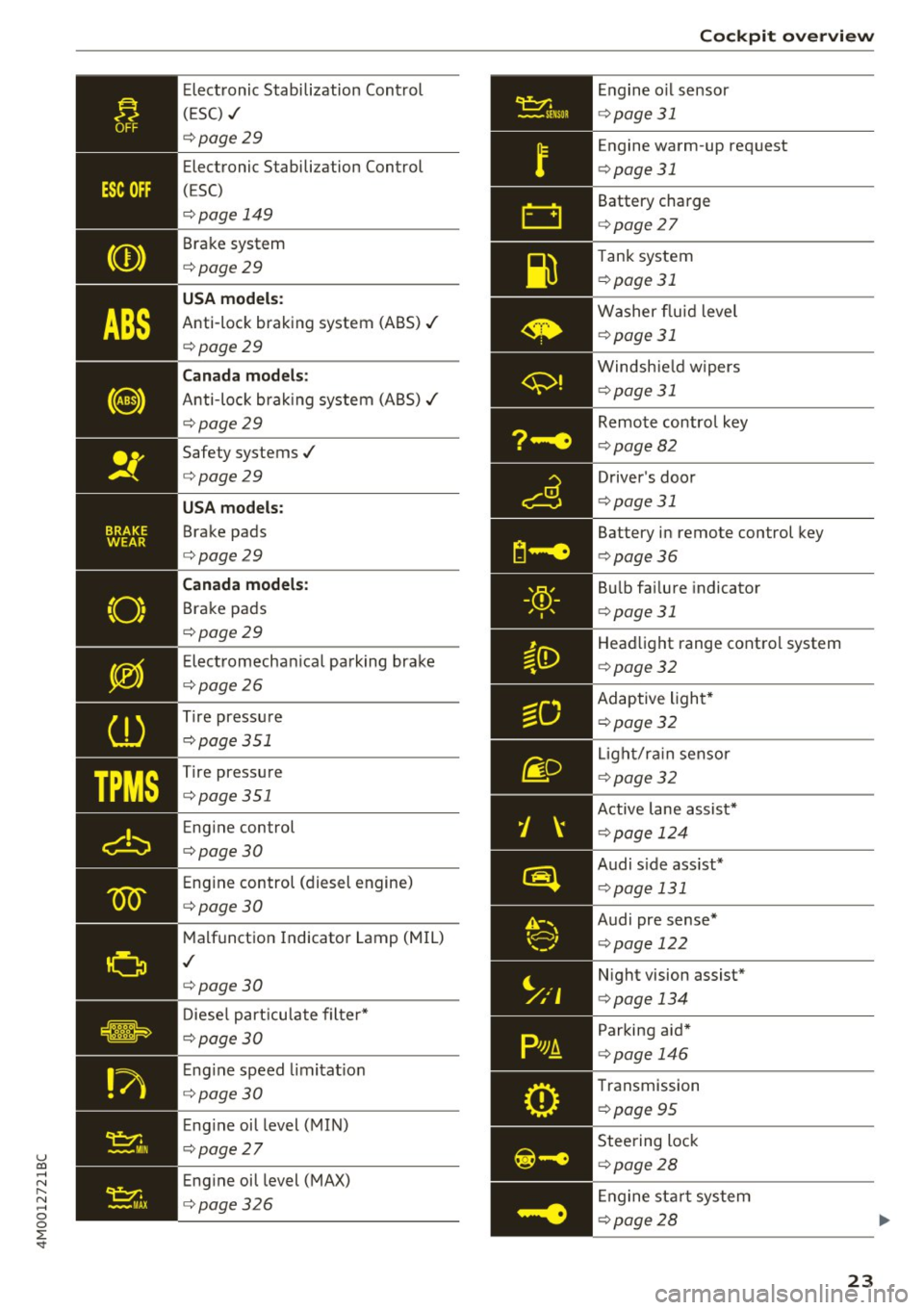
Electronic Stabilization Contro l
(ESC)
¢ page 29
Page 25 of 402
u co ...... N r-... N ...... 0
0
:E: '
(ESC) ./
¢page29
Electronic Stabilization Control
(ESC)
¢page 149
Brake system
¢page29
USA models:
Anti-lock braking system (ABS)./
¢page29
Canada models:
Anti-lock braking system (ABS)./
¢page29
Safety systems ./
¢page29
USA models:
Brake pads
¢page29
Canada models:
Brake pads
¢page29
Electromechanical parking brake
¢page26
Tire pressure
¢page 351
-'
Tire pressure
_ ¢page351
Engine control
¢page30
Engine control (diesel engine)
¢page30
Malfunction Indicator Lamp (MIL)
./
¢page30
Diesel particulate filter*
¢page30
Engine speed limitation
¢page 30
Engine oil level (MIN)
¢page27
Engine oil level (MAX)
¢page326 Cockpit overview
Engine
oil sensor
¢page 31
Engine warm -up request
¢ page 31
Battery charge
c>page 27
Tank system
i=>page 31
Washer fluid level
¢page 31
Windshield wipers
¢page 31
Remote control key
¢page 82
Driver's door
¢page 31
Battery in remote control key
¢page 36
Bulb failure indicator
¢page 31
Headlight range control system
¢page 32
Adaptive light*
c>page 32
Light/rain sensor
c>page 32
Active lane assist*
c>page 124
Audi s ide assist*
c> page 131
Audi pre sense*
¢page 122
Night vision assist*
c>page 134
Parking aid*
c>page 146
Transmission
c>page 95
Steering lock
c>page28
Engine start system
c>page28
23
Page 29 of 402

u co ...... N r-... N ...... 0
0
:E: '
burns. Wait until you no longer see or hear
steam or coolant escaping .
- The engine compartment in any vehicle can
be a dangerous area. Stop the eng ine and
allow it to cool before working in the engine
compartment. A lways follow the informa
t io n found in
¢ page 322, Working in the
engine compartment.
(I) Note
Do not continue driving if the. indicator
light turns on as this increases the risk of en
gine damage.
~ Safety belt
The . indicator light stays on unt il the drive r's
and front passenger's safety be lts are fastened.
Above a certain speed, there will also be a wa rn
ing tone .
@ Tips
For addit iona l information on safety be lts ,
see
¢ page 265.
t3 Generator/vehicle battery
I f the . or(•) indicator light turns on, there is a
malfunct ion in the generato r o r the veh icle elec
tr ica l system .
• Electrical system: malfunction! Safel y stop
v ehicle
Do no t cont inue d riving and switc h the eng ine
off. See an a utho rized Aud i de aler or aut hor ized
Aud i Service Facility for assistance .
(•) Electrical system: malfunction! R estart not
po ssible . Plea se conta ct Service
The vehicle battery was disconnected from the
ve hicle electrical system and will no longer
charge . Drive to an author ized A udi dealer or au
thor ized Audi Se rvice Fa cility immed iate ly.
Do not stop the engine, or you will not be able to
start it aga in . If you can no longer sta rt the en
g ine , see an authori zed Audi dealer or authorized
Aud i Service Fac ility for assistance.
Coc kpit o ve rv iew
(•) F.lectrical sy stem: malfunction! Please con
tact Se rvice
Drive to an authori zed A udi dealer or autho riz ed
A udi Service Facility immed iate ly. Because the ve
hicle battery is discharging, turn o ff all unneces
sary el ectrical equipment such as the radio . S ee
an a utho rized Aud i dea ler or authorized Audi
Service Facility if the battery charge level is too low.
(•) Electrical sy stem: low battery charge. Bat
tery will be charged while d riv ing
T he s tarting ability may be impa ired.
If this message tu rns off after a little whi le, the
vehicle battery cha rged e nough while driving.
If the message does not turn off and stay off
whe n driving, have an author ized Audi dealer or
autho rized Aud i Serv ice Facility repa ir the mal
funct ion.
't:::?: Engine oil pressure
• Turn off engine . Oil pres sure t oo low
Stop the engine and do not cont in u e d rivi ng.
Check the eng ine oi l level
¢ page 326.
-If the eng ine o il level is too low, add engine oil
¢ page 326 . Only continue driving once the in
d icator light turns off .
- If the engine o il level is correct and the indica
tor light still turns on, turn t he e ngine off and
do not cont inue driving . See an authorized Aud i
deale r or a uthorized Aud i Service Facility fo r as
sis tance .
(D Tips
The oil pressure warni ng is not an oil level in
dicator. Always check the oil level regularly .
~ Engine oil level (MIN)
• Pleas e add oil immediatel y.
Add engine oil immediately ¢ page 326.
El Please add max. x qt (l) oil. You can contin·
ue d riv ing
Ill-
27
Page 33 of 402

u co ...... N r-... N ...... 0
0
:E: '
RPM range.
~ .... Engine oil sensor
• Oil le vel sy ste m: malfunction! Please co n
tact Service
The sensor to check the engine oil leve l has
fa iled. Drive to an authorized Audi dealer or au
thorized Audi Service Facility immediate ly to have
the ma lfunction corrected .
• Oil le vel sen sor : o il change nece ssary. Plea se
contact Service
Fu el has en tered the eng ine oi l as a res ult of fre
q uent short dr ives . Avoid hig h engine speeds, full
acceleration and heavy engine loads . Drive to an
authorized Audi dealer or authoriz ed Audi Service
Facility immediately to have the oil changed .
• Oil pre ssure se nso r: malfunction ! Please
contact Service
There is a malfunction in the oil p ressure sensor.
D rive to an autho rized Aud i dea le r o r a uthorized
Audi Service Facility immediately to have the
malfunct ion corrected.
f Engine warm-up request
n Plea se w arm up eng ine
Fu el has entered the engine oi l, either from low
outside temperat ures or freq uent short drives.
Drive unti l the engine is warm so that the fue l in
the eng ine oil will evaporate. Avoid high engine
speeds, full acce lerating and heavy eng ine loads
when doing this.
Bil Tank system
ID'J Plea se r efuel
If the indicator light turns on for the f irst time
and the message appea rs, there are about 2.6
gal lons (10 liters) of fuel left in the tank .
li}'J Please refuel immediately
If the indicator lig ht turns on the message ap
pears, the fue l tank is almost empty. Re fuel the
vehicle immediate ly.
Coc kpit o ve rv iew
li}'J Tank system : malfunction! Please cont act
Ser vic e
T he re is a m alfu nction in the f uel tank system.
Drive to an author ized Audi dealer or authorized
Audi Service Facility immed iate ly to have the
malfunction corrected.
(D Tips
For more information on fuel ing, see
c:;, page 316.
~ Washer fluid level
m Plea se ad d wa sher fluid
Fill the washer fluid for the windsh ield washer
system and the headlight washer system * when
the ignit ion is switched off
9 page 331.
~ , Windshield wipers
$ vVindshield wipers : malfun ction ! Please con
tact Service
The re is a ma lf u nction w ith the windshield wip
ers .
Drive to an author ized Audi dealer or authorized
Audi Service Fac ility immed iately to have the
malfunction corrected .
~ Driver's door
IJI Driver's door: malfun ction! Shif t to P before
leaving vehicle . See owner' s manual
The re is a ma lfunction in the d rive r's door . Select
t h e P selector leve r pos ition to secure the vehicle.
Drive to an au thorized Audi dealer or authorized
Audi Service Facility immed iately to have the
malfu nction corrected.
-:cp:-Bulb failure indicator
If the II ind icator light tu rns o n, a bulb has
failed. The message indica tes the location of the
bulb. Replace the bulb immediately.
Vehicle light s: m alfunction! Please contact
Servi ce
31
Page 81 of 402

u co ...... N r-... N ...... 0
0
:E: '
General information
Breaking in
A new vehicle must be broken in for the first
1,000 mi les (1,500 km). Do not dr ive at speeds
that will exceed 2/3 of the maximum permitted
engine speed (RPM) for the first 600 miles
(1,000 km), and avoid full acceleration during
this period . You may gradually start increasing
the RPM and the speed between 600 miles
(1,000 km) and 1,000 miles (1,500 km) .
During the first hours of use, the engine has a
higher internal friction than later on when all
moving parts have settled into p lace with each
other.
How the vehicle is driven during the first 1,000
miles (1,500 km) also affects the engine quality.
Drive at moderate engine speeds after the initia l
break-in period, particularly when running a cold
engine . This will reduce eng ine wear and improve
the m ileage .
Do not drive at too low of an engine speed (RPM) .
Shift down if the engine stops running "smooth ly". Extremely high eng ine speeds are automati
cally reduced.
Reducing the risk of vehicle damage
([) Note
When driving on poor roads, by curbs and on
steep ramps , make su re that low-hang ing
components such as the spoiler and exhaust
system do not come into contact with these
or they could be damaged. This especially ap
plies to vehicles with low ground clearance
and vehicles that are heavily loaded.
Driving through water on roads
Note the following to reduce the risk of vehicle
damage when driv ing through water, for example
on flooded roads :
- The water must not be any higher than the bot
tom of the vehicle body.
D riving
- Do not drive faster than walking speed.
A WARNING
After driv ing through water or mud, the effec
tiveness of the brakes may be reduced due to moisture on the brake rotors and brake pads.
A few careful brake applications should dry
off the brakes and restore the full braking ef
fect .
(D Note
- Vehicle components such as the engine,
transmission, suspens ion or electrical sys-
tem can be severely damaged by driving
through water.
- Always switch the Start/Stop system" off
when driving through water¢
page 84.
(D Tips
-Determine the depth before driving through
water.
- Do not stop the vehicle, drive in reverse or
switch the engine off when driving through
water.
- Keep in mind that oncoming vehicles may
create waves that raise the water level and
make it too deep for your vehicle to drive
through safely.
- Avoid driv ing through salt water, because
this can cause corrosion.
Economical and environmentally-friendly
driving
T he amount o f fuel consumpt ion, the environ
mental impact and the wear to the engine,
brakes and tires depends mostly on your driving
style. With an ant icipatory and economic driving
style, fuel consumption can be reduced by ap proximately 10-15%. The following tips will help
you conserve the environment and your money at the same time.
Anticipatory driving
A vehicle uses the most fuel when accelerating.
When you drive with anticipation, you do not
need to brake as often and so you accelerate less.
When possible, let your vehicle coast with a gear ..,.
79
Page 91 of 402

u co ...... N r-... N ...... 0
0
:E: '
-If you do not begin driving immediately or
the engine stalls after releasing the brake pedal, your vehicle may begin to roll back
ward . Press the brake pedal or set the park
ing brake immed iately.
- The intelligent technology of hill hold assist
cannot overcome the lim itations imposed by
natural physical laws. The increased comfort
offered by hill hold ass ist should not cause
you to take safety risks .
- Hi ll hold assist cannot hold the veh icle in
place on all hills (for example, if the ground
is slippery or icy).
- To reduce the risk of an accident, always
make sure the vehicle is situated safely
wh ile stat ionary.
Off road driving
General information
The electronic stabilization contro l (ESC) func
tions were enhanced for driving offroad. Offroad
mode can be activated when driving in situat ions
where slippage or a differential lock function is
necessary
Q page 149. The hill descent ass ist is
a lso available, which automatically brakes the ve
hicle and maintains a constant speed as a result
~page 150. In addition, your Audi prov ides con
tinuous all wheel drive.
H owever , your Aud i is not a purely offroad vehi
cle . Your vehicle was not designed to d rive unde r
extreme ope rating conditions such as driving in
an expedition style.
Only drive in terrain that is suitable for the vehi
cle and your driving ability . Never take any un
necessary risks!
Before driving offroad
- Check the eng ine oil level, the tire pressure, the
coolant level and the fluid level in the washer
fluid reservoir .
- Store pieces of luggage and other objects in the
luggage compartment and secure them from
s li ding out of place.
Driving
After driving offroad
-After driving offroad, remove branches and
other debris from the radiator grille, under
body, and wheels . Look especially for foreign
objects (such as stones) that may be stuck in
the tire tread.
- Clean the vehicle body and underbody and in
spect the vehicle for possible damage.
- Clean the windows, headlights, tail lights and
the license plate if they are dirty.
- Per form a brake test (especially after driving
through water).
_& WARNING
- Be especially cautious and aware when driv
ing under difficu lt cond it ions and when off
road. Veh icle damage and injuries may occur
when dr iv ing at excessively high speeds or
with incorrect driving maneuvers.
- Always adjust your speed and driving style
to the roads, terrain, traffic and weather
conditions . Drive especially slowly if there is
low visibility when offroad.
- Please note that the wheels can sp in more
and the vehicle can swerve when in offroad
mode, espec ially when the road is slippery
or has loose surface material.
- Driving stability is reduced when in offroad
mode.
@ For the sake of the environment
Avoid harming the environment and show
consideration for nature .
(D Tips
Only drive where it is permitted and always
stay on the prov ided roads and paths .
Explanation of technical terms
The following data is based on idea l conditions .
T he values may vary depending on the load,
ground composition and the environment. The
driver is therefore responsible for deciding
whether a vehicle can hand le a specific situation
¢ £ . ~
89
Page 202 of 402
Audi connect vehicle control
-Pay attention to upper- and lower-case let
ters when entering the vehicle code.
- If you do not have the 10-digit vehicle code,
contact an authorized Audi dealer or author
ized Audi Service Facility.
Additional options
Applies to vehicles with Audi connect vehicle control
License subscription
The validity and expirat ion date of you r subscrip
tions are displayed. When
Warning before sub
scription expires
is activated, a message wi ll be
d isp layed warning you that your license is about
to expire.
Select:
! MENU ! button> Audi connect > Display
available functions >
right control button> Li
cense subscription.
Resetting the primary user
F or examp le, you ca n reset the key user when
selling your vehicle in order to deactivate these
services .
Requirement: the ignition must be switched on.
Select :
!MENU ! button> Audi connect > right
control button
> Audi connect user management
> Key user> Reset key user .
Warning levels
Requirement: the primary user must have set one
or more warning levels. Secondary users can only
see if a warning level is act ive or not .
Select:
! MENU ! button> Audi connect > right
control button
> Alerts.
Remote locking and
unlocking
Applies to vehicles with Audi connect vehicle control
You can lock and unlock your veh icle using this
service.
Requirement
- This requires the 4-dig it PIN that you specified
during the verification on www.audiusa.com/
myaudi.
- The vehicle must be stationary.
200
- The ignition must be switched off.
Vehicle status report
Applies to vehicles w ith Audi connect vehicle control
The Driver Information System collects data un
der certain conditions and sends it to a server.
When data is stored, yo u can access va lues such
as these using the service:
- Remaining range
- Fue l tank level
- Oil level
- Vehicle doors are open/closed or locked/un-
locked
- Mi leage
- Next oil change
- Next inspection
- Warning messages
- Side marker lights/parking lights on/off
For additional information on the Driver Informa
tion System, refer to
c:> page 15, Driver informa
tion system.
A WARNING
Do not ignore messages and warning or ind i
cator lights that turn on in the vehicle be
cause of the information in the status report .
This could lead to break downs in on the road,
accidents and serious injuries.
Parking location
Applies to vehicles with Audi connect vehicle control
The vehicle collects data under certain cond it ions
and sends it to a serve r.
When data is stored, you can access values such
as these using the service :
- Vehicle location display,
- Display of one's own location,
- Route to you r vehicle .
If your mobile device also has a navigation func
tion, you ca n navigate to your last kno wn parking
lo ca tion .
Page 327 of 402

u co ...... N r-... N ...... 0
0
:E: '
oil that matches the Audi oil quality standard listed on the st icker. The sticker is located at the
front of the engine compartment
c> page 324,
fig . 267.
Audi re comm end s
Ocastrot /[g/j;t{E'g Frtw.::<.. ·-:dr,,JA.L
A ud i recommends Longlife h igh perform ance
e ngin e oil from Audi Genui ne Part s
Using the proper engine oil is important for the
functionality and service life of the eng ine. Your
engine was factory -filled with a high-quality oil
which can usua lly be used throughout the entire
yea r.
Note
Your Limited New Vehicle Warranty does not
cover damage o r malfunctions due to failure
to follow recommended maintenance and use requirements as set fo rth in the Aud i Owner's
Manual and Warranty
& Maintenance booklet.
- Use only a high q ual ity eng ine oil that ex-
pressly complies with the Aud i oil q uality
standard specified for your vehi cle's engine .
Using any other oil can cause serious engine
damage .
- Do not mix any l ubricants o r other additives
into the engine oil. Doing so can cause en
gine damage.
(D Tips
If you need to add oil and there is none availa
b le that meets the Audi oil quality standard
your eng ine requires, you may add a total of
no more than 0.5 qt (0.5 l) of a h igh-quality
"synthet ic" o il that meets the following speci
fications .
- Vehicles with gasoline eng ine: ACEA A3 or
API SM with a viscosity grade of SAE OW-30,
SAE 5W -30 or SAE 5W-40 .
- Vehicles with d iesel eng ine : ACEA C3 or
API CF with a v iscosity grade of SAE OW-30
or SAE 5W -30 .
- For more information about engine o il that
has been approved for your vehicle, please
contact e ither you r authorized Audi dea le r
or A udi C ustome r Relat ions at
Ch eck ing and Filling
1 (800) 822 -2834 or visit our web site at
www.audiusa .com or www .audicanada .ca.
Engine oil consumption
The engin e in your v ehicl e dep ends on an ad e
quat e amount of oil to lubricate and cool all of
its moving parts.
In order to provide effect ive lub rication and cool
ing of inte rnal engine components, all inte rnal
combustion engines consume a certain amount
of oil. Oil consumption varies from eng ine to en
gine and may change significantly over the life of
the engine. Typ ically, engines w ith a specified
break -in period (see
c> page 79) consume more
o il dur ing the break-in per iod than they consume
after oil consumption has stabilized .
Under normal cond itions, the rate of oil con
sumption depends on the qua lity and viscos ity of
the oil, the RPM (revolutions per m inute) at
which the engine is operated, the amb ient tem
perature and road condi tions. Further facto rs a re
the amo unt of oil di lution from water co ndensa
tion or fue l resid ue a nd the oxidation level of the
oi l. As any engine is subject to wear as mileage
builds up, the oi l consumption may increase ove r
time unt il replacement of worn components may
become necessary.
With a ll these variab les coming into play, no
standard rate of oi l consumption can be estab
lished or spec ified . There is no alternative to reg
ular and frequent checking of the oi l level, see
Note .
If the y ellow engine oil leve l warning symbo l Bl
in the instrument cluster lights up, you should
check the o il level as soon as possible
c> page 326. Top off the o il at your earliest con
venience
c> page 326 .
A WARNING
--Before you check anyth ing in the eng ine com-
partment, always read and heed all WARN
I NGS
c> .&. in Working in the engine compart-
ment on page 322.
Ill>
325