2017 AUDI Q5 trailer
[x] Cancel search: trailerPage 129 of 296

Switching on and off
Applies to: vehicl es wit h Aud i parking system p lus w ith rear
view came ra
The rearview camera switches an automatically
together with the acoustic and visual park assist
when you put the vehicle in reverse.
Fig. 144 Center console: Park ing system switch
Fig . 1 45 MMI display: visual distance display
Switching on
.. Switch the MMI on and select reverse gear .
.. To use the front park ing system, press the
switch
p,, 1A in the center console c::> fig . 144. A
sho rt confirmation tone sounds and the indica
tor light in the switc h lights up.
Switching between th e re arview came ra and
vi sual displa y
.. Press the Graphi c co ntrol button c::>page 128,
fig. 146
® to see the visual d isplay .
.. Press the
Rear view contro l butto n to see the
rearview camera image
¢fig. 145.
Switching off
.. Drive faster than 6 mph ( 10 km/h), or
~ .. press the switch P'#A or .....
~ .. switch off the ign ition. N ..... 0 0
0:
co
P ark ing aid
Segments in the visual di splay
T he red segments in front of and behind the vehi
cle
c:::> fig. 145 help you to determine the distance
between you and an obstacle. As your vehicle
comes closer to the obstacle, the segments move
closer to the vehicle. The collision area has been
reached when the next to last segment is dis
played . Do not continue dr iving farther
c:::> .&. in
General Information on page
126!
A WARNING
-- The MM I display cannot show, o r cannot ad-
equate ly show, certain objects (such as
smal l posts or grating), recesses i n the
g ro und and protruding parts on another car.
- On ly use the rearv iew camera to ass ist yo u if
it shows a good, clea r pi ctu re. For example,
the image may be affected by the sun shin
ing into the lens, dirt on the lens or if there
is a defect.
- Use the rearv iew camera on ly w ith the rea r
lid completely closed. Make sure any objects
you may have mounted on the rear lid do
not block the rearv iew camera.
(D Tips
- The sensors must be kept clean and free of
snow and ice for t he park ass ist to operate .
- The visua l display is shown in the illust ra
tion of the rearview camera. This display shows where the sensors have detected an
obstacle.
- You can change the volume and pitch of the
signa ls as well as the display
c:::> page 130.
- Please fol low the instructions for tow ing a
trailer
c:::> page 130.
- What appears in the display is time -de
layed.
127
Page 130 of 296

Parking aid
Reverse Parking
Applies to: vehicles w ith Aud i park ing system p lus w ith rear
view c amera
Parking mode 1 con be used when parking in a
garage or into a parking space.
Fig. 146 MMI disp lay: a iming at a parking spot
Fig. 147 MMI disp lay: align ing the vehicle
.,. Switch the MMI on and se lect reverse gear .
.,. Turn the steering wheel until the orange orien
tation lines
(D appear in the parking spot
¢ fig . 146. Use the markings @to help you es
timate the distance from an obstacle. Each
marking represents 3 ft (1 meter). The blue
area represents an extension of the vehicle's
outline by approximately 16
ft (S meters) to
the rear .
.,. While driving in reverse gear, adjust the steer
ing wheel angle to fit the parking space with
the a id of the orange orientation lines ¢(D.
®
marks the rear bumper . Stop the vehicle when
the red orientation line© borders an object
¢,&. .
.&_ WARNING
- The rearview camera does not show the en
tire area behind the vehicle¢
page 125,
128
fig. 142. Watch out especially for small chil
dren and animals. The rearview camera can
not always detect them, posing risk of an
accident!
- Please note that objects not touching the
ground can appear to be further away than
they really are (for example, the bumper of
a parked vehicle, a trailer hitch, or the rear
of a truck). In this case, you should not use
the help lines to help with parking, which
poses danger of an accident!
(D Note
In the MMI display, the direction of travel of
the vehicle rear is represented depending on
the steering wheel angle. The vehicle front
swings out more than the vehicle rear. Main
tain plenty of distance so that your outside
mirror or a corner of your vehicle does not col
lid e with any obstacles. This can damage to
your vehicle.
Page 131 of 296

a,
a,
..... N ,....
N ..... 0 0
0:
co
Parallel Parking
Applies to: vehicles with Aud i parking system plus with rear
view camera
Use parking mode 2 to help you porollel pork
along the side of a street.
Fig. 148 MMI display: blue surface in the parking spot
Fig. 1 49 MMI display : Blue curve on the curb
The following steps apply only when there is no
obstacle such as a wall near the parking spot.
Otherwise, please read the information prov ided
in the "Parking Next to Obstacles" sect ion.
.,. Activate the turn signal.
.,. Pos ition your vehicle paralle l to the edge of the
street, approx imately 3 ft (1 meter) from a
parked veh icle.
.,. Swi tch the M MI on and se lect reverse gear. The
park ing a id turns on and park ing mode 1 ap
pears on the d isplay .
.,. Press the control button
(D ¢ fig. 148 on the
MMI control console. Parking mode 2 appears.
.,. Back up and align yo ur vehicle so the b lue area
@ borders on the rear end of the vehicle or on
the parking spot line. The blue area represents
an extension of the vehicle's outline by approxi
mately 16 ft (S meters) to the rear. The long
s ide of the blue area should be on the curb. The
en tire blue area must fit into the parki ng spot.
P ark ing aid
.,. With the vehicle stopped, turn the steering
wheel to the right as far as it will go.
.,. Back into the parking spot until the b lue curve
touches the curb¢
fig. 149. Stop the vehicle.
.,. With the vehicle stopped, turn the steering
wheel to the left as far as it will go .
.,. Continue to back into the parki ng spot unt il the
veh icle is parked parallel to the c urb. @ marks
the rear bumpe r. Stop the ve hicle when the red
orientat ion line @ borders an object¢
&
Keep an eye on the front of yo ur vehicle while
doing this ¢(D.
Parking next to obstacles
When there is an obstacle (such as a wall) next to
th e parking spot, choose a spot with mo re space
o n t he sides. Pos ition the long side of the b lue
area so that there is sufficient space from the
curb. The area must not be on the curb. You wi ll
also need to start turning the steering wheel
much earlier. There should be a sufficient
amount of space between the curb and the blue
curve, and the blue curve¢
fig. 149 must not
touch the curb.
A WARNING
-The rearview camera does not show the en
tire area behind the vehicle¢
page 125 ,
fig. 142.
Watch o ut especially fo r small ch il
d ren and animals. The rearview came ra can
not a lways detect them, posing risk of an
accide nt!
- P lease note that o bjects no t touching the
g ro und can appear to be further away tha n
they rea lly are (for e xamp le, the bumper of
a parked vehicle, a trailer h itch, or the rear
of a truck). In this case, you shou ld not use
the help lines to help with parking, which poses danger of an accident!
(D Note
In the M Ml d is play, the direction o f travel of
the veh icle rear is represented depend ing on
the steer ing whee l ang le. The ve hicle front
swings o ut more tha n the vehicle rea r. Main
ta in plenty of distance so that your o utside
129
Page 132 of 296

Parking aid
mirror or a corne r of your veh icle does not col
lide with any obstacles. This can damage to
your vehicle.
(D Tips
The left or right orientation lines and surfaces
will be displayed, depending on the turn sig
nal being used .
Adjusting the display
and warning tones
A pp lies to : ve hicles w ith Audi park ing system plus w ith rea r
view ca mera
The display and warning tones can be adjusted in
the MMI.
~ Select: ICARlfunction button> Parking system.
Or
~ Select: I CARI funct ion button > Car systems*
control button > Driver assist> Parking aid .
Display
-Off -when the parking system is switched on,
only audible signals are g iven.
- On -when the parking system is switched on,
either the visual disp lay or the picture from the
rearview camera is displayed .
Warning tones
-Front volume -front sensor volume
-Front frequency -front sensor frequency
- Rear volume -rear sensor volume
-Rear frequency -rear sensor frequency
-In -car entertainment fader/Music volume
while parking -
when the parking system is
switched on, the volume of the active audio
source is lowered .
The newly adjusted value is briefly heard from
the signal generator.
(D Tips
- The warning tones can also be adjusted di
rectly by the v isual disp lay or the picture
from the rearview camera. S imply press the
Settings control button.
- Changed settings are act ivated when park
in g system is switched on again .
130
-Th e settings are automatically stored and
assigned to the remote control key.
Trailer hitch
Applies to : vehicles wi th Audi parking sys te m plus wi th rear
v iew camera an d tra il er hitc h
For vehicles with a factory installed trailer hitch,
o r a trailer hitch installed according to factory
spec ifications, the parking system rear sensors
do not come on whenever you shift into reverse
gear or when you press the
p, qA switch. Remem
ber, there is no warning for distances to the rear.
The front sensors remain activated. The visual
display switches to the trailer tow ing mode. The
picture from the rearview camera w ill not show
the or ientat ion lines nor the blue surfaces .
If you install a hitch yourself, this function may
not work.
Error messages
App lies to: vehicles wi th Audi parking sys te m plus with rear
v iew camera
There is an error in the system if the LED on the
PJJJA switch is blinking and you hear a continuous
alarm for a few seconds after switching on the parking system or when the parking system is al
ready activated . Have your authorized Audi dealer
correct the error.
(D Tips
If the error is not corrected before you switch
off the ign ition, when you switch on the park
ing system again, the LED in the
Pw.o. switch
will blink.
Page 202 of 296

Trailer towing
Trailer towing
Driving with a trailer
General information
Your Audi was designed primarily for passenger
transportation.
If you plan to tow a trailer, please remember that
the additional load will affect durability, economy and performance.
Trailer towing not on ly places more stress on the
ve hicle, it also ca lls for more concentration from
the dr iver.
F or this reason, always follow the operating and
driving instructions provided and use common
sense.
Technical requirements
Trailer hitch
Use a weight-carrying hitch conforming to the
gross tra iler weight. The hitch must be suitab le
for your veh icle and tra iler and must be mounted
securely on the vehicle's chassis at a technically
sound
locat ion . Use on ly a trailer hitch with a re
movable ba ll mount . Always che ck with the t rail
er hitch man ufac tur er to make s ure t hat you are
using the co rrect hi tc h.
Do not use a bumper hitch.
The hitch must be installed in such a way that it
does not interfere with the impact -absorbing
bumper system. No mod ificat ions should be
made to the vehicle exhaust and b rake systems .
Fr om t ime to t ime, che ck that all hitch mo unti ng
bol ts rem ain securely f aste ned.
W hen you are not tow ing a tra iler, remove the
tra ile r hitc h ba ll mount . This prevents the hit ch
from caus ing damage s hou ld your veh icle be
s truck from be hind ¢
,&..
Trailer brakes
If you r trailer is equipped with a brak ing system,
check to be su re that it conforms to all regula
tions .
200
The t rai ler hydraulic bra ke system must not be
directly connected to the vehicle's hydraulic
bra ke system ¢&. .
Safety chains
Always use s afety chains be tween you r vehi cle
and t he tra ile r.
Trailer lights
Traile r lights must meet all regula tions . B e s ure
to check w ith your author ized Audi dealer for cor
r ec t wir ing, swi tches, an d relays.
Mirrors
If you are unable to see t he traffic behind you us
i ng t he regular outs ide mirrors, then yo u
must in
stall ex tended mirro rs . It is impo rtant that you
al ways have clear vision to the rear.
.&_ WARNING
- If a tra ile r has e lectr ical brake s ple ase no te
t h at these b ra kes are not activated by the
factory -fit ted contro l unit -risk of accident!
- After removing the traile r h itch, d o no t
s t o re it in your vehicle. In case of sud den
braking, the hitch co uld fly forwar d and in
jure you or yo ur passenge rs.
- Never install a "we igh t distribu tin g" or
"loa d eq ualizing" trailer hitch on your veh i
cle . The vehicle was not designed fo r these
kinds o f trailer hitches. The hitch attach
ment can fail, ca us ing the tra ile r to tear
loose from the vehicle .
- The Gross Vehicle Weight Rating for your
veh icle, found on the safety compliance la
be l on the driver's s ide B-pillar, must never
be exceeded under any circ umstances . Ex
ceed ing the Gross Vehicle We ight Rat ing of
your veh icle is likely to damage yo ur vehicle,
a nd such d amage will no t be covered by
your Limi ted New Vehicle W arra nty . Exceed
ing the Gross Ve hicl e We ight Rating will al
so change the pe rformance and han dling
characte ristics o f yo ur vehicle, which could
cause a crash result ing in se rious injury or
death.
Page 203 of 296
CD
CD
.... N ,-... N ..... 0 0 C<'. 00
Operating instructions
6" r-2
~·~
1/2"
1·1/2"
ill
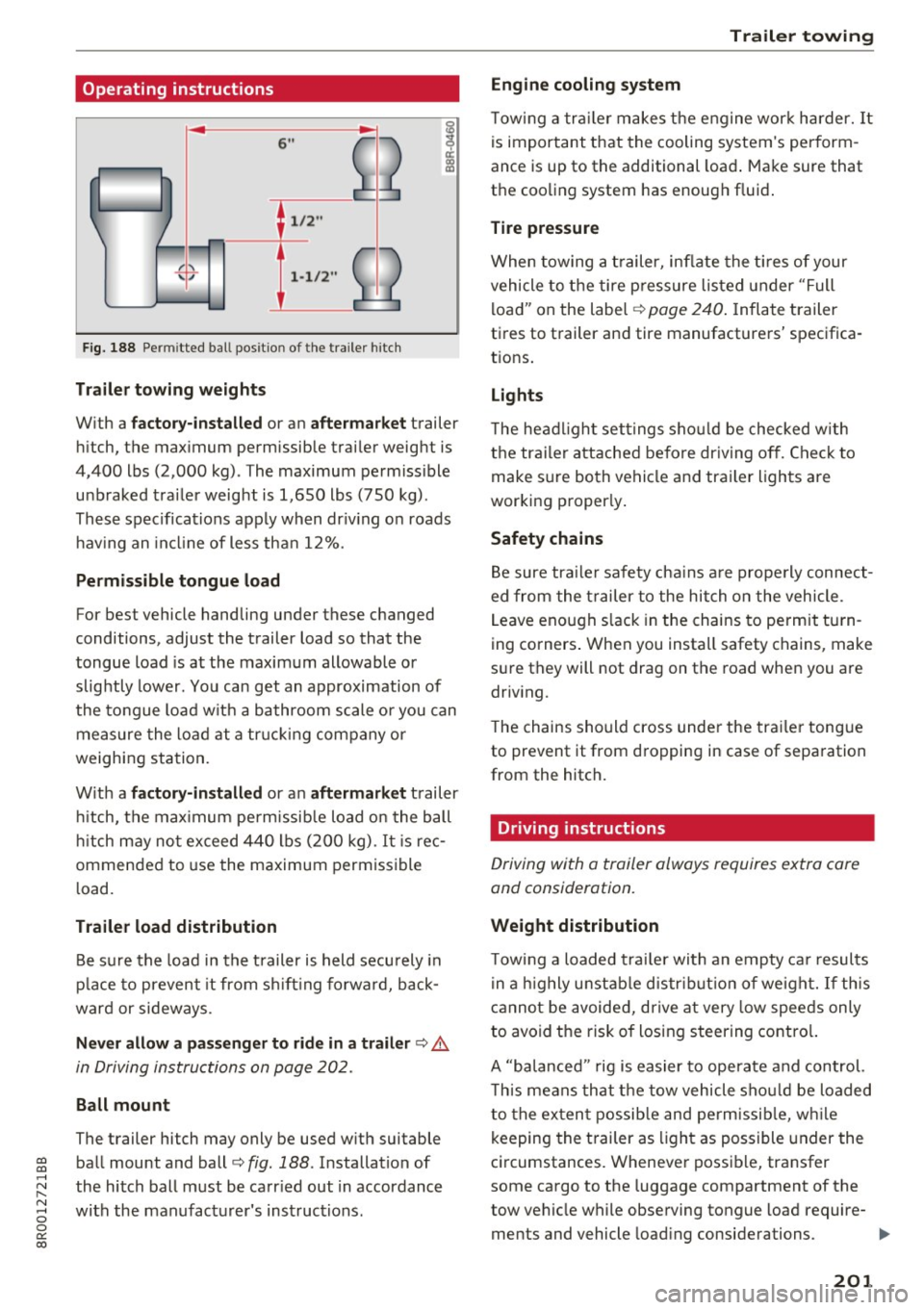
Fig. 188 Permi tted ba ll pos it io n of the trailer h itch
Trailer towing weights
With a
factory-installed or an aftermarket trailer
hitch, the maximum permissible trailer weight is
4,400 lbs (2,000 kg) . The maximum permissible
unbraked trailer weight is 1,650 lbs (750 kg).
These specifications apply when driving on roads having an incline of less than 12%.
Permissible tongue load
For best vehicle handling under these changed
conditions, adjust the trailer load so that the
tongue load is at the maximum allowable or
slightly lower. You can get an approximation of
the tongue load with a bathroom scale or you can
measure the load at a trucking company or
weighing station.
With a
factory-installed or an aftermarket trailer
hitch, the maximum permissible load on the ball
hitch may not exceed 440 lbs (200 kg) .
It is rec
ommended to use the maximum permissible
load.
Trailer load distribution Be sure the load in the trailer is held securely in
place to prevent it from shifting forward, back
ward or sideways.
Never allow a passenger to ride in a trailer ¢.&.
in Driving instructions on page 202.
Ball mount
The trailer hitch may only be used with suitable ball mount and ball¢
fig. 188 . Installation of
the hitch ball must be carried out in accordance
with the manufacturer's instructions .
Trailer towing
Engine cooling system
Towing a trailer makes the engine work harder. It
is important that the cooling system's perform
ance is up to the additional load. Make sure that
the cooling system has enough fluid.
Tire pressure
When towing a trailer, inflate the tires of your
vehicle to the tire pressure listed under "Full
load" on the label¢
page 240. Inflate trailer
tires to trailer and tire manufacturers' specifica
tions.
Lights
The headlight settings should be checked with
the trailer attached before driving off. Check to
make sure both vehicle and trailer lights are
working properly.
Safety chains
Be sure trailer safety chains are properly connect
ed from the trailer to the hitch on the vehicle .
Leave enough slack in the chains to permit turn
ing corners. When you install safety chains, make
sure they will not drag on the road when you are
driving.
The chains should cross under the trailer tongue
to prevent it from dropping in case of separation
from the hitch.
· Driving instructions
Driving with a trailer always requires extra care
and consideration.
Weight distribution
Towing a loaded trailer with an empty car results
in a highly unstable distribution of weight. If this
cannot be avoided, drive at very low speeds only
to avoid the risk of losing steering control.
A "balanced " rig is easier to operate and control.
This means that the tow vehicle should be loaded
to the extent possible and permissible, while
keeping the trailer as light as possible under the
circumstances. Whenever possible, transfer
some cargo to the luggage compartment of the
tow vehicle while observing tongue load require-
ments and vehicle loading considerations. .,.
201
Page 204 of 296

Trailer towing
Sp eed
The higher the speed, the more d ifficult it be
comes for the driver to contro l the rig. Do not
dr ive at the maximum permissible speed. Reduce
your speed even more if load, w eather or wind
conditions are unfavorable -particularly when
going downhill.
Red uce vehicle speed
immediatel y if the trai le r
shows the s lightest sign of swaying .
Do not try
to stop the swayin g by ac cele rating.
Observe speed limits . In some areas, speeds for
vehicles towing trailers are lower than for reg ular
ve hicles.
A lways apply b rakes early . When dr iving down
hi ll, shi ft into a lower gear to use the engine
braking effect to slow the vehicle. Use of the
brakes a lone can cause them to overheat and fail.
Coolant temperature
The coolant temperatu re gauge ¢ page 8 must
be observed ca refully . If the needle moves close
to the upper end of the scale, reduce speed im
mediately and/or turn off the air conditioner .
I f t he coolan t temperature warn ing light i n the
instr ument cluster s tarts flashing ., pull off
the road, stop and let the engine
idle for about
two minutes to prevent heat bu ild-up .
A WARNING
Anyone not properly restrained in a moving
vehicle is at a much greater risk in an acci
dent . Never let anyone ride in your car who is
not properly wearing the restraints provided
by Audi .
Trailer towing
information
Important to know
Your veh icle hand les different ly when tow ing a
tra iler because of the additional weight and dif
fe rent weight d istr ibut ion . Safety, performance
and economy w ill great ly depend on how careful
ly you load you r trailer and operate your rig .
202
Before you actually tow your trailer, practice
turning, stopping and backing up in an area away
from traffic . Keep pract icing unt il yo u h ave be
come comp lete ly familiar w ith the way your vehi
cle-tra iler combination behaves and responds.
Backing up is difficult and requires practice .
Backing up w ith a trailer generally req uires steer
i ng action opposite to that when backing up your
vehicle without a trailer.
Maintain a greater distance between your vehicle
and the one in front of you . You will need more
room to stop. To compensate for the trailer, you
will need a larger than normal turning radius.
When passing, remember that you cannot accel erate as fast as you normally wou ld because of
the added load. Make sure you have enough room
to pass. After passing, allow p lenty of room for
your trailer before changing lanes again.
Avo id jerky starts, sharp turns or rapid lane
changes.
(D Tips
- Do not tow a trailer during the break-in peri
od of your veh icle.
- If you tow a trai ler, your Audi may requi re
more frequent maintenance due to the ex
tra load ¢
page 2 76.
' Parking on a slope
Do not park on a slope with a trailer. If it cannot
be avoided, do so only after doing the following:
When parking:
.,. App ly the foot bra ke .
.,. Have someone place cho cks under bot h the ve
hicle and the trailer wheels .
.,. With choc ks in place, slowly release the brakes
until the wheel chocks absorb the load.
.,. Turn the wheels towards the curb .
.,. App ly the parking brake .
.,. Move the selector lever to P .
When restarting after parking :
.,. App ly the foot brake .
.,. Start the eng ine .
.,. Move the se lector lever to D/S.
Page 205 of 296
CD
CD
.... N ,-... N ..... 0 0 C<'. 00
~ Release the parking brake and slowly pull out
and away from the whee l chocks.
~ Stop and have someone retrieve t he whee l
chocks .
(D Tips
If you move the selector lever of the a utomat
ic transm ission to P before applying the park
ing brake and before block ing the wheels, you
may have to use more force later to move the
lever out of the P position .
Trailer towing
203