2017 AUDI A8 park assist
[x] Cancel search: park assistPage 84 of 354

Driving
During emergency braking, your vehicle will
brake similar to heavy braking. ESC and the
associated components (ABS, ASR, EDL)
cannot overcome the laws of physics. In cor
ners and when road or weather conditions
are bad, a full brake application can cause
the vehicle to skid or the rear end to swerve,
which increases the risk of an accident.
- If the power supply fails, you cannot set the
parking brake if it is released. In this case,
park the vehicle on level ground and secure
it by placing the selector lever in the P posi
tion. See an authorized Audi dealer or au
thorized Audi Service Facility for assistance.
- Always take the vehicle key with you when leaving your vehicle, even for a short period
of time. This applies particularly when chil
dren remain in the vehicle . Otherwise chil
dren could start the engine, release the
parking brake or operate electrical equip
ment such as power windows, which in
creases the risk of an accident.
- No one should remain in the vehicle when it is locked -especially children. Locked doors
make it more difficult for emergency work
ers to get into the vehicle, which puts lives
at risk.
(D Tips
When stopping at a traffic signal or stopping in city traffic, you can set the parking brake
manually. The vehicle does not have to be
held with the brake pedal. The parking brake
eliminates the tendency to creep when a se
lector lever position is engaged. As soon as
you press the accelerator pedal, the parking brake releases automatically and your vehicle
starts to move
c> page 82.
(D} Tips
-Occasional noises when the parking brake is
set and released are normal and are not a
cause for concern.
- The parking brake goes through a self-test
cycle at regular intervals when the vehicle is
stopped. Any noises associated with this are normal.
82
- If there is a power failure, the parking brake
will not set if it is released, and it will not release if it is set ¢&. . See an authorized
Audi dealer or authorized Audi Service Fa cility for assistance .
Starting from a stop
Various convenience and safety functions may be
available when the vehicle begins driving, de
pending on vehicle equipment .
Starting on hills with the parking brake set
Requirement: the driver 's door must be closed
and the driver's safety belt must be fastened.
.,. To start driving comfortably when on a hill, set
the parking brake and begin driving as usual.
The braking force of the parking brake does not
release automatically until the wheels build up
enough driving force.
Starting on hills with hill hold assist
Hill hold assist makes it easier to start on hills.
Requirement: the driver's door must be closed
and the engine must be running.
.,. To activate hill hold assist, press and hold the
brake pedal for several seconds. The vehicle
must be in an uphill direction of travel.
After releasing the brake pedal, the braking pow
er is maintained for a brief moment
c> &. to pre
vent the vehicle from rolling back when starting.
During this time, you can easily begin to move
your vehicle.
&_ WARNING
A ppl ies to: ve hicles with hill hold assist
- If you do not begin driving immediately or
the engine stalls after releasing the brake
pedal, your vehicle may begin to roll back
ward. Press the brake pedal or set the park
ing brake immediately .
- The intelligen t technology of hill hold assist
cannot overcome the limitations imposed by
natural physical laws. The increased comfort
offered by hill hold assist should not cause
you to take safety risks .
Page 88 of 354
Driving
-Do not inadvertent ly press the acce lerator
pedal when the vehicle is stationary. Other
wise the vehicle will start to move immedi
ately, eve n if the parking brake is set. This
cou ld resu lt in a crash .
(D Tips
For safety reasons, the parking brake is re
leased automatically only when the dr iver's
safety belt is engaged in the buckle .
Hill descent control
The hill descent control system assists the driver
when driving down hills .
Hill descent control activates when the transmis
sion is in the Dor S pos ition and you press the
brake pedal. The transmiss ion automatically se
lects a gear that is suitable for the hill . H ill de
scent control tries to mainta in the speed ach
ieved at the time of braking, within phys ical and
technical limi tations. If may sti ll be necessary to
adj ust the speed with the b rake pedal.
H ill descent contro l switches off o nce the hill lev
e ls out o r you press the accelerator peda l.
When operating the cruise contro l system
i::> page 92, hill descent control is also activated
when the speed is set.
A WARNING
H ill descent control cannot overcome phys ica l
lim itations, so it may not be able to maintain
a constant speed under all condit ions. Always
be ready to apply the brakes .
86
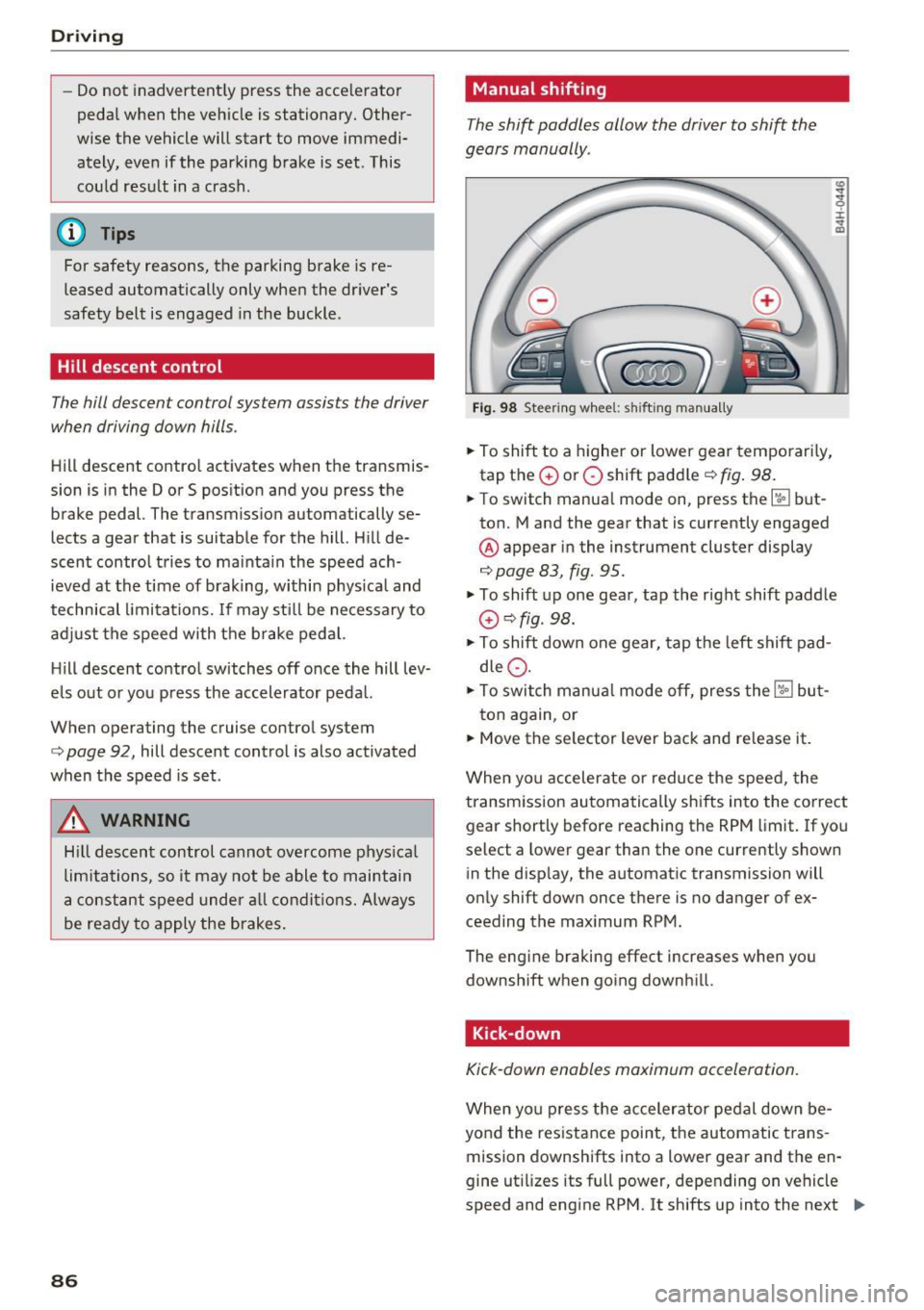
Manual shifting
The shi~ paddles allow the driver to shift the
gears manually .
Fig. 98 Steer ing whee l: s hifting man ually
.., To shift to a higher or lowe r gear temporari ly,
tap the
0 or 0 shift padd le i::> fig . 98 .
.., To switch manua l mode on , press the~ but
ton. Mand the gear that is currently engaged
@ appear in the instrument cluster display
i::>page 83, fig. 95.
I :i: .. m
.., To shift up one gear, tap the right shift paddle
G) c::>fig . 98.
.., To shift down one gear, tap the left shift pad
dle
Q .
.., To switch manua l mode off, press the ~ but-
ton again, or
.., Move the se lector lever back and re lease it.
When yo u accelerate or reduce the speed, the
transmission au tomatically shifts into the correct
gear shortly before reaching the RPM limit. If yo u
select a lower gear than the one currently shown
in the disp lay, the automatic transmission will
only shift down once there is no dang .er of ex
ceeding the maximum RPM.
The eng ine braking effect increases when you
downshift when going downh ill.
Kick-down
Kick-down enables maximum acceleration.
When yo u press the accelerator pedal down be
yond the res istance point, the automatic trans
mission downshifts into a lower gear and the en
gine ut ilizes its full power, depending on vehicle
speed and engine RPM. It shifts up into the next .,,_
Page 103 of 354

0 co .... N ,..._
N .... 0 0 :c '
Applies to: vehicles with Audi adaptive cruise contro l
.,. Se lect: t he I CAR I fu nction bu tton > Car systems
co ntro l bu tton > Driver a ssist > Audi braking
guard .
System -
Switch the bra kin g g ua rd On/ Off. When
you swit ch the ig nition on, the message
Braking
guard: Off
appears if t he sys tem is switched o ff.
Early warning -The distance and approac h warn
i ngs i n the display can be sw itched
On/ Off.
@ Tips
- Your settings are automatically stored and
ass igned to the remote cont rol key bei ng
used.
- If you restric t or sw itch off the ESC, the
braking gua rd also sw itches itself off
¢ page 12 7.
- Switch braking guard off when yo u are load
i ng t he ve hicle on to a vehicle ca rr ier, t rain,
shi p or other type o f transportation. This
c a n p reven t undesired w arnings from the
br akin g guard system.
Messages
Applies to: veh icles with Audi adaptive cruise control
Braking guard: Off
This message appea rs if the sys tem is switc hed
off through the In fota inme nt system . Otherwise ,
if the system is tur ned off, the informa tion ap
pears every time shortly after the start of t he
tr ip.
The message also appears if the system is not
avai la bl e d ue to a ma lfunction or if the ESC is
switched off~
page 127. If this is the case, the
system w ill not prov ide warnings about a possi
b le co llision.
Braking guard : engaged
This message appea rs if a sha rp bra ke press ure
was applied due to an ac ute wa rn ing.
ACC: unavailable
ACC and Audi braking guard: Unavailable Assist
T
he system cannot gua rantee that it will detect
objects co rrectly and is sw itched off . The sensors
have been moved or are faulty. The p re sense
funct ions may a lso be affected . D rive to an au
t h ori zed Audi dea ler or authorized Audi Service
Facility immed iate ly to have the malfunction cor
rected .
ACC: Currently unavailable. No sensor vis ion
ACC and Audi braking guard: Cu rrently unavail
able. No sensor vision
Th is mess age appears if the senso r view i s ob
str ucted, for examp le by leaves, snow , heavy
spray or dirt. Clean the sensors¢
page 94 ,
fig . 104.
ACC : Currently unavailabl e. Gradient too steep
The road exceeds the maximum poss ible angle
fo r safe adaptive c ruise cont rol operat io n. Adap
t ive cr uise control is sw itched off.
ACC: only available in D, Sor M
Se lect the D, Sor M selector leve r pos ition.
ACC : Currently unavailable. Parking brake ap •
plied
The ad apt ive cr uise cont rol system sw itches off
a utoma tica lly if the parking brake is se t.
ACC: Currently unavailable . Stability control
( ESC) input .
This message appears if the Electronic Stab iliza
t ion Control (ESC) is taking action to stab ilize the
vehicle . In t his case, adaptive cruise control
switches off automatically .
ACC off: manual control!
This message appears when adaptive cruise con
trol cannot set the parking brake. P ress the brake
pedal to prevent the vehicle from ro lling.
• ••
T h ree white do ts appear if a setting canno t be se
l ecte d w it h t he oper ati ng leve r. For ex ample, this
h appens if a daptive cr uise con trol c annot sta rt
driv ing a utomat ica lly in stop -and -go traff ic be
ca use the dr iver has not fastene d their safety
belt . ..,.
101
Page 113 of 354

0 co .... N ,..... N .... 0 0 :c '
movements, the driver's braking and accelera
tion, and as the road surface, vehicle speed and load. A sporty setting is generally used in vehicles
with adaptive air suspension sport*.
The vehicle ground clearance depends on the
mode selected and the speed. When you are in
the auto or dynamic mode, the highway setting is
activated when you drive above 75 mph (120 km/
h) for more than 30 seconds. The ground clear
ance is increased automatically if the speed
drops below 44 mph (70 km/h) for more than 120 seconds .
Steering
The power steering adapts. Indirect steering that
moves easily as in comfort mode is especially
suited to long drives on a highway. The dynamic
mode provides sporty, direct steering .
Applies to: vehicles with dynamic steering
The steering ratio changes based on vehicle
speed in order to maintain optimum steering ef
fort for the driver at all times . This sets the steer
ing to be less sensitive at higher speeds in order
to provide improved vehicle control. At reduced
speeds, steering is more direct in order to keep
the steering effort as minimal as possible when
the driver is maneuvering the vehicle. At low and
average speeds, dynamic steering* additionally
provides more responsive steering performance.
Sport differential*
As a component of the all wheel drive system
(quattro)
~ page 130, the sport differential dis
tributes the driving power to the rear axle de
pending on the situation. The distribution of
power varies from balanced (comfort) to sporty
(dynamic) depending on the selected mode. The
goal is a high level of agility and ability to accel
erate on curves. The vehicle is very responsive to
steering .
Cornering light*
The cornering light adapts the high beams to the
direction of the curve depending on the speed.
The pivoting action and the lighting also adapt to
the mode .
Assist
Adaptive cruise control*
The behavior when accelerating can be adjusted
from comfortable to sporty, depending on the
drive select mode. Adaptive cruise control also
responds to the driving behavior of the vehicle
ahead in a more conservative or sporty manner.
Engine sound*
The engine sound adapts to the current mode
and can be subtle to sporty.
(D Note
- Make sure there is enough clearance above
and below the vehicle when parking. The
height of the vehicle can change once it is
parked due to temperature fluctuations,
changes to the load conditions and changes
to the driving modes, which can affect clear
ance.
- When transporting the vehicle on a car car
rier, train, ship or by other means, only tie
the vehicle down at the running surface of
the tires, which is the outer circumference.
Securing the vehicle at the axle compo
nents, suspension struts or towing eyes is
not permitted because the pressure in the
air suspension struts can change during
transport. The vehicle may not be secured
sufficiently if this happens.
@ Tips
- In some models, the maximum vehicle
speed can only be reached in the auto and
dynamic modes.
- The S selector lever position automatically
engages if the dynamic mode is selected.
- In vehicles that have dynamic steering*, op
erating noise is heard when starting or stop
ping the engine. This does not indicate a
problem.
111
Page 116 of 354

Parking systems
Parking systems
General information
Applies to: vehicles with parking system plus/rearview cam
era/peripheral camera
Depending on your vehicle's equipment , various
parking aids will help you when parking and ma
neuvering.
The
parking system plus assists you when park
ing by audibly and visually indicating objects de
tected in front of and behind the vehicle
¢page 115.
The rearview camera shows the area behind the
vehicle in the Infotainment system display. This
display assists you when you are cross or parallel parking
¢ page 116. The parking system plus
functions are also available
¢ page 115.
The peripheral cameras give various views to
help you when parking or maneuvering
¢ page 119. The parking system plus functions
are also available
¢page 115.
& WARNING
-Always look for traffic and check the area
around your vehicle by looking at it directly
as well. The parking system cannot replace
the driver's attention. The driver is always
responsible when entering or leaving a park
ing space and during similar maneuvers .
- Please note that some surfaces , such as
clothing, are not detected by the system .
- Sensors and cameras have blind spots in
which people and objects cannot be detect
ed . Be especially cautious of small children
and animals .
- The sensors can be displaced by impacts or
damage to the radiator gr ille, bumper,
wheel housing and the underbody . The park
ing system may be impaired as a result.
Have an authorized Audi dealer or author
ized Audi Service Facility check their func
tion .
- Make sure the sensors are not obstructed by
stickers, deposits or other materials. If they
are, the sensor function could be impaired.
For additional information on cleaning, see
c:> page 306.
114
(D Note
-Some objects are not detected or displayed
by the system under certain circumstances:
- Objects such as barrier chains, trailer draw
bars, vertical poles or fences
- Objects above the sensors such as wall ex
tensions
- Objects with certain surfaces or structures
such as chain link fences or powder snow
- If you continue driving closer to a low ob
ject, it may disappear from the sensor range. Note that you will no longer be
warned about th is obstacle.
(D Tips
- The system may provide a warning even
though there are no obstacles in the cover
age area in some situations, such as:
- certain road surfaces or when there is tall
grass.
- external ultrasonic sources such as from cleaning vehicles .
- in heavy rain, snow, or thick vehicle ex
haust.
- We recommend that you practice parking in
a traffic -free location or parking lot to be
come familiar with the system . When doing
this, there should be good light and weath
er conditions.
- You can change the volume and pitch of the
signals as well as the display¢
page 124.
-Please refer to the instructions for towing a
trailer located in
¢page 124.
-What appears in the infotainment display is
somewhat time-delayed.
- The sensors must be kept clean and free of
snow and ice for park aid to operate .
Page 120 of 354
Parking system s
• While driving in reverse gear, adjust the steer
ing whee l angle to fit the parking space using
the orange orientation lines for assistance
c> & in General information on page 116, c> (D
in General information on page 117. @ repre
sents the rear bumper . At the very latest, stop
the veh icle when t he red orientation line @
borders an object .
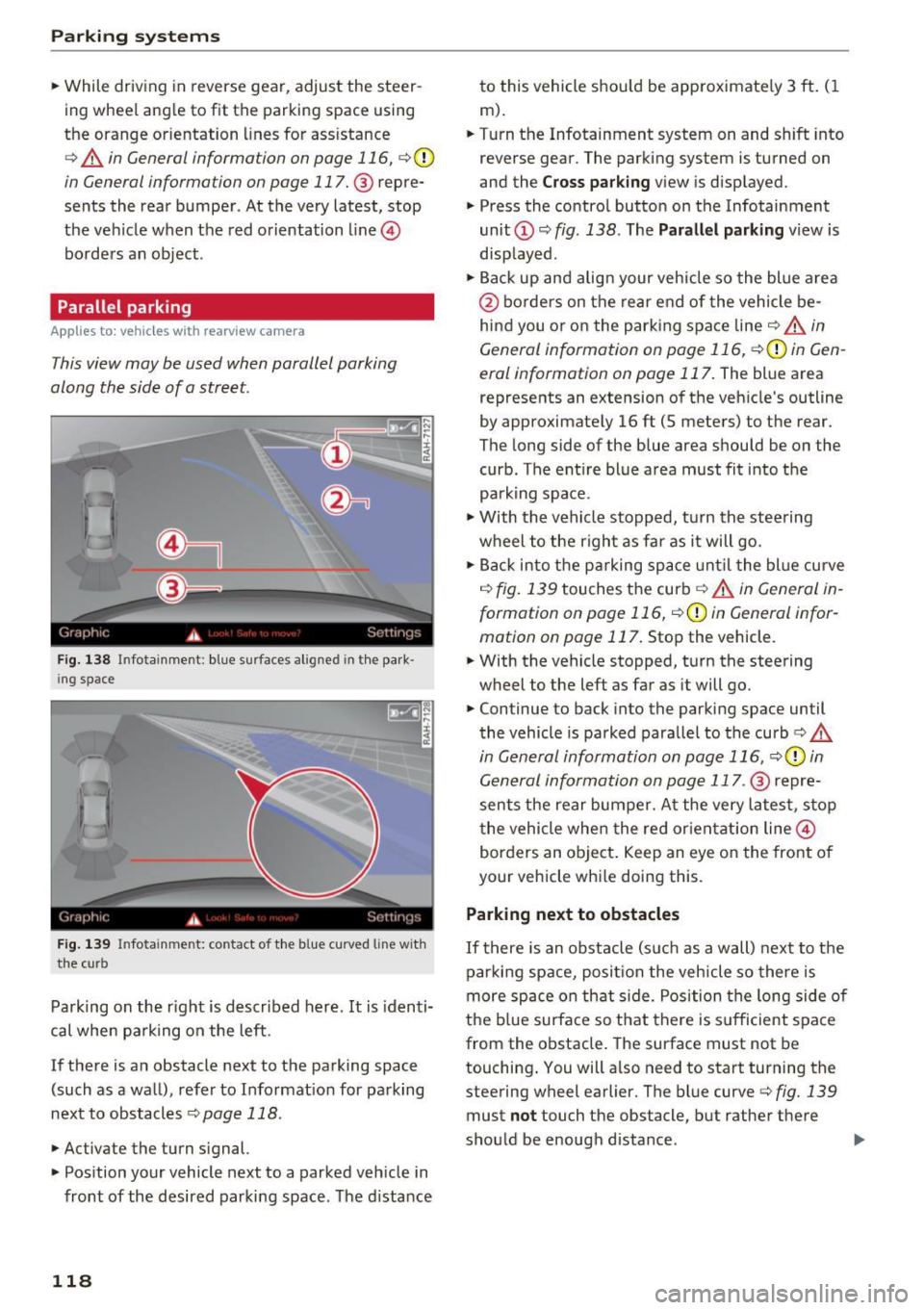
Parallel parking
App lies to: ve hicles w ith rearview ca mera
This view may be used when parallel parking
along the side of a street.
F ig. 1 38 Infotainment: blue surfaces aligned in th e par k
i ng space
Fig . 1 39 In fotainment: contact of the bl ue curved line with
t h e curb
Parking on the r ight is described here. It is identi
cal whe n pa rking on the left.
If there is an obstacle next to the parking space (such as a wall), refer to Informat ion for parking
next to obstacles
c:::> page 118 .
• Activate the turn signal.
• Pos ition your vehicle next to a parked veh icle in
front of the desired parki ng space. The distance
118
to this vehicle should be approximate ly 3 ft . (1
m) .
• Turn the Infotainment system on and shift into
reverse gear. The parking system is turned on
and the
C ro ss park ing view is disp layed.
• Press the contro l butto n on the Infotainment
unit ©~
fig. 138 . The Parallel parking view is
disp layed.
• Backup and align your veh icle so the blue a rea
@ bo rders on the rear end of the vehicle be
hind you or on the park ing space line
c:::> & in
General information on page 116,
c:::> (D in Gen
eral information on page 117.
The blue area
represents an extension
of the vehicle's outline
by approximately 16 ft (5 meters) to the rear.
The long side of the blue area should be on the curb. The entire blue area must fit into the
parking space.
• With the vehicle stopped, t urn the steering
wheel to the right as far as it will go.
• Back into the p arking space unt il the bl ue curve
<=:> fig. 139 touches the curb c:::> & in General in
formation on page 116,
<=:> CD in General infor
mation on page 117 .
Stop the vehicle.
• With the vehicle stopped, turn the steering
wheel to the left as far as it will go.
• Continue to back into the parking space until
the vehicle is parked paralle l to the curb
c> &
in General information on page 116, c> (D in
General information on page 117 .
@ repre
sents the rear bumper. A t the very latest, stop
the vehicle whe n the red or ientat ion line @
borders an object . Keep an eye on the front of
your vehicle whi le doing this.
Parking next to obstacles
If there is an obstacle (s uch as a wall) nex t to t he
parking sp ace, posi tion the veh icle so there is
more sp ace on that side. Position the long side o f
the b lue surface so that there is s ufficient space
from the obstacle. The surface must not be
touching . You will a lso need to start turning the
steering wheel earlier. The bl ue curve
c> fig. 139
must not touch the obstacle, but rather there
should be enough distance .
Page 123 of 354

C) C0 ....
"' " "' .... 0 0 :r
Applies to: vehicles with peripheral cameras
Fig . 144 Infotainment system: corner v iew (front)
Fig . 145 Infotainment system: corner view (rear)
This view can assist you for examp le, when you
are exiting from an area w ith poor visibility. The
area at the front and rear s ides of the vehicles is
displayed .
.. To show the side view toward the front, select
the symbol ®~
fig. 144 with the contro l knob
and press the control knob .
.. To show the side view toward the rear, select
the symbol ®
q fig. 145 with the control knob
and press the control knob .
Parking systems
Front
Applies to: vehicles with peripheral cameras
Fig. 146 Infot ainme nt system: front mode
This view assists you for example, in using the
full maneuvering range in front of the vehicle.
The area in front of the vehicle is displayed. The
vehicle surround ings are shown in the left area of
the display . You can switch between the optical
display and camera image
qpage 120 .
.. Select the © symbol with the control knob. The
orange-colored orientat ion lines denote the
projected direction of travel. Stop the vehicle
when the red o rientation line* borders an ob
jec t
q _&. in General information on page 119.
Rear
Applies to: vehicles with peripheral cameras
Fig. 147 Infotainme nt system: rea r mo de
This view assists you for example, in using the
full maneuvering range behind the vehicle. The
area be hind t he vehicle is displayed. The vehicle
s ur rou ndings are shown in the left area of the
display. You can switch between the optical dis
play and ca mera image
qp age 120.
.. Select the symbol @with the contro l knob . Ill>-
121
Page 124 of 354

Parking system s
You can choose between three different views in
this mode.
.,. To cross park, parallel park or position the vehi
cle in front of a tra iler*, press the control but
ton ® on the contro l pane l repeatedly unt il the
symbol for the des ired mode is selected .
Perpendicular parking
Applies to: ve hicles w ith perip hera l cameras
This view may be used when parking in a garage
or in a parking space .
Fig . 14 8 Infotainment system: aiming at a parking space
Fig . 149 Infotainment system: aligning the veh icle
Requ irements: cross parki ng must be selected
q page 121 .
.,. The orange orientation lines (D show the d irec
tion of travel of the vehicle . Turn the steering
wheel until the orange orientation lines appear i n the pa rking space
¢ fig. 148 . Use the ma rk
ings @to he lp you estimate the distance to an
obstacle . Ea ch marking represents approxi
ma tely 3 ft (1 m). The blue area represents an
extension o f the vehicle's outline by approxi
mately 16
ft (S meters) to the rear.
.,. While driv ing in reverse gear, adjust the steer
ing wheel angle to f it the parking space using
122
the o range or ientation lines for assistance
q A in General information on page 119, q (D
in General information on page 119. @repre
sents the rear bumper. You should stop revers
ing at the latest when the red o rientation line
@ borders an object<=>.&. in General informa
tion on page 116.
Parallel parking
App lies to: vehicles wit h peripheral cameras
This view may be used when parallel parking
along the side of a street.
Fi g. 15 0 In fota inment: blue surfaces alig ned in the park
in g space
Fig. 151 Infota inment: contact of the blue c urved line w ith
the cu rb
Parking on the right is descr ibed here . It is identi
ca l when parking on the left.
If there is an obstacle next to the parking space (such as a wall), refer to Information fo r parking
next to obstacles
q page 118 .
.,. Activate the turn signal.
.,. Posit ion your veh icle next to a parked vehicle in
front of the des ired park ing space . The distance
to this vehicle should be approximate ly 3 ft. ( 1
m). ..,.