2017 AUDI A6 attention
[x] Cancel search: attentionPage 39 of 280

co
co
.... N
" N .... 0 0 <.,;) 'SI"
time. T hi s app lies pa rt icu larly when children
remain in the vehicle. Othe rw ise children
co uld start t he engine or operate elect rical
equipment (such as power windows), which
increases the r is k of an accident .
Power windows
Controls
The driver can control all power window s.
F ig. 32 Dr ive r's door : power w indow co ntro ls
All power window sw itches are eq uipped w ith a
two-stage funct ion:
Opening and closing the windows
"' -$ :,
"' CD
~ T o open or close the w indow completely, p ress
the switch down or pu ll the switch up briefly to
the second level. The operation will stop if the
switch is pressed/pu lled again.
~ To se lect a position in between opened and
closed, press/pull the sw itch to the first level
u nt il the desired window position is reached.
Power window switches
(!) L eft front door
@ R ight front door
® L eft rea r d oor
© Right rear door
A WARNING
- Always take the vehicle key wit h you when
leaving the vehicle, even fo r a short period
of time . This applies particularly w hen ch il
dr en re ma in in the vehicl e. O th erwis e chi l
dre n cou ld st art t he engi ne or ope ra te e lec
t ric al eq uip m ent (such as power wi ndows),
Open ing and closing
which increases the risk of an acc ident. The
power windows continue to function until
the dr iver's door or front passenge r's door
has been opened .
- Pay careful attention when closing the w in
dows . Pinch ing could ca use serio us in juries.
- When locking the vehicle from o utside, the
veh icle must be unoccup ied since the win
d ows can no longe r be o pened in an emer
g e ncy .
@ Tips
You can still o pen and close the windows for
approximately 10 mi nutes after tur ning t he
i gnition off . The power windows do not switch
off until the driver 's door o r front passenger 's
door has been open ed .
Convenience opening
All of the windows and the sunroof* can be
opened at once .
The settings in the Infota inment system specify
which w indows will open .
Convenience opening feature
~ Press and hold the~ button on the remote
control key until a ll of the w indows reach the
desired position and the sunroof* is tilted open.
Setting convenience opening in the
Infotainment system
~ Select: the I CAR I funct io n button > (Car) * Sys
tems
contro l button > Vehicle sett ings > Cen
tral locking
> Long-press to open windows .
To enable convenience openin g of the w indows
and the roof *, th e
Front windows , Rear windows
and Roof functions must be switched On .
A WARNING
For security reasons, the w indows and the
su nroof* can o nly be opened wit h the remote
control key at a maximum distance of a pprox
im ately 6 fee t (2 m ) from the veh icle .
37
Page 40 of 280

Opening and clo sin g
Correcting power window malfunctions
You con reactivate the one-touch up/down func
tion if it malfunctions .
• Pull the power window switch up unt il the win
dow is completely raised.
• Release the sw itch and pull it up again for at
least one second.
Sunroof
Description
Applies to: veh icles with slid ing/tilting sunroof
Fig. 33 Sect ion of head liner: sunroof button
@ Tilting /sliding
• To tilt the sunroof comp letely, press t he switch
briefly to the second level.
• To open the sunroof completely, p ull the switch
briefly to the second level
c:::> &_ .
• To select an intermediate position, press/pull
the switch to the first level until the desired po
sition is reached.
@ Openin g/sliding (ver sion 1 )
• To move the roof into the reduced wind noise
position, press the button back brief ly to the
second level. The roof will open all the way if
you press the button back to the second level
again.
• To close the sunroof completely, press the
switch forward br iefly to the second level
c:::> & .
• To select an intermediate pos ition, press/pull
the switch forward/back to the first level until
the des ired position is reached .
@ Opening/sliding (ver sion 2)
• To open the sunroof completely, press the
switch back to just before the second level.
38
• To close the sunroof complete ly, press the
switch forward briefly to the second level
c:::> &_.
• To select an intermediate posit ion, press/pu ll
the switch forward/back to the first level until
the desired position is reached.
The sunshade can be opened and closed by hand
when the roof is closed. The sunshade opens au
tomatically when the roof is opened.
You can sti ll operate the sliding/tilting sunroof
for about 10 minutes after the ignition is switch
ed off. The switch is deactivated once the driver 's
or front passenger's door is opened.
A WARNING
Pay careful attention whe n clos ing the slid
ing/tilting s unroof- otherwise serious injury
could result! A lways take the ignition key w ith
you w hen leav ing the veh icle.
-
(D Note
Always close your slid ing/tilting sunroof when
l eav ing your vehicle. Sudden rain can cause
damage to the inter io r equipment of your ve
h icl e, par ticu larly the elect ronic equipment.
(j) Tips
- For information on conven ience ope ning, re
fer to
c:::> page 3 7 .
- The sunroof will only open down to -20 °C
(-4 °F).
Sunroof power emergency closing
Applies to: vehicles with sliding/tilting sunroof
If the s unroof de tects an object in its path when
i t is closing, i t will open again automatically . In
th is case, you can close the roof with the power
emergency closing function .
• Within five seconds af ter the sunroof opens au
tomatically, pull the sw itch un til the roof
closes.
If you let go of the switch ea rly, the sunroof w ill
open again .
Page 48 of 280

Lights and Vision
Automatic dimming rearview mirror*
.. Press the button@~ fig. 44. The indicator
light @ turns on. Interior and exterior mirrors*
will dim when there is incoming light (such as h eadlights from the rear).
A WARNING
If the glass on an automatic dimming mirror
breaks, electrolyte can leak out . This liquid
can irritate the skin, eyes and respiratory sys
tem .
If there is contact with the fluid, flush
immediately with plenty of water . Consult a
physician if necessary.
- Repeated or long-term exposure to electro
lyte fluid can lead to irritation of the air
ways, especially in people with asthma or
other respiratory conditions. Take deep
breaths immediately after leaving the vehi
cle or, if this is not possible, open all of the doors and windows as wide as possible.
- If electrolyte fluid enters the eyes, flush
them thoroughly with a large amount of
clean water for at least 15 minutes and then
seek medical attention.
- If electrolyte fluid comes into contact with
the skin, flush the affected area with clean
water for at least 15 minutes and then clean
with soap and water and seek medical at
tention. Clean affected clothing and shoes
thoroughly before wearing again .
- If the fluid was swallowed and the person is conscious, flush the mouth with water for at
least 15 minutes. Do not induce vomiting
unless this is recommended by medical pro
fessionals. Seek medical attention immedi
ately.
(D Note
If the glass on an automatic dimming mirror
breaks, electrolyte can leak out. This liquid
damages plastic surfaces and paint. Clean
this liquid as quickly as possible, for example
with a wet sponge.
46
@ Tips
- If the light reaching the rearview mirror is
obstructed, the automatic dimming mirror
will not function correctly,
- The automatic dimming mirrors do not dim
when the interior lighting is turned on or
the reverse gear is selected.
Sun visors
[ __ ____,}
Fig. 45 Front pas seng er's side: sun vis or
The sun visors for the driv er and front passenger
can be released from their mounts and tu rned to
ward the doors
(D .
The mirror light switches on when the cover over
the vanity mirror @opens .
Sunshades on the rear doors
Applies to : vehicles with sunshades on the rear doors
Fig. 46 Rai sed sunshade on a rear doo r
.. Pull the sunshade out and secure it in the hooks
on the upper door frame
~ fig. 46.
Page 49 of 280

co
co
.... N
" N .... 0 0 <..:l 'SI'
Sunshade on the rear window
Applies to: vehicles with a sunshade on the rear window
Applies to: sedan
F ig. 4 7 Center console: button for rear window su nshade
~ To raise/lower the sunshade, press the~ but-
ton
¢ fig. 47 in the cockpit .
The rear window sunshade can be set so that it
retracts automatically when driving in reve rse. To
do this, select: ICARlfunction button>
(Ca r)* sys
tems
control button > Vehicle settings > Auto
matic rear blind > On .
The sunshade is extended
again as soon as the vehicle is trave ling forward
at a speed greater than
9 mph (15 km/h) if the
ignition has not been switched off in the mean
time.
& WARNING
-
N ever operate the rear window sunshade
w ith out paying attention or in an uncon trol
led manner. Pinching could cause serious inju
r ies .
(0 Tips
-Pressing the~ button several times in a
row can trigger the overload protection . The
sunshade can on ly be extended/retracted
again after a brief waiting period.
- The rear window sunshade only functions
when the vehicle interior is warmer than
14° F (-1 0°C) .
Lights and V ision
Windshield wipers
Switching the windshield wipers on
Fig. 48 W inds hield w iper leve r
Move the windshie ld wiper lever to the corre
sponding position:
@ -windsh ield wipers off
@ -rain sensor mode. The windsh ield wipers
switch on once the vehicle speed exceeds approx imately 2 mph (4 km/h) and it is raining . The
higher the rain sensor sensit ivity is set (switch @
to the right), the earlier the windshield wipers re
act to moisture on the windshie ld. You can deac
tivate the rain sensor mode in the Infota inment
system, which switches the intermittent mode
on. Select: ICARI function button>
(Car)* sys
tems
con trol button > Driver assistance > Rain
sensor> Off.
In intermittent mode, you can ad
just the interval time using the switc h@ .
@-slow wiping
®-fast w iping
@ -single wipe If you hold the lever in this posi
t ion longer, the wipers switch from slow wip ing
to fast wiping.
® -clean the windshield The wipers wipe one
time after several seconds of driving to remove
water droplets. You can sw itch this function off
by moving the lever to posit ion ® within
10 sec
onds of the afterwipe . The afterwipe function is
reactivated the next time you switch the ignit ion
o n .
Cleaning the headlights*. The headlight washer
system* operates only when the low beam head- lights are on. If you move the lever to posit ion
II>-
47
Page 60 of 280

Sea ts and stor age
Rel ease h andl e on the b ackr est
.. Pull the release lever@~ fig. 66 in the direc-
tion of the arrow to fold the backrest fo rward.
Folding the backrest back into the upr ight
po sit ion
.. Fol d the backrest back up aga in until it latches
and the red marking @ is no longer vis ible
9 _&. .
You can lock the backrest whe n it is latched in
p lace using the mechanical key ©
c::> fig. 66. This
prevents any access to the luggage compartment
from the vehicle interior.
.&_ WARNING
- Be careful when folding the backrests for
ward! Not paying attention and not check
ing when fo ld ing the backrests can lead to
pinching injuries.
- The backrest must be latched secure ly to
ensure that the safety belt is protecting the
center seating pos it ion.
- The backrest must be securely latched so
objects cannot slide forward out of the lug
gage compartment during sudden braking.
(D Note
- If you move the front seat back when the
rear seat backrest is folded forward, you
could damage the head restraints on the rear seat.
- If the Rear Seat Entertainment (RSE)* is in
stalled, move the rear head restraints down before folding the backrests forward
9 page 52 to reduce the risk of damage.
- When folding the backrest forward, make
sure the outer safety belts are in the belt
g uide recess so that they do not get pinched
i n the backrest lock and damaged. O ther ob
j ects sho uld be removed from the rear
bench seat to protect the backrest from
damage .
58
-
Tie-downs
Applies to: vehicles with tie -dow ns
Fig. 67 Luggage compartment: locat io n of the t ie-downs
.. To secure objects, for example using the lug
gage compartment net, fold the t ie-down re
tainer upward.
Luggage compartment net
Applies to: vehicles with luggage compartment net
The cargo net prevents small objects from slid
ing.
F ig . 68 Luggage compartment: cargo net stretched out
.. Attach the hooks for the luggage compa rtment
net in the tie-downs .
.&_ WARNING
For strength reasons, on ly objects wit h a max
imum we ight of 10 lb (5 kg) shou ld be se
cured in the luggage compartment net. Heavi
er objects are not adequately secured . There
is risk of personal injury.
Page 88 of 280

Assist
Assist Speed warning system
Applies to: vehicles with speed warning system
The speed warning system helps you to stay un
der a specified maximum speed.
The speed warning system warns you if you are
exceeding the maximum speed that you have set.
A warning tone will sound as soon as your speed
exceeds the stored value slightly.
The . (USA models)/ . (Canada models) indi
cator light and a message appear in the instru
ment cluster display at the same time. The •
• indicator light and the message turn off if the
speed falls back below the stored maximum
speed .
Setting a threshold is recommended if you would
like to be reminded when you reach a certain
maximum speed. Situations where you may want
to do so include driving in a country with a gener
al speed limit or if there is a specified maximum
speed for winter tires.
Setting the warning threshold
The warning threshold is set in the Infotainment
system.
.. Select: the
ICARI function button > (Car)* Sys
tems
control button > Driver assistance >
Speed warning.
(D Tips
Regardless of the speed warning system, you
should always monitor your speed using the
speedometer and make sure you are following
the legal speed limit.
86
Cruise control system
Switching on
Applies to: vehicles with cruise control system
The cruise control system makes it possible to
drive at a constant speed starting at 20 mph (30
km/h) .
0
f
~
0
Fig. 88 Operat ing lever: cruise co ntro l syste m
.,. To switch the cruise control on, pull the lever
into posit ion
(D ~ fig . 88.
.,. Drive at the speed to be maintained .
.,. To store the speed, press the button @.
~ M 0 :i:
;;i;
The stored speed and the (ij;\1)~14 (USA models) /
l'I (Canada models) indicator light are disp layed
in the instrument cluster.
This information is also shown briefly in the
Head-up disp lay* .
The speed is maintained by modifying engine
power or through an active brake intervention.
~ WARNING
-Always pay attention to the traffic around
you when the cruise control system is in op
eration . You are always responsible for your
speed and the distance between your vehi
cle and other vehicles.
- For safety reasons, cruise control should not be used in the city, in stop-and-go traffic, on
winding roads and when road conditions are poor (such as ice, fog, gravel, heavy rain and
hydroplaning), because this increases the
r isk of an accident.
- Switch the cruise control off temporarily
when dr iv in g in turning lanes, highway exits
or in construction zones.
-
Page 91 of 280
co
co
.... N
" N .... 0 0 <.,;) 'SI"
- With stationary objects~ page 90.
A WARNING
Always pay attention to traffic when adapt ive
cruise control is switched on and braking
guard is active . As the dr iver, you are still re
sponsible for starting and for maintaining
speed and d istance to other objects. Braking
guard is used to assist you . The driver must
always take action to avoid a collision . The
driver is always responsib le for brak ing at the
co rrect time .
- For safety reasons, do not use adapt ive
cruise co ntro l when driv ing on ro ads w ith
many curves, when the road su rface is in
poor condit ion and/or in bad weather (s uch
as ice, fog, grave l, heavy rain and hydrop la n
ing). Using the system under these condi
t ions increases the risk of an accident.
- Switch adaptive cruise contro l off tempora
rily when driving in turning lanes, on ex
pressway exits or in construction zones. This
prevents the vehicle from accelerating to
the stored speed when in these situations .
- The adapt ive cru ise control system will not
brake by itself if you put your foot on the ac
celerator pedal. Doing so can overr ide the
speed and distance regulation .
- When approaching stat ionary objects such
as stopped traffic, adapt ive cru ise control
will not respo nd and braking gua rd will have
l imited func tion .
- The adapt ive cru ise control system and
bra king g uard do not react to people, ani
mals, objects crossing the road or oncom ing
objects.
- T he function of the radar sensors can be af
fec ted by reflec tive objects s uch as guard
rai ls, the ent rance to a tunnel, heavy rain or
ice.
& WARNING
- Improper use of adaptive cruise control can cause collisions, other accidents and serious
persona l injury.
- Never let the comfort and convenience that
adaptive cruise cont rol and braking guard
A ss ist
offe r dist ract you from the need to be alert
to traffic cond itions and the need to remain
in full control of your vehicle at all times,
- Always remember that the adaptive cruise
control and braking guard have limits -they
will not slow the vehicle down or maintain
the set distance when you dr ive towa rds an
obstacle or something on or near the road
that is not moving, s uch as vehicles stopped
in a t raff ic jam, a stalled or disab led vehicle.
If r eg istered by the radar sensors, vehicles
or obsta cles that are not moving ca n trigger
a co llision wa rning and if confirmed by the
video came ra, an acute co llision wa rning .
- Never fo llow a vehicle so closely that you
cannot stop your vehicle safely . The adap
tive cruise contro l cannot slow or brake the
veh icle safely w hen you follow another vehi
cle too closely. A lways remember that the
automatic braking function cannot bring the
veh icle to a sudde n or emergency stop u n
der these conditions .
- To prevent unintended operat ion , always
sw itch ACC off when it is not being used .
(D Note
The sensors can be d isplaced by impacts or
damage to the bumper, wheel housing and
underbody. That could affect the adaptive
cruise contro l system and braking gua rd .
Have an au thorized Audi dealer o r autho rized
A udi Service Fac ility check the ir funct ion.
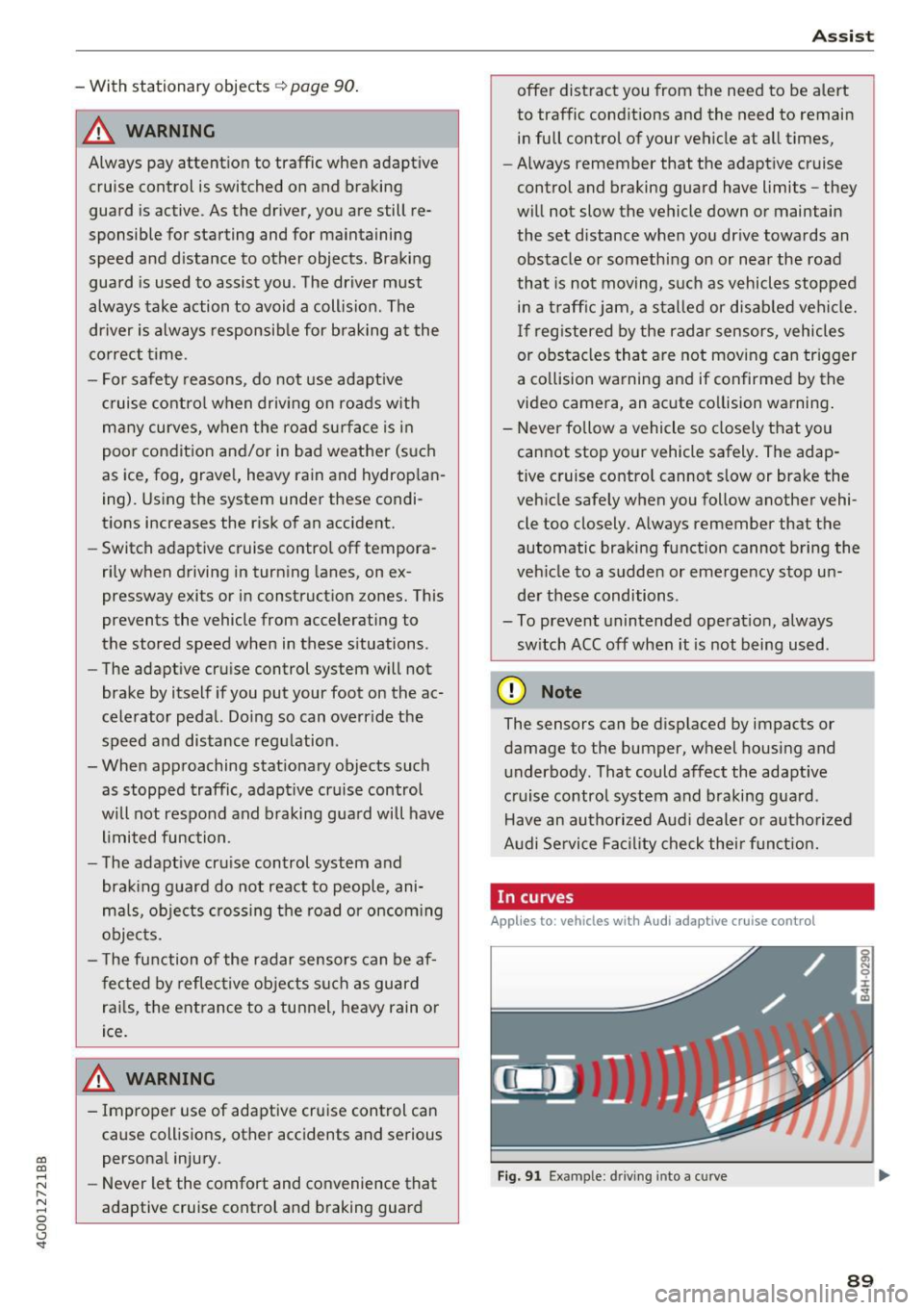
In curves
Applies to: vehicles with Audi adaptive cruise control
I
F ig. 91 Exa mpl e: dri ving into a c urve
89
Page 96 of 280

Assist
moving more slowly. The braking guard does not
react if it cannot detect the situation.
The system advises you of various dangerous sit
uations:
- The
distance warning occurs if you drive too
closely to the object ahead for a long period of
time . If the object ahead brakes strongly, you
would not be able to avoid a collision. The.
indicator light appears as an indication for this.
- The
approach warning occurs when an object
ahead is traveling more slowly or brakes
strongly . When this warning occurs, it may only
be possible to avoid a collision by swerving or
braking strongly. The danger is indicated by the
• indicator light ¢
fig. 99. An aud io signa l will
also sound.
If you do not react early enough or at all to a dan
gerous situation, the braking guard supports you
with a braking intervention.
- If a collision is imminent, the system will first
provide an
acute warning by braking sharply.
- If you do not react to the acute warning, the
braking guard can increase the braking force
within the limits of the system
1l. Th is reduces
the vehicle speed in the event of a co llision.
- The system can initiate complete deceleration
shortly before a collision
ll. Full deceleration at
high speeds occurs only in vehicles with adap
tive cruise control and s ide assist (pre sense
plus).
- If the braking guard determines that you are
not braking strongly enough when there is an
impen ding collision, it can increase the braking
force .
- The pre sense functions also engage when
there is an impending collision
¢ page 137.
Which functions can be controlled?
You can switch the braking guard and the dis
tance/approach warning on or off in the Infotain
ment system ¢
page 95, Settings in the Info
tainment system.
l) This is not availab le in some co untr ies.
94
A WARNING ,_
Lack of attention can cause collisions, other
accidents and serious personal injuries. The
braking guard is an assist system and cannot
prevent a collision by itself . The driver must
always intervene. The driver is always respon
sible for braking at the correct time.
- Always pay close attention to traffic, even
when the braking guard is switched on. Be
ready to intervene and be ready to take
complete control whenever necessary. Al
ways keep the safe and legal distance be
tween your vehicle and vehicles up ahead.
- Braking guard works within limits and will
not respond outside the system limits, for
example when approaching a stopped vehi
cle or stationary obstacle (end of a traffic
jam or vehicle that has broken down in traf
fic).
- Always remember that the radar sensor for
the braking guard works only within defined
detection and range limits that may prevent
the proper detection of other vehicles.
- The radar sensor's function and range can
be reduced by rain, snow and heavy spray.
Moving vehicles up ahead may not be
promptly detected or may not be detected
at all.
- Reflective surfaces including crash barriers
or tunnel entrances may impair the function
of the radar sensor.
(D Tips
-You can cancel the braking with increasing
force that is initiated by the system by brak
ing yourself, by accelerating noticeably or
by swerving.
- Keep in mind that braking guard can brake
unexpectedly. Always secure any cargo or
objects that you are transporting to reduce
t he risk of damage or injury.