2017 AUDI A6 lock
[x] Cancel search: lockPage 56 of 280
Sea ts and stor age
.. Press and hold the control knob until the ad
justing process is complete.
@ Tips
The lumbar support and upper th igh support
settings a re not transferred when aligning
the front passenger's seat with the driver's
seat.
Ashtray
A pp lies to: ve hicles w ith ashtray
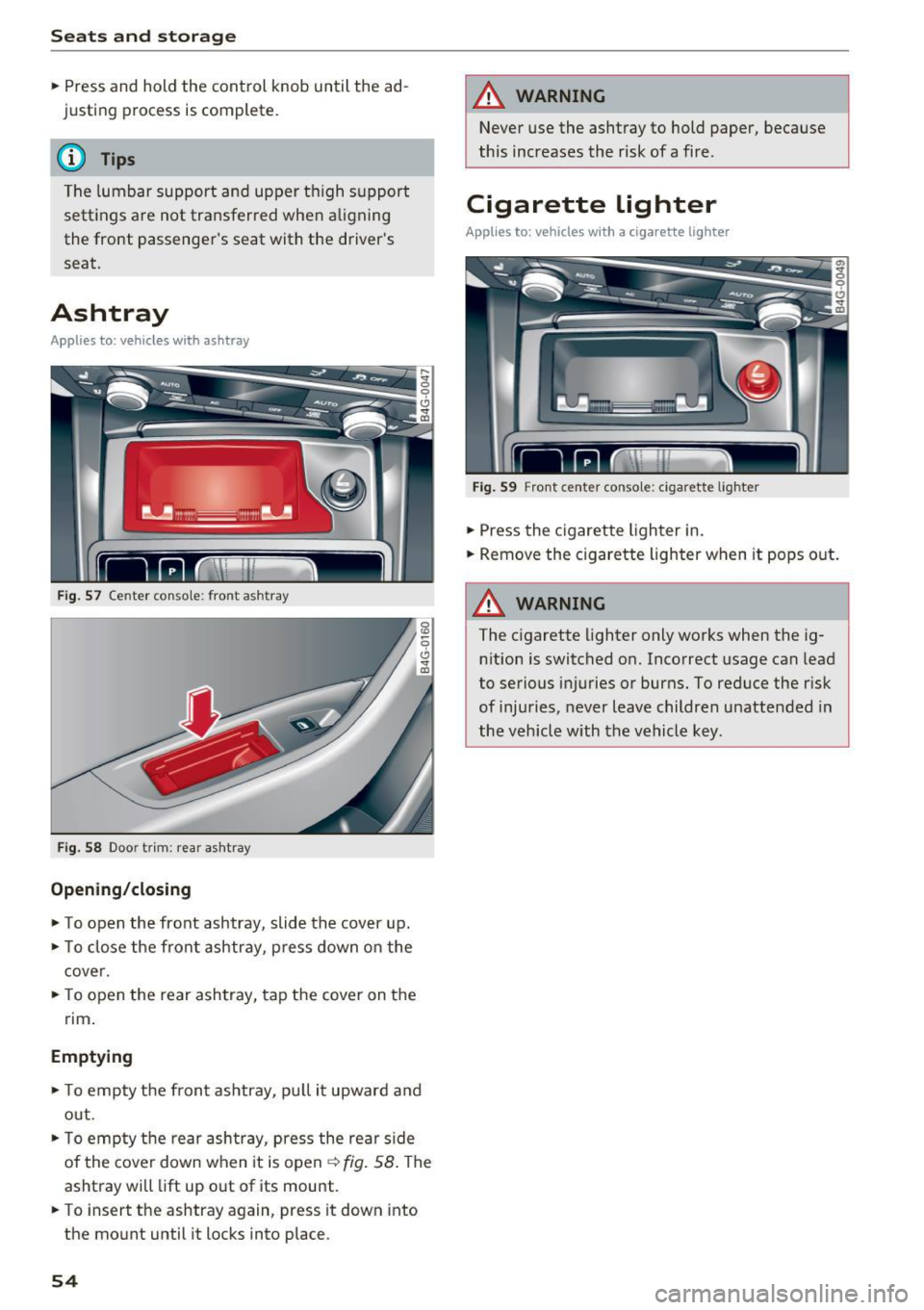
F ig . 57 Center conso le : front ashtray
F ig. 58 Doo r tr im: rea r asht ray
Opening /closing
.. To open the front ashtray, slide the cover up .
.. To close the front ashtray, press down on the
cover .
.. To open the rear ashtray, tap the cover on the
rim .
Emptying
.. To empty th e front ashtray, pu ll it upward and
out .
.. To empty the rear ashtray, press the rear side
of the cover down when it is open ¢ fig. 58 . The
ashtray will lift up out of its mount .
.. To insert the ashtray again, press it down into
the mount until it locks into place.
54
A WARNING
Never use the ashtray to hold paper, because
this increases the risk of a fire .
Cigarette lighter
Applies to: vehicles wi th a ci gare tte lighter
F ig . 59 Front center conso le: cigarette lighter
.. Press the c igarette lighter in .
.. Remove the cigarette lighter when it pops out.
A WARNING
The cigarette lighter only works when the ig
n ition is switched on. Incorrect usage can lead
to serious injuries or burns. To reduce the risk
of injuries, never leave children unattended in
the vehicle with the vehicle key.
Page 58 of 280

Seats and storage
_& WARNING
-Do not put any hot beverages in the cup
holder while the vehicle is moving. Hot bev
erages could spill, which can cause injury.
- Do not use any breakable beverage contain
ers (for example, made out of glass or por
celain) . You could be injured by them in the
event of an accident.
0 Note
Beverage containers in the cup holders should
always have a lid . If not, beverages could spill
and cause damage to vehicle equipment, such
electronics or seat covers .
Cooled glove compartment
Applies to: veh icles with cooled glove compartment
The cooled glove compartment only functions
when the
AIC system is switched on.
Fig. 64 Glove compar tm ent: s witch in g coo ling mode on/
off
~ Turn the knob@ counter-clockwise to switch
the cooling on . The symbols on the knob indi
cate the correct position.
~ Turn the knob @ clockwise to switch the cool-
ing off .
The glove compartment cooling mode only func
tions when the vehicle A/C system is switched on .
If the heating is switched on, switching the glove
compartment cooling mode off is recommended.
Other storage compartments
You will find a range of storage compartments
and holders at different locations in the vehicle.
56
- Compartments in the doors
-Compartment in the glove compartment
(cooled*) . The glove compartment can be
locked using the mechanical key.
- Glasses holder* in the headliner (near the rear
view mirror)
- Storage compartment under the front center
armrest*
- Compartments* on the backrests of the front
seats
- Garment hooks on the sides of the pillars in the
rear of the vehicle and in the rear grab handles
- Compartment in the rear center armrest
- Two folding hooks*, that are at the upper side
of the luggage compartment
_& WARNING
- To reduce the risk of personal injury in an
accident or sudden stop, always keep the
glove compartment closed while driving.
- Always keep the lid of the compartment for
(sun)glasses* closed while driving to reduce
the risk of injury during a sudden braking
maneuver or in the event of an accident .
- Any articles of clothing that you have hung
up must not interfere with the driver's view.
The coat hooks are designed only for light
weight clothing. Never hang any clothing
with hard, pointed or heavy objects in the pockets on the coat hooks. During sudden
braking or in an accident -especially if the
airbag is deployed - these objects could in
jure any passengers inside the vehicle .
- Read and follow all WARNINGS
c::> page 167, Important safety instructions
on the side airbag system.
- Hang clothes in such a way that they do not
impair the driver 's vision .
-
- The coat hooks must only be used for light
weight clothing . Do not leave any heavy or
sharp edged objects in the pockets which
may interfere with the side curtain airbag
deployment and can cause personal injury in
a crash.
- Do not use coat hangers for hanging cloth
ing on the coat hooks as this can interfere
Page 59 of 280

co
co
.... N
" N .... 0 0 <..:l 'SI"
with proper deployment of the side curtain
airbags in an accident.
- Do not hang heavy objects on the coat
hooks, as they could cause personal injury in
a sudden stop.
CD Note
Objects on the rear shelf that rub against the
rear window can damage the rear window
heating wires.
Roof rack
App lies to: ve hicles with roof rac k
~
------~~ ~
Fig. 65 Attachm ent points for the roof rack
If luggage or cargo is to be carried on the roof,
you must observe the following:
- Only a specially designed roof rack may be used
on your vehicle. These roof racks are the basis
for a complete roof rack system. Additional at
tachments/carrier systems are necessary to
transport luggage and sports equipment . We
recommend roof racks and attachments from
the Audi Genuine Accessories program.
- When installing the roof rack, make sure that it
is mounted only at the designated points on
the roof
c> fig . 65 .
- The permissible roof load for your vehicle is
220 lbs (100 kg). The roof load is the total of
the weight of the roof rack, the attachments
and the cargo you are carrying . However, you
must also note the permitted load of the carri
er system being used. For the permitted axle
load and the permitted total vehicle weight, re
fer to
c> page 255.
Seats and storage
A WARNING
--Follow the installation instructions provided
with the roof rack system. If you do not se cure the roof rack system and objects on the
roof correctly, they could come loose from
the vehicle and cause an accident.
- Using a roof rack system increases the r isk
of an accident, because it changes the driv
ing characteristics by shifting the center of
gravity and/or the increasing the surface
area exposed to wind. Adapt your driving
and speed to the current cond itions.
CD Note
Make sure that the luggage compartment lid
and the sunroof* do not come into contact
with objects on the roof when they are open.
(,® For the sake of the environment
Your vehicle will require more fuel due to the
increased wind resistance. So remove the roof
rack after using it.
Luggage compartment
General information
A WARNING ~
Read and follow the important safety precau-
tions in
c> page 134, Storing cargo correctly .
Increasing the size of the luggage
compartment
Applies to : vehicles wit h folding back rests
The rear seat backrests can be folded forward ei
ther separately or together.
Fig. 66 Backrest: re lease lever, securing knob a nd lock*
57
Page 60 of 280

Sea ts and stor age
Rel ease h andl e on the b ackr est
.. Pull the release lever@~ fig. 66 in the direc-
tion of the arrow to fold the backrest fo rward.
Folding the backrest back into the upr ight
po sit ion
.. Fol d the backrest back up aga in until it latches
and the red marking @ is no longer vis ible
9 _&. .
You can lock the backrest whe n it is latched in
p lace using the mechanical key ©
c::> fig. 66. This
prevents any access to the luggage compartment
from the vehicle interior.
.&_ WARNING
- Be careful when folding the backrests for
ward! Not paying attention and not check
ing when fo ld ing the backrests can lead to
pinching injuries.
- The backrest must be latched secure ly to
ensure that the safety belt is protecting the
center seating pos it ion.
- The backrest must be securely latched so
objects cannot slide forward out of the lug
gage compartment during sudden braking.
(D Note
- If you move the front seat back when the
rear seat backrest is folded forward, you
could damage the head restraints on the rear seat.
- If the Rear Seat Entertainment (RSE)* is in
stalled, move the rear head restraints down before folding the backrests forward
9 page 52 to reduce the risk of damage.
- When folding the backrest forward, make
sure the outer safety belts are in the belt
g uide recess so that they do not get pinched
i n the backrest lock and damaged. O ther ob
j ects sho uld be removed from the rear
bench seat to protect the backrest from
damage .
58
-
Tie-downs
Applies to: vehicles with tie -dow ns
Fig. 67 Luggage compartment: locat io n of the t ie-downs
.. To secure objects, for example using the lug
gage compartment net, fold the t ie-down re
tainer upward.
Luggage compartment net
Applies to: vehicles with luggage compartment net
The cargo net prevents small objects from slid
ing.
F ig . 68 Luggage compartment: cargo net stretched out
.. Attach the hooks for the luggage compa rtment
net in the tie-downs .
.&_ WARNING
For strength reasons, on ly objects wit h a max
imum we ight of 10 lb (5 kg) shou ld be se
cured in the luggage compartment net. Heavi
er objects are not adequately secured . There
is risk of personal injury.
Page 63 of 280

co
co
.... N
" N .... 0 0 <.,;) 'SI"
Warm and cold
Automatic climate control
Applies to: vehicles with deluxe automatic climate contro l
We recommend pressing the !AUTO I button and setting the temperature to 72 °F (22 °C) .
Fig. 72 Deluxe automatic cl imate con trol: contro ls
Press the buttons to turn the functions on or off .
The dial adjusts the temperature and the blower .
The LED in a button will light up when the func
tion is sw itched on .
IAUTOI Switching automatic mode on
Automatic mode maintains a constant tempera
ture inside the vehicle. Air temperature, airflow
and air distribution are controlled automatically .
Adjusting the temperature
The temperat ure can be adjusted individually for
the driver and front passenger using the dials@
and @.
Adjusting the blower~
Using the dial @, you can manually adjust the
amount of air generated by the blower to suit
your preferences. The blower should always run
at a low setting to prevent the windows from
fogging and to ensure a continuous exchange of air inside the vehicle. To have the blower regulat
ed automatically, press the
IAUTO I button.
~. [m , ~ Adjusting air distribution
You can manua lly se lect the vents where the air
will flow. To have the air distribution regulated
automatically, press the
IAUTO ! button.
1-1 Switching recirculation mode on/off
In recirculation mode, the air inside the vehicle is
cir culated and filtered . This prevents the unf il
tered air outside the vehicle from entering the
vehicle interior . We recommend sw itching recir
culation mode on when driving through a tunnel
or when sitting in traffic ~&_ .
The
! AUTO I button or I
recirculation mode off .
IOFFI Switching the climate control system
on/off
The ! OF F! button sw itches the climate control
system on or off .
It also switches on when you
press the blower control. Airflow from outside is
blocked when the climate cont rol system is
switched off.
IA/Cl Switching cooling mode on/off
The air is not cooled and humidity is not removed
when cooling mode is switched off. This can
cause fog on the windows . The cooling mode
switches off automatically when there are cold
outside temperatures.
is;,i, FRONT I Switching the defroster on/off
The w indshield and side windows are defrosted
or cleared of condensat ion as quickly as poss ible . .,,_
61
Page 65 of 280

co
co
.... N
" N .... 0 0 <.:l '
re ar con tro ls
Press the buttons to turn the functions on or off .
Use the controls to adjust the temperature, the
blower speed and the air distribution. The LED in
a button will light up when the function is
sw itched on . T he front settings are shown in the
climate control system display and in the Info
tainment system d isp lay for a few seconds. The
d river and front passenger settings can be ad
justed separately.
The settings can also be adjusted in the rear
~ fig. 74.
IO FF I Sw itchin g the clim ate cont rol s ystem
on /off
The IO FFI button switches the climate control
system on or off.
It also sw itches on when you
press the control. Ai rflow from outside is b locked
when the climate control system is switched off .
The
IO FF I button in the rear only switc hes the A/C
system on/off in the rear of the vehicle .
IA/Cl Switching cooling mod e on /off
The air is not cooled and humidity is not removed
when cooling mode is switched off. This can
cause fog o n the windows . The cooling mode
switches off automatically when there are cold
outside temperatures.
1 6<) 1 Sw itching recirculation m ode on /off
In recircu lation mode, the a ir inside the vehicle is
circu lated and fi ltered. This prevents the unfil
tered a ir o utside the vehicle from entering the
vehicle interior. We recommend switching recir
culation mode on when driving through a tunnel
or when sitting in traffic~&. .
Warm and c old
The !AU TO I button or lllill F RON TI button switches
recircu lation mode off.
I AUTO I Switching automatic mode on
Automat ic mode main tains a cons tant tempera
ture inside the vehicle. Air temperatu re , airf low
and air distr ib ution are controlled automatically.
If press and hold the button longer, 72 °F (22 °C)
will be set .
Adju stin g the temperature
Temperatures between 60 °F ( +16 °() and 84 °F
(+28 °() ca n be set . Outside of this range,
LO or
HI w ill appear in the climate control system dis
play . In both settings, the climate control runs
constantly at the max imum cool ing or heat ing
level. The temperature is not regu lated.
Ad ju sting the blower~
You can adjust the volume of a ir generated by the
blower to your preference . The blower shou ld al
ways run at a low sett ing to prevent the windows
from fogging and to ensure a cont inuo us ex
change of air inside the vehicle , To have the blow
er regu lated automatically , press the
IAU TO ! but
ton .
~ Adju sting air distribution
You can ma nually select the vents where the air
will flow. To h ave the air d istr ibut ion regulated
a utomat ica lly, press the
IAUTOI but ton.
~ Adjusting seat he ating* /seat v entilation *
Pressing the button sw itches the seat heating/
seat ventilation on at the h ighest setting (level
3). The LEDs indicate the tempe rature level. To
reduce the temperat ure, press the b utton again.
To switc h the seat heat ing/seat ventilation off,
press the button repeatedly until the LED turns
off.
After 10 m inutes, the seat heat ing a utomatically
swi tches from level 3 to level 2.
l
The w indshield and side windows a re defrosted
or clea red of condensat ion as quickly as poss ible.
T he maxim um amount of air flows mainly from
the vents below the windsh ield. Reci rc u lat ion
Ill>-
63
Page 71 of 280

co
co
...,
N
" N ...,
0 0 <.,;) 'SI'
~ page 129, fig. 140. If you cannot main
tain this minimum distance, the airbag sys
tem cannot protect you properly.
- If physical limitations prevent you from sit
ting 10 in (25 cm) or more from the steer ing wheel, check with your authorized Audi
dealer to see if adaptive equipment is avail
able.
- If the steering wheel is aligned with your
face, the supplemental driver's airbag can
not provide as much protection in an acci
dent. Always make sure that the steering
wheel is aligned with your chest.
-Always hold the steering wheel with your
hands at the 9 o'clock and 3 o'clock posi
tions to reduce the risk of personal injury if
the driver's airbag deploys.
- Never hold the steer ing wheel at the 12
o'clock position or with your hands inside
the steering wheel rim or on the steering
wheel hub . Holding the steering wheel the
wrong way can cause serious injuries to the
hands, arms and head if the driver's airbag
deploys.
Power steering wheel position adjustment
App lies to: ve hicles with power steering whee l adjustment
The steering wheel position can be adjusted elec
trically up and down and forward and back.
Fig. 77 Switch for adjust ing the steer ing whee l pos ition
~ To adjust the height, press the switch up/down.
The steering column will cont inue moving as
long as you are pressing the switch .
~ To move the steering wheel forward or back,
press the switch forward/back. The steering
column will continue moving as long as you are
pressing the switch.
Driving
The steering wheel can a lso be adjusted when the
ignition is switched off .
In vehicles with memory function*, the steering
column settings are sto red together with the
seat position.
A WARNING
Improper use of steering wheel adjustment
and improper seating position can cause seri
ous personal injury.
- Adjust the steering wheel column only when
the vehicle is not moving to prevent loss of
vehicle control.
- Adjust the driver's seat or steering whee l so
that there is a minimum of 10 in (25 cm)
between your chest and the steering wheel
r:=;, page 129, fig . 140 . If you cannot main
tain this minimum distance, the airbag sys
tem cannot protect you properly.
- If physical limitations prevent you from sit ting 10 in (25 cm) or more from the steer
ing wheel, check with your authorized Audi
dealer to see if adaptive equipment is avail
able.
- If the steering wheel is aligned with your
face, the supplemental dr iver's airbag can
not provide as much protection in an acci
dent. Always make sure that the steering
wheel is aligned with your chest.
- Always hold the steering wheel with your
hands at the 9 o'clock and 3 o'clock posi
tions to reduce the risk of personal injury if
the driver's airbag deploys.
- Never hold the steering wheel at the 12
o'clock position or with your hands inside
the steering wheel rim or on the steering
wheel hub . Holding the steering wheel the
wrong way can cause serious injuries to the
hands, arms and head if the driver's airbag
deploys.
-
69
Page 73 of 280

co
co
.... N ,..._
N .... 0 0 <..:l '
~ Bring the vehicle to a full stop.
~ Move the selector lever to the P or N position.
~ Press the I START ENGINE STOPI ~page 70,
fig. 78 button.
Steering lock1
)
The steering locks when you turn the engine off
using the
I START ENGINE STOPI button and
open the driver's door. The locked steering helps
prevent vehicle theft.
Emergency off function*
If it is absolutely necessary, the engine can also
be turned off while driving in the R or D/S selec
tor lever position at speeds below 6 mph (10 km/
h). To stop the engine, press and hold the
I START ENGINE STOPI button and also press the
brake pedal.
~ WARNING
- Never turn off the engine before the vehicle
has come to a complete stop. The full func
tion of the brake booster and the power
steering is not guaranteed. You may need to
use more force when braking or steering.
Because you cannot brake and steer as you
usually would, this could lead to accidents
and serious injuries.
- Always take the key with you whenever you
leave your vehicle. Otherwise, the engine
could be started or electrical equipment
such as the power windows could be operat
ed. This can lead to serious injury.
- For safety reasons, always park the vehicle
with the selector lever in the P position.
Otherwise, there is the risk that the vehicle
could roll unintentionally.
(D Note
If the engine has been under heavy load for
an extended period of time, heat builds up in
the engine compartment after the engine is
switched off and there is a risk of damaging
the engine. For this reason, let the engine run
l ) This function is not available in all countr ies.
Driving
at idle for approximately two minutes before
shutting it off.
(D Tips
After the engine has been switched off, the
radiator fan can continue to run for up to 10
minutes -even with the ignition switched off.
It can also switch on again after some time if
the coolant temperature rises as the result of
heat buildup or if the engine is already warm
and the engine compartment is also heated
by the sun's rays.
Messages
Turn off ignition before leaving car
This message appears and a warning tone sounds
if you open the driver's door when the ignition is
switched on.
Press brake pedal to start engine
This message appears if you do not press the brake pedal when starting the engine.
II Key not in vehicle?
This indicator light turns on and this message ap·
pears if the ignition key was removed from the
vehicle when the engine was running.
If the igni
tion key is no longer in the vehicle, you cannot
switch on the ignition or start the engine once
you stop it. You also cannot lock the vehicle from
the outside.
Shift to P, otherwise vehicle can roll away.
Doors do not lock if lever is not in P.
This message appears for safety reasons if the
transmission is not in the P position when you
switch the ignition off. Move the selector lever to
the P position. Otherwise the vehicle is not pro
tected from rolling and it cannot be locked.
II Key is not recognized. Hold back of key
against marked area. See owner's manual
If the indicator light turns on and this message
appears, there is a malfunction
~page 72. .,..
71