2017 AUDI A3 SEDAN check oil
[x] Cancel search: check oilPage 325 of 400

a, a, ..... N
" N ..... 0 N > 00
@ For the sake of the environment
-Before changing your oil, first make sure
you know where yo u can properly dispose of
the used oil.
- Always dispose of used engine oil prope rly .
Do not dump it on garden soil, wooded
areas, into open streams or down sewage
drains.
- Recycle used engine oil by taking it to a used engine oil collection facility in your area, or
contact a serv ice stat ion.
Cooling system
Coolant
The engine coo ling system is filled with a mixture
of purified water and coolant additive at the fac
tory. This coo lant must not be not changed.
The coolant leve l is monitored through
the . in
d icator
light ¢ page 28. However, we do recom
mend occasionally checking the coo lant level
manually.
I f you m ust add coolant, use a m ixture of water
and coolant addit ive. Mixing the coolant additive
with distilled water is recommended.
Coolant additive
The coolant addi tive is made of anti-freezing and
cor ros ion pro tection agents. Only use the follow
ing coolant additives . These additives may be
mixed with each other.
Coolant additive Specification
G13 TL 774 J
G12++ TL 774 G
The amount of coo lant additive that needs to be
mixed with water depends on the climate where
the vehicle will be operated .
If the coolant addi
tive percentage is too low, the coolan t can freeze
and damage the engine.
Checking and Filling
Coolant Freeze protec-
additive tion
Warm regions min.40% min. -13 °F
max. 45% (-25 °()
Cold reg
ions min. 50% max. -40 °F
max . 55 % (-40
°()
(D Note
-
Before the start of winter, have an a uthor
ized Aud i dea ler o r authorized Audi Serv ice
Facility check if the coo lant additive in your
vehicle matches the percentage appropriate
for the climate. This is especially important
when driving in colder climates.
- If the appropriate coo lant additive is not
available in an emergency, do not add any
other additive. You could damage the en
gine . If this happens, on ly use water and re
store the correct mix tu re ratio with the
specified coolant add it ive as soon as poss i
ble.
- Only refill w ith new coolant.
- Radiator sealant must not be mixed with
the coolant .
Adding coolant
Fig. 27 4 En g in e compa rtment: ma rkings on the coolant
expansion tank
Observe the safety precautions ¢ page 316,
Working in the engine compartment.
Checking the engin e coolant level
.. Park the vehicle on a level su rface .
.. Switch t he ignit ion off.
.. Read the coolant level on the coolant expans ion
tank ¢ fig. 2 74. The coolant leve l must be be -
tween the ma rkings when the engine in cold .
..,
323
Page 326 of 400

Checking and Filling
When the engine is warm it can be slightly above the upper marking.
Adding coolant
Plug-in hybrid drive* : Your vehicle has two cool
ant expansion tanks that are separate from each
other. The smaller of the two expansion tanks
must not be opened
¢ page 104. Read and fol
low the important safety precautions ¢
A in
Coolant on page 105 .
Requirement: there must be a residual amount of
coolant in the expansion tank
¢ (D .
~ Let the engine cool down.
~ Place a cloth over the coolant expansion tank
cap and unscrew the cap counterclockwise
¢_&. .
~ Add coolant mixed in the correct ratio
¢page 323 up to the upper marking.
~ Make sure that the fluid level remains stable.
Add more coolant if necessary.
~ Close the cap securely.
Coolant loss usually indicates there is a leak . Im
mediately drive your vehicle to an authorized
Audi dealer or authorized Audi Service Facility
and have the cooling system inspected.
If the
cooling system is not leaking, a loss can come
from the coolant boiling through overheating
and being pushed out of the cooling system.
.,&. WARNING
The cooling system is pressurized and can be
come very hot. To reduce the risk of burns
from hot coolant:
- Do not open the coolant expansion tank cap
when the engine is hot. This increases the
risk of burns.
- Stop the engine and allow it to cool.
- Protect your face, hands and arms from es-
caping coolant and steam by covering the
coolant tank cap with a large, thick cloth.
- Turn the coolant tank cap counterclockwise
slowly and keep light pressure on the cap.
- To reduce the risk of burns, do not allow any
antifreeze or coolant to drip onto the ex
haust system or hot engine components.
324
The ethylene glycol in engine coolant can
catch fire under certain circumstances.
- The coolant additive and the coolant can be
dangerous to your health. For this reason,
keep the coolant in the original container
and away from children . There is a risk of
poisoning.
- When working in the engine compartment,
remember that the radiator fan can switch
on even if the ignition is switched off, which
increases the risk of injury.
(D Note
Do not add coolant if the expansion tank is
empty . Air could enter the cooling system and
damage the engine . If this is the case, do not
continue driving . See an authorized Audi deal
er or authorized Audi Service Facility for assis
tance.
- Before the start of winter, have an author
ized Audi dealer or authorized Audi Service
Facility check if the coolant additive in your
vehicle matches the percentage appropriate
for the climate. This is especially important
when driving in colder climates.
- If the appropriate coolant additive is not
available in an emergency, do not add any
other additive. You could damage the en
gine. If this happens, only use water and re
store the correct mixture ratio with the
specified coolant additive as soon as possi
ble .
- Only refill with new coolant.
- Radiator sealant must not be mixed with the coolant.
· Radiator fan
The radiator fan switches on automatically by it
self
An auxiliary electric radiator fan switches on and
off depending on coolant temperature and other
vehicle operating conditions.
After you switch the engine off, the auxiliary fan
can continue running for up to 10 minutes
-even
with the ignition off.
It can even switch on again
later by
itself ¢.& , if .,..
Page 329 of 400

CXl CXl .... N ,.__
N .... 0 N > 00
Windshield washer system
Fig. 277 Engine co mpa rtment: washer fluid reservoir cap
Observe the safety precautions ¢ page 316,
Working in the engine compartment.
M N
-N ~
"' a,
The windshield washer f luid reservoir~ contains
the cleaning solution for the windshield and the
headlight washer
system* ¢ page 319, fig. 2 71 .
The reservoir capacity can be found in
¢page 375 .
To reduce the risk of lime scale deposits on the
spray nozzles, use clean water with low amounts
of calc ium . Always add window cleaner to the wa
ter. When the outside temperatures are co ld, an
anti-freezing agent should be added to the water
so that it does not freeze.
CD Note
-The concentration of anti-freezing agent
must be adjusted to the vehicle operating
conditions in the respective climate. A con
centration that is too high can lead to veh i
cle damage.
- Never add radiator anti-freeze or other addi
tives to the washer fluid.
- Do not use a glass cleaner that contains
paint solvents, because this could damage
the paint .
Service interval display
The service interval display detects when your ve
hicle is due for service .
The service interva l display works in two stages:
- Inspection or oil change reminder: after a cer-
ta in distance driven, a message appea rs in the
Checking and Filling
instrument cluster display each time the igni
tion is switched on or off. The remaining dis
tance or time is disp layed briefly.
- Inspection or oil change due: if your vehicle
has reached an inspection or oil change interval
or both intervals at the same time, the mes
sage
Inspection due! or Oil change due! or Oil
change and inspection due!
appears briefly af
ter sw itching the ignition on/off.
Checking service intervals
You can check the remaining distance or time un
til the next oi l change or next inspection in the
Infotainment system. Select in the Infotainment
system: the
! MENUI button> Vehicle> left con
trol button
> Service & checks > Service inter
vals.
Resetting the indicator
An authorized Audi dealer or authorized Audi Service Facility will reset the service interval dis
play after performing service .
If you have changed the oi l yourself, you must re
set the oil change interval.
T o reset the disp lay, select in the Infotainment
system: the
! MENUI button> Vehicle> left con
tro l button
> Service & checks > Service intervals
> Reset oil change interval.
CD Note
-Only reset the oil change indicator if the oi l
was changed.
- Following the service intervals is critical to
maintaining the function, service life, and
value of your vehicle, especially the engine.
Even if the mileage on the vehicle is low, do
not exceed the time for the next service.
327
Page 330 of 400
Wheels
Wheels
Wheels and Tires
General information
~check your tires regularly for
damage (punctures, cuts, cracks
and bulges). Remove foreign ob
jects from the tire tread.
~ If driving over curbs or similar
obstacles, drive slowly and ap
proach the curb at an angle.
~ Have faulty tires or rims re
placed immediately.
~ Protect your tires from oil,
grease and fuel.
~ Mark tires before removing
them so that the same running direction can be maintained if
they are reinstalled .
~ Lay tires flat when storing and
store them in a cool, dry location
with as little exposure to light as possible.
(i}) Note
-Please note that summer and
winter tires are designed for
the conditions that are typical i n those seasons. Audi recom
mends using winter tires dur
i ng the winter months. Low
temperatures significantly de crease the elasticity of summ
er tires, which affects traction
328
and braking ability. If summer
tires are used in very cold
temperatures, cracks can form on the tread bars, resulting in
permanent tire damage that
can cause loud driving noise
and unbalanced tires.
-Burnished, polished or chromed rims must not be used in winter driving condi
tions. The surface of the r ims
does not have sufficient corro
sion protection for th is and
could be permanently dam
aged by road salt or similar
substances.
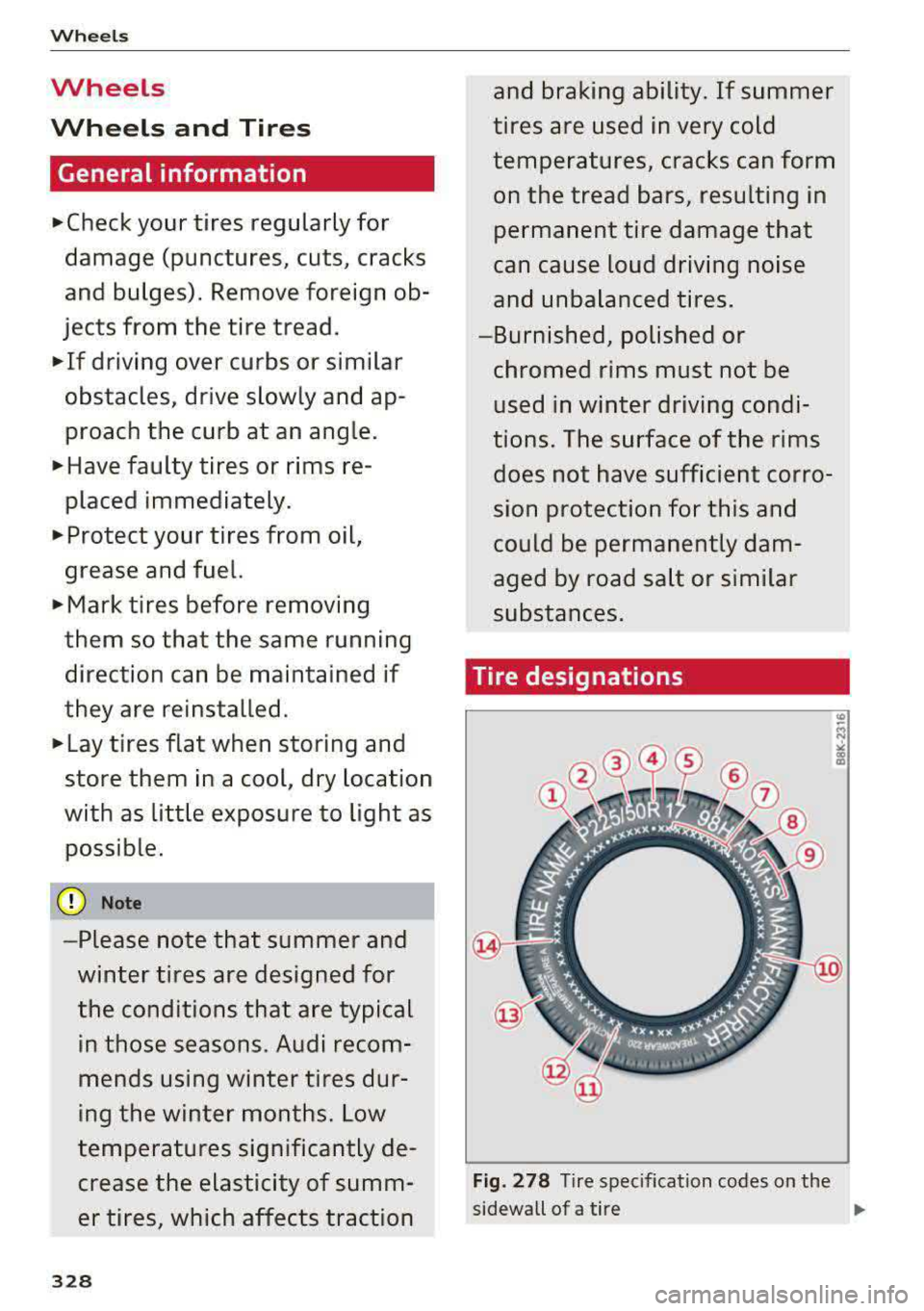
Tire designations
Fig. 278 Tire specifi cation codes on the
sidewall of a tire
.,._
Page 375 of 400

CXl CXl .... N ,.__
N .... 0 N > 00
distr ibut ion an d ba lance . This might hap
pen, for exam ple, when heavy compo
nents such as the engine b lock or trans
miss io n are removed.
- When removing heavy components like
t h ese, anc hor vehicle t o hoist o r add corr e
sponding weights to maintain the center of
grav ity. Oth erwise, the ve hicle might ti lt or
s li p off the hois t, causing s eriou s perso na l
lnJUry.
(D Note
- Be awar e of the fo llowing poi nts before lift
i ng t he vehicle:
- The vehicle should never be lifted or
jacked up from underneath the engine oil pan , the transmission housing, the front
or rear axle or the body side members .
This could lead to serious damage.
- To avoid damage to the unde rbody or
chassis frame, a rubber pad must be in
serted between the floor jack and the lift
points.
- Before driv ing over a workshop hoist,
check that the vehicle weight does not
exceed the permissible lifting capacity of
the hoist .
- Before driving over a workshop hoist, en
sure that there is sufficient clearance be
tween the hoist and low parts of the ve
hicle.
Emergency situations
373
Page 388 of 400

Index
e-tron Navigation . . . . . . . . . . . . . . . . . . . . . . . . . 216
also refer to Plug-in hybrid drive . . . . . . . . 94
eco mode (automatic climate control system) .7.1
Economical route . . . . . . . . . . . . . . . . . . . . . 208
Efficiency program . . . . . . . . . . . . . . . . . . . . . 19
Electrical accessories
refer to Socket . . . . . . . . . . . . . . . . . . . . . . . 64
Electric drive . . . . . . . . . . . . . . . . . . . . . . . . . . 94
Electric range . . . . . . . . . . . . . . . . . . . . . . . . 216
Electromechanical parking brake . . . . . . . . . 83
E lectromechanica l steering . . . . . . . . . . . . . 154
Electronic Differential Lock (EDL) . . . . . . . . 151
El ectronic immobili zer . . . . . . . . . . . . . . . . . . 35
Electronic speed limiter . . . . . . . . . . . . . . . . 123
Electronic Stabilization Control ( ESC) . . . . . 151
Emergency assistance . . . . . . . . . . . . . . . . . 353
Emergency braking function . . . . . . . . . . . . . 84
Emergency flashers . . . . . . . . . . . . . . . . . . . . 53
Eme rgency starting . . . . . . . . . . . . . . . . . . . 368
Emissions control system
Cata lytic converter . . . . . . . . . . . . . . . . . . . 316
Energy consumers . . . . . . . . . . . . . . . . . . . . . 18
Energy management . . . . . . . . . . . . . . . . . . 155
Engine Coolant . . . . . . . . . . . . . . . . . . . . . . . . . . . . 323
Messages . . . . . . . . . . . . . . . . . . . . . . . . . . . 80
Start/Stop system . . . . . . . . . . . . . . . . . . . . 81
Starting/stopping (button) . . . . . . . . . . . . . 78
Starting/stopping (key) . . . . . . . . . . . . . . . . 77
Starting with jumper cables . . . . . . . . . . . 368
Engine compartment
Opening and closing the hood...... ... . 318
Overview ..... .................. .... 319
Safety precautions . . . . . . . . . . . . . . . . . . . 316
Engine coolant
Radiator fan . . . . . . . . . . . . . . . . . . . . . . . . 324
Engine oil . . . . . . . . . . . . . . . . . . . . . . . . . . . 319
Adding . . . . . . . . . . . . . . . . . . . . . . . . . . . . 321
Changing . . . . . . . . . . . . . . . . . . . . . . . . . . 322
Checking the oil level................. 321
Consumption . . . . . . . . . . . . . . . . . . . . . . . 321
D ipstick .. .. .... ................ 319,321
Oil change interval . . . . . . . . . . . . . . . . . . . 327
O il consumption . . . . . . . . . . . . . . . . . . . . . 320
386
Specification and viscosity............. 319
Temperature display . . . . . . . . . . . . . . . . . .
11
Ent ering characters/numbers (speller) . . . . 165
Entering lette rs (speller) . . . . . . . . . . . . . . . 165
Ente rtainment sliding menu . . . . . . . . . . . . 163
Entry/exit lighting . . . . . . . . . . . . . . . . . . . . . 53
Entry assistance . . . . . . . . . . . . . . . . . . . . . . . 62
Environment Proper disposal of drained engine oil . . . . 322
Unlead ed gasoline . . . . . . . . . . . . . . . . . . . 312
ESC
refer to Electronic Stabilization
Control (ESC) . . . . . . . . . . . . . . . . . . . . . . . 151
Event Data Recorder (EDR) . . . . . . . . . . . . . 156
Expanded view . . . . . . . . . . . . . . . . . . . . . . . . 15
Exterior lighting . . . . . . . . . . . . . . . . . . . . . . . S 1
Exterior mirrors . . . . . . . . . . . . . . . . . . . . . . . 55
Fo lding . . . . . . . . . . . . . . . . . . . . . . . . . . . . . 55
Folding settings . . . . . . . . . . . . . . . . . . . . . . 38
Externa l voice operation . . . . . . . . . . . . . . . . 175
F
Factory default settings
Multi Media Interface . . . . . . . . . . . . . . . . 242
Fader (sound) . . . . . . . . . . . . . . . . . . . . . . . . 245
Fastening Booster seats . . . . . . . . . . . . . . . . . . . . . . . 302
Convertible child safety seats . . . . . . . . . . 300
Infant seats . . . . . . . . . . . . . . . . . . . . . . . . 298
Fast forwarding/rewindi ng (audio/video
file) . . . . . . . . . . . . . . . . . . . . . . . . . . . . . . . . 230
Fast forwarding (audio/video file) . . . . . . . . 230
Fast route . . . . . . . . . . . . . . . . . . . . . . . . . . . 208
Favorites Media ....... ..... .. ............... 232
Navigation . . . . . . . . . . . . . . . . . . . . . . . . . 202
Telephone. . . . . . . . . . . . . . . . . . . . . . . . . . 182
File formats (media drives) . . . . . . . . . . . . . 235
Floor mats . . . . . . . . . . . . . . . . . . . . . . . . . . . 252
Fo lding the rear seats . . . . . . . . . . . . . . . . 67, 68
Foot pedals . . . . . . . . . . . . . . . . . . . . . . . . . . 252
Fo r the sake of the environment
Environmentally-friendly driving . . . . . . . . 74
Leaks ........ ... ... .............. .. 317
Roof rack . . . . . . . . . . . . . . . . . . . . . . . . . . . 69