2017 AUDI A3 SEDAN Capacity
[x] Cancel search: CapacityPage 237 of 400

CXl CXl .... N ,.__
N .... 0 N > 00
Picture for- Description
mat
Automatic
The MMI detects the picture for- mat of the source and displays the
image in the optimum ratio . Black
bars may appear on the sides of
the display, depending on the
source format and the Infotain-
ment system d isp lay that is instal-
led.
Zoom The image is enlarged to fill the
ent ire Infotainment system d is-
p lay . Switch the function off if the
image is distorted.
Cinema-Use this setting for films in cinema
scope format 21:9. Black bars are shown
in the upper and lower edges of the
Infotainment system display.
Original The image is displayed in the ratio
of the source format. Se lect th is
option if the image is distorted or a
section of the image is cut off
when
Auto is selected . Media
Picture for- Description
mat
4 :3 The image is fixed in the 4:3 pie-
ture format. Black bars are shown on the sides of the Infotainment
system display.
16:9 T he image is f ixed in the 16:9 pie-
ture format . Black bars are shown
in the upper and lower edges of the
Infotainment system display.
(D Tips
- Not all video DVDs have parenta l control.
- The protection levels for the
Parental con-
trol
are based on the US standards from the
Motion Picture Association of America
(MPAA). Note that the age levels for v ideo
DVDs in European countries may differ.
- Password entry for
Parental control will be
locked for approx imately one m inute if you
enter the incorrect password three times in
a row. The password can o nly be reset by an
authorized Audi dealer.
Supported media and file formats
Overview
The Jukebox*, SD card reader and the USB storage device* connection support the following audio/vid
eo file properties:
Audio files Video files*
Supported SD/SDHC/SDXC/MMC
memory cards:
with a capacity of up to 128 GB
media DVD drive : audio CDs (up to 80 min) w ith CO text (artist, album, song)*, CO-ROMs with
a capacity of up to 700 MB; DVD±R/RW; DVD v ideo; DVD audio with audio tracks that
are compatible with a DVD video player;
Audi music interface: mobile devices (such as an iPod ¢ page 228 , MTP player, USB
storage device in "USB Device Subclass 1 and 6" that conforms to USB 2.0: USB sticks,
USB MP3 players (Plug-a nd-Play-capable), exte rna l USB flash drives and hard dr ives
File system Memory cards: exFAT, FAT, FAT32, NTFS
USB storage device: FAT, FAT32, NTFS
USB storage device partitions (primary /logical* : 2 per USB-connection
CD/DVD file system: IS09660, Joliet, UDF
Metadata Album cover
: GIF, )PG, PNG with max.
800x800 px . The album cover from the
medium or from Gracenote* is disp layed,
depending on availability.
235
Page 238 of 400
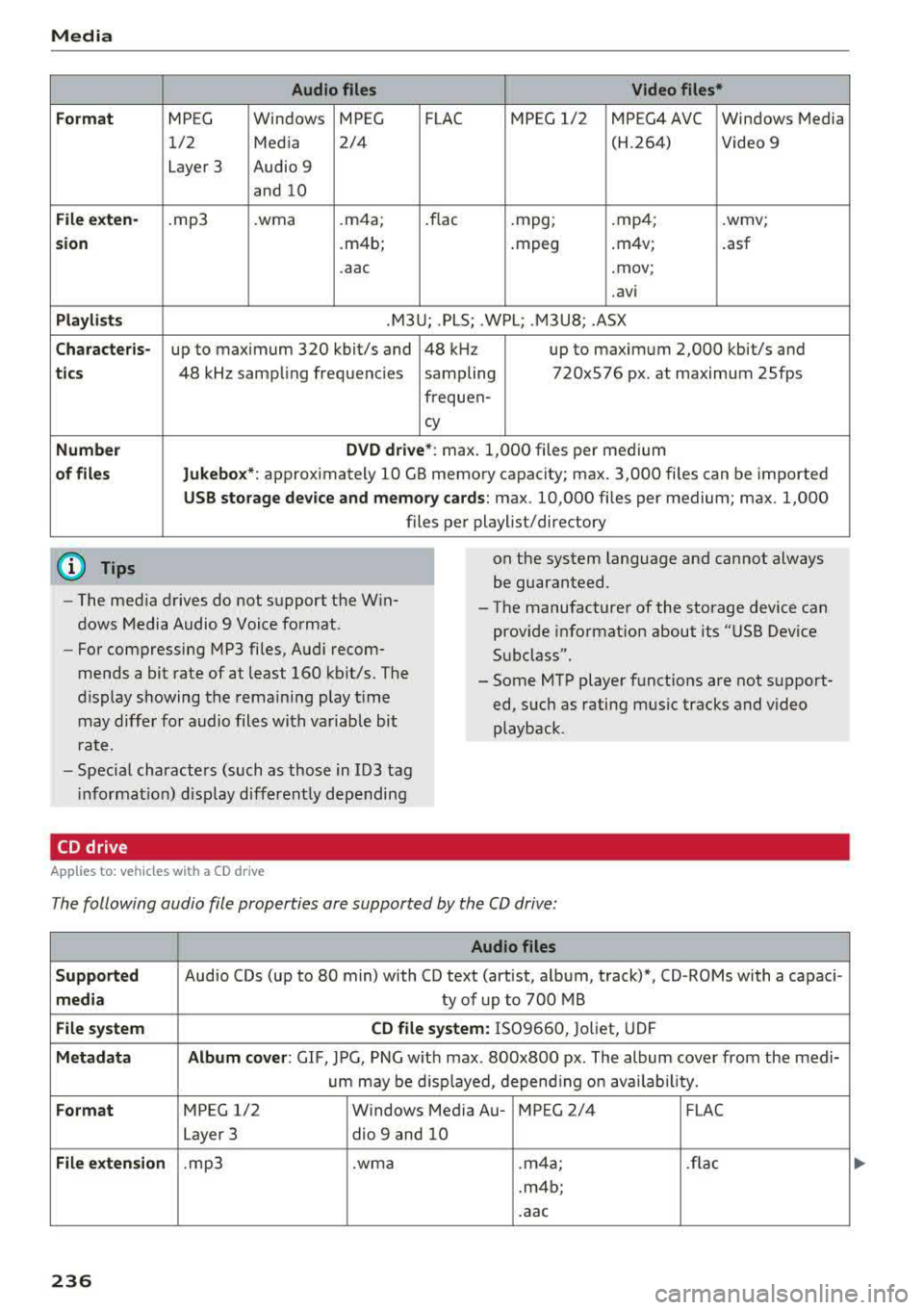
Media
Form at
Fil e ex te n-
s ion
Pla ylists
C ha ra cteri s-
ti cs
Number
of fil es
(D Tips Audio files
Video files*
MPEG Windows MPEG FLAC MPEG 1/2 MPEG4 AVC Windows Media
1/2 Media 2/4 (H.264) Video 9
Layer 3 Audio 9
and 10
. mp3 .wma .m4a; .flac .mpg; .mp4; .wmv;
.m4b; .mpeg .m4v;
.asf
.aac .mov;
.avi
.M3U; .PLS; .WPL; .M3U8; .ASX
up to maximum 320 kbit/s and 48 kHz up to maximum 2,000 kbit/s and
48 kHz sampling frequencies sampling 720x576 px. at maximum 25fps
freq uen-
cy
D VD d riv e* : max . 1,000 files per medium
Jukebo x*: approximately 10 GB memory capacity; max. 3,000 files can be imported
USB stor age de vice a nd m emor y cards : max. 10,000 files per medium; max. 1,000
files per playlist/directory
on the system language and cannot always
be guaranteed.
- The med ia drives do not support the Win
dows Media Audio 9 Voice format. - The
manufacturer of the storage device can
prov ide information about its "USB Dev ice
Subclass".
-
For compressing MP3 files, Audi recom
mends a bit rate of at least 160 kb it/s. The
display showing the remaining play t ime
may differ for audio files with variable bit
r a te. -
Some MTP player functions are not support
ed, such as rating mus ic tracks and video
playback.
- Special characters (such as those in 103 tag
i nformat ion) disp lay different ly depending
CD drive
A pp lies to: ve hicles w ith a CD drive
The following audio file properties are supported by the CD drive:
Audio files
S upported
Audio CDs (up to 80 min) with CD text (artist, album, track)*, CD-ROMs with a capaci-
medi a ty of up to 700 MB
File system CD file syste m: IS09660, Joliet, UDF
Metadat a A lbum co ver : GIF , JPG, PNG w ith max. 800x800 px . The album cover from the medi-
um may be d isp layed, depend ing on avai lab ility.
Form at MPEG 1/2 Windows Media Au- MPEG 2/4 FLAC
Layer 3 dio
9 and 10
File exten sion .mp3 .wma .m4a; .flac
.m4b;
.aac
236
Page 239 of 400
CXl CXl .... N r--N .... 0 N > 00
Media
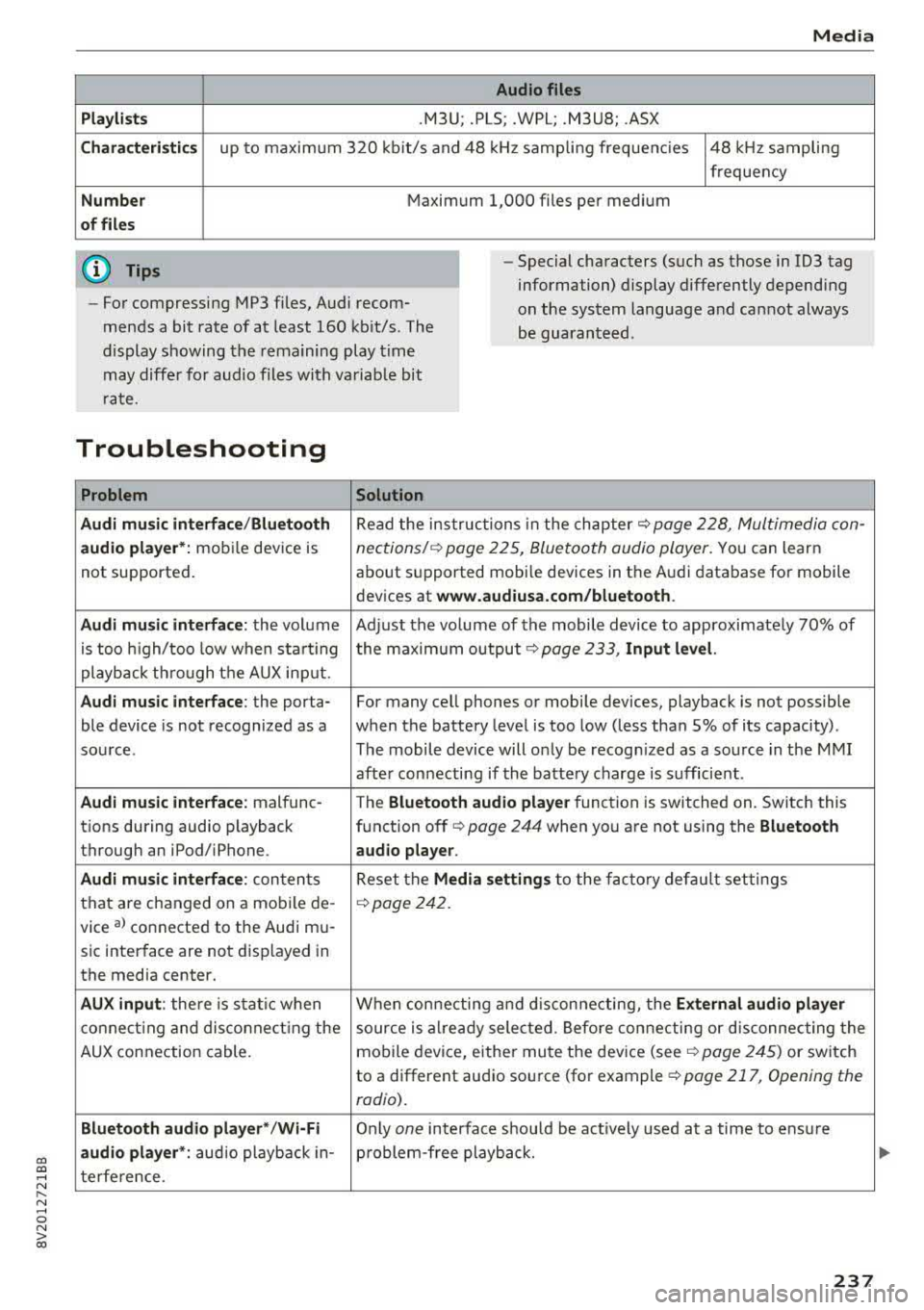
Audio files
Pla ylists
.M3U; .PLS; .WPL; .M3U8; .ASX
Chara cter istic s up to maxim um 320 kb it/s and 48 kHz samp ling freque ncies 48 kHz sampling
frequency
N umber Maximum 1,000 files per medium
of fil es
(D Tips
- For compressing MP3 files, Audi recom
mends a bit rate of at least 160 kb it/s. The
display s howing the remaining play t ime
may diffe r for audio files with va riab le bit
r ate. -
Special characters (such as those in 1D3 tag
information) display differently depend ing
on the system language a nd can not always
be guaran teed .
Troubleshooting
Problem Solution
Audi music interface /Bluetooth
Read the in struc tions in the chapter c::> page 228, Multimedia con-
audio player* :
mobile dev ice is nections/ c::> page 225, Bluetoo th audio player. Yo u can learn
not supported . about s
upported mobi le devices in the A udi database fo r mobile
devices at
www.audiusa.com /bluetooth .
Audi music interface :
the volum e Adjust the volume of the mobile device to approximate ly 70% of
is too high/too low when sta rt ing the maximu m output
9 page 233, Input level.
playb ack th rough t he AUX inp ut.
Audi music interface : the porta- For many cell phones or mobile devices, playback is not possible
ble device is not recognized as a when the battery level is too low (less than 5% of its capacity) .
sou rce. The mobile de·vice will o nly be recogn ized as a so urce in the M MI
afte r con necting if the batte ry charge is sufficient .
Audi music interface : malfunc-
The Bluetooth audio playe r function is switched on. Switch this
t ions during audio playback function off
c> page 244 when you are not using the Bluetooth
through an iPod/ iPhone. audio player .
Audi music interface :
conten ts Reset the M edia setting s to the f acto ry de fau lt set tings
that are changed on a mobile de -
c::>page 242.
vice al connected to the Aud i m u-
sic inter face are not d isplayed in
the media center.
AUX input : there is s tat ic when W hen con necting and disconnec ting, the External audio player
co nne ct ing and dis co nne ct ing the source is alr e a dy sele cted. Befo re con necting or d isconnecting the
AUX connection cable. mo
bile device, either mu te the dev ice (see
c::> page 245) or switch
to a different audio so urce (fo r example
c::> page 217, Opening the
radio) .
Bluetooth audio player* /Wi-Fi
Only on e interface s hou ld be act ively used at a time to ens ure
audio player *: audio playback in- p roblem-free playback.
t e rfe re n ce .
237
Page 256 of 400

Driving safety
-Close the power top*,
- Open all air outlets in the instrument pan-
el,
- Switch off the air recirculation,
- Set the fresh air fan to the highest speed.
.&, WARNING
-
Always make sure that the doors, all win
dows, the power roof*, the power top* and
the rear lid are securely closed and locked to
reduce the risk of injury when the vehicle is
not being used.
- After closing the rear lid, always make sure
that it is properly closed and locked.
- Never leave your vehicle unattended espe cially with the rear lid left open. A child
could crawl into the vehicle through the lug
gage compartment and close the rear lid be
coming trapped and unable to get out. Be
ing trapped in a vehicle can lead to serious
personal injury.
- Never let children play in or around the vehi
cle.
- Never let passengers ride in the luggage
compartment. Vehicle occupants must al
ways be properly restrained in one of the ve
hicle's seating positions.
(D Tips
- Air circulation helps to reduce window fog
ging . Stale air escapes to the outside
through vents in the trim panel. Be sure to
keep these slots free and open.
- The tire pressure must correspond to the load. The tire pressure is shown on the tire
pressure label. The tire pressure label is lo
cated on the driver's side B-pillar. The tire
pressure label lists the recommended cold
tire inflation pressures for the vehicle at its
maximum capacity weight and the tires that
were on your vehicle at the time it was man ufactured. For recommended tire pressures
for normal load conditions, please see chap ter
c:> page 336.
254
· Tie-downs
The luggage compartment is equipped with four
tie-downs to secure luggage and other items .
Use the tie-downs to secure your cargo properly
c:> page 253, Loading the luggage compartment .
In a collision, the laws of physics mean that even
smaller items that are loose in the vehicle will
become heavy missiles that can cause serious in
jury . Items in the vehicle possess energy which
vary with vehicle speed and the weight of the
item . Vehicle speed is the most significant factor .
For example, in a frontal collision at a speed of
30 mph (48 km/h), the forces acting on a 10-lb
(4 .5 kg) object are about 20 times the normal
weight of the item. This means that the weight
of the item would sudden ly be about
200 lbs. (90 kg). You can imagine the injuries
that a 200 lbs. (90 kg) item flying freely through
the passenger compartment could cause in a col
lision like this.
.&, WARNING
Weak, damaged or improper straps used to
secure items to tie-downs can fail during hard
braking or in a collision and cause serious per
sonal injury.
- Always use suitable mounting straps and
properly secure items to the tie-downs in
the luggage compartment to help prevent
items from shifting or flying forward as dan
gerous missiles.
- When the rear seat backrest is folded down, always use suitable mounting straps and properly secure items to the tie-downs in
the luggage compartment to help prevent
items from flying forward as dangerous
missiles into the passenger compartment.
- Never attach a child safety seat tether strap
to a tie-down.
-
Page 315 of 400
CXl CXl .... N r--N .... 0 N > 00
-If you are unable to determine whether or
not a particular fuel blend meets the speci
ficat ions, ask your service station or its fuel
supplier.
-Do not use fuel for which the contents can
not be identified.
-Fuel system damage and performance prob
l ems resulting from the use of fue ls diffe r
ent from those specified are not the respon
s ibility of Audi and are not covered under
the New Veh icle or the Emiss ion Control
System Warrant ies .
-If you experience a loss of fue l economy or
driveability and pe rformance problems due
to the use of one of these fuel blends, we r ecommend that you switch to unblended
fuel.
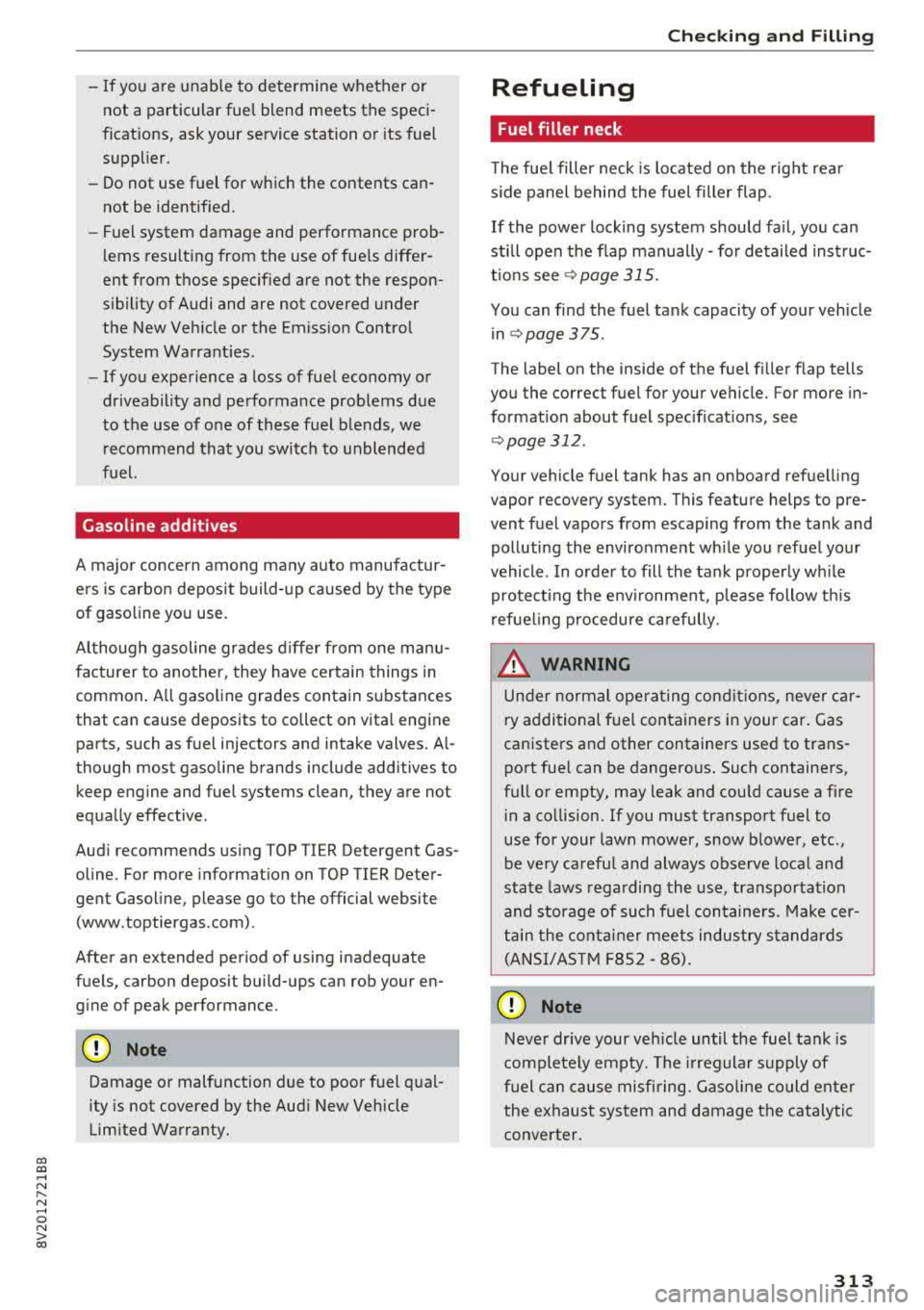
Gasoline additives
A ma jor concern among many auto manufactur
ers is carbon deposit build-up ca used by the type
of gasoline yo u use.
A lt hough gasoline grades d iffer from one manu
facturer to another, they have cer tain things in
common . A ll gasoline grades contain substances
that can cause deposits to collect on vita l engine
parts, such as fue l injectors and intake valves.
Al
though most gasoline brands include additives to
keep engine and fuel systems clean, they are not
equally effective .
Aud i recommends using TOP TIER Detergent Gas
oline. For more informat ion on TOP TIER Dete r
gent Gasoline, please go to the official website
(www.toptiergas .com) .
After an extended period of using inadequate
fuels, carbon deposit build-ups can rob your
en
g ine of peak performance.
CD Note
Damage or malfunction due to poor fuel q ual
ity is not covered by the Aud i New Vehicle
Limited Warranty.
Ch eck ing and Filling
Refueling
Fuel filler neck
The fue l filler neck is located on the rig ht rea r
s ide panel behind the fuel fille r flap .
If the power lock ing system shou ld fail, yo u can
st ill open the flap manually
-fo r detailed instruc
tio ns see
9 page 315.
You can find the fuel tank capacity of your vehicle
i n
c::;, page 375 .
The label on the inside of the f uel fi ller flap tells
you the correct fuel for your vehicle. For more in
f ormat ion about fuel spec ificat ions, see
9 page 312.
Your vehicle fuel tank has an onboard refue lling
vapor recovery system. This feature helps to pre
vent fuel vapors from escaping from the tank and polluting the environme nt wh ile you refue l yo ur
vehicle . In order to fill the tank p roper ly w hile
pro tect ing t he e nvir onment, p lease follow t his
r efue ling p rocedure ca refully.
_& WARNING
Un der normal opera ting co nd it io ns, neve r car
ry additional f uel con tainers in your car. Gas
canisters and other containers used to trans
port fue l can be dange rous. Such containe rs,
f ull or empty, may leak and could cause a fire
i n a co llision. If you must transpo rt fuel to
use for your lawn mower, snow blower, etc .,
be ve ry careful and always observe local and
sta te laws rega rding the use, transportation
and storage of su ch f uel con tainers. Make cer
t ai n t he co ntain er meets industry standards
(ANSI/AS TM F8S2
-86).
CD Note
Never drive your veh icle until the fue l tank is
complete ly empty. The irreg ular s upply of
f u el can cause misfiring. Gaso lin e c ould enter
the e xhaust sys tem an d damage the cat aly tic
conve rter.
313
Page 316 of 400

Checking and Filling
Fueling
Fig . 265 -Applies to: veh icles wi tho ut p lug -in hybrid dr ive
ri ght rea r side of t he veh icle: ope nin g the fuel filter door
Fig. 266 Fue l fi ll er doo r w it h attached fuel cap
Plug-in hybrid drive* : Please a lso read the infor
matio n under
¢page 105, Refueling.
The fuel filler door is unlocked or locked by the
central locking system.
Op en ing th e fuel cap
"' Applies to : vehicles with p lug-in hybri d drive :
Also read the information found
in c> page 105,
Opening the fuel filler door .
"'Applies to : vehicles wi tho ut plug-in hybrid
dr ive: Press the left side of the fuel filler door
to open it-arrow-
¢ fig . 265.
"' Unscrew the tank cap counterclockw ise.
"' Place the cap from above on the open fue l filler
door ¢ fig. 266.
Closing th e fu el cap
"' Turn the fuel cap clockwise until you hear it
lock.
"' Close the fuel fille r door unt il it l atches.
Once the pump nozzle sw itches off, the fuel tank
is
" full" . Do not fi ll the tank more . Otherw ise the
expansion space in the tank will be f illed.
314
The correct fuel type for your vehicle can be
found on a label located on the inside of the fuel
filler door. For additional informat ion on fuel,
see
¢ page 312.
The fuel tank capacity of your ve hicle is listed in
the
T echn ical Dat a section ¢ page 375.
To avoid fuel spilling or evaporat ing from the fuel
tank always close fue l fi ller cap properly and
completely . An improperly closed fuel fi ller cap
may also cause the MIL
l amp ¢ page 23 to come
on .
_& WARNING
Not pay ing attention when fueling or han
dling fuel incorrectly can lead to fires, explo
sions or serious injur ies.
-Fue l ignites easily and can cause serious
burns and other injur ies.
-
-If you do not switch the engine off when fu
eling and/or do not insert the fuel nozzle
completely into the tank open ing, fuel can
leak out or run over . Leaked fuel ca n ign ite
and start a fire.
-Do not use the telephone while f ueling. The
elec tromagnetic rays ca n cause sparks,
which can ignite fue l vapors and start a fire.
- Do not sit in your vehicle wh ile fue ling. If
you must make an exception and ente r your
veh icle agai n while fueling, close the door
an d touch me tal to d ischarge stat ic elect ric
ity before to uching the f uel nozz le . Static
electricity can create spa rks, which can ig
nite vapors when fueling.
-Do not smoke or have an open flame in the
area when fueling your vehicle or fi lling a
fue l container because this increases the
risk of an explosion.
-For your safety, carrying fuel containers in
your vehicle is not recommended. W hether
fu ll or empty, the container can leak and
cause a fire in the event of an acc ident.
- If you must make an exception and trans- port a fuel container, note the fo llow ing:
- Never fill the fuel container with fuel
while i t is in o r on the vehicle. Static e lec
tricity is discharged whe n filling w hich can
.,._
Page 329 of 400

CXl CXl .... N ,.__
N .... 0 N > 00
Windshield washer system
Fig. 277 Engine co mpa rtment: washer fluid reservoir cap
Observe the safety precautions ¢ page 316,
Working in the engine compartment.
M N
-N ~
"' a,
The windshield washer f luid reservoir~ contains
the cleaning solution for the windshield and the
headlight washer
system* ¢ page 319, fig. 2 71 .
The reservoir capacity can be found in
¢page 375 .
To reduce the risk of lime scale deposits on the
spray nozzles, use clean water with low amounts
of calc ium . Always add window cleaner to the wa
ter. When the outside temperatures are co ld, an
anti-freezing agent should be added to the water
so that it does not freeze.
CD Note
-The concentration of anti-freezing agent
must be adjusted to the vehicle operating
conditions in the respective climate. A con
centration that is too high can lead to veh i
cle damage.
- Never add radiator anti-freeze or other addi
tives to the washer fluid.
- Do not use a glass cleaner that contains
paint solvents, because this could damage
the paint .
Service interval display
The service interval display detects when your ve
hicle is due for service .
The service interva l display works in two stages:
- Inspection or oil change reminder: after a cer-
ta in distance driven, a message appea rs in the
Checking and Filling
instrument cluster display each time the igni
tion is switched on or off. The remaining dis
tance or time is disp layed briefly.
- Inspection or oil change due: if your vehicle
has reached an inspection or oil change interval
or both intervals at the same time, the mes
sage
Inspection due! or Oil change due! or Oil
change and inspection due!
appears briefly af
ter sw itching the ignition on/off.
Checking service intervals
You can check the remaining distance or time un
til the next oi l change or next inspection in the
Infotainment system. Select in the Infotainment
system: the
! MENUI button> Vehicle> left con
trol button
> Service & checks > Service inter
vals.
Resetting the indicator
An authorized Audi dealer or authorized Audi Service Facility will reset the service interval dis
play after performing service .
If you have changed the oi l yourself, you must re
set the oil change interval.
T o reset the disp lay, select in the Infotainment
system: the
! MENUI button> Vehicle> left con
tro l button
> Service & checks > Service intervals
> Reset oil change interval.
CD Note
-Only reset the oil change indicator if the oi l
was changed.
- Following the service intervals is critical to
maintaining the function, service life, and
value of your vehicle, especially the engine.
Even if the mileage on the vehicle is low, do
not exceed the time for the next service.
327
Page 333 of 400

Bead separa tion
means a breakdown of the bond
between components in the bead.
Cord
means the strands forming the
plies in the tire .
Cold tire inflation pressure
means the tire pressure recom
mended by the vehicle manufac
turer for a tire of a designated size that has not been driven for
more than a couple of miles (kilo
meters) at low speeds in the
three hour period before the tire
pressure is measured or adjusted .
Curb weight
means the weight of a motor ve
hicle with standard equipment in
c luding the maximum capac ity of
fuel, oi l, and coolant, a ir condi
tioning and add itional weight of
optional equipment.
E xtra load tire
means a tire designed to operate
at higher loads and at h igher in
flation pressures than the corre sponding standard tire. Extra load
tires may be identified as
"X L",
:;:;: "xl", "E XTRA LOAD" , or "RF" on ...
~ the s idewal l. ... 0 N > a:,
Wheels
Gross Axle Weight Rating
( " GAWR")
means the load-carrying capacity
of a single axle system, measured
at the tire -ground interfaces.
Gross Vehicle Weight Rating
(" GVWR ")
means the max imum total loaded
weight of the vehicle.
Groove
means the space between two ad
jacent tread ribs .
Load rating (code)
means the maxim um load that a
tire is rated to carry for a given in
flat ion pressure . You may not f ind
this informat ion on all tires be
cause it is not required by law.
Maximum load rating
means the load rating for a tire at
the maximum permissible infla
tion pressure for that tire .
Maximum loaded vehicle
weight
means the sum of:
(a) Curb weight
(b) Accessory weight
(c) Vehicle capacity we ight , and
(d) Production options we ight
33 1