2017 Alfa Romeo Giulietta lock
[x] Cancel search: lockPage 22 of 212

INTERIOR LIGHTS
FRONT CEILING LIGHT
Switch 5 fig. 21 is used to switch on/off
roof lights.
Switch 5 positions:
central position: lights 1 and 4 switch
on/off when the doors are
opened/closed;
pressed to the left(position OFF):
lights 1 and 4 are always switched off;
pressed to the right(position):
lights 1 and 4 are always switched on.
Lights switch on/off progressively.
Switch 2 switches on/off light 1.
Switch 3 switches on/off light 4.
IMPORTANT Before getting out of the
car, make sure that both switches are in
the central position: when the doors are
closed the lights will switch off to avoid
draining the battery.
In any case, if the switch is left in the on
position, the roof light switches off
automatically about 15 minutes after the
engine has been switched off.
ROOF LIGHT TIMING
(for versions where provided)
Timing while getting into the car
The roof lights come on won unlocking,
opening and closing.
The timed period is interrupted when the
ignition is turned to "MAR-ON".
Timing while getting out of the car
The roof lights come on when the key is
removed from the ignition within
2 minutes of switching off the engine, on
opening and closing a door with the
removed key.
The timing stops automatically when the
doors are locked.
WINDSCREEN/REAR WINDOW
WIPER
This operates only with the ignition key
turned to MAR.
SCREEN WIPER/WASHER
Operation5) 6)
Ring 2 fig. 22 can be set to the following
positions:
O– windscreen wiper off;
– intermittent operation (low
speed);
AUTO– Rain sensor on (for
versions/markets where provided);
– intermittent operation;
– continuous slow operation;
– continuous fast operation.
21A0K0805C
22A0K0557C
20
GETTING TO KNOW YOUR CAR
Page 30 of 212

To close them, carry out the procedure in
reverse.
INITIALISATION PROCEDURE
The sunroof must be re-initialised after
disconnecting the battery or if the
relevant protection fuse is blown.
Proceed as follows:
press button 1 fig. 26 until the roof is
completely closed. Then release the
button;
press button 2 and hold it down for at
least 10 seconds and/or until the glass
panel clicks forwards. Release the button
at this point;
within 5 seconds of the previous
operation, press button 2 and hold it
down: the front glass panel will complete
a full opening and closing cycle. Only
release the button at the end of this
cycle.
MAINTENANCE/EMERGENCY
In case of emergency or maintenance the
roof can be moved manually when there
is no power supply (opening/closing of
the front glass panel) by carrying out the
following operations:
remove the protective cap 1 fig. 28
located on the internal lining, between
the two sun blinds;
take the Allen key 2 supplied, which is
located in the on-board documentation
container or in the toolbox in the luggage
compartment;
introduce the key into housing 3 and
turn it clockwise to open the roof or
anticlockwise to close the roof.
IMPORTANT
8)Do not open the sun roof if there is snow
or ice on it: you may damage it.
WARNING
14)When leaving the vehicle, always
remove the key from the ignition switch to
avoid the risk of injury to those still inside
the car due to accidental operation of the
sun roof. Improper use of the roof can be
dangerous. Before and during operation,
always check that no one is exposed to the
risk of being injured by the moving sun roof
or by objects getting caught or hit by it.27A0K0577C
28A0K0578C
28
GETTING TO KNOW YOUR CAR
Page 31 of 212

ENGINE BONNET
OPENING
Proceed as follows:
pull lever 1 fig. 29 in the direction
indicated by the arrow;
operate lever 2 fig. 30, in the direction
indicated by the arrow, and raise the
bonnet.
IMPORTANT Two side gas shock
absorbers are provided to assist in
opening the bonnet. Do not tamper with
the shock absorber and accompany the
bonnet while lifting it.
IMPORTANT Before raising the bonnet,
make sure that the arms of the wipers
are not raised from the windscreen and
that the wiper is not operational.
CLOSING
Lower the bonnet to approximately
20 centimetres from the engine
compartment then let it drop. Make sure
that the bonnet is completely closed and
not only fastened by the locking device
by trying to open it. If it is not perfectly
closed, do not try to press the bonnet
down but open it and repeat the
procedure.
15) 16)
IMPORTANT Always check that the
bonnet is closed correctly to prevent it
from opening while the vehicle is
travelling.
WARNING
15)For safety reasons, the bonnet must
always be properly closed while the car is
travelling. Therefore, make sure that the
bonnet is properly closed and that the lock is
engaged. If you discover that the bonnet is
not perfectly closed during travel, stop
immediately and close the bonnet in the
correct manner.
16)Perform these operations only when the
car is stationary.
29A0K0607AC
30A0K0607BC
29
Page 32 of 212

BOOT
The luggage compartment unlocking is
electrically operated and is deactivated
when the car is in motion.
OPENING
When unlocked, the luggage
compartment can be opened from
outside the car by pressing the electric
logo fig. 31 until a click, which indicates
unlocking, is heard or by pressing the
button on the key.
The direction indicators and internal light
will blink twice when the boot is opened:
the light will go out automatically when
the boot is closed. The light switches off
automatically after a few minutes if the
luggage compartment is left open.Emergency opening from the inside
To carry out the emergency opening from
the inside of the car, remove the rear seat
head restraints, completely fold down
the rear seats (see paragraph “Extending
the luggage compartment”), then press
on lever 1 fig. 32.
CLOSING
Lower the tailgate, pressing near the lock
until you hear it click into place.
Handles are provided inside the tailgate
to make it easier to close.
IMPORTANT Before closing the luggage
compartment make sure that you have
the keys, since the luggage compartment
is automatically locked.LUGGAGE COMPARTMENT
INITIALISATION
IMPORTANT If the battery is
disconnected or the protection fuse
blows, the luggage compartment
opening/closing mechanism must be
initialised as follows:
close all the doors and the luggage
compartment;
press the buttonon the key;
press the buttonon the key;
EXTENDING THE LUGGAGE
COMPARTMENT
The luggage compartment can be
partially (1/3 or 2/3) or totally extended
by splitting the rear seat.
See the descriptions in “Rear seats” for
how to expand the luggage compartment.
BAG HOOKS
There are also bag hooks inside the
luggage compartment.
LUGGAGE RETAINING NET
(for versions/markets, where provided)
This is useful for correctly arranging the
load and/or for transporting light
materials. The luggage retaining net is
available from Lineaccessori Alfa Romeo.31A0K0068C
32A0K0583C
30
GETTING TO KNOW YOUR CAR
Page 34 of 212

When “Natural” mode is selected, no
messages or symbols are shown on the
display.
The device acts on the dynamic car
control systems (engine, steering, ESC,
ASR, ELECTRONIC Q2 systems, etc.).
TURNING “Dynamic” MODE ON/OFF
9)
IMPORTANT For versions/markets,
where provided, switching to "Dynamic"
mode is automatically disabled in the
first kilometres in order to guarantee
correct settling of the mechanical
components. If an attempt to activate
the system is made before this limit, the
display will show a dedicated message to
remind the driver that this request
cannot be fulfilled.
Activation
Move lever 1 fig. 33 downwards (to the
letter “d”) and hold in this position for
0.5 seconds until the corresponding LED
lights up or the word “Dynamic” appears
on the display.
When lever 1 fig. 33 is moved to the “d”
position, the activation of “Dynamic”
mode is confirmed by a temporary
variation in the brightness (flashing) of
the instrument panel.Turning off
Mover the lever 1 fig. 33 to the "Natural"
position;
TURNING“All Weather” MODE ON/OFF
Activation
Move lever 1 fig. 33 downwards (to the
letter “a”) and hold in this position for
0.5 seconds until the corresponding LED
lights up or the word “All Weather”
appears on the display.
Deactivation
Mover the lever 1 fig. 33 to the "Natural"
position;
IMPORTANT
9)"FAST" VERSION: Considering the high
levels of vehicle performance, it is
recommended to not use the "Dynamic"
mode when driving the first kilometres with
the vehicle in order to provide the
mechanical components with the necessary
running-in period.
VERSION WITH LPGSYSTEM
19) 21)10) 11) 12) 13) 14) 16)
INTRODUCTION
The LPG version features two fuel supply
systems: one for petrol and one for LPG.
PASSIVE SAFETY/ACTIVE SAFETY
Although the LPG system has numerous
safety features, it is advisable to proceed
as follows every time the vehicle is not in
use for a long period or moved in an
emergency as a result of a breakdown or
accident:
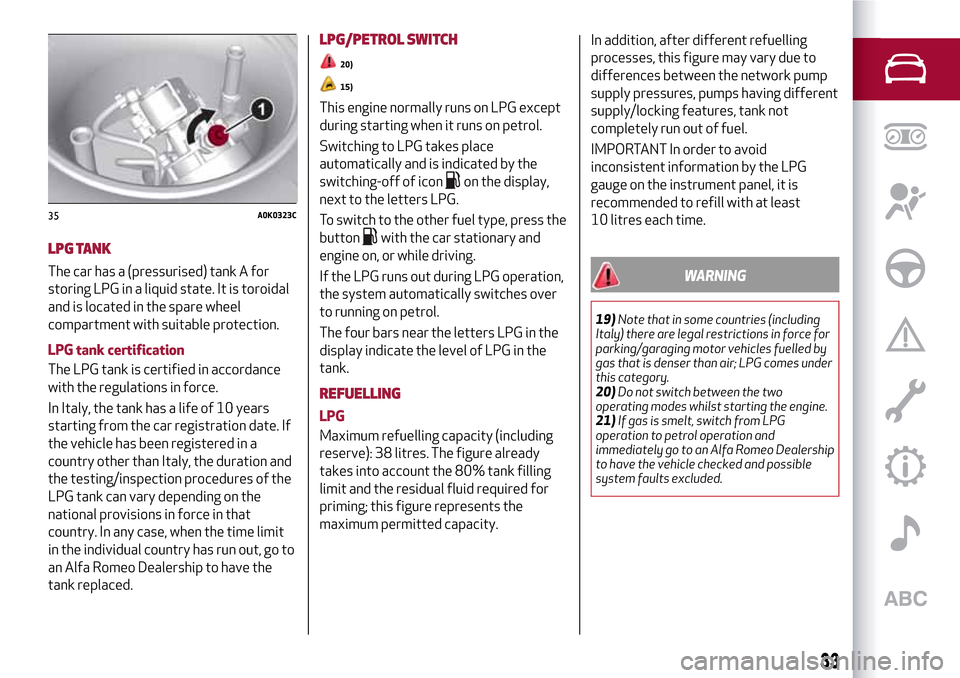
unscrew the fixing devices 1 fig. 34,
then remove the cover 2;
Close the LPG cock rotating the ring 1
fig. 35 clockwise.
refit the cover and retighten the
fastening devices.
34A0K0322C
32
GETTING TO KNOW YOUR CAR
Page 35 of 212
LPG TANK
The car has a (pressurised) tank A for
storing LPG in a liquid state. It is toroidal
and is located in the spare wheel
compartment with suitable protection.
LPG tank certification
The LPG tank is certified in accordance
with the regulations in force.
In Italy, the tank has a life of 10 years
starting from the car registration date. If
the vehicle has been registered in a
country other than Italy, the duration and
the testing/inspection procedures of the
LPG tank can vary depending on the
national provisions in force in that
country. In any case, when the time limit
in the individual country has run out, go to
an Alfa Romeo Dealership to have the
tank replaced.
LPG/PETROL SWITCH
20)
15)
This engine normally runs on LPG except
during starting when it runs on petrol.
Switching to LPG takes place
automatically and is indicated by the
switching-off of icon
on the display,
next to the letters LPG.
To switch to the other fuel type, press the
button
with the car stationary and
engine on, or while driving.
If the LPG runs out during LPG operation,
the system automatically switches over
to running on petrol.
The four bars near the letters LPG in the
display indicate the level of LPG in the
tank.
REFUELLING
LPG
Maximum refuelling capacity (including
reserve): 38 litres. The figure already
takes into account the 80% tank filling
limit and the residual fluid required for
priming; this figure represents the
maximum permitted capacity.In addition, after different refuelling
processes, this figure may vary due to
differences between the network pump
supply pressures, pumps having different
supply/locking features, tank not
completely run out of fuel.
IMPORTANT In order to avoid
inconsistent information by the LPG
gauge on the instrument panel, it is
recommended to refill with at least
10 litres each time.
WARNING
19)Note that in some countries (including
Italy) there are legal restrictions in force for
parking/garaging motor vehicles fuelled by
gas that is denser than air; LPG comes under
this category.
20)Do not switch between the two
operating modes whilst starting the engine.
21)If gas is smelt, switch from LPG
operation to petrol operation and
immediately go to an Alfa Romeo Dealership
to have the vehicle checked and possible
system faults excluded.
35A0K0323C
33
Page 36 of 212

IMPORTANT
10)The car is equipped with a specifically
designed gaseous LPG injection system: it is
therefore absolutely forbidden to alter the
configuration of the system or its
components. The use of other components or
materials could cause malfunctions and lead
to a reduction in safety; therefore, in the
case of problems, contact an Alfa Romeo
Dealership. When towing or lifting the
vehicle, follow the instructions in the main
handbook under the paragraph on "Towing
the vehicle" to prevent damage to the gas
system parts.
11)The system operates at temperatures
ranging between -20°C and 100°C.
12)When using a painting oven, the LPG
tank should be removed from the car and
later carefully refitted at an Alfa Romeo
Dealership. Although the LPG system has
numerous safety features, it is advisable to
proceed as follows every time the vehicle is
not in use for a long period or moved in an
emergency as a result of a breakdown or
accident: unscrew the devices fastening the
cover of the LPG tank, then remove it. Close
the LPG cock rotating the ring nut clockwise
(see "Passive safety / active safety"). Refit
the cover and retighten the fastening
devices.13)Only use LPG for motor vehicles.
14)It is strictly forbidden to use any additive
in the LPG. Periodically (at least once every
six months) it is advisable to let the LPG in
the tank run out and, at the first refuelling, to
check that it does not exceed the maximum
capacity of 38 litres (reserve included) (with
a tolerance of 2 litres excess). If the level is
above 38 litres (reserve included) contact an
Alfa Romeo Dealership immediately.
15)When switching is requested, metallic
noise from the valves which pressurise the
circuit can be heard. For the switching logic
described above, a delay between the valve
ticking and the switching off of the
instrument panel indication is completely
normal.
16)In particular usage conditions, such as
starting and operation at low ambient
temperature or LPG supply with low propane
content, the system may switch temporarily
to petrol operation, without a visual
indication of switching on the instrument
panel. In the event of low LPG levels in the
tank or request for high performance (e.g.
overtaking, car fully laden, steep hills) the
system may automatically switch to petrol
operation to guarantee the engine power
requested; the green warning light on the
instrument panel switches on to indicate this.
When the above conditions are no longer
present, the system automatically restores
LPG operation; the green warning light
switches off. To achieve the automatic
switching described above, make sure that
there is always enough fuel in the petrol tank.
34
GETTING TO KNOW YOUR CAR
Page 42 of 212

MENU ITEMS
IMPORTANT If there is anUconnect™
system, some menu items are displayed
and managed by the latter and not the
instrument panel (refer to the
description in the Multimedia chapter or
in the supplements available online).
Menu
Access to the Setup Menu.
Lights
(only with side lights on)
Adjustment (8 levels) of the brightness of
the instrument panel, theUconnect™
system controls (for versions/markets
where provided) and the automatic
climate control system controls (for
versions/markets where provided).
Speed warning
Vehicle speed limit setting (km/h or mph).
When this is exceeded, the driver is
notified by an audible warning signal.
Headlight sensor
(for versions/markets, where provided)
Automatic switch on/off of lights
according to external light conditions.
The dusk sensor sensitivity can be
adjusted according to 3 levels (level
1=minimum sensitivity, level 2=average
sensitivity, level 3=maximum sensitivity).Rain sensor
(for versions/markets, where provided)
Adjustment (4 levels) of the sensitivity of
the rain sensor.
TripB activation
Activation (On) and deactivation (Off) of
Trip B display (partial trip counter). For
more information see the "Trip computer"
section.
Set time
Clock setting through two sub-menus:
“Time” and “Format”.
Set date
Date setting (day - month - year).
First page
(for versions/markets, where provided)
Selection of the information you would
like to see on the main screen. You can
view the date or the trip distance.
Autoclose
Activation of the automatic locking of the
doors on exceeding the speed of
20 km/h.Measurement unit
Unit of measurement setting via three
submenus: “Distances”, “Fuel
consumption” and “Temperature”.
If the set distance unit is "km", the display
allows the fuel consumption unit to be set
as km/l or l/100km. If the set distance
unit is “mi” the fuel consumption unit will
be displayed in “mpg”.
Language
Display language selection.
Warning volume
Adjustment (8 levels) of the volume of
the buzzer which accompanies the
display of failures/warnings.
Seat belt beep
This function can be displayed only after
an Alfa Romeo Dealership has
deactivated the SBR system (see
paragraph “SBR system” in the “Safety”
chapter).
Service
Display of information about km/mileage
intervals or, for versions/markets, where
provided, time intervals for car servicing.
Passenger airbag
Activation/deactivation of front
passenger side airbag and side air bag for
pelvis, chest and shoulder protection -
Side bag
40
KNOWING THE INSTRUMENT PANEL