Page 96 of 473

95Continued
Instrument Panel
Gauges and Displays
Gauges
Gauges include the speedometer, tachometer, fuel gauge, temperature gauge, High
Voltage battery charge level gauge, ASSIST/CHARGE gauge, SH-AWD®
temperature gauge, and related indicato rs. They are displayed when the power
mode is in ON.
Displays your driving speed in mph or km/h.
Shows the number of engine revolutions per minute.
■Engine speed red-zone indication
Alerts you when the engi ne speed is near the tachometer’s red zone.
When the engine speed exceed s 7,000 rpm, the outer ring of the tachometer flashes
in red.
To protect the engine from damage, never drive with the tachometer in its red zone.
Displays the amount of fuel left in the fuel tank.
■Speedometer
■Tachometer
■Fuel Gauge
1 Speedometer
Press and hold the mph/km /h change button until
you hear a beep.
The speedometer reading and the displayed
measurements switch between mph and km/h.
1Fuel Gauge
NOTICE
You should refuel when the needle approaches .
Running out of fuel can cause the engine to misfire,
damaging the cata lytic converter.
The actual amount of remain ing fuel may differ from
the fuel gauge reading.E
17 NSX-31T6N6000.book 95 ページ 2016年4月22日 金曜日 午後3時44分
Page 100 of 473
99
uuGauges and Displays uDriver Information Interface
Continued
Instrument Panel
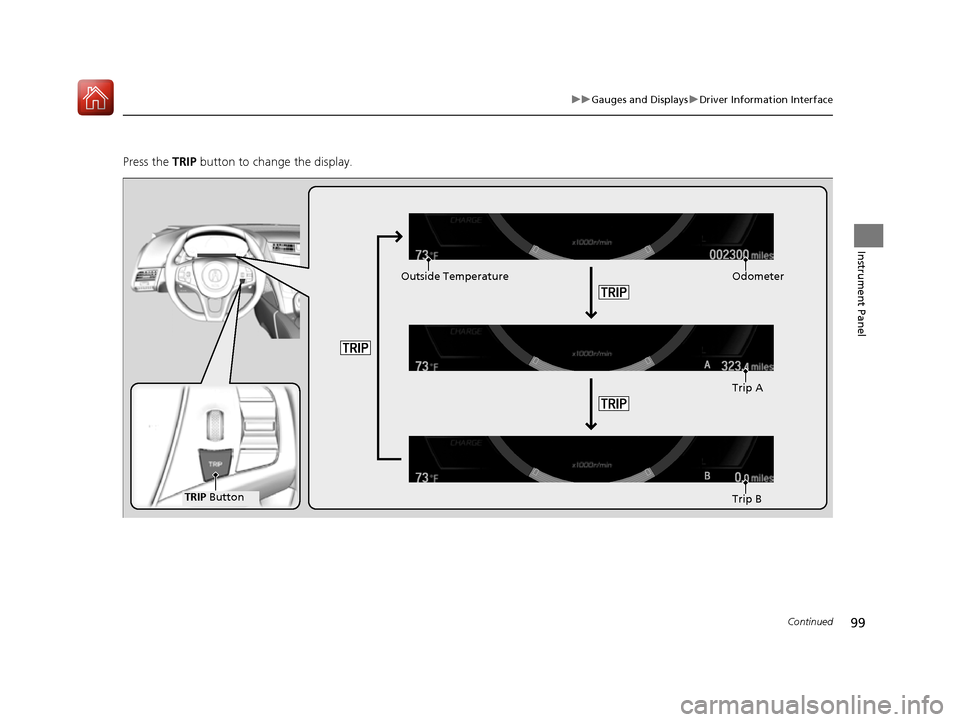
Press the TRIP button to change the display.
Odometer
Trip A
Trip B
TRIP Button
Outside Temperature
17 NSX-31T6N6000.book 99 ページ 2016年4月22日 金曜日 午後3時44分
Page 101 of 473

uuGauges and Displays uDriver Information Interface
100
Instrument Panel
Shows the total number of miles (U.S.) or ki lometers (Canada) that your vehicle has
accumulated.
Shows the total number of miles (U.S.) or kilometers (Canada) driven since the last
reset. Meters A and B can be used to measure two separate trips.
■Resetting a trip meter
To reset a trip meter, display it, then press and hold the TRIP button. The trip meter
is reset to 0.0.
When a trip meter is reset, the average fuel economy, the elapsed time, and the
average speed are also reset.
Shows the outside temperature in Fahr enheit (U.S.) or Celsius (Canada).
■Adjusting the outside temperature display
Adjust the temperature reading up to ± 5°F or ± 3°C if the temperature reading
seems incorrect.
■Odometer
■Trip Meter
■Outside Temperature
1 Trip Meter
Switch between trip meter A and trip meter B by
pressing the TRIP button.
1Outside Temperature
The temperature sensor is in the front bumper.
Road heat and exhaust from another vehicle can
affect the temperature reading when your vehicle
speed is less than 19 mph (30 km/h).
It may take several minutes for the display to be
updated after the temperature reading has stabilized.
Use the audio system’s customized features to
correct the temperature.
2 Customized Features P. 232
17 NSX-31T6N6000.book 100 ページ 2016年4月22日 金曜日 午後3時44分
Page 104 of 473

103
Controls
This chapter explains how to operate the various controls necessary for driving.
Clock.................................................. 104
Locking and Unlocking the Doors Key Types and Functions .................. 105
Low Keyless Access Remote Signal Strength ......................................... 106
Locking/Unlocking the Doors from the
Outside .......................................... 107
Locking/Unlocking the Doors from the Inside ............................................. 115
Auto Door Locking/Unlocking .......... 118
Opening and Closing the Hatch....... 119
Security System ................................ 122
Immobilizer System .......................... 122 Security System Alarm...................... 122Opening and Closing the Windows.... 125Operating the Switches Around the
Steering Wheel ENGINE START/STOP Button............. 127
Turn Signals ..................................... 130
Light Switches.................................. 131
Daytime Running Lights ................... 134
Wipers and Washers ........................ 135
Brightness Control ........................... 136
Rear Defogger/Heated Door Mirror Button.....137Driving Position Memory System*.... 138
Adjusting the Steering Wheel........... 140 Adjusting the Mirrors
....................... 141
Interior Rearview Mirror ................... 141
Power Door Mirrors ......................... 142
Adjusting the Seats .......................... 144
Interior Lights/Interior Convenience Items ................................................ 149
Interior Lights .................................. 149
Interior Convenience Items .............. 151
Climate Control System ................... 156
Using Automatic Climate Control .... 156Automatic Climate Control Sensors......160
* Not available on all models
17 NSX-31T6N6000.book 103 ページ 2016年4月22日 金曜日 午後3時44分
Page 108 of 473

107
uuLocking and Unlocking the Doors uLocking/Unlocking the Doors from the Outside
Continued
Controls
Locking/Unlocking the Doors from the Outside
When you carry the keyle ss access remote, the
outer door handles automatically pop in/out
and you can lock/unlock the doors and open
the hatch.
Outer door handles automatically pop in/out
within about 6 feet (2 m) radius of the outside
door handle.
You can lock/unlock the doors within a radius
of about 32 inches (80 cm) of the outside door
handle. You can open the hatch within about
32 inches (80 cm) radius from the hatch
release button.
■Locking the vehicle Press the door lock button on either door.u Some exterior lights flash; the beeper
sounds; both doors lock; both outer door
handles pop in if they are popped out;
and the security system sets.
■Using the Keyless Access System1Using the Keyless Access System
If you do not open a door within 30 seconds of
unlocking the vehicle, th e doors will automatically
relock and the outer ha ndles of the doors will
automatically pop back in.
You can lock or unlock doors using the remote
transmitter or keyless access system only when the
power mode is in VEHICLE OFF.
•Do not leave the keyless access remote in the
vehicle when you get out . Carry it with you.
•Even if you are not carrying the keyless access
remote, you can lock/unlock the doors while
someone else with the remote is within range.
•The door may be unlocked if the door handle is
covered with water in heavy rain or in a car wash if
the keyless access remote is within range.
•If you grip either door handle wearing gloves, the
door sensor may be slow to respond or may not
respond by unlocking the doors.
•The door may not open if you pull it immediately
after gripping the door handle. Grip the handle
again and confirm that th e door is unlocked before
pulling the handle.
•Even within the 32 inches (80 cm) radius, you may
not be able to lock/unl ock the doors with the
keyless access remote if it is above or below the
outside handle.
•The keyless access remote may not operate if it is
too close to the door and door glass.
17 NSX-31T6N6000.book 107 ページ 2016年4月22日 金曜日 午後3時44分
Page 109 of 473

uuLocking and Unlocking the Doors uLocking/Unlocking the Doors from the Outside
108
Controls
■Unlocking the vehicle
When you walk to the vehicle while carrying
the keyless access remote, the outer door
handles will automatically pop out.
The auto pop-out function activates when
both doors are closed, and the keyless access
remote is within a 6-foot (2 m) radius of the
outside door handle.
Pushing out the door handle
To push out the outer door handle manually,
push the front side inwards.1 Using the Keyless Access System
If you lock the doors and then keep the keyless
remote within the detection range for more than 2
minutes, the auto pop-out function will be disabled.
If the function is disa bled, pop out the handle
manually or use the unlock button on the keyless
access remote.
If you walk away from the vehicle when the power
system is on, the auto pop-out function will not
work.
If you close the doors and take the keyless access
remote out of the 6-foot (2m) detection range and
then bring it back into the range within 10 seconds,
the pop-out function will not work. In this case, pop
out the door handle manuall y or use the remote
transmitter.
If, however, you bring the remote back into range
after 10 seconds, the handl es will automatically pop
out.
17 NSX-31T6N6000.book 108 ページ 2016年4月22日 金曜日 午後3時44分
Page 111 of 473
110
uuLocking and Unlocking the Doors uLocking/Unlocking the Doors from the Outside
Controls
Press the hatch release button:
u The hatch unlocks and opens.
u The beeper sounds.
2 Using the Hatch Release Button P. 119
17 NSX-31T6N6000.book 110 ページ 2016年4月22日 金曜日 午後3時44分
Page 113 of 473

uuLocking and Unlocking the Doors uLocking/Unlocking the Doors from the Outside
112
Controls
■Locking the doors
Press the lock button.
Once: u Some exterior lights flash, both doors
lock, both outer door handles pop in,
and the security system sets.
Twice (within five seco nds after the first
push):
u The beeper sounds and verifies the
security system is set.
■Using the Remote Transmitter1Using the Remote Transmitter
If you do not open a door within 30 seconds of
unlocking the vehicle with the remote transmitter,
the doors will automaticall y relock and the outer
handles of the doors will au tomatically pop back in.
You can change the relock timer setting.
2 Customized Features P. 232
If the interior light switch is in the door activated
position, the interior light s come on when you press
the unlock button.
No doors opened: The li ghts fade out after 30
seconds.
Doors relocked with the remote: The lights go off
immediately. 2 Interior Lights P. 149
The remote transmitter us es low-power signals, so
the operating range may vary depending on the
surroundings.
The remote will not lock the vehicle when a door is
open.
LED
Unlock
Button Lock
Button
17 NSX-31T6N6000.book 112 ページ 2016年4月22日 金曜日 午後3時44分