Page 23 of 473
22
Quick Reference Guide
Audio Remote Controls
(P 165)
●SOURCE Button
Press to change the audio mode: FM/
SiriusXM ®
*/USB/iPod/Pandora ®*/Apps*/
Bluetooth ® Audio/Audio Apps*.
● Left Selector Wheel
Roll to adjust the volume up/down.
Radio: Move right or left to change the
preset station.
Move and hold to select the next
or previous strong station.
USB device: Move right or left to skip to the
beginning of the next song or
return to the beginning of the
current song.
Move and hold to change a folder.
Left Selector Wheel
SOURCE Button
17 NSX-31T6N6000.book 22 ページ 2016年4月22日 金曜日 午後3時44分
Page 24 of 473

23
Quick Reference Guide
Driving (P 297)
Electronic Gear Selector (P 314)
● Select
(P and depress the brake pedal when turning on the power.
Park
Press the
(P button.
Used when parking or before turning the power on or off.
Transmission is locked.
Reverse
Press back the
( R button.
Used when reversing.
Neutral
Press the
( N button.
Used to keep the transmission disengaged from the engine and motor.
Drive/Manual
Each time you press the button, the mode switches between D (drive) and M (manual) mode.
●Normal driving (gears change between 1st and 9th automatically)●Temporarily driving in the sequential mode
●Driving in the sequential mode
D/M
D (Drive)
M (Manual)
Gear Position Indicator/Gear
Selection Indicator
The gear position indicator, the
gear selection indicator and the
shift button indicator indicate
the current gear selection.
Gear Position Indicator Shift Button
Indicator
●
Gear selection
Gear Selection Indicator
* Not available on all models
17 NSX-31T6N6000.book 23 ページ 2016年4月22日 金曜日 午後3時44分
Page 25 of 473

24
Quick Reference Guide
Paddle Shifters (P322)
Paddle shifters allow you to shif t gears much like a manual transmission (1st throu gh 9th). This is useful for regenerative braking.
You cannot shift up or down while in EV mode.
When the transmission is in (D (D-paddle shift mode)The vehicle will go into the sequential mode momentarily, and the gear selection
indicator becomes more prominent.
The sequential mode is automatically canceled and the gear selection indicator
returns to ordinary display un der the following conditions.
•Hold the (+ paddle shifter for a few seconds.
•Once you start traveling at a constant speed.
•The vehicle comes to a complete stop.•When you change to another IDS mode.
The sequential mode automatically shifts under following condition
•Accelerator pedal depressed beyond the click.
•Engine speed reaches near the tachometer’s red zone.•Engine speed reaches idle speed while deceleration.
When the transmission is in M (Manual) modeThe vehicle will go into the sequential mo de, and the gear position indicator goes
off and only the gear selection indicator is displayed.
You can cancel this mode by pressing the button, pulling the
( + paddle
shifter for a few seconds or changing IDS mode to QUIET. When the sequential
mode is canceled, the display is changed from only the gear selection indicator to
both of the gear position indicato r and the gear selection indicator.
The transmission automatically shi fts up from 1st to 2nd and does not
automatically shift up between 2nd and 9th gear.D/M
Gear Position Indicator
Shift Down
( -
Paddle Shifter Shift Up (
+
Paddle Shifter
Gear Selection Indicator
Gear Selection Indicator
Gear Selection Indicator Gear Position IndicatorD (Drive)
D-Paddle
M (Manual)
17 NSX-31T6N6000.book 24 ページ 2016年4月22日 金曜日 午後3時44分
Page 26 of 473
25
Quick Reference Guide
VSA® OFF Button (P 334)
● The Vehicle Stability Assist (VSA® ) system
helps stabilize the vehicle during
cornering, and helps maintain traction
while accelerating on loose or slippery
road surfaces.
● VSA ® comes on automatically every time
you turn on the power system.
Tire Pressure Monitoring
System (TPMS)
(P 339)
● The TPMS monitors tire pressure.
● The TPMS is turned on automatically
every time you turn on the power system.
Refueling (P 357)
aPress the fuel fill
door release button.
bAfter refueling,
wait for about five
seconds before
removing the filler
nozzle.
Fuel requirement: Unleaded premiu m gasoline with a pump octane
number 91 or higher
Fuel tank capacity: 15.6 US gal (59.0 liters)
Wait for five seconds
17 NSX-31T6N6000.book 25 ページ 2016年4月22日 金曜日 午後3時44分
Page 27 of 473
26
Quick Reference Guide
Maintenance (P 361)
Press the hatch release button on the
driver’s door.
Lights (P387)
● Inspect all lights regularly.
Under the Hatch (P372)
● Check engine oil and engine coolant.
Add when necessary.
Tires (P393)
● Inspect tires and wheels regularly.
● Check tire pressures regularly.
● Install winter tires for winter driving.
Handling Summer Only tires and Ultra High Performance
(UHP) tires in low ambient temperatures.
2 Cold Weather Driving (P402)
17 NSX-31T6N6000.book 26 ページ 2016年4月22日 金曜日 午後3時44分
Page 41 of 473
uuSeat Belts uFastening a Seat Belt
40
Safe Driving
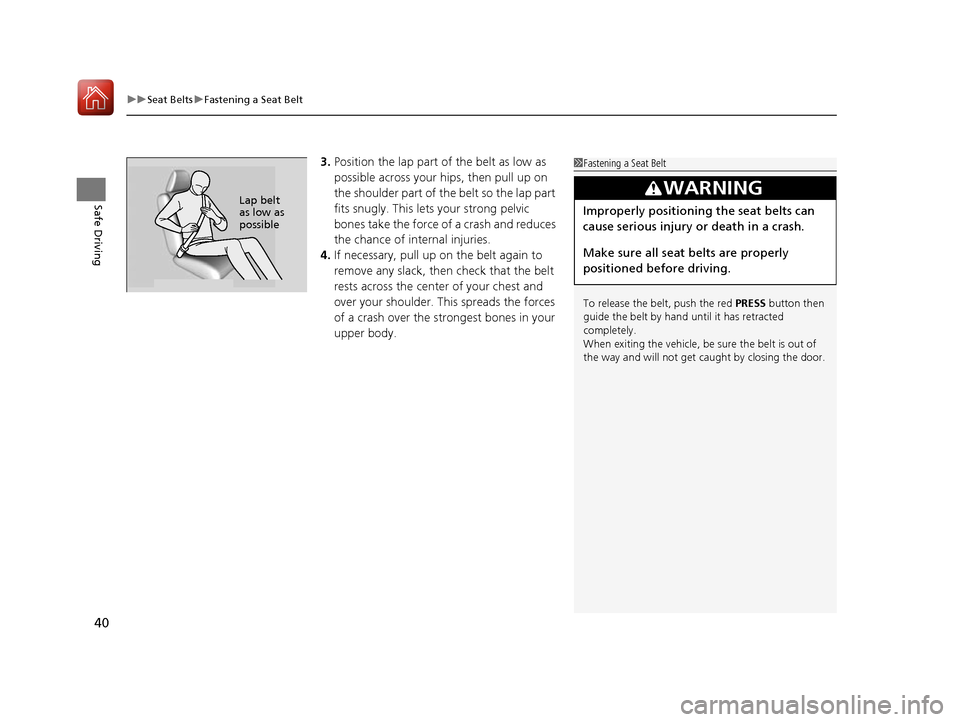
3. Position the lap part of the belt as low as
possible across your hips, then pull up on
the shoulder part of the belt so the lap part
fits snugly. Th is lets your strong pelvic
bones take the force of a crash and reduces
the chance of internal injuries.
4. If necessary, pull up on the belt again to
remove any slack, then check that the belt
rests across the center of your chest and
over your shoulder. Th is spreads the forces
of a crash over the strongest bones in your
upper body.1 Fastening a Seat Belt
To release the belt, push the red PRESS button then
guide the belt by hand until it has retracted
completely.
When exiting the vehicle, be sure the belt is out of
the way and will not get ca ught by closing the door.
3WARNING
Improperly positioning the seat belts can
cause serious injury or death in a crash.
Make sure all seat belts are properly
positioned before driving.Lap belt
as low as
possible
17 NSX-31T6N6000.book 40 ページ 2016年4月22日 金曜日 午後3時44分
Page 70 of 473
69
Instrument Panel
This chapter describes the buttons, indicators, and gauges that are used while driving.
Indicators............................................ 70
Driver Information Interface Warning and Information Messages ...................... 83
Gauges and Displays .......................... 95
Gauges .............................................. 95
Driver Information Interface ............... 98
17 NSX-31T6N6000.book 69 ページ 2016年4月22日 金曜日 午後3時44分
Page 80 of 473
79
uuIndicators u
Continued
Instrument Panel
IndicatorNameOn/BlinkingExplanationMessage
Vehicle Stability
Assist (VSA ®)
System Indicator
●Comes on for a few seconds when
you set the power mode to ON,
then goes off.
●Blinks when VSA ® is active.●Comes on if there is a problem
with the VSA® system.
●Stays on constantly - Have your vehicle
checked by an authorized Acura NSX
dealer.
2 Vehicle Stability Assist (VSA® ), aka
Electronic Stability Control (ESC),
System P. 333
Vehicle Stability
Assist (VSA ®) OFF
Indicator
●Comes on for a few seconds when
you set the power mode to ON,
then goes off.
●Comes on when you press the
VSA ® OFF button to change VSA ®
mode.
●Comes on when you select TRACK
mode by the IDS Mode switch.
2 VSA ® OFF Button P. 334
2 Integrated Dynamics System (IDS)
P. 323
17 NSX-31T6N6000.book 79 ページ 2016年4月22日 金曜日 午後3時44分


