2016 VOLVO XC90 T8 warning
[x] Cancel search: warningPage 164 of 546
INSTRUMENTS AND CONTROLS
* Option/accessory, for more information, see Introduction.
162 •
Moving the second row seats forward/rear- ward (p. 174)
• Adjusting the second row backrest tilt(p. 171)
Manually operated front seats
The front seats can be adjusted in a number of ways to help provide the most comfortable seat-ing position.
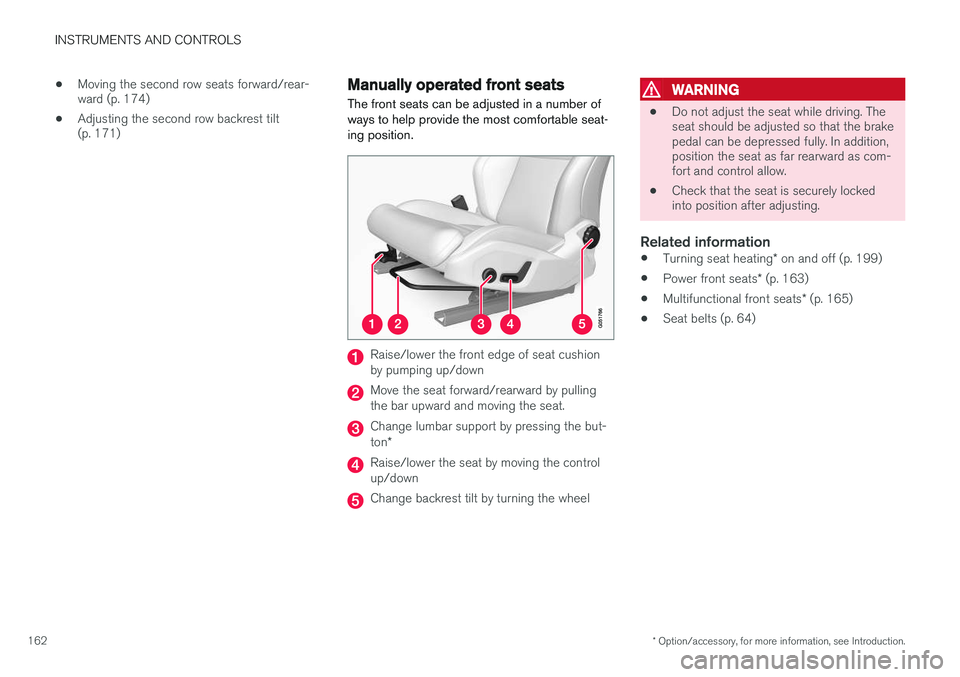
Raise/lower the front edge of seat cushion by pumping up/down
Move the seat forward/rearward by pulling the bar upward and moving the seat.
Change lumbar support by pressing the but- ton *
Raise/lower the seat by moving the control up/down
Change backrest tilt by turning the wheel
WARNING
• Do not adjust the seat while driving. The seat should be adjusted so that the brakepedal can be depressed fully. In addition,position the seat as far rearward as com-fort and control allow.
• Check that the seat is securely lockedinto position after adjusting.
Related information
•
Turning seat heating
* on and off (p. 199)
• Power front seats
* (p. 163)
• Multifunctional front seats
* (p. 165)
• Seat belts (p. 64)
Page 167 of 546
INSTRUMENTS AND CONTROLS
}}
* Option/accessory, for more information, see Introduction.165
2.
Press and release the M button. The indica-
tor light in the button will illuminate.
3. Press button 1, 2 or 3 within 3 seconds to
store the current position of the seat/ mirrors/head-up display in the selected but-ton.
> When the position has been stored in the selected button, an audible signal will sound and the indicator light in the M but-
ton will go out.
If none of the buttons (1, 2 or 3) is pressedwithin 3 seconds, the indicator light in the M but-
ton will go out and the position will not be stored.
The seat/mirrors/head-up display must be moved before a new position can be stored.
Using a stored positionA stored position can be used when one of thefront doors is opened or closed:
Front door open
–Press one of the bottons ( 1–3 ) briefly. The
seat, door mirrors and head-up display will move to the positions stored in that button.
Front door closed
–Press and hold one of the buttons ( 1–3 ) until
the seat, door mirrors and head-up display have moved to the positions stored in thatbutton. The seat, door mirrors and head-up display willstop automatically if the button is released beforethe they have reached the stored positions.
WARNING
•
Because the driver's seat can be adjusted with the ignition off, children should neverbe left unattended in the vehicle.
• Movement of the seat can be STOPPEDat any time by pressing any button on thepower seat control panel.
• Do not adjust the seat while driving. Theseat should be adjusted so that the brakepedal can be depressed fully. In addition,position the seat as far rearward as com-fort and control allow.
• The seat rails on the floor must not beobstructed in any way when the seat is inmotion.
Related information
•
Adjusting power front seats
* (p. 163)
• Power front seats
* (p. 163)
Multifunctional front seats *
In addition to the adjustment settings offered by the power seat controls, the multifunction controlprovides additional possibilities for convenienceand comfort.
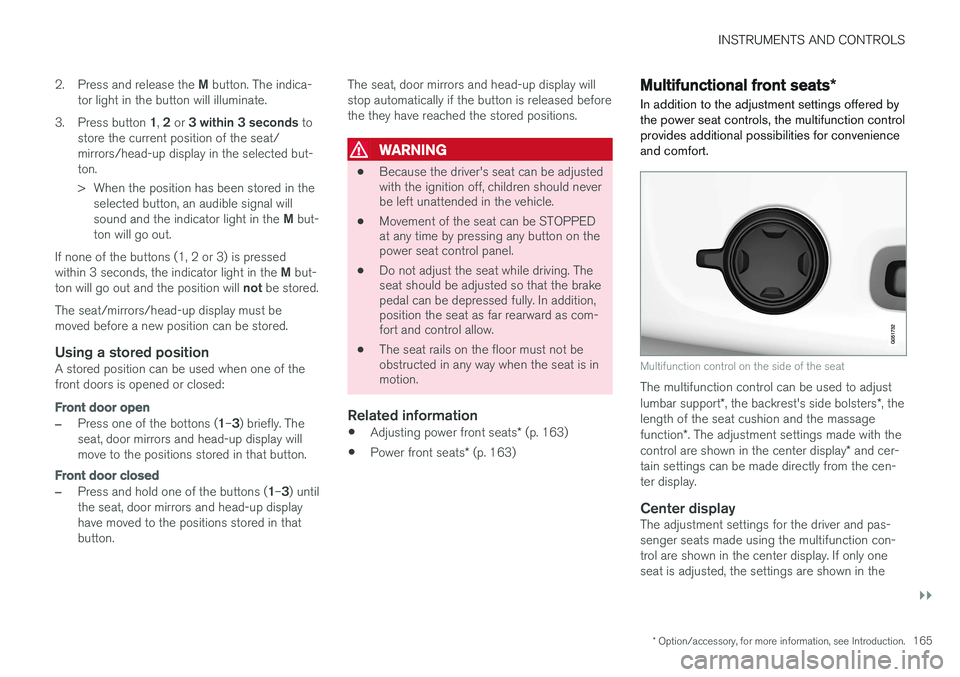
Multifunction control on the side of the seat
The multifunction control can be used to adjust lumbar support *, the backrest's side bolsters *, the
length of the seat cushion and the massagefunction *. The adjustment settings made with the
control are shown in the center display * and cer-
tain settings can be made directly from the cen- ter display.
Center displayThe adjustment settings for the driver and pas-senger seats made using the multifunction con-trol are shown in the center display. If only oneseat is adjusted, the settings are shown in the
Page 172 of 546

||
INSTRUMENTS AND CONTROLS
* Option/accessory, for more information, see Introduction.
170
Activating/deactivating the function1.
In the center display, select SettingsMy
Car
Seats.
2. Activate/deactivate the function by select- ing/deselecting the
Easy Ingress & Egressbox.
Related information
• Power front seats
* (p. 163)
• Ignition modes (p. 370)
Adjusting the second row head restraints
The center head restraint in the second row of seats can be adjusted to suit the height of theseat's occupant. The outboard head restraints can be folded down * for a better rear view.
Adjusting the center head restraint
Center head restraint button
The center head restraint should be adjusted up or down according to the passenger's height. Therestraint should be carefully adjusted to supportthe occupant's head. To lower the head restraint, press and hold the button (see the illustration) and push the headrestraint down carefully.
WARNING
The center rear seat head restraint should only be in its lowest position when this seat isNOT occupied. When the center position isoccupied, the head restraint should be cor-rectly adjusted to the passenger
Page 174 of 546
||
INSTRUMENTS AND CONTROLS
* Option/accessory, for more information, see Introduction.
172
Outboard seats
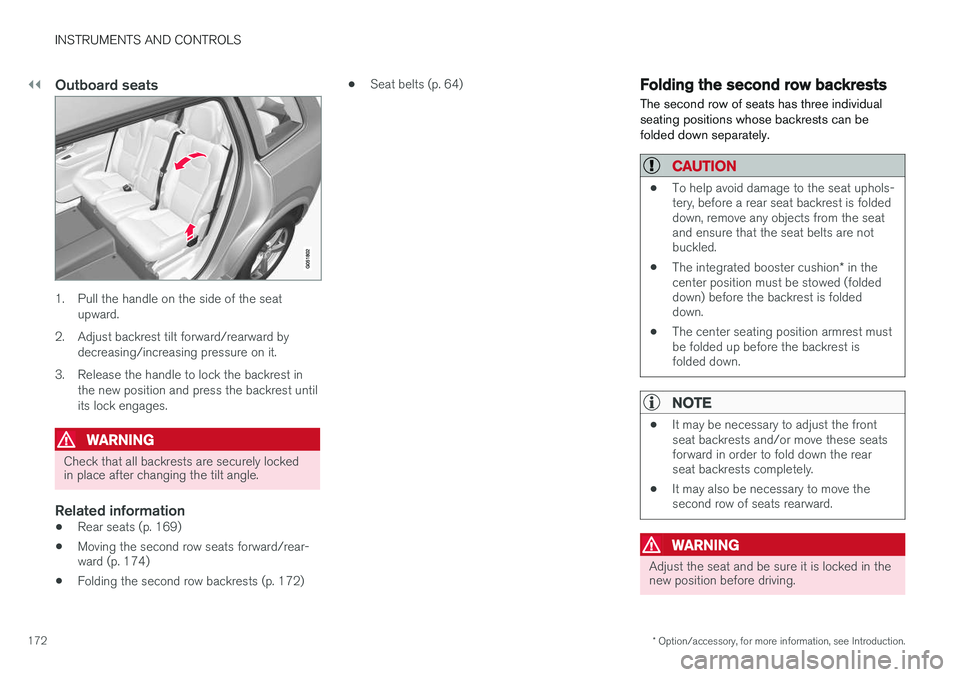
1. Pull the handle on the side of the seat
upward.
2. Adjust backrest tilt forward/rearward by decreasing/increasing pressure on it.
3. Release the handle to lock the backrest in the new position and press the backrest until its lock engages.
WARNING
Check that all backrests are securely locked in place after changing the tilt angle.
Related information
• Rear seats (p. 169)
• Moving the second row seats forward/rear- ward (p. 174)
• Folding the second row backrests (p. 172) •
Seat belts (p. 64)
Folding the second row backrests
The second row of seats has three individual seating positions whose backrests can befolded down separately.
CAUTION
• To help avoid damage to the seat uphols- tery, before a rear seat backrest is foldeddown, remove any objects from the seatand ensure that the seat belts are notbuckled.
• The integrated booster cushion
* in the
center position must be stowed (foldeddown) before the backrest is foldeddown.
• The center seating position armrest mustbe folded up before the backrest isfolded down.
NOTE
•It may be necessary to adjust the front seat backrests and/or move these seatsforward in order to fold down the rearseat backrests completely.
• It may also be necessary to move thesecond row of seats rearward.
WARNING
Adjust the seat and be sure it is locked in the new position before driving.
Page 175 of 546
INSTRUMENTS AND CONTROLS
173
Center seat
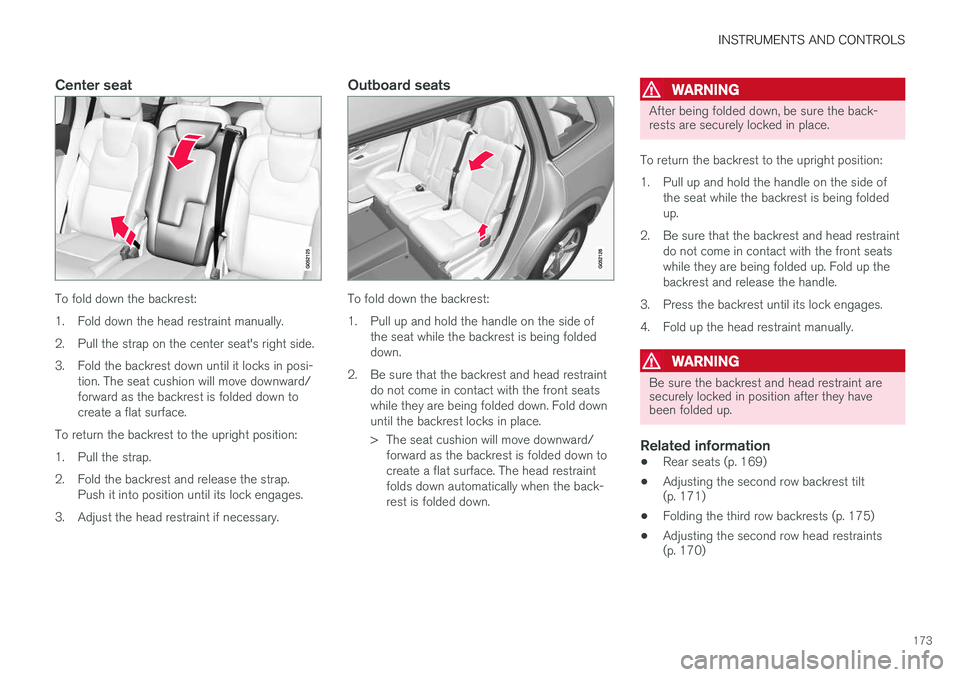
To fold down the backrest:
1. Fold down the head restraint manually.
2. Pull the strap on the center seat's right side.
3. Fold the backrest down until it locks in posi-tion. The seat cushion will move downward/ forward as the backrest is folded down tocreate a flat surface.
To return the backrest to the upright position:
1. Pull the strap.
2. Fold the backrest and release the strap. Push it into position until its lock engages.
3. Adjust the head restraint if necessary.
Outboard seats
To fold down the backrest:
1. Pull up and hold the handle on the side of the seat while the backrest is being folded down.
2. Be sure that the backrest and head restraint do not come in contact with the front seatswhile they are being folded down. Fold downuntil the backrest locks in place.
> The seat cushion will move downward/forward as the backrest is folded down to create a flat surface. The head restraintfolds down automatically when the back-rest is folded down.
WARNING
After being folded down, be sure the back- rests are securely locked in place.
To return the backrest to the upright position:
1. Pull up and hold the handle on the side of the seat while the backrest is being folded up.
2. Be sure that the backrest and head restraint do not come in contact with the front seatswhile they are being folded up. Fold up thebackrest and release the handle.
3. Press the backrest until its lock engages.
4. Fold up the head restraint manually.
WARNING
Be sure the backrest and head restraint are securely locked in position after they havebeen folded up.
Related information
• Rear seats (p. 169)
• Adjusting the second row backrest tilt (p. 171)
• Folding the third row backrests (p. 175)
• Adjusting the second row head restraints(p. 170)
Page 176 of 546
INSTRUMENTS AND CONTROLS
* Option/accessory, for more information, see Introduction.
174
Moving the second row seats forward/rearward
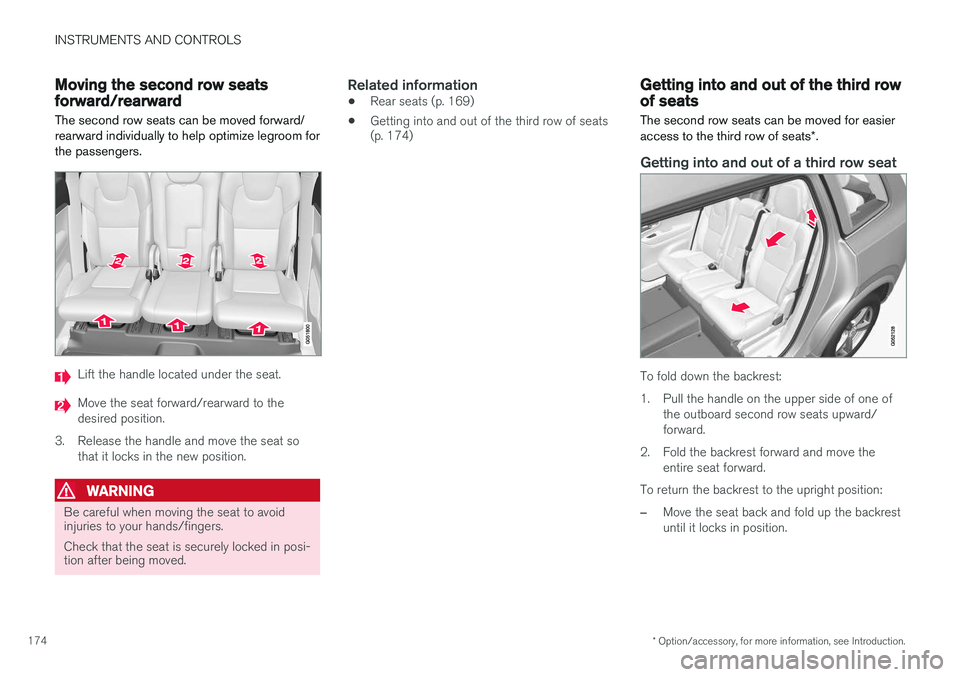
The second row seats can be moved forward/ rearward individually to help optimize legroom forthe passengers.
Lift the handle located under the seat.
Move the seat forward/rearward to the desired position.
3. Release the handle and move the seat so that it locks in the new position.
WARNING
Be careful when moving the seat to avoid injuries to your hands/fingers. Check that the seat is securely locked in posi- tion after being moved.
Related information
• Rear seats (p. 169)
• Getting into and out of the third row of seats (p. 174)
Getting into and out of the third row of seats
The second row seats can be moved for easier access to the third row of seats *.
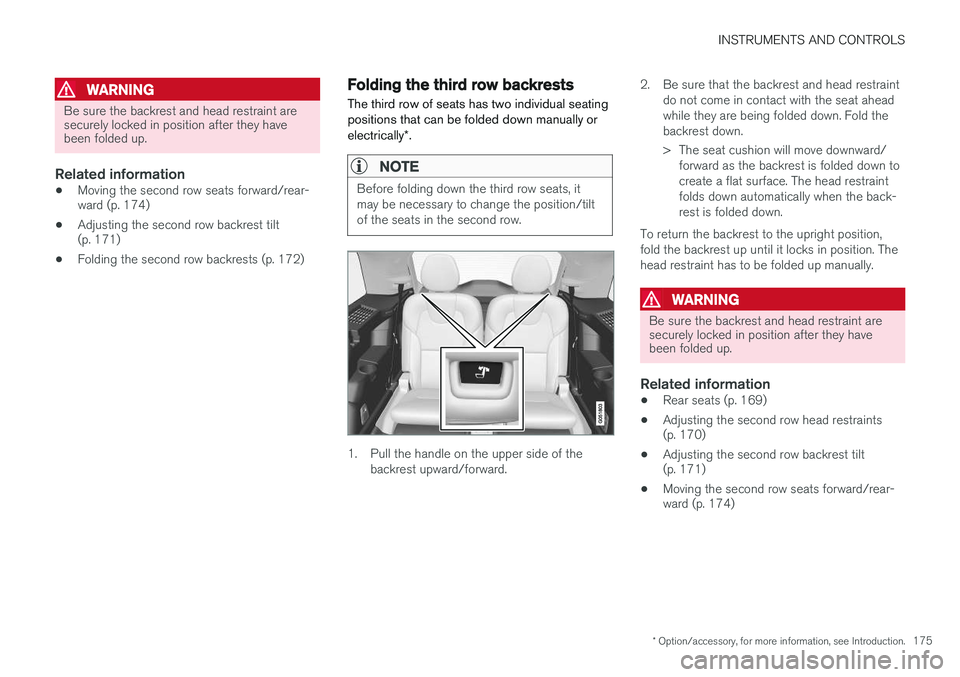
Getting into and out of a third row seat
To fold down the backrest:
1. Pull the handle on the upper side of one of
the outboard second row seats upward/ forward.
2. Fold the backrest forward and move the entire seat forward.
To return the backrest to the upright position:
–Move the seat back and fold up the backrest until it locks in position.
Page 177 of 546
INSTRUMENTS AND CONTROLS
* Option/accessory, for more information, see Introduction.175
WARNING
Be sure the backrest and head restraint are securely locked in position after they havebeen folded up.
Related information
•Moving the second row seats forward/rear- ward (p. 174)
• Adjusting the second row backrest tilt(p. 171)
• Folding the second row backrests (p. 172)
Folding the third row backrests
The third row of seats has two individual seating positions that can be folded down manually or electrically *.
NOTE
Before folding down the third row seats, it may be necessary to change the position/tiltof the seats in the second row.
1. Pull the handle on the upper side of the
backrest upward/forward. 2. Be sure that the backrest and head restraint
do not come in contact with the seat ahead while they are being folded down. Fold thebackrest down.
> The seat cushion will move downward/forward as the backrest is folded down to create a flat surface. The head restraintfolds down automatically when the back-rest is folded down.
To return the backrest to the upright position,fold the backrest up until it locks in position. Thehead restraint has to be folded up manually.
WARNING
Be sure the backrest and head restraint are securely locked in position after they havebeen folded up.
Related information
• Rear seats (p. 169)
• Adjusting the second row head restraints (p. 170)
• Adjusting the second row backrest tilt(p. 171)
• Moving the second row seats forward/rear-ward (p. 174)
Page 211 of 546
LOADING AND STORAGE
}}
209
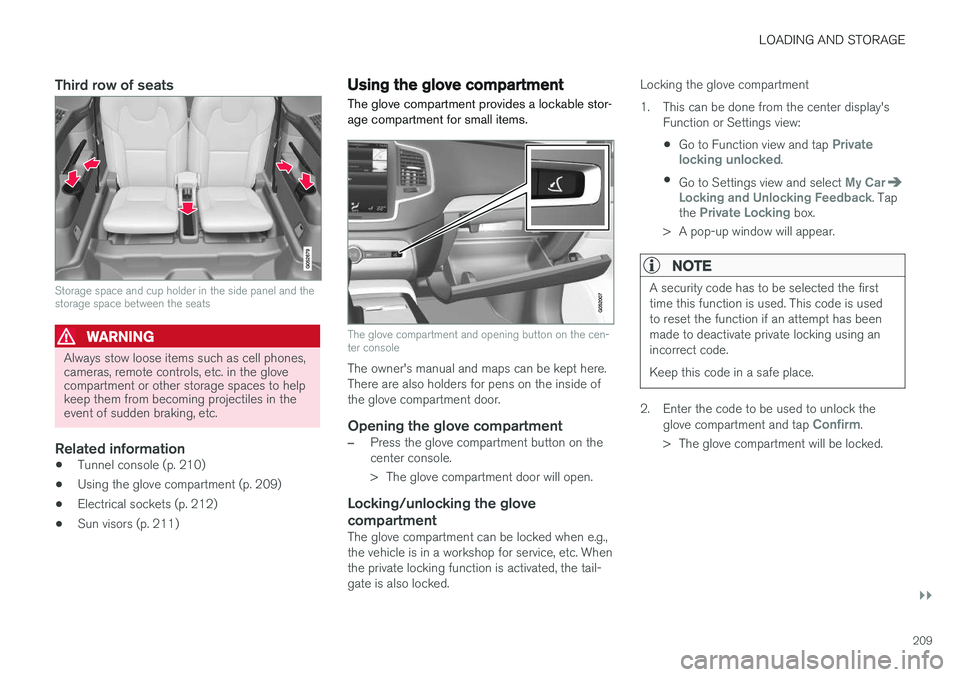
Third row of seats
Storage space and cup holder in the side panel and the storage space between the seats
WARNING
Always stow loose items such as cell phones, cameras, remote controls, etc. in the glovecompartment or other storage spaces to helpkeep them from becoming projectiles in theevent of sudden braking, etc.
Related information
•Tunnel console (p. 210)
• Using the glove compartment (p. 209)
• Electrical sockets (p. 212)
• Sun visors (p. 211)
Using the glove compartment
The glove compartment provides a lockable stor- age compartment for small items.
The glove compartment and opening button on the cen- ter console
The owner's manual and maps can be kept here. There are also holders for pens on the inside ofthe glove compartment door.
Opening the glove compartment
–Press the glove compartment button on the center console.
> The glove compartment door will open.
Locking/unlocking the glove compartment
The glove compartment can be locked when e.g., the vehicle is in a workshop for service, etc. Whenthe private locking function is activated, the tail-gate is also locked. Locking the glove compartment
1. This can be done from the center display's
Function or Settings view:
• Go to Function view and tap
Private
locking unlocked.
• Go to Settings view and select
My CarLocking and Unlocking Feedback. Tap
the Private Locking box.
> A pop-up window will appear.
NOTE
A security code has to be selected the first time this function is used. This code is usedto reset the function if an attempt has beenmade to deactivate private locking using anincorrect code. Keep this code in a safe place.
2. Enter the code to be used to unlock the glove compartment and tap Confirm.
> The glove compartment will be locked.