2016 VOLVO XC90 T8 lock
[x] Cancel search: lockPage 174 of 546
||
INSTRUMENTS AND CONTROLS
* Option/accessory, for more information, see Introduction.
172
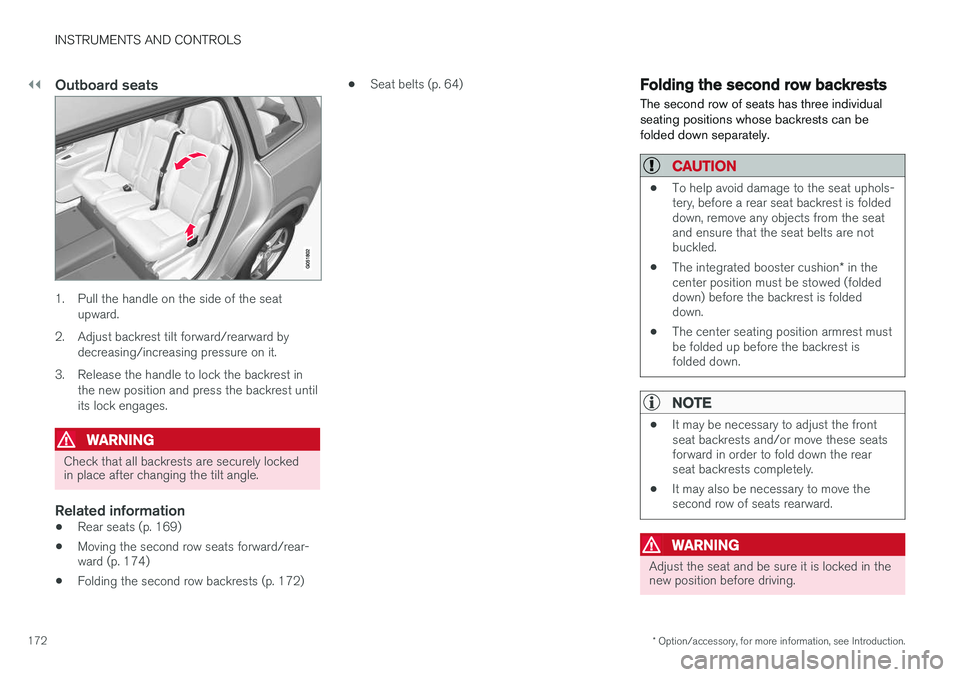
Outboard seats
1. Pull the handle on the side of the seat
upward.
2. Adjust backrest tilt forward/rearward by decreasing/increasing pressure on it.
3. Release the handle to lock the backrest in the new position and press the backrest until its lock engages.
WARNING
Check that all backrests are securely locked in place after changing the tilt angle.
Related information
• Rear seats (p. 169)
• Moving the second row seats forward/rear- ward (p. 174)
• Folding the second row backrests (p. 172) •
Seat belts (p. 64)
Folding the second row backrests
The second row of seats has three individual seating positions whose backrests can befolded down separately.
CAUTION
• To help avoid damage to the seat uphols- tery, before a rear seat backrest is foldeddown, remove any objects from the seatand ensure that the seat belts are notbuckled.
• The integrated booster cushion
* in the
center position must be stowed (foldeddown) before the backrest is foldeddown.
• The center seating position armrest mustbe folded up before the backrest isfolded down.
NOTE
•It may be necessary to adjust the front seat backrests and/or move these seatsforward in order to fold down the rearseat backrests completely.
• It may also be necessary to move thesecond row of seats rearward.
WARNING
Adjust the seat and be sure it is locked in the new position before driving.
Page 175 of 546
INSTRUMENTS AND CONTROLS
173
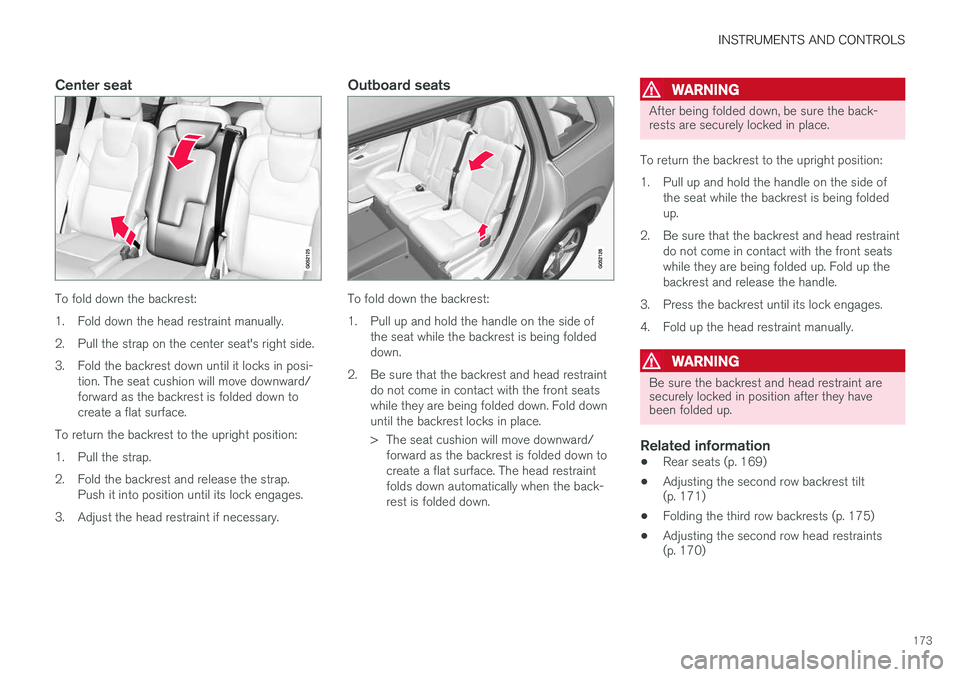
Center seat
To fold down the backrest:
1. Fold down the head restraint manually.
2. Pull the strap on the center seat's right side.
3. Fold the backrest down until it locks in posi-tion. The seat cushion will move downward/ forward as the backrest is folded down tocreate a flat surface.
To return the backrest to the upright position:
1. Pull the strap.
2. Fold the backrest and release the strap. Push it into position until its lock engages.
3. Adjust the head restraint if necessary.
Outboard seats
To fold down the backrest:
1. Pull up and hold the handle on the side of the seat while the backrest is being folded down.
2. Be sure that the backrest and head restraint do not come in contact with the front seatswhile they are being folded down. Fold downuntil the backrest locks in place.
> The seat cushion will move downward/forward as the backrest is folded down to create a flat surface. The head restraintfolds down automatically when the back-rest is folded down.
WARNING
After being folded down, be sure the back- rests are securely locked in place.
To return the backrest to the upright position:
1. Pull up and hold the handle on the side of the seat while the backrest is being folded up.
2. Be sure that the backrest and head restraint do not come in contact with the front seatswhile they are being folded up. Fold up thebackrest and release the handle.
3. Press the backrest until its lock engages.
4. Fold up the head restraint manually.
WARNING
Be sure the backrest and head restraint are securely locked in position after they havebeen folded up.
Related information
• Rear seats (p. 169)
• Adjusting the second row backrest tilt (p. 171)
• Folding the third row backrests (p. 175)
• Adjusting the second row head restraints(p. 170)
Page 176 of 546
INSTRUMENTS AND CONTROLS
* Option/accessory, for more information, see Introduction.
174
Moving the second row seats forward/rearward
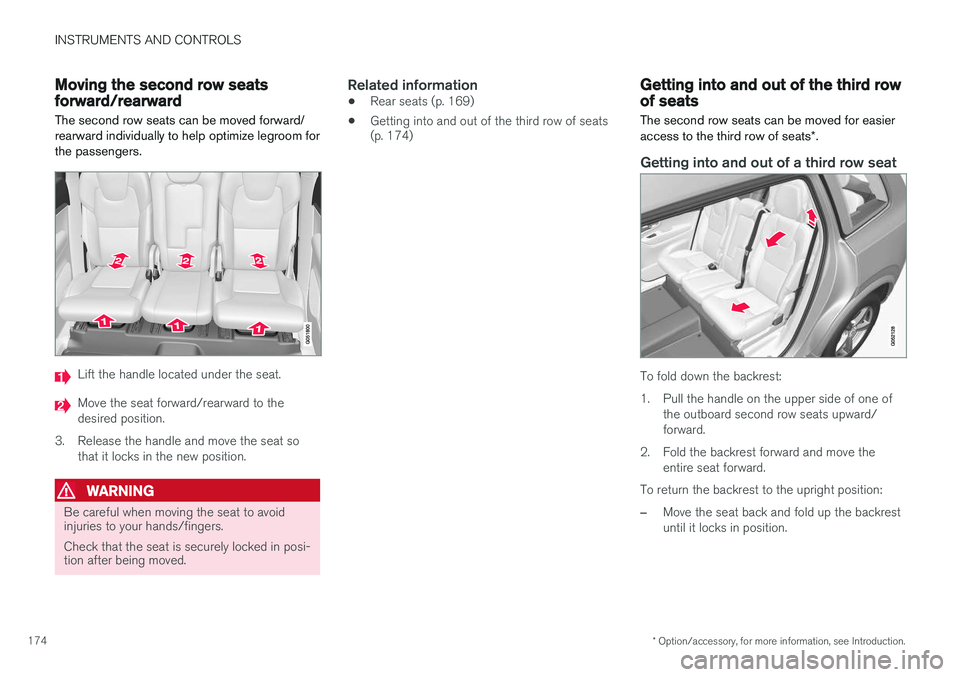
The second row seats can be moved forward/ rearward individually to help optimize legroom forthe passengers.
Lift the handle located under the seat.
Move the seat forward/rearward to the desired position.
3. Release the handle and move the seat so that it locks in the new position.
WARNING
Be careful when moving the seat to avoid injuries to your hands/fingers. Check that the seat is securely locked in posi- tion after being moved.
Related information
• Rear seats (p. 169)
• Getting into and out of the third row of seats (p. 174)
Getting into and out of the third row of seats
The second row seats can be moved for easier access to the third row of seats *.
Getting into and out of a third row seat
To fold down the backrest:
1. Pull the handle on the upper side of one of
the outboard second row seats upward/ forward.
2. Fold the backrest forward and move the entire seat forward.
To return the backrest to the upright position:
–Move the seat back and fold up the backrest until it locks in position.
Page 177 of 546
INSTRUMENTS AND CONTROLS
* Option/accessory, for more information, see Introduction.175
WARNING
Be sure the backrest and head restraint are securely locked in position after they havebeen folded up.
Related information
•Moving the second row seats forward/rear- ward (p. 174)
• Adjusting the second row backrest tilt(p. 171)
• Folding the second row backrests (p. 172)
Folding the third row backrests
The third row of seats has two individual seating positions that can be folded down manually or electrically *.
NOTE
Before folding down the third row seats, it may be necessary to change the position/tiltof the seats in the second row.
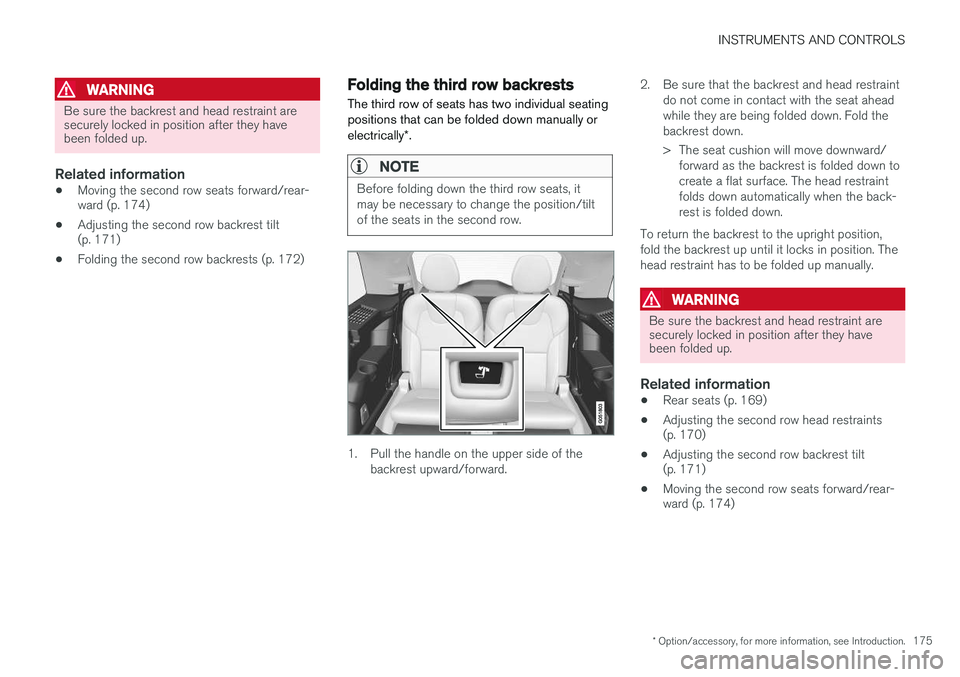
1. Pull the handle on the upper side of the
backrest upward/forward. 2. Be sure that the backrest and head restraint
do not come in contact with the seat ahead while they are being folded down. Fold thebackrest down.
> The seat cushion will move downward/forward as the backrest is folded down to create a flat surface. The head restraintfolds down automatically when the back-rest is folded down.
To return the backrest to the upright position,fold the backrest up until it locks in position. Thehead restraint has to be folded up manually.
WARNING
Be sure the backrest and head restraint are securely locked in position after they havebeen folded up.
Related information
• Rear seats (p. 169)
• Adjusting the second row head restraints (p. 170)
• Adjusting the second row backrest tilt(p. 171)
• Moving the second row seats forward/rear-ward (p. 174)
Page 181 of 546

CLIMATE
}}
* Option/accessory, for more information, see Introduction.179
Climate system sensors The climate system's sensors help regulate the passenger compartment temperature, humiditylevel, etc.
Location of the sensors
Humidity sensor: in the rearview mirror con- sole.
Ambient temperature sensor: in the pas- senger's side door mirror.
Passenger compartment temperature sen- sor: near the center console buttons.
Sunlight sensor: on the upper side of the dashboard.
NOTE
Do not cover or block the sensors with cloth- ing or other objects.
On models equipped with the optional Interior Air Quality System, there is also an air quality sensorlocated at the climate system's air intake.
Related information
•Climate control system (p. 178)
• Perceived temperature (p. 178)
• Interior Air Quality System (IAQS)
* (p. 186)
Parking climate (preconditioning)
The climate in the passenger compartment can be preconditioned and maintained, even whenthe vehicle is parked. For full functionality, the
vehicle's charging cable must be connected .
Parking climate/preconditioning and maintaining pas- senger compartment climate comfort is controlled from the Parking climate tab in the center display's Climate
view.
Page 182 of 546

||
CLIMATE
* Option/accessory, for more information, see Introduction.
180
PreconditioningPreconditioning the vehicle before driving can help reduce wear and reduce energy consump-tion during a trip.
NOTE
Full preconditioning is only possible when the vehicle's charging cable is connected. In other cases, the passenger compartment can be cooled for 3 minutes in warm weather. This function is started from the
Parking
climate tab in the center display's Climate
view.
With the charging cable connected, precondition- ing can be started immediately or a timer functioncan start this procedure at a later time. This feature utilizes several of the vehicle's sys- tems:
• The High Voltage Coolant Heater (HVCH) warms the hybrid battery and passengercompartment in cold weather.
• In warm weather, the ventilation system willattempt to cool the passenger compartmentto the current ambient temperature.
• In warm weather, the air conditioning systemwill cool the passenger compartment to acomfortable temperature.
• The electrically heated steering wheel andseats can be activated. •
Heating for the windshield, tailgate windowand door mirrors can be activated.
If preconditioning is used in warm weather, a cer- tain amount of water may condense under thevehicle, which is normal. When preconditioning is used, this system will attempt to establish a comfortable temperature in the passenger compartment but not necessarily
the temperature currently set in the climate system .
Maintaining a comfortable passenger compartment climate
The climate in the passenger compartment can be maintained even when the vehicle is parkedand the engine is turned off (e.g., if anyoneintends to remain in the vehicle). This function can only be direct-started.This function utilizes several of the vehicle's sys- tems:
• Residual heat from the engine is used help keep the passenger compartment warm incool temperatures.
• In warm weather, the ventilation system willattempt to cool the passenger compartmentto the current ambient temperature.
This function will not be activated if the vehicle is locked from the outside in order to avoid usingresidual engine heat unnecessarily. This functionis primarily intended for use when the engine isnot running but someone remains in the vehicle.
Related information
• Starting and stopping preconditioning (p. 184)
• Activating/deactivating the climate comfort retaining function
* (p. 181)
• Activating/deactivating the parking climate timer (p. 181)
• Charging the hybrid battery (p. 383)
• Hybrid battery charging cable (p. 375)
Page 184 of 546
CLIMATE
182
NOTE
•If there is not sufficient residual engine heat available, this function cannot bestarted
• This function will be turned off if the vehi-cle is locked from the outside in order toavoid using residual engine heat unnec-essarily. This function is primarilyintended for use when the engine is notrunning but someone remains in the vehi-cle
Preconditioning timer
The timer can be set to start preconditioning at a predetermined time.
The timer can store up to 8 preset times for:
• A time on a particular date
• A time on one or more days of the week, with or without the repeat function.
NOTE
Full preconditioning is only possible when the vehicle's charging cable is connected. In other cases, the passenger compartment can be cooled for 3 minutes in warm weather. This function is started from the
Parking
climate tab in the center display's Climate
view.
Related information
• Parking climate (preconditioning) (p. 179)
Setting the parking climate (preconditioning) timer
The parking climate (preconditioning) timer can be activated or deactivated at any time. How-
ever, the vehicle's changing cable must beconnected.
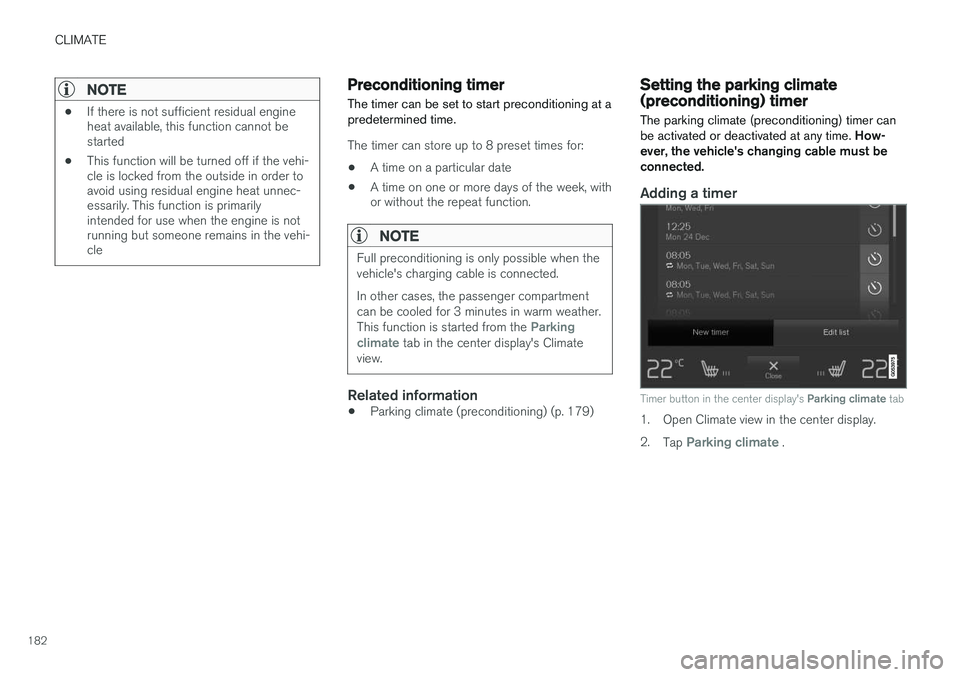
Adding a timer
Timer button in the center display's Parking climate tab
1. Open Climate view in the center display. 2.
Tap
Parking climate .
Page 185 of 546

CLIMATE
183
3.
Tap
Add timer.
> A pop-up window will open.
NOTE
A new timer setting cannot be made if there are already 8 timers set. Delete one of theexisting timer settings in order to add a newone.
4. Tap Date to set a specific date for the timer
setting. Tap
Days to set a timer for one or more days
of the week. For
Days: activate/deactivate the repeat
function by selecting/deselecting the
Repeat weekly box.
5. For
Date: Select a date for preconditioning
by scrolling in the date list using the arrow keys. For
Days: Select days of the week for pre-
conditioning by tapping the days' buttons.
6. Set the time at which preconditioning should be completed by scrolling with the arrows in the clock.
7. Tap
Confirm to add the timer setting.
> The timer settings will be added to the list and activated.
Editing a timer setting1. Open Climate view in the center display. 2. Tap the
Parking climate tab.
3. Tap the timer setting to be changed. > A pop-up window will open.
4. Change the setting as described in the sec- tion "Adding a timer setting" above.
Deleting a timer setting
The button for editing a list/deleting a timer setting in the Climate setting's Parking climate tab
1. Open Climate view in the center display. 2.
Tap the
Parking climate tab.
3. Tap
Edit list.
4. Tap the delete icon at the right in the list. >The icon will change to the text
Delete. 5.
Tap
Delete to confirm.
> The timer setting will be deleted from the list.