2016 VOLVO XC90 T8 brake light
[x] Cancel search: brake lightPage 281 of 546
DRIVER SUPPORT
}}
* Option/accessory, for more information, see Introduction.279
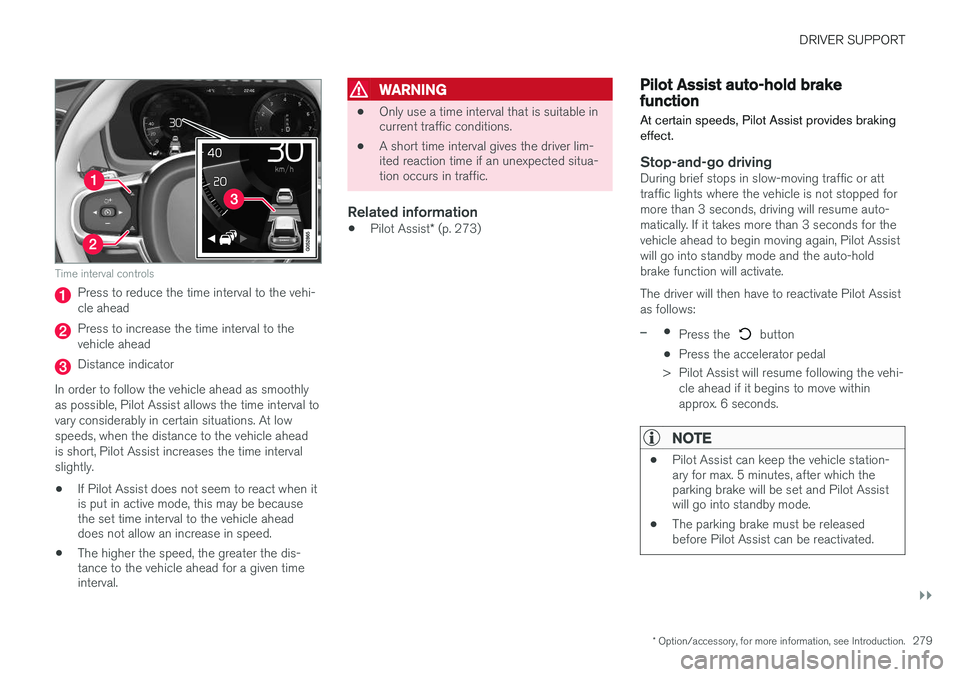
Time interval controls
Press to reduce the time interval to the vehi- cle ahead
Press to increase the time interval to the vehicle ahead
Distance indicator
In order to follow the vehicle ahead as smoothly as possible, Pilot Assist allows the time interval tovary considerably in certain situations. At lowspeeds, when the distance to the vehicle aheadis short, Pilot Assist increases the time intervalslightly.
• If Pilot Assist does not seem to react when it is put in active mode, this may be becausethe set time interval to the vehicle aheaddoes not allow an increase in speed.
• The higher the speed, the greater the dis-tance to the vehicle ahead for a given timeinterval.
WARNING
• Only use a time interval that is suitable in current traffic conditions.
• A short time interval gives the driver lim-ited reaction time if an unexpected situa-tion occurs in traffic.
Related information
•
Pilot Assist
* (p. 273)
Pilot Assist auto-hold brake function At certain speeds, Pilot Assist provides braking effect.
Stop-and-go drivingDuring brief stops in slow-moving traffic or att traffic lights where the vehicle is not stopped formore than 3 seconds, driving will resume auto-matically. If it takes more than 3 seconds for thevehicle ahead to begin moving again, Pilot Assistwill go into standby mode and the auto-holdbrake function will activate. The driver will then have to reactivate Pilot Assist as follows:
–•
Press the button
• Press the accelerator pedal
> Pilot Assist will resume following the vehi- cle ahead if it begins to move within approx. 6 seconds.
NOTE
• Pilot Assist can keep the vehicle station- ary for max. 5 minutes, after which theparking brake will be set and Pilot Assistwill go into standby mode.
• The parking brake must be releasedbefore Pilot Assist can be reactivated.
Page 283 of 546

DRIVER SUPPORT
* Option/accessory, for more information, see Introduction.281
WARNING
•Pilot Assist is not a collision avoidance system. The driver is always responsiblefor applying the brakes if the system doesnot detect another vehicle.
• Do not use Pilot Assist in demandingdriving conditions such as city driving orother heavy traffic situations, in slipperyconditions, when there is a great deal ofwater or slush on the road, during heavyrain or snow, in poor visibility, on windingroads or on highway on- or off-ramps.
• Pilot Assist uses the vehicle's cameraand radar sensor, which have limitations.
Pilot Assist may deactivate or not function optimally if:
• the lane's side market lines are missing, badly faded or cross each other.
• the division of lanes is not clear, e.g.,when a line divides or merges withanother, at exits or if there are many roadsigns/markers.
• if there are edges or other lines on ornear the lane, e.g., curbs, cracks, repairedareas, sharp shadows, etc.
• the lane is narrow or winding.
• the weather conditions (rain, snow, fog,slush, poor visibility, backlighting, etc).
The driver should also be aware that Pilot Assist has the following limitations:
• High curbs, barriers and temporary obsta- cles (cones, barriers etc) may not bedetected or could be detected incorrectlyas side marker lines, which may create arisk of collision. The driver must ensure asafe distance to these obstacles.
• The camera or radar sensor may not beable to detect objects if there are pot-holes or if there are stationary objectspartially or completely blocking the road.
• Pilot Assist does not "see" pedestrians,animals, etc.
• Pilot Assist's steering capacity is limitedand may not always be able to help thedriver keep the vehicle in the lane.
The driver can always take action to override Pilot Assist.
Steep roads and/or heavy loadsPilot Assist is primarily intended for use on rela-tively level roads. The function may not be able tomaintain the correct time interval to the vehicleahead on when driving down steep hills, when thevehicle is transporting a heavy load or if it is tow-ing a trailer. The driver should be attentive andprepared to apply the brakes in these situations.
Related information
• Radar sensor limitations (p. 258)
• Pilot Assist
* (p. 273)
• Starting and activating Pilot Assist (p. 276) •
Setting a Pilot Assist time interval (p. 278)
• Deactivating/resuming Pilot Assist (p. 277)
• Pilot Assist auto-hold brake function (p. 279)
• Camera limitations (p. 254)
Page 284 of 546
DRIVER SUPPORT
282
Other Adaptive Cruise Control (ACC) functions
ACC has several supplementary functions:
• Changing target vehicles
• Automatic standby mode when changing tar- gets
• Auto-hold brake function
• Deactivation of the auto-hold brake function
• Automatically setting the parking brake
Changing target vehicles
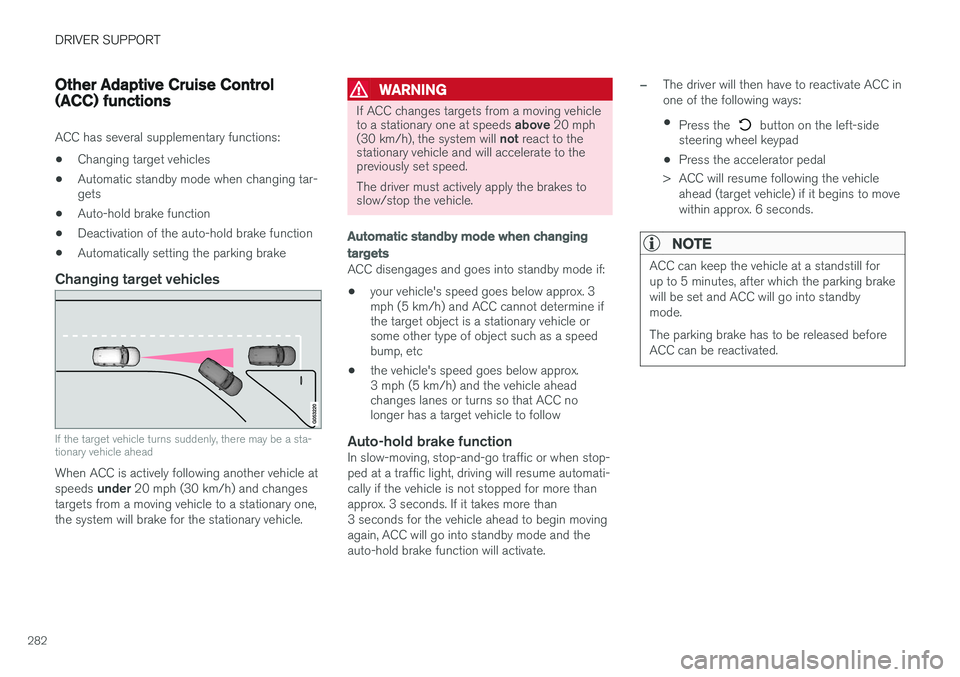
If the target vehicle turns suddenly, there may be a sta- tionary vehicle ahead
When ACC is actively following another vehicle at speeds
under 20 mph (30 km/h) and changes
targets from a moving vehicle to a stationary one, the system will brake for the stationary vehicle.
WARNING
If ACC changes targets from a moving vehicle to a stationary one at speeds above 20 mph
(30 km/h), the system will not react to the
stationary vehicle and will accelerate to the previously set speed. The driver must actively apply the brakes to slow/stop the vehicle.
Automatic standby mode when changing targets
ACC disengages and goes into standby mode if:
• your vehicle's speed goes below approx. 3 mph (5 km/h) and ACC cannot determine ifthe target object is a stationary vehicle orsome other type of object such as a speedbump, etc
• the vehicle's speed goes below approx.3 mph (5 km/h) and the vehicle aheadchanges lanes or turns so that ACC nolonger has a target vehicle to follow
Auto-hold brake functionIn slow-moving, stop-and-go traffic or when stop- ped at a traffic light, driving will resume automati-cally if the vehicle is not stopped for more thanapprox. 3 seconds. If it takes more than3 seconds for the vehicle ahead to begin movingagain, ACC will go into standby mode and theauto-hold brake function will activate.
–The driver will then have to reactivate ACC in one of the following ways:
• Press the
button on the left-side
steering wheel keypad
• Press the accelerator pedal
> ACC will resume following the vehicle ahead (target vehicle) if it begins to move
within approx. 6 seconds.
NOTE
ACC can keep the vehicle at a standstill for up to 5 minutes, after which the parking brakewill be set and ACC will go into standbymode. The parking brake has to be released before ACC can be reactivated.
Page 291 of 546
DRIVER SUPPORT
}}}}
289
When City Safety applies the brakes, the brake lights will illuminate. When City Safety is triggered and applies the brakes, a text message will be displayed in theinstrument panel.
Related information
•
City Safety
™ troubleshooting (p. 295)
• City Safety in crossing traffic (p. 291)
• City Safety limitations (p. 293)
• City Safety symbols and messages (p. 297)
• Detecting cyclists and pedestrians with City Safety (p. 290)
• Rear Collision Warning (RCW) (p. 292)
• City Safety warning level settings (p. 289)
• City Safety in crossing traffic (p. 291)
• Seat belts (p. 64)
City Safety warning level settings
City Safety is always activated but the function's warning distance can be adjusted.
NOTE
City Safety cannot be turned off and activates automatically each time the engine/electricmotor is started.
Setting a warning level (distance)
The distance set for warnings determines the system's responsiveness and sets the distance atwhich visual, audible and tangible (haptic) warn-ings will be triggered. To do so:1. Tap
Settings in the center display's Top
view.
2. Tap
My CarIntelliSafeCity Safety.
3. Choose among
Earlier, Normal or Later.
Begin by choosing
Earlier. If too many warnings
are given, change to Normal.
If the driver feels that warnings are given too often, the warning level can be lowered. Thismeans that warnings will be provided later, result-ing in fewer warnings being given. The setting
Later should only used in exceptional
circumstances, e.g., for a more dynamic driving style.
WARNING
• No automatic system can be guaranteed to function 100% correctly in all situa-tions. For that reason, never test CitySafety by driving toward a person orobject. This could result in serious injuryor death.
• Even if the setting
Earlier has been
selected, warnings may be perceived as being given late, e.g., if the difference inspeed is great or if the vehicle aheadbrakes suddenly.
• City Safety can provide a warning for apotential collision but it can never shortenthe driver's reaction time.
• To help make City Safety as effective as possible, always using the setting
Earlieris recommended.
NOTE
•Due to local traffic regulations in certain markets, RCW will
not activate the rear
turn signals. That part of the function will be deactivated.
• The use of the rear turn signals will alsobe deactivated if the City Safety warning level is set at
Later. See also the section
"Setting a warning level (distance)" in the article "City Safety settings."
• If RCW detects a vehicle approachingfrom behind, the seat belt pretensioners
Page 295 of 546

DRIVER SUPPORT
}}
293
Related information
•City Safety
™ (p. 287)
• Whiplash protection system (p. 63)
• Seat belts (p. 64)
• City Safety warning level settings (p. 289)
City Safety limitations
City Safety ™ may have limited or reduced func-
tionality in certain situations.
The function has several limitations that the driver should be familiar with:
Low objects
Hanging objects, such as flags for overhanging loads or accessories such as auxiliary lights orfront protective grids that extend beyond theheight of the hood may limit City Safety's func-tion.
Slippery driving conditions
The extended braking distance on slippery roads may reduce City Safety's capacity to help avoid acollision. In situations of this type, the ABSbrakes and Electronic Stability Control will helpprovide braking power and stability.
Backlighting
Strong sunlight, reflections, extreme light con- trasts, the use of sunglasses, or if the driver is notlooking straight ahead may make the visual warn-ing signal in the windshield difficult to see.
Heat
If the temperature in the passenger compartment is very high, the camera and radar sensor may betemporarily turned off for approx. 15 minutesafter the engine has been started to protect theirelectronic components. When the temperaturehas cooled sufficiently, the camera and radarsensor will restart automatically. The visual warning signal may also be temporarilydisabled due to high passenger compartmenttemperatures caused by strong sunlight. Warnings may not be given if the distance to the vehicle ahead is short and the driver is activelyoperating the vehicle (clearly depressing a pedalor turning the steering wheel).
Reduced visibility
City Safety's functions may be greatly impeded or deactivated by e.g., intense snowfall or rain, indense fog, in very dusty conditions or if there isblowing snow in front of the vehicle. Condensa-tion, ice, snow or dirt on the windshield may alsoreduce the system's functionality.
NOTE
•
Keep the windshield in front of the radar sensor free of ice, snow, dirt, etc.
• Snow or ice on the hood deeper than2 inches (5 cm) may obstruct the sensor.Keep the hood free of ice and snow.
• Do not mount or in any way attach any-thing on the windshield that couldobstruct the radar sensor.
Page 309 of 546
DRIVER SUPPORT
}}
307
The tone becomes constant when you are within approximately 1 ft (30 cm) of an object and theinnermost sensor field will be red. If there areobjects within this distance both behind and infront of the vehicle, the tone alternates betweenfront and rear speakers. While an audible signal is being given, its volume level can be raised/lowered using the
>II control
in the center console or can be adjusted in the Setting menu.
WARNING
Park Assist is an information system, NOT a safety system. This system is designed to bea supplementary aid when parking the vehicle.It is not, however, intended to replace the driv-er's attention and judgement.
Rear park assist
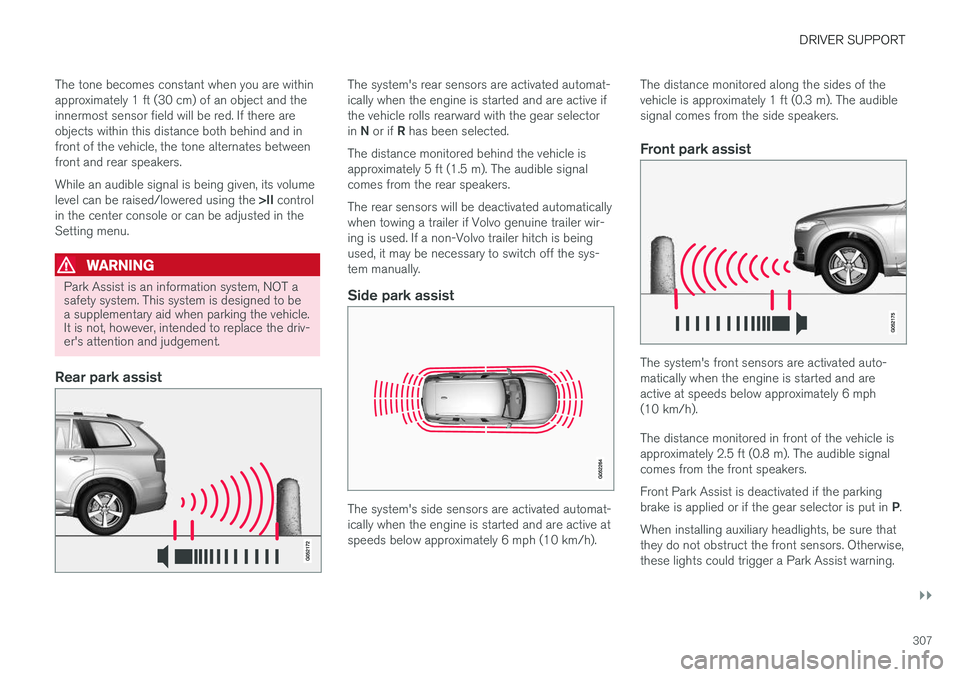
The system's rear sensors are activated automat- ically when the engine is started and are active ifthe vehicle rolls rearward with the gear selector in N or if R has been selected.
The distance monitored behind the vehicle is approximately 5 ft (1.5 m). The audible signalcomes from the rear speakers. The rear sensors will be deactivated automatically when towing a trailer if Volvo genuine trailer wir-ing is used. If a non-Volvo trailer hitch is beingused, it may be necessary to switch off the sys-tem manually.
Side park assist
The system's side sensors are activated automat- ically when the engine is started and are active atspeeds below approximately 6 mph (10 km/h). The distance monitored along the sides of thevehicle is approximately 1 ft (0.3 m). The audiblesignal comes from the side speakers.
Front park assist
The system's front sensors are activated auto- matically when the engine is started and areactive at speeds below approximately 6 mph(10 km/h). The distance monitored in front of the vehicle is approximately 2.5 ft (0.8 m). The audible signalcomes from the front speakers. Front Park Assist is deactivated if the parking brake is applied or if the gear selector is put in
P.
When installing auxiliary headlights, be sure that they do not obstruct the front sensors. Otherwise,these lights could trigger a Park Assist warning.
Page 318 of 546
DRIVER SUPPORT
* Option/accessory, for more information, see Introduction.
316
Park Assist Camera (PAC) *
limitations
The Park Assist Camera system has certain limi- tations that the driver should be aware of.
NOTE
Bicycle carriers or other accessories mounted on the tailgate may obstruct the camera'sfield of vision.
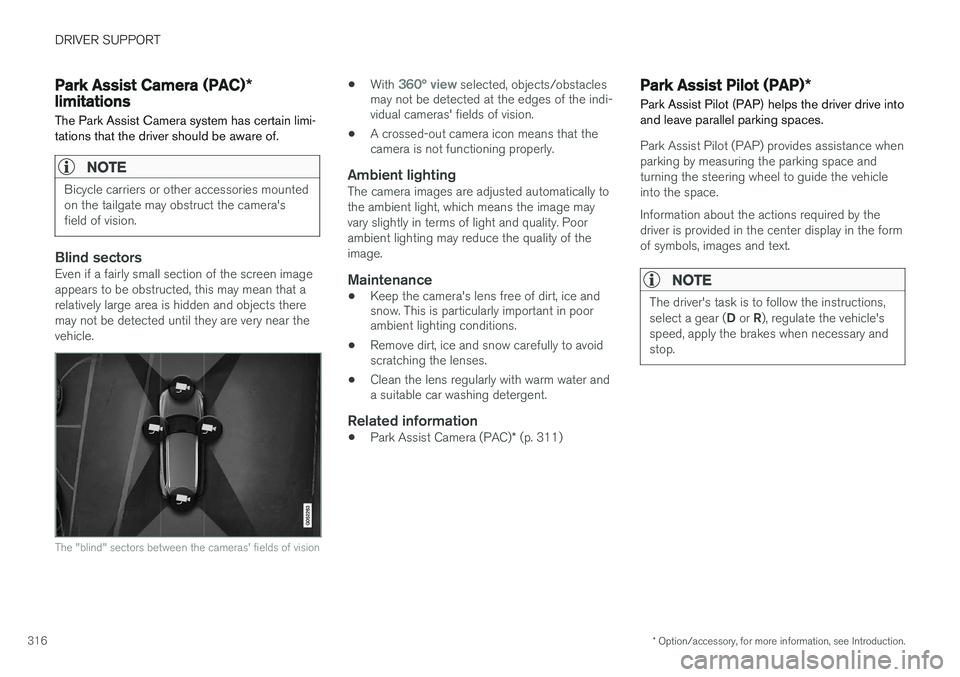
Blind sectorsEven if a fairly small section of the screen image appears to be obstructed, this may mean that arelatively large area is hidden and objects theremay not be detected until they are very near thevehicle.
The "blind" sectors between the cameras' fields of vision
• With 360° view selected, objects/obstacles
may not be detected at the edges of the indi- vidual cameras' fields of vision.
• A crossed-out camera icon means that thecamera is not functioning properly.
Ambient lightingThe camera images are adjusted automatically to the ambient light, which means the image mayvary slightly in terms of light and quality. Poorambient lighting may reduce the quality of theimage.
Maintenance
• Keep the camera's lens free of dirt, ice and snow. This is particularly important in poorambient lighting conditions.
• Remove dirt, ice and snow carefully to avoidscratching the lenses.
• Clean the lens regularly with warm water anda suitable car washing detergent.
Related information
•
Park Assist Camera (PAC)
* (p. 311)
Park Assist Pilot (PAP) *
Park Assist Pilot (PAP) helps the driver drive into and leave parallel parking spaces.
Park Assist Pilot (PAP) provides assistance when parking by measuring the parking space andturning the steering wheel to guide the vehicleinto the space. Information about the actions required by the driver is provided in the center display in the formof symbols, images and text.
NOTE
The driver's task is to follow the instructions, select a gear ( D or R), regulate the vehicle's
speed, apply the brakes when necessary and stop.
Page 322 of 546

||
DRIVER SUPPORT
* Option/accessory, for more information, see Introduction.
320 adjusted by driving slightly forward and backing up. 1.
Put the gear selector in D, wait until the
steering wheel has turned and drive forward slowly.
2. Stop the vehicle when you are instructed by PAP to do so.
3. Put the gear selector in R, back up slowly
and stop when you are instructed by PAP todo so.
When the parking procedure is finished (this will be indicated by a text message and a graphicimage), PAP switches off automatically. If neces-sary, the driver may need to make minor adjust-ments to ensure that the vehicle is parked cor-rectly.
CAUTION
The warning distance is shorter when PAP is using the sensors than when Park Assist isusing them.
Leaving a parking spaceThis function can only be used for a vehicle that has been par-allel parked and is activated inthe center display's Functionview. 1. Tap the
Park out button in
the center display's Function view.
2. Follow the instructions provided. The proce- dure is the same as when parking the vehicle. The steering wheel may turn back slightly when the function is completed and the driver mayhave to turn the back before leaving the parkingspace. If PAP determines that the driver can leave the parking space without assistance, the functionwill deactivate before the vehicle is completelyout of the space.
Related information
• Park Assist Pilot (PAP)
* (p. 316)
• Park Assist Pilot (PAP)
* limitations (p. 320)
• Park Assist Pilot (PAP)
* symbols and mes-
sages (p. 322)
Park Assist Pilot (PAP) * limitations
The PAP function may be limited in certain situa- tions.
The PAP parking sequence is cancelledA parking sequence will be cancelled:
• if the vehicle is driven too fast (above approx. 4 mph (7 km/h)
• if the driver taps
Cancel in the center display
• if the driver moves the steering wheel with sufficient force.
• if the anti-lock brakes or Electronic StabilityControl are activated (e.g., if a wheel beginsto spin or lose traction)
In such cases, a text message will explain why the parking sequence was cancelled.
NOTE
• PAP will not function correctly if its sen- sors are obstructed by dirt, snow, etc.
• In certain situations, PAP may not be ableto measure a parking space. This couldbe due to external sources of sound (e.g.,a vehicle's horn, tires on wet asphalt,pneumatic brakes, noise from a motorcy-cle's exhaust, etc.) emitting ultrasoundusing approximately the same frequen-cies as PAP.