2016 VOLVO S80 fog light
[x] Cancel search: fog lightPage 127 of 380

04 Climate
04
125
NOTE
If the blower is turned off completely, the air conditioning is disengaged, which mayresult in fogging on the windows.
Related information
•Climate – general information (p. 118)
• Electronic climate control (ECC) (p. 122)
• Air conditioning (p. 125)
• Climate – sensors (p. 119)
Automatic climate control
The Auto function automatically controls tem- perature (p. 124), air conditioning (p. 125),blower speed (p. 124), recirculation (p. 128)and air distribution (p. 121).
If you select one or moremanual functions, the otherfunctions continue to becontrolled automatically. Theair quality (p. 119) sensor isengaged and all manual set-tings are switched off when
AUTO is pressed. The display shows
AUTO
CLIMATE.
Blower speed in automatic mode can be set under
Climate settingsAutomatic blower
adjustment
. Choose between Low, Normalor High.
NOTE
Selecting the lowest blower speed may increases the risk of fog forming on thewindows.
Related information
• Climate – general information (p. 118)
Air conditioning
The air conditioning function cools and dehu- midifies the air in the passenger compart-ment.
When the indicator light inthe button is on, the air con-ditioning is controlled auto-matically. This cools/heatsand dehumidifies the incom-ing air. When the indicatorlight in the button is off, the
air conditioning is disengaged. Other func-tions are still controlled automatically. Whenmaximum defroster (p. 126) is selected, theair conditioning system is set for maximumblower speed and dehumidifies the cabin asquickly as possible.
Related information
• Climate – general information (p. 118)
• Automatic climate control (p. 125)
Page 130 of 380
04 Climate
04
128
Air distribution – recirculation
Recirculation can be used to shut out exhaust fumes, smoke, etc., from the passenger com-partment.The air in the passengercompartment is then recircu-lated, i.e., no air from outsidethe car is taken into the carwhen this function is acti-vated. The indicator light inthe button will illuminate
when recirculation is selected. If the air in the car recirculates for too long, there is a risk of condensation forming on theinsides of the windows, especially in winter.
TimerThe timer function minimizes the risk of fog- ging, or stale air when the recirculation func-tion is selected by automatically switching offthe function after a certain length of time,depending on the ambient temperature. Acti-vate/deactivate the function under
Climate
settings
Recirculation timer. See My Car
– introduction (p. 70) for a description of the menu system.
NOTE
When Defroster is selected, recirculation is always deactivated.
Related information
• Climate – general information (p. 118)
• Air distribution – general (p. 121)
• Air distribution – function (p. 127)
• Air distribution – table (p. 129)
Page 193 of 380

07 Driver support
07
}}
191
City Safety – operation
Using City Safety™
NOTE
The City Safety™ function is activated automatically each time the engine hasbeen switched off and restarted.
On and OffIn certain situations, it may be desirable to switch City Safety™ off, such as when drivingin close quarters where leaves, branches, etc.may obscure the hood and windshield. When the engine is running, City Safety™ can be switched off as follows: Press My Car in the center console control
panel and go to
SettingsCar settings
Driver support systemsCity Safety.
Select
Off.
If the engine is switched off, City Safety™ will reactivate when the engine is restarted.
WARNING
The laser sensor emits light when the igni- tion is in mode II or higher, even if City
Safety™ has been switched off.
To switch City Safety™ on again:
• Follow the same procedure as for switch- ing City Safety™ off but select
On.
Related information
•City Safety – introduction (p. 189)
• City Safety – function (p. 190)
• City Safety – limitations (p. 191)
• City Safety – troubleshooting (p. 192)
• City Safety – symbols and messages (p. 194)
• City Safety – Laser sensor (p. 195)
• My Car – introduction (p. 70)
City Safety – limitations
Limitations
WARNING
The laser sensor has certain limitations and its function may be reduced (or it maynot function at all) in conditions such asheavy rain or snowfall, or by dense fog orthick, blowing dust or snow. Condensa-tion, dirt, ice or snow on the windshieldmay also interfere with the sensor’s func-tion.
The sensor used by City Safety™ is designed to detect cars and other larger motor vehiclesahead of your vehicle in both daylight anddarkness. Objects such as warning flags hanging from long objects on the roof or accessories suchas auxiliary lights or protective arches on thefront of the vehicle that are higher than thehood may also impede the sensor’s function. Braking distance to the vehicle ahead increa- ses on slippery road surfaces, which mayreduce City Safety’s capacity to avoid a colli-sion. In situations like this, the stability sys-tem (see Stability system – introduction(p. 162)) will help provide the best possiblebraking capacity and stability. City Safety™ emits a laser beam and meas- ures the way in which the light is reflected.
Page 206 of 380

07 Driver support
07
204* Option/accessory, for more information, see Introduction.
The camera’s limitations
The camera has the same limitations as the human eye. The camera is used by Pedestrian and Cyclist Detection with Full Auto Brake Collision warn-ing – introduction (p. 196), Active High Beams(Active high beams (AHB)* (p. 84)), Road SignInformation (Road Sign Information (RSI)* –introduction (p. 166)) and Driver Alert System(Driver Alert System (p. 209)) with LaneDeparture Warning.
NOTE
• To help protect the camera in very hot conditions, it may be temporarilyswitched off for approximately 15minutes after the engine has beenstarted.
• Keep the section of the windshield infront of the camera clean and free ofice, snow, or condensation.
WARNING
•
The camera has the same type of limi- tations as the human eye, i.e., it can-not see as well in heavy snowfall orrain, thick fog or in heavy blowing dustor snow. In such conditions, systemsdepending on the camera may experi-ence greatly reduced functionality ormay be temporarily deactivated.
• Never place any objects, decals, etc.,on the windshield in front of the cam-era. This could reduce or block thecamera’s function, and could causeone or more of the systems that utilizethe camera to stop functioning.
• Strong sunlight, reflections from theroad surface, ice or snow covering theroad, a dirty road surface, or unclearlane marker lines may drasticallyreduce the camera’s capacity todetect the side of a lane, a pedestrian,a cyclist or another vehicle.
Related information
•
Collision warning – introduction (p. 196)
• Collision warning* – function (p. 198)
• Collision warning* – operation (p. 199)
• Collision warning* – Pedestrian detection (p. 201)
• Collision warning* – Cyclist detection(p. 200)
• Collision warning* – limitations (p. 202) •
Collision warning – troubleshooting(p. 205)
• Collision warning – symbols and mes-sages (p. 207)
• Road Sign Information (RSI)* – introduc-tion (p. 166)
• Driver Alert System (p. 209)
• Active high beams (AHB)* (p. 84)
Page 230 of 380
||
07 Driver support
07
228* Option/accessory, for more information, see Introduction.
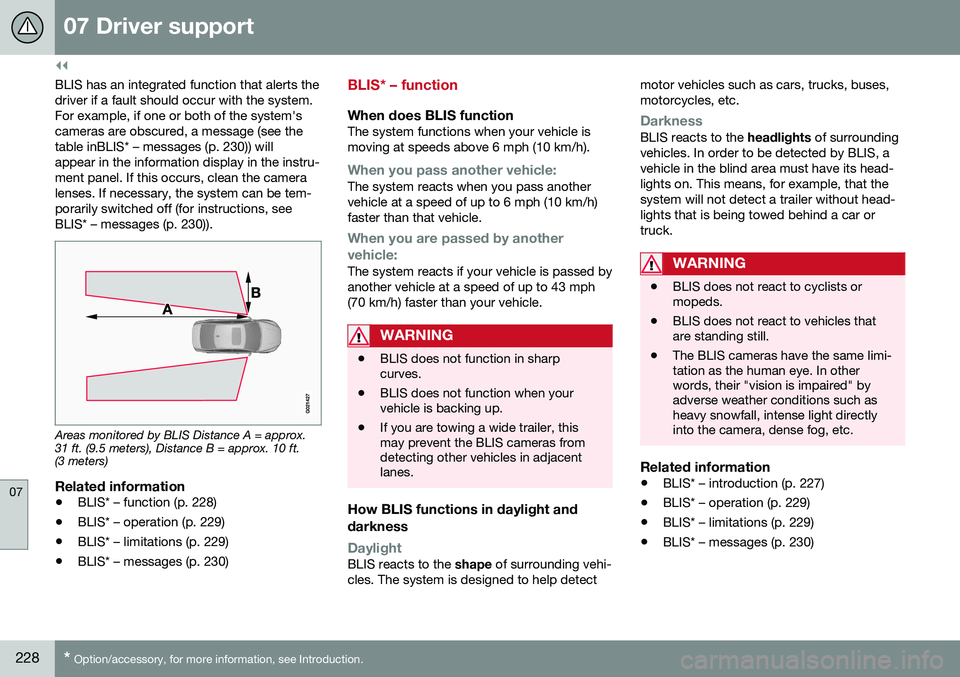
BLIS has an integrated function that alerts the driver if a fault should occur with the system.For example, if one or both of the system'scameras are obscured, a message (see thetable inBLIS* – messages (p. 230)) willappear in the information display in the instru-ment panel. If this occurs, clean the cameralenses. If necessary, the system can be tem-porarily switched off (for instructions, seeBLIS* – messages (p. 230)).
Areas monitored by BLIS Distance A = approx. 31 ft. (9.5 meters), Distance B = approx. 10 ft.(3 meters)
Related information
• BLIS* – function (p. 228)
• BLIS* – operation (p. 229)
• BLIS* – limitations (p. 229)
• BLIS* – messages (p. 230)
BLIS* – function
When does BLIS functionThe system functions when your vehicle is moving at speeds above 6 mph (10 km/h).
When you pass another vehicle:The system reacts when you pass another vehicle at a speed of up to 6 mph (10 km/h)faster than that vehicle.
When you are passed by another
vehicle:
The system reacts if your vehicle is passed by another vehicle at a speed of up to 43 mph(70 km/h) faster than your vehicle.
WARNING
• BLIS does not function in sharp curves.
• BLIS does not function when yourvehicle is backing up.
• If you are towing a wide trailer, thismay prevent the BLIS cameras fromdetecting other vehicles in adjacentlanes.
How BLIS functions in daylight and darkness
DaylightBLIS reacts to the
shape of surrounding vehi-
cles. The system is designed to help detect motor vehicles such as cars, trucks, buses, motorcycles, etc.
DarknessBLIS reacts to the
headlights of surrounding
vehicles. In order to be detected by BLIS, a vehicle in the blind area must have its head-lights on. This means, for example, that thesystem will not detect a trailer without head-lights that is being towed behind a car ortruck.
WARNING
• BLIS does not react to cyclists or mopeds.
• BLIS does not react to vehicles thatare standing still.
• The BLIS cameras have the same limi-tation as the human eye. In otherwords, their "vision is impaired" byadverse weather conditions such asheavy snowfall, intense light directlyinto the camera, dense fog, etc.
Related information
•
BLIS* – introduction (p. 227)
• BLIS* – operation (p. 229)
• BLIS* – limitations (p. 229)
• BLIS* – messages (p. 230)
Page 321 of 380
10 Maintenance and servicing
10
}}
319
CAUTION
Keep the area around the power steering fluid reservoir clean when checking.
Bulbs – introduction
Certain bulbs can be replaced by the vehicle's owner. However, the bulbs on the followinglist should only be replaced by a trained andqualified Volvo service technician. All bulb specifications are listed in Bulbs – specifications (p. 326).• Active Bending Lights
• Front parking lights
• Daytime running lights
• Turn signals in the door mirrors
• Approach lighting in the door mirrors
• Interior lighting
• Rear parking lights
• Rear side marker lights
• Brake lights
• LED bulbsNOTE
•For information regarding any bulbs not mentioned in this section, pleasecontact your Volvo retailer or a trainedand authorized Volvo service techni-cian.
• Always switch off the ignition beforestarting to replace a bulb.
• If an error message remains in the dis-play after a faulty bulb has beenreplaced, contact an authorized Volvoworkshop.
• Condensation may form temporarily onthe inside of the lenses of exteriorlights such as headlights, fog lights, ortaillights. This is normal and the lightsare designed to withstand moisture.Normally, condensation will dissipateafter the lights have been on for ashort time.
• The optional Active Bending Lightbulbs contain trace amounts of mer-cury. These bulbs should always bedisposed of by a trained and qualifiedVolvo service technician.
Page 327 of 380
10 Maintenance and servicing
10
325
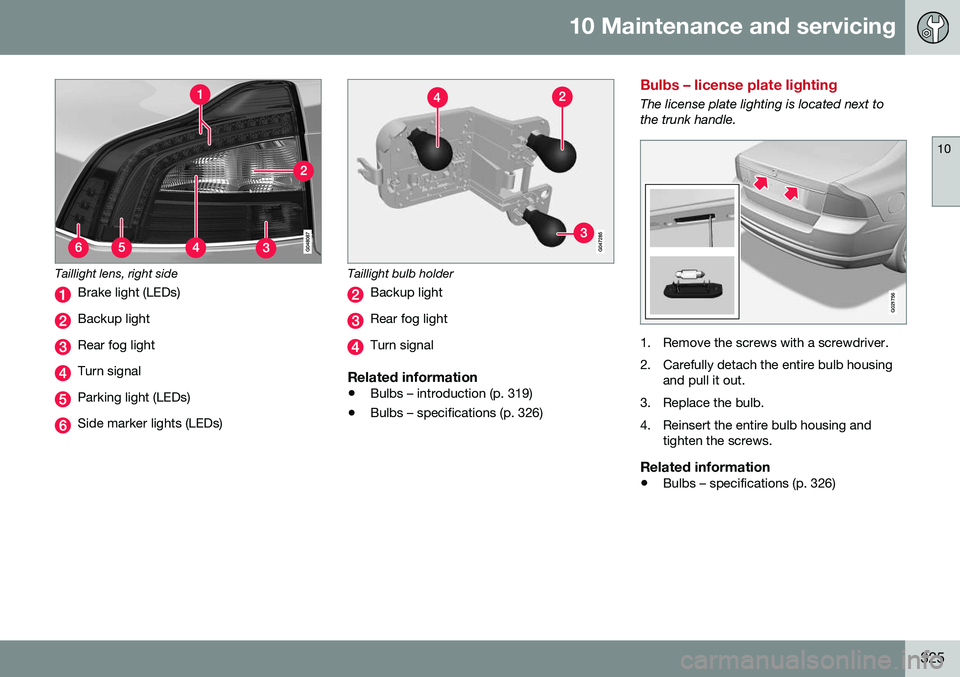
Taillight lens, right side
Brake light (LEDs)
Backup light
Rear fog light
Turn signal
Parking light (LEDs)
Side marker lights (LEDs)
Taillight bulb holder
Backup light
Rear fog light
Turn signal
Related information
•Bulbs – introduction (p. 319)
• Bulbs – specifications (p. 326)
Bulbs – license plate lighting
The license plate lighting is located next to the trunk handle.
G021756
1. Remove the screws with a screwdriver.
2. Carefully detach the entire bulb housing
and pull it out.
3. Replace the bulb.
4. Reinsert the entire bulb housing and tighten the screws.
Related information
• Bulbs – specifications (p. 326)
Page 328 of 380
10 Maintenance and servicing
10
326* Option/accessory, for more information, see Introduction.
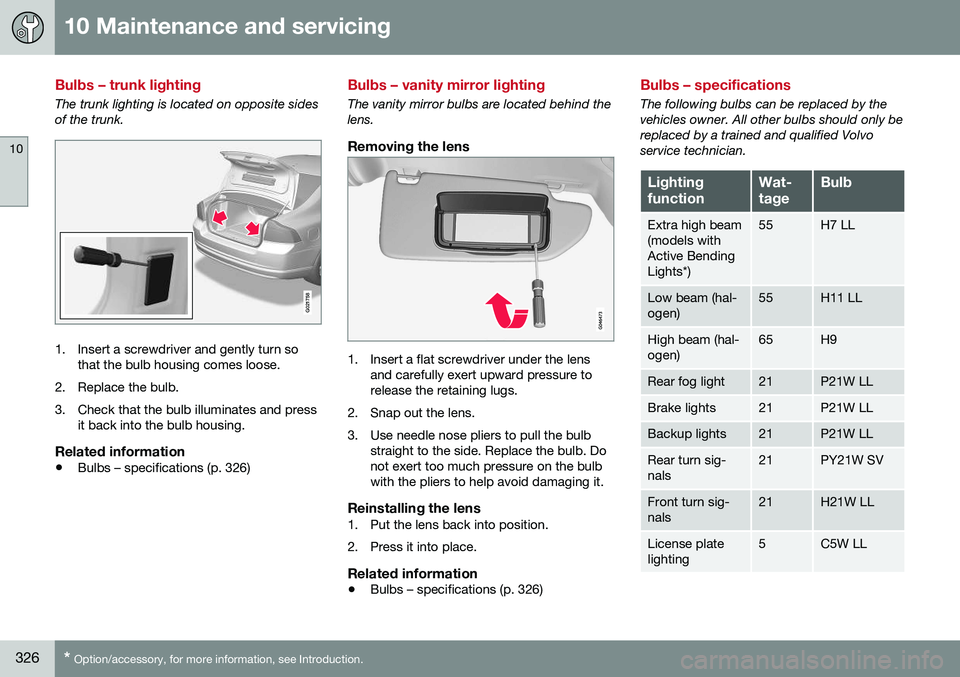
Bulbs – trunk lighting
The trunk lighting is located on opposite sides of the trunk.
G021758
1. Insert a screwdriver and gently turn so
that the bulb housing comes loose.
2. Replace the bulb.
3. Check that the bulb illuminates and press it back into the bulb housing.
Related information
• Bulbs – specifications (p. 326)
Bulbs – vanity mirror lighting
The vanity mirror bulbs are located behind the lens.
Removing the lens
1. Insert a flat screwdriver under the lens
and carefully exert upward pressure to release the retaining lugs.
2. Snap out the lens.
3. Use needle nose pliers to pull the bulb straight to the side. Replace the bulb. Do not exert too much pressure on the bulbwith the pliers to help avoid damaging it.
Reinstalling the lens1. Put the lens back into position.
2. Press it into place.
Related information
• Bulbs – specifications (p. 326)
Bulbs – specifications
The following bulbs can be replaced by the vehicles owner. All other bulbs should only bereplaced by a trained and qualified Volvoservice technician.
Lighting functionWat- tageBulb
Extra high beam (models withActive BendingLights*)55H7 LL
Low beam (hal- ogen)55H11 LL
High beam (hal- ogen)65H9
Rear fog light21P21W LL
Brake lights21P21W LL
Backup lights21P21W LL
Rear turn sig- nals21PY21W SV
Front turn sig- nals21H21W LL
License plate lighting5C5W LL