2016 VOLVO S60 Messages
[x] Cancel search: MessagesPage 232 of 392

||
07 Driver support
07
230* Option/accessory, for more information, see Introduction.
1. Searching for and measuring a parking
space. While this is taking place, the vehi- cle's speed must be below 20 mph(30 km/h). See also steps A and B in the
illustration in the section "1: Searchingand measuring" in Park Assist Pilot (PAP)*– operation (p. 230).
2. Steering the vehicle as it backs into the parking space. See also steps C and D in
the illustration in the section "2: Backinginto the parking space" in Park AssistPilot (PAP)* – operation (p. 230).
3. Adjusting the vehicle's position in the parking space by moving forward andrearward. See also steps E and F in the
illustration in the section "3: Adjusting thevehicle's position" in Park Assist Pilot(PAP)* – operation (p. 230).
Related information
• Park Assist Pilot (PAP)* – introduction(p. 229)
• Park Assist Pilot (PAP)* – limitations(p. 232)
• Park Assist Pilot (PAP)* – symbols andmessages (p. 233)
• Park assist – introduction (p. 225)
• Rear Park Assist Camera (PAC) – intro-duction (p. 234)
Park Assist Pilot (PAP)* – operation
1: Searching and measuring
PAP searches for a potential parking space and measures it to see if there is sufficientspace for your vehicle. To start this proce-dure:
1. Activate PAP by pressingthis button on the centerconsole and if necessaryslowing down to a speedbelow 20 mph (30 km/h). 2. Keep an eye on the instru-
ment panel and be prepared to stop the vehi- cle when you are instructed by PAP to do so.
NOTE
PAP normally searches for available park- ing spaces along the curb on the right(passenger's) side of the vehicle. However,it can also assist in finding and parking inspaces on the driver's side. To do so: • Activate the left turn signal. PAP will then search for a parking space on theleft side of the vehicle.
Page 233 of 392

07 Driver support
07
* Option/accessory, for more information, see Introduction.231
2: Backing into the parking space
When the vehicle is backing up, PAP will steer it into the parking space.
1. Check that the area behind the vehicle is
clear and put the gear selector in R.
2. Back up slowly without moving the steer- ing wheel. The vehicle's speed must be below approximately 4 mph 7 km/h.
3. Keep an eye on the instrument panel and be prepared to stop the vehicle when youare instructed by PAP to do so.
NOTE
•Release the wheel while PAP is steer- ing the vehicle.
• The steering wheel must be able toturn freely.
• For PAP to function optimally, waituntil the steering wheel is no longerturning before beginning the nextphase of the parking procedure.
3: Adjusting the vehicle's position
After the vehicle has backed into the parking space, its position in the space has to beadjusted by driving slightly forward and back-ing up. 1. Put the gear selector in
D, wait until the
steering wheel has turned and drive for- ward slowly.
2. Stop the vehicle when you are instructed by PAP to do so.
3. Put the gear selector in R, back up slowly
and stop when you are instructed by PAPto do so.
When the parking procedure is finished (this will be indicated by a text message and agraphic image in the instrument panel) , PAPswitches off automatically. If necessary, thedriver may need to make minor adjustmentsto ensure that the vehicle is parked correctly.
Related information
• Park Assist Pilot (PAP)* – introduction (p. 229)
• Park Assist Pilot (PAP)* – function (p. 229)
• Park Assist Pilot (PAP)* – limitations(p. 232)
• Park Assist Pilot (PAP)* – symbols andmessages (p. 233)
• Park assist – introduction (p. 225)
• Rear Park Assist Camera (PAC) – intro-duction (p. 234)
Page 235 of 392

07 Driver support
07
* Option/accessory, for more information, see Introduction.233
The sensors must be cleaned regularly to ensure that they work properly. Clean themwith water and a suitable car washing deter-gent.
Related information
•
Park Assist Pilot (PAP)* – introduction (p. 229)
• Park Assist Pilot (PAP)* – function (p. 229)
• Park Assist Pilot (PAP)* – operation(p. 230)
• Park Assist Pilot (PAP)* – symbols andmessages (p. 233)
• Park assist – introduction (p. 225)
• Rear Park Assist Camera (PAC) – intro-duction (p. 234)
Park Assist Pilot (PAP)* – symbols and messages
Various PAP-related combinations of sym- bols, graphics and text messages are dis-played in the instrument panel and some-times also include suitable actions. A text message can be erased by pressing briefly on the
OK button on the turn signal
lever. Contact a Volvo retailer or a trained and qualified Volvo service technician If a mes-sage indicating that PAP is not functioningproperly is displayed.
Related information
• Park Assist Pilot (PAP)* – introduction (p. 229)
• Park Assist Pilot (PAP)* – function (p. 229)
• Park Assist Pilot (PAP)* – operation(p. 230)
• Park Assist Pilot (PAP)* – limitations(p. 232)
• Park assist – introduction (p. 225)
• Rear Park Assist Camera (PAC) – intro-duction (p. 234)
Park assist – troubleshooting
Faults in the systemIf the information symbol illuminates andPark assist syst Service required is shown
on the information display, this indicates that the system is not functioning properly andhas been disengaged. Consult a trained andqualified Volvo service technician.
CAUTION
In certain circumstances, the park assist system may give unexpected warning sig-nals that can be caused by external soundsources that use the same ultrasound fre-quencies as the system. This may includesuch things as the horns of other vehicles,wet tires on asphalt, pneumatic brakes,motorcycle exhaust pipes, etc. This doesnot indicate a fault in the system.
Related information
• Park assist – introduction (p. 225)
• Park assist – limitations (p. 228)
• Park assist – function (p. 225)
• Park assist – operation (p. 227)
• Rear Park Assist Camera (PAC) – function (p. 234)
Page 241 of 392
07 Driver support
07
* Option/accessory, for more information, see Introduction.239
WARNING
• BLIS and CTA are information sys- tems, NOT warning or safety systemsand do not function in all situations.
• BLIS and CTA do not eliminate theneed for you to visually confirm theconditions around you, and the needfor you to turn your head and should-ers to make sure that you can safelychange lanes or back up.
• As the driver, you have full responsibil-ity for changing lanes/backing up in asafe manner.
Related information
•
BLIS* – function (p. 239)
• BLIS* – operation (p. 240)
• BLIS* – Cross Traffic Alert (CTA) (p. 240)
• BLIS* – limitations (p. 242)
• BLIS* – messages (p. 243)
BLIS* – function
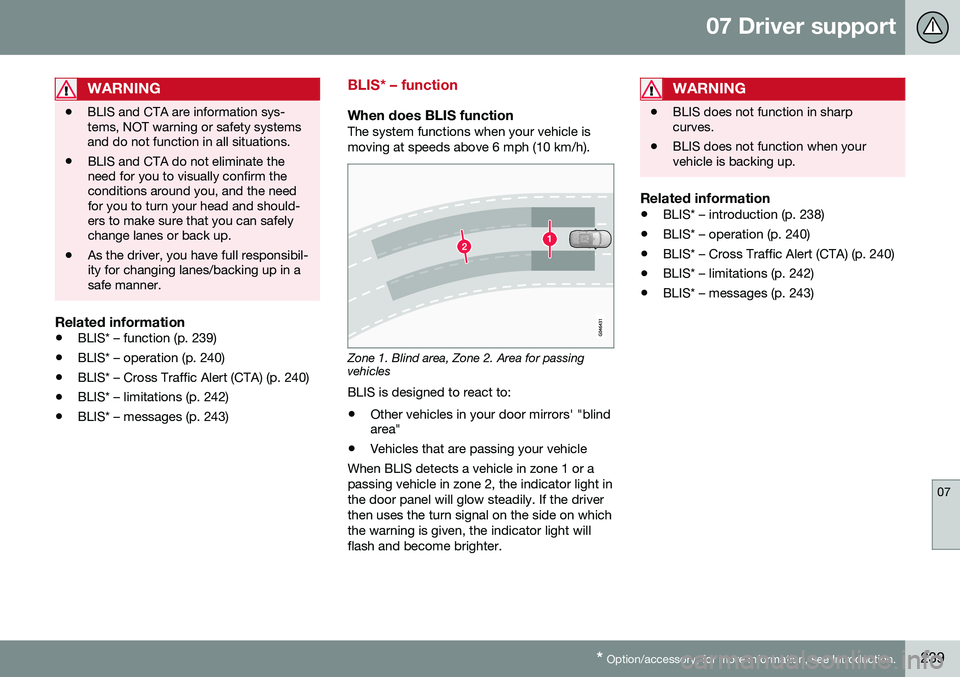
When does BLIS functionThe system functions when your vehicle is moving at speeds above 6 mph (10 km/h).
Zone 1. Blind area, Zone 2. Area for passing vehicles
BLIS is designed to react to:
• Other vehicles in your door mirrors' "blind area"
• Vehicles that are passing your vehicle
When BLIS detects a vehicle in zone 1 or a passing vehicle in zone 2, the indicator light inthe door panel will glow steadily. If the driverthen uses the turn signal on the side on whichthe warning is given, the indicator light willflash and become brighter.
WARNING
• BLIS does not function in sharp curves.
• BLIS does not function when yourvehicle is backing up.
Related information
•
BLIS* – introduction (p. 238)
• BLIS* – operation (p. 240)
• BLIS* – Cross Traffic Alert (CTA) (p. 240)
• BLIS* – limitations (p. 242)
• BLIS* – messages (p. 243)
Page 242 of 392

07 Driver support
07
240* Option/accessory, for more information, see Introduction.
BLIS* – operation
Activating/deactivating BLIS
Button for activating/deactivating BLIS BLIS and CTA 14
are activated when the
engine is started; this is confirmed when the indicator lights on the front door panels flashonce. BLIS can be deactivated/reactivated by pressing the button on the center console. The number or combinations of options on the vehicle may not leave a space availableon the center console for the BLIS button. Ifthis is the case, BLIS can be deactivated/reactivated in the MY CAR menu system, see
My Car – introduction (p. 70)
• Select Off or On in
SettingsCar
settings
BLIS. When BLIS is deactivated/reactivated, the indicator lights will go out/illuminate (the indi-cators will also flash once when the functionis reactivated) and a message will appear inthe instrument panel. To erase the message: •
Press the
OK button on the left steering
wheel lever
or
• Wait for approx. 5 seconds for the mes- sage to disappear
Related information
•BLIS* – introduction (p. 238)
• BLIS* – function (p. 239)
• BLIS* – Cross Traffic Alert (CTA) (p. 240)
• BLIS* – limitations (p. 242)
• BLIS* – messages (p. 243)
BLIS* – Cross Traffic Alert (CTA)
Cross Traffic Alert (CTA) is a supplementary BLIS 15
function intended to detect vehicles
crossing behind your vehicle while you are backing up.
Park assist/CTA button On vehicles equipped with the optional Park assist system (p. 225), Cross Traffic Alert(CTA) can be deactivated/reactivated bypressing the Park assist button on the centerconsole. The BLIS indicator lights on the frontdoors will flash when CTA is reactivated bypressing the button.
14 Cross Traffic Alert
Page 244 of 392

||
07 Driver support
07
242* Option/accessory, for more information, see Introduction.
However, as you back your vehicle out of a parking space, CTA's "field of vision"expands. Examples of other limitations include:
• Dirt, ice or snow obstructing the sensors may reduce the system's function ormake it impossible to detect other vehi-cles or objects.
• Do not attach tape, decals, etc., on thesurface of the sensors (see the illustrationin the following "Maintenance" section).
• BLIS and CTA are deactivated if a trailer'swiring is connected to the vehicle's elec-trical system.
Related information
•BLIS* – introduction (p. 238)
• BLIS* – function (p. 239)
• BLIS* – operation (p. 240)
• BLIS* – limitations (p. 242)
• BLIS* – messages (p. 243)
BLIS* – limitations
Maintenance
Location of the BLIS/CTA sensors 16
The BLIS/CTA 17
sensors are located on the
inside of the rear fenders/bumper. The surfaces in front of the sensors must be kept clean for the system to function opti-mally.
CAUTION
Repairs to the BLIS/CTA systems and/or repainting the rear bumper should only bedone by a trained and qualified Volvo serv-ice technician.
Related information
• BLIS* – introduction (p. 238)
• BLIS* – function (p. 239)
• BLIS* – operation (p. 240)
• BLIS* – Cross Traffic Alert (CTA) (p. 240)
• BLIS* – messages (p. 243)
16
Generic illustration
17 Cross Traffic Alert
Page 245 of 392

07 Driver support
07
* Option/accessory, for more information, see Introduction.243
BLIS* – messages
If BLIS/CTA 18
are not functioning normally, a
symbol will illuminate in the instrument panel and a text message will be displayed. Followany instructions that may be provided. These messages include:
MessageSystem status
CTA OFFCTA has been switched off manually. BLIS remainsactive.
BLIS and CTA OFFTrailerattachedBLIS and CTA are tempo- rarily deactivated becausea trailer's wiring has beenconnected to the vehicle'selectrical system.
BLIS and CTA Serv-ice requiredBLIS and CTA are not functioning normally.
• If this message recurs, the systems should beinspected by a trainedand qualified Volvoservice technician.
Messages can be erased by pressing the
OK
button on the left steering wheel lever.
Related information
• BLIS* – introduction (p. 238)
• BLIS* – function (p. 239)
• BLIS* – operation (p. 240)
• BLIS* – Cross Traffic Alert (CTA) (p. 240)
• BLIS* – limitations (p. 242)
18
Cross Traffic Alert
Page 257 of 392

08 Starting and driving
08
}}
255
Start/Stop – Hill Start Assist (HSA)
When starting on steep hills, HSA (see Trans- mission – general information (p. 250)) retainspressure on the brake pedal for several sec-onds after the pedal has been released inorder to keep the vehicle at a standstill. Thebrakes will be released after several secondsor when the driver presses the acceleratorpedal. The pedal will return to its normal posi-tion somewhat slower than normal.
Related information
•Start/Stop – introduction (p. 255)
• Start/Stop – function (p. 255)
• Start/Stop – settings (p. 258)
• Start/Stop – Auto-stop exceptions (p. 256)
• Start/Stop – Auto-start exceptions(p. 257)
• Start/Stop – symbols and messages(p. 259)
Start/Stop – introduction
Start/Stop is a function that temporarily switches off the engine when the vehicle isnot moving, for instance in heavy traffic or at atraffic light to help reduce fuel consumption. Start/Stop is available with certain engines/ transmissions.
Related information
•Start/Stop – function (p. 255)
• Start/Stop – settings (p. 258)
• Start/Stop – Auto-stop exceptions (p. 256)
• Start/Stop – Auto-start exceptions(p. 257)
• Start/Stop – Hill Start Assist (HSA)(p. 255)
• Start/Stop – symbols and messages(p. 259)
Start/Stop – function
Function and use
Start/Stop symbol in the instrument panel
Start/Stop button on the center console
Start/Stop is activated automatically each time the engine is started 9
. The symbol in the
instrument panel will be displayed for several seconds when the engine starts and the indi-cator light in the On/Off button will remainilluminated while the function is activated. All of the vehicle's systems will function while the engine is auto-stopped, although thefunction of certain systems may reduced atthis time. For example, blower speed andhigh infotainment system volume may bereduced to help conserve the battery'scapacity.
9 Not when the engine is started using the optional Engine Remote Start feature, Starting the engine (p. 245)