2016 VOLVO S60 Messages
[x] Cancel search: MessagesPage 258 of 392

||
08 Starting and driving
08
256* Option/accessory, for more information, see Introduction.
Auto-stopping the engineNormally, when Start/Stop is activated and the brakes are applied until the vehicle comesto a standstill, the engine will auto-stop auto-matically if the driver keeps the brake pedal
depressed .
To remind the driver that the enginehas been auto-stopped, theStart/Stop symbol will illuminate inthe instrument panel and remain on
until the engine restarts.
If the ECO function* (ECO* (p. 260)) is activated, theengine may auto-stop beforethe vehicle comes to a com-plete standstill.
Auto-starting the engineThe engine restarts as soon as the driver releases the brake pedal.
Deactivating Start/StopIn certain situations (e.g., driving in heavy, stop-and-gotraffic), it may be preferableto deactivate Start/Stop. This is done by pressing the button in the center console.
The indicator light in the button will go out. Start/Stop will remain deactivated until the button is pressed again or until the engine isswitched off and restarted by the driver.
Related information
• Start/Stop – introduction (p. 255)
• Start/Stop – settings (p. 258)
• Start/Stop – Auto-stop exceptions (p. 256)
• Start/Stop – Auto-start exceptions(p. 257)
• Start/Stop – Hill Start Assist (HSA)(p. 255)
• Start/Stop – symbols and messages(p. 259)
Start/Stop – Auto-stop exceptions
In certain situations or conditions, the engine may not auto-stop
when the vehicle comes
to a standstill, such as if:
Condition/situation
The vehicle's speed has not reached a speed of approx. 5 mph (8 km/h) after themost recent auto-start or after the driverhas started the engine.
The driver unbuckles his/her seat belt.
The main battery's charge is below the minimum level.
The engine has not reached its normal operating temperature.
The ambient temperature is below approx. 25°F (-4°C) or above approx. 85°F (30°C).
The windshield's heating function* is acti- vated.
The climate system cannot keep the desired settings in the passenger compart-ment; the blower will operate at highspeed.
The vehicle is backing up.
The main battery's temperature is below freezing or too high.
Page 259 of 392

08 Starting and driving
08
}}
* Option/accessory, for more information, see Introduction.257
Condition/situation
The driver is turning the steering wheel hard.
The road's incline is very steep.
A trailer's electrical system is connected to the vehicle.
The hood has been opened A
.
The transmission has not reached its nor- mal operating temperature.
Atmospheric pressure is below a level equivalent to an altitude of approx. 4,900–8,200 ft (1500–2500 m) above sea level.The actual pressure is also affected by cur-rent weather conditions.
The Adaptive Cruise Control's* Queue Assist feature is activated.
The gear selector is in the SB
or " +/–" posi-
tion.
A Certain engines only
B Sport mode (where applicable)
Related information
• Start/Stop – introduction (p. 255)
• Start/Stop – function (p. 255)
• Start/Stop – settings (p. 258)
• Start/Stop – Auto-start exceptions (p. 257) •
Start/Stop – Hill Start Assist (HSA)(p. 255)
• Start/Stop – symbols and messages(p. 259)
Start/Stop – Auto-start exceptions
In certain situations or conditions, the engine may auto-start
even though the driver is still
pressing the brake pedal, such as if:
Condition/situation
Condensation forms on the windows.
The climate system cannot keep the desired settings in the passenger compart-ment.
Electrical current consumption is tempo- rarily high or the main battery's charge isbelow the minimum level.
The brake pedal is pumped repeatedly.
The hood has been opened A
.
The vehicle begins to move or increases speed slightly (if the engine auto-stoppedbefore the vehicle was at a standstill (seeECO* (p. 260))).
The driver unbuckles his/her seat belt while the gear selector is in the D or N positions.
The steering wheel is turned A
.
Page 260 of 392
||
08 Starting and driving
08
258
Condition/situation
The gear selector is moved from D to SB
, R
or " +/–".
The driver's door is opened with the gear selector in D – an audible signal and a text
message will inform the driver thatStart/Stop is active.
A Certain engines only
B Sport mode (where applicable)
WARNING
Do not open the hood if the engine has auto-stopped. The engine could suddenlyauto-start. Before opening the hood:
• Switch off the ignition using the START/STOP ENGINE
button.
• Be aware that if the engine has beenrunning, components in the enginecompartment will be very hot.
If the engine does not auto-start, this could be due to
:
• The driver's seat belt is not fastened
• The gear selector is in
P and the driver's
door is opened
In these cases, the driver will have to restart the engine by pressing the START/STOP
ENGINE button.
Related information
•Start/Stop – introduction (p. 255)
• Start/Stop – function (p. 255)
• Start/Stop – settings (p. 258)
• Start/Stop – Auto-stop exceptions (p. 256)
• Start/Stop – Hill Start Assist (HSA)(p. 255)
• Start/Stop – symbols and messages(p. 259)
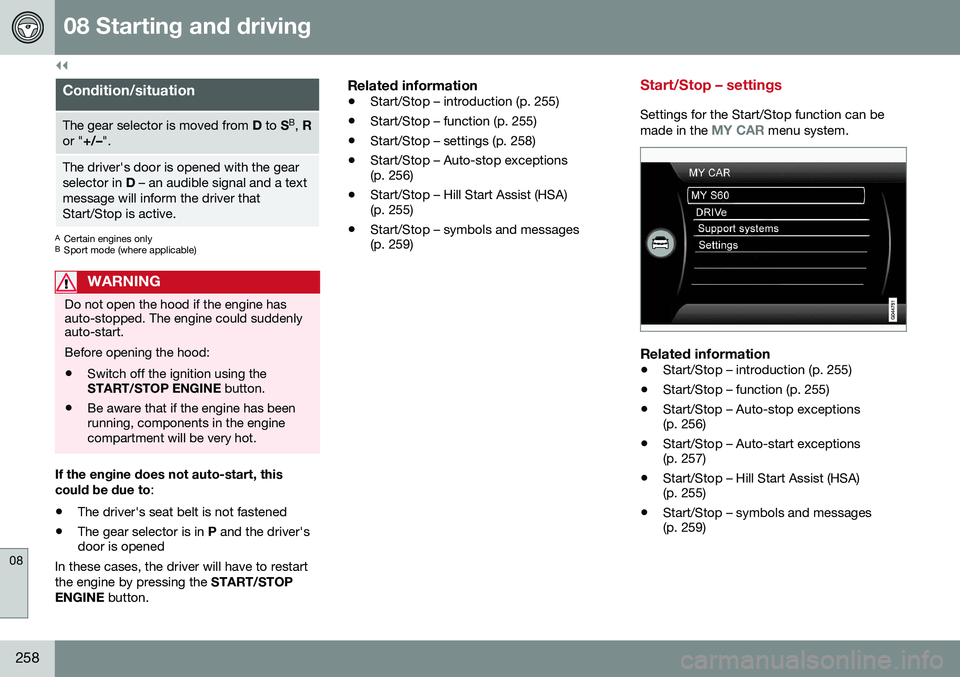
Start/Stop – settings
Settings for the Start/Stop function can be
made in the MY CAR menu system.
Related information
• Start/Stop – introduction (p. 255)
• Start/Stop – function (p. 255)
• Start/Stop – Auto-stop exceptions (p. 256)
• Start/Stop – Auto-start exceptions(p. 257)
• Start/Stop – Hill Start Assist (HSA)(p. 255)
• Start/Stop – symbols and messages(p. 259)
Page 261 of 392

08 Starting and driving
08
259
Start/Stop – symbols and messages
Text messagesCombined with the information sym- bol in the instrument panel, the
Start/Stop function may also display mes- sages in certain situations. Follow the instruc-tions provided in the message. The followingtable gives several examples.
SymbolMessageInformation/action
Auto Start/Stop Service requiredStart/Stop is not functioning properly. Contact a Volvo retailer or a trained and qualified Volvo service technician.
Autostart Engine running + an
audible signalThis is triggered if the driver's door is opened while the engine is auto-stopped.
-Press Start buttonThe engine will not auto-start. Start the engine normally by pressing the START/STOP ENGINE
button.
-Select P or N to startStart/Stop has been deactivated. Move the gear selector to N or P and start the engine normally
be pressing the START/STOP ENGINE button.
-Press Start buttonThe engine will not auto-start. Move the gear selector to N or P and start the engine normally be
pressing the START/STOP ENGINE button.
If the message does not disappear after the suggested action has been taken, contact aVolvo retailer or a trained and qualified Volvoservice technician.
Related information
•Start/Stop – introduction (p. 255)
• Start/Stop – function (p. 255) •
Start/Stop – settings (p. 258)
• Start/Stop – Auto-stop exceptions (p. 256)
• Start/Stop – Auto-start exceptions(p. 257)
• Start/Stop – Hill Start Assist (HSA)(p. 255)
Page 268 of 392

08 Starting and driving
08
266
Parking brake – general information
The electric parking brake helps to keep the vehicle stationary when it is parked.
Electric parking brake
Parking brake control
NOTE
•A faint sound from the parking brake's electric motor can be heard when theparking brake is being applied. Thissound can also be heard during theautomatic function check of the park-ing brake.
• The brake pedal will move slightlywhen the electric parking brake isapplied or released.
Low battery voltageIf the battery voltage is too low, the park- ing brake cannot be applied or released. Connect an auxiliary battery if the batteryvoltage is too low, see Jump starting (p. 249).
Parking on a hill
•
If the vehicle is pointing uphill, turn the front wheels so that they point away fromthe curb.
• If the vehicle is pointing downhill, turn thefront wheels so that they point toward thecurb.
The parking brake should also be applied.
Related information
• Parking brake – applying (p. 266)
• Parking brake – releasing (p. 267)
• Parking brake – symbols and messages(p. 269)
• Brakes – general (p. 262)
Parking brake – applying
Applying the electric parking brake
Parking brake control
1. Press firmly on the brake pedal.
2. Push the control. >The
symbol in the instrument
panel flashes while the parking brake is being applied and glows steadily whenthe parking brake has been fullyapplied.
3. Release the brake pedal and ensure that the vehicle is at a standstill.
4. When the vehicle is parked, the gear selector must be in position P.
Page 269 of 392

08 Starting and driving
08
}}
267
NOTE
•In an emergency the parking brake can be applied when the vehicle is movingby holding in the control. Braking willbe interrupted when the acceleratorpedal is depressed or the control isreleased.
• An audible signal will sound during thisprocedure if the vehicle is moving atspeeds above 6 mph (10 km/h).
Related information
•
Parking brake – general information (p. 266)
• Parking brake – releasing (p. 267)
• Parking brake – symbols and messages(p. 269)
• Brakes – general (p. 262)
Parking brake – releasing
Releasing the electric parking brake
Parking brake control
Manual release1. Fasten the seat belt.
2. Insert the remote key in the ignition slot
and press the START/STOP ENGINE
button (or press the START/STOP
ENGINE button with a valid remote key in
the passenger compartment on vehicles with the optional keyless drive).
3. Press firmly on the brake pedal.
4. Pull the parking brake control.
Automatic release1. Start the engine.
NOTE
• For safety reasons, the parking brake is only released automatically if the engineis running and the driver is wearing aseat belt.
• The electric parking brake will bereleased immediately when the acceler-ator pedal is pressed and the gearselector is in position
D or R.
2. Fasten the seat belt.
3. Move the gear selector to position D or R
and press the accelerator pedal. The parking brake will release when the vehi-cle begins to move.
Heavy load uphillA heavy load, such as a trailer, can cause the vehicle to roll backward when the parkingbrake is released automatically on a steepincline. To help avoid this:
1. Keep the electric parking brake lever pushed in with the left hand while shifting into Drive with the right.
2. While pressing the accelerator pedal to pull away, release the parking brake leveronly after the vehicle begins to move.
Related information
• Parking brake – general information (p. 266)
• Parking brake – applying (p. 266)
Page 270 of 392

||
08 Starting and driving
08
268
•Parking brake – symbols and messages (p. 269)
• Brakes – general (p. 262)
Page 271 of 392

08 Starting and driving
08
269
Parking brake – symbols and messages
A text message can be erased by pressing briefly on the OK button on the turn signal
lever.
Symbol and messages in the instrument panel
SymbolMessageDescription/action
"Message"Read the message in the information display
A flashing symbol indicates that the parking brake is being applied. If the symbol flashes in any other situation then this means that a fault has arisen. Read the message on the information display.
-Park brake not fully releasedA fault is preventing the parking brake from being released. Try to apply the parking brake and release it sev- eral times. If the problem persists, contact an authorized Volvo workshop. If you drive off with this error mes-sage showing, a warning signal sounds.
-Parking brake not appliedA fault is preventing the parking brake from being applied. Try to apply the parking brake and release it several times. If the problem persists, contact an authorized Volvo workshop. If you drive off with this error messageshowing, a warning signal sounds.
-Parking brake Service requiredA fault has occurred. Try to apply and release. Contact a Volvo workshop if the fault remains
WARNING
If the vehicle must be parked before the fault has been corrected, always put thegear selector in P and turn the wheels so
that they point away from the curb if thevehicle is pointing uphill or toward the curbif it is pointing downhill.
Related information
• Parking brake – general information (p. 266)
• Parking brake – applying (p. 266)
• Parking brake – releasing (p. 267)
• Brakes – general (p. 262)