Page 383 of 688
3833-2. Using the audio system (Entune Audio)
VENZA_OM_OM73030U_(U) 3
Interior features ■ For PBAP compatible Bluetooth ®
phones
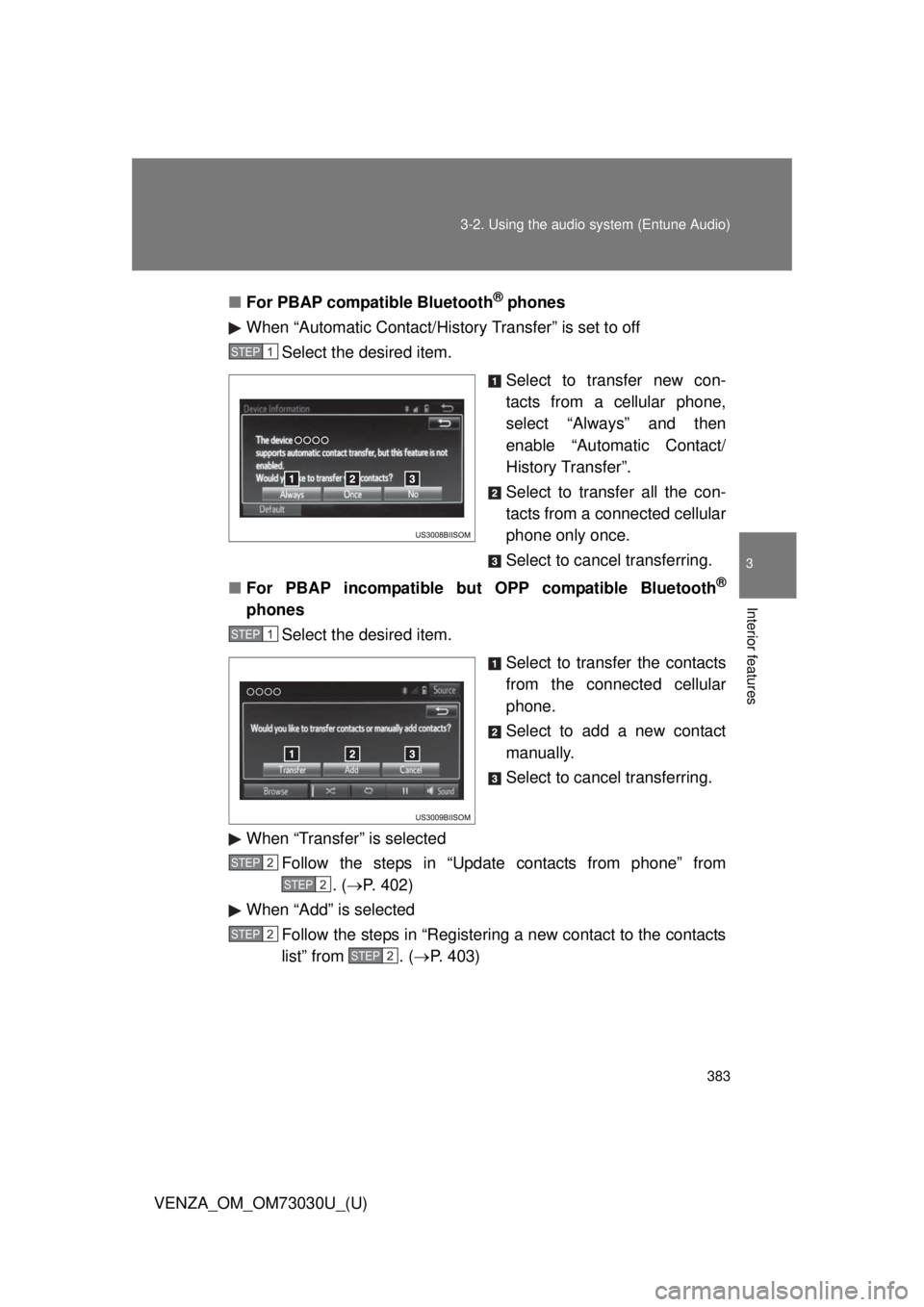
When “Automatic Contact/History Transfer” is set to off
Select the desired item.
Select to transfer new con-
tacts from a cellular phone,
select “Always” and then
enable “Automatic Contact/
History Transfer”.
Select to transfer all the con-
tacts from a connected cellular
phone only once.
Select to cancel transferring.
■ For PBAP incompatible but OPP compatible Bluetooth ®
phones
Select the desired item.
Select to transfer the contacts
from the connected cellular
phone.
Select to add a new contact
manually.
Select to cancel transferring.
When “Transfer” is selected
Follow the steps in “Update contacts from phone” from
. ( P. 402)
When “Add” is selected
Follow the steps in “Registering a new contact to the contacts
list” from . ( P. 403)STEP 1
STEP 1
STEP 2
STEP 2
STEP 2
STEP2
Page 391 of 688
3913-2. Using the audio system (Entune Audio)
VENZA_OM_OM73030U_(U) 3
Interior features
Bluetooth ®
phone message function
Displaying “Messa ge Inbox” screen
Press the button.
Select .
Receiving a message
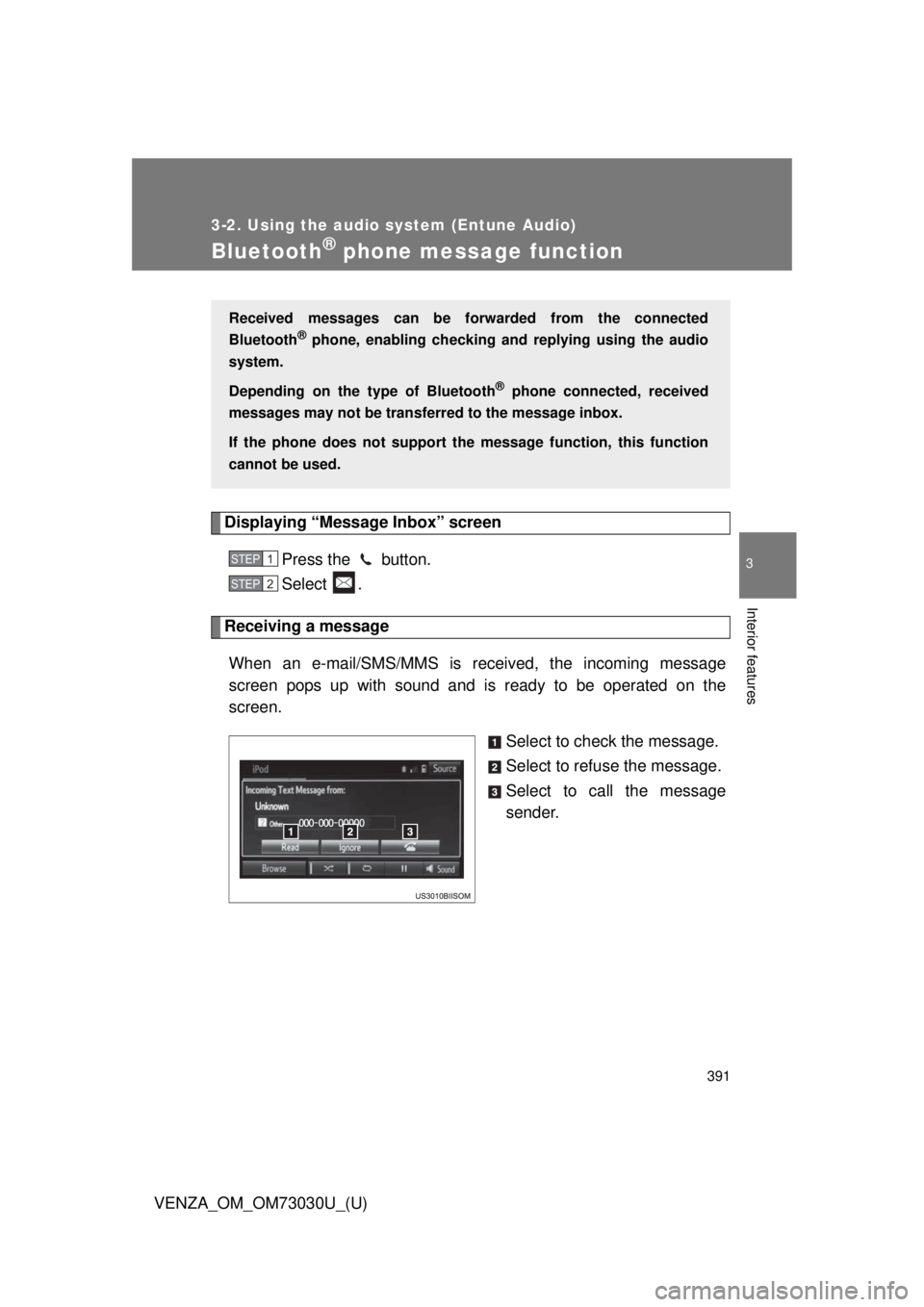
When an e-mail/SMS/MMS is received, the incoming message
screen pops up with sound and is ready to be operated on the
screen.
Select to check the message.
Select to refuse the message.
Select to call the message
sender.Received messages can be forwarded from the connected
Bluetooth ®
phone, enabling checking and replying using the audio
system.
Depending on the type of Bluetooth ®
phone connected, received
messages may not be transfer red to the message inbox.
If the phone does not support the message function, this function
cannot be used. STEP 1
STEP 2
Page 394 of 688
3943-2. Using the audio system (Entune Audio)
VENZA_OM_OM73030U_(U) Replying to a message
Display the “Messa ge Inbox” screen. ( P. 391)
Select the desired message from the list.
Select “Quick Message”.
Select the desired message.
Select “Send”. If an error message is displayed, follow the guidance on the screen
to try again.
■ Editing quick reply message
Select “Quick Message”.
Select corresponding to the desired message to edit.
Select “OK” when editing is completed.■ Check the messages
● Depending on the type of Bluetooth ®
phone being connected, it may be
necessary to perform additional steps on the phone.
● Messages are displayed in the appropriate connected Bluetooth ®
phone’s registered mail address folder.
Select the tab of the desired folder to be displayed.
● Only received messages on the connected Bluetooth ®
phone can be dis-
played.
● The text of the message is not displayed while driving.
● When “Automatic Message Readout” is set to on, messages will be auto-
matically read out. ( P. 408)
● Turn the “PWR VOL” knob, or use the volume switch on the steering
wheel to adjust the message read out volume.
● The message read out function is available even while driving. STEP 1
STEP 2
STEP 3
STEP 4
STEP 5
STEP 1
STEP 2
STEP 3
Page 397 of 688
3973-2. Using the audio system (Entune Audio)
VENZA_OM_OM73030U_(U) 3
Interior features
Bluetooth ®
phone settings“Phone/Message Settings” screen
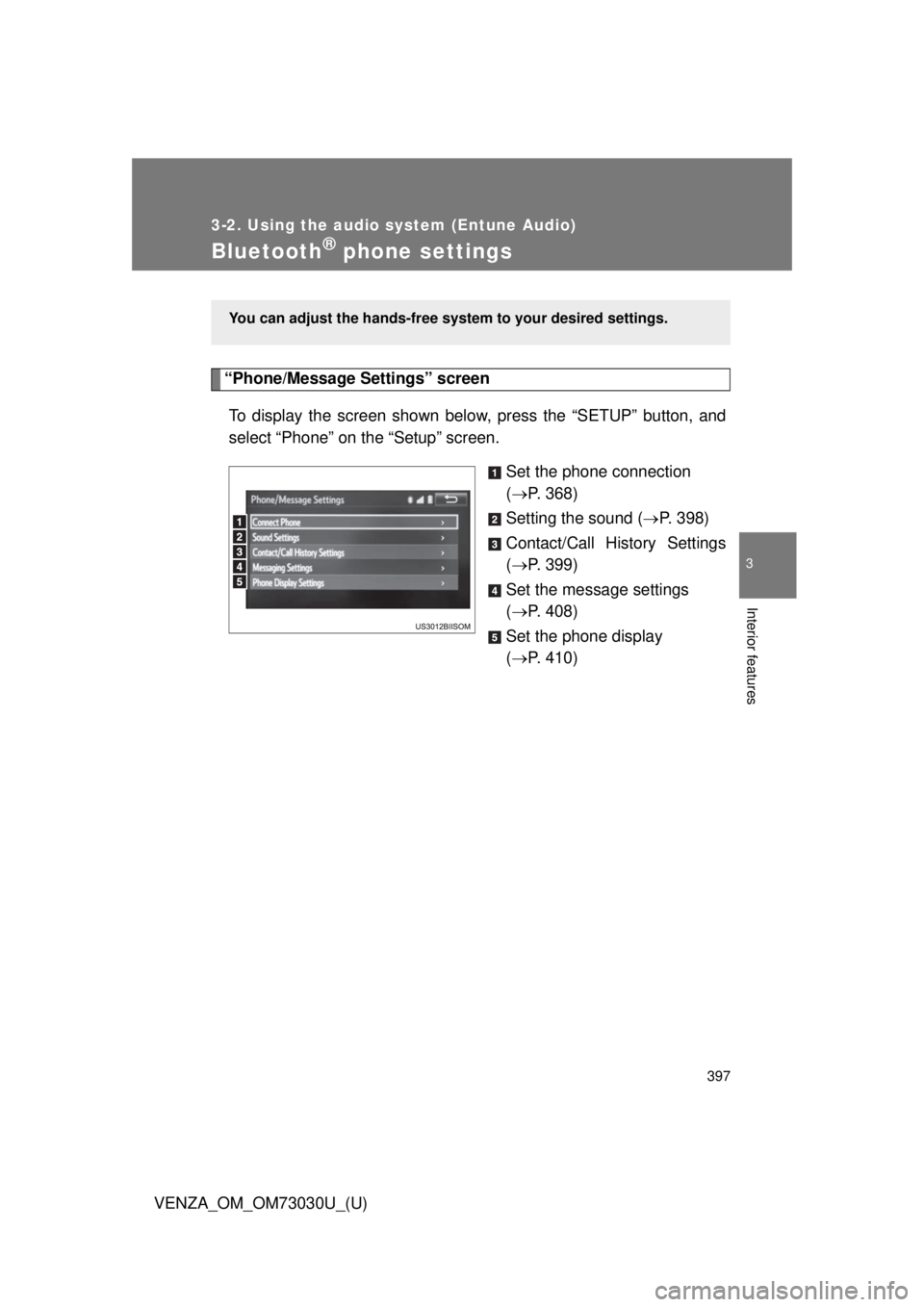
To display the screen shown belo w, press the “S ETUP” button, and
select “Phone” on the “Setup” screen.
Set the phone connection
( P. 368)
Setting the sound ( P. 398)
Contact/Call History Settings
( P. 399)
Set the message settings
( P. 408)
Set the phone display
( P. 410)You can adjust the hands-free syst em to your desired settings.
Page 399 of 688
3993-2. Using the audio system (Entune Audio)
VENZA_OM_OM73030U_(U) 3
Interior features
Contact/Call Histor y Settings The contact can be transferred from a Bluetooth ®
phone to the sys-
tem. The contact also can be added, edited and deleted.
The call history can be deleted and contact and favorites can be
changed.
Display the “Phone/Message Settings” screen. ( P. 397)
Select “Contact/Ca ll History Settings”.STEP 1
STEP 2
Page 400 of 688
4003-2. Using the audio system (Entune Audio)
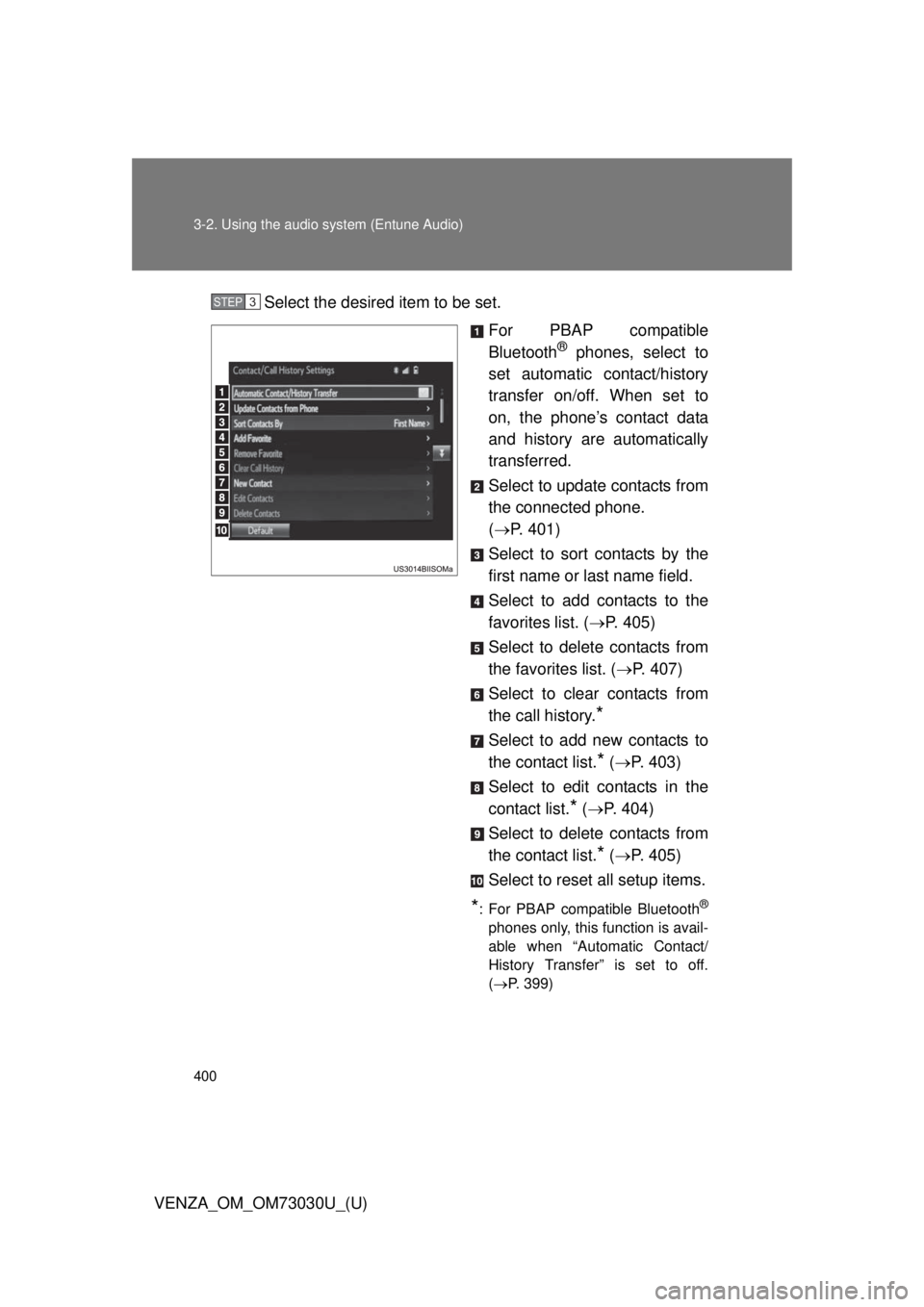
VENZA_OM_OM73030U_(U) Select the desired item to be set.
For PBAP compatible
Bluetooth ®
phones, select to
set automatic contact/history
transfer on/off. When set to
on, the phone’s contact data
and history are automatically
transferred.
Select to update contacts from
the connected phone.
( P. 401)
Select to sort contacts by the
first name or last name field.
Select to add contacts to the
favorites list. ( P. 405)
Select to delete contacts from
the favorites list. ( P. 407)
Select to clear contacts from
the call history.
* Select to add new contacts to
the contact list.
* ( P. 403)
Select to edit contacts in the
contact list.
* ( P. 404)
Select to delete contacts from
the contact list.
* ( P. 405)
Select to reset all setup items.
* : For PBAP compatible Bluetooth ®
phones only, this function is avail-
able when “Automatic Contact/
History Transfer” is set to off.
( P. 399)STEP 3
Page 401 of 688
4013-2. Using the audio system (Entune Audio)
VENZA_OM_OM73030U_(U) 3
Interior features Update contacts from phone
Operation methods differ between PBAP compatible and PBAP
incompatible but OPP compatible Bluetooth ®
phones.
If your cellular phone is neither PBAP nor OPP compatible, the con-
tacts cannot be transferred.
■ For PBAP compatible Bluetooth ®
Phones
Select “Update Contacts from Phone”.
Check that a confirmation screen is displayed when the oper-
ation is complete. This operation may be unnecessary depending on the type of cellu-
lar phone.
Depending on the type of cellular phone, OBEX authentication may
be required when transferring contact data. Enter “1234” into the
Bluetooth ®
phone.
If another Bluetooth ®
device is connected when transferring contact
data, depending on the phone, the connected Bluetooth ®
device
may need to be disconnected.
Depending on the type of Bluetooth ®
phone being connected, it may
be necessary to perform additional steps on the phone. STEP 1
STEP 2
Page 402 of 688
4023-2. Using the audio system (Entune Audio)
VENZA_OM_OM73030U_(U) ■ For PBAP incompatible but OPP compatible Bluetooth ®
Phones
Select “Update Contacts from Phone”.
Transfer the contact data to the system using a Bluetooth ®
phone. This operation may be unnecessary depending on the type of cellu-
lar phone.
Depending on the type of cellular phone, OBEX authentication may
be required when transferring contact data. Enter “1234” into the
Bluetooth ®
phone.
To cancel this function, select “Cancel”.
Select “Done” when it appears on the screen.
Check that a confirmation screen is displayed when the oper-
ation is complete.
■ Updating the contacts in a different way (From the “Call His-
tory” screen)
For PBAP compatible Bluetooth ®
phones, this function is available
when “Automatic Contact/History Transfer” is set to off. ( P. 399)
Display the phone screen. ( P. 379)
Select the “Call History” tab and select a contact not yet regis-
tered in the contact list.
Select “Update Contact”.
Select the desired contact.
Select a phone type for the phone number. STEP 1
STEP 2
STEP 3
STEP 4
STEP 1
STEP 2
STEP 3
STEP 4
STEP 5