Page 113 of 688
1131-6. Theft deterrent system
1
Before driving
VENZA_OM_OM73030U_(U) ■ System maintenance
The vehicle has a maintenance-free type alarm system.
■ Items to check before locking the vehicle
To prevent unexpected triggering of the alarm and vehicle theft, make sure
of the following.
● Nobody is in the vehicle.
● The windows and moon roof are closed before the alarm is set.
● No valuables or other personal items are left in the vehicle.■ Deactivating or stopping the alarm
Do one of the following to deactivate or stop the alarm.
● Unlock the doors using the entry function (vehicles with smart
key system) or the wire less remote control.
● Start the engine. (The alarm will be deactivated or stopped
after a few seconds.)
Page 115 of 688
1151-6. Theft deterrent system
1
Before driving
VENZA_OM_OM73030U_(U) ■ Panic mode
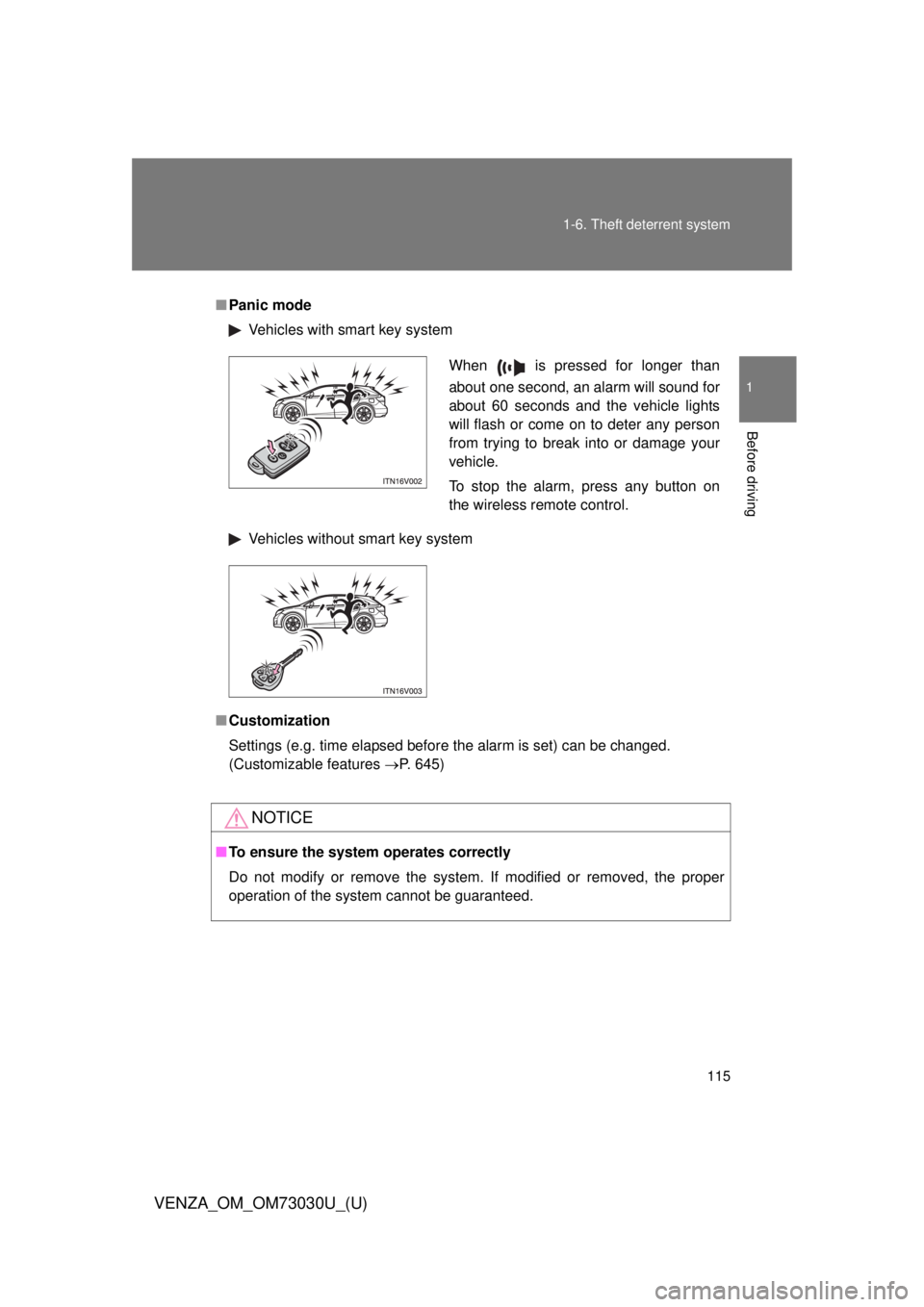
Vehicles with smart key system
Vehicles without smart key system
■ Customization
Settings (e.g. time elapsed before the alarm is set) can be changed.
(Customizable features P. 645)
NOTICE■ To ensure the system operates correctly
Do not modify or remove the system. If modified or removed, the proper
operation of the system cannot be guaranteed. When is pressed for longer than
about one second, an alarm will sound for
about 60 seconds and the vehicle lights
will flash or come on to deter any person
from trying to break into or damage your
vehicle.
To stop the alarm, press any button on
the wireless remote control.
Page 422 of 688
4223-2. Using the audio system (Entune Audio)
VENZA_OM_OM73030U_(U) ■ Compatible models
The Bluetooth ®
audio system supports portable audio players with the fol-
lowing specifications
● Bluetooth ®
specifications:
Ver. 1.1, or higher (Recommended: Ver. 3.0+EDR or higher)
● Profiles:
• A2DP (Advanced Audio Distribution Profile) Ver. 1.0, or higher
(Recommended: Ver. 1.2 or higher)
This is a profile to transmit stereo audio to the audio system.
• AVRCP (Audio/Video Remote Control Profile) Ver. 1.0 or higher
(Recommended: Ver. 1.4 or higher)
This is a profile to allow remote control the A/V equipment.
However, please note that some functions may be limited depending on the
type of portable audio player connected.
The hands-free system supports cellular phones with the following specifica-
tions.
● Bluetooth ®
specification:
Ver. 1.1 or higher (Recommended: Ver. 3.0+EDR or higher)
● Profiles:
• HFP (Hands Free Profile) Ver. 1.0 or higher (Recommended: Ver. 1.6
or higher)
This is a profile to allow hands-free phone calls using a cellular phone
or head set. It has outgoing and incoming call functions.
• OPP (Object Push Profile) Ver. 1. 1 or higher (Recommended: Ver. 1.2)
This is a profile to transfer contact data. When a Bluetooth ®
compatible
cellular phone has both PBAP and OPP, OPP cannot be used.
• PBAP (Phone Book Access Profile) Ver. 1.0 or higher (Recommended:
Ver. 1.1)
This is a profile to transfer contact data.
• MAP (Message Access Profile) Ver. 1.0 or higher
If the cellular phone does not support HFP, you cannot register it with the
hands-free system.
Page 458 of 688
4583-5. Other interior features
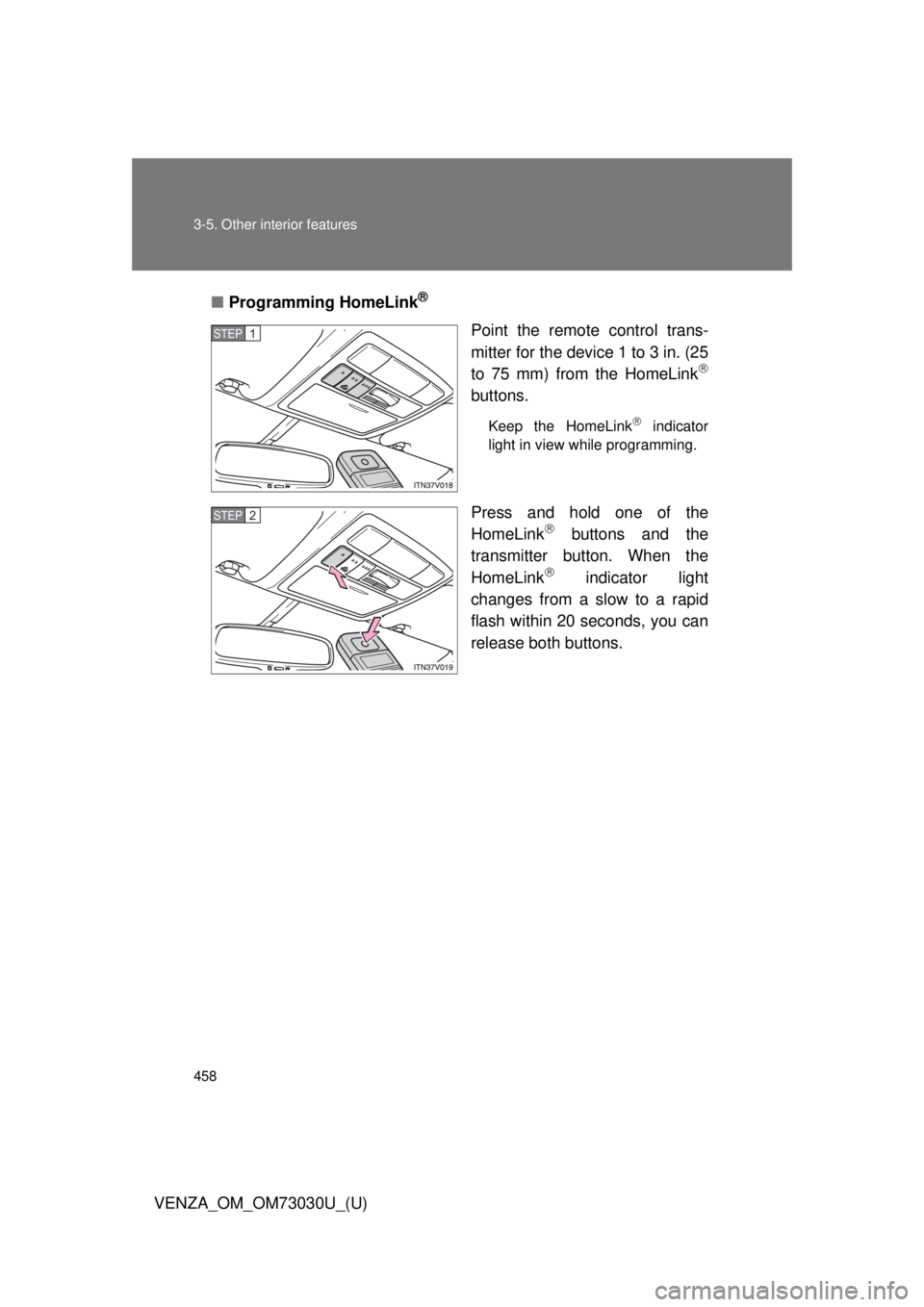
VENZA_OM_OM73030U_(U) ■ Programming HomeLink ®
Point the remote control trans-
mitter for the device 1 to 3 in. (25
to 75 mm) from the HomeLink
buttons. Keep the HomeLink
indicator
light in view while programming.
Press and hold one of the
HomeLink
buttons and the
transmitter button. When the
HomeLink
indicator light
changes from a slow to a rapid
flash within 20 seconds, you can
release both buttons.STEP 1
STEP 2
Page 459 of 688
4593-5. Other interior features
3
Interior features
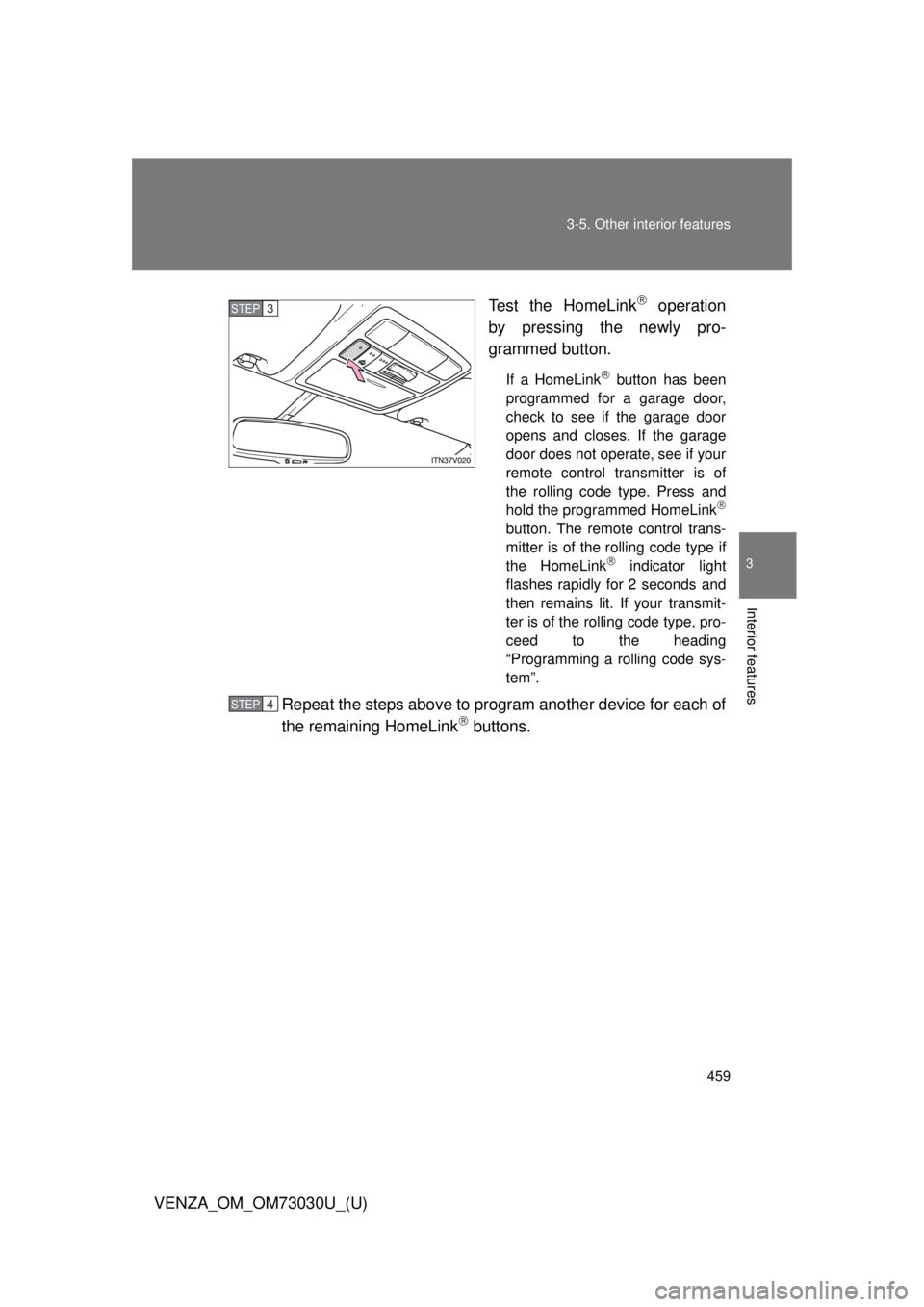
VENZA_OM_OM73030U_(U) Test the HomeLink
operation
by pressing the newly pro-
grammed button. If a HomeLink
button has been
programmed for a garage door,
check to see if the garage door
opens and closes. If the garage
door does not operate, see if your
remote control transmitter is of
the rolling code type. Press and
hold the programmed HomeLink
button. The remote control trans-
mitter is of the rolling code type if
the HomeLink
indicator light
flashes rapidly for 2 seconds and
then remains lit. If your transmit-
ter is of the rolling code type, pro-
ceed to the heading
“Programming a rolling code sys-
tem”.
Repeat the steps above to program another device for each of
the remaining HomeLink
buttons.STEP 3
STEP 4
Page 461 of 688
4613-5. Other interior features
3
Interior features
VENZA_OM_OM73030U_(U) ■ Programming an entry gate (f or U.S.A. owners)/Programming
all devices in the Canadian market
Place your transmitter 1 to 3 in. (25 to 75 mm) away from the
surface of the HomeLink
.Keep the HomeLink
indicator light in view while programming.
Press and hold the selected HomeLink
button.
Repeatedly press and releas e (cycle) the device’s remote
control button for two seconds each until step 4 is completed.
When the indicator light on the HomeLink
compatible trans-
ceiver starts to flash rapidly, release the buttons.
Test the operation of the HomeLink
by pressing the newly
programmed button. Check to see if the gate/device operates
correctly.
Repeat the steps above to program another device for each of
the remaining HomeLink
buttons.
■ Programming other devices
To program other devices such as home security systems, home
door locks or lighting, contact your authorized Toyota dealer for
assistance.
■ Reprogramming a button
The individual HomeLink
buttons cannot be erased but can be
reprogrammed. To reprogram a bu tton, follow the “Programming”
instructions. STEP 1
STEP 2
STEP 3
STEP 4
STEP 5
STEP 6
Page 463 of 688
4633-5. Other interior features
3
Interior features
VENZA_OM_OM73030U_(U) ■ Before programming
● Install a new battery in the remote control transmitter.
● The battery side of the remote control transmitter must be pointed away
from the HomeLink
button.
■ Certification for the garage door opener
FCC ID: CB2300NHL3
FCC ID: CB2281AHL4
NOTE:
This device complies with Part 15 of the FCC Rules.
Operation is subject to the following two conditions: (1) this device may not
cause harmful interference, and (2) this device must accept any interference
received, including interference that may cause undesired operation.
FCC WARNING:
Changes or modifications not expressly approved by the party responsible
for compliance could void the user’s authority to operate the equipment.
■ For additional programming assistance with your HomeLink ®
Univer-
sal Transceiver
Visit on the web at www.homelink.com or call 1-800-355-3515.
CAUTION■ When programming a garage door or other remote control devices
The garage door or other devices may operate, so ensure people and
objects are out of danger to prevent potential harm.
■ Conforming to federal safety standards
Do not use the HomeLink
compatible transceiver with any garage door
opener or device that lacks safety stop and reverse features as required by
federal safety standards.
This includes any garage door that cannot detect an interfering object. A
door or device without these features increases the risk of death or serious
injury.
Page 525 of 688
5254-3. Do-it-yourself maintenance
4
Maintenance and care
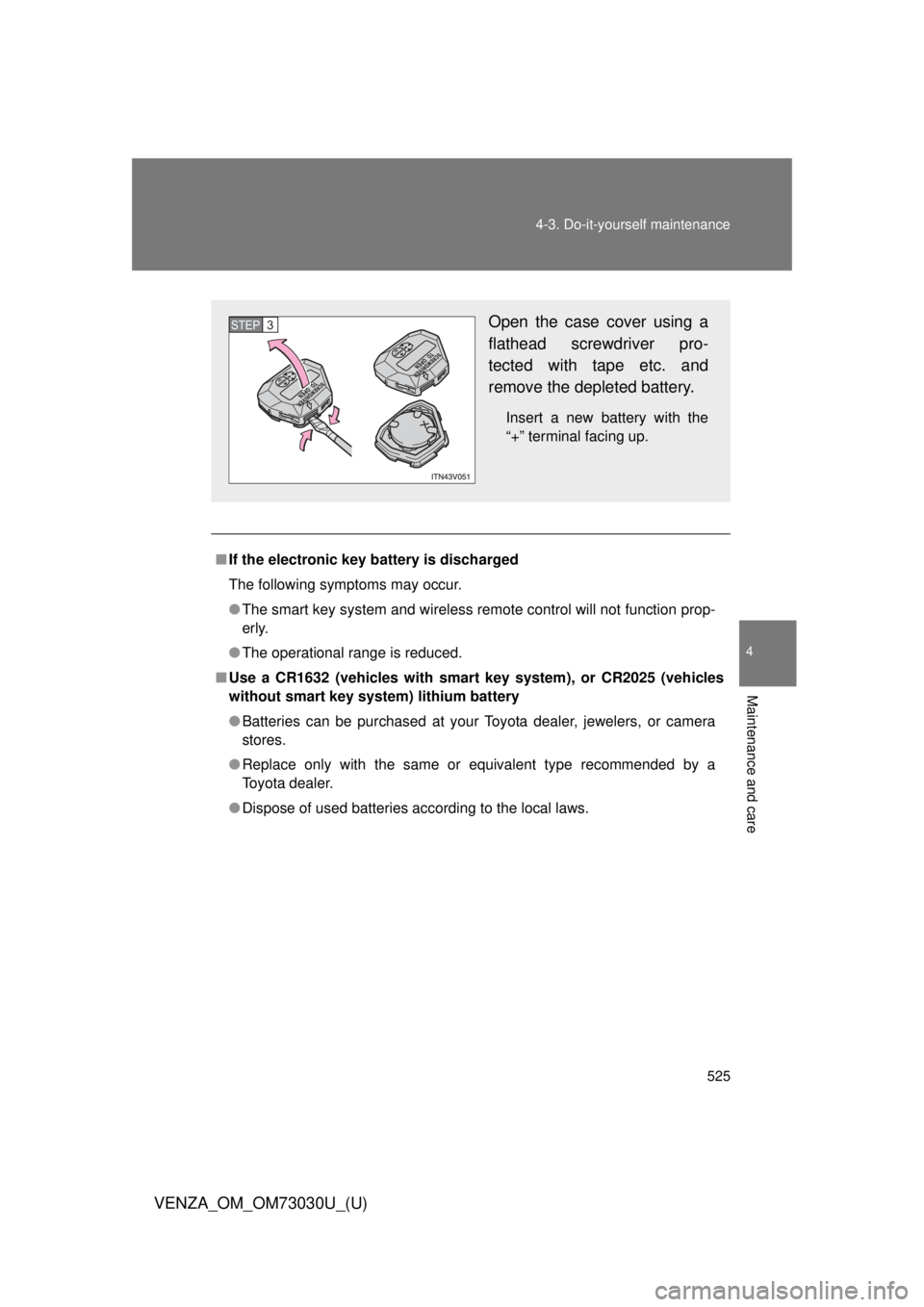
VENZA_OM_OM73030U_(U) ■ If the electronic key battery is discharged
The following symptoms may occur.
● The smart key system and wireless remote control will not function prop-
erly.
● The operational range is reduced.
■ Use a CR1632 (vehicles with smar t key system), or CR2025 (vehicles
without smart key system) lithium battery
● Batteries can be purchased at your Toyota dealer, jewelers, or camera
stores.
● Replace only with the same or equivalent type recommended by a
Toyota dealer.
● Dispose of used batteries according to the local laws. Open the case cover using a
flathead screwdriver pro-
tected with tape etc. and
remove the depleted battery. Insert a new battery with the
“+” terminal facing up.STEP 3