Page 568 of 688
5685-2. Steps to take in an emergency
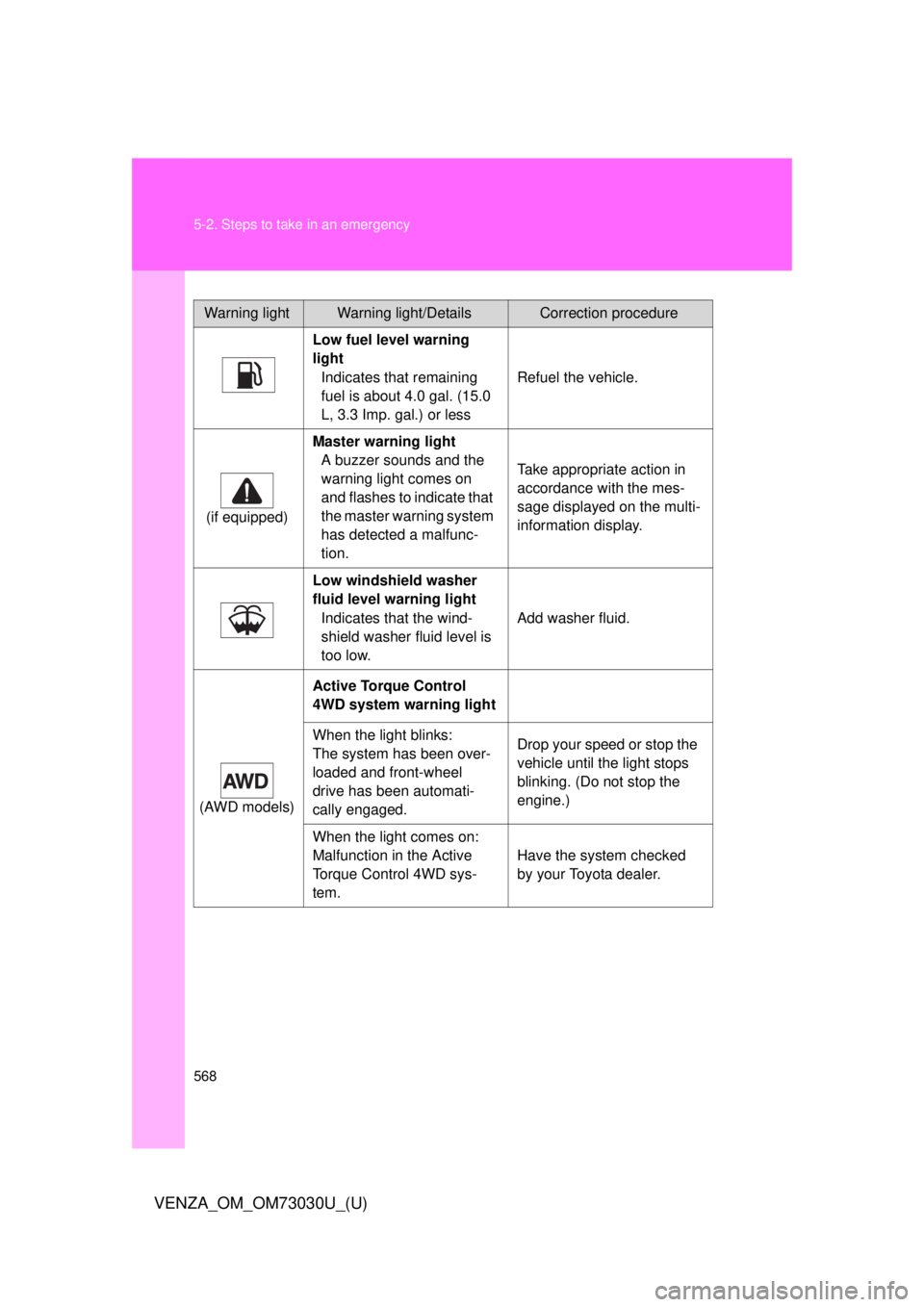
VENZA_OM_OM73030U_(U) Warning light Warning light/Details Correction procedure
Low fuel level warning
light
Indicates that remaining
fuel is about 4.0 gal. (15.0
L, 3.3 Imp. gal.) or less Refuel the vehicle.
(if equipped) Master warning light
A buzzer sounds and the
warning light comes on
and flashes to indicate that
the master warning system
has detected a malfunc-
tion. Take appropriate action in
accordance with the mes-
sage displayed on the multi-
information display.
Low windshield washer
fluid level warning light
Indicates that the wind-
shield washer fluid level is
too low. Add washer fluid.
(AWD models) Active Torque Control
4WD system warning light
When the light blinks:
The system has been over-
loaded and front-wheel
drive has been automati-
cally engaged. Drop your speed or stop the
vehicle until the light stops
blinking. (Do not stop the
engine.)
When the light comes on:
Malfunction in the Active
Torque Control 4WD sys-
tem. Have the system checked
by your Toyota dealer.
Page 578 of 688
5785-2. Steps to take in an emergency
VENZA_OM_OM73030U_(U)If a warning message is displayed
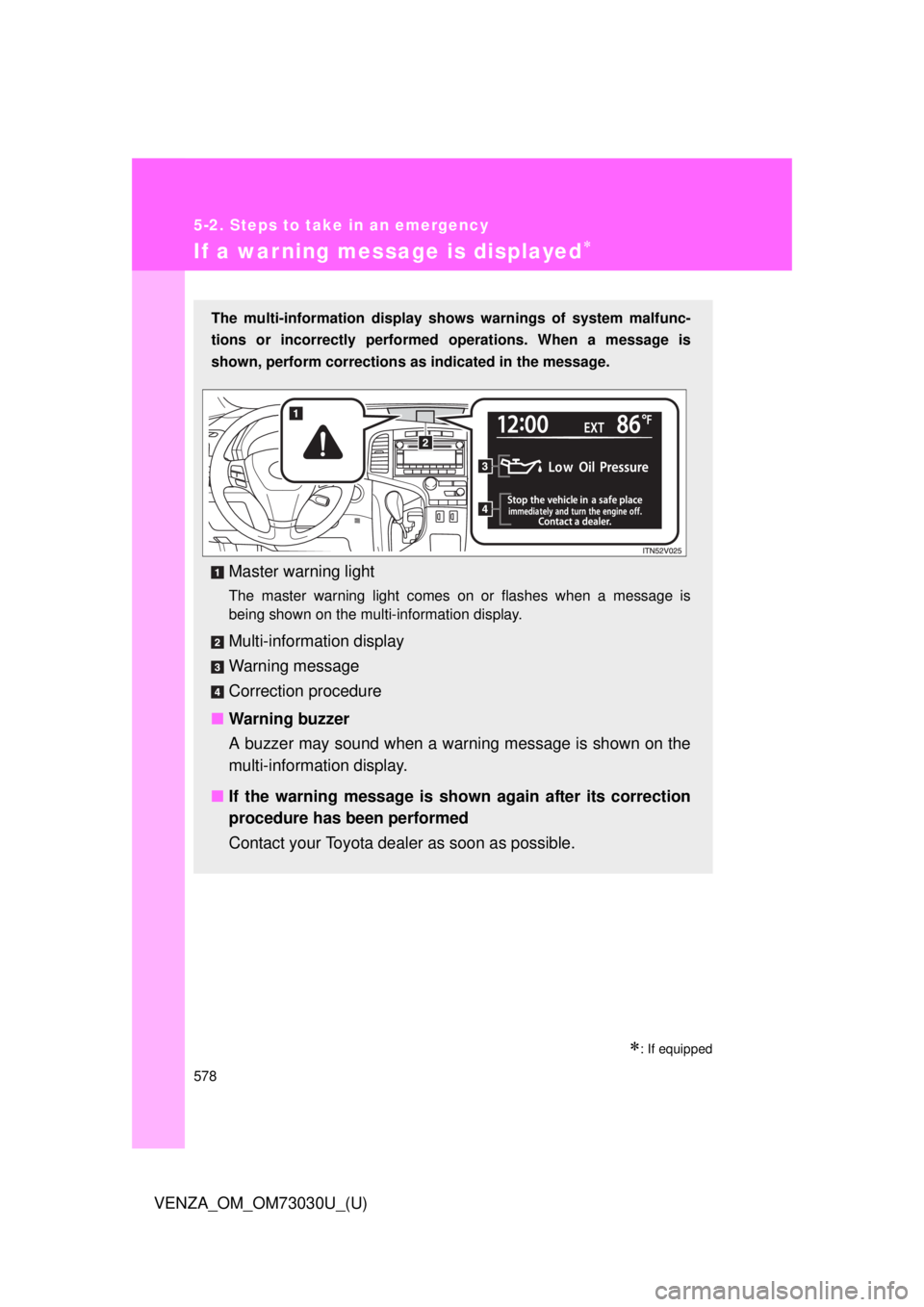
: If equippedThe multi-information display shows warnings of system malfunc-
tions or incorrectly performe d operations. When a message is
shown, perform corrections as indicated in the message.
Master warning light The master warning light comes on or flashes when a message is
being shown on the multi-information display.
Multi-informat ion display
Warning message
Correction procedure
■ Warning buzzer
A buzzer may sound when a warning message is shown on the
multi-informat ion display.
■ If the warning message is shown again after its correction
procedure has been performed
Contact your Toyota dealer as soon as possible.
Page 645 of 688
645 6
Vehicle specifications
VENZA_OM_OM73030U_(U) 6-2. Customization
Customizable features
Customizable features
Vehicles with TFT type multi-info rmation display: Some function
settings can be changed by opera ting the multi-information display.
( P. 652)
Settings that can be chan ged by your Toyota dealer
Definition of symbols: O = Available, = Not availableYour vehicle includes a variety of electronic features that can be
personalized to your preferen ces. Programming these preferences
requires specialized equipment and may be performed by your
Toyota dealer.
Some function settings are changed simultaneously with other functions
being customized. Contact your Toyota dealer for further details.
Page 649 of 688
6496-2. Customization
6
Vehicle specifications
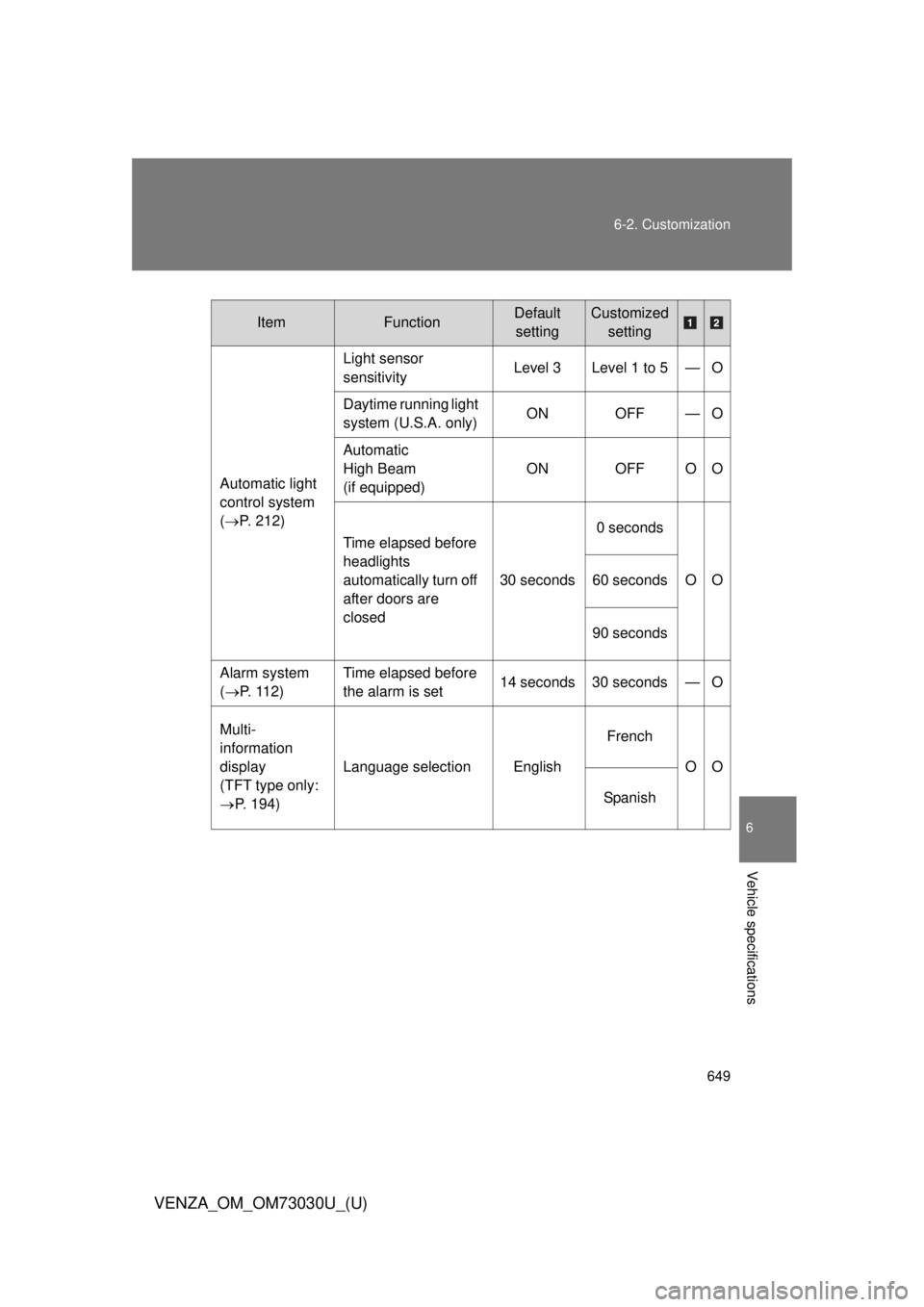
VENZA_OM_OM73030U_(U) Item Function Default
setting Customized
setting
Automatic light
control system
( P. 212) Light sensor
sensitivity Level 3 Level 1 to 5 — O
Daytime running light
system (U.S.A. only) ON OFF — O
Automatic
High Beam
(if equipped) ON OFF O O
Time elapsed before
headlights
automatically turn off
after doors are
closed 30 seconds 0 seconds
OO60 seconds
90 seconds
Alarm system
( P. 1 1 2 ) Time elapsed before
the alarm is set 14 seconds 30 seconds — O
Multi-
information
display
(TFT type only:
P. 194) Language selection English French
OO
Spanish
Page 652 of 688
6526-2. Customization
VENZA_OM_OM73030U_(U) Customizing the features by usin g the multi-information display
(vehicles with TFT type mu lti-information display)
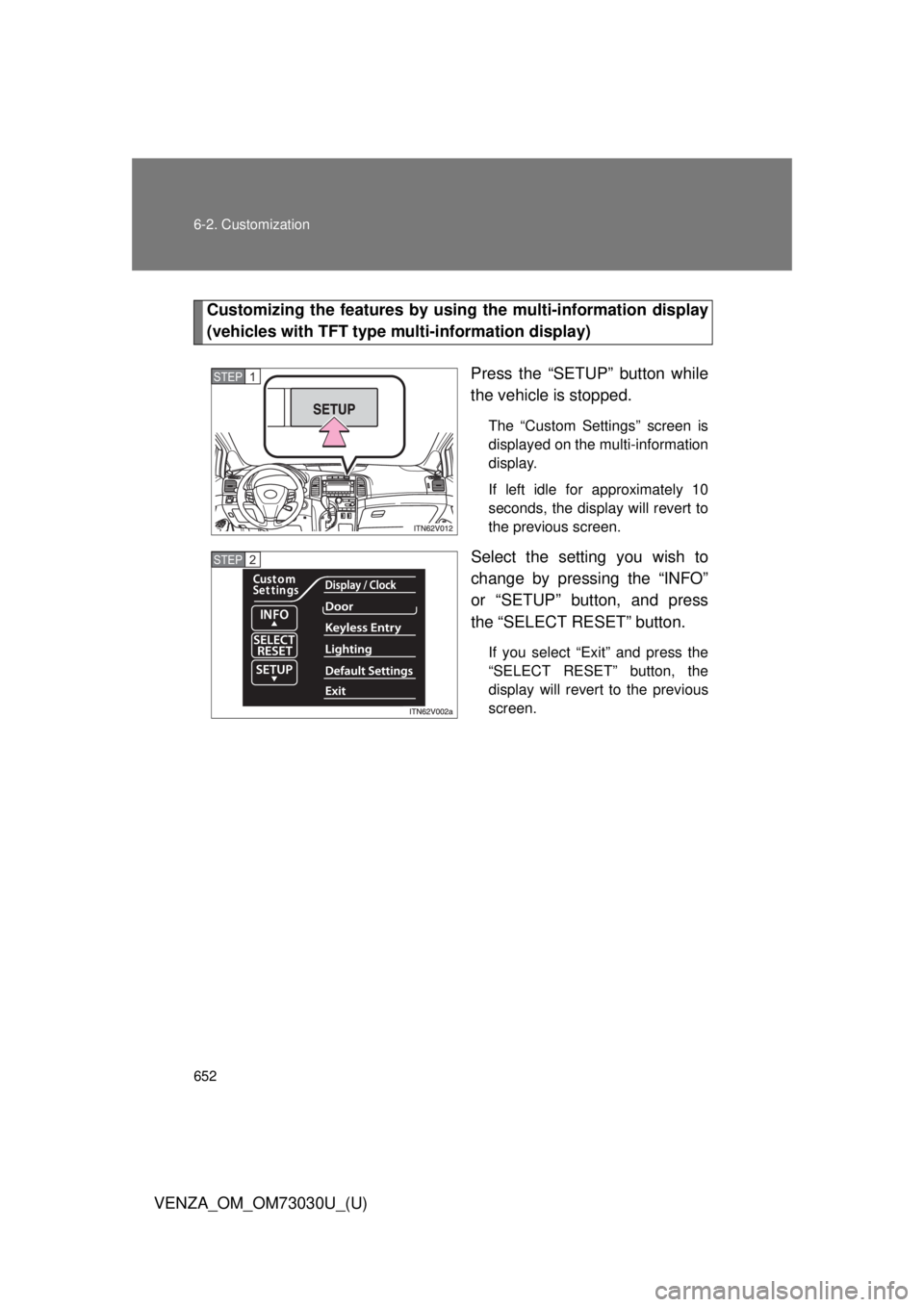
Press the “SETUP” button while
the vehicle is stopped. The “Custom Settings” screen is
displayed on the multi-information
display.
If left idle for approximately 10
seconds, the display will revert to
the previous screen.
Select the setting you wish to
change by pressing the “INFO”
or “SETUP” button, and press
the “SELECT RESET” button. If you select “Exit” and press the
“SELECT RESET” button, the
display will revert to the previous
screen.STEP 1
STEP 2
Page 653 of 688
6536-2. Customization
6
Vehicle specifications
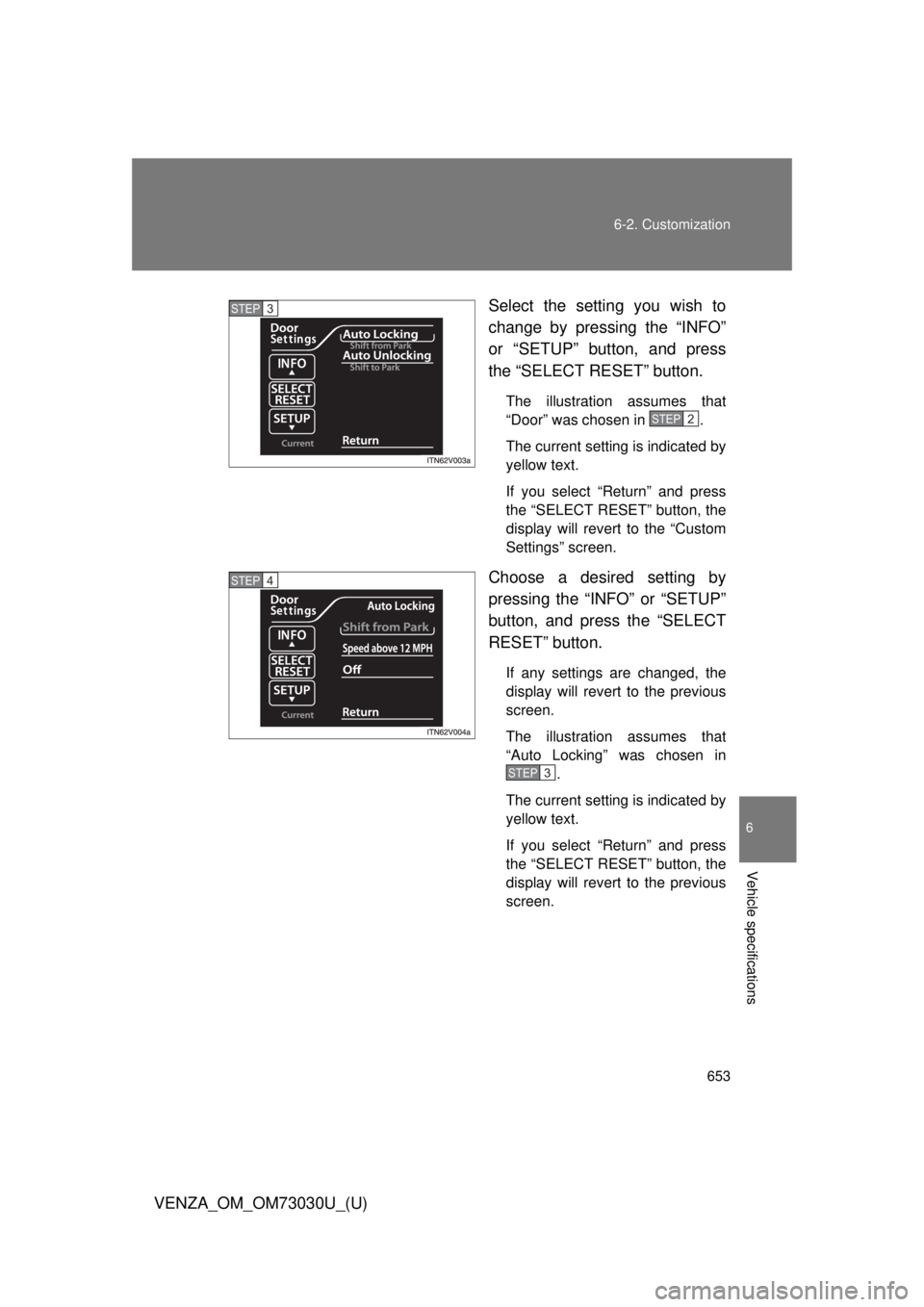
VENZA_OM_OM73030U_(U) Select the setting you wish to
change by pressing the “INFO”
or “SETUP” button, and press
the “SELECT RESET” button. The illustration assumes that
“Door” was chosen in .
The current setting is indicated by
yellow text.
If you select “Return” and press
the “SELECT RESET” button, the
display will revert to the “Custom
Settings” screen.
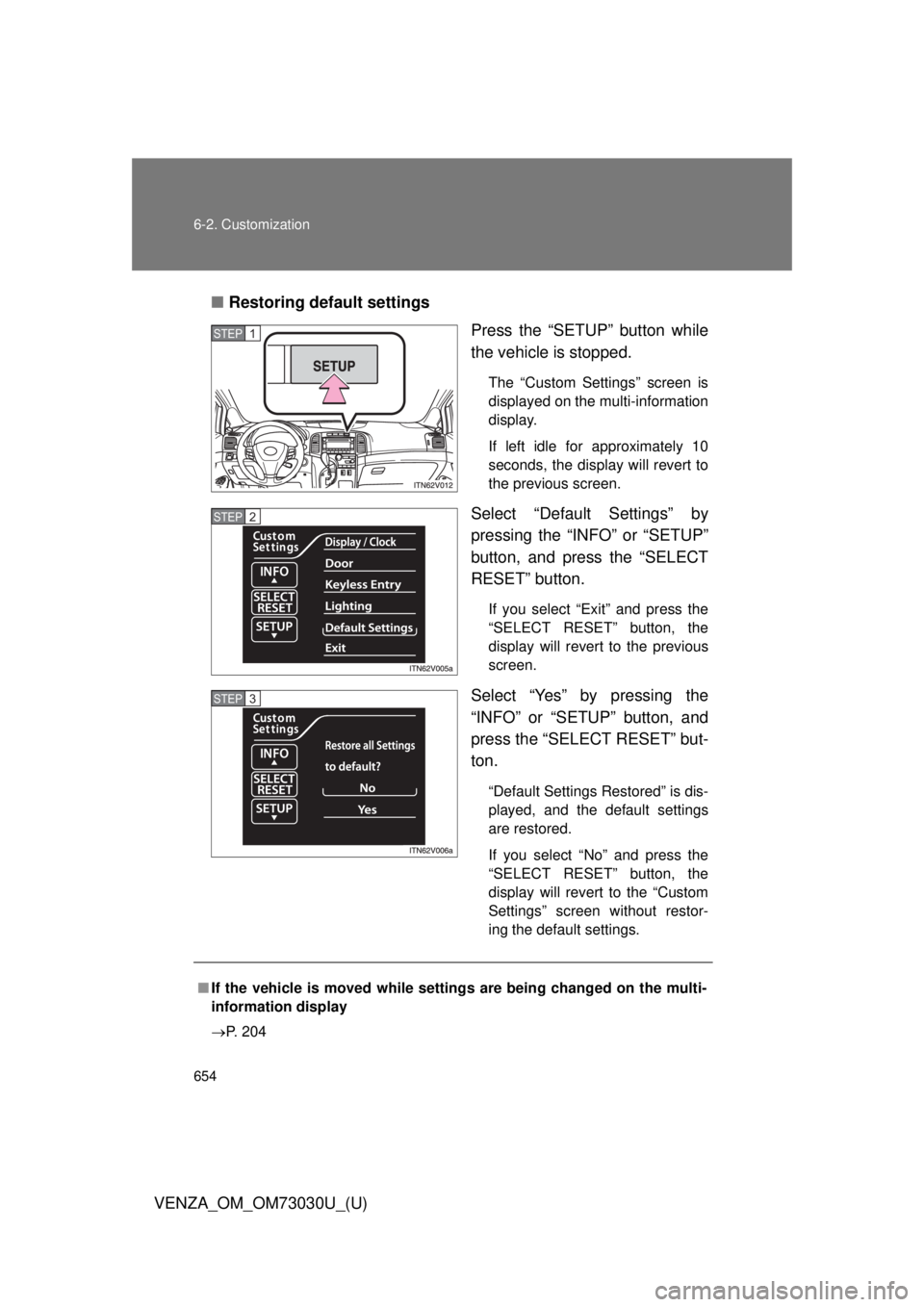
Choose a desired setting by
pressing the “INFO” or “SETUP”
button, and press the “SELECT
RESET” button. If any settings are changed, the
display will revert to the previous
screen.
The illustration assumes that
“Auto Locking” was chosen in
.
The current setting is indicated by
yellow text.
If you select “Return” and press
the “SELECT RESET” button, the
display will revert to the previous
screen.STEP 3
STEP2
STEP 4
STEP3
Page 654 of 688
6546-2. Customization
VENZA_OM_OM73030U_(U) ■ Restoring default settings
Press the “SETUP” button while
the vehicle is stopped. The “Custom Settings” screen is
displayed on the multi-information
display.
If left idle for approximately 10
seconds, the display will revert to
the previous screen.
Select “Default Settings” by
pressing the “INFO” or “SETUP”
button, and press the “SELECT
RESET” button. If you select “Exit” and press the
“SELECT RESET” button, the
display will revert to the previous
screen.
Select “Yes” by pressing the
“INFO” or “SETUP” button, and
press the “SELECT RESET” but-
ton. “Default Settings Restored” is dis-
played, and the default settings
are restored.
If you select “No” and press the
“SELECT RESET” button, the
display will revert to the “Custom
Settings” screen without restor-
ing the default settings.STEP 1
STEP 2
STEP 3
■ If the vehicle is moved while setti ngs are being changed on the multi-
information display
P. 204
Page 674 of 688
674
VENZA_OM_OM73030U_(U) Abbreviation list
Abbreviation/Acronym list ABBREVIATIONS MEANING
2WD 2-Wheel Drive
4WD 4-Wheel Drive
ABS Anti-lock Brake System
ACC Accessory
ALR Automatic Locking Retractor
AUX Auxiliary
AWD All-Wheel Drive
A/C Air Conditioning
CRS Child Restraint System
ECON Economy
ECU Electronic Control Unit
EDR Event Data Recorder
ELR Emergency Locking Retractor
EPS Electric Power Steering
GAWR Gross Axle Weight Rating
GCWR Gross Combination Weight Rating
GVWR Gross Vehicle Weight Rating
INFO Information
I/M Emission inspection and maintenance
LATCH Lower Anchors and Tether for Children
LCD Liquid Crystal Display
LED Light Emitting Diode
MMT Methylcy clopentadienyl Manganese Tricarbonyl
M+S Mud and Snow
MTBE Methyl Tertiary Butyl Ether