Page 77 of 284
77
AUDIO SYSTEM
3
2. RADIO OPERATION
1. AM/FM RADIO
■CONTROL SCREEN
Entune Premium Audio
OVERVIEW
Select “AM” or “FM” on the “Select Audio Source” screen. ( P.73)
Top screen
Option screen
Page 78 of 284
78
2. RADIO OPERATION
Entune Audio Plus
■CONTROL PANEL
Top screen
Option screen
Page 79 of 284
79
2. RADIO OPERATION
AUDIO SYSTEM
3
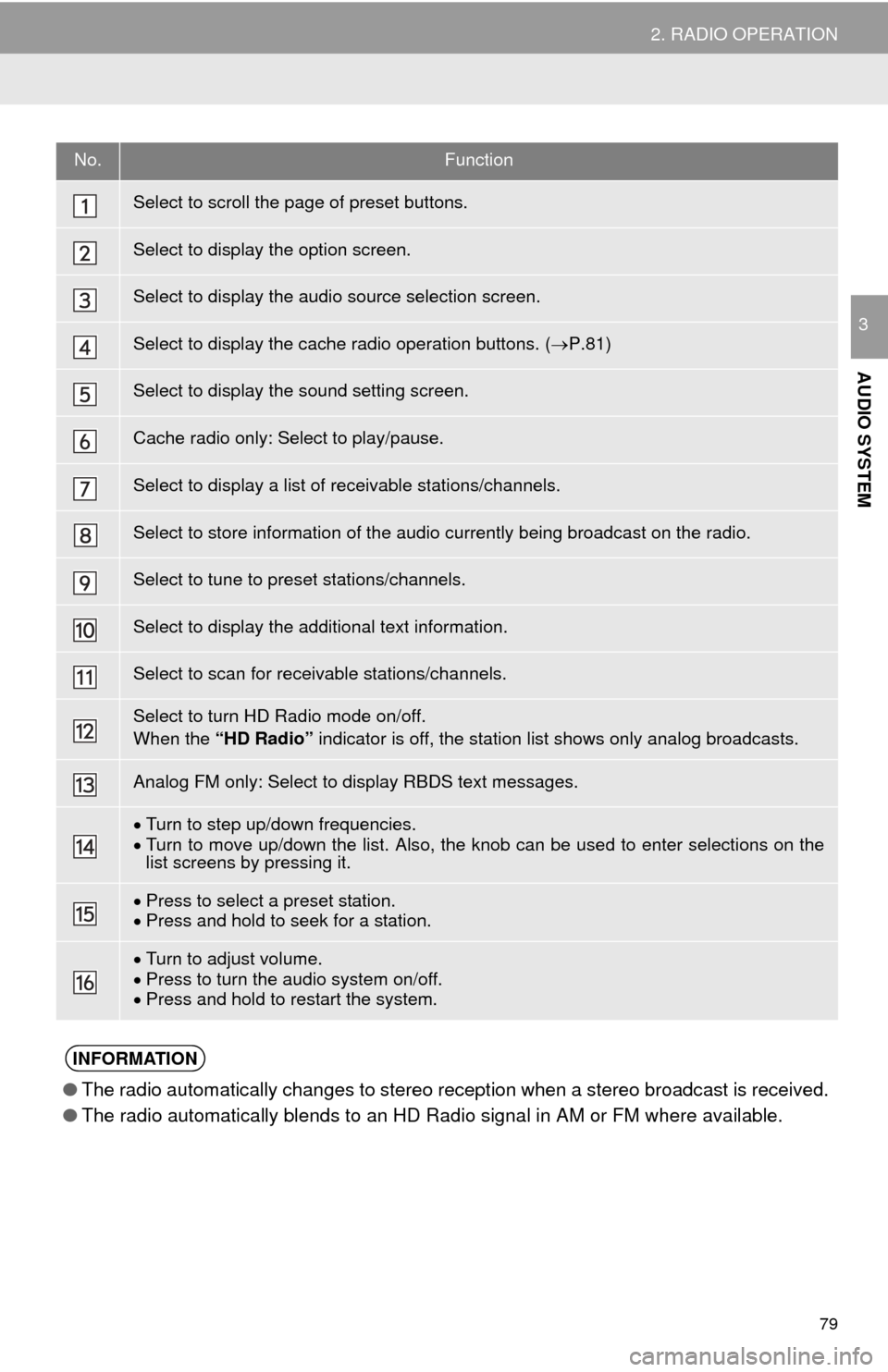
No.Function
Select to scroll the page of preset buttons.
Select to display the option screen.
Select to display the audio source selection screen.
Select to display the cache radio operation buttons. (P.81)
Select to display the sound setting screen.
Cache radio only: Select to play/pause.
Select to display a list of receivable stations/channels.
Select to store information of the audio currently being broadcast on the radio.
Select to tune to preset stations/channels.
Select to display the additional text information.
Select to scan for receivable stations/channels.
Select to turn HD Radio mode on/off.
When the “HD Radio” indicator is off, the station list shows only analog broadcasts.
Analog FM only: Select to display RBDS text messages.
Turn to step up/down frequencies.Turn to move up/down the list. Also, the knob can be used to enter selections on the
list screens by pressing it.
Press to select a preset station.Press and hold to seek for a station.
Turn to adjust volume.
Press to turn th e audio system on/off.
Press and hold to re start the system.
INFORMATION
●The radio automatically changes to stereo reception when a stereo broadcast is received.
● The radio automatically blends to an HD Radio signal in AM or FM where available.
Page 80 of 284
80
2. RADIO OPERATION
1Tune in the desired station.
2Select “(add new)” .
To change the preset station to a different
one, select and hold the preset station.
3Select “Yes” on the confirmation
screen.
4Select “OK” after setting the new pre -
set station.
1Select “Station List” .
2FM radio only: Select the desired pro -
gram genre.
3Select the desired station and select
“OK” .
PRESETTING A STATION
Radio mode has a mix preset function,
which can store up to 36 stations (6
stations per page x 6 pages) from any
of the AM, FM or SAT bands.
INFORMATION
●The number of preset radio stations dis-
played on the screen can be changed.
( P. 1 1 3 )
SELECTING A STATION
FROM THE LIST
A station list can be displayed.
Page 81 of 284
81
2. RADIO OPERATION
AUDIO SYSTEM
3
■REFRESHING THE STATION LIST
1Select “Refresh” on the “Station List”
screen and the following screen will be
displayed.
“Cancel Refresh” : Select
to cancel the
refresh.
“Source” : Select to change to another au-
dio source while refreshing.
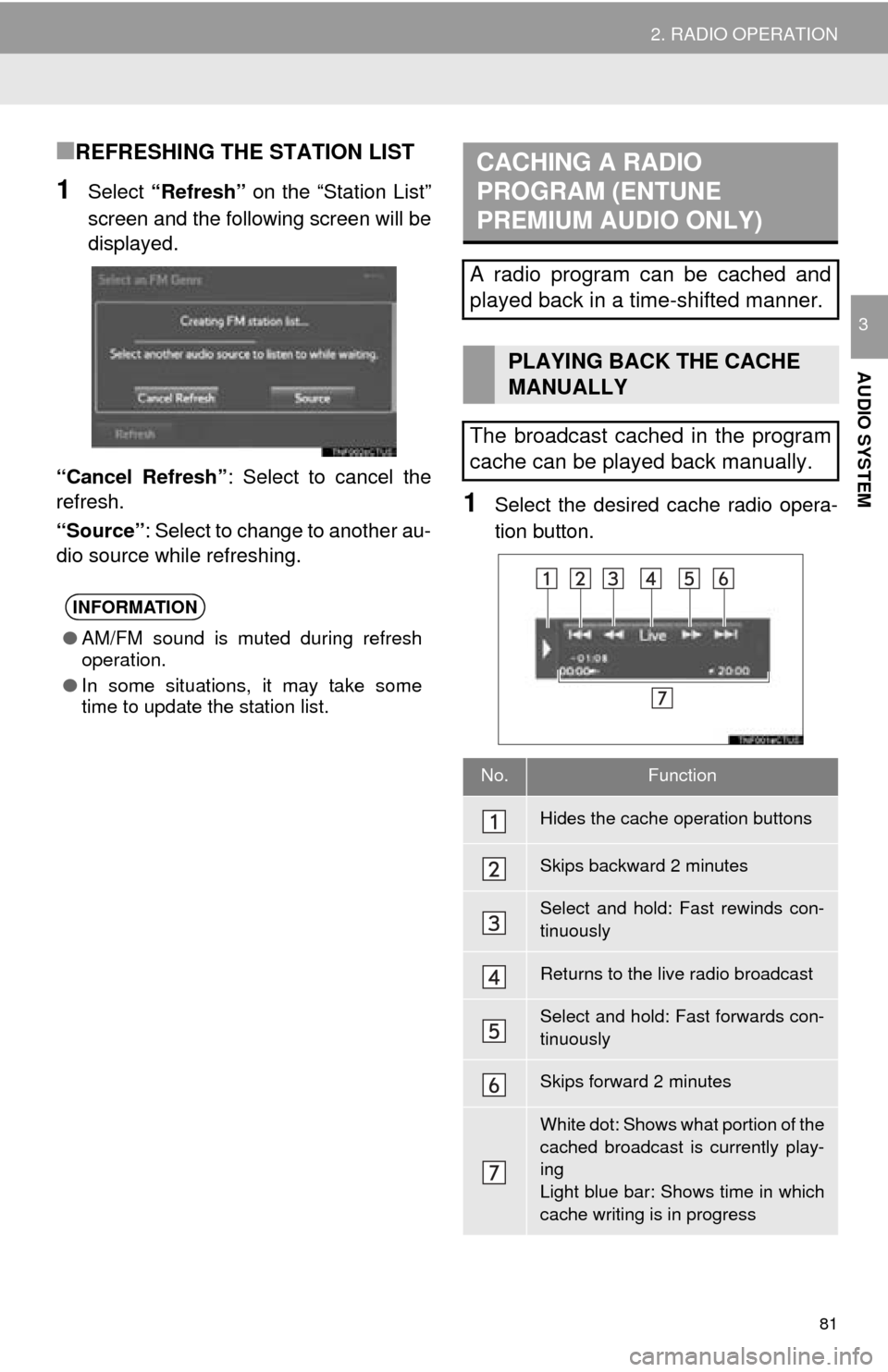
1Select the desired cache radio opera -
tion button.
INFORMATION
● AM/FM sound is muted during refresh
operation.
● In some situations, it may take some
time to update the station list.
CACHING A RADIO
PROGRAM (ENTUNE
PREMIUM AUDIO ONLY)
A radio program can be cached and
played back in a time-shifted manner.
PLAYING BACK THE CACHE
MANUALLY
The broadcast cached in the program
cache can be played back manually.
No.Function
Hides the cache operation buttons
Skips backward 2 minutes
Select and hold: Fast rewinds con-
tinuously
Returns to the live radio broadcast
Select and hold: Fast forwards con-
tinuously
Skips forward 2 minutes
White dot: Shows what portion of the
cached broadcast is currently play-
ing
Light blue bar: Shows time in which
cache writing is in progress
Page 82 of 284

82
2. RADIO OPERATION
1Select “Station List” .
2FM radio only: Select a desired genre
of station and select a desired station.
The genre list is in the following order:
• Classical
• Country
• EasyLis (Easy Listening)
• Inform (Information)
•Jazz
•News
•Oldies
• Other
• Pop Music
• Religion
•Rock
• R&B (Rhythm and Blues)
• Sports
•Talk
• Traffic (Not available when “HD Radio”
in
dicator is off.)
• Alert (Emergency Alert)
AUTOMATIC PLAYBACK OF
THE CACHE
If the radio broadcast is interrupted by
another audio output, such as an
incoming phone call, the system will
automatically cache the interrupted
portion and perform time-shift
playback when the interruption ends.
To manually operate the cache
operation: ( P.81)
INFORMATION
●The system can store up to 20 minutes.
Cached data will be erased when the
radio mode or station is changed or
when the audio system is turned off.
● If noise or silence occurs during the
caching process, cache writing will con-
tinue, with the noise or silence recorded
as is. In this case, the cached broadcast
will contain the noise or silence when
played back.
RADIO BROADCAST DATA
SYSTEM
This audio system is equipped with Ra-
dio Broadcast Data Systems (RBDS).
RBDS mode allows text messages to
be received from radio stations that uti-
lize RBDS transmitters.
When RBDS is on, the radio can
— only select stations of a particular
program type,
— display messages from radio sta-
tions,
— search for a stronger signal station.
RBDS features are available only
when listening to an FM station that
broadcasts RBDS information and the
“FM Info” indicator is on.
SELECTING A DESIRED
GENRE
Page 83 of 284

83
2. RADIO OPERATION
AUDIO SYSTEM
31Select “Station List” .
2Select the desired traffic program sta -
tion.
TRAFFIC ANNOUNCEMENT
(FM RADIO)
A station that regularly broadcasts traf-
fic information is automatically located.
INFORMATION
● If a traffic program station is found, the
name of the traffic program station will
be displayed for a while.
USING HD Radio ™
TECHNOLOGY
HD Radio ™
Technology is the digital
evolution of analog AM/FM radio. Your
radio product has a special receiver
which allows it to receive digital broad-
casts (where available) in addition to
the analog broadcasts it already re-
ceives. Digital broadcasts have better
sound quality than analog broadcasts
as digital broadcasts provide free,
crystal clear audio with no static or dis-
tortion. For more information, and a
guide to available radio stations and
programming, refer to
www.hdradio.com
.
HD Radio Technology manufactured
under license from iBiquity Digital
Corporation. U.S. and Foreign
Patents. HD Radio ™
and the HD, HD
Radio, and “Arc” logos are proprietary
trademarks of iBiquity Digital Corp.
Page 84 of 284
84
2. RADIO OPERATION
1Select “HD)” logo .
2Select the desired channel.
Turning the “TUNE·SCROLL” knob can
also select the desired multicast channel.
1Select “Tag” to bookmark the music
information.
2Connect an iPod. ( P.74)
Turn on the power of the iPod if it is not
turned on.
Once an
iPod is connected, the music tag
moves from the radio into the iPod.
When the iPod is connected to iTunes, the
“tagged” information of the songs which
were tagged while listening to the radio
can be viewed with an option to purchase.
AVAILABLE HD Radio ™
TECHNOLOGY
MULTICAST
On the FM radio frequency most digital
stations have “multiple” or supplemen-
tal programs on one FM station.
PRESERVING WITH MUSIC
INFORMATION
Tag information in the music broad-
casting is preserved in the system can
be transferred to an iPod.


