Page 194 of 741

194
RAV4_OM_OM42A41U_(U)
4-1. Before driving
WARNING
■Hitch
Trailer hitch assemblies have different weight capacities established by the
hitch manufacturer. Even though the vehicle may be physically capable of
towing a higher weight, the operator must determine the maximum weight
rating of the particular hitch assembly and never exceed the maximum
weight rating specified for the trailer-hitch. Exceeding the maximum weight
rating set by the trailer-hitch manufacturer can cause an accident resulting
in death or serious personal injuries.
■ When towing a trailer
Toyota recommends trailers with brakes that conform to any applicable fed-
eral and state/provincial regulations.
● If the gross trailer weight exceeds unbraked TWR, trailer brakes are
required. Toyota recommends trailers with brakes that conform to all appli-
cable federal and state/provincial regulations.
● Never tap into your vehicle’s hydraulic system, as this will lower the vehi-
cle’s braking effectiveness.
● Never tow a trailer without using a safety chain securely attached to both
the trailer and the vehicle. If damage occurs to the coupling unit or hitch
ball, there is danger of the trailer wandering into another lane.
NOTICE
■When installing a trailer hitch
Use only the position recommended by your Toyota dealer. Do not install
the trailer hitch on the bumper; this may cause body damage.
■ Do not directly splice trailer lights
Do not directly splice trailer lights. Directly splicing trailer lights may damage
your vehicle’s electrical system and cause a malfunction.
Page 197 of 741

RAV4_OM_OM42A41U_(U)
1974-2. Driving procedures
4
Driving
■If the engine does not start
The engine immobilizer system may not have been deactivated. ( →P. 73)
Contact your Toyota dealer.
■ When the steering lock cannot be released
■ Key reminder function
A buzzer sounds if the driver’s door is opened while the engine switch is in the
“LOCK” or “ACC” position to remind you to remove the key. When starting the engine, the engine
switch may seem stuck in the “LOCK”
position. To free it, turn the key while turn-
ing the steering wheel slightly left and
right.
WARNING
■When starting the engine
Always start the engine while sitting in the driver’s seat. Do not depress the
accelerator pedal while starting the engine under any circumstances.
Doing so may cause an accident resulting in death or serious injury.
■ Caution when driving
Do not turn the engine switch to the “LOCK” position while driving. If, in an
emergency, you must turn the engine off while the vehicle is moving, turn
the engine switch only to the “ACC” position to stop the engine. An accident
may result if the engine is stopped while driving. ( →P. 605)
NOTICE
■To prevent battery discharge
Do not leave the engine switch in the “ACC” or “ON” position for long peri-
ods of time without the engine running.
■ When starting the engine
● Do not crank the engine for more than 30 seconds at a time. This may
overheat the starter and wiring system.
● Do not race a cold engine.
● If the engine becomes difficult to start or stalls frequently, have your vehi-
cle checked by your Toyota dealer immediately.
Page 202 of 741

202
RAV4_OM_OM42A41U_(U)
4-2. Driving procedures
WARNING
■When starting the engine
Always start the engine while sitting in the driver’s seat. Do not depress the
accelerator pedal while starting the engine under any circumstances.
Doing so may cause an accident resulting in death or serious injury.
■ Caution while driving
If engine failure occurs while the vehicle is moving, do not lock or open the
doors until the vehicle reaches a safe and complete stop. Activation of the
steering lock in this circumstance may lead to an accident, resulting in
death or serious injury.
■ Stopping the engine in an emergency
If you want to stop the engine in an emergency while driving the vehicle,
press and hold the engine switch for more than 2 seconds, or press it briefly
3 times or more in succession. ( →P. 605)
However, do not touch the engine switch while driving except in an emer-
gency. Turning the engine off while driving will not cause loss of steering or
braking control, but the power assist to these systems will be lost. This will
make it more difficult to steer and brake, so you should pull over and stop
the vehicle as soon as it is safe to do so.
NOTICE
■ To prevent battery discharge
● Do not leave the engine switch in ACCESSORY or IGNITION ON mode
for long periods of time without the engine running.
● If “POWER ON” is displayed on the multi-information display, the engine
switch is not off. Exit the vehicle after turning the engine switch off.
● Do not stop the engine when the shift lever is in a position other than P. If
the engine is stopped in another shift lever position, the engine switch will
not be turned off but instead be turned to ACCESSORY mode. If the vehi-
cle is left in ACCESSORY mode, battery discharge may occur.
■ When starting the engine
● Do not race a cold engine.
● If the engine becomes difficult to start or stalls frequently, have your vehi-
cle checked by your Toyota dealer immediately.
■ Symptoms indicating a malfunction with the engine switch
If the engine switch seems to be operating somewhat differently than usual,
such as the switch sticking slightly, there may be a malfunction. Contact
your Toyota dealer immediately.
Page 205 of 741
RAV4_OM_OM42A41U_(U)
2054-2. Driving procedures
4
Driving
The following modes can be selected to suit driving conditions.
■Eco drive mode
Use Eco drive mode to help achieve low fuel consumption during
trips that involve frequent accelerating.
Press the “ECO MODE” button
to select Eco drive mode.
The “ECO MODE” indicator light
will come on.
Press the button again to cancel
Eco drive mode.
■
Sport mode
Use sport mode for sporty driving or driving in mountainous
regions.
Press the “SPORT” button to
select sport mode.
The “SPORT” indicator light will
come on.
Press the button again to cancel
sport mode.
Selecting the driving mode
Page 209 of 741

RAV4_OM_OM42A41U_(U)
2094-2. Driving procedures
4
Driving
■If the warning light comes on or the warning message is displayed (AWD
models only)
Vehicles with the multi-information display (with monochrome display)
When the warning light goes out, the vehicle can be driven again.
If the warning light does not go out after waiting a while, have your vehicle
inspected by your Toyota dealer.
Vehicles with the multi-information display (with color display)
*: If any shift range in D is selected ( →P. 206), make sure to return to normal
D position driving. (Vehicles with paddle shift switches only)
When the warning message goes out, the vehicle can be driven again.
If the warning message does not go out after waiting a while, have your vehi-
cle inspected by your Toyota dealer.
■ AI-SHIFT
The AI-SHIFT automatically selects the suitable gear according to driver per-
formance and driving conditions.
The AI-SHIFT automatically operates when the shift lever is in D. (Shifting the
shift lever to S cancels the function.) If the automatic transmission fluid tem-
perature warning light comes on while
driving, make sure to return to D position
driving and reduce speed by easing off
the accelerator pedal. Stop the vehicle in
a safe place, shift the shift lever to P and
let the engine idle until the warning light
goes out.
If the automatic transmission fluid tem-
perature warning message is displayed
while driving, make sure to return to D
position driving
* and reduce speed by
easing off the accelerator pedal. Stop the
vehicle in a safe place, shift the shift lever
to P and let the engine idle until the warn-
ing message goes out.
WARNING
■ When driving on slippery road surfaces
Do not accelerate or shift gears suddenly.
Sudden changes in engine braking may cause the vehicle to spin or skid,
resulting in an accident.
Page 210 of 741

210
RAV4_OM_OM42A41U_(U)
4-2. Driving procedures
Turn signal lever
Right turn
Lane change to the right (move
the lever partway and release
it)
The right hand signals will flash 3
times.
Lane change to the left (move
the lever partway and release
it)
The left hand signals will flash 3
times.
Left turn
■Turn signals can be operated when
Vehicles without smart key system
The engine switch is in the “ON” position.
Vehicles with smart key system
The engine switch is in IGNITION ON mode.
■ If the indicator flashes faster than usual
Check that a light bulb in the front or rear turn signal lights has not burned
out.
■ If the turn signals stop flashing before a lane change has been per-
formed
Operate the lever again.
■ To discontinue flashing of the turn signals during a lane change
Operate the lever in the opposite direction.
■ Customization
The setting of the turn signals flash during a lane change can be changed.
(Customizable features: →P. 702)
Operating instructions
1
2
3
4
Page 211 of 741
211
RAV4_OM_OM42A41U_(U)
4-2. Driving procedures
4
Driving
Parking brake
Sets the parking brake
Fully pull the parking brake while
depressing the brake pedal.
Releases the parking brake
Slightly raise the lever and lower it
completely while pressing the but-
ton.
■Parking brake engaged warning buzzer
→P. 619
■ Usage in winter time
→P. 316
U.S.A. Canada
1
2
NOTICE
■Before driving
Fully release the parking brake.
Driving the vehicle with the parking brake set will lead to brake components
overheating, which may affect braking performance and increase brake
wear.
Page 212 of 741
212
RAV4_OM_OM42A41U_(U)
4-3. Operating the lights and wipers
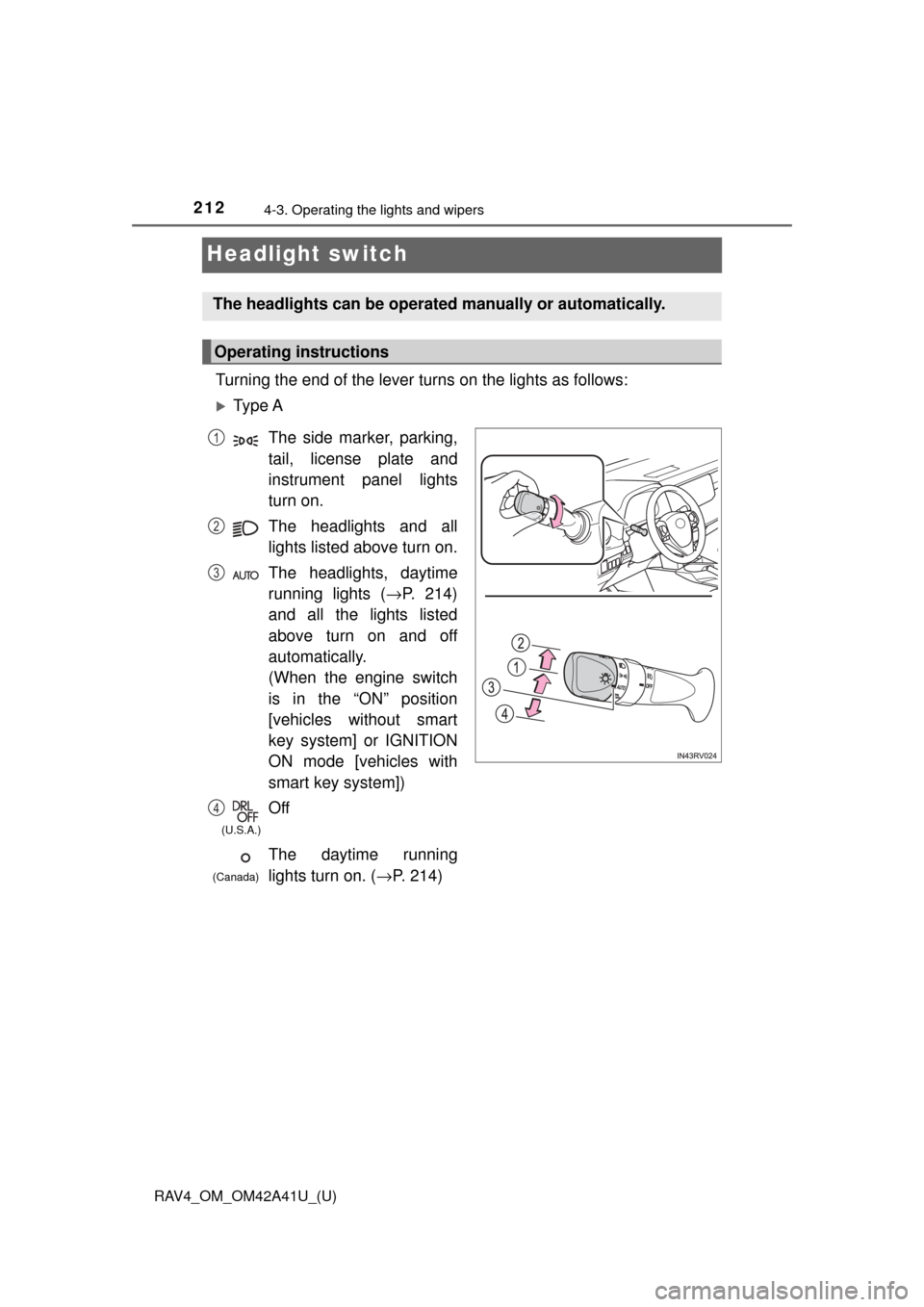
Headlight switch
Turning the end of the lever turns on the lights as follows:
Ty p e A
The headlights can be operated manually or automatically.
Operating instructions
The side marker, parking,
tail, license plate and
instrument panel lights
turn on.
The headlights and all
lights listed above turn on.
The headlights, daytime
running lights (→P. 214)
and all the lights listed
above turn on and off
automatically.
(When the engine switch
is in the “ON” position
[vehicles without smart
key system] or IGNITION
ON mode [vehicles with
smart key system])
Off
The daytime running
lights turn on. ( →P. 214)1
2
3
4
(U.S.A.)
(Canada)