Page 95 of 741

RAV4_OM_OM42A41U_(U)
952. Instrument cluster
2
Instrument cluster
The settings of the following items can be changed, refer to P. 695
For functions that can be enabled or disabled, the function switches
between on and off each time is pressed.
●(Lane Departure Alert with steering control)* (→ P. 252)
● (Pre-Collision System)
* (→ P. 238)
● (Blind Spot Monitor)
* (→ P. 305)
● (Intuitive parking assist)
* (→ P. 277)
● (Power back door)
* (→ P. 120)
● Meter Settings
• Language
Select to change the language on the display.
•Units
Select to change the unit of measure for fuel consumption.
• Eco Driving Indicator Light Select to activate/deactivate the Eco Driving Indicator Light
• Pop-up display Select to set the pop-up displays, which may appear in some situa-
tions, on/off.
• Accent color Select to change the accent colors on the screen, such as the cursor
color.
• Default settings Registered or changed meter settings will be deleted or returned to
their default setting.
*: If equipped
Settings display
Page 96 of 741

96
RAV4_OM_OM42A41U_(U)
2. Instrument cluster
■System check display
After turning the engine switch to IGNITION ON mode, opening image is dis-
played while system operation is checked. When the system check is com-
plete, the normal screen will return.
■ Dynamic Torque Control AWD system display
Displays the Dynamic Torque Control AWD system operation state and the G-
force state.
■ Suspension of the settings display
In the following situations, the settings display using the meter control
switches will be suspended.
●When a warning message appears on the multi-information display
● When the vehicle begins to move
■ When disconnecting and reco nnecting battery terminals
The drive information will be reset.
■ Liquid crystal display
Small spots or light spots may appear on the display. This phenomenon is
characteristic of liquid crystal displays, and there is no problem continuing to
use the display.Torque distribution display
Displays the amount of drive torque
applied.
G-force display
Displays the current G-force state.
1
2
Page 98 of 741

98
RAV4_OM_OM42A41U_(U)
2. Instrument cluster
Fuel consumption information
Vehicles with Entune Audio
Press the “CAR” button.
Vehicles with Entune Premium Audio with Navigation and Entune
Audio Plus
Press the “APPS” button, and t hen select “Eco” on the screen.
If the “Trip Information” screen does not appear, select “Trip Informa-
tion”. Reset the trip information data
Previous fuel consumption per
minute
Current fuel consumption
“Past Record” screen appears
Cruising range
Elapsed time
Average vehicle speed
Average fuel consumption for the past 15 minutes is divided by color
into past averages and averages at tained since the engine switch was
last turned to the “ON” position (vehicles without smart key system) or
IGNITION ON mode (vehicles with smart key system). Use the dis-
played average fuel consumption as a reference.
These images are examples only, an d may vary slightly from actual
conditions.
The fuel consumption informat ion can be displayed on Entune
Premium Audio with Navigation and Entune Audio screen.
Display the trip information or past record screen
Trip information
1
2
3
4
5
6
7
Page 99 of 741

RAV4_OM_OM42A41U_(U)
992. Instrument cluster
2
Instrument cluster
If the “Past Record” screen does not appear, select “Past Record”.
Reset the past record data
Best recorded fuel consumption
Average fuel consumption (if
equipped)
Previous fuel consumption
record
Current fuel consumption
Update the past record data
“Trip Information” screen appears
These images are examples only, an d may vary slightly from actual
conditions.
■ Resetting the data
●Selecting “Clear” on the “Trip Information” screen will reset the trip informa-
tion data.
● Selecting “Clear” on the “Past Record” screen will reset the past record
data.
■ Updating the past record data
Selecting “Update” on the “Past Record” screen will update the past record
data.
Also, the average fuel consumption displa yed in the multi-information display
will be reset at the same time.
■ Cruising range
Displays the estimated maximum distance that can be driven with the quan-
tity of fuel remaining.
This distance is computed based on your average fuel consumption. As a
result, the actual distance that can be driven may differ from that displayed.
Past record
1
2
3
4
5
6
7
Page 104 of 741

104
RAV4_OM_OM42A41U_(U)
3-1. Key information
■Panic mode
Vehicles without smart key system
Vehicles with smart key system
■ If you lose your keys
New genuine keys can be made by your Toyota dealer using a master key
(vehicles without smart key system) or the other mechanical key (vehicles
with smart key system) and the key number stamped on your key number
plate. Keep the plate in a safe place such as your wallet, not in the vehicle.
■ When riding in an aircraft
When bringing a key with wireless remote control function onto an aircraft,
make sure you do not press any buttons on the key while inside the aircraft
cabin. If you are carrying the key in your bag etc., ensure that the buttons are
not likely to be pressed accidentally. Pressing a button may cause the key to
emit radio waves that could interfere with the operation of the aircraft. When is pressed for longer than
about one second, an alarm will sound
intermittently and the vehicle lights will
flash to deter any person from trying to
break into or damage your vehicle.
To stop the alarm, press any button on the
wireless remote control.
When is pressed for longer than
about one second, an alarm will sound
intermittently and the vehicle lights will
flash to deter any person from trying to
break into or damage your vehicle.
To stop the alarm, press any button on the
electronic key.
Page 115 of 741
RAV4_OM_OM42A41U_(U)
1153-2. Opening, closing and locking the doors
3
Operation of each component
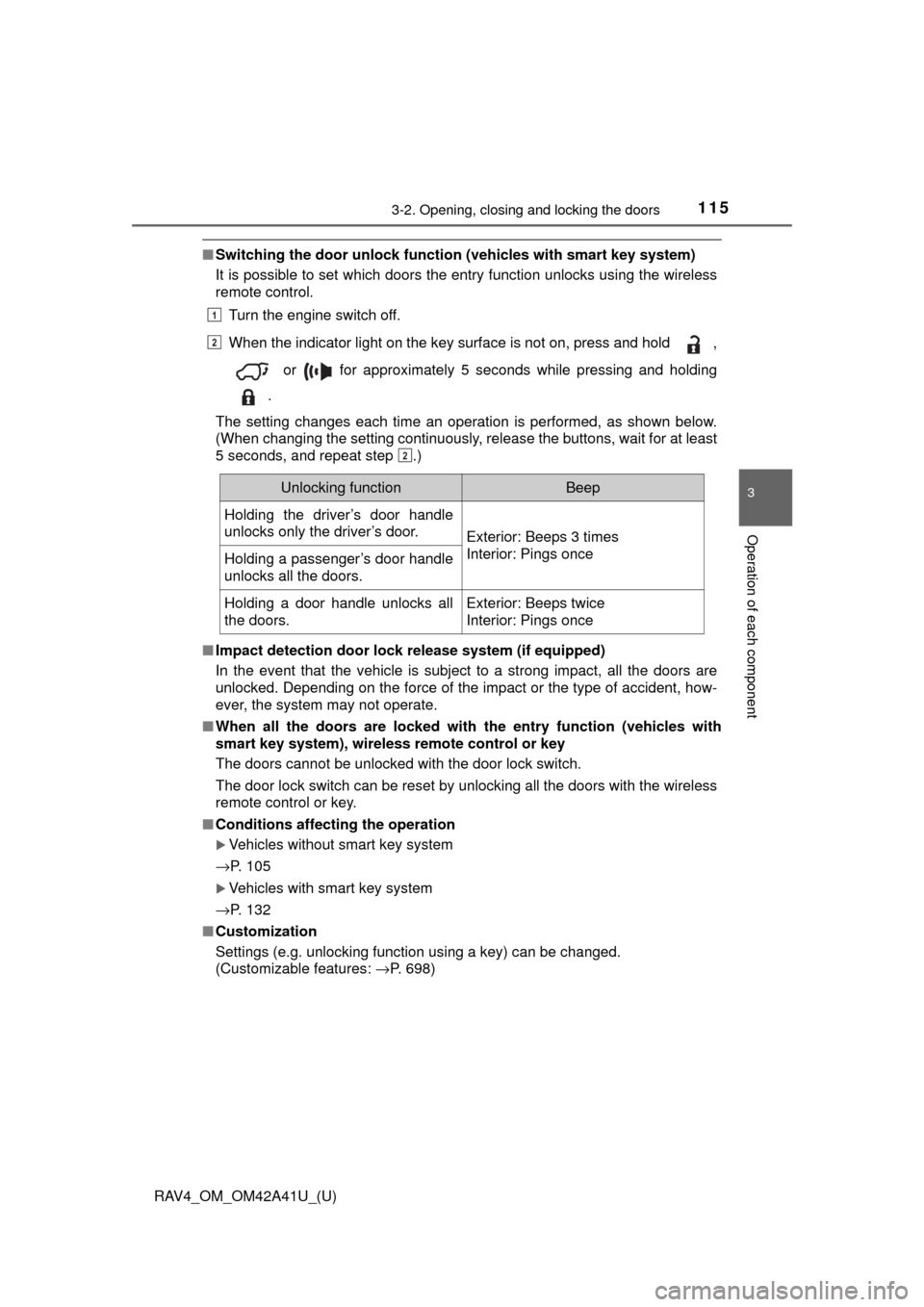
■Switching the door unlock functi on (vehicles with smart key system)
It is possible to set which doors the entry function unlocks using the wireless
remote control.
Turn the engine switch off.
When the indicator light on the key surface is not on, press and hold ,
or for approximately 5 seconds while pressing and holding
.
The setting changes each time an operation is performed, as shown below.
(When changing the setting continuously, release the buttons, wait for at least
5 seconds, and repeat step .)
■ Impact detection door lock release system (if equipped)
In the event that the vehicle is subject to a strong impact, all the doors are
unlocked. Depending on the force of the impact or the type of accident, how-
ever, the system may not operate.
■ When all the doors are locked with the entry function (vehicles with
smart key system), wireless remote control or key
The doors cannot be unlocked with the door lock switch.
The door lock switch can be reset by unlocking all the doors with the wireless
remote control or key.
■ Conditions affecting the operation
Vehicles without smart key system
→P. 105
Vehicles with smart key system
→P. 132
■ Customization
Settings (e.g. unlocking function using a key) can be changed.
(Customizable features: →P. 698)
1
2
2
Unlocking functionBeep
Holding the driver’s door handle
unlocks only the driver’s door.
Exterior: Beeps 3 times
Interior: Pings once
Holding a passenger’s door handle
unlocks all the doors.
Holding a door handle unlocks all
the doors.Exterior: Beeps twice
Interior: Pings once
Page 121 of 741
RAV4_OM_OM42A41U_(U)
1213-2. Opening, closing and locking the doors
3
Operation of each component
■Luggage compartment light
The luggage compartment light turns on when the back door is opened with
the luggage compartment light switch on.
■ If the back door open er is inoperative
The back door can be unlocked from the inside.
Vehicles without power back door On
Off
Remove the cover on the back door
trim.
Use a cloth to prevent scratches.
After loosening the screw, move the
cover.
Push the lever for the back door motor.
1
2
1
2
3
Page 123 of 741

RAV4_OM_OM42A41U_(U)
1233-2. Opening, closing and locking the doors
3
Operation of each component
■When reconnecting th e battery (vehicles with power back door)
To enable the power back door to operate properly, close the back door man-
ually.
■ Back door closer (vehicl es with power back door)
In the event that the back door is left slightly open, the back door closer will
automatically close it to the fully closed position.
■ Fall-down protection function (vehicles with power back door)
While the power back door is opening automatically, applying excessive force
to it will stop the opening operation to prevent the power back door from sud-
denly shutting.
■ Back door closing assist (veh icles with power back door)
If the back door is lowered manually when the back door is stopped at an
open position, the back door will fully close automatically.
■ Canceling the adjusted open positi on of the back door (vehicles with
power back door)
Press and hold the power back door switch on the back door until the buzzer
sounds 4 times, pauses momentarily, and then sounds 2 times. The open
position is initialized to the fully opened position.
■ Customization (vehicles with power back door)
Settings (e.g. power back door opening angle) can be changed.
(Customizable features: →P. 699)
