Page 211 of 741
211
RAV4_OM_OM42A41U_(U)
4-2. Driving procedures
4
Driving
Parking brake
Sets the parking brake
Fully pull the parking brake while
depressing the brake pedal.
Releases the parking brake
Slightly raise the lever and lower it
completely while pressing the but-
ton.
■Parking brake engaged warning buzzer
→P. 619
■ Usage in winter time
→P. 316
U.S.A. Canada
1
2
NOTICE
■Before driving
Fully release the parking brake.
Driving the vehicle with the parking brake set will lead to brake components
overheating, which may affect braking performance and increase brake
wear.
Page 216 of 741
216
RAV4_OM_OM42A41U_(U)
4-3. Operating the lights and wipers
Automatic High Beam∗
Push the lever away from you with
the headlight switch in posi-
tion.
The Automatic High Beam indica-
tor will come on when the head-
lights are turned on automatically
to indicate that the system is
active.
∗: If equipped
The Automatic High Beam uses an in-vehicle camera sensor to
assess the brightness of streetlights, the lights of vehicles
ahead etc., and automatically turns the high beam on or off as
necessary.
WARNING
■Limitations of the Automatic High Beam
Do not rely on the Automatic High Beam. Always drive safely, taking care to
observe your surroundings and turning the high beam on or off manually if
necessary.
■ To prevent incorrect operation of the Automatic High Beam system
Do not overload the vehicle.
Activating the Automatic High Beam system
Page 219 of 741
RAV4_OM_OM42A41U_(U)
2194-3. Operating the lights and wipers
4
Driving
• There is a highly reflective object ahead of the vehicle, such as a sign ora mirror.
• The back of a vehicle ahead is highly reflective, such as a container on a truck.
• The vehicle’s headlights are damaged or dirty.
• The vehicle is listing or tilting, due to a flat tire, a trailer being towed etc.
• The high beam and low beam are repeatedly being switched between in an abnormal manner.
• The driver believes that the high beam may be causing problems or dis- tress to other drivers or pedestrians nearby.
■ Temporarily lowering sensor sensitivity
The sensitivity of the sensor can be temporarily lowered.
Turn the engine switch off while the following conditions are met.
• The headlight switch is in .
• The headlight switch lever is in high beam position. Turn the engine switch to IGNITION ON mode.
Within 5 seconds after , repeat pulling the headlight switch lever to the
original position then pushing it to the high beam position quickly 9 times,
then leave the lever in high beam position.
Automatic High Beam (headlights) may turn on even the vehicle is stopped.
■ If a warning message of the Auto matic High Beam is displayed
It may indicate a malfunction in the system. Contact your Toyota dealer.
■ Customization
The Automatic High Beam can be turned off.
(Customizable features: →P. 701)
1
2
32
Page 224 of 741
224
RAV4_OM_OM42A41U_(U)
4-3. Operating the lights and wipers
WARNING
■Caution regarding the use of washer fluid
When it is cold, do not use the washer fluid until the windshield becomes
warm. The fluid may freeze on the windshield and cause low visibility. This
may lead to an accident, resulting in death or serious injury.
NOTICE
■When the windshield is dry
Do not use the wipers, as they may damage the windshield.
■ When the washer fluid tank is empty
Do not operate the switch continually as the washer fluid pump may over-
heat.
■ When a nozzle becomes blocked
In this case, contact your Toyota dealer.
Do not try to clear it with a pin or other object. The nozzle will be damaged.
■ To prevent battery discharge
Do not leave the wipers on longer than necessary when the engine is off.
Page 230 of 741
230
RAV4_OM_OM42A41U_(U)
4-4. Refueling
Pull up the opener to open the
fuel filler door.
Turn the fuel tank cap slowly to
remove it and hang it on the
back of the fuel filler door.
After refueling, turn the fuel tank
cap until you hear a click. Once
the cap is released, it will turn
slightly in the opposite direction.
Opening the fuel tank cap
1
2
Closing the fuel tank cap
WARNING
■ When replacing the fuel tank cap
Do not use anything but a genuine Toyota fuel tank cap designed for your
vehicle. Doing so may cause a fire or other incident which may result in
death or serious injury.
Page 235 of 741

RAV4_OM_OM42A41U_(U)
2354-5. Using the driving support systems
4
Driving
WARNING
■To avoid malfunction of the camera sensor
Observe the following precautions.
Otherwise, the camera sensor may not operate properly, possibly leading to
an accident resulting in death or serious injury.
● Keep the windshield clean at all times.
• If the windshield is dirty or covered with an oily film, water droplets,
snow, etc., clear the windshield.
• If a glass coating agent is applied to the windshield, it will still be \
neces- sary to use the windshield wipers to remove water droplets from the
area of the windshield in front of the camera sensor.
• If the inner side of the windshield where the camera sensor is installed is dirty, contact your Toyota dealer.
● If the part of the windshield in front of the camera sensor is fogged up or
covered with condensation or ice, use the windshield defogger to remove
the fog, condensation or ice. ( →P. 485, 493)
● If water droplets cannot be properly removed from the area of the wind-
shield in front of the camera sensor by the windshield wipers, replace the
wiper insert or wiper blade.
If the wiper inserts or wiper blades need to be replaced, contact your Toy-
ota dealer.
● Do not attach window tinting to the windshield.
● Replace the windshield if it is damaged or cracked.
If the windshield needs to be replaced, contact your Toyota dealer.
● Do not get the camera sensor wet.
● Do not allow bright lights to shine into the camera sensor.
● Do not dirty or damage the camera sensor.
When cleaning the inside of the windshield, do not allow glass cleaner to
contact the lens. Also, do not touch the lens. If the lens is dirty or dam-
aged, contact your Toyota dealer.
●Do not install an antenna or attach stick-
ers (including transparent stickers) or
other items to the area of the windshield
in front of the camera sensor (shaded
area in the illustration).
Page 236 of 741
236
RAV4_OM_OM42A41U_(U)
4-5. Using the driving support systems
■Certification
WARNING
●Do not subject the camera sensor to a strong impact.
● Do not change the installation position or direction of the camera sensor or
remove it.
● Do not disassemble the camera sensor.
● Do not install an electronic device or device that emits strong electric
waves near the camera sensor.
● Do not modify any components of the vehicle around the camera sensor
(inside rear view mirror, etc.) or ceiling.
● Do not attach any accessories that may obstruct the camera sensor to the
hood, front grille or front bumper. Contact your Toyota dealer for details.
● If a surfboard or other long object is to be mounted on the roof, make sure
that it will not obstruct the camera sensor.
● Do not modify the headlights or other lights.
Page 242 of 741
242
RAV4_OM_OM42A41U_(U)
4-5. Using the driving support systems
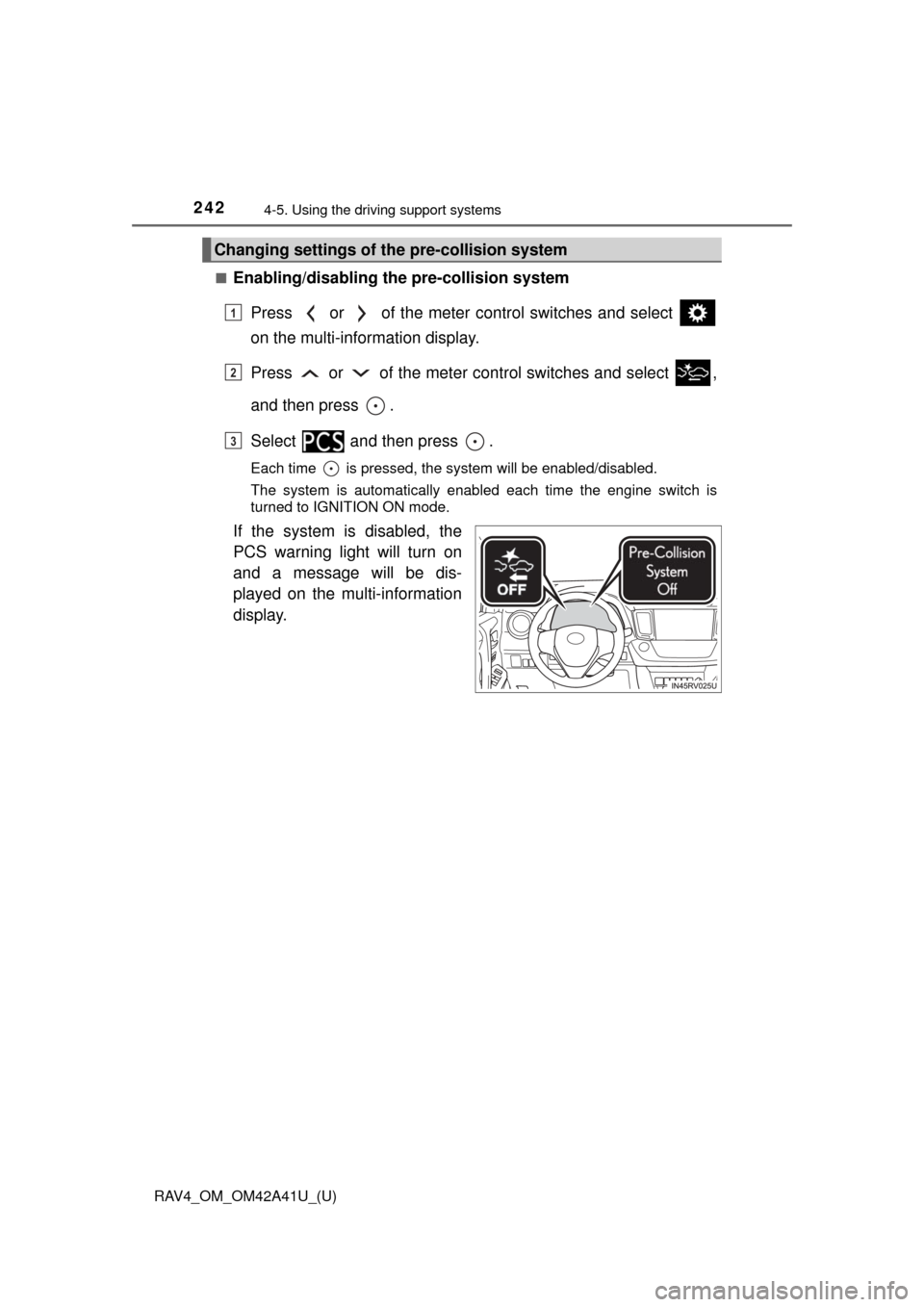
■Enabling/disabling th e pre-collision system
Press or of the meter control switches and select
on the multi-information display.
Press or of the meter co ntrol switches and select ,
and then press .
Select and then press .
Each time is pressed, the system will be enabled/disabled.
The system is automatically enabled each time the engine switch is
turned to IGNITION ON mode.
If the system is disabled, the
PCS warning light will turn on
and a message will be dis-
played on the multi-information
display.
Changing settings of th e pre-collision system
1
2
3