2016 TOYOTA RAV4 collision
[x] Cancel search: collisionPage 245 of 741
RAV4_OM_OM42A41U_(U)
2454-5. Using the driving support systems
4
Driving
Region B
(The pedestrian detection function is not available and the pre-collision
braking function is available)
The pre-collision system is enabled and the system determines that the pos-
sibility of a frontal collision with a vehicle is high.
Each function is operational at the following speeds:
● Pre-collision warning:
• Vehicle speed is between approximately 10 and 110 mph (15 and
180 km/h).
• The relative speed between your vehicle and the vehicle ahead is
approximately 7 mph (10 km/h) or more.
● Pre-collision brake assist:
• Vehicle speed is between approximately 19 and 110 mph (30 and
180 km/h).
• The relative speed between your vehicle and the vehicle ahead is approximately 19 mph (30 km/h) or more.
● Pre-collision braking:
• Vehicle speed is between approximately 10 and 110 mph (15 and
180 km/h).
• The relative speed between your vehicle and the vehicle ahead is approximately 7 mph (10 km/h) or more.
The system may not operate in the following situations:
● If a battery terminal has been disconnected and reconnected and then the
vehicle has not been driven for a certain amount of time
● If the shift lever is in R
● If VSC is disabled (only the pre-collision warning function will be opera-
tional)
● If the PCS warning light is flashing or illuminated
Page 246 of 741

246
RAV4_OM_OM42A41U_(U)
4-5. Using the driving support systems
Region C
(The pedestrian detection function and pre-collision braking function are
not available)
The pre-collision system is enabled and the system determines that the pos-
sibility of a frontal collision with a vehicle is high.
Each function is operational at the following speeds:
● Pre-collision warning:
• Vehicle speed is between approximately 10 and 110 mph (15 and
180 km/h).
• The relative speed between your vehicle and the vehicle ahead is
approximately 7 mph (10 km/h) or more.
● Pre-collision brake assist:
• Vehicle speed is between approximately 19 and 110 mph (30 and
180 km/h).
• The relative speed between your vehicle and the vehicle ahead is approximately 19 mph (30 km/h) or more.
The system may not operate in the following situations:
● If a battery terminal has been disconnected and reconnected and then the
vehicle has not been driven for a certain amount of time
● If the shift lever is in R
● If VSC is disabled (only the pre-collision warning function will be opera-
tional)
● If the PCS warning light is flashing or illuminated
■ Pedestrian detection function
*4
*4: Depending on the region in which the vehicle was sold, the pedestrian
detection function may not be available.
■ Cancelation of the pre-collision braking
*3
●If either of the following occur while the pre-collision braking function is
operating, it will be canceled:
• The accelerator pedal is depressed strongly.
• The steering wheel is turned sharply or abruptly.
● If the vehicle is stopped by the operation of the pre-collision braking func-
tion, the operation of the pre-collision braking function will be canceled after
the vehicle has been stopped for approximately 2 seconds.
*3: Depending on the region in which the vehicle was sold, the pre-collision
braking function may not be available.
The pre-collision system detects pedestri-
ans based on the size, profile, and motion
of a detected object. However, a pedes-
trian may not be detected depending on
the surrounding brightness and the
motion, posture, and angle of the
detected object, preventing the system
from operating properly. (→P. 250)
Page 247 of 741
RAV4_OM_OM42A41U_(U)
2474-5. Using the driving support systems
4
Driving
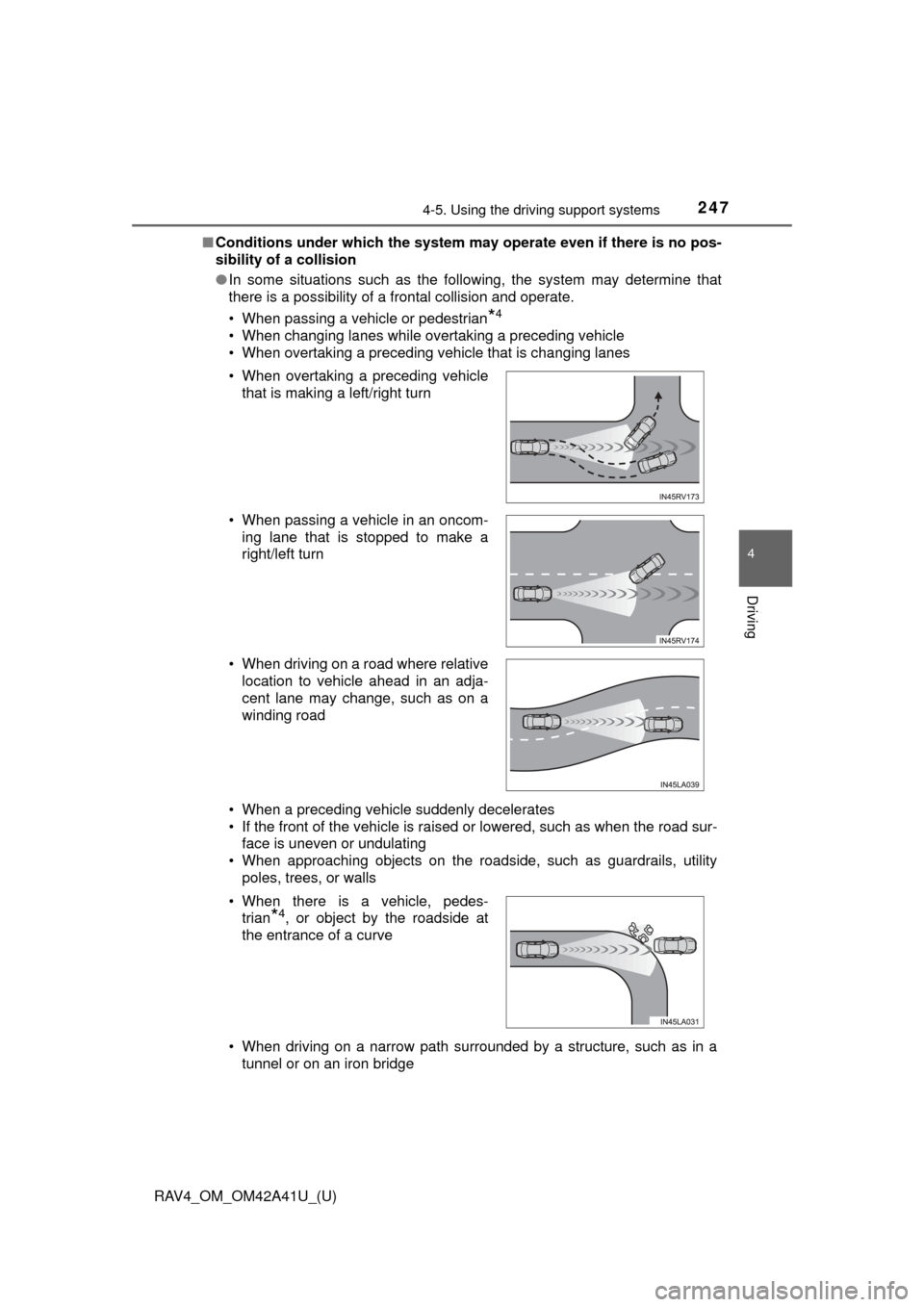
■Conditions under which the system ma y operate even if there is no pos-
sibility of a collision
● In some situations such as the following, the system may determine that
there is a possibility of a frontal collision and operate.
• When passing a vehicle or pedestrian
*4
• When changing lanes while overtaking a preceding vehicle
• When overtaking a preceding vehicle that is changing lanes
• When a preceding vehicle suddenly decelerates
• If the front of the vehicle is raised or lowered, such as when the road sur-
face is uneven or undulating
• When approaching objects on the roadside, such as guardrails, utility poles, trees, or walls
• When driving on a narrow path surrounded by a structure, such as in a tunnel or on an iron bridge
• When overtaking a preceding vehicle
that is making a left/right turn
• When passing a vehicle in an oncom- ing lane that is stopped to make a
right/left turn
• When driving on a road where relative location to vehicle ahead in an adja-
cent lane may change, such as on a
winding road
• When there is a vehicle, pedes- trian
*4, or object by the roadside at
the entrance of a curve
Page 251 of 741

RAV4_OM_OM42A41U_(U)
2514-5. Using the driving support systems
4
Driving
• Groups of pedestrians which are close together
• Pedestrians who are wearing white and look extremely bright
• Pedestrians in the dark, such as at night or while in a tunnel
• Pedestrians whose clothing appears to be nearly the same color or
brightness as their surroundings
• Pedestrians near walls, fences, guardrails, or large objects
• Pedestrians who are on a metal object (manhole cover, steel plate, etc.)
on the road
• Pedestrians who are walking fast
• Pedestrians who are changing speed abruptly
• Pedestrians running out from behind a vehicle or a large object
• Pedestrians who are extremely close to the side of the vehicle (outside rear view mirror, etc.)
*4: Depending on the region in which the vehicle was sold, the pedestrian
detection function may not be available.
■ If the PCS warning light flashes a nd a warning message is displayed on
the multi-information display
The pre-collision system may be tem porarily unavailable or there may be a
malfunction in the system.
● In the following situations, the warning light will turn off, the message will
disappear and the system will become operational when normal operating
conditions return:
• When the radar sensor or camera sensor or the area around either sen-
sor is hot, such as in the sun
• When the radar sensor or camera sensor or the area around either sen-
sor is cold, such as in an extremely cold environment
• When the radar sensor or front grille emblem is dirty or covered with
snow, etc.
• If the camera sensor is obstructed, such as when the hood is open or a sticker is attached to the windshield near the camera sensor
● If the PCS warning light continues to flash or the warning message does not
disappear, the system may be malfunctioning. Have the vehicle inspected
by your Toyota dealer immediately.
■ If VSC is disabled
●If VSC is disabled ( →P. 300), the pre-collision brake assist and pre-collision
braking functions are also disabled.
● The PCS warning light will turn on and “VSC Turned Off Pre-Collision Brake
System Unavailable” will be displayed on the multi-information display.
Page 261 of 741

RAV4_OM_OM42A41U_(U)
2614-5. Using the driving support systems
4
Driving
WARNING
■Before using dynamic radar cruise control
Driving safely is the sole responsibility of the driver. Do not rely solely on the
system, and drive safely by always paying careful attention to your sur-
roundings.
The dynamic radar cruise control provides driving assistance to reduce the
driver’s burden. However, there are limitations to the assistance provided.
Even when the system is functioning normally, the condition of the preced-
ing vehicle as detected by the system may differ from the condition
observed by the driver. Therefore, th e driver must always remain alert,
assess the danger of each situation and drive safely. Relying on this system
or assuming the system ensures safety while driving can lead to an acci-
dent, resulting in death or serious injury.
■ Cautions regarding the driving assist systems
Observe the following precautions, as there are limitations to the assistance
provided by the system.
Failure to do so may cause an accident resulting in death or serious injury.
● Assisting the driver to measure following distance
The dynamic radar cruise control is only intended to help the driver in
determining the following distance between the driver’s own vehicle and a
designated vehicle traveling ahead. It is not a mechanism that allows care-
less or inattentive driving, and it is not a system that can assist the driver in
low-visibility conditions. It is still necessary for driver to pay close attention
to the vehicle’s surroundings.
● Assisting the driver to judge proper following distance
The dynamic radar cruise control determines whether the following dis-
tance between the driver’s own vehicle and a designated vehicle traveling
ahead is within a set range. It is not capable of making any other type of
judgement. Therefore, it is absolutely necessary for the driver to remain
vigilant and to determine whether or not there is a possibility of danger in
any given situation.
● Assisting the driver to operate the vehicle
The dynamic radar cruise control has limited capability to prevent or avoid
a collision with a vehicle traveling ahead. Therefore, if there is ever any
danger, the driver must take immediate and direct control of the vehicle
and act appropriately in order to ensure the safety of all involved.
■ To avoid inadvertent dynamic radar cruise control activation
Switch the dynamic radar cruise control off using the “ON-OFF” button
when not in use.
Page 269 of 741

RAV4_OM_OM42A41U_(U)
2694-5. Using the driving support systems
4
Driving
■Dynamic radar cruise control can be set when
●The shift lever is in D or range 4 or higher of S has been selected.
● Range 4 or higher of D has been selected by using the paddle shift switch.
(Vehicles with paddle shift switches)
● Vehicle speed is above approximately 30 mph (50 km/h).
■ Accelerating after setting the vehicle speed
The vehicle can be accelerated normally. After acceleration, the set speed
resumes. However, during vehicle-to-vehicle distance control mode, the vehi-
cle speed may decrease below the set speed in order to maintain the dis-
tance to the vehicle ahead.
■ Automatic cancelation of vehicle-t o-vehicle distance control mode
Vehicle-to-vehicle distance control mode is automatically canceled in the fol-
lowing situations:
● Actual vehicle speed falls below approximately 25 mph (40 km/h).
● VSC is activated.
● TRAC is activated for a period of time.
● When the VSC or TRAC system is turned off by pressing the VSC OFF
switch.
● The sensor cannot detect correctly because it is covered in some way.
● Pre-collision braking is activated.
If vehicle-to-vehicle distance control mode is automatically canceled for any
other reason, there may be a malfunction in the system. Contact your Toyota
dealer.
■ Automatic cancelation of co nstant speed control mode
Constant speed control mode is automatically canceled in the following situa-
tions:
● Actual vehicle speed is more than approximately 10 mph (16 km/h) below
the set vehicle speed.
● Actual vehicle speed falls below approximately 25 mph (40 km/h).
● VSC is activated.
● TRAC is activated for a period of time.
● When the VSC or TRAC system is turned off by pressing the VSC OFF
switch.
● Pre-collision braking is activated.
If constant speed control mode is automatically canceled for any other rea-
son, there may be a malfunction in the system. Contact your Toyota dealer.
■ Warning messages and buzzers for dynamic radar cruise control
Warning messages and buzzers are used to indicate a system malfunction or
to inform the driver of the need for caution while driving.
If a warning message is shown on the multi-information display, read the
message and follow the instructions.
Page 300 of 741

300
RAV4_OM_OM42A41U_(U)
4-5. Using the driving support systems
■Turning off the TRAC/VSC/Trailer Sway Control systems
To turn the TRAC/VSC/Trailer Sway Control systems off, press and hold
for more than 3 seconds while the vehicle is stopped.
Vehicles with the multi-information display (with monochrome display)
The “TRAC OFF” and VSC OFF in dicator lights will come on.
Press again to turn the systems back on.
Vehicles with the multi-information display (with color display)
“Traction Control Turned Off” will be shown and the VSC OFF indicator light
will come on.
*
Press again to turn the systems back on.
*: On vehicles with pre-collision system, pre-collision brake assist and pre- collision braking will also be disabled. The PCS warning light will come on
and the message will be shown on the multi-information display. ( →P. 238)
■ When the “AUTO LSD” indicator light flashes even if the VSC OFF
switch has not been pressed (2WD models)
TRAC, AUTO LSD and hill-start assist control cannot be operated. Contact
your Toyota dealer.
■ When the “TRAC OFF” indicator light comes on even if the VSC OFF
switch has not been pressed (AWD models) (vehicles with the multi-
information display [wit h monochrome display])
TRAC and hill-start assist control cannot be operated. Contact your Toyota
dealer.
■ When the message is displayed on th e multi-information display show-
ing that TRAC has been disabled even if the VSC OFF switch has not
been pressed (AWD models) (vehicles with the multi-information display
[with color display])
TRAC and hill-start assist control cannot be operated. Contact your Toyota
dealer.
Page 513 of 741
512
RAV4_OM_OM42A41U_(U)
6-3. Using the storage features
WARNING
●When installing/stowing the luggage cover, make sure that the luggage
cover is securely installed/stowed. Failure to do so may result in serious
injury in the event of sudden braking or a collision.
● Do not place anything on the luggage cover to avoid death or serious
injury.
● Do not allow children to climb on the luggage cover. Climbing on the lug-
gage cover could result in damage to the luggage cover, possibly causing
death or serious injury to the child.
NOTICE
●Do not put heavy items on the luggage cover.
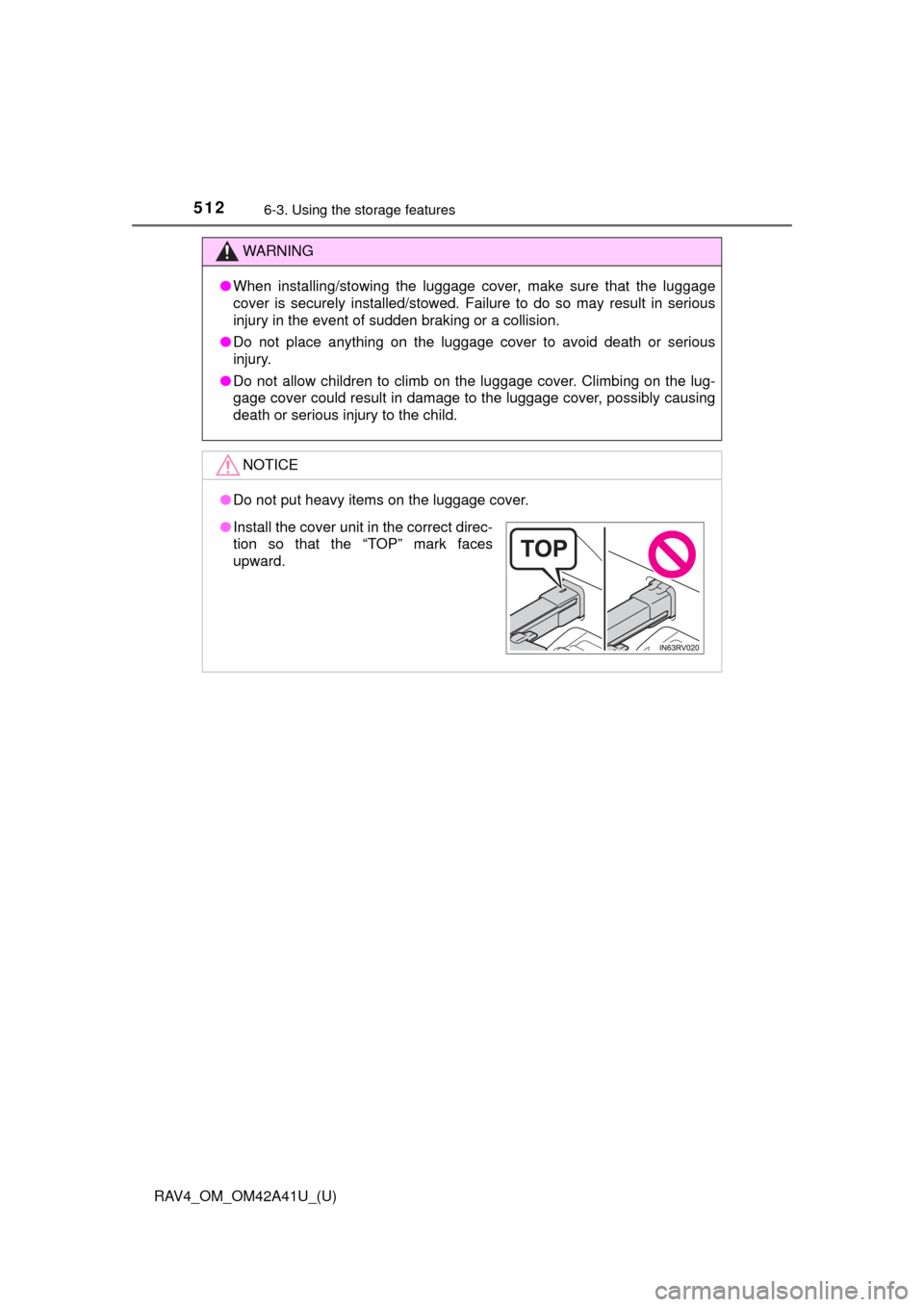
●Install the cover unit in the correct direc-
tion so that the “TOP” mark faces
upward.