Page 441 of 741
440
RAV4_OM_OM42A41U_(U)
5-19. Bluetooth® Audio
Listening to Bluetooth® Audio
You can check such indicators as signal strength and battery charge
on the screen.
Connection status
Battery charge
The battery charge indicator may
not be displayed depending on the
connected device.
The Bluetooth® audio system enables the user to enjoy music
played on a portable player from the vehicle speakers via wire-
less communication.
When a Bluetooth
® device cannot be connected, check the connec-
tion status on the “Bl uetooth* Audio” screen. If the device is not con-
nected, either register or reconnect the device. (→ P. 435)
*: Bluetooth is a registered trademark of Bluetooth SIG, Inc.
Status display
1
2
IndicatorsConditions
Connection statusGood Not connected
Battery chargeFull Empty
Page 442 of 741
RAV4_OM_OM42A41U_(U)
4415-19. Bluetooth® Audio
5
Audio system
Select or to Play/Pause.
For details on “Bluetooth
* Audio” screen operation methods, refer to
Basic Audio Operations. ( →P. 395)
For details on how to select a track or album, refer to selecting, fast-
forwarding and reversing tracks/files/songs. ( →P. 406)
*: Bluetooth is a registered trademark of Bluetooth SIG, Inc.
Playing Bluetooth® audio
Page 444 of 741
RAV4_OM_OM42A41U_(U)
4435-20. Bluetooth® Phone
5
Audio system
■Telephone switch (→P. 456)
■Microphone
The vehicle’s built in micro-
phone is used when talking on
the phone.
The person you are speaking to
can be heard from the front
speakers.
To use the hands-free system,
you must register your
Bluetooth
® phone in the sys-
tem. ( →P. 433)
You can check indicators such as signal strength and battery charge
on the phone screen.
Connection status
Signal strength
Battery charge
Status display
1
2
3
IndicatorsConditions
Connection status
Good Poor Not connected
(Blue) (Gray)
Battery chargeFull Empty
Signal strengthExcellent Poor
Page 446 of 741
RAV4_OM_OM42A41U_(U)
4455-20. Bluetooth® Phone
5
Audio system
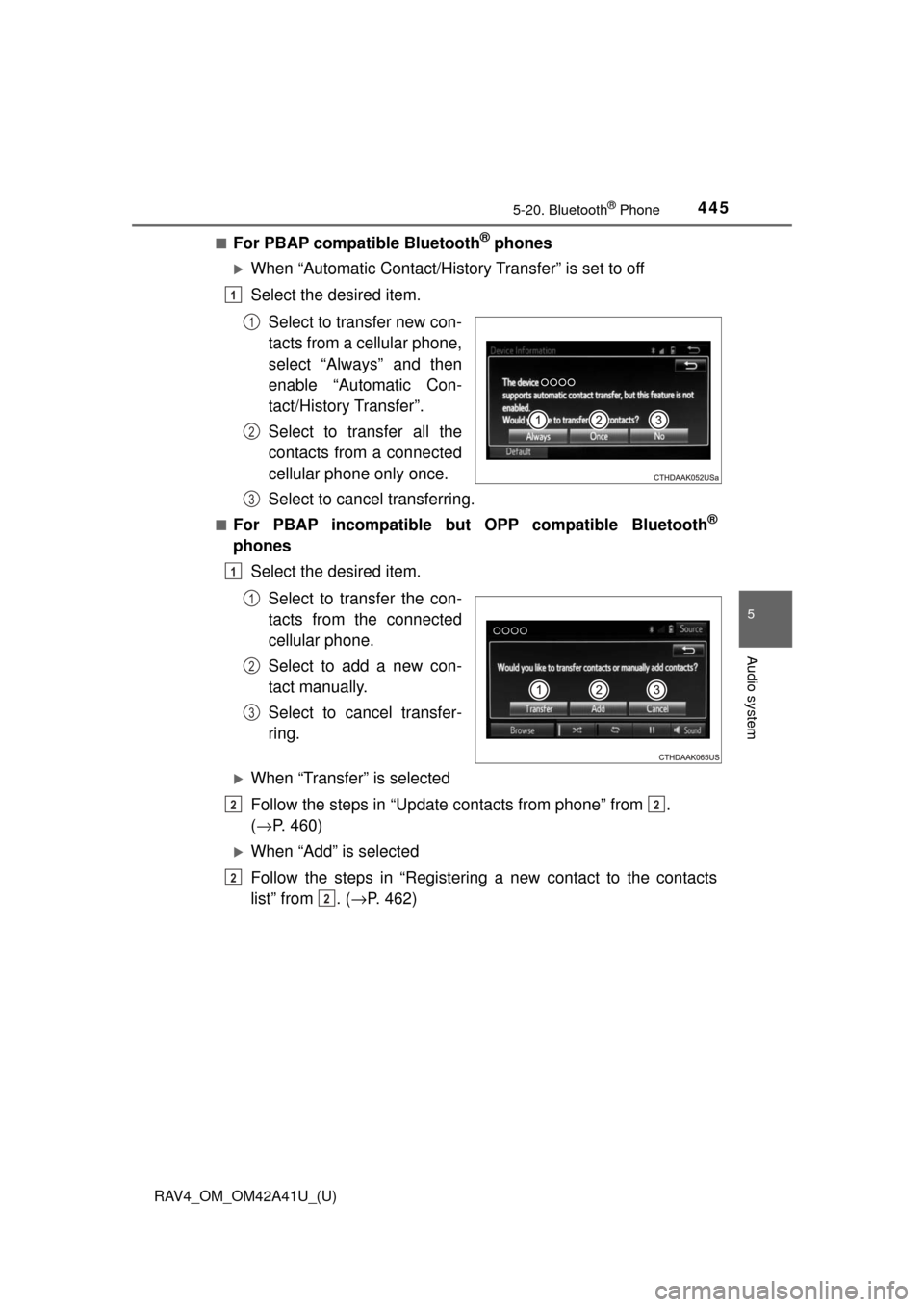
■For PBAP compatible Bluetooth® phones
When “Automatic Contact/History Transfer” is set to off
Select the desired item.Select to transfer new con-
tacts from a cellular phone,
select “Always” and then
enable “Automatic Con-
tact/History Transfer”.
Select to transfer all the
contacts from a connected
cellular phone only once.
Select to cancel transferring.
■For PBAP incompatible but OPP compatible Bluetooth®
phonesSelect the desired item.
Select to transfer the con-
tacts from the connected
cellular phone.
Select to add a new con-
tact manually.
Select to cancel transfer-
ring.
When “Transfer” is selected
Follow the steps in “Update contacts from phone” from .
(→ P. 460)
When “Add” is selected
Follow the steps in “Registering a new contact to the contacts
list” from . (→ P. 462)
1
1
2
3
1
1
2
3
22
2
2
Page 448 of 741
447
RAV4_OM_OM42A41U_(U)
5-20. Bluetooth® Phone
5
Audio system
Receiving a call
Press the switch on the steer-
ing wheel or select .
Press the switch on the steering wheel or select .
Turn the “PWR VOL” knob. You can also adjust the volume using the
steering switches.
■International calls
Received international calls may not be displayed correctly depending on the
cellular phone in use.
When a call is received, the following screen is displayed
together with a sound.
To answer the phone
To refuse a call
To adjust the incoming call volume
Page 450 of 741
RAV4_OM_OM42A41U_(U)
4495-20. Bluetooth® Phone
5
Audio system
■Release Tones
●A continuous tone signal is a character string that consists of numbers and
the characters p or w. (e.g.056133w0123p#1 ∗)
● When the “p” pause tone is used, the tone data up until the next pause tone
will be automatically sent after 2 seconds have elapsed. When the “w”
pause tone is used, the tone data up until the next pause tone will be a\
uto-
matically sent after a user operation is performed.
● Release tones can be used when automated operation of a phone based
service such as an answering machine or bank phone service is desired. A
phone number with continuous tone signals can be registered in the contact
list.
● Tone data after a “w” pause tone can be operated on voice command during
a call.
Turn the “Handset mode” on to switch from a hands-free call to a cel-
lular phone call.
Turn the “Handset mode” off to switch from a cellular phone call to a
hands-free call.
Select “Transmit Volume”.
Select the desired level for the transmit volume.
Select “OK”.
Press the switch on the steering wheel or select .
To transfer a call
Transmit volume setting
To hang up
1
2
3
Page 452 of 741
451
RAV4_OM_OM42A41U_(U)
5-20. Bluetooth® Phone
5
Audio system
Bluetooth® phone message function
Press the button.
Select .
When an e-mail/SMS/MMS is received, the incoming message screen
pops up with sound and is ready to be operated on the screen. Select to check the message.
Select to refuse the message.
Select to call the message
sender.
Received messages can be forwarded from the connected
Bluetooth® phone, enabling checking and replying using the
audio system.
Depending on the type of Bluetooth
® phone connected, received
messages may not be transf erred to the message inbox.
If the phone does not support the message function, this func-
tion cannot be used.
Displaying “Message Inbox” screen
Receiving a message
1
2
1
2
3
Page 454 of 741
RAV4_OM_OM42A41U_(U)
4535-20. Bluetooth® Phone
5
Audio system
Display the “Message Inbox” screen. (→P. 451)
Select the desired message from the list.
Check that the message is displayed.
E-mails: Select “Mark
Unread” or “Mark Read” to
mark mail unread or read on
the message inbox screen.
This function is available when
“Update Message Read Status
on Phone” is set to on ( →P. 467)
Select to make a call to the
sender.
Select to have messages read ou t. To cancel this function, select
“Stop”.
Select to display the previous or next message.
Select to reply the message.
Checking the messages
1
2
3
1
2
3
4
5