Page 398 of 741
397
RAV4_OM_OM42A41U_(U)
5-13. Setup
5
Audio system
Setup menu
Press the “SETUP” button to display the “Setup” screen.Select to adjust the settings for
operation sounds, screen ani-
mation, etc. ( →P. 398)
Select to display the voice set-
tings screen. (→ P. 403)
Select to adjust the settings for
contrast and brightness of the
screen. ( →P. 401)
Select to adjust the settings for registering, removing, connecting
and disconnecting Bluetooth
® devices. ( →P. 438)
Select to adjust the settings for contact, message settings, etc.
( → P. 459)
Select to set audio settings. ( →P. 400)
Select to turn the screen off.
Select to set the vehicle customization ( →P. 695).
You can adjust the audio system to your desired settings.
Display “Setup” screen
1
2
3
4
5
6
7
8
Page 400 of 741

RAV4_OM_OM42A41U_(U)
3995-13. Setup
5
Audio system
The clock on the Entune Audio can be adjusted by the following pro-
cedure.
For vehicles with a navigation system or Entune Audio Plus, refer to
the “NAVIGATION AND MULTIMEDIA SYSTEM OWNER’S MAN-
UAL”.
Press the “SETUP” button and select “General” and then select
“Clock”.
Adjust hour/minute
Switch AM/PM
Rounds to the nearest hour
*
Displays in the 24-hour/12-hour
format
*e.g.: 1:00 to 1:29 → 1:00
1:30 to 2:00 → 2:00
●Vehicles without a smart key system:
The clock is displayed when the engine switch is in the “ACC” or “ON” posi-
tion.
Vehicles with a smart key system:
The clock is displayed when the engine switch is in ACCESSORY or IGNI-
TION ON mode.
● When disconnecting and reconnecting battery terminals, the clock will auto-
matically be set to --:--.
Select “Delete Personal Data” on the “General Settings” screen.
Select “Delete”.
Check carefully beforehand, as data cannot be retrieved once deleted.
A confirmation screen will be displayed. Select “Yes”.
The following personal data will be deleted or changed to its default
settings.
• General settings
• Audio settings
• Phone settings
Clock
1
2
3
4
Deleting personal data
1
2
3
Page 401 of 741
400
RAV4_OM_OM42A41U_(U)
5-13. Setup
Audio settings
Press the “SETUP” button.
Select “Audio” on the “Setup” screen.Number of Radio Presets
Select the number of radio
preset stations.
Display Cover Art on/off
Automatic Sound Levelizer
Select “Automatic Sound Levelizer”.
Select “High”, “Mid”, “Low” or “Off”.
■ The sound quality level is adjusted individually
The treble, mid and bass levels can be adjusted for each audio mode sepa-
rately.
■ About Automatic Sou nd Leveliser (ASL)
ASL automatically adjusts the volume and tone quality according to the vehi-
cle speed.
Settings are available for adjusting the radio operation, cover
art, etc.
Screen for audio settings
1
2
1
2
3
Automatic sound leveliser (ASL)
1
2
Page 402 of 741
401
RAV4_OM_OM42A41U_(U)
5-13. Setup
5
Audio system
Display settings
Press the “SETUP” button.
Select “Display” on the “Setup” screen.Adjust the screen display
Adjust the camera display
*
Changes to day mode.
*: If equipped
When the headlights are tur ned on, the screen dims.
However, the screen can be switch ed to day mode by selecting “Day
Mode”.
The screen will stay in day mode when the headlights are turned on until
“Day Mode” is selected again.
Settings are available for adjusting the contrast and brightness
of the screen.
Screen for display settings
1
2
1
2
3
Day mode
Page 404 of 741
403
RAV4_OM_OM42A41U_(U)
5-13. Setup
5
Audio system
Voice settings
Adjust the voice guidance vol-
ume setting.
Set the voice recognition
prompts “High”, “Low” or “Off”.
Set the train voice recognition.
Set the voice prompt interrupt
on/off.
Set the voice recognition tuto-
rial.
■To return to the default settings
Select “Default”, and then “Yes”.
This screen is used for setting the voice command guidance
system.
1
2
3
4
5
Page 405 of 741
404
RAV4_OM_OM42A41U_(U)
5-14. Using the audio system
Selecting the audio source
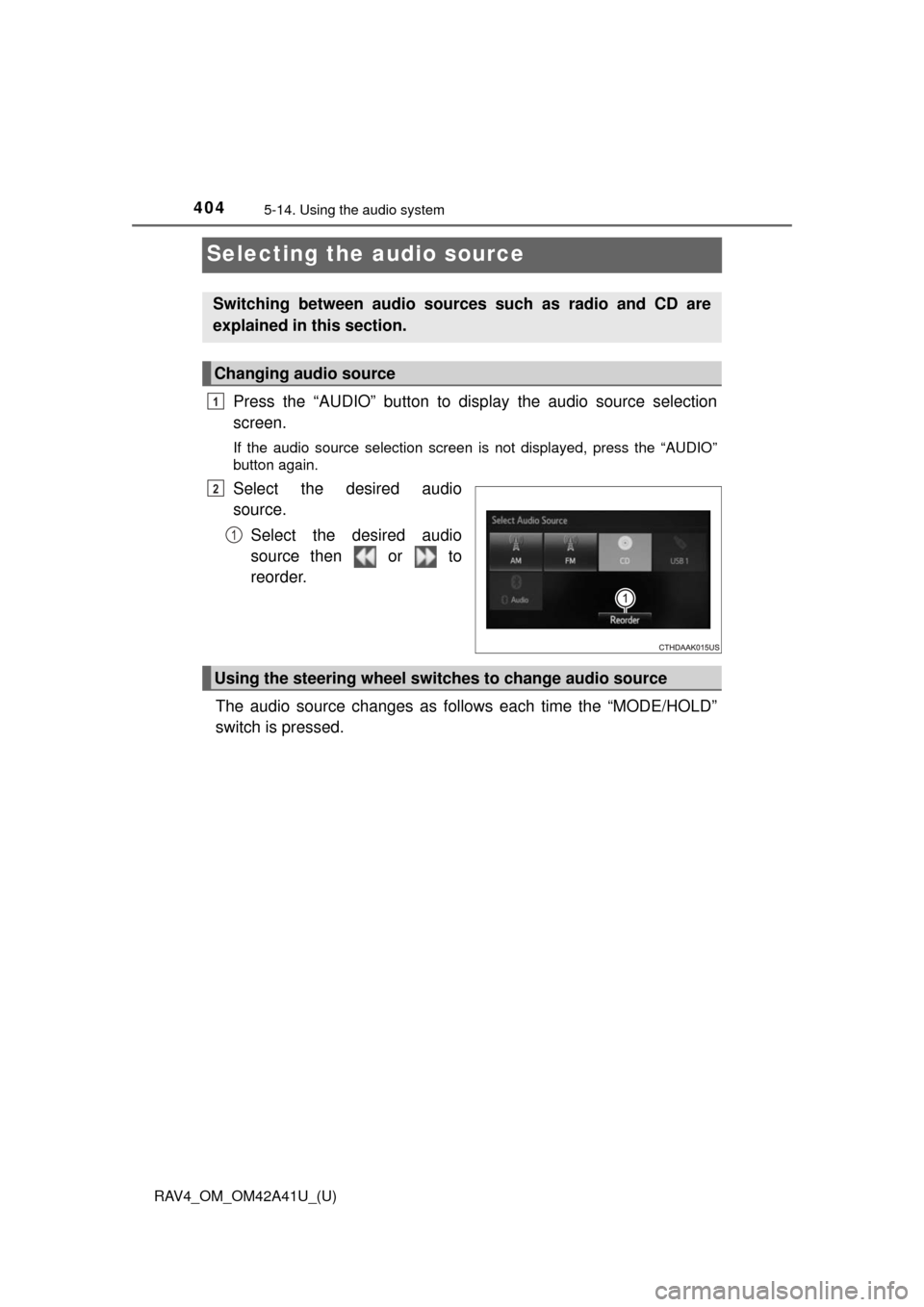
Press the “AUDIO” button to display the audio source selection
screen.
If the audio source selection screen is not displayed, press the “AUDIO”
button again.
Select the desired audio
source.
Select the desired audio
source then or to
reorder.
The audio source changes as follows each time the “MODE/HOLD”
switch is pressed.
Switching between audio sources such as radio and CD are
explained in this section.
Changing audio source
1
2
1
Using the steering wheel switches to change audio source
Page 406 of 741
405
RAV4_OM_OM42A41U_(U)
5-14. Using the audio system
5
Audio system
List screen operation
: Select to scroll to the nextor previous page.
: If appears to the right of titles, the complete titles are
too long for the display. Select
this button to scroll the title.
Turn the “TUNE•SCROLL” knob to move the cursor box to select a
desired item from the list, and press the knob to play it. The track that
is being played is highlighted.
To return to the top screen, select “Now Playing” on the list screen.
When a list screen is displayed, use the appropriate buttons to
scroll through the list.
How to scroll
Page 407 of 741
406
RAV4_OM_OM42A41U_(U)
5-14. Using the audio system
■Selecting a track/file/song
Press the “SEEK >” button or “< TRACK” button, or turn the
“TUNE•SCROLL” knob to select the desired track/file/song number.
To fast-forward or reverse, press and hold the “SEEK >” button or
“< TRACK” button.
■Selecting a track/file/song from the track/file/song list
Select “Browse” or cover art.
Select the desired track/file/
song.
When an MP3/WMA/AAC disc or USB memory device is being used,
the folder can be selected. When a Bluetooth
® device or iPod is being
used, the album can be selected.
According to the audio device, the following is displayed.
Selecting, fast-forwarding a nd reversing tracks/files/songs
1
2
Audio sourceList name
Audio CDTrack
MP3/WMA/AAC discFolder, File
Bluetooth®Album, Track
USBArtist, Album, Song, Genre, Com-
poser
iPod
Playlist, Artist, Album, Genre,
Audiobook, Composer, Song, Video,
Podcast