2016 TOYOTA PRIUS V Brake system
[x] Cancel search: Brake systemPage 256 of 620

256
PRIUS v_OM_OM47B12U_(U)
4-5. Using the driving support systems
■Conditions that may trigger the system even if there is no possibility of a
collision
If the following obstructs the front of the sensor, the system judges that a col-
lision may be possible and operates.
●When passing by a vehicle while making left or right turns or passing a vehi-
cle in an opposite lane.
●When the vehicle rapidly approaches an object in front of it (such as another
vehicle, toll gate, etc.)
●When climbing a steep hill, etc., and there are structures in the upper region
of the road (billboards, low ceilings, street lamps, etc.)
●When driving through narrow passages or places with low ceilings (bridges,
tunnels, overhead passes, etc.)
●When driving on an uneven road surface
●When metal objects are on the road surface causing level differences or
protrusions in the road
●When an extreme change in vehicle height occurs
●When the radar sensor moves off position due to its surrounding area being
subjected to a strong impact.
●When there is an obstacle (guardrails, etc.) on the roadside at a curve
entrance
●When the front of your vehicle is pointing upwards (caused by putting a
heavy load in the luggage compartment)
When the system is activated in the situations described above, there is also
a possibility that the brakes will be applied with a force greater than normal.
■Obstacles not detected
The sensor cannot detect plastic obstacles such as traffic cones. There may
also be occasions when the sensor cannot detect pedestrians, animals, bicy-
cles, motorcycles, trees, or snowdrifts.
■Situations in which the pre-collision system does not function properly
The system may not function effectively in situations such as the following:
●On roads with sharp bends or uneven surfaces
●If a vehicle suddenly moves in front of your vehicle, such as at an intersec-
tion
●If a vehicle suddenly cuts in front of your vehicle, such as when overtaking
●In inclement weather such as heavy rain, fog, snow or sand storms
●When your vehicle is skidding with the VSC system off
●When an extreme change in vehicle height occurs
●When the radar sensor moves off position due to its surrounding area being
subjected to a strong impact
●Due to greatly turning the steering wheel when an obstacle suddenly
appears ahead
Page 258 of 620

258
PRIUS v_OM_OM47B12U_(U)
4-5. Using the driving support systems
WARNING
■Limitations of the pre-collision system
It is the driver’s responsibility to drive safely. The driver should be aware of
the surroundings and strive for safe driving.
Do not rely on the pre-collision system instead of normal braking opera-
tions. This system does not avoid or reduce collisions in every situation.
Overly relying on the system and entrusting it with safety may cause an
unexpected accident which could lead to death or serious injury.
Although the system is designed for the purpose to support in avoiding colli-
sions or reducing the damage of a collision, the effect changes according to
various conditions. (P. 255)
Therefore, it does not always provide the same performance. Also, the pre-
collision braking does not work depending on the operating conditions of the
driver. When the driver has stepped on the brake pedal and is operating the
steering wheel, the system judges that the driver is taking avoiding action
and the automatic braking may not operate.
■Handling the radar sensor
Observe the following to ensure the pre-collision system can function effec-
tively.
Otherwise, the system may not function correctly and could result in an
accident.
●Keep the sensor and grille cover clean at all times.
Clean the sensor and grille cover with a soft cloth so you do not mark or
damage them.
●Do not subject the sensor or surrounding area to a strong impact.
If the sensor moves even slightly off position, the system may become
inaccurate or malfunction. If the sensor or surrounding area is subject to a
strong impact, always have the area inspected and adjusted by your
Toyota dealer.
●Do not disassemble the sensor.
●Do not attach accessories or stickers to the sensor, grille cover or sur-
rounding area.
●Do not modify or paint the sensor and grille cover.
●If the sensor needs to be replaced, contact your Toyota dealer.
Page 259 of 620

PRIUS v_OM_OM47B12U_(U)
2594-5. Using the driving support systems
4
Driving
WARNING
■Cautions regarding the assist contents of the system
By means of alarms and brake control, the pre-collision system is intended
to assist the driver in avoiding collisions through the process of LOOK-
JUDGE-ACT. There are limits to the degree of assistance the system can
provide, so please keep in mind the following important points.
●Assisting the driver in watching the road
The pre-collision system is only able to detect obstacles directly in front of
the vehicle, and only within a limited range. It is not a mechanism that
allows careless or inattentive driving, and it is not a system that can assist
the driver in low-visibility conditions. It is still necessary for the driver to
pay close attention to the vehicle’s surroundings.
●Assisting the driver in making correct judgement
When attempting to estimate the possibility of a collision, the only data
available to the pre-collision system is that from obstacles it has detected
directly in front of the vehicle. Therefore, it is absolutely necessary for the
driver to remain vigilant and to determine whether or not there is a possi-
bility of collision in any given situation.
●Assisting the driver in taking action
The pre-collision system’s braking assist feature is designed to help
reduce the severity of a collision, and so only acts when the system has
judged that a collision is unavoidable. This system by itself, without the
proper operations of the driver, is not capable of automatically avoiding a
collision or bringing the vehicle to a stop safely. For this reason, when
encountering a dangerous situation the driver must take direct and imme-
diate action in order to ensure the safety of all involved.
Page 260 of 620
260
PRIUS v_OM_OM47B12U_(U)
4-6. Driving tips
Hybrid vehicle driving tips
◆Using Eco drive mode
When using Eco drive mode, the torque corresponding to the accel-
erator pedal depression amount can be generated more smoothly
than it is in normal conditions. In addition, the operation of the air
conditioning system (heating/cooling) will be minimized, improving
the fuel economy. (P. 245)
◆Use of Hybrid System Indicator
The Eco-friendly driving is possible by keeping the Hybrid System
Indicator within Eco area. (P. 98)
◆Shift position operation
Shift the shift position to D when stopped at a traffic light, or driving
in heavy traffic etc. Shift the shift position to P when parking. When
using the N, there is no positive effect on fuel consumption. In the
N, the gasoline engine operates but electricity cannot be gener-
ated. Also, when using the air conditioning system, etc., the hybrid
battery (traction battery) power is consumed.
◆Accelerator pedal/brake pedal operation
●Drive your vehicle smoothly. Avoid abrupt acceleration and
deceleration. Gradual acceleration and deceleration will make
more effective use of the electric motor (traction motor) without
having to use gasoline engine power.
●Avoid repeated acceleration. Repeated acceleration consumes
hybrid battery (traction battery) power, resulting in poor fuel con-
sumption. Battery power can be restored by driving with the
accelerator pedal slightly released.
For economical and ecological driving, pay attention to the fol-
lowing points:
Page 261 of 620

PRIUS v_OM_OM47B12U_(U)
2614-6. Driving tips
4
Driving
◆When braking
Make sure to operate the brakes gently and in a timely manner. A
greater amount of electrical energy can be regenerated when slow-
ing down.
◆Delays
Repeated acceleration and deceleration, as well as long waits at
traffic lights, will lead to bad fuel economy. Check traffic reports
before leaving and avoid delays as much as possible. When driving
in a traffic jam, gently release the brake pedal to allow the vehicle to
move forward slightly while avoiding overuse of the accelerator
pedal. Doing so can help control excessive gasoline consumption.
◆Highway driving
Control and maintain the vehicle at a constant speed. Before stop-
ping at a toll booth or similar, allow plenty of time to release the
accelerator and gently apply the brakes. A greater amount of elec-
trical energy can be regenerated when slowing down.
◆Air conditioning
Use the air conditioning only when necessary. Doing so can help
reduce excessive gasoline consumption.
In summer: When the ambient temperature is high, use the recircu-
lated air mode. Doing so will help to reduce the burden on the air
conditioning system and reduce fuel consumption as well.
In winter: Because the gasoline engine will not automatically cut out
until it and the interior of the vehicle are warm, it will consume fuel.
Fuel consumption can be improved by avoiding overuse of the
heater.
◆Checking tire inflation pressure
Make sure to check the tire inflation pressure frequently. Improper
tire inflation pressure can cause poor fuel economy.
Also, as snow tires can cause large amounts of friction, their use on
dry roads can lead to poor fuel economy. Use tires that are appro-
priate for the season.
Page 263 of 620

263
PRIUS v_OM_OM47B12U_(U)
4-6. Driving tips
4
Driving
Winter driving tips
●Use fluids that are appropriate to the prevailing outside tempera-
tures.
• Engine oil
• Engine/power control unit coolant
• Washer fluid
●Have a service technician inspect the condition of the 12-volt bat-
tery.
●Have the vehicle fitted with four snow tires or purchase a set of tire
chains for the front tires.
Ensure that all tires are the same size and brand, and that chains match
the size of the tires.
Perform the following according to the driving conditions:
●Do not try to forcibly open a window or move a wiper that is frozen.
Pour warm water over the frozen area to melt the ice. Wipe away
the water immediately to prevent it from freezing.
●To ensure proper operation of the climate control system fan,
remove any snow that has accumulated on the air inlet vents in
front of the windshield.
●Check for and remove any excess ice or snow that may have accu-
mulated on the exterior lights, vehicle’s roof, chassis, around the
tires or on the brakes.
●Remove any snow or mud from the bottom of your shoes before
getting in the vehicle.
Carry out the necessary preparations and inspections before
driving the vehicle in winter. Always drive the vehicle in a man-
ner appropriate to the prevailing weather conditions.
Preparation for winter
Before driving the vehicle
Page 415 of 620
415
PRIUS v_OM_OM47B12U_(U)
7-2. Maintenance
7
Maintenance and care
General maintenance
Listed below are the general maintenance items that should be
performed at the intervals specified in the “Owner’s Warranty
Information Booklet” or “Owner’s Manual Supplement/Sched-
uled Maintenance Guide”. It is recommended that any problem
you notice should be brought to the attention of your Toyota
dealer or qualified service shop for advice.
Engine compartment
ItemsCheck points
Brake fluidIs the brake fluid at the correct level? (P. 434)
Engine/power control
unit coolantIs the engine/power control unit coolant at the
correct level? (P. 431)
Engine oilIs the engine oil at the correct level? (P. 427)
Exhaust systemThere should not be any fumes or strange
sounds.
Radiator/condenserThe radiator and condenser should be free from
foreign objects. (P. 433)
Washer fluidIs there sufficient washer fluid? (P. 437)
Luggage compartment
ItemsCheck points
12-volt batteryCheck the connections. (P. 439)
Page 440 of 620
440
PRIUS v_OM_OM47B12U_(U)
7-3. Do-it-yourself maintenance
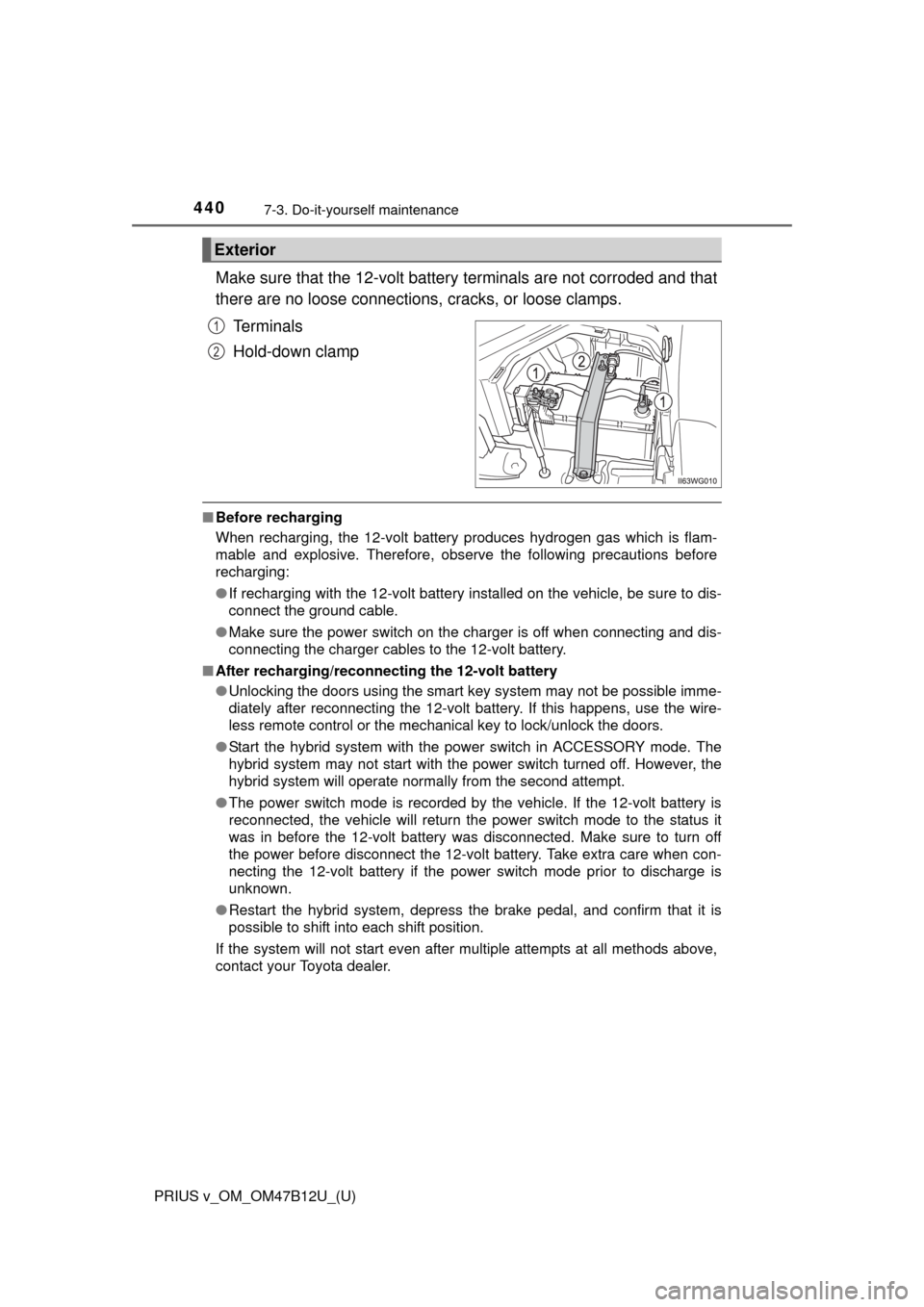
Make sure that the 12-volt battery terminals are not corroded and that
there are no loose connections, cracks, or loose clamps.
Terminals
Hold-down clamp
■Before recharging
When recharging, the 12-volt battery produces hydrogen gas which is flam-
mable and explosive. Therefore, observe the following precautions before
recharging:
●If recharging with the 12-volt battery installed on the vehicle, be sure to dis-
connect the ground cable.
●Make sure the power switch on the charger is off when connecting and dis-
connecting the charger cables to the 12-volt battery.
■After recharging/reconnecting the 12-volt battery
●Unlocking the doors using the smart key system may not be possible imme-
diately after reconnecting the 12-volt battery. If this happens, use the wire-
less remote control or the mechanical key to lock/unlock the doors.
●Start the hybrid system with the power switch in ACCESSORY mode. The
hybrid system may not start with the power switch turned off. However, the
hybrid system will operate normally from the second attempt.
●The power switch mode is recorded by the vehicle. If the 12-volt battery is
reconnected, the vehicle will return the power switch mode to the status it
was in before the 12-volt battery was disconnected. Make sure to turn off
the power before disconnect the 12-volt battery. Take extra care when con-
necting the 12-volt battery if the power switch mode prior to discharge is
unknown.
●Restart the hybrid system, depress the brake pedal, and confirm that it is
possible to shift into each shift position.
If the system will not start even after multiple attempts at all methods above,
contact your Toyota dealer.
Exterior
1
2